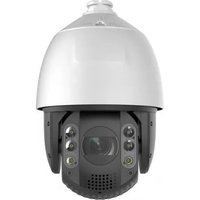
LEVELONE FCS-4041 - Surveillance Camera

FCS-4041 - Surveillance Camera LEVELONE - Free user manual and instructions

Find the device manual for free FCS-4041 LEVELONE in PDF.

📄 19 pages English EN Download 💬 AI Question 10 questions ⚙️ Specs
Notice LEVELONE FCS-4041 - page 2
View the manual : English EN 中文 ZH
Pick your language and provide your email: we'll send you a specifically translated version.
Product Type Surveillance Camera
Brand LevelOne
Model FCS-4041
Resolution 1920 x 1080 (Full HD)
Lens Fixed focal length, 3.6 mm
Night Vision Up to 30 meters with IR LEDs
Field of View 72° horizontal
Video Compression H.264, MJPEG
Motion Detection Yes, with email alert
Audio Two-way audio via built-in microphone and speaker
Power Supply 12V DC or PoE (IEEE 802.3af)
Power Consumption Max 7W
Dimensions 65 x 60 x 120 mm
Weight 350 g
Operating Temperature -10°C to 50°C
Storage Temperature -20°C to 60°C
Weatherproof Rating IP66 (outdoor use)
Network Interface 10/100 Ethernet RJ45
Supported Protocols TCP/IP, HTTP, DHCP, DNS, NTP
Mounting Wall or ceiling mount included
Maintenance Clean lens with soft dry cloth; avoid liquids
Security Password protection, HTTPS encryption
Spare Parts & Repairability Contact LevelOne support; limited user-serviceable parts
General Information Free user manual available for download at notice-facile.com

Frequently Asked Questions - FCS-4041 LEVELONE

How do I reset the FCS-4041 to factory default settings?
Press and hold the reset button on the camera's rear panel for 10 seconds using a paperclip. The camera will reboot and restore all settings to defaults.
Can I use the FCS-4041 outdoors?
Yes, it has an IP66 weatherproof rating, making it suitable for outdoor use in rain or dust. Ensure proper sealing of cables.
Does the camera support PoE (Power over Ethernet)?
Yes, the FCS-4041 supports IEEE 802.3af PoE, allowing both power and data over a single Ethernet cable. Alternatively, you can use a 12V DC adapter.
How do I access the camera remotely?
Install the LevelOne IP Cam Utility or use a web browser. Forward ports on your router and configure DDNS if needed. Refer to the manual for detailed steps.
What is the maximum resolution and frame rate?
The camera records at 1920x1080 (Full HD) at 30 fps for smooth video. Lower resolutions are available to save bandwidth.
Does the FCS-4041 have night vision?
Yes, it features infrared (IR) LEDs that provide clear black-and-white video up to 30 meters in complete darkness.
How can I update the firmware?
Download the latest firmware from the LevelOne website. In the camera's web interface, go to Maintenance > Firmware Upgrade and upload the file. Do not power off during update.
How do I clean the camera lens?
Use a soft, dry microfiber cloth to gently wipe the lens. Avoid any liquids or abrasive materials that may scratch or damage the glass.
What mobile app is compatible?
The camera works with the LevelOne IP Cam Viewer app (iOS/Android) for live viewing and playback. Ensure your phone is on the same network.
How many users can view the camera simultaneously?
Up to 10 users can stream the video simultaneously, depending on network bandwidth and camera performance.

User questions about FCS-4041 LEVELONE

0 question about this device. Answer the ones you know or ask your own.

Ask a new question about this device

Your email remains private: it is only used to notify you if someone answers your question.

No questions yet. Be the first to ask one.

Download the instructions for your Surveillance Camera in PDF format for free! Find your manual FCS-4041 - LEVELONE and take your electronic device back in hand. On this page are published all the documents necessary for the use of your device. FCS-4041 by LEVELONE.

USER MANUAL FCS-4041 LEVELONE

Wired/Wireless Network Camera

Quick Installation Guide

English Ελληνικά

Deutsch Svenska

This guide covers only the most common situations. All detail information is described in the user manual.

Viewing System Requirements

● Windows 2000, XP, VISTA, Windows7 operating systems
- Browser: Internet Explorer 6.0 or above

NOTE:

All the captured images of installation mentioned in this user manual were based on Windows VISTA operating system. For installation on other Windows OS, e.g. Windows XP, all the procedures remain the same.
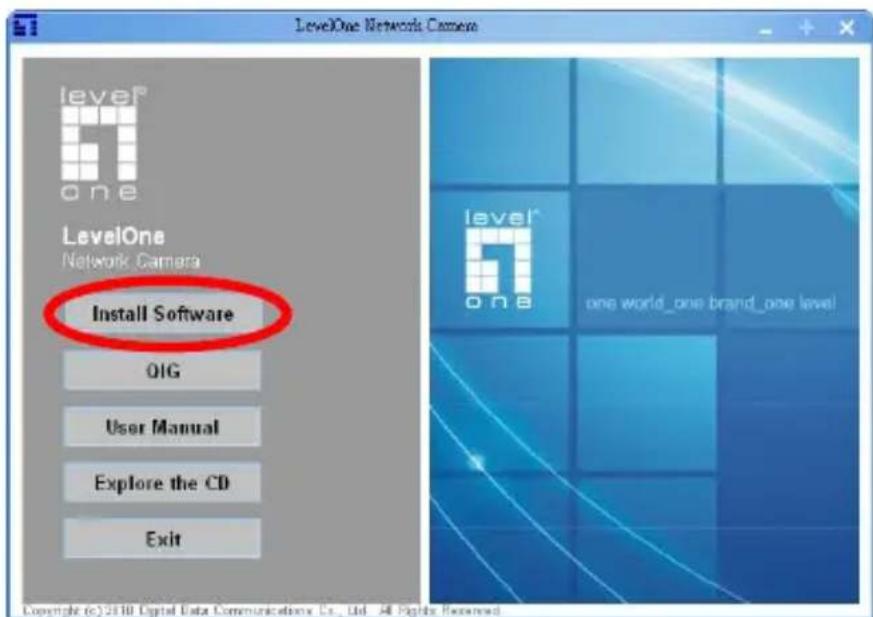
LevelOne Networks Camera level® one LevelOne Network Camera Install Software QIG User Manual Explore the CD Exit level® one world_one brand_one level Copyright © 2010 Digital Data Communications Co., Ltd. All Rights Reserved

Figure 1-1

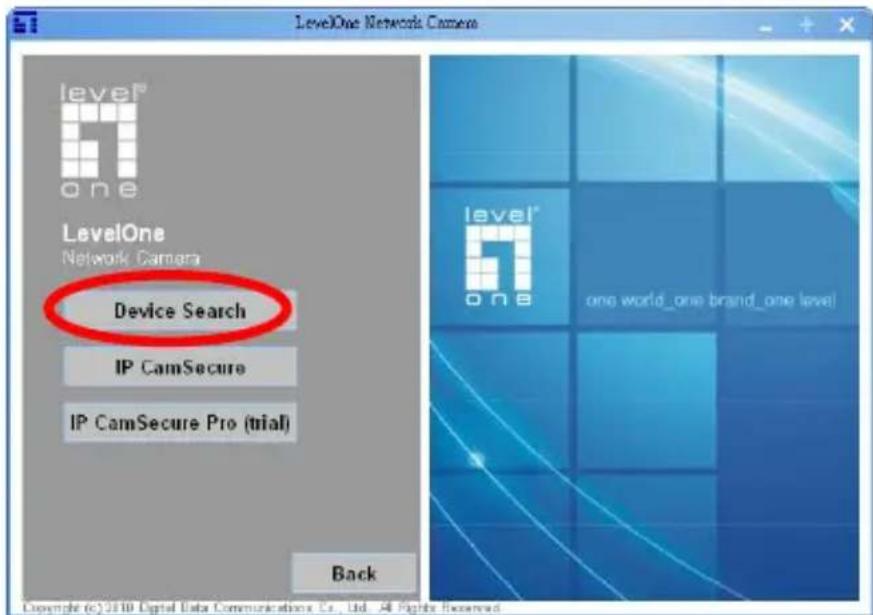
LevelOne Network Camera level® one LevelOne Network Camera Device Search IP CamSecure IP CamSecure Pro (trial) Back level® one world_one brand_one level! Copyright (c) 2010 Digital Data Communications Co., Ltd. All Rights Reserved

Figure 1-2

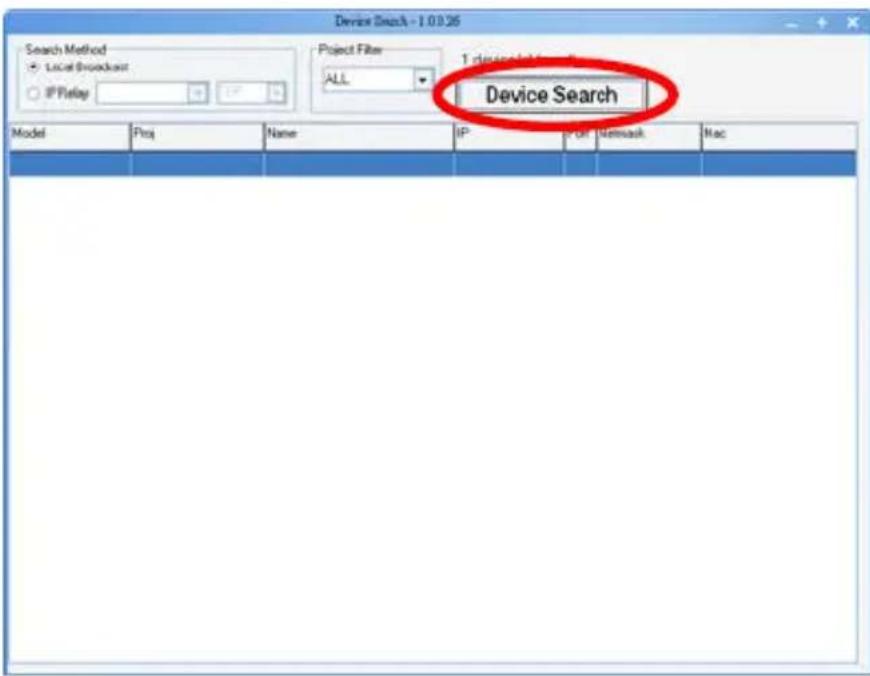
Device Search - 1.0.0.26 Search Method Local Broadcast IP Relay Project Filter ALL 1 device Search Device Search Model Proj Name IP P-Off Network Mac

Figure 1-3

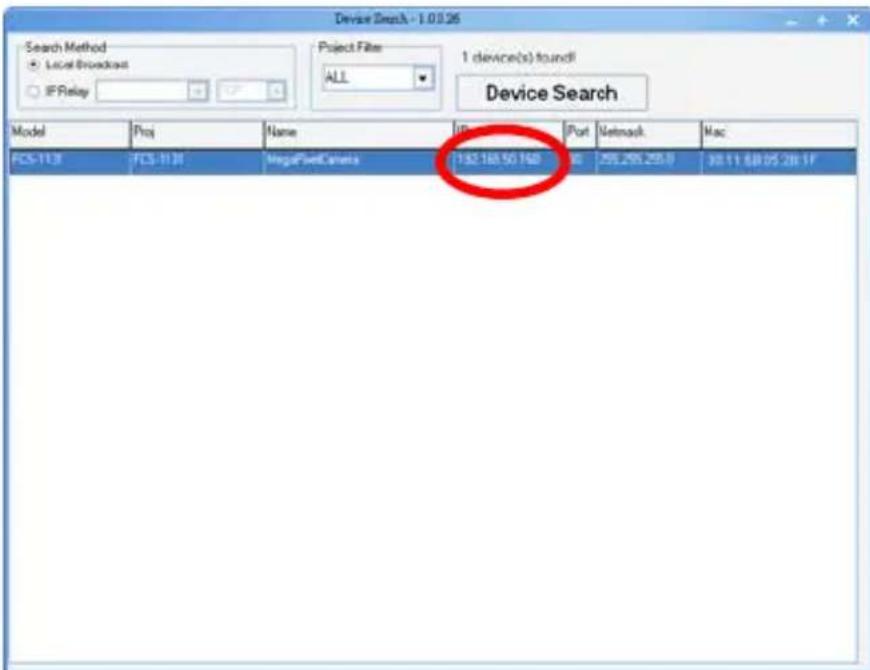
Device Search - 1.0.0.95 Search Method Local Broadcast IF Relay Project Filter ALL 1 device(s) found! Device Search Model Proj Name Port Network Mac FCS-113 FCS-1136 VegetNetCamera 132.188.50.148 8 259.255.255.8 98.11.88.05.28.1F

Figure 1-4

Connect to 192.168.50.125 The server: 192.168.50.125 at MegapixelPCamera requires a username and password. Warning: This server is requesting that your username and password be sent in an insecure manner (basic authentication without a secure connection). User name: root Password: Remember my passwo…

Figure 2-1

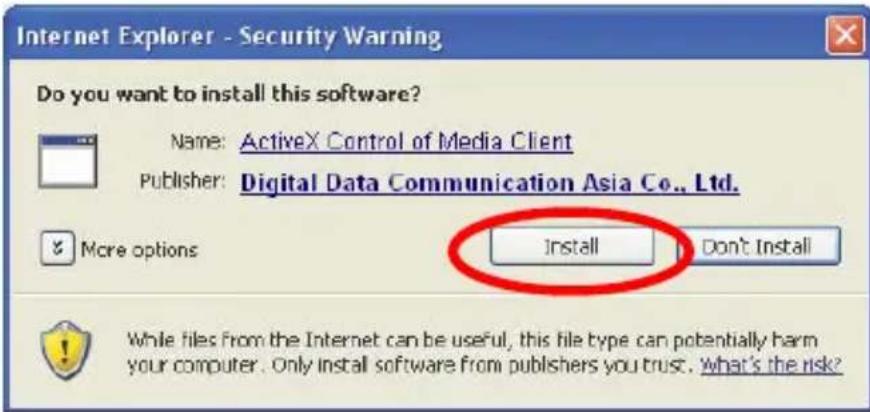
Internet Explorer - Security Warning Do you want to install this software? Name: ActiveX Control of Media Client Publisher: Digital Data Communication Asia Co., Ltd. More options Install Don't Install While files from the Internet can be useful, this file type can potentially harm your computer. Onl…

Figure 2-2

levelone Home System Streaming Camera Logout 2007/01/25 20:07 Video format MJPEG H.364 MJPEG Librate middle compression middle quality H.264 Strate low compression, high quality, 409686a

Figure 2-3

LevelOne Network Camera level one LevelOne Network Camera Device Search IP CamSecure IP CamSecure Pro (trial) Back level one one world_one brand_one level

Figure 3-1

English

Using the Software CD to configure the camera

■ Power on your PC and insert the CD-ROM
■ The setup page should load automatically. If it does not, please select your CD-ROM drive manually to open the setup page.
■ Select "Install Software"->" Device Search" (Figure1-1&1-2)
■ Run "Device Search". (Figure 1-3)
■ The Device Search will show MAC address and an IP Address of available LevelOne Network Cameras. Highlight the MAC address and double click to link to the selected device.(Figure 1-4)
■ Enter ‘root’ for the name, and leave the password blank. (Figure 2-1)
■ The following screen would appear automatically. Click “Next” and proceed. (Figure 2-2)
■ Congratulations, you can use the camera through the network to view the video.(Figure 2-3)

Installing IP CamSecure

Click "IP CamSecure" and follow the onscreen instruction or refer to the user's manual to complete installation.(Figure 3-1)

Deutsch

Using the Software CD to configure the camera
Manual assistant
Powered by Anthropic
Waiting for your message
Product information

Brand : LEVELONE

Model : FCS-4041

Category : Surveillance Camera