
FH-971E - Heating HONEYWELL - Free user manual and instructions
Find the device manual for free FH-971E HONEYWELL in PDF.


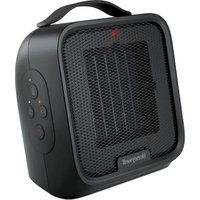
| Product Type | Fan heater |
| Brand | Honeywell |
| Model | FH-971E |
| Heating power | 2000 W (max) |
| Recommended heating area | Up to 25 m² |
| Power supply | 220-240 V ~ 50/60 Hz |
| Dimensions (W x H x D) | 25 x 35 x 15 cm |
| Weight | 2.1 kg |
| Adjustable thermostat | Yes, temperature dial |
| Heating modes | Fan only, gentle heat, intense heat |
| Oscillation function | Yes, horizontal rotation |
| Overheat protection | Yes, automatic shut-off |
| Frost protection | Yes, maintains 5°C |
| Noise level | 50 dB (approx) |
| Maintenance and cleaning | Dust the grille with a dry cloth; clean the filter regularly |
| Spare parts and repairability | Filter and stand interchangeable; repair possible by a professional |
| General information | Compliant with CE standards; do not use outdoors |
Frequently Asked Questions - FH-971E HONEYWELL
User questions about FH-971E HONEYWELL
0 question about this device. Answer the ones you know or ask your own.
Ask a new question about this device
Download the instructions for your Heating in PDF format for free! Find your manual FH-971E - HONEYWELL and take your electronic device back in hand. On this page are published all the documents necessary for the use of your device. FH-971E by HONEYWELL.
USER MANUAL FH-971E HONEYWELL
natural_image
Exterior view of a portable air conditioner unit (no visible text or symbols on the device body)
natural_image
White portable air conditioner with grid grille and ventilation slots (no visible text or symbols)
natural_image
White portable air conditioner with grid grille and ventilation grille (no text or symbols visible)| CONTENTS |
| INHALTSVERZEICHNIS |
| SOMMAIRE |
| INHOUDSOPGAVE |
| ÍNDICE |
| ÍNDICE |
| INDICE |
| INNEHÅLLSFÖRTECKNING |
| INNHOLTSFORTEGNELSE |
| INDHOLDSFORTEGNELSE |
| SISÄLLYSLUETTELO |
| ПЕРІЕХОМENA |
| FIHRIST |
| Содержание |
| SPIS TREŚCI |
| OBSAH |
| TARTALOMJEGYZÉK |

| ENGLISH | GB | 4 |
| DEUTSCH | DE | 7 |
| FRANÇAIS | FR | 10 |
| NEDERLANDS | NL | 13 |
| ESPAÑOL | ES | 16 |
| PORTUGUÊS | PT | 19 |
| ITALIANO | IT | 22 |
| SVENSKA | SE | 25 |
| NORSK | NO | 28 |
| DANSK | DK | 31 |
| SUOMI | FI | 34 |
| ΕΛΛΗΝΙΚΑ | GR | 37 |
| TÜRKÇE | TR | 40 |
| ΓΑΡΑΗΤΙΥΑ | RU | 43 |
| POLSKI | PL | 46 |
| ČESKY | CZ | 49 |
| MAGYAR | HU | 52 |
| عربي | SA | 59 |

(1)

natural_image
3D rendered circular object with internal features and three small symbols (circle, cross, star) pointing to its edges (no text or labels)natural_image
White Honeywell air conditioner with wavy grille and ventilation slots (no text or symbols visible)(2)

ENGLISH
IMPORTANT SAFETY INFORMATION
Read all the instructions through before starting to use the fan heater. Keep this user's manual safely for future reference.
- Install the fan heater in a location that is inaccessible to children.
- Do not operate the fan heater outdoors.
- Place the fan heater on a firm, even surface. Make sure the fan heater is standing securely so that it cannot tip over all fall off. The fan heater should only be operated in an upright position.
- Unwind the power cable completely, i.e. pull the cable completely out of the cable storage space. If the power cable is not completely unwound or pulled out this could lead to overheating and cause a fire.
- Do not use an extension cable or an infinitely variable speed regulator, as this could lead to overheating, a fire or an electric shock.
- The fan heater must be connected to a single-phase plug with the voltage as stated on the type plate of the appliance.
- Always disconnect the plug from the power supply when the fan heater is not in use, or when it is handled, moved, or cleaned. Do not tug at the cable to unplug the appliance.
- Do not operate the fan heater anywhere near inflammable gases or substances such as solvents, paint, glues, etc.
- Do not install the fan heater directly beneath a power socket.
- Do not use the fan heater in close proximity to a bathtub, a shower or a swimming pool.
- Do not use the fan heater in any kind of transport vehicle (e.g. construction vehicle, elevator, lift, caravan, automobile, cabin) or similar enclosed space.
- Warning: The air exhaust opening (2) of the fan heater gets hot during use (over 80 °C / 175 °F). Burnable materials such as cushions, duvets, bedding, furnishings, paper, curtains, and clothing must be kept at least 100cm away from the fan heater.
-
Keep the fan heater clean. Before operating the fan heater, make sure that the air intake vent (11) and the air exhaust vent (2) are open. No objects must be allowed to get into the air intake (11) or air exhaust (2) openings. Do not cover up the fan heater (not the front of the fan heater), as this could lead to overheating, fire or an electric shock.
-
Do not immerse the fan heater in water or any other liquids and do not spill water or any other liquid onto the appliance or into the air intake (11) or air exhaust (2) openings.
- Clean the fan heater regularly, paying attention to the cleaning instructions.
- If the power cable (12) of the fan heater is damaged it must be repaired by a workshop approved by the manufacturers, as special tools are needed.
- Do not start operating the fan heater if it is damaged or shows any signs of damage, or if it is not functioning properly. Disconnect the plug from the power supply.
CONSTRUCTION
- Safety distances
- Air exhaust vent
- Rotary power switch
- OFF (O)
- Cold air ()
- Warm air 1000 W ()
- Hot air 2000 W ()
- Rotary thermostat switch
- Room temperature about + 5 °C
- Room temperature about + 30 °C
- Air intake vent
- Power cable and plug
- Cable storage space
- Transport grip
FIRST TIME OF USE
- Read all the instructions through before starting to use the fan heater.
- Unpack the fan heater and power cable, remove all packaging materials and dispose of them in an environmentally friendly manner.
- Place the fan heater on a firm, even surface. Make sure the appliance is standing securely so that it cannot tip over or fall off. A safety distance of at least 100 cm from other objects must be observed
Cable storage space
- The fan heater has a cable storage space (13). Push the power cable (12) through the opening into the storage space, up to the plug.
ENGLISH
- When you do not wish use the fan heater, you must pull the power cable (12) out completely.
OPERATING INSTRUCTIONS
FH-971E Fan Heater with rotary power switch FH-972E Fan Heater with rotary thermostat switch FH-973E Fan Heater with power - / thermostat rotary switch
- Make sure that the rotary power switch (3) is in the OFF position (4). Connect the power plug to the power socket. Do not touch the power cable with wet hands.
- Make sure that the air intake vent (11) and air exhaust vent (2) are not covered. The air intake vent (11) and air exhaust vent (2) must always be free when the fan heater is operating.
- Use the rotary power switch (8) and/or the rotary thermostat switch (8) for the heating operation, depending on the fan heater model and as described below.
- Before you move or store the fan heater, turn the rotary power switch (3) to the OFF position (4) and unplug the appliance.
Rotary power switch
- By turning the rotary power switch (3) in a clockwise direction you can choose between 4 possible settings:
(O) OFF (4)
(✗ Cold air (5)
(Warm air 1000 Watt (6))
(★ Hot air 2000 Watt (7)
- When the rotary power switch (3) is in the hot air 2000 W position (7), you cannot turn it further in a clockwise direction, but have to turn it back in an anticlockwise direction.
Rotary thermostat switch
- For model FH-973E, first turn the rotary power switch (3) to a heating setting. For model FH-972E follow the instructions starting at 2.
-
Turn the rotary power switch (8) clockwise to the highest position 7.
-
When the desired room temperature is reached, turn the rotary thermostat switch (8) anticlockwise until you hear it click. Now the fan heater turns the heating operation off.
- Now turn the rotary thermostat switch back (8) clockwise very slightly. The fan heater will now automatically switch on and off to maintain the chosen room temperature.
- The further you turn the rotary thermostat switch (8) in a clockwise direction, the higher the room temperature will be. The highest position 7 corresponds to a room temperature of about 30°C. The lowest position (✗) corresponds to a room temperature of about 5 °C.
- It is normal for the thermostat not to switch itself on when the room temperature is more than 30 °C.
- If the room temperature is less than 5° C, the fan heater will heat until the room temperature has risen to above 5° C.
- When the rotary power switch (3) is in the hot air 2000 W position (7), you cannot turn it further in a clockwise direction, but have to turn it in an anticlockwise direction.
Overheating protection
- The fan heater is equipped with overheating protection, which automatically switches the appliance off if it is overheated.
- In this case, turn the rotary power switch (3) to the OFF position (4) and unplug the appliance.
- Allow the fan heater to cool for at least 20 minutes.
- If necessary, remove any objects which have caused faulty operating or overheating from inside or in front of the air intake vent (11) or air exhaust vent (2).
- Restart the fan heater as described in the "operating instructions".
CLEANING AND MAINTENANCE
We advise you to clean the fan heater regularly. So as not to impair the working of the fan heater, please follow the instructions for cleaning and maintenance.
Cleaning
- Before you start cleaning the fan heater, turn the rotary power switch (3) to the OFF position (4) and unplug the appliance from the power supply.
- Clean the air intake opening (11) and air exhaust opening (2) with a vacuum cleaner, so as to remove the dirt from the motor and heating element.
- Clean the surface of the fan heater with a soft, damp cloth.
- Restart the fan heater as described in the "operating instructions".
Maintenance
- The fan heater does not require special maintenance.
- If the fan heater has to be repaired, always contact an authorised workshop.
- If the power cable has to be replaced, a power cable of type 2x1mm² H05VVF HAR must be used.
CONDITION OF PURCHASE
As condition of purchase the purchaser assumes responsibility for the correct use and care of this fan heater according to these operating instructions. The purchaser or user must himself or herself decide when and for how long the fan heater is to be in operation.
WARNING: IF PROBLEMS ARISE WITH THIS FAN HEATER, PLEASE OBSERVE THE INSTRUCTIONS IN THE GUARANTEE CONDITIONS. DO NOT ATTEMPT TO OPEN OR REPAIR THE FAN HEATER YOURSELF, AS THIS COULD LEAD TO TERMINATION OF THE GUARANTEE AND CAUSE DAMAGE TO PERSONS AND PROPERTY.
Technical modifications reserved.
DEUTSCH
(Air chaud 1000 watts (6)
MANUAL DE INSTRUÇÕES
(Varmluft 1000 Watt (6)
( * Hetluft 2000 Watt (7)
The Honeywell trademark is used by Kaz, Inc. under licence
from Honeywell Intellectual Properties, Inc.

Brand : HONEYWELL
Model : FH-971E
Category : Heating