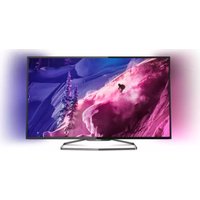
40PFK6989 - Television PHILIPS - Free user manual and instructions
Find the device manual for free 40PFK6989 PHILIPS in PDF.


| Product Type | LED Television |
| Screen Size | 40 inches (101.6 cm) |
| Resolution | 1920 x 1080 (Full HD) |
| Refresh Rate | 60 Hz |
| Smart TV Platform | Philips Smart TV (Saphi) |
| Wi-Fi Connectivity | Built-in IEEE 802.11 b/g/n |
| HDMI Ports | 3 (HDMI 1.4, with ARC support) |
| USB Ports | 2 (USB 2.0) |
| Audio Power Output | 20 W (2 x 10 W) |
| Power Consumption (Operating) | 70 W (typical) |
| Power Consumption (Standby) | < 0.5 W |
| Dimensions (with stand) | 923 x 575 x 225 mm |
| Dimensions (without stand) | 923 x 540 x 89 mm |
| Weight (with stand) | 8.5 kg |
| Weight (without stand) | 8.0 kg |
| VESA Mounting Pattern | 200 x 200 mm |
| Tuner | DVB-T/T2/C/S/S2 |
| Energy Efficiency Class | A+ (EU) |
Frequently Asked Questions - 40PFK6989 PHILIPS
User questions about 40PFK6989 PHILIPS
0 question about this device. Answer the ones you know or ask your own.
Ask a new question about this device
Download the instructions for your Television in PDF format for free! Find your manual 40PFK6989 - PHILIPS and take your electronic device back in hand. On this page are published all the documents necessary for the use of your device. 40PFK6989 by PHILIPS.
USER MANUAL 40PFK6989 PHILIPS
Turn on the Smart TV and place the video store app on the Smart TV home screen.


Player 1 Player 2
2.6
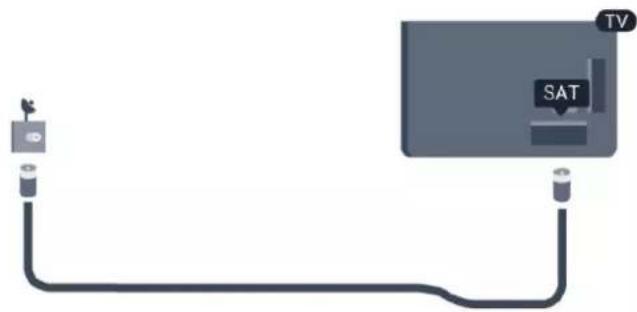
Satellite dish
Connect the F-type satellite connector to the SAT satellite connection on the back of the TV.
3
Network
3.1
Wireless network


Network devices
To completely turn off EasyLink...
Automatic power off of devices
Insert an HDMI cable near the antenna connections to connect the set-top box to the TV.
Insert an HDMI cable near the antenna connection to connect the device to the TV.
Turn off the timer
Delay for turning off the sound output . . .
CVBS - Left Right Audio
Connect the game console to the television with a composite cable (CVBS) and with a Right/Left audio cable to the television.
![graph TD A["Game console"] --> B["Video / Audio L R"] C["TV"] --> D["Video L/R"]](/content/2026/06/1279384/images/57bdc5e1ea3b13aa5c81c1304a623115e017c3d1b86cc5566c1e1f0df0818f04.jpg)
2 - Turn on the USB Hard Disk and the television.
Connect the mouse
Turn on the television and connect the USB mouse to one of the USB connections on the television. You can also connect the USB mouse to a connected USB keyboard.
Mouse clicks
5
Turn on
5.1
On or Standby
5.3
Brightness of the wordmark
6.3
Battery
Universal access
To turn off Text 2.5 . . .
Remove satellite
To remove satellites ...
- Help
- PTA507
- PTA508
- PTA509
- PTA517
- PTA518
- PTA519
13.2
The 3D glasses
To turn Miracast on or off ...
Turn on Miracast
Make sure Wi-Fi Miracast is turned on.
Remove scheduled recording
Remove or rename
• Remove an app
Contrast settings
Contrast modes
Advanced Ambilight settings
Wall color
You can neutralize the effect of a colored wall on the Ambilight colors with Wall color. Select the color of the wall behind the TV and the TV will adapt the Ambilight colors to it.
To select the wall color...
To select how Ambilight switches off...
Acknowledgements and License Texts for any open source software used in this Philips TV.
This is a document describing the distribution of the source code used on the Philips TV, which fall either under the GNU General Public License (the GPL), or the GNU Lesser General Public License (the LGPL), or any other open source license. Instructions to obtain source code for this software can be found in the user manual.
PHILIPS MAKES NO WARRANTIES WHATSOEVER, EITHER EXPRESS OR IMPLIED, INCLUDING ANY WARRANTIES OF MERCHANTABILITY OR FITNESS FOR A PARTICULAR PURPOSE, REGARDING THIS SOFTWARE. Philips offers no support for this software. The preceding does not affect your warranties and statutory rights regarding any Philips product(s) you purchased. It only applies to this source code made available to you.
Freetype (2.4.3)
FreeType is a software font engine that is designed to be small, efficient, highly customizable, and portable while capable of producing high-quality output (glyph images).
This piece of software is made available under the terms and conditions of the FreeType Project license, which can be found below.
Source: http://freetype.sourceforge.net
zlib (1.2.3)
The 'zlib' compression library provides in-memory compression and decompression functions, including integrity checks of the uncompressed data.
This piece of software is made available under the terms and conditions of the zlib license, which can be found below.
Source: http://www.zlib.net/
Fraunhofer AAC Encoder (3.3.3)
AAC Encoder.
Source: Android JB source code
unicode (3.2)
This library is used to perform UNICODE string manipulation.
This piece of software is made available under the terms and conditions of the ICU license, which can be found below.
Source: http://www.icu-project.org/
libpng (1.2.43)
PNG decoder.
This piece of software is made available under the terms and conditions of the libpng license, which can be found below.
Source: http://www.libpng.org/pub/png/libpng.html
libjpg (6b)
This library is used to perform JPEG decoding tasks.
This piece of software is made available under the terms and conditions of the libjpg license, which can be found below. Source: http://www.ijg.org/
libmng (1.0.10)
libmng - THE reference library for reading, displaying, writing and examining Multiple-Image Network Graphics. MNG is the animation extension to the popular PNG image-format.
This piece of software is made available under the terms and conditions of the libmng license, which can be found below. Source: http://sourceforge.net/projects/libmng/files/
u-Boot loader (1.3.4)
Used by boot loader and only linked with boot loader, GPL license.
This piece of software is made available under the terms and conditions of the u-Boot loader license, which can be found below.
Source: http://sourceforge.net/projects/u-boot/files/u-boot/U-
Boot-1.1.4/u-boot-1.1.4.tar.bz2/download
Libcurl (7.21.7)
HTTP client; libcurl is a free and easy-to-use client-side URL transfer library, supporting FTP, FTPS, HTTP, HTTPS, SCP, SFTP, TFTP, TELNET, DICT, LDAP, LDAPS, FILE, IMAP, SMTP, POP3 and RTSP. libcurl supports SSL certificates, HTTP POST, HTTP PUT, FTP uploading, HTTP form based upload, proxies, cookies, user+password authentication (Basic, Digest, NTLM, Negotiate, Kerberos4), file transfer resume, http proxy tunneling and more! This piece of software is made available under the terms and conditions of the Libcurl license, which can be found below. Source: http://curl.haxx.se/
c-ares (1.7.4)
c-ares is a C library that performs DNS requests and name resolves asynchronously.
This piece of software is made available under the terms and conditions of the c-ares license, which can be found below.
Source: http://c-ares.haxx.se/c-ares-1.7.1.tar.gz
openssl (1.0.0d)
OpenSSL is an open source implementation of the SSL and TLS protocols. The core library (written in the C programming language) implements the basic cryptographic functions and provides various utility functions. Wrappers allowing the use of the OpenSSL library in a variety of computer languages are available.
This piece of software is made available under the terms and conditions of the 1.7.4 license, which can be found below.
Source: http://www.openssl.org/source/openssl-1.0.0.tar.gz
Expat (2.01)
xml parser; Expat is an XML parser library written in C. It is a stream-oriented parser in which an application registers handlers for things the parser might find in the XML document (like start tags). An introductory article on using.
This piece of software is made available under the terms and conditions of the Expat license, which can be found below.
Source: http://expat.sourceforge.net/
DirectFB include SAWMAN (1.4.0)
It is a software library for GNU/Linux/UNIX based operating system with a small memory footprint that provides graphics acceleration, input device handling and abstraction layer, and integrated windowing system with support for translucent windows and multiple display layers on top of the Linux framebuffer without requiring any kernel modifications. This piece of software is made available under the terms and conditions of the DirectFB license, which can be found below. Source: http://sourceforge.net/projects/jointspace/files/remote_applications_SDK/remote_spplications_SDK_v1.3.1/DirectFB141_source_1.3.1.7z/download
SAWMAN
SquashFS is a compressed read-only file system for Linux. SquashFS compresses files, inodes and directories, and supports block sizes up to 1 MB for greater compression. SquashFS is also the name of free/open software, licensed under the GPL, for accessing SquashFS filesystems.
Source: http://squashfs.sourceforge.net/
Linux Kernel (3.0)
The Linux kernel is an operating system kernel used by the Linux family of Unix-like operating systems.
This piece of software is made available under the terms and conditions of the Linux Kernel license, which can be found below.
Source: http://www.kernel.org
SQLite (3.7.2)
SQLite is a in-process library that implements a self-contained, serverless, zero-configuration, transactional SQL database engine.
This piece of software is made available under the terms and conditions of the SQLite license, which can be found below.
Source: http://www.sqlite.org/download.html
SquashFS (3.4)
SquashFS is a compressed read-only file system for Linux. SquashFS compresses files, inodes and directories, and supports block sizes up to 1 MB for greater compression. SquashFS is also the name of free/open software, licensed under the GPL, for accessing SquashFS filesystems.
This piece of software is made available under the terms and conditions of the SquashFS license, which can be found below.
Source: http://squashfs.sourceforge.net/
glibc (2.6.1)
Any Unix-like operating system needs a C library: the library which defines the ``system calls'' and other basic facilities such as open, malloc, printf, exit... The GNU C library is used as the C library in the GNU system and most systems with the Linux kernel.
This piece of software is made available under the terms and conditions of the glibc license, which can be found below.
Source: http://www.gnu.org/software/libc/
mtd-utils (1)
The aim of the system is to make it simple to provide a driver for new hardware, by providing a generic interface between the hardware drivers and the upper layers of the system. Hardware drivers need to know nothing about the storage formats used, such as FTL, FFS2, etc., but will only need to provide simple routines for read, write and erase. Presentation of the device's contents to the user in an appropriate form will be handled by the upper layers of the system.
This piece of software is made available under the terms and conditions of the mtd-utils license, which can be found below. Source: http://www.linux-mtd.infradead.org/index.html
libusb (1.0.6)
This is the home of libusb, a library that gives user level applications uniform access to USB devices across many different operating systems. libusb is an open source project licensed under the GNU Lesser General Public License version 2.1. Many participants in the libusb community have helped and continue to help with ideas, implementation, support and improvements for libusb.
This piece of software is made available under the terms and conditions of the libusb license, which can be found below.
Source:
http://libusb.wiki.sourceforge.net
http://www.libusb.org/
libusb-compat (0.1.3)
Library to enable user space application programs to communicate with USB devices.
This piece of software is made available under the terms and conditions of the libusb-compat license, which can be found below.
Source: http://libusb.wiki.sourceforge.net/LibusbCompat0.1
NTFS-3G Read/Write Driver (2010.5.22)
NTFS-3G is an open source cross-platform implementation of the Microsoft Windows NTFS file system with read-write support. NTFS-3G often uses the FUSE file system interface, so it can run unmodified on many different operating systems. It is runnable on Linux, FreeBSD, NetBSD, OpenSolaris, BeOS, QNX, WinCE, Nucleus, VxWorks, Haiku, MorphOS, and Mac OS X. It is licensed under either the GNU General Public License or a proprietary license. It is a partial fork of ntfsprogs and is under active maintenance and development.
This piece of software is made available under the terms and conditions of the NTFS-3G Read/Write Driver license, which can be found below.
Source: http://www.tuxera.com
WPA Supplicant (0.5.10 & 0.6.7)
These packages are used to provide WiFi access. The supplier for these tools is Atheros. These pieces of software are made available under the terms and conditions of the GPL v2 license, which can be found below.
This piece of software is made available under the terms and conditions of the WPA Supplicant license, which can be found below.
Source: http://hostap.epitest.fi/wpa_supplicant/
ntfsprogs (2.0.0)
Some useful tools for the NTFS file system.
This piece of software is made available under the terms and conditions of the ntfsprogs license, which can be found below.
Source: http://sourceforge.net/projects/linux-ntfs
fuse (2.8.4)
Fuse is a simple interface for userspace programs to export a virtual filesystem to the linux kernel.
This piece of software is made available under the terms and conditions of the fuse license, which can be found below.
Source: http://fuse.sourceforge.net/
libiconv (1.11.1)
This library provides an iconv() implementation, for use on systems which don't have one, or whose implementation cannot convert from/to Unicode.
This piece of software is made available under the terms and conditions of the libiconv license, which can be found below.
Source: http://ftp.gnu.org/pub/gnu/libiconv
electric-fence (2.1.13)
Used for memory corruption detection.
This piece of software is made available under the terms and conditions of the electric-fence license, which can be found below.
Source: http://perens.com/FreeSoftware/ElectricFence/electricfence_2.1.13-0.1.tar.gz
liveMedia
When Wifi Display or streaming RtspPlayer are enabled.
This piece of software is made available under the terms and conditions of the electric-fence license, which can be found below.
Source: www.live555.com
QT (4.7.0)
Netflix, Skype, best TV, Pandora, Picasa? Will use QT.
This piece of software is made available under the terms and conditions of the QT license, which can be found below.
Source: http://qt.nokia.com/
e2fsprogs (1.41.14)
e2fsprogs provides the filesystem utilities for use with the ext2 filesystem, it also supports the ext3 and ext4 filesystems.
This piece of software is made available under the terms and conditions of the e2fsprogs license, which can be found below.
Source: http://e2fsprogs.sourceforge.net/
alsa (1.0.24.1)
Advanced Linux Sound Architecture (ALSA).
This piece of software is made available under the terms and conditions of the alsa license, which can be found below.
Source: http://www.alsa-project.org
lvm2 (2.02.89)
DM_VERITY.
This piece of software is made available under the terms and conditions of the lvm2 license, which can be found below.
Source: ftp://sources.redhat.com/pub/lvm2/releases/
encfs (1.3.2)
A library that provides an encrypted filesystem in user-space.
Source: http://www.arg0.net/encfs
boost (1.15.0)
A library that provides free peer-reviewed portable C++ source libraries, used for encfs.
Source: http://www.boost.org
rlog (1.4)
A library that provides a flexible message logging facility for C programs and libraries, used for encfs.
Source: http://www.arg0.net/rlog
iptables (1.4.15)
For cross connection.
Source: http://www.netfilter.org/projects/iptables/
bash (3.2.48)
Bash is the shell, or command language interpreter, that will appear in the GNU operating system.
Bash is an sh-compatible shell that incorporates useful features from the Korn shell (ksh) and C shell (csh).
It is intended to conform to the IEEE POSIX P1003.2/ISO
9945.2 Shell and Tools standard.
It offers functional improvements over sh for both programming and interactive use.
In addition, most sh scripts can be run by Bash without modification.
Source: http://www.gnu.org/software/bash/
coreutils (6.9)
The GNU Core Utilities are the basic file, shell and text manipulation utilities of the GNU operating system.
These are the core utilities which are expected to exist on every operating system.
Source: http://www.gnu.org/software/coreutils/
findutils (4.2.31)
The GNU Find Utilities are the basic directory searching utilities of the GNU operating system.
These programs are typically used in conjunction with other programs to provide modular and powerful directory search and file locating capabilities to other commands.
Source: http://www.gnu.org/software/findutils/
gawk (3.1.5)
If you are like many computer users, you would frequently like to make changes in various text files wherever certain patterns appear, or extract data from parts of certain lines while discarding the rest.
To write a program to do this in a language such as C or Pascal is a time-consuming inconvenience that may take many lines of
- SATELLITE DISH
- NETWORK
- WIRELESS NETWORK
- NETWORK DEVICES
- AUTOMATIC POWER OFF OF DEVICES
- CVBS - LEFT RIGHT AUDIO
- CONNECT THE MOUSE
- MOUSE CLICKS
- TURN ON
- ON OR STANDBY
- BRIGHTNESS OF THE WORDMARK
- BATTERY
- UNIVERSAL ACCESS
- REMOVE SATELLITE
- HELP
- THE 3D GLASSES
- TO TURN MIRACAST ON OR OFF
- TURN ON MIRACAST
- REMOVE SCHEDULED RECORDING
- REMOVE OR RENAME
- CONTRAST SETTINGS
- CONTRAST MODES
- ADVANCED AMBILIGHT SETTINGS
- WALL COLOR
- FREETYPE (2.4.3)
- ZLIB (1.2.3)
- UNICODE (3.2)
- LIBPNG (1.2.43)
- LIBJPG (6B)
- LIBMNG (1.0.10)
- U-BOOT LOADER (1.3.4)
- LIBCURL (7.21.7)
- C-ARES (1.7.4)
- OPENSSL (1.0.0D)
- EXPAT (2.01)
- DIRECTFB INCLUDE SAWMAN (1.4.0)
- SAWMAN
- LINUX KERNEL (3.0)
- SQLITE (3.7.2)
- SQUASHFS (3.4)
- GLIBC (2.6.1)
- MTD-UTILS (1)
- LIBUSB (1.0.6)
- SOURCE
- LIBUSB-COMPAT (0.1.3)
- NTFS-3G READ/WRITE DRIVER (2010.5.22)
- WPA SUPPLICANT (0.5.10 & 0.6.7)
Brand : PHILIPS
Model : 40PFK6989
Category : Television