
SilentStar FC9304 - Vacuum Cleaner PHILIPS - Free user manual and instructions
Find the device manual for free SilentStar FC9304 PHILIPS in PDF.


| Product Type | Cylinder Vacuum Cleaner |
| Model | SilentStar FC9304 |
| Brand | Philips |
| Bagless | Yes |
| Dust Capacity | 1.5 L |
| Power Supply | 220-240 V, 50-60 Hz |
| Power Consumption | 1600 W |
| Filtration System | HEPA 13 washable filter |
| Noise Level | 74 dB |
| Dimensions (L x W x H) | 41 x 24 x 29 cm |
| Weight | 5.5 kg |
| Operating Radius | 9 m |
| Cord Length | 6 m |
| Accessories Included | Crevice tool, dusting brush, upholstery nozzle |
| Main Brush | Motorized turbo brush (optional) |
| Filter Maintenance | Washable under running water every 3 months |
| Dust Container Cleaning | Empty after each use, wash periodically |
| Safety Features | Automatic shut-off when overheated, thermal fuse |
| Repairability | Spare parts available (filters, brushes, hose) |
| Warranty | 2 years (varies by region) |
Frequently Asked Questions - SilentStar FC9304 PHILIPS
User questions about SilentStar FC9304 PHILIPS
0 question about this device. Answer the ones you know or ask your own.
Ask a new question about this device
Download the instructions for your Vacuum Cleaner in PDF format for free! Find your manual SilentStar FC9304 - PHILIPS and take your electronic device back in hand. On this page are published all the documents necessary for the use of your device. SilentStar FC9304 by PHILIPS.
USER MANUAL SilentStar FC9304 PHILIPS
Register your product and get support at
www.philips.com/welcome
FC9306, FC9304, FC9302
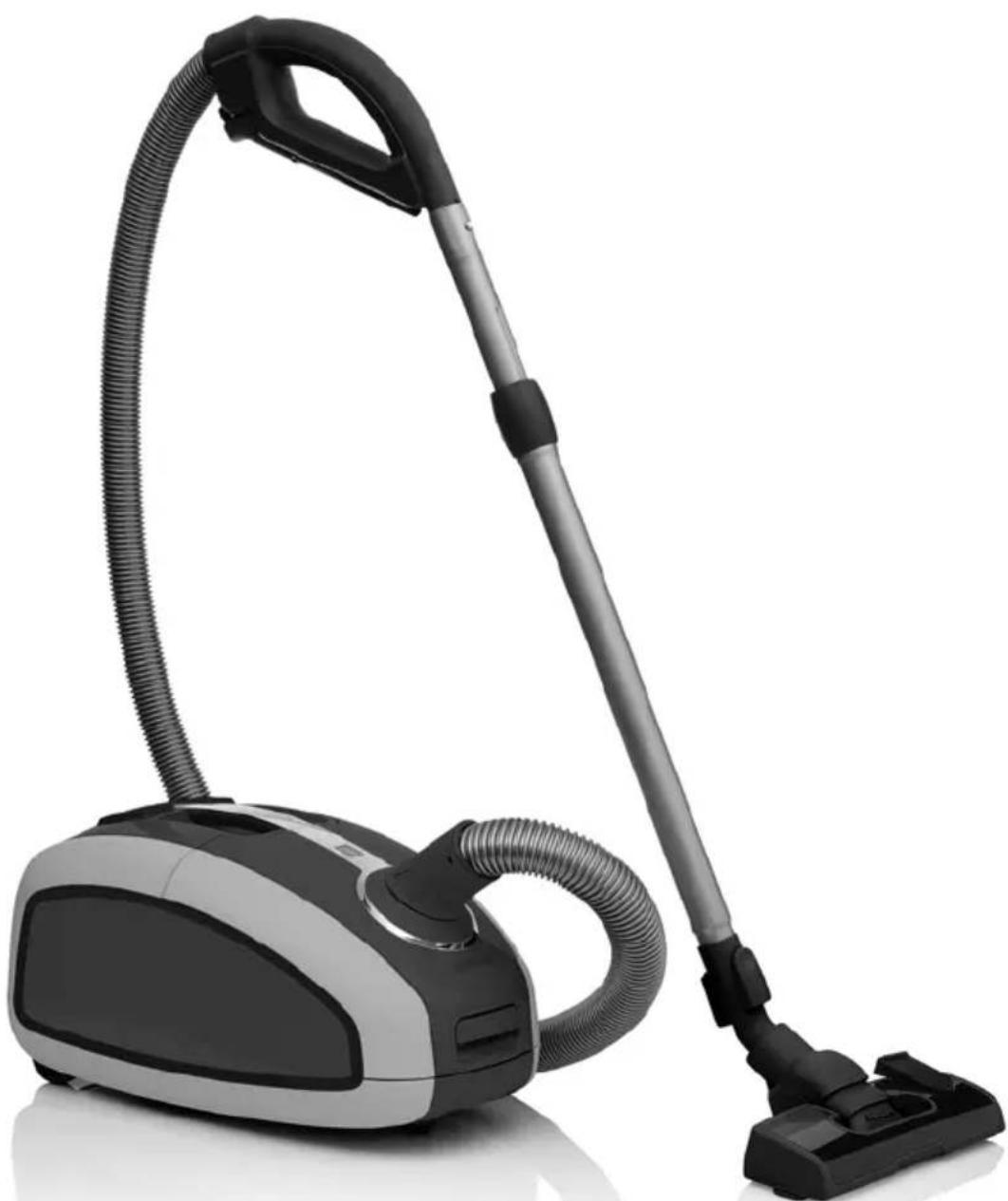
natural_image
Exterior view of a black and silver vacuum cleaner with coiled hose (no text or symbols visible)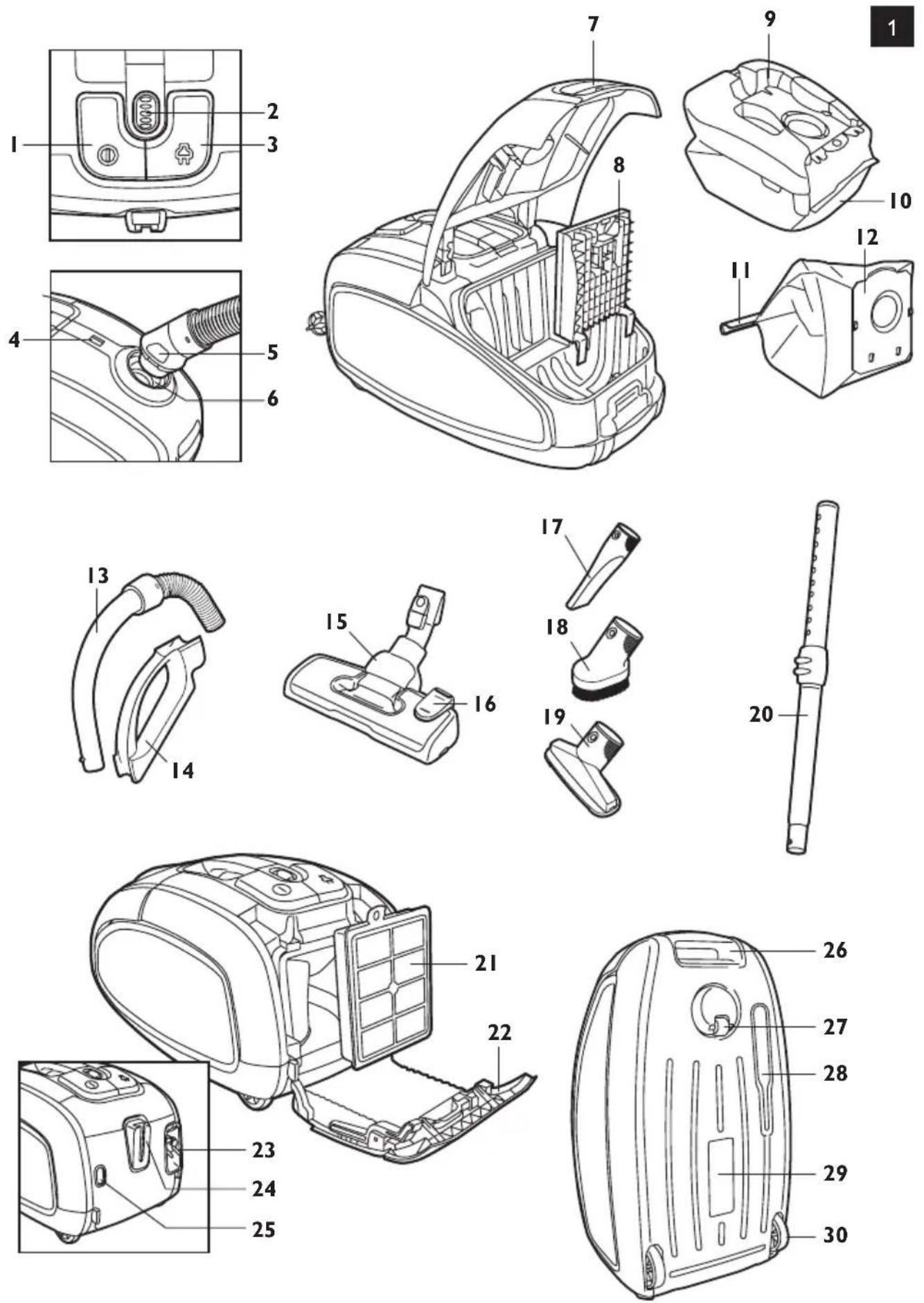
ENGLISH 6
ESPAÑOL 18
INDONESIA 30
한국어 42
BAHASA MELAYU 54
PORTUGUÊS 66
ภาษาไทย 78
TIÊNG VIÊT 89
繁體中文 101
简体中文 113
Introduction
Congratulations on your purchase and welcome to Philips! To fully benefit from the support that Philips offers, register your product at www.philips.com/welcome.
This vacuum cleaner's extremely efficient motor produces less noise than other types and yields a high performance at a low power consumption.
General description (Fig. 1)
1 On/off button
2 Suction power selection wheel
3 Cord rewind button
4 Dustbag-full indicator
5 Hose release buttons
6 Hose connection opening
7 Cover release tab
8 Motor protection filter holder
9 Dustbag holder
10 Dustbag
11 Removable strip (specific types only)
12 Reusable dustbag (specific types only)
13 Handgrip
14 Accessory holder
15 SilentStar nozzle
16 Rocker switch for carpet/hard floor settings
17 Crevice tool
18 Small brush
19 Small nozzle
20 2-piece telescopic tube
21 HEPA 13 washable filter
22 Filter cover
23 Mains plug
24 Parking slot
25 Release button of filter cover
26 Storage grip
27 Swivel wheel
28 Parking/storage ridge
29 Type plate
30 Rear wheels
Important
Read this user manual carefully before you use the appliance and save it for future reference.
Danger
- Never suck up water or any other liquid. Never suck up flammable substances and do not suck up ashes until they are cold.
Warning
- Check if the voltage indicated on the appliance corresponds to the local mains voltage before you connect the appliance.
- Do not use the appliance if the plug, the mains cord or the appliance itself is damaged.

natural_image
Illustration of a person using a manual vacuum cleaner to clean or remove debris, with motion lines indicating vibration (no text or symbols)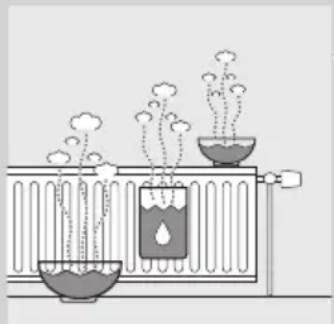
natural_image
Illustration of a chemical experiment setup with two test tubes and rising plants (no text or symbols)- If the mains cord is damaged, you must have it replaced by Philips, a service centre authorised by Philips or similarly qualified persons in order to avoid a hazard.
- This appliance is not intended for use by persons (including children) with reduced physical, sensory or mental capabilities, or lack of experience and knowledge, unless they have been given supervision or instruction concerning use of the appliance by a person responsible for their safety.
- Children should be supervised to ensure that they do not play with the appliance.
- Do not point the hose, the tube or any other accessory at the eyes or ears nor put it in your mouth when it is connected to the vacuum cleaner and the vacuum cleaner is switched on.
Caution
- When you use the vacuum cleaner to vacuum ashes, fine sand, lime, cement dust and similar substances, the pores of the dustbag become clogged. As a result, the dustbag-full indicator will indicate that the dustbag is full. Replace the disposable dustbag or empty the reusable dustbag, even if it is not full yet (see chapter ‘Replacing/emptying the dustbag’).
- Never use the appliance without the motor protection filter. This could damage the motor and shorten the life of the appliance.
- Only use Philips s-bag ^TM synthetic dustbags or the reusable dustbag provided (some countries only).
- During vacuum cleaning, especially in rooms with low air humidity, your vacuum cleaner builds up static electricity. As a result you can experience electric shocks when you touch the tube or other steel parts of your vacuum cleaner. These shocks are not harmful to you and do not damage the appliance. To reduce this inconvenience we advise you:
1 to discharge the appliance by frequently holding the tube against other metal objects in the room (for example legs of a table or chair, radiator etc.);
2 to raise the air humidity level in the room by placing water in the room. For example, you can hang containers filled with water from your radiators or place bowls filled with water on or near your radiators.
Electromagnetic fields (EMF)
This Philips appliance complies with all standards regarding electromagnetic fields (EMF). If handled properly and according to the instructions in this user manual, the appliance is safe to use based on scientific evidence available today.
Before first use
1 Take the appliance and its accessories out of the box.
2 Remove any sticker, protective foil or plastic from the appliance.
Preparing for use
Attaching the handgrip
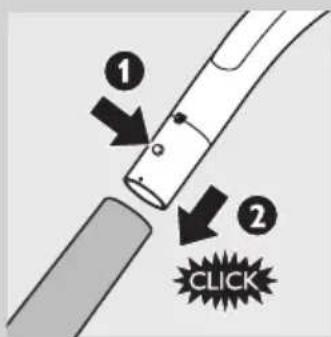
1 To connect the telescopic tube to the handgrip, press the spring-loaded lock button on the handgrip (1) and insert the handgrip into the tube (2). Fit the spring-loaded lock button into the opening in the tube ('click').
2 To disconnect the tube from the handgrip, press the spring-loaded lock button and pull the handgrip out of the tube.
Attaching the nozzle and accessories
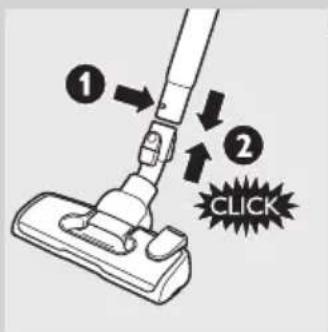
1 To connect the nozzle or an accessory to the tube, press the spring-loaded lock button (1) on the tube and insert the tube into the floor nozzle (2). Fit the spring-loaded lock button into the opening in the nozzle ('click').
Note: You can also connect the nozzle or accessories directly to the handgrip in the same way.
2 To disconnect the nozzle or an accessory from the tube, press the spring-loaded lock button and pull the nozzle out of the tube.
Hose
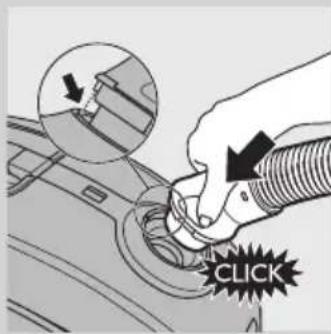
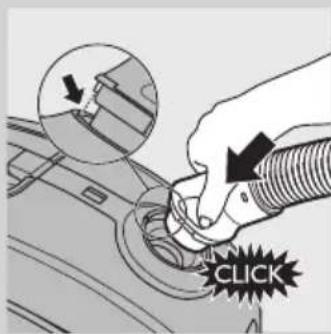
1 To connect the hose, push it firmly into the appliance ('click').
Note: Make sure that the projection of the hose fits into the recesses.

natural_image
Hand inserting a hose into a car's air vent (no text or symbols visible)2 To disconnect the hose, push the buttons (1) and pull the hose out of the appliance (2).
2-piece telescopic tube
natural_image
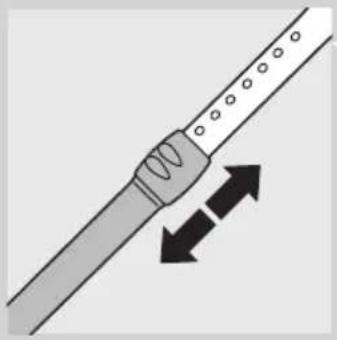
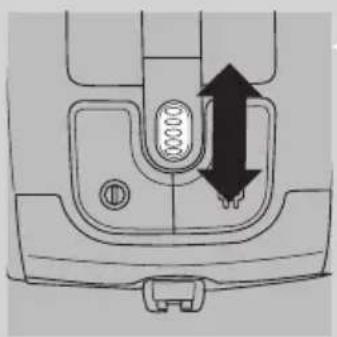
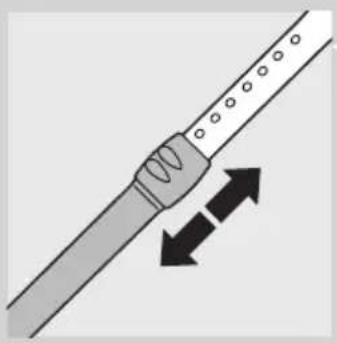
Diagram of a tool interacting with a string, showing two opposing directional arrows (no text or symbols)1 Move the tube lock up or down to adjust the tube length so that the handgrip is at hip level.
SilentStar nozzle
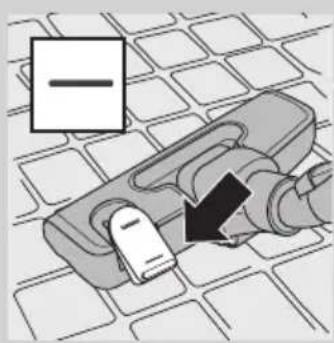
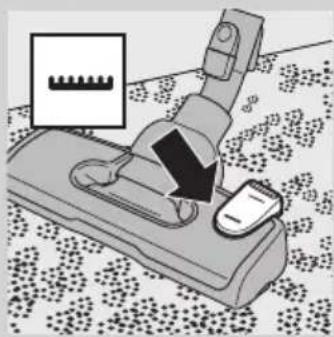
The SilentStar nozzle is a low-noise, multi-purpose nozzle for carpets and hard floors.
- Use the hard floor setting to clean hard floors (for instance tiled, parqueted, laminated and linoleumed flooring): push the rocker switch on top of the nozzle with your foot to make the brush strip come out of the housing.
natural_image
Diagram of a mechanical device with a magnified inset showing a gear-like component (no text or symbols present)- Use the carpet setting to clean carpets: push the rocker switch again to make the brush strip disappear into the nozzle housing.
Accessories
natural_image
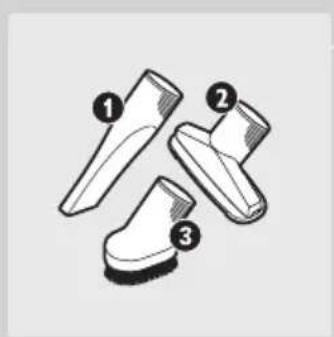
Three types of boots with numbered labels (1, 2, 3) showing different angles and designs (no text or symbols beyond labels)- You can connect the crevice tool (1), the small nozzle (2) or the small brush (3) directly to the handgrip or to the tube.
Accessory holder
natural_image
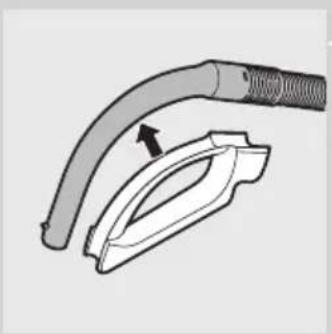
Diagram of a hairless cable connector with a magnified inset showing the internal structure (no text or symbols)1 Snap the accessory holder onto the handgrip.
2 Store accessories in the accessory holder by pushing them into the holder. To detach the accessories, pull them out of the holder.
You can store two accessories at a time in the accessory holder.

natural_image
Diagram of a hairdryer tool with two clips and arrows indicating process (no text or symbols)- Crevice tool and small nozzle.
Note: The small nozzle must be placed in the accessory holder as shown in the picture.

natural_image
Diagram of a medical or surgical tool with two arrows indicating movement or force (no text or symbols present)- Crevice tool and small brush.
Using the appliance

natural_image
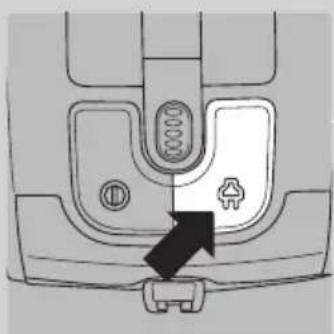
Mechanical component diagram showing a valve with a black arrow pointing to a connector (no text or symbols)1 Pull the cord out of the appliance and put the mains plug in the wall socket.
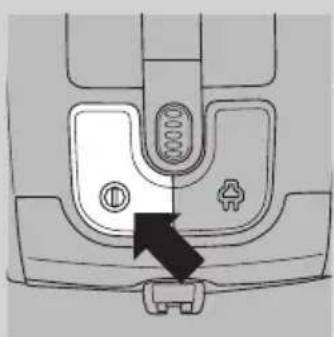
2 To switch on the appliance, press the on/off button on top of the appliance.
Tip: To avoid bending your back, press the on/off button with your foot.
3 To switch off the appliance, press the on/off button on top of the appliance.
Adjusting suction power
natural_image
Technical diagram of a sewing machine's side panel showing internal components and directional arrows (no text or labels)1 During vacuum cleaning, you can adjust the suction power with the selection wheel on top of the appliance.
- Use maximum suction power to vacuum very dirty carpets and hard floors.
- Use moderate suction power to vacuum carpets.
- Use minimum suction power to vacuum curtains, tablecloths etc.
Pausing during use

natural_image
Illustration of a vacuum cleaner with handle and base (no text or symbols)1 If you want to stop vacuum cleaning for a moment, press the on/off button on top of the appliance to switch off the appliance
2 Insert the ridge on the nozzle into the parking slot to park the tube in a convenient position.
3 To ensure stable parking of the telescopic tube, adjust the tube to the shortest length.
4 To continue vacuum cleaning, simply press the on/off button on top of the appliance to switch on the appliance.
Storage
natural_image
Mechanical component diagram showing a fastener pad inserted into a socket (no text or symbols)1 Switch off the appliance and remove the mains plug from the wall socket.
2 Press the cord rewind button to rewind the mains cord.
natural_image
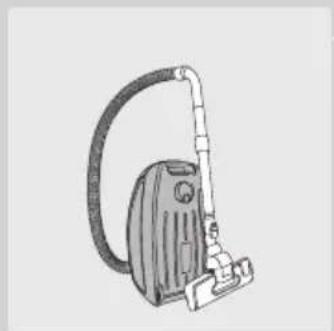
Line drawing of a vacuum cleaner with hose and clamped arm (no text or symbols)3 Put the appliance in upright position. To attach the nozzle to the appliance, insert the ridge on the nozzle into the storage slot.
- To ensure stable parking of the telescopic tube, adjust the tube to the shortest length.
Tip: We advise you to wrap the hose around the tube to ensure stable parking and to save even more space when you store the appliance.
Replacing/emptying the dustbag
Tip: We advise you to clean the motor protection filter every time you replace or empty the dustbag (see chapter 'Cleaning and maintenance of filters').
Always unplug the appliance before you replace the disposable dustbag or empty the reusable dustbag.
Before replacing/emtying the dustbag
In some cases, the dustbag full indicator can indicate that the dustbag is full, even though it is not. This may occur if the pores of the dustbag are clogged (e.g. when you have vacuumed ashes, fine sand, lime, cement dust and similar substances) or if something is blocking the nozzle, tube and/or hose. If the pores of the dustbag are clogged, you have to replace the disposable dustbag or empty the reusable dustbag, even if it is not full yet. If the dustbag is not clogged but not full either, something is blocking the nozzle, tube and/or hose. In this case, do not replace the dustbag but remove the obstruction.
Replacing the disposable dustbag

natural_image
Technical diagram of a car engine component with a black arrow pointing to a specific part (no text or symbols present)- Replace the dustbag as soon as the dustbag-full indicator has changed colour permanently, i.e. even when the nozzle is not placed on the floor.

natural_image
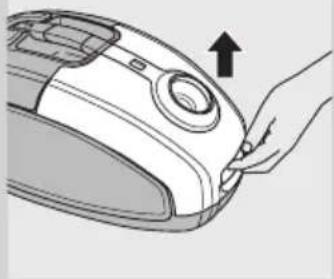
Illustration of a hand holding a vacuum cleaner's air vent (no text or symbols visible)1 Pull the cover upwards to open it.

natural_image
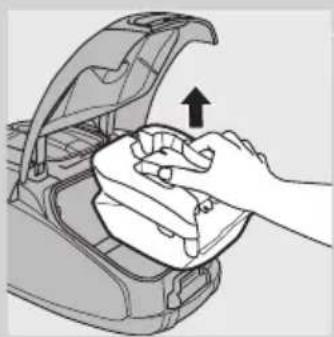
Illustration of a hand cleaning a car trunk with an upward arrow indicating motion (no text or symbols)2 Lift the dustbag holder out of the appliance.
Make sure you hold the dustbag upright when you lift it out of the appliance.

natural_image
Illustration of hands operating a mechanical device with a gear and directional arrow (no text or symbols)3 Pull at the cardboard tag to remove the full dustbag from the holder.
When you do this, the dustbag is sealed automatically.

natural_image
Illustration of hands holding a device with a black arrow indicating rotation (no text or symbols)4 Slide the cardboard front of the new dustbag into the two grooves of the dustbag holder as far as possible.
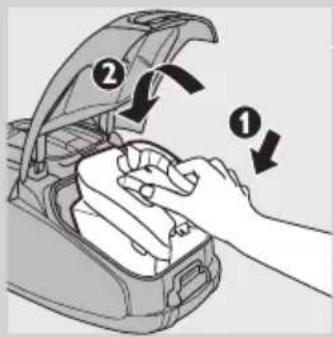
5 First insert the front of the dustbag holder into the vacuum cleaner (1) and then press the back into the vacuum cleaner (2).
Note: If no dustbag has been inserted, you cannot close the cover.
6 Push the cover downwards to close it.
Emptying the reusable dustbag (some countries only)
In some countries, this vacuum cleaner also comes with a reusable dustbag that can be used and emptied repeatedly. You can use the reusable dustbag instead of disposable dustbags.
To remove and insert the reusable dustbag, simply follow the instructions in 'Replacing the disposable dustbag'.
To empty the reusable dustbag:
1 Slide the clip off the dustbag sideways.
2 Shake out the contents into a dustbin.
3 To close the dustbag, slide the clip back onto the bottom edge of the dustbag.
Cleaning and maintenance of filters
Always unplug the appliance before you clean or replace the filters.
Permanent motor protection filter
Clean the permanent motor protection filter every time you empty the reusable dustbag or replace the disposable dustbag.
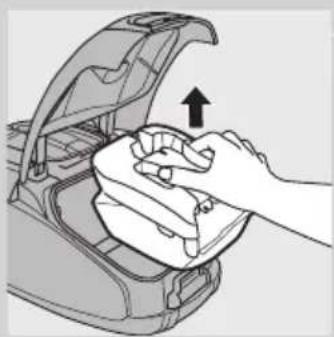
1 Remove the dustbag holder with the dustbag.

natural_image
Illustration of a hand cleaning a car trunk with a cloth (no text or symbols)
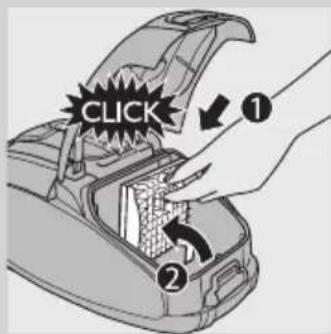
2 Press the tab at the top of the motor protection filter holder down to release it (1). Lift the filter holder out of the dustbag compartment (2).
3 Shake the filter over a dustbin to clean it.
4 Put the clean filter back into the filter holder.
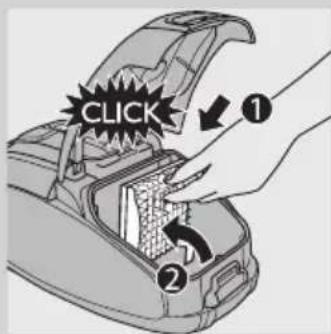
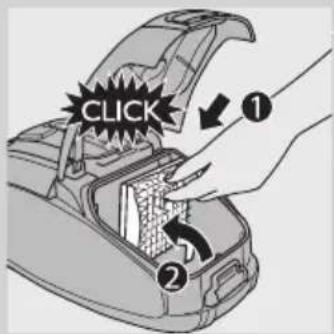
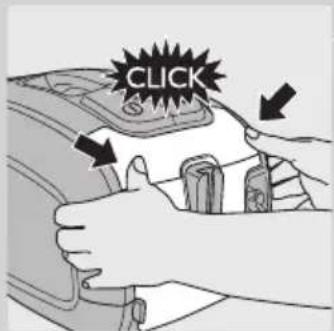
5 Fit the two lugs of the filter holder behind the ridge at the bottom to ensure that it fits properly at the top (1). Then press the filter holder home ('click') (2).
6 Place the dustbag holder with the dustbag back into the appliance and close the cover.
HEPA 13 washable filter
HEPA 13 washable filter is able to remove 99.95% of all particles down to 0.0003mm in size from the outlet air. This not only includes normal house dust, but also harmful microscopic vermin such as dust mites and their excrements, which are well-known causes of respiratory allergies.
Note: To guarantee optimal dust retention and performance of the vacuum cleaner, always replace the HEPA filter with an original Philips filter of the correct type (see chapter 'Ordering accessories').
Clean the washable HEPA 13 filter every 6 months. You can clean the washable HEPA 13 filter max. 4 times. Replace the filter after it has been cleaned 4 times.
Note: Do not clean the HEPA 13 filter in the washing machine, but follow the procedure below.

natural_image
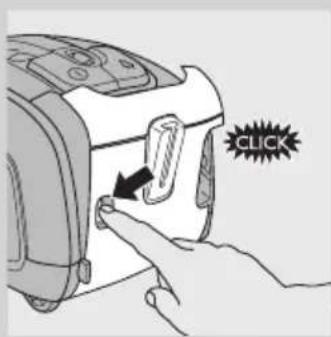
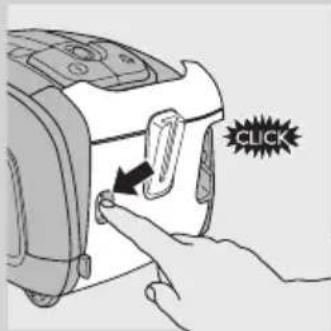
Illustration of a hand placing a grid panel into an electric vehicle (no text or symbols visible)1 Press the filter cover release button to open the filter cover.
2 Remove the filter cover.
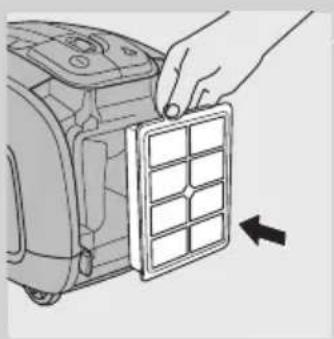
3 Take out the washable HEPA 13 filter.
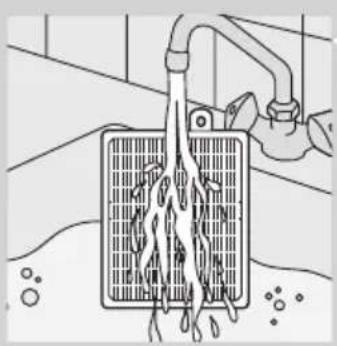
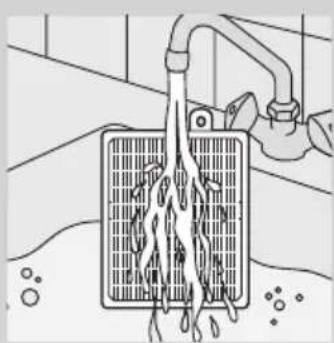
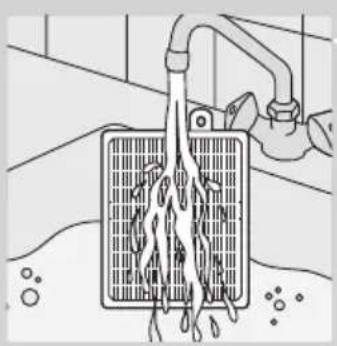
4 Rinse the pleated side of the HEPA 13 filter under a hot slow-running tap.
natural_image
Illustration of a hand using a drain to clean water from a grid-patterned container (no text or symbols)- Hold the filter in such a way that the pleated side points upwards and the water flows parallel to the pleats. Hold the filter at an angle so that the water washes away the dirt inside the pleats.
natural_image
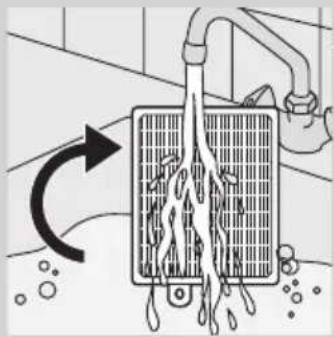
Diagram of a water filter or drain system with flow arrows indicating direction (no text or symbols)- Turn the filter 180^ and let the water flow along the pleats in opposite direction.
- Continue this process until the filter is clean.
natural_image
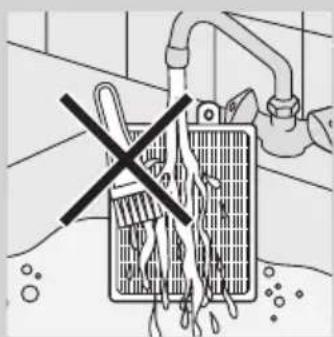
Diagram of a battery with a crossed-out switch, no text or symbols presentNever clean the washable filter with a brush.
Note: Cleaning does not restore the original colour of the filter, but does restore its filtration power.
5 Carefully shake the water from the surface of the filter. Let the filter dry completely for at least 2 hours before you put it back into the vacuum cleaner.
natural_image
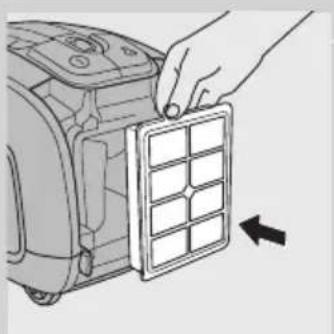
Illustration of a hand placing a grid panel into a device (no text or symbols visible)6 Put the dry filter back into the appliance.
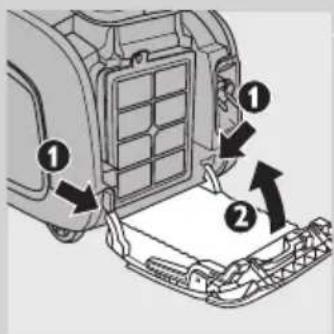
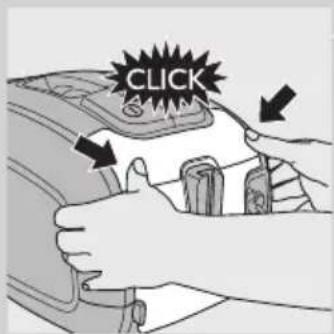
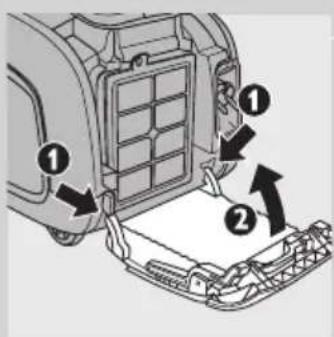
7 Fit the two lugs of the filter cover behind the ridge at the bottom of the vacuum cleaner (1). Then push the filter cover towards the appliance (2).
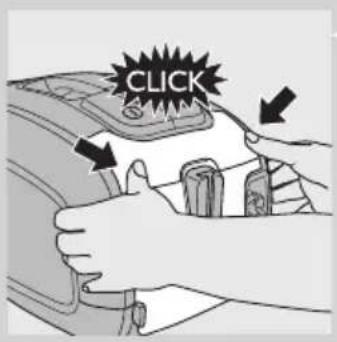
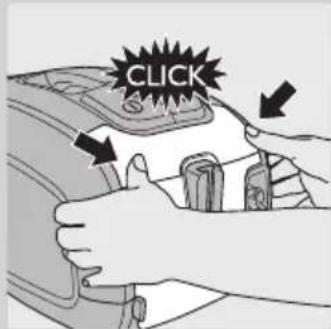
8 Press the filter cover home to lock it ('click').
Note: Make sure the filter is properly closed.
Ordering accessories
For purchasing dustbags, filters or other accessories for this appliance, please visit www.philips.com, consult the worldwide guarantee leaflet or contact the Philips Consumer Care Centre in your country.
Ordering dustbags
- Philips Classic s-bag ™ synthetic dustbags are available under type number FC8021.
- Philips Clinic s-bag ^™ high filtration synthetic dustbags are available under type number FC8022.
- Philips Anti-odour s-bag ^TM synthetic dustbags are available under type number FC8023.
- Reusable dustbags (some countries only) are available under code number 4322 004 93370.
Note: Please visit www.s-bag.com for more information about the s-bag.
Ordering filters
- HEPA 13 washable filters are available under code number 4322 004 93350.
Environment
natural_image
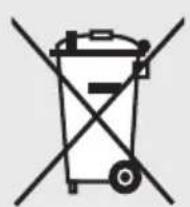
Symbol of a trash bin crossed with no text or numbers, representing waste sorting or disposal (no text present)- Do not throw away the appliance with the normal household waste at the end of its life, but hand it in at an official collection point for recycling. By doing this, you help to preserve the environment.
Guarantee and service
If you need service or information or if you have a problem, please visit the Philips website at www.philips.com or contact the Philips Consumer Care Centre in your country (you find its phone number in the worldwide guarantee leaflet). If there is no Consumer Care Centre in your country, go to your local Philips dealer.
Troubleshooting
This chapter summarises the most common problems you could encounter with the appliance. If you are unable to solve the problem with the information below, contact the Consumer Care Centre in your country.
1 The suction power is insufficient.
A The suction power may be set to a low setting.
- Set the suction power to a higher setting.
B The nozzle, tube or hose may be blocked up.
- To remove the obstruction, disconnect the blocked-up item and connect it (as far as possible) the other way around. Switch on the vacuum cleaner to force the air through the blocked-up item in opposite direction.
C The dustbag may be full.
- Empty the reusable dustbag (specific types only) or replace the dustbag.
D The filters may be dirty.
- Clean or replace the filters.
2 When I use my vacuum cleaner I sometimes feel electric shocks.
A Your vacuum cleaner has built up static electricity. The lower the air humidity in the rooms, the more static electricity the appliance builds up.
- To reduce this inconvenience, we advise you to discharge the appliance by frequently holding the tube against other metal objects in the room (for example legs of a table or chair, radiator etc.).
- To reduce this inconvenience, we advise you to raise the air humidity level in the room by placing water in the room. For example, you can hang containers filled with water from your radiators or place bowls filled with water on or near your radiators.

natural_image
Illustration of a hand pressing down on a mechanical component with a black arrow indicating the step (no text or symbols present)Introducción
natural_image
Illustration of a person using a vacuum cleaner to clean or remove debris, with motion lines indicating waste (no text or symbols)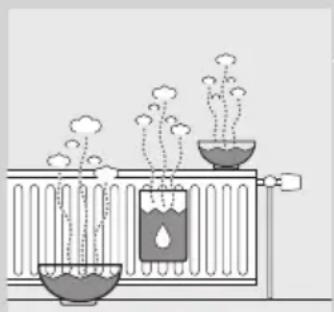
natural_image
Illustration of a chemical experiment setup with test tubes and vapor rising (no text or symbols)natural_image
Hand inserting a hose into a car's air vent (no text or symbols visible)natural_image
Diagram of a tool interacting with a string, showing two opposing directional arrows (no text or symbols)natural_image
Diagram of a mechanical device with a magnified inset showing a gear-like component (no text or symbols present)natural_image
Three types of boots with numbered labels (1, 2, 3) showing different angles and designs (no text or symbols beyond labels)natural_image
Diagram of a hairless cable connector with a handle and clamped part, no text or symbols presentnatural_image
Diagram of a hairbrush with two clips and a handle, showing mechanical components (no text or symbols)natural_image
Diagram of a medical or laboratory device with two tool tips and directional arrows indicating movement (no text or symbols)natural_image
Mechanical component diagram showing a valve with adjustment knob and connector (no text or symbols)natural_image
Technical diagram of a sewing machine's side panel showing internal components and directional arrows (no text or labels)natural_image
Line drawing of a vacuum cleaner with handle and base (no text or symbols)natural_image
Mechanical component diagram showing a fastener or connector with a black arrow pointing to a button (no text or symbols present)natural_image
Line drawing of a vacuum cleaner with hose and clamped arm (no text or symbols)natural_image
Technical line drawing of a car engine compartment with a black arrow pointing to a component (no text or symbols present)natural_image
Illustration of a hand holding a vacuum cleaner's lid with an arrow indicating the handle (no text or symbols present)natural_image
Illustration of a hand cleaning a car trunk with a cloth, showing an upward arrow (no text or symbols)natural_image
Illustration of hands assembling a mechanical component with a right-hand arrow (no text or symbols)natural_image
Illustration of hands holding a mechanical component with an arrow indicating direction (no text or symbols)natural_image
Illustration of a hand cleaning a car trunk with an open lid and upward arrow indicating motion (no text or symbols)

natural_image
Illustration of a hand placing a grid panel into a device (no text or symbols visible)natural_image
Illustration of a hand washing a water tank with liquid dripping (no text or symbols)natural_image
Diagram of a heat exchanger with cooling fins and airflow direction arrow (no text or symbols)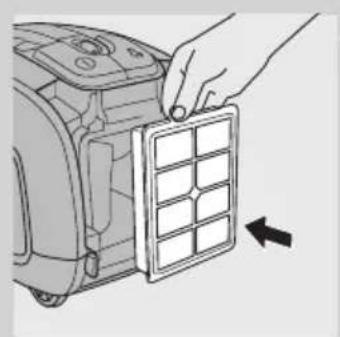
natural_image
Illustration of a hand placing a grid panel into a device component (no text or symbols visible)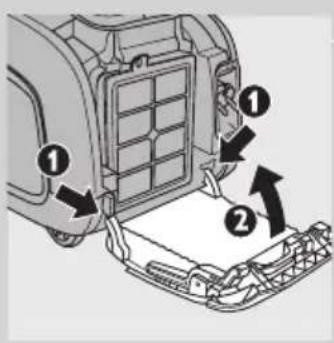
natural_image
Illustration of a hand inserting a plug into a car body component (no text or symbols visible)Pendahuluan
natural_image
Illustration of a person using a vacuum cleaner to clean or remove debris, with no text or symbols present.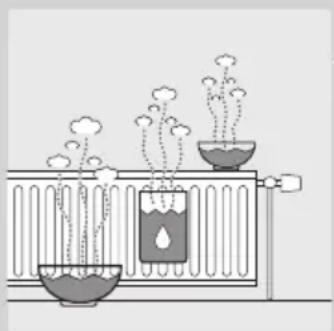
natural_image
Diagram of a scientific apparatus with two test tubes and rising plants, no text or symbols presentnatural_image
Hand holding a hose to a component with numbered callouts (no text or symbols visible)natural_image
Diagram of a tool interacting with a string, showing two opposing directional arrows (no text or symbols)natural_image
Diagram of a mechanical device with a magnified inset showing a gear-like component (no text or symbols present)natural_image
Three types of boots with numbered labels (1, 2, 3) showing different angles and designs (no text or symbols beyond labels)natural_image
Diagram of a hairless cable connector with a handle and clamped part, no text or symbols presentnatural_image
Diagram of a hairpin with two clips and arrows indicating movement (no text or symbols)natural_image
Diagram of a medical or surgical tool with two arrows indicating movement or force (no text or symbols present)natural_image
Mechanical component diagram showing a valve with adjustment knob and connector (no text or symbols)natural_image
Technical diagram of a sewing machine handle with no visible text or symbolsnatural_image
Line drawing of a vacuum cleaner with handle and base (no text or symbols)natural_image
Mechanical component diagram showing a valve with adjustment knob and connector (no text or symbols)natural_image
Illustration of a vacuum cleaner with coiled hose and handle (no text or symbols)natural_image
Technical line drawing of a car engine component with a black arrow pointing to a small component (no text or symbols present)- Gantilah kantong debu bila indikator kantong debu penuh telah berubah warna secara permanen, misalnya, sekalipun nozel tidak diletakkan di lantai.
natural_image
Illustration of a hand holding a vacuum cleaner's lid with an arrow indicating the handle (no text or symbols present)natural_image
Illustration of hands cleaning a car trunk with a cloth and upward arrow (no text or symbols)natural_image
Illustration of hands assembling a mechanical component with a right-hand arrow (no text or symbols)natural_image
Illustration of hands holding a mechanical component with an arrow indicating direction (no text or symbols)natural_image
Illustration of a hand cleaning a car trunk with a cloth (no text or symbols)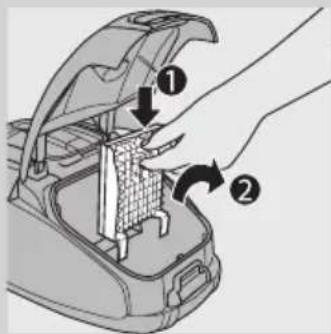
natural_image
Illustration of a hand placing a grid panel into a device (no text or symbols visible)natural_image
Illustration of a hand washing a water heater with liquid dripping (no text or symbols)natural_image
Diagram of a water heater with flow direction arrow (no text or symbols)natural_image
Diagram of a battery cell with an open circuit breaker and a crossed-out resistor (no text or symbols)natural_image
Illustration of a hand placing a grid panel into a device (no text or symbols visible)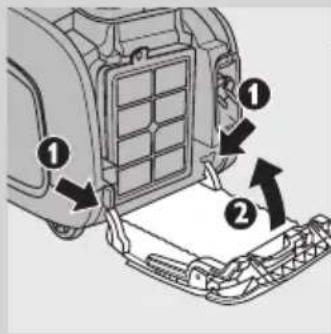
natural_image
Symbol of a trash bin crossed with a diagonal line, representing no waste or discharge (no text or numbers present)natural_image
Illustration of a hand holding a tool interacting with a car trunk (no text or symbols visible)natural_image
Illustration of a person using a manual vacuum cleaner to clean or remove debris, with motion lines indicating vibration (no text or symbols)
natural_image
Diagram of a chemical experiment setup with test tubes, bubbles, and vapor rising (no text or labels)natural_image
Hand inserting a hose into a car's air vent (no text or symbols visible)natural_image
Diagram of a cable or wire with two opposing arrows indicating direction (no text or symbols)natural_image
Diagram of a mechanical device with a magnified inset showing a gear-like component (no text or symbols present)natural_image
Illustration of three different boots with numbered labels (1, 2, 3) indicating different shoe types or features.natural_image
Diagram of a hairless cable connector with a magnified view showing the connector (no text or symbols)natural_image
Diagram of a hairpin with two clips and arrows indicating movement (no text or symbols)- 릜새 노즐 및 소형 노즐
natural_image
Diagram of a medical or surgical tool with two arrows indicating movement or force (no text or symbols present)- 틈새 노즐 및 소형 브러시
제품 사용

natural_image
Diagram of a sewing machine keyway showing buttons and a connector (no text or labels)natural_image
Technical diagram of a sewing machine handle with no visible text or symbolsnatural_image
Line drawing of a vacuum cleaner with handle and base (no text or symbols)natural_image
Mechanical component diagram showing a valve with a black arrow pointing to a connector (no text or symbols)natural_image
Line drawing of a vacuum cleaner with coiled hose and handle (no text or symbols)natural_image
Technical line drawing of a mechanical component with a black arrow pointing to a small feature (no text or symbols present)natural_image
Line drawing of a hand pressing down on a vacuum cleaner's air vent (no text or symbols)natural_image
Illustration of hands cleaning a car trunk with a cloth and upward arrow (no text or symbols)natural_image
Illustration of hands operating a mechanical device with a gear and directional arrow (no text or symbols)natural_image
Illustration of hands holding a mechanical component with an arrow indicating direction (no text or symbols)natural_image
Illustration of a hand cleaning a car trunk with a cloth, showing an upward arrow (no text or symbols)natural_image
Illustration of a hand placing a grid panel into an electric scooter (no text or symbols)natural_image
Illustration of a hand using a drain drain to clean water, with no text or symbols present.natural_image
Diagram of a heat exchanger with cooling pipes and water droplets, showing airflow direction (no text or symbols)natural_image
Diagram of a battery with a crossed-out switch, no text or symbols presentnatural_image
Illustration of a hand placing a grid panel into a device (no text or symbols visible)natural_image
Symbol of a trash bin crossed with no text or numbers, representing waste sorting or disposal (no text present)natural_image
Illustration of a hand pressing down on a mechanical component with a black arrow indicating the step (no text or symbols present)Pengenalan
natural_image
Illustration of a person using a vacuum cleaner to clean or remove debris, with motion lines indicating vibration (no text or symbols)
natural_image
Diagram of a scientific apparatus with two test tubes and rising plants, no text or symbols presentnatural_image
Illustration of a hand gripping a textured rod with two opposing arrows indicating movement (no text or symbols)natural_image
Illustration of three different boots with numbered labels (1, 2, 3) indicating different types of boots or accessories.natural_image
Diagram of a hairdryer tool with a curved tube and a plastic clamp, showing no text or symbols.natural_image
Diagram of a hairbrush with three inserted clips and arrows indicating insertion or disassembly (no text or symbols)natural_image
Diagram of a mechanical device with two tool tips and directional arrows indicating movement or force (no text or symbols)natural_image
Mechanical component diagram showing a valve with a black arrow pointing to a button (no text or symbols)natural_image
Technical diagram of a sewing machine handle with no visible text or symbolsnatural_image
Illustration of a vacuum cleaner with handle and base mount (no text or symbols)natural_image
Mechanical component diagram showing a valve with a black arrow pointing to a connector (no text or symbols)natural_image
Illustration of a vacuum cleaner with hose and clamped arm (no text or symbols)natural_image
Technical line drawing of a car head panel with a black arrow pointing to a component (no text or symbols)natural_image
Illustration of a hand holding a vacuum cleaner's lid with an arrow indicating the handle (no text or symbols present)natural_image
Illustration of a hand cleaning a car trunk with an upward arrow indicating the process (no text or symbols present)natural_image
Illustration of hands operating a mechanical device with a gear and directional arrow (no text or symbols)natural_image
Illustration of hands holding a mechanical component with an arrow indicating direction (no text or symbols)natural_image
Illustration of a hand cleaning a car trunk with a cloth (no text or symbols)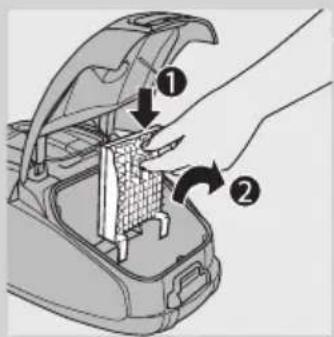
natural_image
Illustration of a hand placing a grid panel into a device component (no text or symbols visible)natural_image
Illustration of a hand washing a water heater with liquid dripping (no text or symbols)natural_image
Diagram of a water heater system with flow direction arrow (no text or symbols)natural_image
Diagram of a battery cell with an open circuit breaker crossed out, no text or symbols presentnatural_image
Illustration of a hand placing a grid panel into a device (no text or symbols visible)natural_image
Symbol of a trash bin crossed with no text or numbers, representing environmental restriction (no text present)natural_image
Illustration of a hand holding a tool interacting with a car handle (no text or symbols visible)Introdução
natural_image
Illustration of a person using a vacuum cleaner to clean or remove debris, with lightning bolts indicating damage (no text or symbols)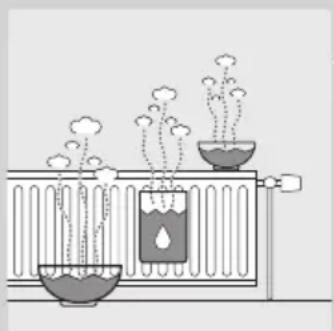
natural_image
Diagram of a scientific apparatus with two test tubes and rising plants, no text or symbols presentnatural_image
Illustration of a hand gripping a textured rod with two opposing arrows indicating movement (no text or symbols)natural_image
Illustration of a mechanical device with a black arrow indicating motion, set on a patterned surface (no text or symbols)natural_image
Illustration of three types of boots with numbered labels (1, 2, 3) indicating different shoe configurations or features.- Pode montar o bico para fendas (1), o bocal para estofos (2) ou a escova pequena (3) directamente à pega ou ao tubo.
natural_image
Diagram of a hairdryer tool with a curved tube and handle, showing mechanical components (no text or symbols)natural_image
Diagram of a hairpin with two clips and arrows indicating movement or insertion (no text or symbols)- Bico para fendas e bocal para estofos.
natural_image
Diagram of a mechanical tool or device with two arrows indicating movement or assembly (no text or symbols present)natural_image
Mechanical component diagram showing a valve with a black arrow pointing to a button (no text or symbols present)natural_image
Technical diagram of a sewing machine's side panel showing keyway and base mount (no text or labels)natural_image
Illustration of a vacuum cleaner with handle and base (no text or symbols)natural_image
Mechanical component diagram showing a fastener pad with a black arrow pointing to a keyway (no text or symbols present)natural_image
Illustration of a vacuum cleaner with hose and clamped arm (no text or symbols)natural_image
Mechanical component diagram showing a valve or connector with a black arrow pointing to a small component (no text or symbols present)natural_image
Illustration of a hand pressing down on a small vacuum cleaner's air vent (no text or symbols visible)natural_image
Illustration of a hand cleaning a car trunk with a cloth, showing an upward arrow (no text or symbols)natural_image
Illustration of hands operating a mechanical gear or switch (no text or symbols visible)natural_image
Illustration of hands holding a mechanical component with an arrow indicating direction (no text or symbols)natural_image
Illustration of a hand cleaning a car trunk with a cloth (no text or symbols)natural_image
Illustration of a hand placing a grid panel into a device component (no text or symbols visible)natural_image
Illustration of a hand washing a water heater with liquid dripping (no text or symbols)natural_image
Diagram of a water heater system with airflow and water droplets (no text or labels)natural_image
Diagram of a battery cell with electrodes and a crossed-out circuit breaker (no text or symbols)natural_image
Illustration of a hand placing a grid panel into a device (no text or symbols visible)
Encomendar acessórios
natural_image
Symbol of a trash bin crossed with no text or numbers, representing waste sorting or disposal (no text present)natural_image
Illustration of a hand holding a tool interacting with a car handle (no text or symbols visible)บทนำ
natural_image
Illustration of a person using a mop to clean or remove a surface, with motion lines indicating vibration (no text or symbols)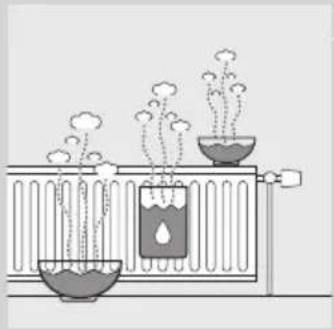
natural_image
Diagram of a chemical experiment setup with two containers, one emitting vapor and the other emitting steam (no text or labels)natural_image
Diagram of a hand holding a cable with two opposing arrows indicating movement (no text or symbols)natural_image
Diagram of a mechanical device with a black arrow indicating force or movement, no text or symbols presentnatural_image
Illustration of three different shoe boots with numbered labels (1, 2, 3) for identification (no text or symbols on the boots themselves)natural_image
Diagram of a hair accessory with a curved tube and plastic housing, no text or symbols presentnatural_image
Diagram of a handheld device with two connectors and arrows indicating movement or assembly (no text or symbols)natural_image
Diagram of a medical or surgical tool with two arrows indicating movement or force direction (no text or symbols present)natural_image
Mechanical component diagram showing a valve with a black arrow pointing to a button (no text or symbols)natural_image
Diagram of a sewing machine's side panel showing internal components and directional arrows (no text or labels)natural_image
Line drawing of a vacuum cleaner with handle and base (no text or symbols)natural_image
Mechanical component diagram showing a valve with a black arrow pointing to a connector (no text or symbols)natural_image
Illustration of a vacuum cleaner with hose and clamped arm (no text or symbols)natural_image
Mechanical component diagram showing a valve or connector with an arrow pointing to a small component (no text or symbols present)natural_image
Illustration of a hand pressing down on a vacuum cleaner's air vent (no text or symbols)natural_image
Illustration of hands cleaning a car trunk with a cloth and upward arrow (no text or symbols)natural_image
Illustration of hands assembling a mechanical component with a right-angle arrow (no text or symbols)natural_image
Illustration of hands operating a mechanical device with a black arrow indicating rotation (no text or symbols present)natural_image
Illustration of a hand cleaning a car trunk with a cloth, showing the open lid and upward arrow (no text or symbols)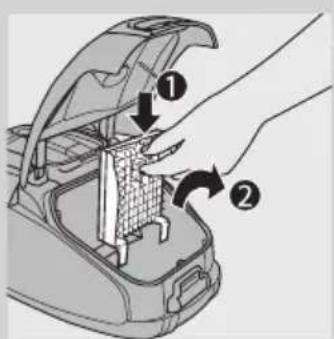
natural_image
Illustration of a hand placing a grid panel into a device component (no text or symbols visible)natural_image
Illustration of a hand pouring liquid into a water tank (no text or symbols)natural_image
Diagram of a water heater system with airflow and water droplets (no text or symbols)natural_image
Diagram of a hand using a tool to clean or remove a battery, with no text or symbols present.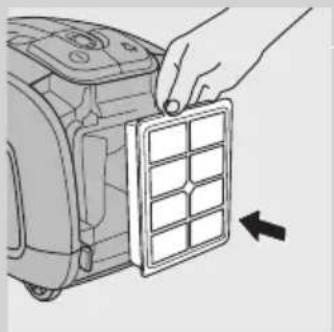
natural_image
Illustration of a hand placing a grid panel into a device casing (no text or symbols visible)
natural_image
Symbol of a trash bin crossed with no text or numbers, representing waste sorting or disposal (no text present)natural_image
Illustration of a hand pressing down on a mechanical component with a black arrow indicating the force (no text or symbols present)Giới thiệu
natural_image
Illustration of a person using a vacuum cleaner to clean or remove debris, with lightning bolts indicating damage (no text or symbols)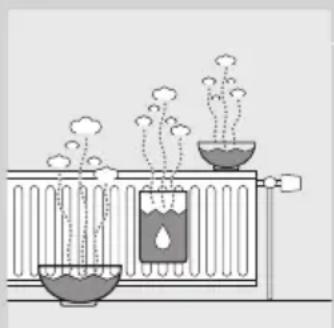
natural_image
Diagram of a chemical experiment setup with test tubes, bubbles, and vapor rising (no text or labels)1 publicly lás pânng thu gôn vào tay cảm, nhân nút khóa là xo trên tay cảm (1) và lás pânng vào ông (2). Lás pânng khóa là xo vào lỗ trên dâu ông (nghe tiếng ‘click’).
2 public sector public sector public sector public sector public sector public sector public sector public sector public sector public sector public sector public sector public sector public sector public sector public sector public sector public sector public sector public sector public sector public sector public sector public sector public sector public sector public sector public sector public sector public sector public sector public sector public sector public sector public sector public sector public sector public sector public sector public sector public sector public sector public sector public sector public sector public sector public sector public sector public sector public sector public sectors, hãy nhân nút khóa lò xo và kéo tay cảm ra khởi ông.
2 publicly depicting the state of a state in China, with the state of the state being fully protected.
Ông
natural_image
Hand inserting a hose into a car air vent (no text or symbols visible)2 public health insurance company, H&Y, 1980, 1981, 1982. Public health insurance company, H&Y, 1983, 1984, 1985, 1986. Public health insurance company, H&Y, 1987, 1988, 1989, 1990. Public health insurance company, H&Y, 1989, 1990, 1991, 1992. Public health insurance company, H&Y, 1990, 1991, 1992. Public health insurance company, H&Y, 1991, 1992, 1993. Public health insurance company, H&Y, 1992, 1993, 1994. Public health insurance company, H&Y, 1993, 1994, 1995. Public health insurance company, H&Y, 1994, 1995, 1996. Public health insurance company, H&Y, 1995, 1996, 1997. Public health insurance company, H&Y, 1996, 1997, 1998. Public health insurance company, H&Y, 1997, 1998, 1999. Public health insurance company, H&Y, 1998, 1999, 2000. Public health insurance company, H&Y, 1999, 2000. Public health insurance company, H&Y, 2001. Public health insurance company, H&Y, 2002. Public health insurance company, H&Y, 2003. Public health insurance company, H&Y, 2004. Public health insurance company, H&Y, 2005. Public health insurance company, H&Y, 2006. Public health insurance company, H&Y, 2007. Public health insurance company, H&Y, 2008. Public health insurance company, H&Y, 2009. Public health insurance company, H&Y, 2010. Public health insurance company, H&Y, 2011. Public health insurance company, H&Y, 2012. Public health insurance company, H&Y, 2013. Public health insurance company, H&Y, 2014. Public health insurance company, H&Y, 2015. Public health insurance company, H&Y, 2016. Public health insurance company, H&Y, 2017. Public health insurance company, H&Y, 2018. Public health insurance company, H&Y, 2019. Public health insurance company, H&Y, 2020. Public health insurance company, H&Y, 2021. Public health insurance company, H&Y, 2022. Public health insurance company, H&Y, 2023. Public health insurance company, H&Y, 2024. Public health insurance company, H&Y, 2025. Public health insurance company, H&Y, 2026. Public health insurance company, H&Y, 2027. Public health insurance company, H&Y, 2028. Public health insurance company, H&Y, 2029. Public health insurance company, H&Y, 2030. Public health insurance company, H&Y, 2031. Public health insurance company, H&Y, 2032. Public health insurance company, H&Y, 2033. Public health insurance company, H&Y, 2034. Public health insurance company, H&Y, 2035. Public health insurance company, H&Y, 2036. Public health insurance company, H&Y, 2037. Public health insurance company, H&Y, 2038. Public health insurance company, H&Y, 2039. Public health insurance company, H&Y, 2040. Public health insurance company, H&Y, 2041. Public health insurance company, H&Y, 2042. Public health insurance company, H&Y, 2043. Public health insurance company, H&Y, 2044. Public health insurance company, H&Y, 2045. Public health insurance company, H&Y, 2046. Public health insurance company, H&Y, 2047. Public health insurance company, H&Y, 2048. Public health insurance company, H&Y, 2049. Public health insurance company, H&Y, 2050. Public health insurance company, H&Y, 2051. Public health insurance company, H&Y, 2052. Public health insurance company, H&Y, 2053. Public health insurance company, H&Y, 2054. Public health insurance company, H&Y, 2055. Public health insurance company, H&Y, 2056. Public health insurance company, H&Y, 2057. Public health insurance company, H&Y, 2058. Public health insurance company, H&Y, 2059. Public health insurance company, H&Y, 2060. Public health insurance company, H&Y, 2061. Public health insurance company, H&Y, 2062. Public health insurance company, H&Y, 2063. Public health insurance company, H&Y, 2064. Public health insurance company, H&Y, 2065. Public health insurance company, H&Y, 2066. Public health insurance company, H&Y, 2067. Public health insurance company, H&Y, 2068. Public health insurance company, H&Y, 2069. Public health insurance company, H&Y, 2070. Public health insurance company, H&Y, 2071. Public health insurance company, H&Y, 2072. Public health insurance company, H&Y, 2073. Public health insurance company, H&Y, 2074. Public health insurance company, H&Y, 2075. Public health insurance company, H&Y, 2076. Public health insurance company, H&Y, 2077. Public health insurance company, H&Y, 2078. Public health insurance company, H&Y, 2079. Public health insurance company, H&Y, 2080. Public health insurance company, H & Y public health insurance companies are not eligible for additional information purposes only in the U.S. H & Y public health insurance companies are not eligible for additional information purposes only in the U.S. H & Y public health insurance companies are not eligible for additional information purposes only in the U.S. H & Y public health insurance companies are not eligible for additional information purposes only in the U.S. H & Y public health insurance companies are not eligible for additional information purposes only in the U.S. H & Y public health insurance companies are not eligible for additional information purposes only in the U.S . H & Y public health insurance companies are not eligible for additional information purposes only in the U.S. H & Y public health insurance companies are not eligible for additional information purposes only in the U.S. H & Y public health insurance companies are not eligible for additional information purposes only in the U.S. H & Y public health insurance companies are not eligible for additional information purposes only in the U.S. H & Y public health insurance companies are not eligible for additional information purposes only in the U.S.. H & Y public health insurance companies are not eligible for additional information purposes only in the U.S.. H & Y public health insurance companies are not eligible for additional information purposes only in the U.S.. H & Y public health Insurance companies are not eligible for additional information purposes only in the U.S.. H & Y public Health Insurance Companies (USA) (USA) (USA) (USA) (USA) (USA) (USA) (USA) (USA) (USA) (USA) (USA) (USA) (USA) (USA) (USA) (USA) (USA) (USA) (USA) (USA) (USA) (USA) (USA) (USA) (USA) (USA) (USA) (USA) (USA) (USA) (USA) (USA) (USA)
Ông thu gọn 2 phân
natural_image
Diagram of a cable or wire with two opposing arrows indicating direction (no text or symbols)natural_image
Diagram of a mechanical device with a magnified inset showing a gear-like component (no text or symbols present)natural_image
Illustration of three types of boots with numbered labels (1, 2, 3) indicating different shoe configurations or features.natural_image
Diagram of a hairless cable connector with a clamped part, showing no text or symbolsnatural_image
Diagram of a hairbrush with two clips and a handle, showing mechanical components (no text or symbols)natural_image
Diagram of a medical or surgical tool with two arrows indicating movement or force (no text or symbols present)natural_image
Mechanical component diagram showing a valve with a black arrow pointing to a connector (no text or symbols present)natural_image
Technical diagram of a sewing machine's side panel showing internal components and directional arrows (no text or labels)natural_image
Line drawing of a vacuum cleaner with attached hose and base mount (no text or symbols)natural_image
Mechanical component diagram showing a valve with adjustment knob and connector (no text or symbols)natural_image
Line drawing of a vacuum cleaner with hose and clamped arm (no text or symbols)natural_image
Technical line drawing of a car body component with a black arrow pointing to a small component (no text or symbols present)natural_image
Illustration of a hand holding a vacuum cleaner's air vent, with an arrow indicating the component (no text or symbols present)natural_image
Illustration of hands cleaning a car trunk with a cloth and upward arrow (no text or symbols)natural_image
Illustration of hands operating a mechanical device with a gear and directional arrow (no text or symbols)natural_image
Illustration of hands holding a device with a black arrow indicating direction (no text or symbols)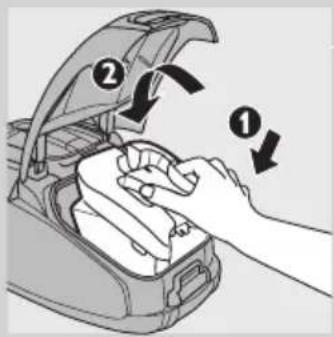
natural_image
Illustration of a hand cleaning a car trunk with a cloth (no text or symbols)natural_image
Illustration of a hand placing a grid panel into a device (no text or symbols visible)TIÊNG VIÊT98
natural_image
Illustration of a hand washing a drain with water flowing out (no text or symbols)
natural_image
Diagram of a heat exchanger with cooling pipes and water flow, showing airflow direction (no text or labels)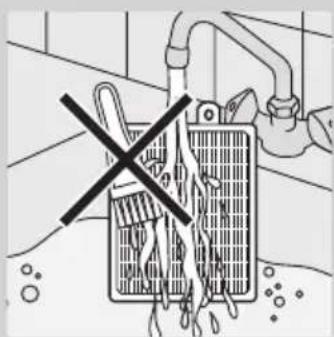
natural_image
Illustration of a hand placing a grid panel into a device casing (no text or symbols visible)
natural_image
Illustration of a hand pressing down on a mechanical component with a black arrow indicating the step (no text or symbols present)簡介
natural_image
Illustration of a person using a vacuum cleaner to clean or remove a surface, with motion lines indicating vibration (no text or symbols)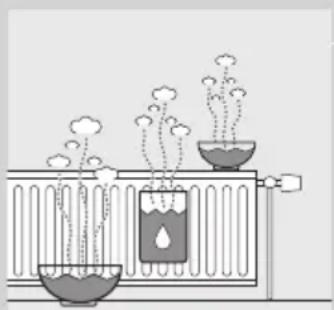
natural_image
Diagram of a chemical experiment setup with test tubes, bubbles, and vapor rising (no text or labels)natural_image
Hand inserting a hose into a car air vent (no text or symbols visible)natural_image
Diagram of a tool interacting with a string, showing two opposing directional arrows (no text or symbols)natural_image
Diagram of a mechanical device with a black arrow indicating a process, surrounded by patterned fabric (no text or symbols)natural_image
Illustration of three different shoe boots with numbered labels (1, 2, 3) for identification (no text or symbols on the boots themselves)natural_image
Diagram of a hairless cable connector with a clamp attachment (no text or symbols)natural_image
Diagram of a hairbrush with two clips and arrows indicating movement (no text or symbols)- 細隙吸頭與小吸頭。
natural_image
Diagram of a medical or surgical tool with two tool tips and directional arrows indicating movement or force (no text or labels)- 細隙吸頭與小刷子。
使用此產品
natural_image
Mechanical component diagram showing a valve with a black arrow pointing to a connector (no text or symbols present)natural_image
Technical diagram of a sewing machine handle with no visible text or symbolsnatural_image
Line drawing of a vacuum cleaner with handle and base (no text or symbols)natural_image
Mechanical component diagram showing a valve with a black arrow pointing to a connector (no text or symbols)natural_image
Illustration of a vacuum cleaner with hose and clamped arm (no text or symbols)natural_image
Mechanical component diagram showing a valve or fitting with a black arrow pointing to a small component (no text or symbols present)natural_image
Illustration of a hand holding a vacuum cleaner's lid with an arrow indicating the handle (no text or symbols present)1 請將蓋子往上拉,掀開蓋子。
natural_image
Illustration of a hand cleaning a car trunk with a cloth and upward arrow (no text or symbols)natural_image
Illustration of hands assembling a mechanical component with a directional arrow (no text or symbols)natural_image
Illustration of hands holding a mechanical component with an arrow indicating direction (no text or symbols)natural_image
Illustration of hands cleaning a car trunk with a cloth (no text or symbols)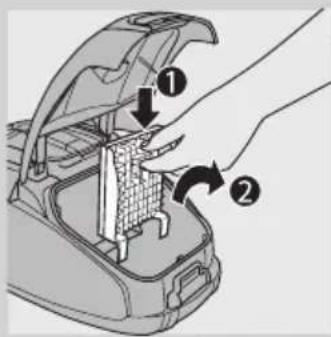
natural_image
Illustration of a hand placing a grid panel into a vehicle chassis (no text or symbols)natural_image
Illustration of a hand washing a water heater with bubbles rising (no text or symbols)natural_image
Diagram of a heat exchanger with cooling pipes and water droplets, showing airflow direction (no text or symbols)請勿使用刷子清潔可水洗濾網。
natural_image
Illustration of a hand placing a grid panel into a vehicle chassis (no text or symbols visible)6 將乾燥的濾網裝回吸塵器。

natural_image
Symbol of a trash bin crossed with no text or numbers, representing waste sorting or disposal (no text present)natural_image
Illustration of a hand inserting a plug into a car seat (no text or symbols)B 吸頭、吸塵管或軟管可能已經阻塞。
natural_image
Illustration of a person using a vacuum cleaner to clean or remove objects, with motion arrows indicating vibration (no text or symbols)
natural_image
Diagram of a chemical experiment setup with test tubes, bubbles, and vapor rising (no text or labels)natural_image
Hand inserting a hose into a car air vent (no text or symbols visible)natural_image
Diagram of a tool interacting with a string, showing two opposing directional arrows (no text or symbols)natural_image
Diagram of a mechanical device with a magnified inset showing a gear-like component (no text or symbols present)natural_image
Illustration of three types of boots with numbered labels (1, 2, 3) indicating different shoe features or components.natural_image
Diagram of a hairdryer with a curved tube and plastic clip, no text or symbols presentnatural_image
Diagram of a hairbrush with two clips and arrows indicating movement (no text or symbols)- 缝隙吸嘴和小号吸嘴。
natural_image
Diagram of a medical or surgical tool with two tool tips and directional arrows indicating movement or force (no text or symbols present)- 缝隙吸嘴和小号毛刷。
使用本产品

natural_image
Mechanical component diagram showing a valve with a black arrow pointing to a connector (no text or symbols present)natural_image
Technical diagram of a sewing machine handle with no visible text or symbolsnatural_image
Line drawing of a vacuum cleaner with attached hose and base (no text or symbols)natural_image
Mechanical component diagram showing a key inserted into a housing with a black arrow pointing to the base (no text or symbols present)natural_image
Illustration of a vacuum cleaner with hose and clamped arm (no text or symbols)natural_image
Mechanical component diagram showing a valve or fitting with a black arrow pointing to a small component (no text or symbols present)natural_image
Illustration of a hand holding a vacuum cleaner's lid with an arrow indicating the handle (no text or symbols present)1 向上拉,打开机盖。
natural_image
Illustration of a hand cleaning a car trunk with a cloth, showing the handle and angle (no text or symbols)2 取出集尘袋固定架。
natural_image
Illustration of hands assembling a mechanical component with a directional arrow (no text or symbols)3 拉起纸板片将装满灰尘的集尘袋取掉。
这时,集尘袋会自动封闭。

natural_image
Illustration of hands holding a mechanical component with an arrow indicating direction (no text or symbols)natural_image
Illustration of hands cleaning a car trunk with a cloth (no text or symbols)natural_image
Illustration of a hand placing a grid panel into a device component (no text or symbols visible)简体中文122
natural_image
Illustration of a hand washing a water heater with liquid dripping (no text or symbols)natural_image
Diagram of a heat exchanger with cooling pipes and water droplets, showing airflow direction (no text or symbols)切勿用刷子清洁可清洗过滤网。
natural_image
Illustration of a hand placing a grid panel into a device (no text or symbols visible)6 将晾干的过滤网放回产品内。
natural_image
Symbol of a trash bin with crossed lines indicating no waste or restriction, and a solid black rectangle below (no text or labels)natural_image
Illustration of a hand inserting a cable into a device component (no text or symbols visible)A 吸力可能设置的较低。
- 将吸力设置为更高的档。
B 吸嘴、硬管或软管可能阻塞。
- Introduction
- General description (Fig. 1)
- Important
- Danger
- Warning
- Caution
- Electromagnetic fields (EMF)
- Before first use
- Preparing for use
- Attaching the handgrip
- Attaching the nozzle and accessories
- Hose
- 2-piece telescopic tube
- SilentStar nozzle
- Accessories
- Accessory holder
- Using the appliance
- Adjusting suction power
- Pausing during use
- Storage
- Replacing/emptying the dustbag
- Before replacing/emtying the dustbag
- Replacing the disposable dustbag
- Emptying the reusable dustbag (some countries only)
- Cleaning and maintenance of filters
- Permanent motor protection filter
- HEPA 13 washable filter
- Ordering accessories
- Ordering dustbags
- Ordering filters
- Environment
- Guarantee and service
- Troubleshooting
- The suction power is insufficient.
- When I use my vacuum cleaner I sometimes feel electric shocks.
- Introducción
- Pendahuluan
- 제품 사용
- Pengenalan
- Introdução
- Encomendar acessórios
- บทนำ
- Giới thiệu
- Ông
- Ông thu gọn 2 phân
- TIÊNG VIÊT98
- 簡介
- 使用此產品
- 使用本产品
- 简体中文122
Brand : PHILIPS
Model : SilentStar FC9304
Category : Vacuum Cleaner