
SC6560 - Vacuum Cleaner SAMSUNG - Free user manual and instructions
Find the device manual for free SC6560 SAMSUNG in PDF.


| Product Type | Canister vacuum cleaner |
| Brand | Samsung |
| Model | SC6560 |
| Maximum power | 2000 W |
| Suction | 2500 mmH2O |
| Tank capacity | 2 L |
| Filter type | Washable HEPA |
| Operating range | 9 m |
| Noise level | 78 dB(A) |
| Weight | 5.2 kg |
| Dimensions (L x W x H) | 40 x 25 x 30 cm |
| Power cord | 6 m |
| Body material | ABS plastic |
| Main functions | Dust, hair, debris suction |
| Motorized brush | Yes, for hard floors and carpets |
| Power regulation | By variator on the body |
| Maintenance and cleaning | Washable HEPA filter with water, easy-emptying container |
| Safety | Automatic shut-off in case of overheating |
| Spare parts | Bags, filters, brushes available |
| Repairability | Estimated repairability index 7.6/10 |
Frequently Asked Questions - SC6560 SAMSUNG
User questions about SC6560 SAMSUNG
0 question about this device. Answer the ones you know or ask your own.
Ask a new question about this device
Download the instructions for your Vacuum Cleaner in PDF format for free! Find your manual SC6560 - SAMSUNG and take your electronic device back in hand. On this page are published all the documents necessary for the use of your device. SC6560 by SAMSUNG.
USER MANUAL SC6560 SAMSUNG
natural_image
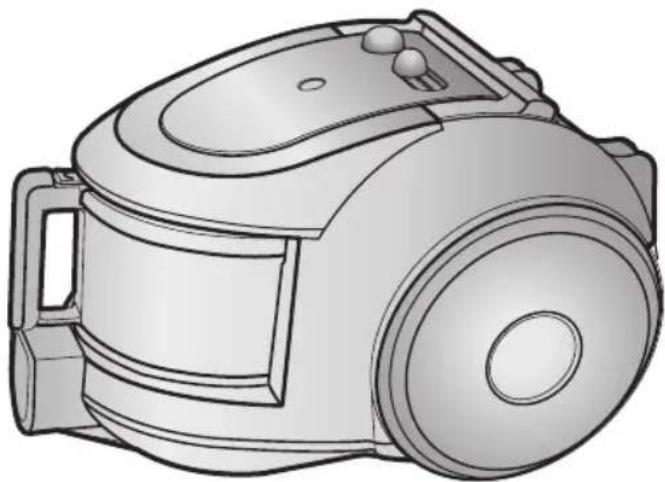
Line drawing of a vacuum cleaner device (no text or symbols)* Before operating this unit, please read the instructions carefully. * Indoor use only.
Register your product at www.samsung.com/global/register
IMPORTANT SAFEGUARDS
- Read all instructions carefully. Before switching on, make sure that the voltage of your electricity supply is the same as that indicated on the rating plate on the bottom of the cleaner.
- WARNING: Do not use the vacuum cleaner when rug or floor is wet.
Do not use to suck up water.
- Close supervision is necessary when any appliance is used by or near children. Do not allow the vacuum cleaner to be used as a toy. Do not allow the vacuum cleaner to run unattended at any time. Use the vacuum cleaner only for its intended use as described in these instructions.
- Do not use the vacuum cleaner without a dust bin. Empty the dust bin before it is full in order to maintain the best efficiency.
- Do not use the vacuum cleaner to pick up matches, live ashes or cigarette butts. Keep the vacuum cleaner away from stoves and other heat sources. Heat can deform and discolour the plastic parts of the unit.
- Avoid picking up hard, sharp objects with the vacuum cleaner as they may damage the cleaner parts. Do not stand on the hose assembly. Do not put weight on the hose. Do not block the suction or the exhaust port.
- Switch the vacuum cleaner off on the body of the machine before unplugging from the electrical outlet. Disconnect the plug from the electrical outlet before changing the dust bag or dust container. To avoid damage, please remove the plug by grasping the plug itself, not by pulling on the cord.
- This appliance is not intended for use by young persons or infirm persons without supervision unless they are adequately supervised by a responsible person to ensure that they can use the appliance safely.
Young children should be supervised to ensure that they do not play with the appliance.
- The plug must be removed from the socket outlet before cleaning or maintaining the appliance.
- The use of an extension cord is not recommended.
- If your vacuum cleaner is not operating correctly, switch off the power supply and consult an authorized service agent.
- If the supply cord is damaged, it must be replaced by the manufacturer or its service agent or a similarly qualified person in order to avoid a hazard.
- Don't carry the vacuum cleaner by holding the hose.
Use the handle on the vacuum cleaner set.
1 ASSEMBLING THE CLEANER


▶ Features may vary according to model.

CAUTION
Please do not press the button of dust bin handle when carrying machine.

natural_image
Technical illustration of a vacuum cleaner assembly (no text or symbols visible)For storage, park the floor nozzle.
natural_image
Illustration of a hand pressing down on a small vacuum cleaner with a numbered label (no text or symbols on the device itself)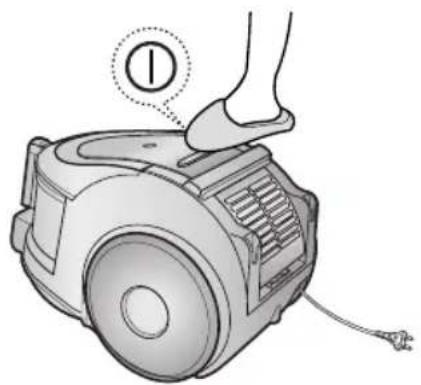
2-2 POWER CORD
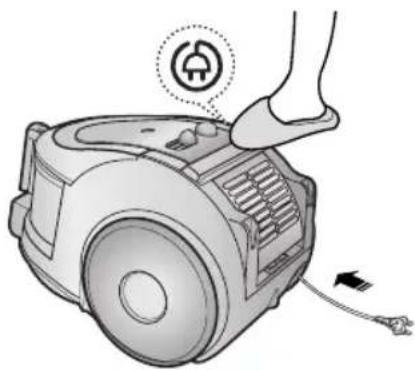
natural_image
Illustration of a robotic vacuum cleaner with a foot and power plug, showing internal components and wiring (no text or symbols)!
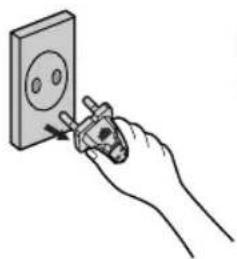
natural_image
Hand using a power tool to install a wall socket (no text or symbols visible)NOTE
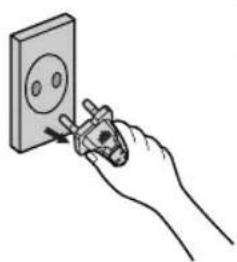
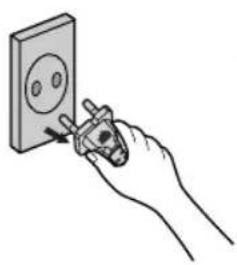
When removing the plug from the electrical outlet, grasp the plug, not the cord.
2-3 POWER-CONTROL
1) SILDE CONTROL TYPE ONLY (Optional)
• SLIDE TO THE STOP POSITION
Vacuum-cleaner switches off (stand by mode)
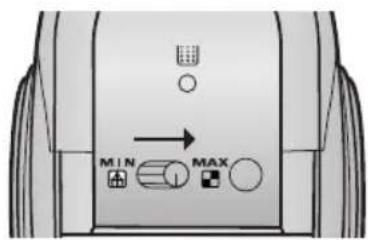
• SLIDE FORWARD TO MAX
Suction capacity increases smoothly up to maximum.
2) BODY-CONTROL TYPE / ON/OFF TYPE
- HOSE - BODY (BODY-CONTROL TYPE ONLY)

natural_image
Simple line drawing of a mechanical tool or bracket with a directional arrow indicating motion (no text or symbols)To reduce suction for cleaning draperies, small rugs, and other light fabrics, pull the tap air until the hole is open.

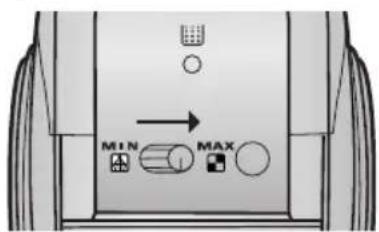
MIN = For delicate surface e.g. net curtains.
MAX = For hard floors and heavily soiled carpets.
2-4 HOW TO USE AND MAINTAIN THE ACCESSORIES
▶ Features may vary according to model.
PIPE

natural_image
Simple line drawing of a cylindrical object with a central shaft and flange (no text or symbols)
natural_image
Illustration of a cylindrical tool with a handle and internal shaft, showing motion arrows (no text or symbols)Adjust the length of the telescopic pipe by sliding the length control button located in the center of the telescopic pipe back and forth.

natural_image
Illustration of a hand holding a cylindrical tool with a flame, emitting smoke (no text or symbols)To check for blockages, separate the telescopic pipe and adjust to shorten. This allows for easier removal of waste clogging the tube.
ACCESSORY


natural_image
Illustration of a robotic arm with directional arrows indicating movement (no text or symbols)

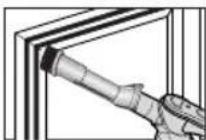

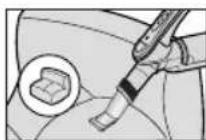
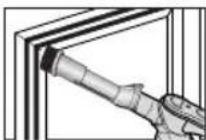
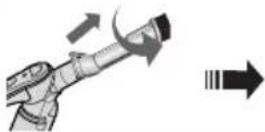
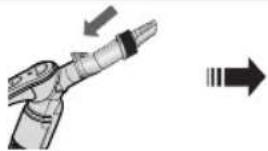
Push the accessory on to the end of the hose handle.
Pull out and turn the dust- ing brush for cleaning deli- cate areas.
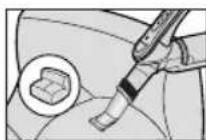
To use the upholstery tool, push the accessory on to the end of the hose handle in the opposite direction.
OPTION

natural_image
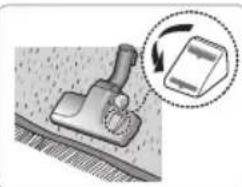
3D rendered image of a vacuum cleaner (no text or symbols visible)▶ Carpet Cleaning
▶ Floor Cleaning
natural_image
Illustration of a mechanical tool interacting with a rectangular object, showing motion arrows (no text or symbols)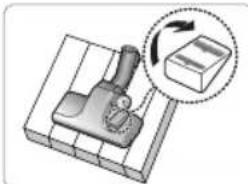
natural_image
Diagram of a mechanical device with a rotating arrow and a box, no text or symbols present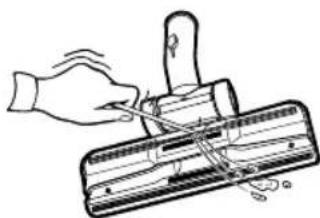
natural_image
Illustration of a hand using a tool to cut or mark a component on a cutting board (no text or symbols)Adjust the inlet lever according to the floor surface.
Remove waste matter completely if the inlet is blocked.
OPTION

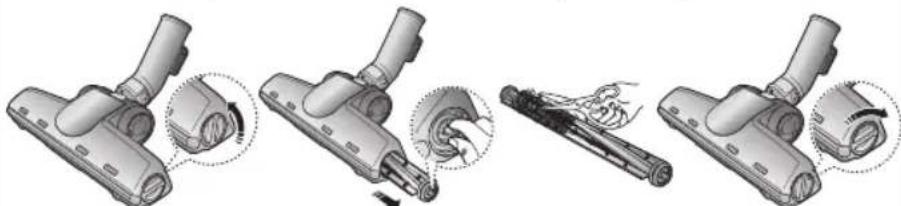
- Detach transparent drum cover for easy cleaning.
natural_image
Four-step diagram showing a hairdryer tool being adjusted, with no visible text or symbols3 EMPTYING THE DUST BIN
1 2 3 Option


natural_image
Diagram of a sun icon inside a container with directional arrows indicating minimum and maximum motion (no text or symbols)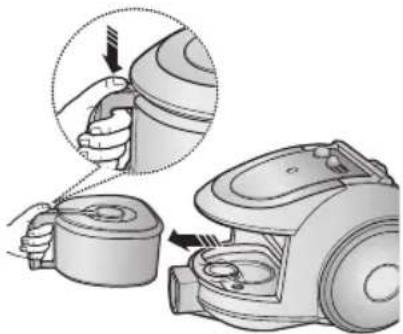
natural_image
Illustration of a hand using a vacuum cleaner to adjust the component (no text or symbols present)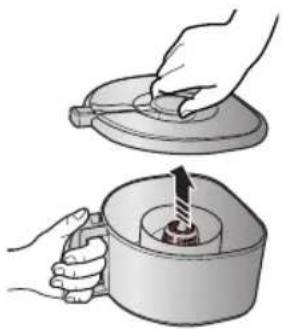
natural_image
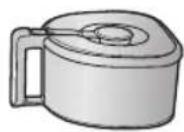
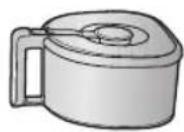
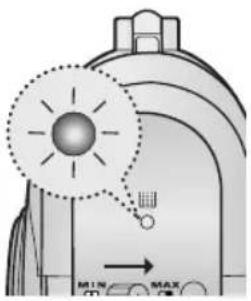
Illustration of two hands using a tool to lift a lid, with a submerged object inside (no text or symbols)Once dust reaches the dust full mark, or once the dust full light is on, empty the dust bin.
Take the dust bin out by pressing the button.
Separate the dust bin cover.
4

natural_image
Illustration of a hand pouring liquid into a trash bin with a lid (no text or symbols)Throw away dust in the bin.
5

natural_image
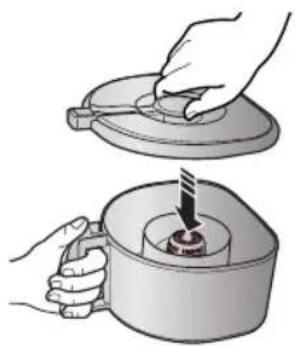
Illustration of hands using a tool to press or install a component into a container (no text or symbols visible)Close the dust bin cover.
6

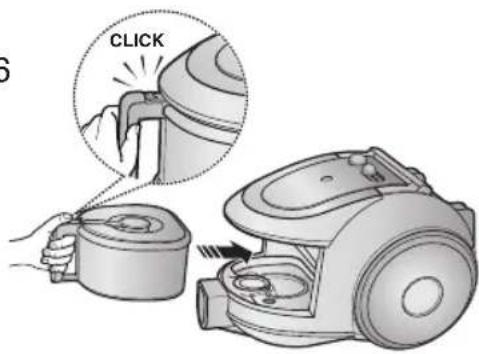
Before use, push the dust bin into the main body of the vacuum cleaner until you hear the "click" sound.
- Empty into a plastic bag (recommended for asthma/allergy sufferers)

natural_image
Illustration of hands holding a large container with a small container inside, no text or symbols present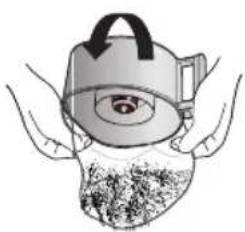
natural_image
Illustration of hands holding a container with a lid and a magnified view of the lid (no text or symbols)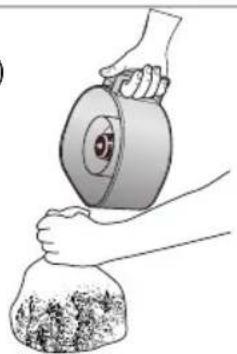
natural_image
Illustration of hands handling a large cylindrical object with a lid, next to a bag filled with granular material (no text or symbols)

NOTE
You may rinse the dust bin with cold water

natural_image
Illustration of hands using a tool to clean or wash a container with a faucet (no text or symbols)4 CLEANING THE DUST PACK
4-1. WHEN TO CLEAN THE DUST PACK
- If suction is noticeably reduced during cleaning, please check the dust pack as indicated below.

HANDLE CONTROL
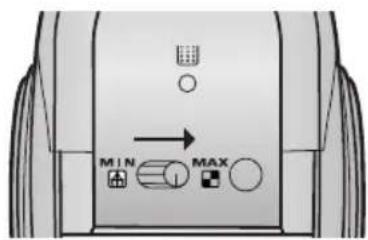
Turn the vacuum power to 'MAX'

natural_image
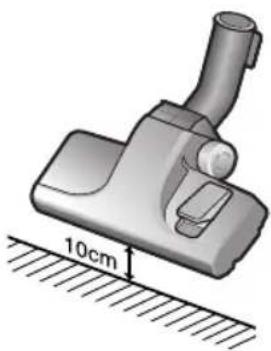
3D illustration of a mechanical device with a 10cm dimension label (no text or symbols on the device itself)If the filter check indicator turns red with the inlet floating 10 cm above flat floor, clean it.


natural_image
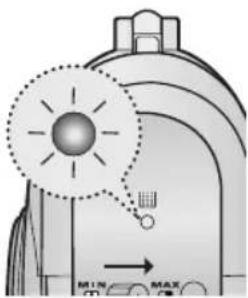
Diagram of a mechanical device with a highlighted circular component and a small inset showing a sensor or probe (no text or symbols present)When the indicator light comes on, please empty the Dust Pack(4-2) as shown in the following illustrations.
4-2 CLEANING THE DUST PACK
1
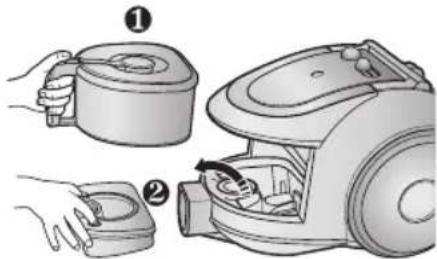
Remove the dust bin and dust pack as shown.
2
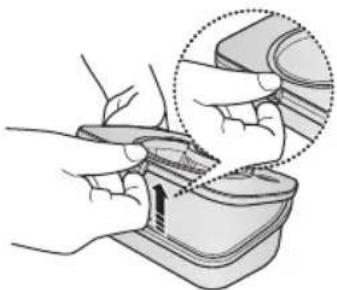
natural_image
Illustration of hands using a tool to adjust or install a device, with a magnified inset showing the detail (no text or symbols present)Remove the fixed frame of the dust pack cover.
3

natural_image
Illustration of hands cleaning a sink with a faucet, showing water and soap (no text or symbols)Remove the sponge pad from the dust pack
4
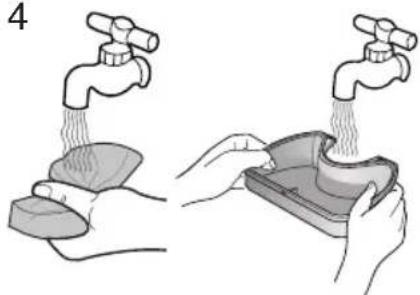
natural_image
Illustration showing two hands performing a water tap and pouring liquid into a container (no text or symbols)Wash the sponge and the filter of the dust pack with water.
5

natural_image
Illustration of a sun shining on a brick wall and two small objects under a shadow (no text or symbols)Let the sponge and dust pack dry in the shade for more than 12 hours.
6

natural_image
Illustration of hands using a tool to apply material or equipment (no text or symbols visible)Put the sponge into the dust pack.

Before reassembly, align the dust pack cover and dust pack correctly.
8
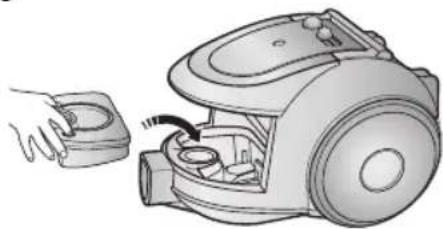
natural_image
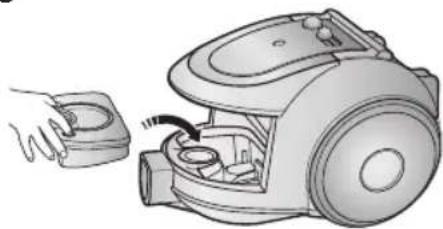
Illustration of a hand inserting a small component into a vacuum cleaner's airbag (no text or symbols present)Put the assembled dust pack into the main body.

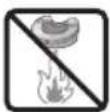


NOTE : Make sure the filter is completely dry before putting it back into the vacuum cleaner. Allow 12 hours for it to dry.
5 CLEANING THE MOTOR PROTECTION FILTER

Take out both the dust bin and the dust pack.

natural_image
Illustration of a hand using a tool to adjust or install a vacuum cleaner's air gap (no text or symbols visible)Remove the motor protection filter from the vacuum cleaner. Shake and tap the dust from it and put back in machine.
6 CLEANING THE OUTLET FILTER

natural_image
Illustration of a robotic vacuum cleaner with a hand adjusting the component (no text or symbols visible)Press the fixed frame part at the back of the main body to remove.

natural_image
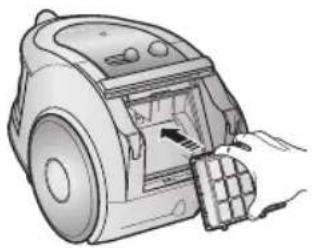
Illustration of a hand inserting a component into a robotic vacuum cleaner (no text or symbols visible)Pull out the HEPA Filter using the tab.
natural_image
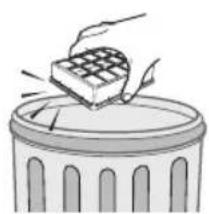
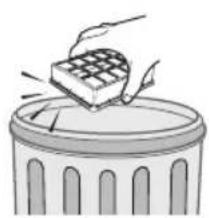
Illustration of a hand placing a grid block onto a trash can (no text or symbols)Dust the HEPA filter. Put the HEPA filter into the main body until you hear a 'click' sound.

natural_image
Illustration of a hand inserting a vacuum cleaner into a device (no text or symbols visible)OPTION - MICRO CARBON FILTER

natural_image
Illustration showing two steps: one hand removing a block into a container, the other hand stacking a block into a trash can (no text or symbols present)Remove and replace the blocked outlet filter.
NOTE : Replacement filters are available at your local Samsung distributor.
- IF YOU HAVE A PROBLEM
| PROBLEM CAUSE REMEDY | ||
| Motor does not start. | No power supply. Thermal cut-out. | Check cable, plug and socket. Leave to cool. |
| Suction force is gradually decreasing. | Nozzle, suction hose or tube is blocked. | Check for blockage and remove it. |
| Cord does not rewind fully. Check that the cord is not twisted or wound unevenly. | Pull the cord out 2-3m and push the cord rewind button. | |
| Vacuum cleaner does not pick up dirt. | Crack or hole in hose. | Check hose and replace if required. |
| Low or decreasing suction | Filter is full of dust. | Please check filter and, if necessary, clean as illustrated in the instructions. |
This Vacuum cleaner is approved the following.
EMC Directive : 89/336/EEC , 92/31/EEC and 93/68/EEC
Low Voltage Directive : 73/23/EEC and 93/68/EEC
Bedienungsanleitung

STAUBSAUGER
natural_image
Line drawing of a vacuum cleaner device (no text or symbols)
ACHTUNG
natural_image
Technical illustration of a vacuum cleaner assembly (no text or symbols visible)natural_image
Illustration of a hand pressing down on a small vacuum cleaner with a foot and plug (no text or symbols)2-2 NETZKABEL

natural_image
Illustration of a hand pressing down on a small electric vacuum cleaner with a power plug icon (no text or symbols)!
natural_image
Hand holding a screwdriver touching an electrical outlet (no text or symbols visible)HINWEIS
2) MODELL MIT BEDIENKNÖPFEN AM STAUBSAUGER/ EIN-/AUS TYP
- ROHR

natural_image
Diagram of a mechanical tool with an arrow indicating direction (no text or symbols)natural_image
Simple line drawing of a cylindrical object with a central shaft and flange (no text or symbols)
natural_image
Illustration of a cylindrical tool with internal components and blue directional arrows indicating motion (no text or symbols)natural_image
Illustration of a hand holding a cylindrical tool with a handle and tip, emitting sound waves (no text or symbols)natural_image
Illustration of a robotic arm with directional arrows indicating movement (no text or symbols)


natural_image
3D rendered image of a vacuum cleaner (no text or symbols visible)natural_image
Illustration of a mechanical tool interacting with a rectangular object, showing motion arrows (no text or symbols)
natural_image
Illustration of a mechanical device with a magnified inset showing rotational motion (no text or symbols)natural_image
Illustration of a hand using a tool to cut or mark a mechanical component (no text or symbols present)natural_image
3D rendering of a mechanical clamp or bracket component (no text or symbols visible)natural_image
Four-step diagram showing a hairdryer tool being adjusted, with no visible text or symbols3 STAUBBEHÄLTER LEEREN
1 2 3 Option
natural_image
Diagram of a mechanical or electrical component with a highlighted circular section and directional arrows (no text or symbols)natural_image
Illustration of a hand using a vacuum cleaner to adjust the component (no text or symbols present)natural_image
Illustration of two hands holding a lid and a container with a pointer, no text or symbols presentnatural_image
Illustration of a hand pouring liquid into a trash bin (no text or symbols)natural_image
Illustration of hands using a tool to press or install a component into a container (no text or symbols visible)natural_image
Illustration of hands holding a rope over a container filled with soil or debris (no text or symbols)
natural_image
Illustration of a person holding a device with a circular lens and a magnified view of the lens (no text or symbols)


HINWEIS
natural_image
Illustration of hands using a tool to clean or wash water from a faucet (no text or symbols)4 STAUBFILTER REINIGEN
4-1.WANN SIE DEN STAUBFILTER REINIGEN SOLLTEN
natural_image
3D illustration of a vacuum cleaner with a 10cm height measurement on a surface (no text or symbols)
natural_image
Diagram of a mechanical or electrical component with a highlighted circular component and a small circular element, no visible text or symbols.natural_image
Illustration of hands using a tool to adjust or install a device, with a magnified inset showing the detail (no text or symbols present)natural_image
Illustration of hands cleaning a sink with a faucet, showing water and soap (no text or symbols)natural_image
Illustration showing two hands performing a water tap and a bowl with steam rising (no text or symbols)natural_image
Illustration of a sun shining on a brick wall and two small objects under a shadow (no text or symbols)natural_image
Illustration of hands using a tool to apply material or equipment (no text or symbols visible)natural_image
Illustration of a hand using a tool to adjust or install a device, with an inset showing a magnified view of the device (no text or symbols present)natural_image
Illustration of a hand inserting a small component into a vacuum cleaner's airbag (no text or symbols present)natural_image
Illustration of a hand using a tool to adjust or install a small electronic device (no text or symbols visible)natural_image
Illustration of a robotic vacuum cleaner with a hand adjusting its side panel (no text or symbols visible)natural_image
Illustration of a hand inserting a component into a robotic vacuum cleaner (no text or symbols visible)natural_image
Illustration of a hand placing a block into a trash can (no text or symbols)Den HEPA-Filter reinigen.
natural_image
Illustration of a hand inserting a component into a device (no text or symbols visible)natural_image
Illustration showing two steps: adding a brick to a house and removing it into a trash can (no text or symbols present)natural_image
Line drawing of a vacuum cleaner device (no text or symbols)
ATTENTION
natural_image
Technical illustration of two views of a vacuum cleaner's internal components (no text or symbols)natural_image
Illustration of a robotic vacuum cleaner with a foot and labeled component (no text or symbols)2-2 CORDON D'ALIMENTATION

natural_image
Illustration of a robotic vacuum cleaner with a foot and plug, showing internal components and wiring (no text or symbols)!

natural_image
Hand holding a screwdriver inserted into an electrical outlet socket (no text or symbols visible)REMARQUE
2) MODÈLE AVEC COMMANDE SUR L'ASPIRATEUR / MODÈLE MARCHE/ARRÊT
- FLEXIBLE

natural_image
Diagram of a mechanical tool with an arrow indicating direction (no text or symbols)MIN = Pour tissus fragiles (rideaux, etc.).
natural_image
Simple line drawing of a cylindrical object with a central shaft and flange (no text or symbols)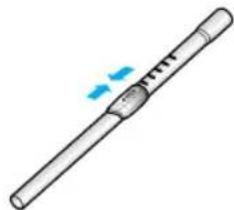
natural_image
Illustration of a cylindrical tool with a handle and a blue arrow indicating motion (no text or symbols)natural_image
Line drawing of a soldering iron with a handle and flame (no text or symbols)natural_image
Diagram of a robotic arm with directional arrows indicating movement (no text or symbols)



natural_image
3D rendered image of a vacuum cleaner (no text or symbols visible)▶ Nettoyage des tapis
▶ Nettoyage des sols

natural_image
Illustration of a mechanical tool interacting with a rectangular object, showing motion arrows (no text or symbols)
natural_image
Illustration of a mechanical device with a magnified inset showing rotational motion (no text or symbols)
natural_image
Illustration of a hand using a tool to cut or mark a mechanical component (no text or symbols present)natural_image
3D rendering of a mechanical clamp or bracket component (no text or symbols visible)natural_image
Four-step diagram showing a hairdryer tool being adjusted, with no visible text or symbols3 VIDER LE BAC À POUSSIÈRE
1 2 3 En option


natural_image
Illustration of a hand using a vacuum cleaner to adjust the component (no text or symbols present)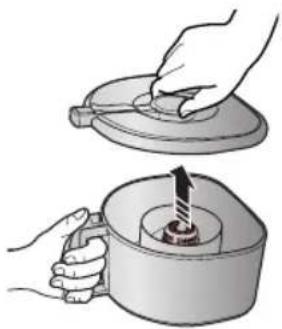
natural_image
Illustration of two hands using a tool to lift a lid, with a mechanical component inside (no text or symbols)natural_image
Illustration of a hand pouring liquid into a trash bin with granular material (no text or symbols)natural_image
Illustration of a hand using a tool to press or install a mechanical component into a container (no text or symbols present)natural_image
Illustration of hands holding a rope over a container filled with soil or debris (no text or symbols)
natural_image
Illustration of hands holding a container with a lid and a handle, partially covered by a textured surface (no text or symbols)

NOTE
natural_image
Illustration of hands using a tool to clean or wash water from a basin (no text or symbols)natural_image
3D illustration of a mechanical device with a 10cm measurement annotation (no text or symbols on the device itself)natural_image
Illustration of hands using a tool to adjust or install a device, with a magnified inset showing the detail (no text or symbols present)natural_image
Illustration of hands cleaning a sink with a faucet, showing water and soap (no text or symbols)natural_image
Illustration showing two hands performing a water tap and a bowl with steam rising (no text or symbols)natural_image
Illustration of a sun shining on a brick wall and two containers under a shelter (no text or symbols)natural_image
Illustration of hands using a tool to apply material or equipment (no text or symbols visible)natural_image
Illustration of a hand inserting a small component into a vacuum cleaner (no text or symbols visible)natural_image
Illustration of a hand using a tool to adjust or install a small mechanical device (no text or symbols visible)natural_image
Illustration of a hand operating a vacuum cleaner with a handle and ventilation grille (no text or symbols)natural_image
Illustration of a hand inserting a component into a vacuum cleaner's air vent (no text or symbols visible)natural_image
Illustration of a hand placing a grid block onto a trash can (no text or symbols)natural_image
Illustration of a hand inserting a component into a vacuum cleaner (no text or symbols visible)natural_image
Illustration showing two steps: adding a block to a small container and removing it into a granular container (no text or symbols)Directive EMC : 89/336/EEC, 92/31EEC et 93/68/EEC
natural_image
Line drawing of a vacuum cleaner device (no text or symbols)
ATTENZIONE
natural_image
Technical illustration of a vacuum cleaner assembly (no text or symbols visible)natural_image
Illustration of a hand pressing down on a small vacuum cleaner with a numbered label (no text or symbols on the device itself)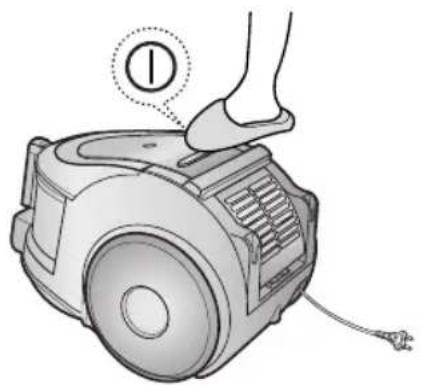
natural_image
Illustration of a robotic vacuum cleaner with a foot and labeled component (no text or symbols)natural_image
Illustration of a robotic vacuum cleaner with a foot and cable, showing mechanical components and a close-up of the lever (no text or symbols present)!
natural_image
Hand using a power tool to switch an electrical outlet (no text or symbols visible)NOTA
natural_image
Diagram of a mechanical tool with a lever and handle, showing no text or symbolsnatural_image
Simple line drawing of a cylindrical object with a central shaft and flange (no text or symbols)
natural_image
Illustration of a cylindrical tool with a handle and internal structure, showing motion arrows (no text or symbols)natural_image
Simple line drawing of a cylindrical tool with a handle and tip, emitting smoke or vapor (no text or symbols)natural_image
Illustration of a robotic arm joint with directional arrows indicating movement (no text or symbols)


natural_image
3D rendered image of a vacuum cleaner (no text or symbols visible)natural_image
Illustration of a tool applying material to a rectangular object with a circular arrow indicating rotation (no text or symbols)
natural_image
Illustration of a mechanical device with a magnified inset showing rotational motion (no text or symbols)natural_image
Illustration of a hand using a tool to cut or mark a mechanical component (no text or symbols present)natural_image
3D rendering of a mechanical clamp or bracket component (no text or symbols visible)natural_image
Four-step diagram showing a hand holding a cable or tool, with no visible text or symbols.3 COME SVUOTARE IL CESTELLO RACCOGLIPOLVERE
1 2 3 OPTIONAL

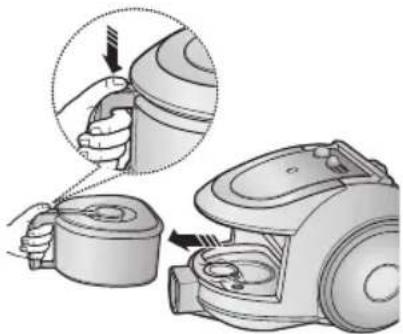
natural_image
Illustration of a hand using a vacuum cleaner to adjust the component (no text or symbols present)
natural_image
Illustration of two hands performing a manual operation: adding a lid to a container with a rotating arrow (no text or symbols)natural_image
Illustration of a hand pouring liquid into a trash bin (no text or symbols)natural_image
Illustration of hands using a tool to press or install a mechanical component into a container (no text or symbols visible)natural_image
Illustration of hands holding a bag over a container filled with food (no text or symbols visible)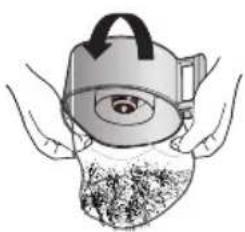
natural_image
Illustration of hands holding a teapot with a lid and a circular object inside (no text or symbols)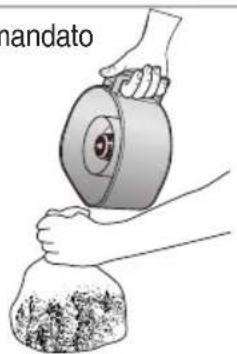
natural_image
Illustration of hands handling a large cylindrical object with a bag, no text or symbols present
NOTA
natural_image
Illustration of hands using a tool to clean or wash a container with a faucet (no text or symbols)4 PULIZIA DEL GRUPPO FILTRANTE
CONTROLLO NELL'IMPUGNATURA
natural_image
3D illustration of a vacuum cleaner with a 10cm height measurement on a surface (no text or symbols)natural_image
Illustration of hands using a tool to adjust or install a component, with a magnified inset showing the detail (no text or symbols present)natural_image
Illustration of hands washing a surface with a faucet above (no text or symbols)natural_image
Illustration showing two hands performing a water tap and a bowl with steam rising (no text or symbols)natural_image
Illustration of a sun shining on a brick wall and two small objects under a spotlight (no text or symbols)natural_image
Illustration of hands using a tool to apply material or equipment (no text or symbols visible)natural_image
Illustration of a hand using a tool to adjust or install a device, with an inset showing a magnified view of the device (no text or symbols present)natural_image
Illustration of a hand inserting a small component into a vacuum cleaner's airbag (no text or symbols present)


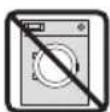
natural_image
Illustration of a hand using a tool to adjust or install a small electronic device (no text or symbols visible)natural_image
Illustration of a hand inserting a component into a vacuum cleaner's air vent (no text or symbols visible)natural_image
Illustration of a hand inserting a component into a vacuum cleaner's airbag (no text or symbols visible)natural_image
Illustration of a hand placing a grid block onto a trash can (no text or symbols)natural_image
Illustration of a hand inserting a component into a vacuum cleaner (no text or symbols visible)natural_image
Illustration of hands holding a small object with a checkered pattern, next to a rectangular block (no text or symbols)
natural_image
Illustration of a hand placing a rectangular block onto a trash bin (no text or symbols)natural_image
Line drawing of a vacuum cleaner device (no text or symbols)* Pred uporabo enote skrbno preberite navodila.
* Samo za notranjo uporabo.
POMEMBNI VARNOSTNI UKREPI
MOŽNOST
natural_image
Illustration of a medical or laboratory device with a handle and tubing (no text or symbols)
natural_image
Illustration of a cleaning brush tool with handle and base (no text or symbols)
natural_image
3D rendered image of a handheld vacuum cleaner with a cylindrical handle and base (no text or symbols visible)▶ Funkcije se razlikujejo glede na model.

POZOR!
Med prenašanjem naprave ne pritiskajte gumba posode za smeti.

natural_image
Technical illustration of a vacuum cleaner assembly (no text or symbols visible)Za shranjevanje postavite talni nastavek na svoje mesto.
2 UPORABA SESALNIKA
2-1 STIKALO ZA VKLOP/IZKLOP
1) MODEL Z UPRAVLJANJEM NA ENOTI
2) MODEL Z GUMBOM ZA VKLOP/IZKLOP

natural_image
Illustration of a hand pressing down on a small vacuum cleaner with a numbered label (no text or symbols on the device itself)
natural_image
Illustration of a hand pressing down on a small vacuum cleaner with a foot and cable (no text or symbols)2-2 NAPAJALNI KABEL

natural_image
Illustration of a robotic vacuum cleaner with a foot and power plug, showing mechanical components and wiring (no text or symbols)!

natural_image
Hand using a power tool to switch an electrical outlet (no text or symbols visible)OPOMBA
2) MODEL Z UPRAVLJANJEM NA ENOTI / Z GUMBOMZA VKLOP/IZKLOP
- CEV

natural_image
Diagram of a mechanical tool with a directional arrow indicating movement (no text or symbols present)natural_image
Simple line drawing of a cylindrical object with a central shaft and flange (no text or symbols)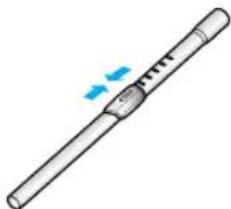
natural_image
Illustration of a cylindrical tool with a handle and internal structure, showing motion arrows (no text or symbols)natural_image
Line drawing of a hand holding a cylindrical tool with a handle and tip, emitting sound waves (no text or symbols)Če želite odstraniti morebitne ovire, ločite teleskopsko cev in jo nastavite na kratko.
Tako boste oviro lažje odstranili.
NASTAVEK

natural_image
Illustration of a robotic arm with directional arrows indicating movement (no text or symbols)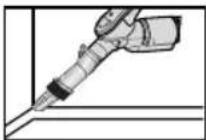


natural_image
3D rendered image of a mechanical vacuum cleaner (no text or symbols visible)▶ Čiščenje preproge
▶ Čiščenje tal

natural_image
Illustration of a mechanical tool interacting with a rectangular object, showing motion arrows (no text or symbols)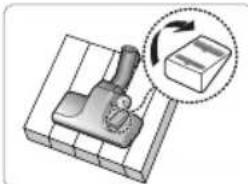
natural_image
Diagram of a mechanical device with a rotating arrow and a box, no text or symbols present
natural_image
Illustration of a hand using a tool to cut or mark a component on a cutting board (no text or symbols)Vzvod dovoda nastavite glede na podlago.
Če je dovod zamašen, odpadke odstranite.
MOŽNOST

natural_image
3D rendering of a mechanical clamp or bracket component (no text or symbols visible)natural_image
Illustration of a hairdryer tool with four sequential steps showing mechanical assembly (no text or symbols)3 PRAZNJENJE POSODE ZA SMETI
1 2 3
Možnost


natural_image
Illustration of a hand using a vacuum cleaner to adjust the component (no text or symbols present)
natural_image
Illustration of two hands operating a lid and a container with a handle, showing mechanical components (no text or symbols)natural_image
Illustration of a hand pouring liquid into a trash bin with granular material (no text or symbols)5
natural_image
Illustration of hands using a tool to press or install a component into a container (no text or symbols visible)6
Izpraznite posodo za smeti.
Zaprite pokrov posode za smeti.
natural_image
Illustration of hands holding a large container with a small container inside, containing a textured substance (no text or symbols visible)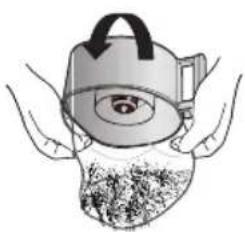
natural_image
Illustration of hands holding a teapot with a lid and a circular object inside, no text or symbols present
natural_image
Illustration of hands using a tool to lift a cylindrical object into a bag, with no visible text or symbols.

OPOMBA
natural_image
Illustration of hands using a tool to clean or wash water from a basin (no text or symbols)4 ČIŠČENJE PODSTAVKA ZA SMETI
4-1 KDAJ ČISTITI PODSTAVEK ZA SMETI
UPRAVLJANJE NA ROČAJU
Moč sesanja nastavite na 'MAX'.
natural_image
3D illustration of a mechanical device with a 10cm dimension label (no text or symbols on the device itself)natural_image
Illustration of hands using a tool to adjust or install a component, with a magnified inset showing the detail (no text or symbols present)Odstranite pritrjeni okvir pokrova podstavka za smeti.
3

natural_image
Illustration of hands cleaning a sink with a faucet, showing water and soap (no text or symbols)natural_image
Illustration showing two hands performing a water tap and a bowl with steam rising (no text or symbols)Gobo in filter podstavka za smeti sperite z vodo.
5

natural_image
Illustration of a sun shining on a brick wall and two small objects under a shadow (no text or symbols)Goba in podstavek za smeti naj se vsaj 12 ur sušita v senci.
6

natural_image
Illustration of hands using a tool to apply material or equipment (no text or symbols visible)Gobo položite v pod- stavek za smeti.

natural_image
Illustration of a hand holding a medical device with an inset showing a magnified view of the device (no text or symbols present)Pred ponovno namestitvijo poravnajte pokrov podstavka za smeti in podstavek za smeti.
8
natural_image
Illustration of a hand inserting a small component into a vacuum cleaner's airbag (no text or symbols present)Sestavljeni podstavek za smeti položite v glavno enoto.



Izvlecite posodo in podstavek za smeti.

natural_image
Illustration of a hand using a tool to adjust or install a vacuum cleaner's internal components (no text or symbols visible)natural_image
Illustration of a hand operating a vacuum cleaner with a paper airplane (no text or symbols visible)natural_image
Illustration of a hand inserting a component into a robotic vacuum cleaner (no text or symbols visible)S pomočjo jezička izvlecite HEPA-filter.
natural_image
Illustration of a hand placing a grid on top of a trash can (no text or symbols)Obrišite HEPA-filter. HEPA-filter položite v glavno enoto, da zaslišite »klik«.
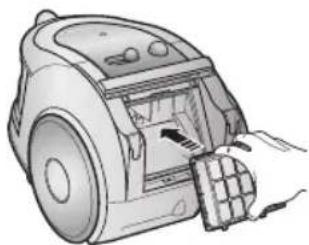
natural_image
Illustration of a hand inserting a component into a vacuum cleaner (no text or symbols visible)OPCIJA - MIKROKARBONSKI FILTER

natural_image
Illustration showing two steps: adding a brick to a model house and adding a block to a trash can (no text or symbols present)Filter odstranite in ga otresite.
OPOMBA:
- IMPORTANT SAFEGUARDS
- ASSEMBLING THE CLEANER
- CAUTION
- 2-2 POWER CORD
- NOTE
- 2-3 POWER-CONTROL
- 2-4 HOW TO USE AND MAINTAIN THE ACCESSORIES
- EMPTYING THE DUST BIN
- CLEANING THE DUST PACK
- 4-1. WHEN TO CLEAN THE DUST PACK
- 4-2 CLEANING THE DUST PACK
- CLEANING THE MOTOR PROTECTION FILTER
- CLEANING THE OUTLET FILTER
- Bedienungsanleitung
- STAUBSAUGER
- ACHTUNG
- 2-2 NETZKABEL
- HINWEIS
- STAUBBEHÄLTER LEEREN
- STAUBFILTER REINIGEN
- 4-1.WANN SIE DEN STAUBFILTER REINIGEN SOLLTEN
- ATTENTION
- REMARQUE
- 2) MODÈLE AVEC COMMANDE SUR L'ASPIRATEUR / MODÈLE MARCHE/ARRÊT
- VIDER LE BAC À POUSSIÈRE
- ATTENZIONE
- NOTA
- COME SVUOTARE IL CESTELLO RACCOGLIPOLVERE
- PULIZIA DEL GRUPPO FILTRANTE
- POMEMBNI VARNOSTNI UKREPI
- POZOR!
- UPORABA SESALNIKA
- 2-1 STIKALO ZA VKLOP/IZKLOP
- 1) MODEL Z UPRAVLJANJEM NA ENOTI
- 2) MODEL Z GUMBOM ZA VKLOP/IZKLOP
- 2-2 NAPAJALNI KABEL
- OPOMBA
- 2) MODEL Z UPRAVLJANJEM NA ENOTI / Z GUMBOMZA VKLOP/IZKLOP
- - CEV
- PRAZNJENJE POSODE ZA SMETI
- ČIŠČENJE PODSTAVKA ZA SMETI
- 4-1 KDAJ ČISTITI PODSTAVEK ZA SMETI
- OPOMBA:
Brand : SAMSUNG
Model : SC6560
Category : Vacuum Cleaner