
Reference 475A - Receiver INFINITY - Free user manual and instructions
Find the device manual for free Reference 475A INFINITY in PDF.


| Brand | Infinity |
| Model | Reference 475A |
| Product Type | Stereo Receiver |
| Power Output | 100 watts per channel into 8 ohms (RMS) |
| Total Harmonic Distortion | < 0.05% |
| Frequency Response | 20 Hz - 20 kHz ± 1 dB |
| Signal-to-Noise Ratio | 100 dB (IHF-A) |
| Input Sensitivity (Phono) | 2.5 mV |
| Input Sensitivity (Line) | 200 mV |
| Speaker Impedance | 4 - 16 ohms |
| Audio Inputs | Phono, CD, Tuner, Tape, Aux (4 pairs) |
| Audio Outputs | Tape Rec, Preamp Out, Speaker A/B |
| Dimensions (W x H x D) | 17.3 x 5.5 x 13.8 inches (440 x 140 x 350 mm) |
| Weight | 24.5 lbs (11.1 kg) |
| Power Consumption | 350 W (max), 20 W standby |
| Power Supply | AC 120 V, 60 Hz (US model) |
| FM Tuner Sensitivity | 1.5 µV (IHF) |
| AM Tuner Sensitivity | 20 µV (IHF) |
| Headphone Output | 1/4 inch stereo jack |
| Remote Control | Yes (IR, includes basic functions) |
| Accessories | User manual, remote control, FM antenna, AM loop antenna |
Frequently Asked Questions - Reference 475A INFINITY
User questions about Reference 475A INFINITY
0 question about this device. Answer the ones you know or ask your own.
Ask a new question about this device
Download the instructions for your Receiver in PDF format for free! Find your manual Reference 475A - INFINITY and take your electronic device back in hand. On this page are published all the documents necessary for the use of your device. Reference 475A by INFINITY.
USER MANUAL Reference 475A INFINITY
natural_image
Illustration of a stylized Wi-Fi device with a horizontal bar and 'Infinity' logo (no text or symbols on the device itself)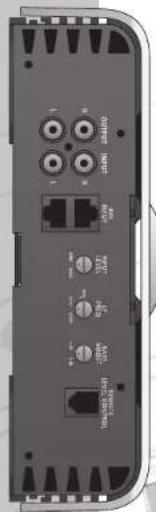
natural_image
Back view of a device showing ports, connectors, and ports without any readable text or symbols
Infinity®
reference series
INTRODUCTION
THANK YOU for purchasing an Infinity® Reference Series amplifier. In order that we may better serve you should you require warranty service for your new amplifier, please retain your original purchase receipt and read the enclosed warranty information card.
WARNING!
Playing loud music in an automobile can hinder your ability to hear traffic and permanently damage your hearing. We recommend listening at low or moderate levels while driving your car. Infinity accepts no liability for hearing loss, bodily injury or property damage resulting from the use or misuse of this product.
IMPORTANT
To get the best performance from your Reference Series amplifiers, we strongly recommend that installation be entrusted to a qualified professional. Although these instructions explain how to install Reference amplifiers in a general sense, they do not show specific installation methods that may be required for your particular vehicle. If you do not have the necessary tools or experience, do not attempt the installation yourself. Instead, please ask your authorized Infinity car audio dealer about professional installation.
INSTALLATION WARNINGS AND TIPS
• Always wear protective eyewear when using tools.
- Turn off the audio system and other electrical devices before you start. Disconnect the (−) negative lead from your vehicle's battery.
- Check clearances on both sides of a planned mounting surface before drilling any holes or installing any screws. Remember that the screws can extend behind the surface.
- At the installation sites, locate and make a note of all fuel lines, hydraulic brake lines, vacuum lines and electrical wiring. Use extreme caution when cutting or drilling in and around these areas.
- Before drilling or cutting holes, use a utility knife to remove unwanted fabric or vinyl to keep material from snagging in the drill bit.
- When routing cables, keep input-signal cables away from power cables and speaker wires.
- When making connections, make certain they are secure and properly insulated.
- If the amplifier's fuse must be replaced, use only the same type and rating as that of the original. Do not substitute another kind.
CHOOSING A LOCATION AND MOUNTING THE AMPLIFIER
Choose a mounting location in the trunk or cargo area where the amplifier will not be damaged by shifting cargo. Amplifier cooling is essential for proper amplifier operation. If the amplifier is to be installed in an enclosed space, make sure there is sufficient air circulation for the amplifier to cool itself.
When mounting the amplifier under a seat, ensure that it is clear of all moving seat parts and does not affect the seat adjustments. Mount the amplifier so it is not damaged by the feet of backseat passengers. Make sure that the amplifier is mounted securely using nuts and bolts or the supplied mounting screws.
Mount the amplifier so that it remains dry – never mount an amplifier outside the vehicle or in the engine compartment.
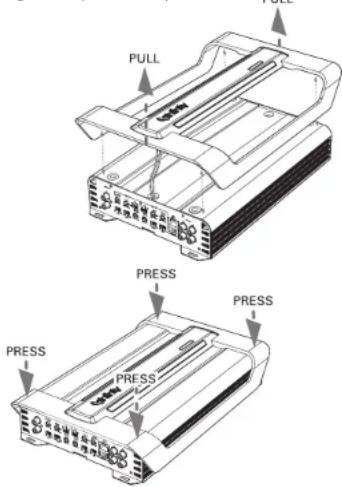
The amplifier's trim panel must be removed to gain access to the mounting tabs. To remove the panel, grasp the ends (indicated by arrows) and pull upward gently. To replace the panel, align the fasteners and press downward gently.
Figure 1. Amplifier's trim panel.
POWER CONNECTIONS
GROUND CONNECTION
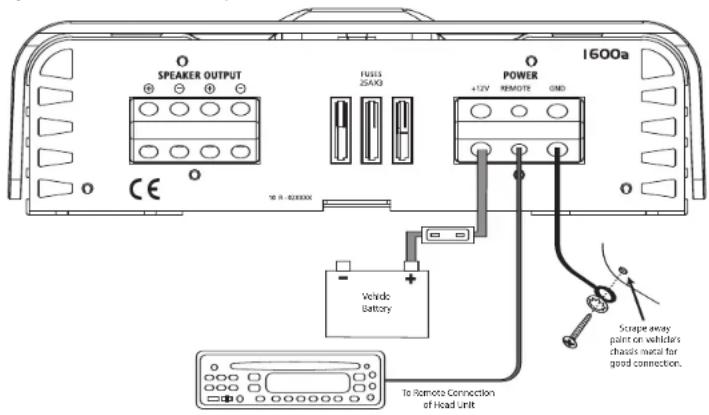
Connect the amplifier's ground (GND) terminal to a solid point on the vehicle's metal chassis, as close to the amplifier as possible. Refer to the chart to the right to determine minimum wire-gauge size. Sand away any paint from this location; use a star-type-lock washer to secure the connection.
POWER CONNECTION
Connect a wire (see chart at right for appropriate gauge) directly to the vehicle's positive battery terminal, and install an appropriate fuse holder within 18" of the battery terminal. Do not install the fuse at this time. Route the wire to the amplifier's location, and connect it to the amplifier's positive (+12V) terminal. Be sure to use appropriate grommets whenever routing wires through the firewall or other sheet metal. Failure to adequately protect the positive wire from potential damage may result in a vehicle fire. When you are done routing and connecting this wire to the battery and to the amplifier, you may install the fuse at the battery. The fuse value should be selected based on total amplifier-current draw; see chart at right.
REMOTE CONNECTION
Connect the amplifier's remote (REMOTE) terminal to the source unit's remote turn-on lead using a minimum of 18-gauge wire. If your source unit does not have a remote turn-on connection, connect the amplifier's (REMOTE) terminal to the vehicle's accessory circuit.
WIRE-GAUGE CHART
Amplifier Maximum Minimum
Model Current Draw Wire Gauge
| 475a | 72A | #8 | AWG |
| 5350a | 75A | #8 | AWG |
| 1300a | 37A | #10 | AWG |
| 1600a | 58A | #8 | AWG |
SPEAKER CONNECTIONS
Refer to the application guides on the pages that follow. Speaker connections should be made using a minimum of 16-gauge wire.
Figure 2. Terminal-connection end plate.
APPLICATIONS - 1300a AND 1600a
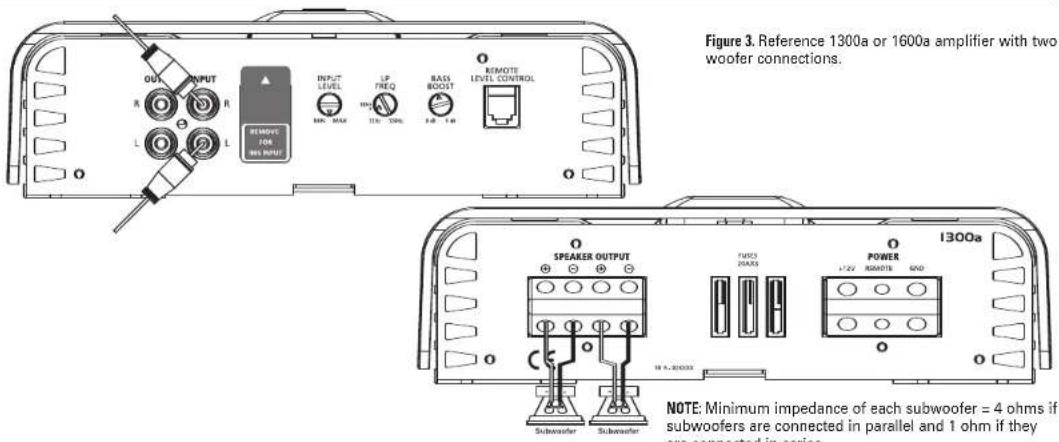
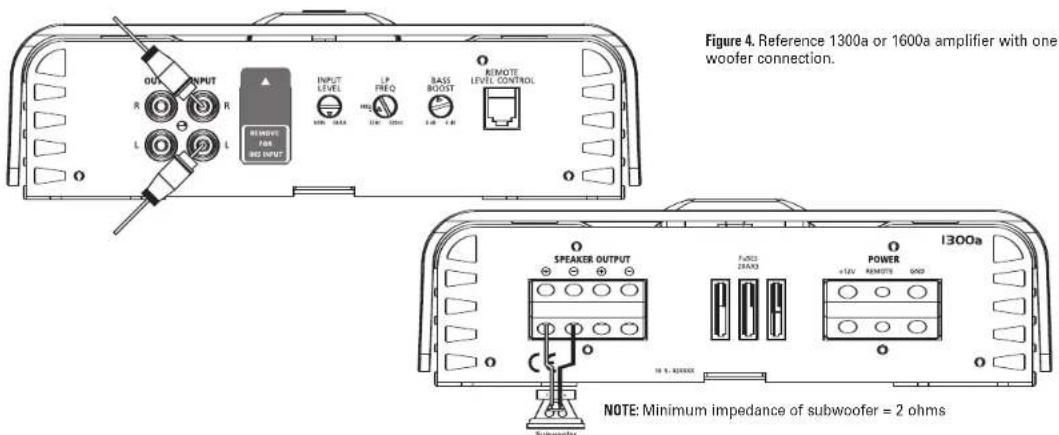
The Reference subwoofer amplifiers are single-channel amplifiers. There are two sets of terminals to make it easy to connect multiple woofers. Either set of (+/-) terminals may be used when connecting woofers.
To the right are four application diagrams to help plan your subwoofer system installation.
NOTE: For simplicity, Figures 3 and 4 do not show power, remote and input connections.
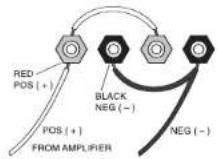
Subwoofers or voice coils connected in series.
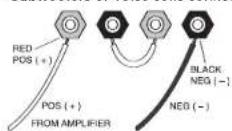
Subwoofers or voice coils connected in parallel.
reference series ^3
APPLICATIONS - 475a
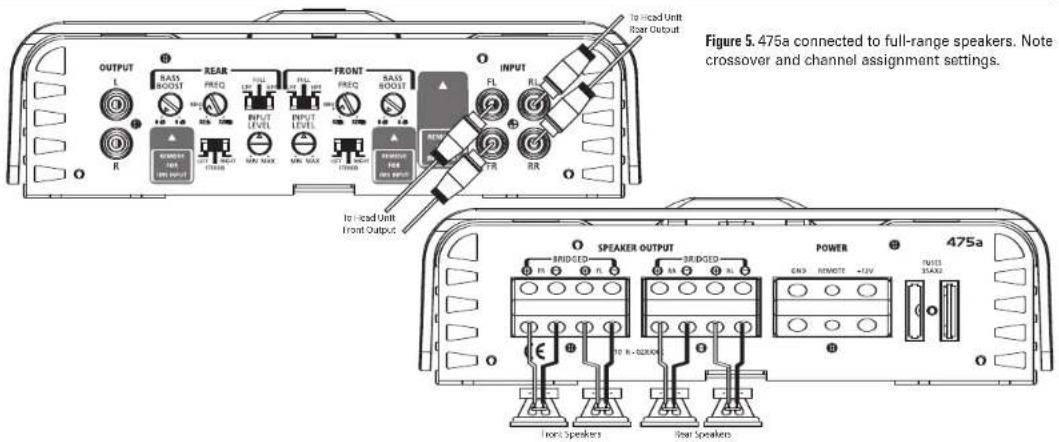
The 475a can be set up for stereo 4-channel, 3-channel or bridged 2-channel operation, as shown in Figures 5 through 8.
NOTE:
- Minimum speaker impedance for stereo operation is 2 ohms. Minimum speaker impedance for bridged operation is 4 ohms.
- Not all possible applications are shown here; e.g., the applications shown in Figures 5, 6 or 8 could include a separate subwoofer driven by an additional amplifier. In that case, the user should refer to Figure 6 for crossover and subamp connection suggestions.
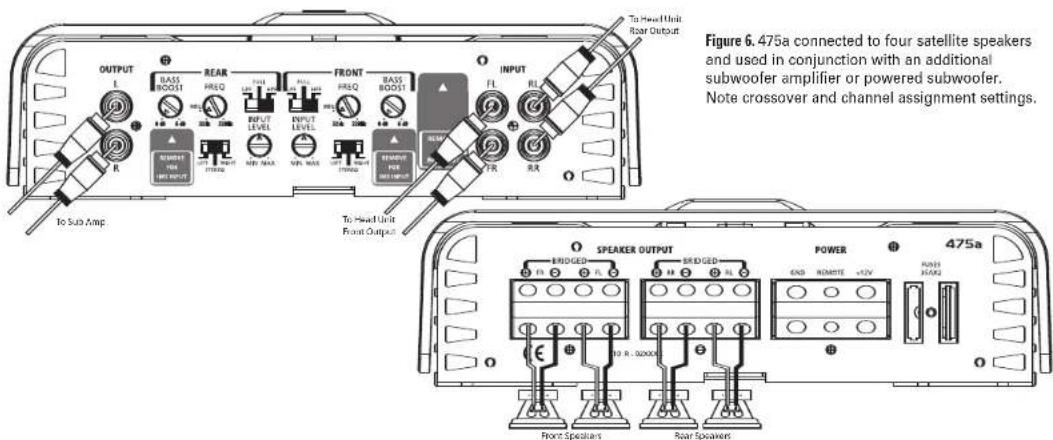
APPLICATIONS - 475a
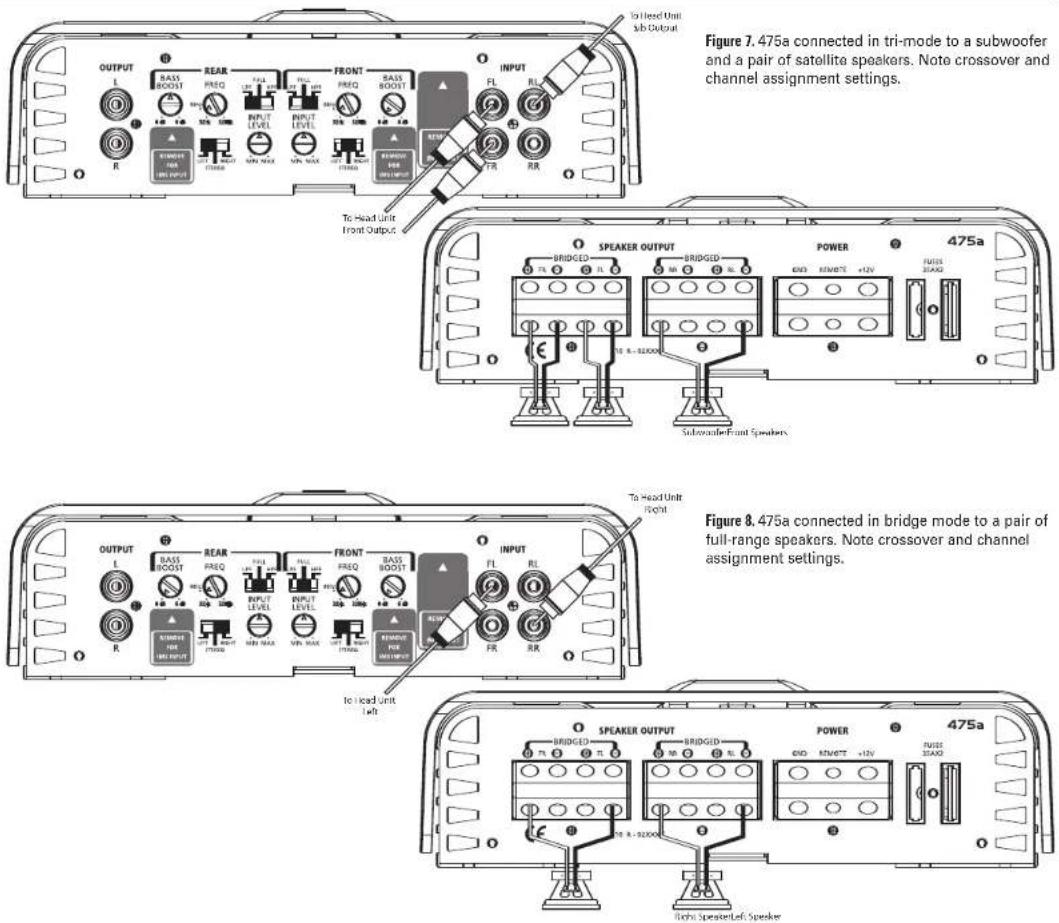
reference series ^5
APPLICATIONS - 5350a
The 5350a can be configured for 5-channel or 3-channel operation, as shown in Figures 9 and 10.
INPUT MODE SWITCH:
- Use INT (internal mode) to send a signal from the front and rear inputs to the subwoofer.
- Use EXT (external mode) when sending a dedicated signal to the subwoofer inputs; e.g., if your source unit has a subwoofer output.
NOTE: Minimum speaker impedance for stereo operation is 2 ohms. Minimum speaker impedance for bridged operation is 4 ohms. Minimum impedance of any subwoofer or combination of subwoofers is 2 ohms.
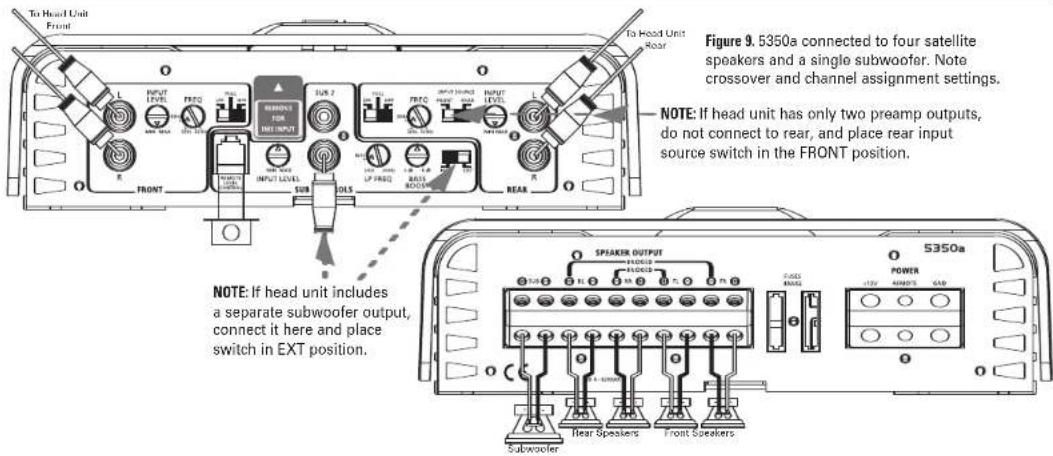
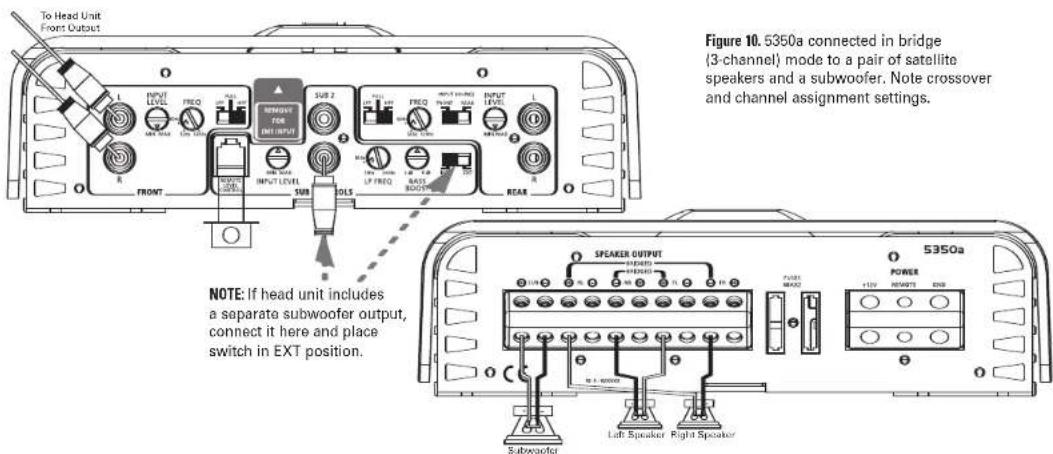
INSTALLATION AND SETUP
Refer to the illustrations on the previous pages for control location.
Reconnect the (−) negative lead to the vehicle's battery. Apply power to the audio system and play a dynamic music track.
SETTING THE CROSSOVER(S)
Determine your system plans and set the crossover-mode switch accordingly. If your system design does not include a subwoofer, set the crossover mode to FULL and skip to "Setting Input Sensitivity."
If your system includes a subwoofer, set the crossover mode to HP (high-pass) for your full-range speakers. Adjust the crossover frequency to limit bass, and provide increased system volume with less distortion.
Mode Switch:
Full: Allows a full-range signal through to the speakers; can be used with larger full-range speakers such as 6^ × 9^ s. HP: Allows a high-pass signal through to the speakers; should be used with most loudspeakers (can protect your full-range speakers from being overdriven with low frequencies, one cause of speaker damage). LP: Allows only bass to pass through to the speakers; should be selected when powering subwoofers.
High-Pass Filters: Initially set the crossover-frequency control midway. While listening to music, adjust the crossover for the least perceived distortion from the speakers, allowing them to reproduce as much bass as possible.
Low-Pass Filters: For subwoofers, choose the highest frequency that removes vocal information from the sound of the subwoofer.
If using the 475a to drive a subwoofer(s), set the crossover mode to LP (low-pass) on the channels connected to the subwoofer.
NOTE: The 1300a, 1600a and the subwoofer output of the 5350a are low-pass only and do not have a crossover-mode switch.
SETTING INPUT SENSITIVITY
- Initially turn the INPUT LEVEL control(s) to the minimum (counterclockwise) position.
- On the source unit, increase the volume control to 3/4 volume. Slowly increase the INPUT LEVEL control(s) toward three o'clock until you hear slight distortion in the music. Then reduce the INPUT LEVEL slightly until distortion is no longer heard.
NOTE: After the source unit is on, blue LEDs (on the top panel) will light, indicating the amplifier is on. If not, check the wiring, especially the remote connection from the source unit. Also refer to "Troubleshooting."
REMOTE LEVEL CONTROL
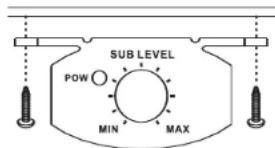
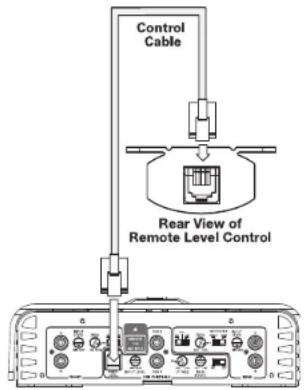
The 1300a, 1600a and 5350a include a remote level control. This will allow the subwoofer level to be adjusted from the listening position. Connect the remote level control using the RJ11 jack on the side of the amplifier. Install the control module in the front of the vehicle within easy reach of the driver. Both the underside of the dash and the center console are suitable locations.
UNDER-DASH MOUNTING
Select a mounting location that allows easy access to the control while driving. Using the REMOTE LEVEL control as a template, mark and drill holes in the mounting surface. Attach the REMOTE LEVEL control using the mounting screws provided (Figure 11).
Figure 11. Under-dash mounting of the REMOTE LEVEL control.
Route the cable behind the dash or other interior panels and under the carpet. Do not route the cable outside the vehicle. Connect the RJ11 cable between the RJ11 receptacle on the amp and the receptacle on the REMOTE LEVEL control (Figure 12).
Figure 12. REMOTE LEVEL control electrical connection.
SETTING THE BASS BOOST
The Bass Boost control will allow you to enhance the bass output of your system at 50Hz up to 6dB
AUX OUTPUT
Reference amplifiers (except 5350a) are equipped with full-range outputs that can be used to connect additional amplifiers.
STATUS LEDs
Power: Indicates the amplifier is on. Protection: Refer to "Troubleshooting" for specific indications.
Figure 13. LED status.

TROUBLESHOOTING
• PROBLEM: No audio (POWER LED is off).
CAUSE and SOLUTION: No voltage at BATT+ and/or REM terminals, or bad or no ground connection. Check voltages at amplifier terminals with VOM.
- PROBLEM: No audio (PROTECT LED glows red). CAUSE and SOLUTION: DC voltage on amplifier output. Amplifier may need service; see enclosed warranty card for service information.
- PROBLEM: No audio (PROTECT LED glows red). CAUSE and SOLUTION: Amplifier is overheated. Make sure amplifier cooling is not blocked at mounting location; verify that speaker-system impedance is within specified limits.
No audio (PROTECT LED glows red).
CAUSE and SOLUTION: Voltage less than 9V on BATT+ connection. Check vehicle charging system.
- PROBLEM: No audio (PROTECT LED glows red). CAUSE and SOLUTION: Voltage greater than 16V or less than 8.5V on BATT+ connection. Check vehicle charging system.
• PROBLEM: Distorted audio.
CAUSE and SOLUTION: Input sensitivity is not set properly, or amplifier or source unit is defective. Check INPUT LEVEL setting, or check speaker wires for shorts or grounds.
- PROBLEM: Distorted audio (PROTECT LED glows intermittently).
CAUSE and SOLUTION: Short circuit in speaker or wire. Remove speaker leads one at a time to locate shorted speaker or wire, then repair.
• PROBLEM: Music lacks "punch."
CAUSE and SOLUTION: Speakers are not connected properly. Check speaker connections for proper polarity.
• PROBLEM:
SPECIFICATIONS
475a
- 75W RMS x 4 channels at 4 ohms and ≤1% THD + N
• Signal-to-noise ratio: 85dBA (reference 1W into 4 ohms) - 90W RMS x 4 channels at 2 ohms, 14.4V supply and ≤1% THD + N
• Dynamic power: 117W at 2 ohms
• Effective damping factor: 6.3 at 4 ohms
• Frequency response: 10Hz - 100kHz (-3dB)
• Maximum input signal: 6V
• Maximum sensitivity: 100mV
• Output regulation: 0.21dB at 4 ohms - Dimensions (L x W x H): 14-3/16" x 9" x 2-11/16" (361mm x 229mm x 69mm)
- Fuse rating: 2 x 35A
- Included: 4 mounting screws, 2 spare 35A fuses, owner's manual, warranty card

1300a
• 200W RMS x 1 channel at 4 ohms and ≤1% THD + N
• Signal-to-noise ratio: 85dBA (reference 1W into 4 ohms)
- 300W RMS x 1 channel at 2 ohms, 14.4V supply and ≤1% THD + N
• Dynamic power: 342W at 2 ohms
• Effective damping factor: 6.364 at 4 ohms
• Frequency response: 11Hz - 330Hz (-3dB)
• Maximum input signal: 6V
• Maximum sensitivity: 100mV
• Output regulation: 0.11dB at 4 ohms
- Dimensions (L x W x H): 14-3/16" x 9" x 2-11/16" (361mm x 229mm x 69mm)
- Fuse rating: 3 x 20A
- Included: 4 mounting screws, 3 spare 20A fuses, 1 remote level control, 1 remote level control cable (RJ11), owner's manual, warranty card

5350a
- 50W RMS x 4 channels plus 150W RMS x 1 channel at 4 ohms and ≤1% THD + N
• Signal-to-noise ratio: 85dBA (reference 1W into 4 ohms) - 60W RMS x 4 channels plus 300W RMS x 1 channel at 2 ohms, 14.4V supply and ≤1% THD + N
• Dynamic power: 89W x 4 and 332W x 1 at 2 ohms
• Effective damping factor: 6.3 at 4 ohms
• Frequency response: 10Hz - 100kHz (-3dB)
• Maximum input signal: 6V
• Maximum sensitivity: 100mV
• Output regulation: 0.12dB at 4 ohms - Dimensions (L x W x H): 16-9/16" x 9" x 2-11/16" (421mm x 229mm x 69mm)
- Fuse rating: 2 x 40A
- Included: 4 mounting screws, 2 spare 40A fuses, 1 remote level control,
1 remote level control cable (RJ11), owner's manual, warranty card
1600a
- 400W RMS x 1 channel at 4 ohms and ≤1% THD + N
• Signal-to-noise ratio: 80dBA (reference 1W into 4 ohms) -
600W RMS x 1 channel at 2 ohms, 14.4V supply and ≤1% THD + N
• Dynamic power: 894W at 2 ohms
• Effective damping factor: 6.3 at 4 ohms
• Frequency response: 11Hz - 330Hz (-3dB)
• Maximum input signal: 6V
• Maximum sensitivity: 100mV
• Output regulation: 0.12dB at 4 ohms -
Dimensions (L x W x H): 14-3/16" x 9' x 2-11/16" (361mm x 229mm x 69mm)
- Fuse rating: 3 x 25A
- Included: 4 mounting screws, 3 spare 25A fuses, 1 remote level control,
1 remote level control cable (RJ11), owner's manual, warranty card


A valid serial number is required for warranty coverage.
Features, specifications and appearance are subject to change without notice.
These products are designed for mobile applications and are not intended for connection to the mains.

TECHNOLOGY - PERFORMANCE - DESIGN
Infinity Systems, 250 Crossways Park Drive, Woodbury, NY 11797 USA
www.infinitysystems.com
© 2007 Harman International Industries, Incorporated. All rights reserved. Part No. REFAMPOM1:07
Infinity is a trademark of Harman International Industries, Incorporated, registered in the United States and/or other countries.
H A Harman International Company
Declaration of Conformity

We, Human Consumer Group International
2, route de Tours
declare in own responsibility that the products described in this
owner's manual are in compliance with technical standards:
EN 55013:2001
EN 55020:2002

Human Consumer Group International
- INTRODUCTION
- WARNING!
- IMPORTANT
- INSTALLATION WARNINGS AND TIPS
- CHOOSING A LOCATION AND MOUNTING THE AMPLIFIER
- POWER CONNECTIONS
- GROUND CONNECTION
- POWER CONNECTION
- REMOTE CONNECTION
- WIRE-GAUGE CHART
- SPEAKER CONNECTIONS
- APPLICATIONS - 1300a AND 1600a
- APPLICATIONS - 475a
- NOTE:
- APPLICATIONS - 5350a
- INPUT MODE SWITCH:
- INSTALLATION AND SETUP
- SETTING THE CROSSOVER(S)
- Mode Switch:
- SETTING INPUT SENSITIVITY
- REMOTE LEVEL CONTROL
- UNDER-DASH MOUNTING
- SETTING THE BASS BOOST
- AUX OUTPUT
- STATUS LEDs
- TROUBLESHOOTING
- • PROBLEM:
- SPECIFICATIONS
- 475a
- 1300a
- 5350a
- 1600a
Brand : INFINITY
Model : Reference 475A
Category : Receiver