
240S4LPMB S-line 24 - Monitor PHILIPS - Free user manual and instructions
Find the device manual for free 240S4LPMB S-line 24 PHILIPS in PDF.


| Product Type | LED Monitor |
| Screen Size | 24 inches (61 cm) |
| Panel Type | IPS |
| Resolution | 1920 x 1080 (Full HD) |
| Aspect Ratio | 16:9 |
| Refresh Rate | 60 Hz |
| Response Time | 5 ms (Gray to Gray) |
| Brightness | 250 cd/m² |
| Contrast Ratio | 1000:1 (Static) |
| Viewing Angles | 178°/178° (Horizontal/Vertical) |
| Connectivity | VGA, DVI-D, DisplayPort, USB 3.0 x4 |
| Power Consumption | Typical: 20 W, Standby: <0.5 W |
| Dimensions (with stand) | 565 x 525 x 220 mm (W x H x D) |
| Weight (with stand) | 5.8 kg |
| VESA Mount | 100 x 100 mm |
| Adjustability | Height, tilt, swivel, pivot |
| Built-in Speakers | Yes, 2 x 2 W |
| Special Features | Low blue light, flicker-free, SmartImage presets |
| Cleaning | Wipe with soft dry cloth; avoid solvents |
| Safety | CE, FCC, RoHS compliant; use only provided power adapter |
| Spare Parts / Repairability | Contact Philips support for service; no user-serviceable parts |
Frequently Asked Questions - 240S4LPMB S-line 24 PHILIPS
User questions about 240S4LPMB S-line 24 PHILIPS
0 question about this device. Answer the ones you know or ask your own.
Ask a new question about this device
Download the instructions for your Monitor in PDF format for free! Find your manual 240S4LPMB S-line 24 - PHILIPS and take your electronic device back in hand. On this page are published all the documents necessary for the use of your device. 240S4LPMB S-line 24 by PHILIPS.
USER MANUAL 240S4LPMB S-line 24 PHILIPS
www.philips.com/welcome
This marking on the product or on its packaging illustrates that, under European Directive 2002/96/EC governing used electrical and electronic appliances, this product may not be disposed of with normal household waste. You are responsible for disposal of this equipment through a designated waste electrical and electronic equipment collection. To determine the locations for dropping off such waste electrical and electronic, contact your local government office, the waste disposal organization that serves your household or the store at which you purchased the product.
Your new monitor contains materials that can be recycled and reused. Specialized companies can recycle your product to increase the amount of reusable materials and to minimize the amount to be disposed of.
All redundant packing material has been omitted. We have done our utmost to make the packaging easily separable into mono materials.
Please find out about the local regulations on how to dispose of your old monitor and packing from your sales representative.
Taking back/Recycling Information for Customers
Philips establishes technically and economically viable objectives to optimize
1. Belangrijk
the environmental performance of the organization's product, service and activities.
From the planning, design and production stages, Philips emphasizes the important of making products that can easily be recycled. At Philips, end-of-life management primarily entails participation in national take-back initiatives and recycling programs whenever possible, preferably in cooperation with competitors, which recycle all materials (products and related packaging material) in accordance with all Environmental Laws and taking back program with the contractor company.
Your display is manufactured with high quality materials and components which can be recycled and reused.
To learn more about our recycling program please visit
http://www.philips.com/sites/philipsglobal/about/sustainability/ourenvironment/productrecyclingservices.page
2. De monitor instellen
2. De monitor instellen
2.1 Installatie
1 Inhoud verpakking
240S4LP


Power

VGA (Optional)

DVI (Optional)
240S4LPM


Audio

Power

VGA (Optional)
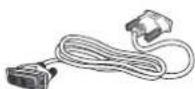
DVI (Optional)
2. De monitor instellen
240S4LPM
2. De monitor instellen
240S4LP
![graph TD A["3"] --> B["TV/◄"] A --> C["SON/▼"] A --> D["SENSOR/▲"] D --> E["5"] D --> F["4"] D --> G["2"] D --> H["1"]](/content/2026/06/1276095/images/a117cf3ec2906dcd5a5443149aea05c7cc8a2927babd563d8c9052e66839b4d8.jpg)
240S4LPM
![graph TD A["3"] --> B["1"] A --> C["SENSOR/▲"] B --> D["7"] C --> E["6"] C --> F["5"] C --> G["4"] C --> H["2"] C --> I["1"]](/content/2026/06/1276095/images/9fff874680c63026d7bb2a6cdbaae856f0e70efd905caf4bb66366f9691e1d09.jpg)
(240S4LPM)
Hoogteafstelling
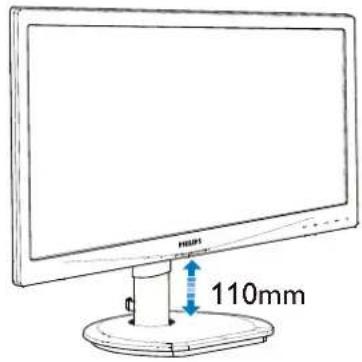
(240S4LPM)
Roteren

(240S4LPM)
2. De monitor instellen
240S4LPM
2. De monitor instellen
Opmerking

- Beeldoptimalisatie

Menu Color (Kleur)


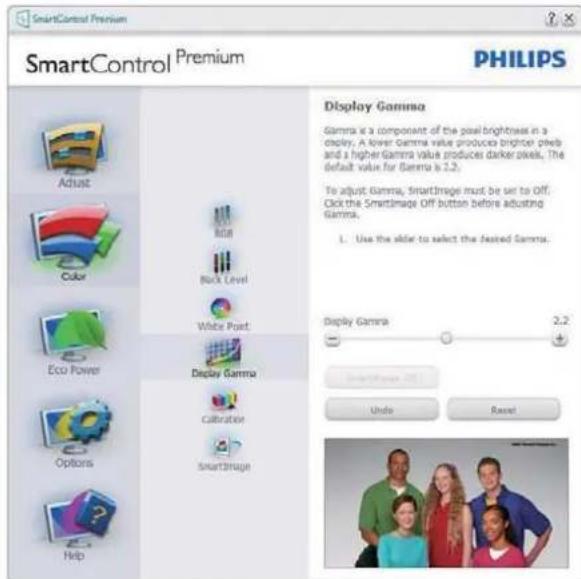
3. Beeldoptimalisatie

Menu Eco Power

3. Beeldoptimalisatie
Menu Options (Opties)
3. Beeldoptimalisatie
Option (Optie)>Auto Pivot

3. Beeldoptimalisatie
Context Sensitive (Contextgevoelig) Menu
3. Beeldoptimalisatie
Vensters slepen en neerzetten
Opmerking
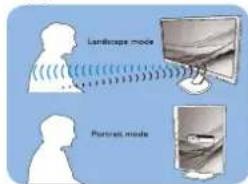
Liggend/staand
This product is TCO Certified-for Sustainable IT
TCO Certified is an international third party

sustainability certification for IT products. TCO Certified ensures that the manufacture, use and
recycling of IT products reflect environmental, social and economic responsibility. Every TCO Certified product model is verified by an accredited independent test laboratory. This product has been verified to meet all the criteria in TCO Certified, including:
Corporate Social Responsibility
Socially responsible production - working conditions and labor law in manufacturing country
Energy Efficiency
Energy efficiency of product and power supply. Energy Star compliant, where applicable
Environmental Management System
Manufacturer must be certified according to either ISO 14001 or EMAS
Minimization of Hazardous Substances
Limits on cadmium, mercury, lead & hexavalent chromium including requirements for mercury-free products, halogenated substances and hazardous flame retardants
Design for Recycling
Coding of plastics for easy recycling. Limit on the number of different plastics used.
Product Lifetime, Product Take Back
Minimum one-year product warranty. Minimum three-year availability of spare parts. Product takeback
Packaging
Limits on hazardous substances in product packaging. Packaging prepared for recycling
Ergonomic, User-centered design
Visual ergonomics in products with a display. Adjustability for user comfort (displays, headsets) Acoustic performance – protection against sound spikes (headsets) and fan noise (projectors, computers) Ergonomically designed keyboard (notebooks)
Electrical Safety, minimal electro-magnetic Emissions Third Party Testing
All certified product models have been tested in an independent, accredited laboratory.
A detailed criteria set is available for download at www.tcodevelopment.com, where you can also find a searchable database of all TCO Certified IT products.
TCO Development, the organization behind TCO Certified, has been an international driver in the field of Sustainable IT for 20 years. Criteria in TCO Certified are developed in collaboration with scientists, experts, users and manufacturers. Organizations around the world rely on TCO Certified as a tool to help them reach their sustainable IT goals. We are owned by TCO, a non-profit organization representing office workers. TCO Development is headquartered in Stockholm, Sweden, with regional presence in North America and Asia.
For more information, please visit www.tcodevelopment.com

Technology for you and the planet
(Only for selective models)
Lead free display promotes environmentally sound recovery and disposal of waste from electrical and electronic equipment. Toxic substances like Lead has been eliminated and compliance with European community's stringent RoHs directive mandating restrictions on hazardous substances in electrical and electronic equipment have been adhered to in order to make Philips monitors safe to use throughout its life cycle.
EPEAT
(www.epeat.net)

The EPEAT (Electronic Product Environmental Assessment Tool) program evaluates computer desktops, laptops, and monitors based on 51 environmental criteria developed through an extensive stakeholder consensus process supported by US EPA.
EPEAT system helps purchasers in the public and private sectors evaluate, compare and select desktop computers, notebooks and monitors based on their environmental attributes. EPEAT also provides a clear and consistent set of performance criteria for the design of products, and provides an opportunity for manufacturers to secure market recognition for efforts to reduce the environmental impact of its products.
Benefits of EPEAT
Reduce use of primary materials Reduce use of toxic materials
Avoid the disposal of hazardous waste EPEAT'S requirement that all registered products meet ENERGY STAR's energy efficiency specifications, means that these products will consume less energy throughout their life.
CE Declaration of Conformity
This product is in conformity with the following standards
• EN60950-1:2006+A11:2009+A1:2010+A12:2011 (Safety requirement of Information Technology Equipment).
• EN55022:2010 (Radio Disturbance requirement of Information Technology Equipment).
• EN55024:2010 (Immunity requirement of Information Technology Equipment).
• EN61000-3-2:2006 +A1:2009+A2:2009 (Limits for Harmonic Current Emission).
- EN61000-3-3:2008 (Limitation of Voltage Fluctuation and Flicker) following provisions of directives applicable.
• 2006/95/EC (Low Voltage Directive).
• 2004/108/EC (EMC Directive).
- 2009/125/EC (ErP Directive, EC No. 1275/2008 Implementing Directive for Standby and Off mode power consumption) and is produced by a manufacturing organization on ISO9000 level.
The product also comply with the following standards
• ISO9241-307:2008 (Ergonomic requirement, Analysis and compliance test methods for electronic visual displays).
• GS EK1-2000:2011 (GS mark requirement).
- prEN50279:1998 (Low Frequency Electric and Magnetic fields for Visual Display).
- MPR-II (MPR:1990:8/1990:10 Low Frequency Electric and Magnetic fields).
Energy Star Declaration
(www.energystar.gov)

As an ENERGY STAR ® Partner, we have determined that this product meets the ENERGY STAR ® guidelines for energy efficiency.

Note
We recommend you switch off the monitor when it is not in use for a long time.
Federal Communications Commission (FCC) Notice (U.S. Only)

This equipment has been tested and found to comply with the limits for a Class B digital device, pursuant to Part 15 of the FCC Rules. These limits are designed to provide reasonable protection against harmful interference in a residential installation. This equipment generates, uses and can radiate radio frequency energy and, if not installed and used in accordance with the instructions, may cause harmful interference to radio communications.
However, there is no guarantee that interference will not occur in a particular installation. If this equipment does cause harmful interference to radio or television reception, which can be determined by turning the equipment off and on, the user is encouraged to try to correct the interference by one or more of the following measures:
• Reorient or relocate the receiving antenna.
- Increase the separation between the equipment and receiver.
- Connect the equipment into an outlet on a circuit different from that to which the receiver is connected.
- Consult the dealer or an experienced radio/TV technician for help.

Changes or modifications not expressly approved by the party responsible for compliance could void the user's authority to operate the equipment.
Use only RF shielded cable that was supplied with the monitor when connecting this monitor to a computer device.
To prevent damage which may result in fire or shock hazard, do not expose this appliance to rain or excessive moisture.
THIS CLASS B DIGITAL APPARATUS MEETS ALL REQUIREMENTS OF THE CANADIAN INTERFERENCE-CAUSING EQUIPMENT REGULATIONS.
FCC Declaration of Conformity
Declaration of Conformity for Products Marked with FCC Logo,
United States Only

This device complies with Part 15 of the FCC Rules. Operation is subject to the following two conditions: (1) this device may not cause harmful interference, and (2) this device must accept any interference received, including interference that may cause undesired operation.
Commission Federale de la Communication (FCC Declaration)

EN 55022 Compliance (Czech Republic Only)
This device belongs to category B devices as described in EN 55022, unless it is specifically stated that it is a Class A device on the specification label. The following applies to devices in Class A of EN 55022 (radius of protection up to 30 meters). The user of the device is obliged to take all steps necessary to remove sources of interference to telecommunication or other devices.
Polish Center for Testing and Certification Notice
The equipment should draw power from a socket with an attached protection circuit (a three-prong socket). All equipment that works together (computer, monitor, printer, and so on) should have the same power supply source.
The phasing conductor of the room's electrical installation should have a reserve short-circuit protection device in the form of a fuse with a nominal value no larger than 16 amperes (A).
To completely switch off the equipment, the power supply cable must be removed from the power supply socket, which should be located near the equipment and easily accessible.
A protection mark "B" confirms that the equipment is in compliance with the protection usage requirements of standards PN-93/T-42107 and PN-89/E-06251.
North Europe (Nordic Countries) Information
Placering/Ventilation
WARNING:
FÖRSÄKRA DIG OM ATT HUVUDBRYTARE OCH UTTAG ÄR LÄTÄTKOMLIGA, NÄR DU STÄLLER DIN UTRUSTNING PÅPLATS.
Placering/Ventilation
ADVARSEL:
S∅RG VED PLACERINGEN FOR, AT NETLEDNINGENS STIK OG STIKKONTAKT ER NEMTTILGÆNGELIGE.
Paikka/Ilmankierto
VAROITUS:
SIJOITA LAITE SITEN, ETTÄ VERKKOJOHTO VOIDAAN TARVITTAESSA HELPOSTI IR- ROTTAA PISTORASIASTA.
BSMI Notice (Taiwan Only)
符合乙類資訊產品之標準
The People's Republic of China released a regulation called "Management Methods for Controlling Pollution by Electronic Information Products" or commonly referred to as China RoHS. All products produced and sold for China market have to meet China RoHS request.
Pixeldefecttoleranties
- TAKING BACK/RECYCLING INFORMATION FOR CUSTOMERS
- BELANGRIJK
- DE MONITOR INSTELLEN
- 2.1 INSTALLATIE
- 1 INHOUD VERPAKKING
- 240S4LPM
- OPMERKING
- MENU COLOR (KLEUR)
- BEELDOPTIMALISATIE
- MENU OPTIONS (OPTIES)
- CONTEXT SENSITIVE (CONTEXTGEVOELIG) MENU
- VENSTERS SLEPEN EN NEERZETTEN
- CORPORATE SOCIAL RESPONSIBILITY
- ENERGY EFFICIENCY
- ENVIRONMENTAL MANAGEMENT SYSTEM
- MINIMIZATION OF HAZARDOUS SUBSTANCES
- DESIGN FOR RECYCLING
- PRODUCT LIFETIME, PRODUCT TAKE BACK
- PACKAGING
- ELECTRICAL SAFETY, MINIMAL ELECTRO-MAGNETIC EMISSIONS THIRD PARTY TESTING
- EPEAT
- BENEFITS OF EPEAT
- CE DECLARATION OF CONFORMITY
- ENERGY STAR DECLARATION
- NOTE
- FEDERAL COMMUNICATIONS COMMISSION (FCC) NOTICE (U.S. ONLY)
- FCC DECLARATION OF CONFORMITY
- UNITED STATES ONLY
- COMMISSION FEDERALE DE LA COMMUNICATION (FCC DECLARATION)
- EN 55022 COMPLIANCE (CZECH REPUBLIC ONLY)
- POLISH CENTER FOR TESTING AND CERTIFICATION NOTICE
- NORTH EUROPE (NORDIC COUNTRIES) INFORMATION
- BSMI NOTICE (TAIWAN ONLY)
- PIXELDEFECTTOLERANTIES
Brand : PHILIPS
Model : 240S4LPMB S-line 24
Category : Monitor