
H2000 160.512 - Knife BeamZ - Free user manual and instructions
Find the device manual for free H2000 160.512 BeamZ in PDF.


| Product type | Chef's knife |
| Brand | BeamZ |
| Model | H2000 160.512 |
| Blade length | 20 cm |
| Blade material | Stainless steel |
| Handle material | Wood or plastic |
| Weight | Approximately 200 g |
| Total dimensions | 33 cm (length), 4.5 cm (width) |
| Recommended use | Cutting vegetables, meats and fish |
| Cleaning and maintenance | Hand wash with mild detergent, dry immediately |
| Sharpening | Use a sharpening steel or a sharpening stone |
| Safety precautions | Use on a cutting board, handle with care |
| Storage | Store in a knife block or protective sheath |
| Spare parts and repairability | Not applicable (one-piece product) |
| General information | Professional quality chef's knife |
Frequently Asked Questions - H2000 160.512 BeamZ
User questions about H2000 160.512 BeamZ
0 question about this device. Answer the ones you know or ask your own.
Ask a new question about this device
Download the instructions for your Knife in PDF format for free! Find your manual H2000 160.512 - BeamZ and take your electronic device back in hand. On this page are published all the documents necessary for the use of your device. H2000 160.512 by BeamZ.
USER MANUAL H2000 160.512 BeamZ
INSTRUCTION MANUAL GEBRUIKSAANWIJZING GEBRAUCHSANLEITUNG MANUEL D'INSTRUCTIONS
ENGLISH
Warning:
- The fazer machine must be placed at least 100 cm away from inflammable materials such as curtains, books, etc. Make sure that the housing cannot be touched by accident.
- Use only Beamz water-based fluid recommended by your dealer.
- Poor liquid caused permanent damage, bad effect, clogging, spitting of unevaporated liquid etc.
- Never add flammable fluids (oil, gas, perfume) to the fog liquid.
- Always keep enough liquid in the tank.
Use of the device without liquid will cause damage to the pump and heater. - Do not obstruct the openings on top of the case to guarantee a good ventilation.
- Don't put any objects on the fazer machine.
- For indoor use only.
- During installation, nobody should stand beneath the mounting area.
- Prior to the first use, have the unit checked by a qualified person.
- The unit contains voltage carrying parts. DO NOT open the fazer machine
- Never plug or unplug the unit with wet hands.
- If the plug and/or mains lead are damaged, they need to be repaired by a qualified technician.
- If the unit is damaged to an extent that you can see internal parts, do not plug the unit into a mains outlet. It needs to be repaired by a qualified technician.
- Only connect this unit to an earthed mains outlet of 220-240Vac/50Hz.
- Always unplug the unit during a thunderstorm or when it is not in use.
- If the unit has not been used for a longer period of time, condensation can occur inside the housing. Please let the unit reach room temperature prior to use.
- When you unplug the unit from the mains always pull the plug, never the lead.
- In order to prevent dropping of the unit, a safety fastening needs to be installed. This can be a solid chain, a steel cable, etc. which has to be fastened separately from the mounting bracket.
- The supplied bracket is the main fixing and must be used to solidly mount the light effect.
- In order to avoid accidents in public premises, the local legal requirements and safety regulations/warnings must be fulfilled.
- Keep out of the reach of children.
Location
Select a location where it is easy to fill the tank.
INSTALLATION AND USE
Safety
Plug the fazer machine only in an earthed mains outlet or extension cord! ATTENTION: the power cord can only be replaced by an original replacement, supplied by Tronios.
Be careful when filling the fluid tank. First of all, unplug the mains lead! Then unscrew the cap on the tank and fill it by means of a funnel.
Only use the original Beamz fluid which is environmental friendly and, if used correctly, leaves no residues.
Do not obstruct the openings on top of the case to guarantee a good ventilation. The heating element of the smoke machine generates heat which needs to be removed. Don't put any objects on the smoke machine.
How to use
Unpack the fazer machine. Do not connect yet the net cable. Fill the fluid tank by means of a funnel. Plug the unit into a mains outlet. Thus the heating element is automatically switched on. Depending on the room temperature, it takes about 3 minutes until the working temperature is reached. Then the thermostat is clicking and the LED on the manual control lights up. Push the switch once and the fazer machine will produce a nice thick fog. Once the fazer machine has reached its working temperature (the LED is lit) the fazer machine can produce fog continuously. After this period of time, the fog generator is cooled so much down that the thermostat switches off. Wait a while until the working temperature is reached again. It is recommended to produce haze with small pauses in between so that the temperature is maintained and the thermostat doesn't switch off. Make sure that there is always enough liquid contained in the tank. Use of the fazer machine without liquid can permanently damage the unit. Once the fazer machine generates little haze or pump generate another 'rattling' sound turn off the unit direct. Check the fluid level and fill the tank when it is empty, check the hose and filter blockages and restore it. Plug in the unit and check if the problem is resolved. If problem persists, switch unit direct off to prevent further damage and contact your dealer.
Switching the unit off
Switch the unit off by unplugging it from the mains. Otherwise the heating element will draw unnecessarily current.
Display:
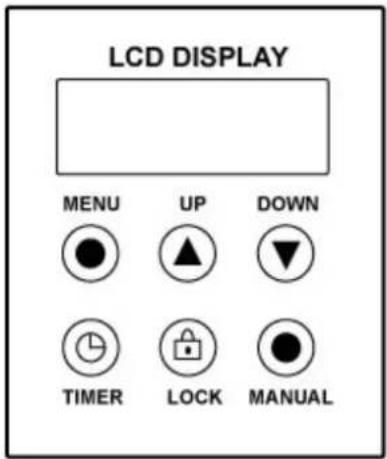
SETTINGS
Via the Menu key, you can adjust the desired settings. After pressing the menu, the display shows the following settings:
- Man Vol Out xxx%.
Adjust the manual volume output within the range of 0% to 100% by means of the Up/Down keys. - Interval Set xxxS Adjust the interval between each fog emission within the range of 1 to 100S by means of the Up-/Down keys.
- Duration Set xxxS
Adjust the duration of each fog emission within the range of 1 to 100S. - Volume Out xxx%
Adjust the volume output during the timer function within the range of 0-100% - DMX 512 #xxx
Adjust the DMX address for DMX control. - Wind for Class
Adjustable fan speed for manual/timer mode.
TIMER CONTROL
Press the Timer key to activate the timer function. The display shows the adjusted interval and the device counts the seconds down to "0". After that, the fog emission is triggered at the volume adjusted under "Timer Out". The duration depends on the settings adjusted under "Duration Set". If you wish to deactivate the timer function, press the Timer key once more.
Manual control (100% output)
Press the Manual key for immediate triggering of the fog emission at 100 % volume. Let the Manual key loose in order to stop the fog emission.
Manual control (locked)
Press the Lock switch for immediate triggering of the fog emission at the volume adjusted under "Volume Out". Press the Volume switch once more in order to stop the fog emission.
DMX control
Connect the machine directly to a DMX controller or a DMX loop with multiple DMX effects. The machine uses a 3-pin XLR connector for DMX connection.
Address Setup: Press the MODE button a number of times until Add appears on the display, with the UP / DOWN buttons the start address may be set. The start address is defined as a first channel to which the machine will respond to. Check that there are no overlapping channels used!
| Channel Function Value Description | ||||
| 1 | Smoke | 000-255 | Output | 0-100% |
| 2 | Fan | 000-255 | Speed | 80-100% |
Note: It is necessary always lock the DMX loop with a 120 Ohm terminator for correct data transmission.
MAINTENANCE
Refilling the fluid reservoir should be done carefully. Remove the plug from the mains first! Then unscrew the cap of the reservoir and fill it by means of a suitable funnel. Use only the original Beamz liquid. This fluid is environmentally friendly, biodegradable and leaves no residue when used correctly. Make sure the fog liquid to become contaminated, close the cap of the liquid can and after filling tank right. After 40 hours, the Fazer machine must be cleaned to avoid deposits in the machine, pump and heater.
Clean procedure
- Run clean procedure in a well-ventilated area.
- Remove fog liquid from the tank, add cleaning solution to tank.
- Switch Fazer machine on and wait until it is warm up.
- Press the button to switch the liquid pumped through the machine.
- Perform the above operation until the tank is empty.
- Fill the tank with hazer liquid.
TECHNICAL SPECIFICATION
| Rated voltage : AC220~240V 50/60Hz | ||
| Power : 1700Watt | ||
| Heat up time : 3 Minutes | ||
| Fuse : F8A | ||
| Control Signal : DMX signal, Manual | ||
| Channel : 2 Channels | ||
| Dimensions : 350 x 185 x 360mm | ||
| Weight (per unit) : 6,8 kg |
The specifications are typical. The actual values can slightly change from one unit to the other. Specifications can be changed without prior notice.
ACCESSORIES
Fazerfluid, high quality fluid on water basis, specially designed for Beamz fazer machines. Guarantees a trouble-free use.
5 liter packaging, ref. no. 160.662
1 liter packaging, ref. no. 160.660
Do not attempt to make any repairs yourself. This would invalid your warranty. Do not make any changes to the unit. This would also invalid your warranty. The warranty is not applicable in case of accidents or damages caused by inappropriate use or disrespect of the warnings contained in this manual. Tronios BV cannot be held responsible for personal injuries caused by a disrespect of the safety recommendations and warnings. This is also applicable to all damages in whatever form.
Electric products must not be put into household waste. Please bring them to a recycling centre. Ask your local authorities or your dealer about the way to proceed.
NEDERLANDS
W
a a r s c h u w i n g :
Handmatige bediening (locked)
Switch the unit off by unplugging it from the mains. Otherwise the heating element will draw unnecessarily current.

AJUSTES
5 litros embalaje, ref. no. 160.662
1 litros embalaje, ref. no. 160.660
tronios
Sound & Light
CE Declaration of Conformity
Manufacturer:
TRONIOS
BV
I hereby declare that the product meets the requirements stated in Directives 2014/35/EU and 2014/30/EU and conforms to the above mentioned Declarations.
Almelo,
23-03-2017
Name : M. Velders
Signature :
www.tronios.com
Copyright © 2014 by TRONIOS the Netherlands


- ENGLISH
- WARNING
- LOCATION
- INSTALLATION AND USE
- SAFETY
- HOW TO USE
- SWITCHING THE UNIT OFF
- DISPLAY
- SETTINGS
- TIMER CONTROL
- MANUAL CONTROL (100% OUTPUT)
- MANUAL CONTROL (LOCKED)
- DMX CONTROL
- MAINTENANCE
- CLEAN PROCEDURE
- ACCESSORIES
- NEDERLANDS
- W
- HANDMATIGE BEDIENING (LOCKED)
- AJUSTES
- TRONIOS
- SOUND & LIGHT
- CE DECLARATION OF CONFORMITY
Brand : BeamZ
Model : H2000 160.512
Category : Knife