Fifa 14 (PSP) - Game EA - Free user manual and instructions
Find the device manual for free Fifa 14 (PSP) EA in PDF.


| Product Type | Video Game (PSP UMD) |
| Publisher | Electronic Arts (EA) |
| Genre | Soccer Simulation |
| Platform | PSP (PlayStation Portable) |
| Release Year | 2013 |
| Disc Type | UMD (Universal Media Disc) |
| Game Modes | Kick-Off, Career Mode, The Season, Tournament, Challenges, Football IQ, Practice Arena, Ad Hoc |
| Players | 1-4 (Ad Hoc multiplayer) |
| PEGI Rating | 3 (General) with Parental Control levels up to 18 |
| Controls | Analog stick, face buttons, shoulder buttons; customizable Classic and Casual controls |
| Storage | Memory Stick Duo required for saving game data |
| Online Features | Ad Hoc wireless (WLAN) for local multiplayer; no internet multiplayer |
| System Software Update | Included on disc for PSP system updates |
| Safety | Health warning for epilepsy and motion sickness; take breaks every 15 minutes |
| Disc Handling | Avoid heat, direct sunlight, moisture; do not use cracked or deformed discs |
| Warranty | 90-day limited warranty on media from date of purchase |
| Customer Support | Online help at help.ea.com; hotlines for AU, NZ, ZA |
| Language | English (manual) |
Frequently Asked Questions - Fifa 14 (PSP) EA
User questions about Fifa 14 (PSP) EA
0 question about this device. Answer the ones you know or ask your own.
Ask a new question about this device
Download the instructions for your Game in PDF format for free! Find your manual Fifa 14 (PSP) - EA and take your electronic device back in hand. On this page are published all the documents necessary for the use of your device. Fifa 14 (PSP) by EA.
USER MANUAL Fifa 14 (PSP) EA
This disc contains software for the PSP™ (PlayStation®Portable) system. Never use this disc on any other system, as it could damage it. Read the PSP™ system Instruction Manual carefully to ensure correct usage. Do not leave the disc near heat sources or in direct sunlight or excessive moisture. Do not use cracked or deformed discs or discs that have been repaired with adhesives as this could lead to malfunction.

Push down one side of the disc as shown and gently pull upwards to remove it. Using excess force to remove the disc may result in damage.
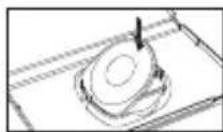
Place the disc as shown, gently pressing downwards until it clicks into place. Storing the disc incorrectly may result in damage.
HEALTH WARNING
Always play in a well lit environment. Take regular breaks, 15 minutes every hour. Discontinue playing if you experience dizziness, nausea, fatigue or have a headache. Some individuals are sensitive to flashing or flickering lights or geometric shapes and patterns, may have an undetected epileptic condition and may experience epileptic seizures when watching television or playing videogames. Consult your doctor before playing videogames if you have an epileptic condition and immediately should you experience any of the following symptoms whilst playing: altered vision, muscle twitching, other involuntary movement, loss of awareness, confusion and/or convulsions.
PIRACY
The PSP™ system and this disc contain technical protection mechanisms designed to prevent the unauthorised reproduction of the copyright works present on the disc. The unauthorised use of registered trademarks or the unauthorised reproduction of copyright works by circumventing these mechanisms or otherwise is prohibited by law.
If you have any information about pirate product or methods used to circumvent our technical protection measures please email anti-piracy@eu.playstation.com or call your local Customer Service number given at the back of this manual.
ULES-01586
FOR PERSONAL USE ONLY: this software is licensed for play on authorised PSP ™ (PlayStation ® Portable) systems only. All unauthorised access, use or transfer of the product or its underlying copyright and trademark works is prohibited. See eu.playstation.com/terms for full usage rights. Library programs ©1997-2013 Sony Computer Entertainment Inc. exclusively licensed to Sony Computer Entertainment Europe (SCEE). RESALE AND RENTAL ARE PROHIBITED UNLESS EXPRESSLY AUTHORISED BY SCEE. PlayStation ™ Network, PlayStation ® Store and PlayStation ® Home subject to terms of use and not available in all countries and languages (eu.playstation.com/terms). Broadband internet service required. Users are responsible for broadband access fees. Charges apply for some content. Users must be 7 years or older and users under 18 require parental consent. Licensed for sale only in Australia and New Zealand.
“-”, “PlayStation”, “P” and “●” are trademarks or registered trademarks of Sony Computer Entertainment Inc.
FIFA 14 © 2013 Electronic Arts Inc. Published by EA Swiss SARL. Developed by Electronic Arts. Manufactured in Austria. All rights reserved.
SYSTEM SOFTWARE UPDATES
This PSP™Game includes System Software update data for the PSP™ system. An update will be required if an "update request" message is displayed on-screen at game start-up.
Performing a System Software update
The update data is displayed with the icon shown here on the Home Menu.

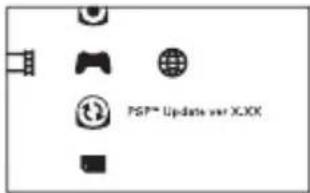
By following the on-screen instructions, you can update the System Software of the PSP™ system. Before performing the update, check the version number of the update data.
- During an update, do not remove the AC Adaptor.
- During an update, do not turn off the power or remove the PSP™Game.
- Do not cancel the update before completion as this may cause damage to the PSP™ system.
Checking that the update was successful
Select "Settings" from the Home Menu, and then select the "System Settings" option. Select "System Information" and if the "System Software" version number displayed on-screen matches the version number of the update data, then the update was successful.
For details on System Software updates for the PSP™ system, refer to the following website: eu.playstation.com
PARENTAL CONTROL
This PSP™ Game software has a preset Parental Control Level based on its content. You can set the Parental Control Level on the PSP™ system to restrict the playback of a PSP™ Game with a Parental Control Level that is higher than the level set on the PSP™ system. For more information, please refer to the PSP™ system Instruction Manual.
This game is classified according to the PEGI rating system. The PEGI rating marks and content descriptors are displayed on the game package (except where, by law, another rating system applies). The relationship between the PEGI rating system and the Parental Control Level is as follows:
PARENTAL CONTROL LEVEL
9
7
5
3
2
AGE GROUP
Restricted to 18 and over
Not suitable for under 15 unless accompanied by an adult
Recommended for mature players
Parental guidance recommended
General
In rare cases, the Parental Control Level of this product may be higher than the age rating which applies in your country, because of differences in the age rating systems in the various countries in which this product is sold. You may need to reset the Parental Control Level on your PSP™ system to enable play.
CONTENTS
3 STARTING THE GAME
4 WIRELESS (WLAN) FEATURES
5 COMPLETE CONTROLS
10 SETTING UP THE GAME
10 KICK-OFF
13 CAREER MODE
14 GAME MODES
15 PRACTICE ARENA
15 AD HOC
15 MY FIFA 14
15 EA SPORTS™ EXTRAS
16 TOTAL FOOTBALLER
16 TEAM MANAGEMENT
18 CONSENT TO USE OF DATA
19 WARRANTY
20 NEED HELP?
STAY IN THE GAME AND REGISTER WITH EA!
Create an Origin Account (EA) and register this game to receive free cheat codes and game hints from EA. Creating an Origin Account (EA) and registering this game is fast and easy!
Visit our website at profile.ea.com and sign up today!
WWW.EASPORTSFOOTBALL.COM
STARTING THE GAME
XMB™ MENU

natural_image
Gray-scale icon set with various camera and printer symbols (no text or labels)Set up the PSP ™ system according to the instructions in its instruction manual. Turn the PSP ™ system on and the POWER indicator will light up green. The XMB ™ Menu will be displayed. Open the disc cover and insert the FIFA 14 disc with the label side facing the rear of the PSP ™ system and then securely close the disc cover.
Select the 🔊 icon from the XMB™ Menu and then select the Ⓧ icon. An image of the software will be displayed. Select the image and press the ◘ button to commence loading.
PLEASE NOTE: the information in this manual was correct at the time of going to print, but some minor changes may have been made late in the product's development. All screenshots for this manual have been taken from the English version of this product, and some screenshots might have been taken from pre-completion screens that differ slightly from those in the finished product.
MEMORY STICK DUO™
To save game settings and progress, insert a Memory Stick Duo TM into the Memory Stick Duo TM slot of the PSP TM system. Saved game data can be loaded from the same Memory Stick Duo TM or any Memory Stick Duo TM containing previously saved game data.
PSP™ SYSTEM
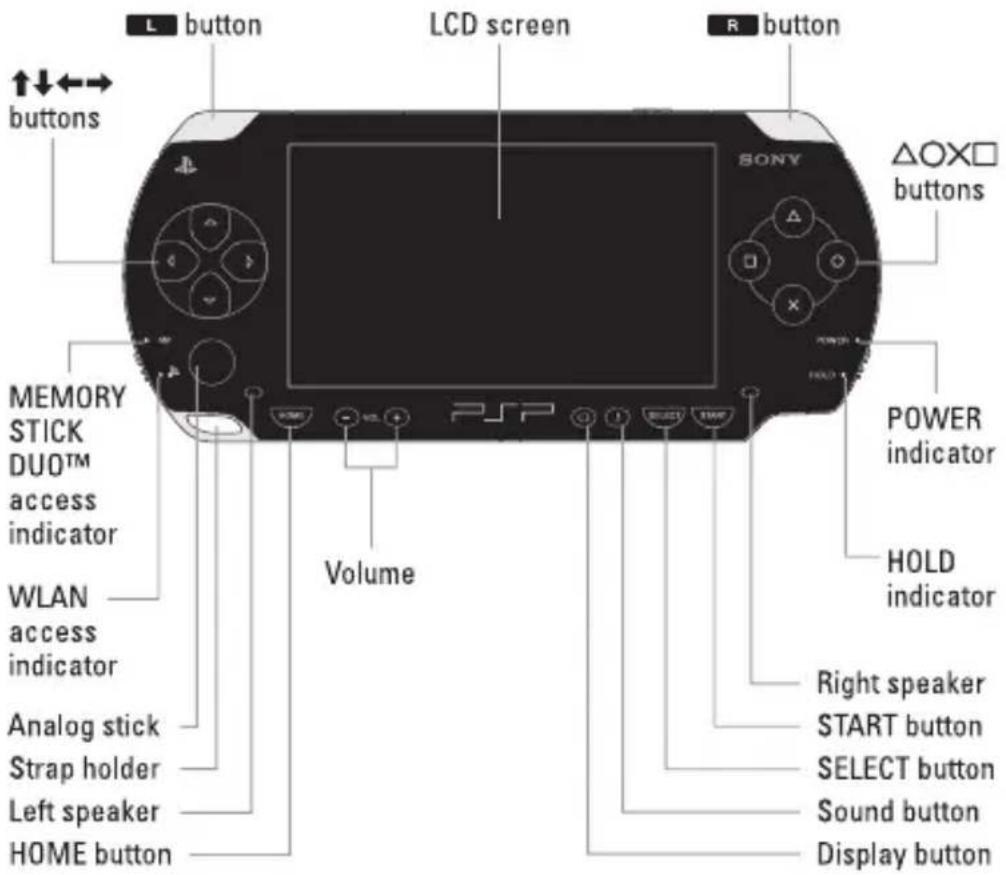
WIRELESS [WLAN] FEATURES
Software titles that support Wireless (WLAN) functionality allow the user to communicate with other PSP™ systems, download data and compete against other users via connection to a Wireless Local Area Network (WLAN).
![EA Fifa 14 (PSP) - WIRELESS [WLAN] FEATURES - 1](/content/2026/06/1269231/images/77ccb2cb7e70813dd8c8df67a6d09f3b35ed338ddad7f8f59267b800252ac73f.jpg)
AD HOC MODE
Ad Hoc Mode is a Wireless (WLAN) feature that allows two or more individual PSP ™ systems to communicate directly with each other.
COMPLETE CONTROLS
Once you've created your profile (see p. 10) go to MY FIFA 14 > GAME SETTINGS > CONTROLS to set up your preferences. Select one of six controller configurations to use and turn Casual Control ON to learn at your own pace (see p. 8).
NOTE: The controls in this manual refer to the Classic Analog Dribble configuration.
BASIC CONTROLS
| Move player | analog stick |
| Sprint | R button (hold) |
OFFENSE
| Knock on (while running) | L button + R button + analog stick |
| Stop ball/Shield ball | analog stick (release) + R button |
| Send teammate on run | R button (double tap) |
| First touch (before receiving the ball) | L button + analog stick |
| Tricks | L button + analog stick |
| Pace control ON/OFF | L button (tap and then hold) |
PASSING AND CROSSING
| Short pass (assisted) | × button |
| Through ball | ▲ button |
| Chipped through ball | L button + ▲ button |
| One-two pass | L button + × button (double tap) |
| Cross/Lob | □ button (hold for increased power) |
| Ground cross | □ button (double tap) |
| Early cross | L button + □ button |
| Early ground cross | L button + □ button (double tap) |
SHOOTING
| Shot/Header | ◎ button |
| Finesse shot | L button + ◎ button |
| Chipped shot | ◎ button + L button (tap while power bar fills) |
FAKES
| Fake shot | ◎ button (hold) + ✗ button(as power bar fills) |
| Fake cross | ■ (hold) button + ✗ button(as power bar fills) |
TRICKS
NOTE: Unless stated, the controls listed below assume that the controlled player is moving vertically upwards.
STANDING MOVES
| Step-over left, kick right | L button +analog stick ←, → |
| Step-over right, kick left | L button +analog stick →, ← |
| Fake kick | L button +analog stick ↑, ↑ |
| Fake left | L button +analog stick ←, ← |
| Fake right | L button +analog stick →, → |
| Pull back | L button +analog stick ↓, ↓ |
| Pull back, go left | L button +analog stick ↓, ↗, ← |
| Pull back, go right | L button +analog stick ↓, ↘, → |
JOGGING MOVES
| Step-over | L button +analog stick ↑, ↑ |
| Lane change left | L button +analog stick ←, ← |
| Lane change right | L button +analog stick →, → |
| Lane change left, cut right | L button +analog stick ←, → |
| Lane change right, cut left | L button +analog stick →, ← |
| 360 left | L button +analog stick ↓, ↗, ← |
| 360 right | L button +analog stick ↓, ↘, → |
| Rainbow left | L button +analog stick ←, ↙, ↑ |
| Rainbow right | L button +analog stick →, ↗, ↑ |
| Flip ball up | L button +analog stick ↑, ↓, ↑ |
DEFENDING
| Switch player | × button |
| Tackle/Clearance | ◎ button |
| Sliding tackle | ■ button |
| Press | ◎ button (hold) |
| Jockey | L button (tap and then hold) |
| Call secondary defender | L button (hold) |
GOALKEEPING
| Move/Aim kick or throw | analog stick |
| Throw | ⊗ button |
| Kick | ■ button/◎ button(hold for increased power) |
| Drop ball | ▲ button |
| Control goalkeeper(when opposition has possession near your goal) | ▲ button |
| Goalkeeper charge | ▲ button (hold) |
SET PIECES
| CORNERS | |
| Lob cross | button (hold for increased power) |
| Driven cross | button (hold for increased power) |
| Low cross | L button + button |
| Short corner | button |
| Call short corner receiver | R button |
FREE KICKS
| Aim | analog stick |
| Shoot | ◎ button (hold for increased power) |
| Driven shot | L button + ◎ button |
| Short pass | ✕ button |
| Lob pass | ☐ button (hold for increased power) |
| Call lay-off man | R button |
| Lay-off man shot | R button (hold) + ◎ button |
| Lay-off man lob pass | R button (hold) + ☐ button(hold for increased power) |
| Lay-off pass into space | R button (hold) + ✗ button(ready for primary kicker's shot) |
| Lay-off man switch sides | R button + analog stick ←/→ |
| Select player in wall(defending team only) | ✕ button |
| Move wall(defending team only) | analog stick ←/→ |
| Jump wall(defending team only) | ☐ button |
| Charge kick(defending team only) | ◎ button |

40.0 M
NOTE: When taking a direct free kick, check the distance indicator to judge whether a shot at goal is the best option with the selected player.
THROW-INS
| Move receiver | analog stick |
| Switch receiver | ⊗ button |
| Leading throw | △ button |
| Direct throw | ◎ button |
| Quick throw-in | R button |
PENALTIES
| Aim kick | analog stick |
| Driven shot | ◎ button(hold for increased power) |
| Placed shot | L button + ◎ button |
| Squat (goalkeeper) | analog stick ↓ |
| Wave arms (goalkeeper) | analog stick ↑ |
| Move/Dive (goalkeeper) | analog stick ←/→ |
CASUAL CONTROLS
If FIFA 14 is a completely new experience for you, then try using casual controls to level the playing field. The smart controls and AI assists provide everything a new player needs to embark on their career.
NOTE: How quickly you pick up the pace is up to you. All the more advanced controls are available for use throughout the game.
ATTACKING
| Smart Pass | ✕ button |
| Shot | ✕ button |
| Engage auto-pilot | analog stick (release) |
DEFENDING
| Switch player | × button |
| Slide tackle | ◎ button |
| Charge ball carrier | ◎ button (hold) |
| Engage auto-pilot | analog stick (release) |
COACHING TIP: Even when in auto-pilot, you're still in charge of passing, shooting, and tackling!
SETTING UP THE GAME
USER PROFILE
Before heading out onto the pitch, it is recommended that you create a user profile. This step is required to save your progress in various game modes to your Memory Stick Duo™. Your profile is available from the main menu (◎ button).
KICK-OFF
Select KICK-OFF to get straight onto the pitch and take on any club or national team in the game. Control the entire team, or get personal as either a pro or the keeper.
KICK-OFF - BE A PRO
Be A Pro lets you take control of a specific player on the field and follow all the action with the player-focused 3rd Person Cam.
PLAYER CAMERA
Live every game with the Player Camera, which provides you with a player-focused view of the action as it unfolds.
BE A PRO CONTROLS
If you're going to play as a pro, you've got to think like one. When your team is on the attack, time your runs and call for the ball at the right time. When defending, ensure you cover any dangers posed by your opponents. Teamwork is everything in football and communication with your teammates is the key to success. Wherever you are on the field, make sure you use the following controls to increase your chances of victory.
| Ask for pass | × button |
| Ask for high pass/cross | ■ button |
| Ask for through ball | ▲ button |
| Ask for shot | ○ button |
| Defensive pressure (when defending) | L button |
INDICATORS
Be A Pro provides many of the same challenges faced by real players. Use the indicators provided to make sure you're in the right place at the right time.

POSITIONING
Knowing where to be on the pitch at any given moment is a must, whatever position you've adopted. In order to improve your positional sense, use the arrows as a guide. Follow them until they disappear to make sure you're in the right place at the right time.

OFFSIDE
To ensure the assistant referee doesn't bring a swift end to another attacking move, make sure you keep an eye out for his flag. When you stray offside, a flag icon appears. To avoid being pulled up, and losing valuable XP, run back past the last defender to get into an onside position.

MARKING
Goals are often scored when opposing players are left unmarked, and it is your responsibility to make sure that doesn't happen. A red ring appears underneath any player with open room that you should be marking. Close in on them as soon as possible!
PERFORMANCE METER
Whether your team is winning or losing, your performance matters. Use the performance meter at the bottom of the screen to measure the success or failure of your hard work. If there's more green than red, you're doing well!
KICK-OFF - BE A KEEPER
Keeper is one of the most important positions on the pitch. In Be A Keeper, you take control of the keeper and must keep your team's net secure! Maintain good positioning in front of the net, make saving shots, cut off crosses, and distribute the ball to your teammates after saves. Stay alert! You cannot afford to fail.
NOTE: There are two camera modes in Be A Keeper. One allows you to follow the ball as the action takes place on the pitch. The other allows you to focus on the goalkeeper and prepare for oncoming attacks. Press the L button to switch between them in order to maintain appropriate positioning on the pitch.
| BE A KEEPER CONTROLS | |
| Save attempt (jump) | × button |
| Save attempt (dive) | ☐ button |
| Toggle camera | L button |
GAME SCREEN
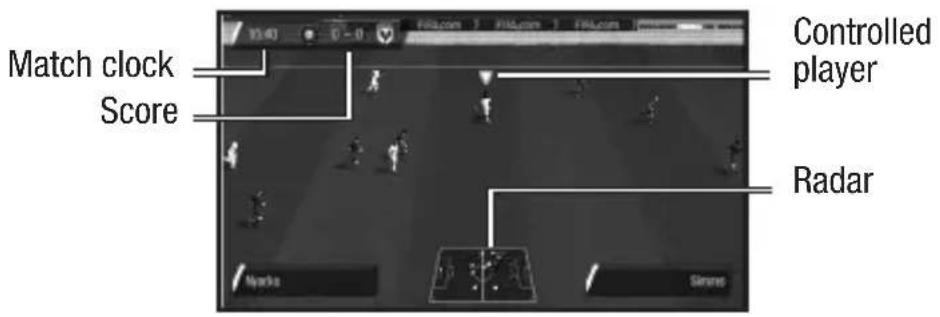
PLAYER STATUS BAR

SUBSTITUTIONS
When the substitution icon appears beside a player's name, it's probably best to sub him out of the game.
SAVING AND LOADING
If you've enabled the Autosave feature (via your Profile) your files are saved automatically to the Memory Stick Duo™ when you begin playing, start a management career, enter a Tournament, or exit a match.
To save your progress manually, access the save option in the mode's main menu and follow the on-screen instructions. To save squad changes, select SAVE SQUADS from the MY FIFA 14/TEAM MANAGEMENT menu.
▶ To load a saved file, select the load option in the relevant mode.
CAREER MODE
Career Mode is an immersive experience that offers you the chance to play through a lifelong football career. Career Mode is split into three different eras: Player, Player Coach, and Manager. Start as a player and play through all three or start later as coach or manager. Your success in each mode is tracked through the Fame system, so the better you perform the more famous you will become!
PLAYER CAREER
Create your own player, or take control of a single professional footballer as you play in multiple leagues, cups, and continental competitions to boost your form rating and ultimately represent your national team.
PLAYER COACH CAREER
Player Coach is the perfect stepping-stone from being a player to being a manager. Take control of the entire team whilst still playing as your individual footballer. Your main focus will be on the team having full control of everything from the formation, playing style, and training, to who is on the bench. As a coach, you do not have to worry about the financial side, such as transfers and ticket prices. The manager is in charge of your team's finances.
MANAGER CAREER
Take control of the financial side of your favorite club and please the Board. Rise to prominence with the Fame system by keeping the team in top form by winning prestigious cup matches and your League!
FAME
Throughout Career Mode, Fame is the measure of how well known you are in the football world. Fame points are needed to progress through the eight levels of Fame. Meet challenges and perform well to earn points. Rising to the occasion will also give you benefits. Check out the Fame screen in Career Mode for your current level and its benefits.
GAME MODES
THE SEASON
The Season allows you to guide your favorite club through an entire season. Over the course of your game calendar, play through multiple domestic and continental competitions. This mode tracks statistics for each individual competition and rewards match-based objectives. There is no need for finances or training, just pick up and play.
TOURNAMENT
Test your skill in a featured tournament or customize one of your own.
CHALLENGES
Put yourself in the boots of some well-known players in a variety of testing scenarios.
FOOTBALL IQ
Prove you're as skilled with your mind as you are with your feet to unlock new game content.
NOTE: Local Game questions are all about your team and the league they're in. National Cup focuses on the country your team is from, and International Championships cover the entire world of football.
How to play:
Once the first question has been thrown at you, select DRIBBLE to take the question or PASS to pass the ball and get a new question. Note that passes go to an open teammate who is behind you, so passing a lot moves the ball slowly back toward your own goal.
Select the button corresponding to your chosen answer on-screen. If you answer incorrectly, the opposition takes control of the ball and moves it closer to your goal. Answer a question correctly and you'll move the ball up the pitch toward the opposition's goal.
When you're close enough to the goal, you can try to score by answering two questions in a row—one to shoot and one to get it past the keeper. The difficulty of the questions depends on the level of knowledge you display.
PRACTICE ARENA
Select TEAM PRACTICE to perfect your skills in Free Practice, Corners, Free Kicks, or Penalty Shoot-Out, or select KEEPER PRACTICE to hone your skills as the team's last line of defense.
AD HOC
Team up with or compete against friends in FIFA 14's Ad Hoc mode. Nearby players with a PSP™ system and FIFA 14 can select AD HOC to join the Ad Hoc Lobby. From here, press the ☐ button to create a game, adjust game options, and then select DONE. Once everyone has joined the Ad Hoc Room and are ready to play, select START GAME.
To make any last minute adjustments, press the ☐ button while in the Ad Hoc Lobby to return to the Change Settings screen.
MY FIFA 14
Customize your football experience and view your FIFA 14 career history in My FIFA 14. From here, you can manage your team, adjust various game settings, create a unique player, and purchase various items at the My FIFA 14 Store using points earned in-game. You can also admire your achievements by viewing trophies and accomplishments. Lastly, this is the place to go to create, edit, and load profiles.
▶ Take note that changes in My FIFA 14 cannot be saved or loaded without an active profile.
EA SPORTS™ EXTRAS
Select FIFA 14 FAQ if you are curious about the series, or want to find the answers to the game's design and functionality. The EA™ Media Center returns, allowing you to add custom tracks to your playing experience, and you can view the talented team behind the title by viewing the game's credits.
TOTAL FOOTBALLER
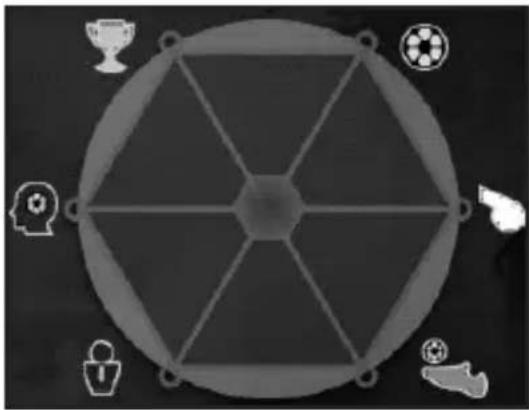
natural_image
Circular diagram with geometric shapes and icons (no text or labels)While in the main menu, press the Ⓞ button to check out the Total Footballer graph and view your usage of the various modes in FIFA 14. Play more modes to gain a more complete profile. Additionally, while in this screen you can press the SELECT button for help and advice on obtaining a more complete profile.
TEAM MANAGEMENT
Before heading out to the pitch use this option to ensure your squad is at its best. Here you can view and adjust your Starting 11, review and reset your Kick Takers, set your Formation and choose from over a dozen Team Styles. This menu is available in the My FIFA 14 main menu options and prior to every match no matter which mode you are playing. If Auto-save is disabled, you will need to manually save your changes by selecting SAVE SQUADS in the MY FIFA 14/TEAM MANAGEMENT menu.
CUSTOM FORMATIONS
Create your own formation to pull off that tactical masterstroke. To build a formation, select MY FIFA 14 > TEAM MANAGEMENT > CUSTOM FORMATION and follow these instructions:
- Choose an empty save slot.
- Select a formation to use as a base.
- Select a position (the green box shows the area it currently covers).
- Use the analog stick to move the selected position within the formation, and then select DONE (if you move a position outside the green box, it will turn into a new position).
NOTE: A position's color changes according to which part of the pitch it's in: red for strikers, green for midfielders, blue for defenders, and goalkeeper is always indicated in yellow.
-
To define a position's attacking runs, select a position from the list, use the analog stick to choose a direction, and press the ✗ button to confirm each one (you can assign up to two directions to each position).
-
Select DONE and then assign defensive runs in the same way as attacking ones.
-
Name your custom formation and press the START button. Select the team you wish to assign this formation to and select DONE.
CONSENT TO USE OF DATA
EA knows that you care how information about you is collected, used and shared, and we appreciate your trust that we will do so carefully and sensibly. Information about our customers is an important part of our business, and EA would never sell your personally identifiable information to anyone. We and agents acting on our behalf do not share information that personally identifies you without your consent, except in rare instances where disclosure is required by law or to enforce EA's legal rights.
When you play this game, EA and its affiliates may collect and store data from your computer or device. Information that EA and its affiliates collect includes technical and related information regarding your computer (or device) and operating system (including Internet Protocol Address and device ID(s)), as well as information about your Software usage (including but not limited to successful installation and/or removal), gameplay and usage statistics, system interactions and peripheral hardware. If you play this game offline, this data will be transmitted to EA and its affiliates if and when you access online features and/or services. EA and its affiliates may use this information to improve their products and services, provide services to and communicate with you (including for marketing purposes), facilitate the provision of software updates, dynamically served content, and software support, and to trouble-shoot bugs or otherwise enhance your experience. IF YOU DO NOT CONSENT TO THIS COLLECTION AND USE OF INFORMATION, DO NOT INSTALL OR USE THE SOFTWARE.
This and all other data provided to EA and/or collected by EA in connection with your installation and use of this Software is collected, used, stored and transmitted by EA Inc., 209 Redwood Shores Parkway, Redwood City, CA 94065 in accordance with EA's Privacy Policy at www.ea.com. To the extent that anything in this section conflicts or is inconsistent with EA's Privacy Policy, the terms of the Privacy Policy shall control.
WARRANTY
Limited Warranty
Electronic Arts Pty Ltd warrants to the original purchaser of this computer software product that the recording media on which the software programs are recorded will be free from defects in materials and workmanship for 90 days from the date of purchase. During such period defective media will be replaced if the original product is returned to Electronic Arts at the below address, together with a dated proof of purchase, a statement describing the defects, the faulty media and your return address. This warranty does not apply to the software program themselves, which are provided “as is”, nor does it apply to media which has been subject to misuse, damage or excessive wear. The benefits to you by this Limited Warranty are in addition to other rights or remedies you may have under a law in relation to the goods to which the warranty relates. Our goods come with guarantees that cannot be excluded under the Australian Consumer Law. You are entitled to a replacement or refund for a major failure and for compensation for any other reasonably foreseeable loss or damage. You are also entitled to have the goods repaired or replaced if the goods fail to be of acceptable quality and the failure does not amount to a major failure. Goods presented for repair may be replaced by refurbished goods of the same type rather than being repaired. Refurbished parts may be used to repair the goods. If you have any questions please contact Electronic Arts on the details below. If goods covered by this Limited Warranty are defective, Electronic Arts will reimburse you for the reasonable direct costs which you incur in making your claim subject to you providing us with original receipts of those direct costs with your claim.
Electronic Arts Customer Warranty, P.O. Box 6301, St Kilda Rd Central, Melbourne, Victoria, Australia 8008. Tel: 1902 261 600, easupport@8-bit.com.au
Returns After Warranty
Electronic Arts will replace user-damaged media, current stocks allowing, if the original media is returned with a cheque or postal order for AUD\$15 per disc, payable to Electronic Arts Pty Ltd. If you have any queries on warranty replacements or user-damaged discs or manuals, please e-mail us on easupport@8-bit.com.au Please remember to include full details of the defect, your name, Non-P.O. Box address and, where possible, a daytime telephone number where we can contact you.
NEED HELP?
EA Customer Support on the Internet
Problem? Question? If you are having problems with your game, we are here to help.
Australia
Online Customer
Support:
https://help.ea.com/
Electronic Arts Australia Support Hotline:
1902 261 600*
*8-bit calls charged at \$2.48 per minute, GST inc. Calls from Mobile & Public phones higher (If you are under 18 years of age parental consent is required). Operating hours from 9am - 6pm Monday to Friday, as well as pre-recorded information 24 hours a day.
South Africa
Online Customer
Support:
https://help.ea.com/
Telephone 0860
EAHELP/324357 if you are dialing from within South Africa, and
+27 83 918 0083 from
outside South Africa, GMT + 2, available
Monday to Thursday
8:30 am to 6pm and
Friday 8:30 am to
5pm. Available on;
Skype, Google Talk,
AIM, Yahoo Messenger,
AOL and MXIT. Listed as Electronic Arts
South Africa (some instances may be
electronicartssouthafrica)
New Zealand
Online Customer
Support:
https://help.ea.com/
Electronic Arts New
Zealand, Games Hotline:
090058885*
(If you are under 18
years of age parental
consent required). *Calls
charged at \$1.99 per
minute inc GST 7 days a
week 9am - 8pm. Calls
from Mobile & Public
phones are higher.
KEEP UP WITH THE LATEST EA NEWS..!
Check out all the latest EA news, downloads and updates on
www.ea.com/au/news or visit www.ea.com/au to register for an Origin
Account (EA) and get all the latest info and exclusives delivered directly to your inbox.
© 2013 Electronic Arts Inc. EA, EA SPORTS, and the EA SPORTS logo are trademarks of Electronic Arts Inc. Official FIFA licensed product. © The FIFA name and OLP Logo are copyright or trademark protected by FIFA. All rights reserved.
Manufactured under license by Electronic Arts Inc. The Premier League Logo
© The Football Association Premier League Limited 2006. The Premier League Logo is a trade mark of the Football Association Premier League Limited which is registered in the UK and other jurisdictions. The Premier League Club logos are copyright works and registered trademarks of the respective Clubs. All are used with the kind permission of their respective owners. Manufactured under licence from the Football Association Premier League Limited. No association with nor endorsement of this product by any player is intended or implied by the licence granted by the Football Association Premier League Limited to Electronic Arts. All other trademarks are the property of their respective owners.
100512102001
CUSTOMER SERVICE NUMBERS
| 119 56Calls charged at local rate | |
| 04 540,116 Euro/Minute | |
| 604 61Tarif appel local/Lokale kosten | |
| 111 46Po – Pa 9:00 – 17:00 Sony Czech. Tarifováno dle platneých telefonních sazeb. Pro další informace a případnou další pomoc kontaktujte prosím www.playstation.sony.cz nebo volejte telefonní číslo +420 222 864 111283 871 637Po – Pa 10:00 – 18:00 Help Line. Tarifováno dle platneých telefonních sazeb | |
| 31 07support@dk.playstation.com Man–fredag 18–21; Lør–søndag 18–21 | |
| 119 110.79 Euro/min + pvm fi-hotline@nordiskfilm.com maanantai – perjantai 15–21 | |
| 33 23prix d’un appel local – ouvert du lundi au samedi | |
| 779 66dnalhcestueD0,12 Euro/minute | |
| Ελλάδα | 000 28Εθνική Χροσεη |
| 56056All calls charged at national rate | |
| 6626ailatlLun/Ven 8:00 – 18:30 e Sab 8:00 – 13:00: 11,88 centesimi di euro + IVA al minuto Festivi: 4,75 centesimi di euro + IVA al minuto Telefoni cellulari secondo il piano tariffario prescelto | |
| 00363Local rate | |
| 718 47dnałedeNInterlokale kosten | |
| 7442 5dnalaeZEWNational Rate0900 97669Before you call this number, please seek the permission of the person responsible for paying the bill.Call cost $1.50 († GST) per minute | |
| 07 900.55 NOK i startavgift og deretter 0.39 NOK pr. Minutt support@no.playstation.com Man–fredag 15–21; Lør–søndag 12–15 | |
| 01 32lagutroPServiço de Atendimento ao Consumidor/Serviço Técnico | |
| 201 20añapsETarifa nacional | |
| Россия | +7 (095) 238 3632 |
| 52 228egėvSsupport@se.playstation.com Mån–Fre 15–21, Lör–søndag 12–15 | |
| 58 00arezzivShrEdessiuSTarif appel national/Nationaler Tarif/Tariffa Nazionale | |
| UK | 5950 6Calls may be recorded for training purposes |
Please call these Customer Service Numbers only for PSP™ Hardware Support.
- HEALTH WARNING
- PIRACY
- ULES-01586
- SYSTEM SOFTWARE UPDATES
- Performing a System Software update
- Checking that the update was successful
- PARENTAL CONTROL
- PARENTAL CONTROL LEVEL
- AGE GROUP
- Restricted to 18 and over
- Not suitable for under 15 unless accompanied by an adult
- CONTENTS
- STAY IN THE GAME AND REGISTER WITH EA!
- WWW.EASPORTSFOOTBALL.COM
- STARTING THE GAME
- XMB™ MENU
- MEMORY STICK DUO™
- WIRELESS [WLAN] FEATURES
- AD HOC MODE
- COMPLETE CONTROLS
- TRICKS
- SET PIECES
- CASUAL CONTROLS
- SETTING UP THE GAME
- USER PROFILE
- KICK-OFF
- KICK-OFF - BE A PRO
- PLAYER CAMERA
- BE A PRO CONTROLS
- INDICATORS
- POSITIONING
- OFFSIDE
- MARKING
- PERFORMANCE METER
- KICK-OFF - BE A KEEPER
- GAME SCREEN
- PLAYER STATUS BAR
- SUBSTITUTIONS
- SAVING AND LOADING
- CAREER MODE
- PLAYER CAREER
- PLAYER COACH CAREER
- MANAGER CAREER
- FAME
- GAME MODES
- THE SEASON
- TOURNAMENT
- CHALLENGES
- FOOTBALL IQ
- How to play:
- PRACTICE ARENA
- AD HOC
- MY FIFA 14
- EA SPORTS™ EXTRAS
- TOTAL FOOTBALLER
- TEAM MANAGEMENT
- CUSTOM FORMATIONS
- CONSENT TO USE OF DATA
- WARRANTY
- Limited Warranty
- Returns After Warranty
- NEED HELP?
- EA Customer Support on the Internet
- Australia
- South Africa
- New Zealand
- KEEP UP WITH THE LATEST EA NEWS..!
Brand : EA
Model : Fifa 14 (PSP)
Category : Game