
703FL - Water filter Flama - Free user manual and instructions
Find the device manual for free 703FL Flama in PDF.


| Product type | Water filter |
| Brand | Flama |
| Model | 703FL |
| Tank capacity | 3.5 L |
| Dimensions (L x W x H) | 25 x 15 x 30 cm |
| Weight | 0.8 kg |
| Power supply | None (manual) |
| Filtration technology | Activated carbon and ion exchange resin |
| Filtration flow rate | 1.5 L/min |
| Filter lifespan | 2 months or 150 L |
| Tank material | BPA-free plastic |
| Color | White / Transparent |
| Main functions | Reduction of chlorine, lead, limescale, improvement of taste |
| Maintenance and cleaning | Clean the tank with soapy water; change the filter regularly |
| Safety | Compliant with food standards |
| Spare parts / repairability | Replacement filter model FR703 |
| General information | 2-year warranty, made in China |
Frequently Asked Questions - 703FL Flama
User questions about 703FL Flama
0 question about this device. Answer the ones you know or ask your own.
Ask a new question about this device
Download the instructions for your Water filter in PDF format for free! Find your manual 703FL - Flama and take your electronic device back in hand. On this page are published all the documents necessary for the use of your device. 703FL by Flama.
USER MANUAL 703FL Flama
natural_image
Clear glass water heater with a spherical lid and internal components (no text or symbols visible)
natural_image
Transparent glass water heater with a spherical object inside, no visible text or symbolsPURIFICADOR DE ÁGUA
PURIFICADOR DE AGUA
FRIDGE JUG
LA CARAFE DE RÉFRIGÉRATEUR
703 FL
FLAMA
PROVISIONS OF WARRANTY
- Safely keep the sales receipt of this product. When a repair is performed under these circumstances, the technician will ask for the respective receipt. The repair service can only be performed after you provide the receipt to confirm that your device is within the warranty period.
- The warranty period for the device is valid for 2 years from the date of purchase.
- We will repair or replace free of charge within the warranty period any parts that, during normal operation of the device, have been damaged due to proven defect in the material or workmanship.
- This warranty does not cover light bulbs, easily breakable parts made from glass or plastic or any other defects that can harm the device's normal operation.
- We are not responsible for damages caused by the misuse or mishandling of the device, chemical or electrochemical conditions. We will decline any other demands or compensation claims regarding objects that are not integral part of the device.
- The repair service performed under the warranty does not extend the warranty period. Only within this period can the repair services under the warranty be performed. The warranty is only valid for the first buyer of the device and is not transferable to others.
- The warranty expires if any repairs, modifications or parts replacement have been attempted by unauthorized persons.
- All expenses and risks concerning transportation to our factory or vice-versa shall always be on account of the buyer.
- Each Aqua Optima filter/cartdridge is optimised for 150L of water filtration, a month's use for the typical family. This warranty doesn't cover Aqua Optima filter/cartdridge of all jugs and kettles, except when verified defects in manufacture.
PROVISIONS OF WARRANTY
To obtain our Technical Repair service during the 24 month warranty period after the date of purchase, you are required to:
- Present the product's invoice/sales receipt, with the model and serial number (where possible).
Note: Not presenting the above mentioned documents, will not allow for the repair service under the warranty.
CONDITIONS DE GARANTIE
CONDITIONS DE GARANTIE
natural_image
Line drawing of a hand pouring liquid into a container with tubing (no text or symbols)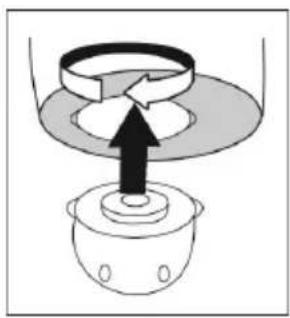
natural_image
Diagram of a mechanical device with a central component and an upward arrow, no text or symbols present.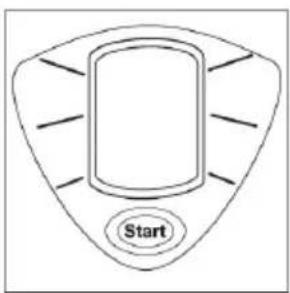
natural_image
Illustration of hands holding a circular object with a black arrow pointing to it (no text or symbols)natural_image
Line drawing of hands performing a task on a cylindrical object (no text or symbols)
natural_image
Diagram of a mechanical assembly with a central component and a base, showing no text or symbols.LIMPEZA
natural_image
Line drawing of hands performing a task with a curved object inside a container (no text or symbols)
natural_image
Diagram of a mechanical device with a central component and an upward arrow, no text or symbols present.
natural_image
Hand holding a small object with circular elements, partially covered by a circular base (no text or symbols visible)natural_image
Line drawing of hands performing a medical procedure on a patient's chest (no text or symbols)
natural_image
Simple line drawing of a mechanical device with an upward arrow indicating motion (no text or symbols)LIMPIEZA
I. Top compartment (cartridge holder)
2. Cartridge filter
3. Spout
4. Lid handle
5. Lid
6. Electronic cartridge reminder
7. Easy release button
8. Spout cover
GETTING THE BEST FROM YOUR NEW FRIDGE JUG...
• Empty the water out of the family jug after first use
To clean away any deposits that are left in the fridge jug after the manufacturing process.
- Cartridge
PLEASE NOTE: It is quite normal to see black particles in the bottom of the cartridge pack and in the top compartment when in use. Please be assured that these particles are not harmful to you or your filter jug and you should not be concerned if you see any
USING
Filtering your water improves the taste and appearance of beverages by reducing limescale, lead, chlorine and other impurities.
Before use
I. Remove cartridge from the packet and soak in a bowl of water for 20 minutes.
2. Take the top compartment (the cartridge holder) out of the fridge jug by pulling the cartridge holder easy release button 7 forward and lift upwards.
3. Insert the cartridge into the top compartment from the bottom and twist clockwise to lock in place.
4. Replace the top compartment (cartridge holder), back into the jug and click into place.

natural_image
Line drawing of hands washing a cup with a tube (no text or symbols)
natural_image
Diagram of a mechanical device with a central component and an upward arrow, no text or symbols present.Filling the fridge jug
I. Fill the fridge jug with tap water by lifting off the snap fitting lid.
2. Allow water to filter through system. You should always throw out the first 2 water filtering, when replacing with a new filter / cartridge.
The fridge jug will hold 1.5 litres of filtered water.
Electronic cartridge reminder
After changing the cartridge and for first usage, the counter must be reset.
- Hold the start button for 3 seconds (100% will show on the display and the outer ring will flash). The display will then switch off due to its energy saving device after 3 minutes.
- You can check the life of your cartridge at any time by pressing the start button for 1 second. The reminder will count down from 100% to 25%.
- 25% turns off when the cartridge needs replacing. The outer ring of the display will flash and continue to flash until the cartridge has been changed.
- Reset the reminder as per point 1.


Replacing electronic cartridge reminder
When the cartridge reminder is due for renewal it can easily be removed.
I. Pull both tabs upwards and lift out the cartridge reminder.
2. To refit your new cartridge reminder, slot tabs into the lugs provided and click into place.
Telephone our replacement parts helpline for your new cartridge reminder.

natural_image
Line drawing of hands holding a circular object with a black arrow pointing to it (no text or symbols)WARNING: Unless the cartridge holder is fitted correctly, the jug lid may not close and lock securely.
When to change your cartridge
This depends on water quality and the improvement required. We recommend that you change your cartridge after 1 month.
The electronic reminder on your Flama water filter system will remind you when to change your cartridge.
Replacing your filter cartridge
I. Take the top compartment (the cartridge holder) out of the jug by pulling the cartridge holder easy release button forward and lift upwards.
2. Remove the old cartridge by rotating it anti-clockwise to unlock it.
3. Remove the new cartridge from the packet and soak in a bowl of water for 20 minutes.
4. Insert the new cartridge into the top compartment from the bottom and twist clockwise to lock in place.
5. Replace the top compartment back into the fridge jug and click into place.
6. Fill with tap water. Allow the water to filter through the system. Discard the water and repeat once more.
IMPORTANT : Only use Flama/Aqua Optima cartridge filters. Telephone our replacement parts helpline for assistance.

natural_image
Line drawing of hands performing a medical procedure on a cup (no text or symbols)
natural_image
Simple line drawing of a mechanical device with an upward arrow indicating motion (no text or symbols)CLEANING
Wipe the outside with a damp cloth.
IMPORTANT: Do not use abrasive cleaners on the fridge jug which may scratch the surface.
HELPLINE
If you have any difficulty with your appliance, do not hesitate to call us. We're more likely to be able to help than the store from where you bought it.
Please have the following information ready to enable our staff to deal with your query quickly:
- Name of the product
- Model number as shown on the underside of the appliance.
ENVIRONMENT PROTECTION

This symbol indicates the separate reclamation of electronic and electric equipment.
The main purpose of the separate reclamation of these residues is to reduce the amount of residues to eliminate, to promote the reuse, the recycling and other forms of valuation, in order to reduce its negative effect on the environment.
When this device is no longer it should not be discarded along with other non differentiated urban residues.
The user is responsible for its gratuitous delivery at the existing reclamation installations created for this purpose.
The collection of equipment no longer in use may also be performed by at the point of sale, while purchasing a new equivalent equipment with the same functions.
To get more detailed information on reclamation venues you should consult your City Council or a point of sale of these equipments.

natural_image
Line drawing of hands washing a cup with a tube (no text or symbols)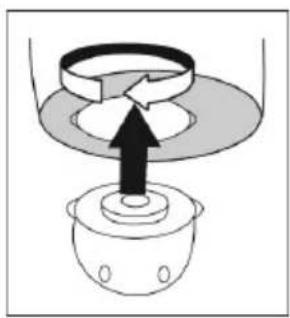
natural_image
Diagram of a mechanical device with a central component and an upward arrow, no text or symbols present.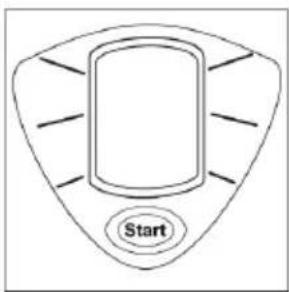
natural_image
Hand holding a small object with circular elements, pressing down on a circular surface (no text or symbols visible)natural_image
Line drawing of hands performing a medical procedure on a patient's chest (no text or symbols)
natural_image
Diagram of a mechanical assembly with a central component and a base, showing no text or symbols.NETTOYAGE
- FLAMA
- PROVISIONS OF WARRANTY
- CONDITIONS DE GARANTIE
- LIMPEZA
- LIMPIEZA
- GETTING THE BEST FROM YOUR NEW FRIDGE JUG...
- • Empty the water out of the family jug after first use
- - Cartridge
- USING
- Before use
- Filling the fridge jug
- Electronic cartridge reminder
- Replacing electronic cartridge reminder
- When to change your cartridge
- Replacing your filter cartridge
- CLEANING
- HELPLINE
- ENVIRONMENT PROTECTION
- NETTOYAGE
Brand : Flama
Model : 703FL
Category : Water filter