
SI C35 CKG - Iron Hotpoint Ariston - Free user manual and instructions
Find the device manual for free SI C35 CKG Hotpoint Ariston in PDF.


| Product Type | Steam Iron |
| Brand | Hotpoint Ariston |
| Model | SI C35 CKG |
| Dimensions (L x W x H) | 30 x 15 x 20 cm |
| Weight | 1.5 kg |
| Power Supply | 220-240 V, 50/60 Hz |
| Power | 2400 W |
| Water Tank Capacity | 300 ml |
| Soleplate | Ceramic soleplate |
| Steam Functions | Continuous steam, steam burst, spray |
| Settings | Variable temperature, adjustable steam |
| Anti-Drip System | Yes |
| Auto Shut-Off | Yes, shut-off after inactivity |
| Cord | Swivel cord, length 2 m |
| Maintenance | Self-cleaning function, descaling recommended |
| Safety | Auto shut-off, thermal fuse |
| Spare Parts | Available: soleplate, water tank, buttons |
| Repairability Index | 7.5 / 10 |
| Color | White/Silver |
Frequently Asked Questions - SI C35 CKG Hotpoint Ariston
User questions about SI C35 CKG Hotpoint Ariston
0 question about this device. Answer the ones you know or ask your own.
Ask a new question about this device
Download the instructions for your Iron in PDF format for free! Find your manual SI C35 CKG - Hotpoint Ariston and take your electronic device back in hand. On this page are published all the documents necessary for the use of your device. SI C35 CKG by Hotpoint Ariston.
USER MANUAL SI C35 CKG Hotpoint Ariston
natural_image
Line drawing of a hot iron with brand logo (Hotpoint, ARISTON) and no visible text or symbols on the device itself.EN Operating instructions
FR Mode d'emploi
A


natural_image
Illustration of a hand pressing down on a mechanical component (no text or symbols visible)
natural_image
Illustration of a hand pouring liquid into a wooden iron with a quill pen (no text or symbols)B

natural_image
Circular diagram with arrows and dots, no readable text or symbols
natural_image
Top-down view of a car interior showing the front wheel, dashboard, and seat (no text or symbols visible)C

natural_image
Circular diagram with arrows and dots, no readable text or symbolsD

natural_image
Close-up of a finger pressing a button on a device (no visible text or symbols)
natural_image
Circular diagram with arrows indicating rotation or direction (no text or symbols)
natural_image
Illustration of a hand ironing an iron with steam rising (no text or symbols)E
natural_image
Circular diagram with arrows indicating rotation or direction (no text or symbols)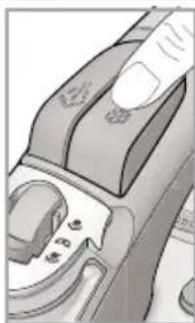
natural_image
Close-up of a mechanical component with no visible text or symbols
natural_image
Illustration of a hand ironing an iron with steam rising (no text or symbols)F

natural_image
Close-up of a hand holding a device with a dial indicator (no visible text or symbols)
natural_image
Illustration of a steam iron with visible cutting edge and base (no text or symbols)G
natural_image
Illustration of a shirt collar with a hanging hook and a close-up of its jacket (no text or symbols)H
OFF

natural_image
Line drawing of a steam iron with a button and handle (no text or symbols)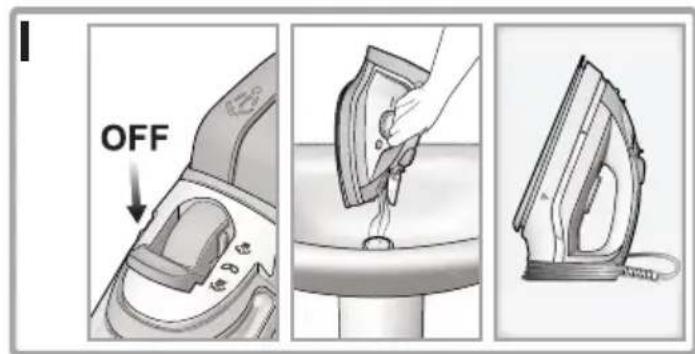


it ISTRUZIONI GENERALI PER LA SICUREZZA
- Do not operate the iron in case of damaged plug, power cord or appliance, or in the presence of visible damage or water leaks from the appliance. In such a case the appliance must be inspected by the Hotpoint authorized technical staff in order to avoid dangerous situations.
- If the appliance was dropped, do not operate it.
- The appliance is not intended to be used by individuals (children included up to 8 years of age) with impaired physical, sensory or mental capabilities, inexpert individuals or individuals who are not familiar with the product, unless they are supervised by a person responsible for their safety, or by individuals who have not received preliminary instructions on the use of the appliance.
• Supervise children to prevent them from playing with the appliance. - Never leave the appliance unattended when the plug is connected into the electrical socket.
- After each use of the appliance, when filling and emptying the water reservoir, as well as when cleaning the appliance, set the steam regulator to Off. Then place the appliance in a stable position, using the stand, and disconnect the plug from the electrical socket.
- The appliance must be used and placed on a stable, flat ho surface. The use on an ironing board is recommended.
- For your safety, all repairs or maintenance operations must be carried out exclusively the Hotpoint authorized technical staff.
- Keep the iron and its cord out of reach of children less than 8 years of age when it is energized or cooling down.
- Cleaning and user maintenance shall not be made by children without supervision.
- When placing the iron on its stand, ensure that the surface on which the stand is placed is stable.
- The plug must be removed from the socket-outlet before the water reservoir is filled with water.
fr CONSIGNES GÉNÉRALES DE SÉCURITÉ
- Shot of steam button
- Spray button
- Steam regulator
- Operating lamp
- Temperature control
- Temperature indicator light
- Power cable holder
INTRODUCTION
Thank you for purchasing our steam iron. In doing so, you have opted for an effective high-performance appliance. We advise you to register this product online at www.hot-point.co.uk to make sure you are entitled to all benefits made available by Hotpoint's Customer Service.
This appliance has been exclusively designed for domestic use and is not intended for industrial use.
Before using the appliance, carefully read the instructions and keep them with care for future use.
GENERAL SAFETY RULES
The safety of your steam iron complies with the technical specifications and standards in force.
The voltage of your electrical mains must correspond to the voltage of the steam iron (220-240 V). Improper connection may result in irreversible damage for the appliance, voiding its warranty.
- Use the appliance only for its intended use as described in this manual.
- This product is intended only for ironing of clothing and household laundry.
- This appliance must be exclusively connected to a grounded socket. When using an extension cord, make sure that a grounded socket is available.
- Inspect the conditions of the power cord on a regular basis.
- Do not fill the water reservoir by holding the appliance directly under the tap. Always use the water measurer supplied with the appliance.
-
Make sure you have disconnected the plug from the electrical socket before filling and emptying the water reservoir and in any case after each
-
Cable winder
- Stand
- Auto-Clean button
- Water reservoir
- Maximum water level
- Soleplate
- Spray nozzle
- Filler hole Lid
Not shown: water measurer
use.
- Disconnect the plug from the socket by holding the plug, and not by pulling the cable.
- Avoid contact between the power cord and the iron plate when hot.
- Do not wind the power cord around the plate when hot. Use the cable winder, instead.
The iron, water and steam coming out of the plate are extremely hot and can burn the skin.
- Before storing the appliance, wait until it has cooled down completely (a steam iron takes about one hour to cool down). Use the handle to store the appliance after use.
- Do not direct the steam towards people or animals and do not iron garments while worn.
- After use, store the appliance in a stable position, using the stand on the back of the iron.
- Never immerse the appliance in water or in any other liquid.
- The appliance must not be left outdoor and exposed to weather agents.
- Never leave or use the appliance in the proximity of flames, ovens, flammable materials or other heat sources.
- Never use the appliance for any purposes other than the ones for which it has been designed.
- In case of suspected damage, immediately disconnect the plug from the electrical socket.
- The manufacturer assumes no responsibility in case of damage resulting from the improper use of the appliance.
BEFORE USE
Before using the appliance for the first time, remove all stickers, protective plastic or cardboard case from the soleplate of the iron.
eh
Make sure that all adhesive parts have been removed from the soleplate with a dampened soft cloth and eliminate any residues or particles from the manufacturing process, by repeatedly filling and emptying the water reservoir.

When switching on the iron for the first time, you may notice an unpleasant odour, a little smoke and some impurities that will disappear in a few minutes. When using the steam function for the first time, do not direct the steam jet on the garments because of the possible presence of manufacturing residues in the steam dispenser.

Never add any perfume, vinegar, starch, scale-removing agents, ironing products or other chemicals in the water reservoir - unless recommended by Hotpoint-Ariston. Never use contaminated water or coming from driers, accumulators or air conditioners.
Filling the water reservoir (A)

We recommend using demineralised water.
Before filling the iron with water, make sure the iron is switched-off and disconnected from the electrical socket.
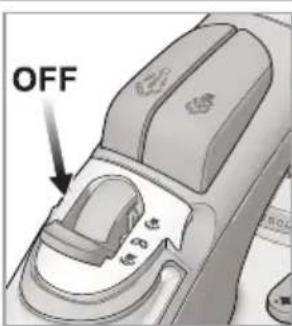
- Set the steam regulator (3) to Off.
- Tilt the iron in such a position to make water entrance easier.
- Open the lid of the filler hole (15) and fill the water reservoir using the water measurer supplied with the iron. Never fill the water reservoir above the maximum water level (12).
- Close the lid of the filling hole.
USING THE IRON
Selecting the temperature and adjusting the steam (B)

- Connect the plug of the appliance into a grounded socket (220-240V).
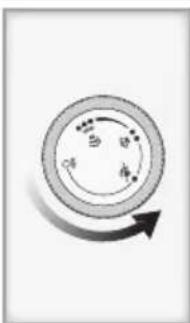
- Use the temperature control (5) to select the desired temperature. If you go from a lower temperature to a higher temperature, the temperature indicator light (6) light up until the selected temperature is reached.
-
When the iron reaches the set temperature, an acoustic signal is emitted and the temperature indicator light goes off.
-
We recommend to check the garment label in order to identify the fabric type. In case of doubts, it is recommended not to use the spray function and iron a hidden corner in order to determine the most appropriate temperature and avoid damaging the fabric. In case of very delicate fabrics, such as silk, wool, and synthetic materials, iron the garment inside out to prevent shiny marks. Start ironing the garments that require a lower temperature, such as synthetic fabrics.

Fabrics with this symbol on the label must not be ironed.
| GARMENT LABEL | FABRIC TYPE | TEMPERATURE INDICATION | STEAM INDICATION |
 | synthetic | Off | |
| [22TA] | silk mixed cotton | Off | |
 | wool mixed wool | ||
 | cotton | ||
 | linen jeans |
- Select the steam level with the steam regulator (3) or move it to Off to iron without steam. When steam ironing, make sure that the water level in the reservoir is at least 14 .
USE

Ironing without steam (C)
- Set the steam regulator (3) to Off (=no steam).
- Select the recommended ironing temperature with the temperature control (5) (see step B and chapter "Using the iron", section "Selecting the temperature and adjusting the steam").
Steam ironing (D)
- Check that the water level in the reservoir is higher than 14 .
- Select the appropriate steam with the steam regulator (3) and the recommended ironing temperature with the temperature selector (5) (see step B and chapter "Using the iron", section "Selecting the temperature and adjusting the steam").

Using the ECO function you can have a 30% of
energy saving and 30% of water saving.
Ironing with shot of steam ( E2 )
The shot of steam function allows you to eliminate persistent wrinkles. You can use this function both in no-steam and steam ironing mode.
- Check that the water level in the reservoir is higher than 14 .
- Select the recommended ironing temperature with the temperature control (5) (see step B and chapter "Using the iron", section "Selecting the temperature and adjusting the steam").
- Press the shot of steam button (1) to obtain an extra steam flow when ironing. If the shot of steam function has not been used for some time, it may be necessary to press the button repeatedly to activate the pump.
FEATURES
Spray function (F)
The spray function is used to dampen the garment in order to remove persistent wrinkles easily. You can use the spray function both in no-steam and steam ironing mode at any temperature.
- Check that the water level in the reservoir is higher than 14 .
- With the iron in horizontal position, press the spray button (2) to dampen the garment.
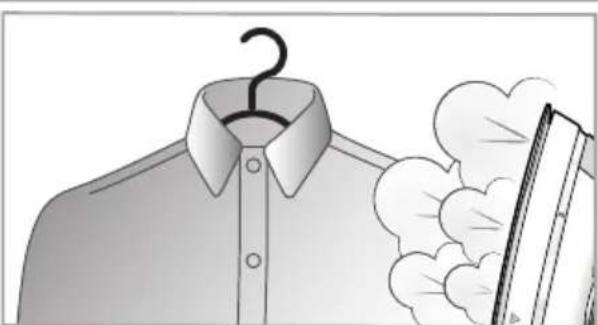
Vertical steam function (G)
The vertical steam function is useful to eliminate wrinkles from hanging garments, curtains, etc. You can use this function by simply placing the iron in vertical position. All functions of the appliance will remain unchanged also in this position (refer to chapter "Use" according to the model).

Do not direct steam towards people or animals and do not iron garments while
Anti-drip function
The iron is provided with anti-drip function in order to automatically interrupt the steam distribution when the temperature is too low, thus preventing water dripping out of the soleplate.

Do not use steam with low temperatures (see chart in step B, chapter "Using the according to the type of iron you are using).
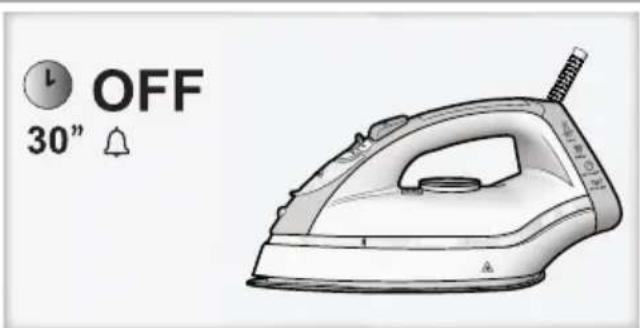
Automatic switch-off function (H)

The automatic switch-off function guarantees total safety.
This function automatically switches off the iron when it is not used for a few minutes. In particular:
- the iron switches off automatically after 30 seconds when left unattended in the ironing position or sideways;
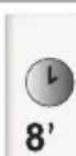
- the iron switches off automatically after 8 minutes when left unattended in the rest position (vertical).
shpt If you leave the iron unattended the operating lamp flashed to inform that the automatic switch-off function is active.
Simply move the iron to switch it back on.

Wait until the temperature indicator light turns off before starting ironing again.
CLEANING AND MAINTENANCE
After use (I)
- Set the steam regulator (3) to Off, disconnect the appliance plug from the electrical socket and let the iron cool down.
- Empty the water reservoir (11).
- Wind the cord around the cable winder (8) and store the iron in vertical position, in a dry safe place.

Never store the iron in horizontal position. Always use the stand at the back of the iron.
Cleaning (J)

Never use aggressive and/or abrasive substances to clean the plastic parts and on soleplate.
- Set the steam regulator (3) to Off, disconnect the appliance plug from the electrical socket and let the iron cool down.
- Use a dry or slightly dampened soft cloth to clean the upper part of the iron.
- For the ordinary cleaning and/or removal of stains or other residues deposited on the plate, clean with a dampened soft cloth and dry.
- Use a dampened cotton tip to eliminate scale in the steam holes that may impair the performance of your iron.

In order to keep the soleplate perfectly smooth and polished, avoid contacts with objects, do not iron sharp objects, such as ins, studs and hinges in order to avoid ching the plate.
- Regularly rinse the reservoir with clean water. After cleaning, always empty the water reservoir.
Auto-Clean Function (K)

If you have been using water from the tap, we recommend starting the Auto-Clean function after ironing.

The use of the Auto-Clean function should not be deemed the same as using deminera-water on a regular basis.
- Check that the appliance is disconnected from the electrical socket and the steam regulator is (3) set to Off.
- Fill the water reservoir (11) up to the maximum water level (12).
- Connect the plug of the appliance into a grounded socket (220-240V).
- Set the temperature to the maximum value with the temperature control (5).
- Wait at least 2 or 3 minutes to warm the iron completely.
- Holding the iron above the sink or a container made of resistant material, press the Auto-Clean button (10) and shake gently.

Steam and boiling water will come out of the soleplate with scale residues and other varieties. Never use plastic containers for action.
-
Switch off the iron and disconnect it from the electrical socket.
-
Set the steam select to the maximum position.
-
Allow water to come out of the holes for at least 30 minutes.
-
Slide the iron gently on a cloth to eliminate any stains from the soleplate.
-
Before using the iron again, press the shot of steam button (1) repeatedly to eliminate any scale residues.

When making this operation, keep the iron away from the garments in order not to them.
TIPS
- Sort the garments out according to the fabric types. This will reduce the need to adjust the temperature according to the different fabrics.
- Start with the garments that require a low ironing temperature and continue with the garments requiring higher ironing temperatures.
- If you are not sure about the composition of the fabric, try ironing a hidden part such as a seam, hem or internal section. Start with a low temperature and gradually increase it until you find the ideal ironing setting.
- When you reduce the iron's temperature to iron delicate garments, wait approximately 2 minutes to let the iron reach the new settings.
- Pure wool (100% wool) garments can be steam-ironed as long as the temperature is set to wool. We recommend using a cotton cloth to prevent any shiny marks on the garment.
- Never iron areas with obvious perspiration marks because the heat will fix the stains and make them permanent.
DISPOSAL OF OLD ELECTRICAL APPLIANCES

The European Directive 2012/19/EU on Waste Electrical and Electronic Equipment (WEEE), requires that old household electrical appliances must not be disposed of in the normal unsorted municipal waste stream.
Old appliances must be collected separately in order to optimise the recovery and of the materials they contain and reduce the human health and the environment.
The crossed out “wheeled bin” symbol on the product reminds you of your obligation, that when you dispose of the appliance it must be separately collected. Consumers should contact their local authority or retailer for information concerning the correct disposal of their old appliance.
TROUBLESHOOTING
Problem Possible cause / Solutions
The soleplate remains cold and does not warm up.
The temperature indicator light turns on and off.
Steam comes out in reduced quantity or does not come out.
Impurities come out from the soleplate and stain the garments.
Water is dripping out of the soleplate
- The plug may not be inserted into the electrical socket, or it may not make contact.
- Check that the temperature is not set to MIN.
- The temperature indicator light turns on to indicate that the iron is getting hot. The indicator light turns off when the set temperature is reached.
• The steam regulator is set to Off.
- Not enough water in the water reservoir. Fill the water reservoir.
- The iron is not sufficiently hot and/or the anti-drip function is active. Replace the iron in vertical position, using the stand, and wait until the temperature indicator light tuns off before starting to iron.
- The plate temperature may be too low due to the excessively frequent activation of the shot of steam button. Slightly increase the interval between steam shots.
- The device is in upright position. Press the steam shot button to check whether any steam emerges
- The iron was leave unattended. The automatic switch-off function is active. Move the iron o switch it back on.
- There may be residues in the vaporisation chamber. Make the cleaning operations (see chapter “Cleaning and maintenance”, section “Auto-Clean Function” according to the model).
- You are using perfume, vinegar, starch, vinegar, starch, scale-removing agents, ironing products or other chemical substances. Remember that these substances may damage the product. Rinse the water reservoir.
- .You are using starch. You can use starch directly on the inside out of the fabrics and in any case never in the water reservoir.
- The garment was not washed correctly or has some soap residues.
- You are ironing a new garment that was not washed for the first time.
- The soleplate temperature may be too low due to the excessively frequent activation of the shot of steam button. Slightly increase the interval between steam shots.
- The soleplate temperature is set to a too-low temperature.
- You have replaced the iron horizontally without emptying it and/or without setting the steam regulator to Off.
- You did not close the lid of the filler hole correctly.
- You have used the shot of steam function with a too-low temperature. We recommend to use these functions with temperatures higher than
● ● ●.
The soleplate is dirty or dark and may stain the fabrics.
- You are using perfume, vinegar, starch, vinegar, starch, scale-removing agents, ironing products or other chemical substances. Remember that these substances may damage the product. Rinse the water reservoir.
- You are using a too-high temperature. Clean the soleplate (see chapter "Cleaning and maintenance", section "Cleaning").
- You are using starch. You can use starch directly on the inside out of the fabrics and in any case never in the water reservoir.
- The garment was not washed correctly or has some soap residues.
- You are ironing a new garment that was not washed for the first time.
The spray function does not work.
- Not enough water in the water reservoir. Fill the water reservoir.
DESCRIPTION DE L'APPAREIL
Função Auto-Clean (K)

Indesit Company SpA Viale Aristide Merloni, 47 60044 Fabriano (AN), Italy
www.indesitcompany.com
ÜLKEYE ÖZGÜ BILGILER KITAPÇIĞIN SON SAYFASINDA BULABILIRSINIZ
- it ISTRUZIONI GENERALI PER LA SICUREZZA
- fr CONSIGNES GÉNÉRALES DE SÉCURITÉ
- INTRODUCTION
- GENERAL SAFETY RULES
- BEFORE USE
- eh
- Filling the water reservoir (A)
- USING THE IRON
- Selecting the temperature and adjusting the steam (B)
- USE
- Ironing without steam (C)
- Steam ironing (D)
- Ironing with shot of steam ( E2 )
- FEATURES
- Spray function (F)
- Vertical steam function (G)
- Anti-drip function
- Automatic switch-off function (H)
- CLEANING AND MAINTENANCE
- After use (I)
- Cleaning (J)
- Auto-Clean Function (K)
- TIPS
- DISPOSAL OF OLD ELECTRICAL APPLIANCES
- TROUBLESHOOTING
- Problem Possible cause / Solutions
- DESCRIPTION DE L'APPAREIL
- Função Auto-Clean (K)
Brand : Hotpoint Ariston
Model : SI C35 CKG
Category : Iron