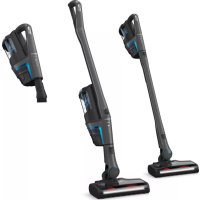
S 5980 - Vacuum without a bag MIELE - Free user manual and instructions
Find the device manual for free S 5980 MIELE in PDF.


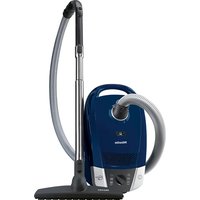
| Product type | Canister vacuum cleaner with bag |
| Brand | Miele |
| Model | S 5980 |
| Power supply | 120 V, 60 Hz |
| Maximum power | 1200 W (estimated) |
| Bag type | Miele G/N bag (disposable) |
| Bag full indicator | Yes, colored indicator |
| Exhaust filter | ACTIVE HEPA (standard), replaceable |
| Motor filter | Dust compartment filter |
| Motorized brush | Powerbrush (SEB 217/236) with wrist shut-off |
| Telescopic tube | Adjustable telescopic electro-tube |
| Cord length | Approx. 9 m (with automatic rewinder) |
| Weight | Approx. 5 kg |
| Dimensions (L x W x H) | Approx. 45 x 25 x 25 cm |
| Included accessories | Crevice nozzle, dusting brush, upholstery tool, filter frame |
| Power adjustment | 5 levels on wrist |
| Standby function | Yes, Standby button with LED |
| Park system | Yes, for storage |
| Safety | Automatic shut-off in case of overheating |
| Maintenance | Cleaning with damp cloth |
| Repairability | Spare parts available from Miele |
Frequently Asked Questions - S 5980 MIELE
User questions about S 5980 MIELE
0 question about this device. Answer the ones you know or ask your own.
Ask a new question about this device
Download the instructions for your Vacuum without a bag in PDF format for free! Find your manual S 5980 - MIELE and take your electronic device back in hand. On this page are published all the documents necessary for the use of your device. S 5980 by MIELE.
USER MANUAL S 5980 MIELE
Operating instructions
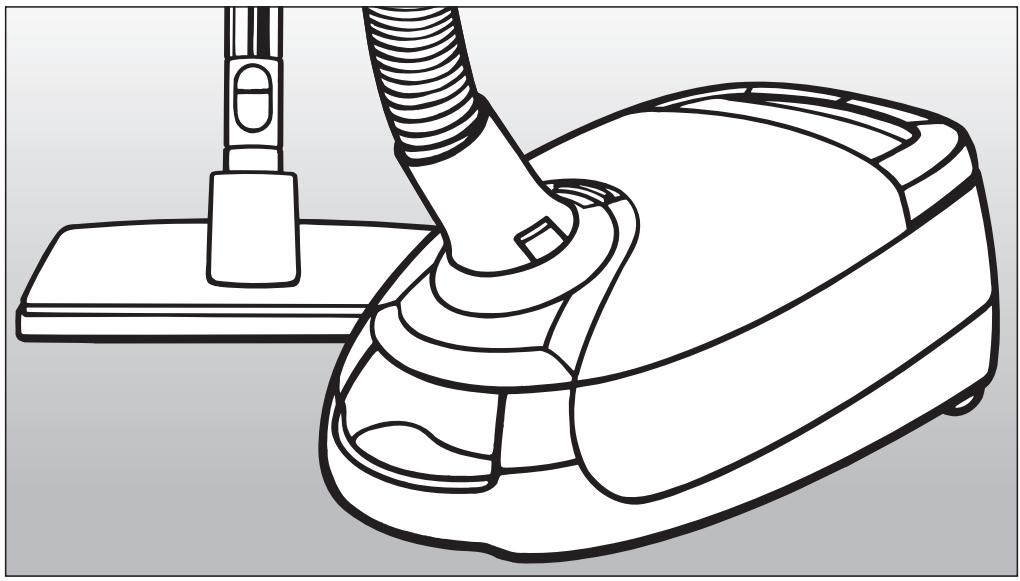
Vacuum cleaner S 5980
To prevent accidents and machine damage, read these instructions before installation and use.
HS11

M.-Nr. 06 806 110
IMPORTANT SAFETY INSTRUCTIONS 4
Guide to the vacuum cleaner 8
Before using the vacuum cleaner 10
Included accessories 14
Use 17
Power cord. 17
Turning the vacuum On and Off. 18
Adjusting the suction 19
Turning the Powerbrush on and off 20
Transport and storage 21
Maintenance and care 23
Purchasing new dustbags and filters 23
Which dustbags and filters are the right ones? 23
When to change the dustbag 24
How to change the dustbag 25
When to change the exhaust filter 26
Replacing the "ACTIVE HEPA" filter 27
Exchanging Exhaust Filters 28
When to change the dust compartment filter 29
How to change the exhaust filter 29
When to change the thread catcher 30
Changing the thread catcher. 30
Cleaning and care 31
Frequently asked questions 32
Technical Service 33
Optional accessories 34
Caring for the environment 39
When using an electrical appliance, basic precautions should always be followed, including the following:
READ ALL INSTRUCTIONS BEFORE USING THIS APPLIANCE
The manufacturer cannot be held responsible for any damage caused by non-compliance of these Important Safety Instructions.
WARNING-
To reduce the risk of fire, electric shock or injury:
Before using
Check the voltage rating of the vacuum cleaner before connecting the power cord to an electrical outlet. Your power source should correspond with the voltage rating plate located on the underside of the vacuum. Use only household AC outlets. Never use DC power sources. If you are not sure of your home's voltage supply, consult a qualified electrician. Connecting the vacuum cleaner to a higher voltage than indicated in these instructions may result in damage to the vacuum cleaner or injury.
To reduce the risk of electric shock, this appliance has a polarized plug (one blade is wider than the other.) This plug will fit in a polarized outlet only one way. If the plug does not fit fully in the outlet, reverse the plug. If it still does not fit, contact a qualified electrician to install the proper outlet. Do not alter the plug in any way.
A damaged vacuum cleaner can be dangerous. Check the packaging, vacuum cleaner and accessories for any signs of damage. Do not use a damaged appliance.
Do not use with a damaged cord or plug. If the appliance is not working as it should, has been dropped, damaged, left outdoors or submerged in water, bring it to a service center.
The electrical outlet must be fitted with a 15 A fuse.
Use
Do not use on people or on animals.
Do not use outdoors or on wet surfaces. Only dry surfaces should be vacuumed.
Use only as described in this manual. Use only Miele recommended accessories.
The manufacturer cannot be held responsible for damage caused by non-compliance with these Important Safety Instructions. This appliance is intended strictly for household use only.
Do not allow the vacuum cleaner to be used as a toy. Close attention is necessary when used near children.
Never use the vacuum cleaner without the dustbag or filters in place. Otherwise it could be damaged.
If a dustbag is not inserted, the dust compartment lid will not close. Do not force it shut.
Do not leave the vacuum plugged in. Unplug it from the outlet when not in use and before servicing.
On the underside of the vacuum handpiece is a metal insert designed to absorb static electricity. Please make certain that your hand remains around this metal insert when vacuuming.
Unwind the cord completely to aid the vacuum in dissipating heat.
This vacuum should not be used to entrap or retain any hazardous materials.
Do not use the vacuum cleaner to pick up liquids or damp dirt. This could impair the electrical safety of the vacuum cleaner. Wait for freshly shampooed carpets to dry.
Do not vacuum anything that is burning or smoking such as cigarettes, matches or hot ashes. The vacuum could catch fire.
Do not vacuum toner dust. Toner, such as that used in printers and photocopiers can conduct electricity.
- Do not use to pick up any flammable or combustible liquids, such as gasoline, or use in areas where they may be present. The vacuum could explode.
Do not vacuum up items which are heavy, hard or have sharp edges. They could cause a blockage and damage the appliance.
Do not pull or carry by the cord, use the cord as a handle, close a door on the cord, or pull the cord around sharp edges or corners. Do not run the appliance over the cord. Keep the cord away from heated surfaces.
IMPORTANT SAFETY INSTRUCTIONS
Do not unplug by pulling on the cord. To unplug, grasp the plug, not the cord.
Do not handle the plug or vacuum with wet hands.
Keep hair, loose clothing, fingers and all parts of the body away from openings and moving parts.
Do not place anything into the openings of the vacuum. Do not use if any openings are blocked; keep them free of dust, lint, hair, or anything that may reduce air flow.
This appliance is equipped with a power cord reel. Hold plug when rewinding onto cord reel. Do not allow plug to whip when rewinding.
Turn off all controls before unplugging.
Use extra care when cleaning on stairs.
Floor attachments, accessories and wands must not be used at head level to avoid injury to eyes and ears.
Monitor the dustbag change indicator and inspect all filters regularly. For best performance, the dustbag and filters should be replaced when necessary. A full bag or blocked filter will reduce the vacuum's suction power. A temperature limiter automatically switches the vacuum cleaner off if it gets too hot, see "Maintenance and care".
Using accessories
The hose and the telescopic wand contain electrical wires. Do not use the vacuum cleaner if these parts are damaged, cut or punctured. Avoid picking up sharp objects. Danger of electric shock!
Unplug the vacuum when changing accessories, especially the Turbobrush, Powerbrush and ACCUNOVA.
To avoid the risk of injury when vacuuming with a Miele Power or Turbobrush do not touch the rotating roller brush. Danger of injury.
The socket on the vacuum cleaner (depending on model) must only be used for the Miele Powerbrush specified for use with this appliance.
Danger of injury. The Miele Powerbrush is a motor driven accessory for use only with Miele vacuum cleaners. The vacuum must not be used with another manufacturer's powerbrush.
Do not use the vacuum without an accessory attached. The rim could be damaged and injuries could result from sharp edges.
Miele dust bags are disposable and intended to be used only once. Do not attempt to reuse them. An over stuffed dustbag will reduce the efficiency of the vacuum.
Only use genuine Miele dustbags with the Miele quality signet and original Miele filter and accessories. Only then will the manufacturer guarantee its safety.
Cleaning, maintenance and repairs
Turn the vacuum off after each use and before every cleaning / maintenance. Pull the plug from the outlet.
Never submerge the vacuum cleaner in water. Clean only with a dry cloth or slightly damp cloth when disconnected from the mains supply. If moisture gets into the appliance there is a risk of electric shock.
The electro-suction hose and the telescopic wand contain electrical wires. The plug connectors must not come in contact with water. These items may only be cleaned with a dry cloth, no moisture can touch them. Danger of electric shock.
Repairs must only be performed by an authorized service agent in accordance with national and local safety regulations. Unauthorized repairs could cause injury or machine damage. The manufacturer cannot be held responsible for unauthorized work.
If the power cord is damaged it should be replaced along with a new cable reel by Miele Technical Service.
Disposing of an old appliance
Before discarding an old vacuum cleaner, please cut off the power cord and render the plug useless. Ensure the appliance presents no danger to children while being stored for disposal.
SAVE THESE INSTRUCTIONS
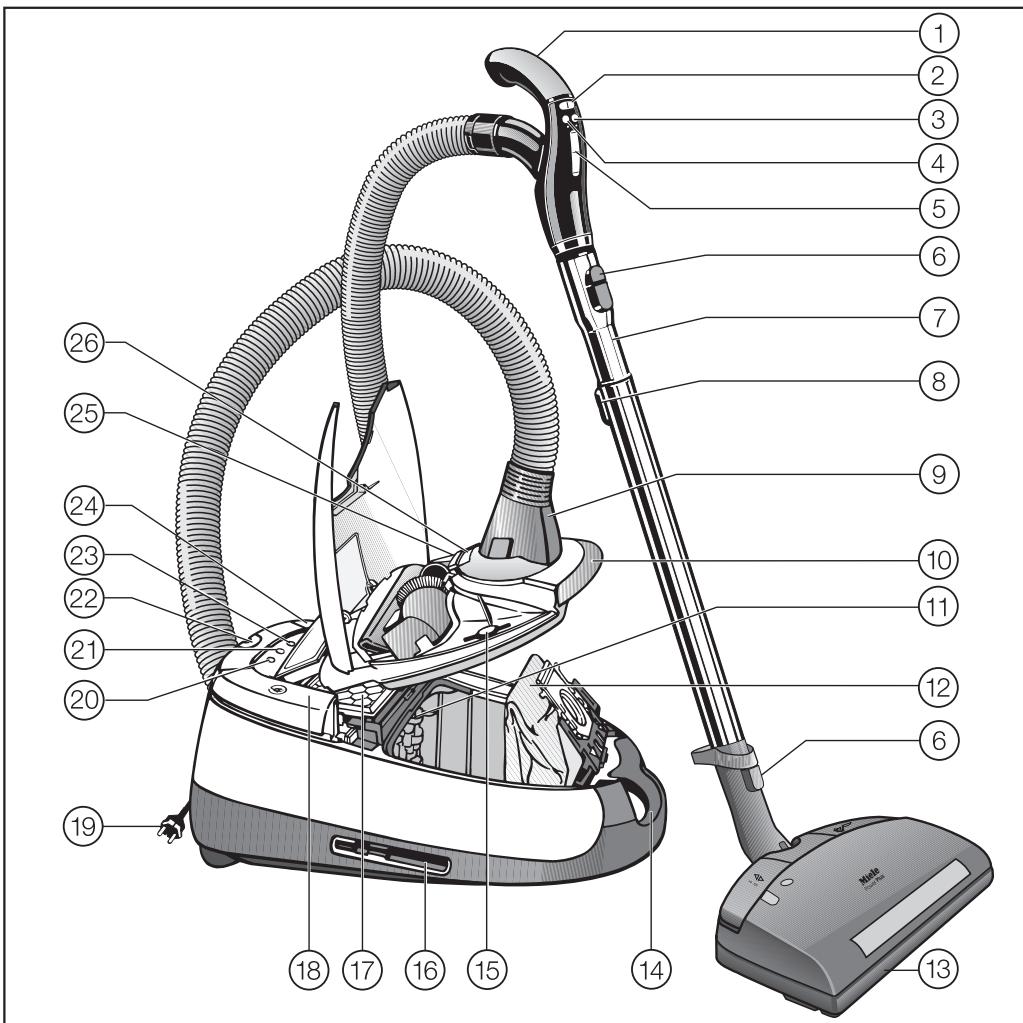
① Hand piece
(2) Suction power buttons + / -
③ On/Off button for Powerbrush with LED
(4) Standby button with LED for vacuum pauses
⑤ Power level display
(6) Lock release button
⑦ Electro Telescopic wand
⑧ Electro Telescopic wand release button
⑨ Elbow
Dust compartment lid release
① Dust compartment filter (motor protection)
Dust bag
(13) Powerbrush (depending on model SEB 217 or SEB 236)
14 Carrying handle
15 Fastener for the powerbrush outlet cap
16 Park-System (on both sides of the vacuum)
Active HEPA filter
18 Cord rewind switch
19 Power cord
20 Exhaust filter display and Reset button
② Thermoindicator
22 Park-System
23 Standby indicator
24 Foot switch On/Off ①
25 Accessory compartment lid release
Dustbag change indicator
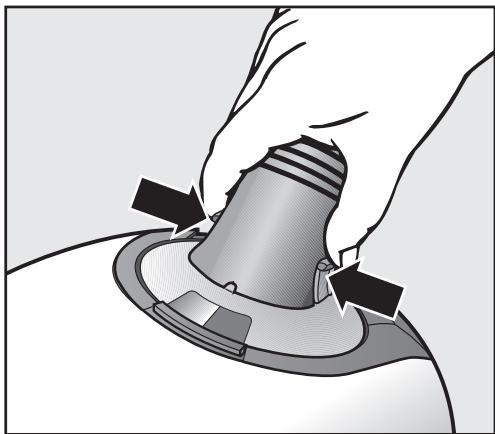
Connecting the Electro hose
Insert the elbow into the suction socket until it clicks. Use the inlet guides to direct insertion.
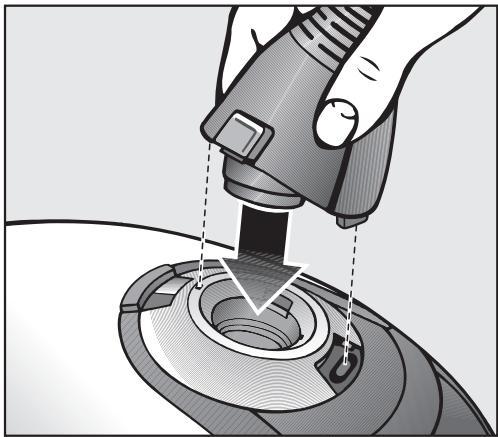
Disconnecting the Electrohose
Press the release buttons at the sides of the elbow and lift the hose from the socket.
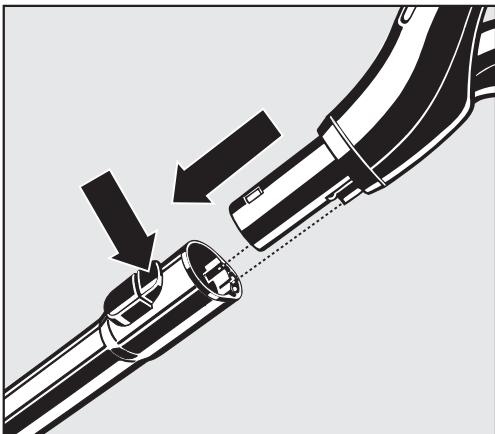
Connecting handpiece and Electro Telescopic wand
Insert the handpiece into the electro telescopic wand until it clicks. Use the inlet guides to direct insertion.
To release the handpiece from the telescopic wand press the locking button (see arrow) and pull the handpiece away from the telescopic wand.
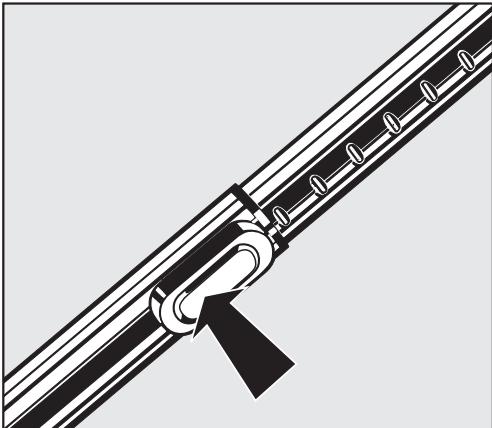
Adjusting the Electro Telescopic suction wand
One part of the electro telescopic wand is fitted inside the other and can be adjusted to your height for comfortable vacuum cleaning.
Press the telescopic wand release button (see arrow) to release the tubes and adjust to the required height.
Using the Powerbrush
The Powerbrush is particularly suitable for cleaning and restoring crushed carpet pile of wall to wall carpeting and floor coverings subject to hard wear, especially in high traffic areas.
The Powerbrush can also be used on smooth floor surfaces.
The standard floor brush or the Miele parquet floorbrush should be used to clean delicate hard flooring and floor surfaces susceptible to scratching.
Do not use the powerbrush on:
- Floors with a variable or uneven surface. The brush could come into contact with the floor and cause damage.
- High quality, hand knotted rugs, for example Berber or Persian rugs, as well as extremely long piled area rugs and carpets. There is a danger of the threads being pulled out. Turn the Powerbrush off to vacuum these types of floor coverings and use only suction.
Connecting the Electro Telescopic wand and the Powerbrush
Insert the Electro Telescopic wand, pointing down, into the Powerbrush until it clicks into place.
For more information on use and maintenance please refer to the instructions supplied with the Powerbrush.
Using the floor brush
Observe the cleaning instructions of the floor manufacturer.
The floor brush is suitable for cleaning carpets, rugs, and hard surfaces. For flooring susceptible to scratching, use one of the special Miele floor brushes (see "Optional accessories").
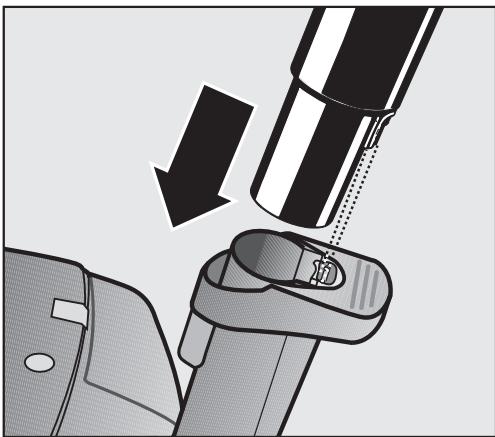
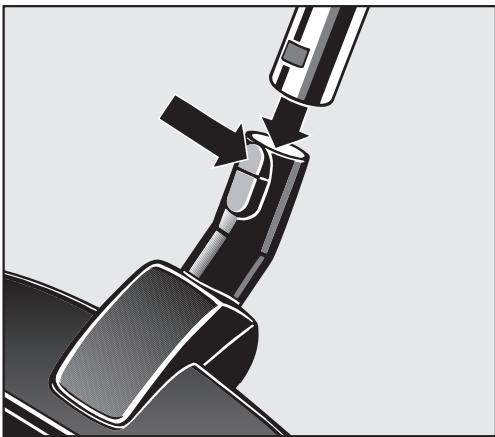
Connecting the Electro Telescopic wand to a floor tool
Fit the Electro Telescopic wand firmly into the floor tool. Turn the wand in opposite directions until it locks with a click.
To release the handpiece from the telescopic wand press the locking button (see arrow) and pull the handpiece away from the telescopic wand.
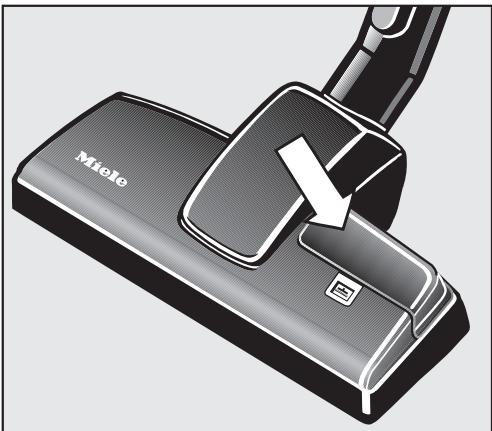
Adjusting the floor brush
For vacuuming carpets and rugs:
Press the foot switch until the symbol shows.
For vacuuming smooth floors:
Press the foot switch until the symbol shows.
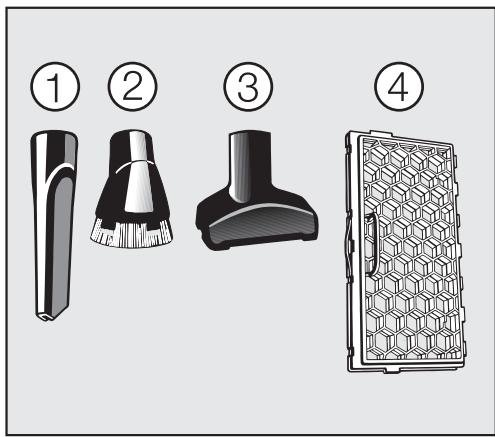
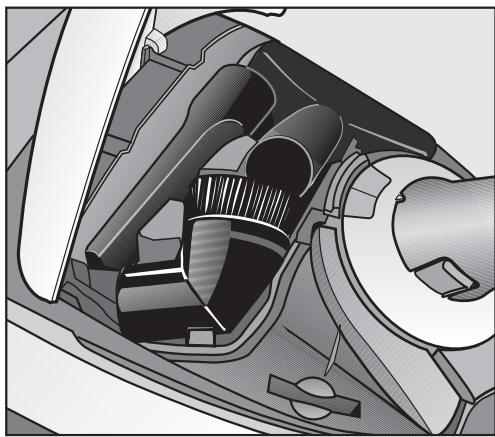
The following accessories are included:
① Crevice nozzle
② Dust brush with natural bristles
③ Upholstery tool
④ Filter frame
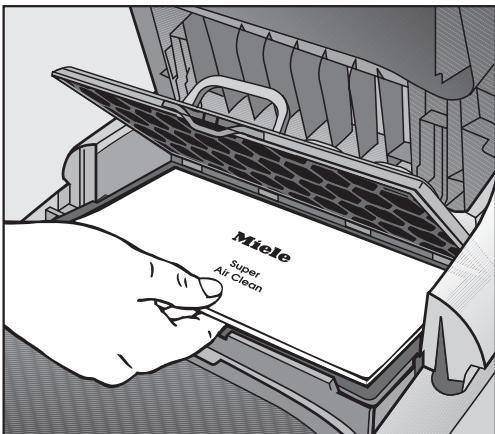
The filter frame is required to replace the Active HEPA filter with a "Super Air Clean" filter (see "Maintenance and care - Exchanging Exhaust Filters").
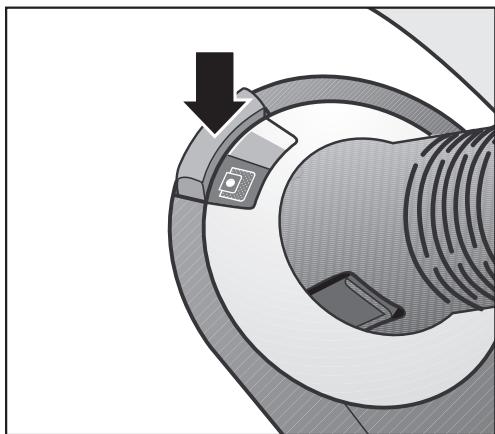
Taking the accessories out
Press the releasing lock (see arrow).
The accessory compartment opens.
Take out the accessory needed.
Close the lid securely.
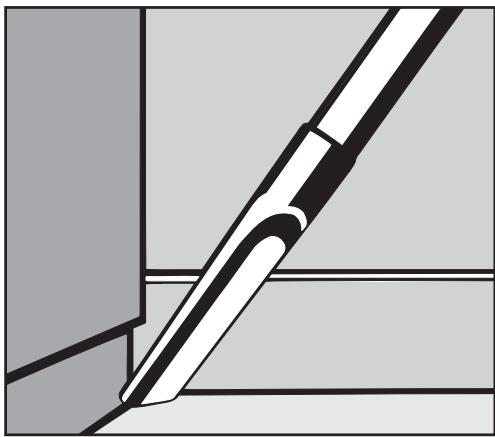
Crevice tool
For cleaning in folds, crevices and corners.
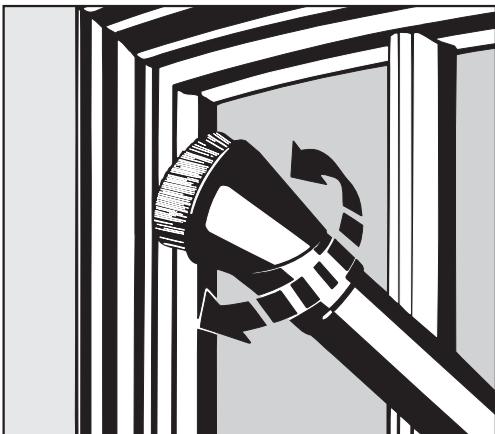
Dust brush with natural bristles
For cleaning moldings, ornate or carved articles, etc.
The head of the dusting brush swivels and can be turned to attain the best cleaning position.
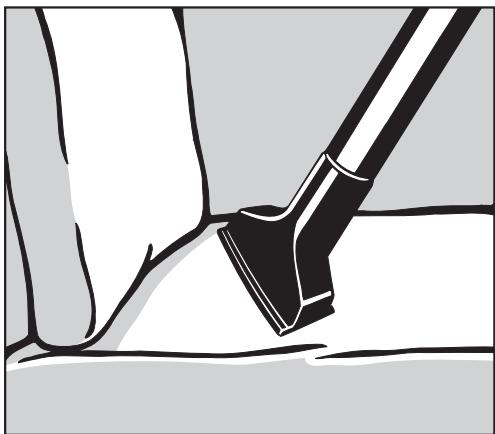
Upholstery tool
For cleaning upholstery, mattresses, cushions, curtains, covers, etc.
Standard floor brush
The standard floor brush can be used for normal cleaning of carpets, rugs, hard surfaces, carpeted stairs, etc.
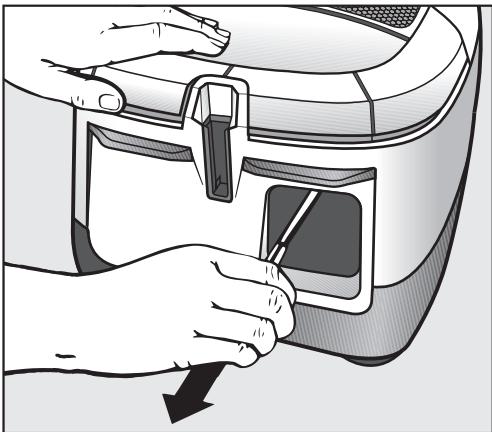
Power cord
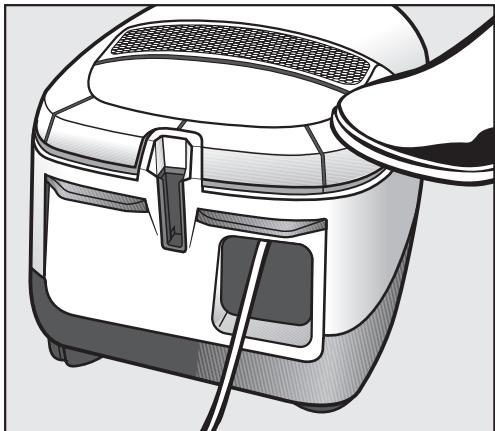
Unwind the cord completely to aid the vacuum in dissipating heat.
Unwinding
Hold the plug and pull out the power cord.
To reduce the risk of electric shock, the vacuum has a polarized plug (one blade is wider than the other). This plug will fit in a polarized outlet only one way. If the plug does not fit fully in the outlet, reverse the plug. If it still does not fit, contact a qualified electrician. Do not alter the plug in any way.
Danger of overheating and damage.
Rewinding
Unplug the vacuum from the outlet.
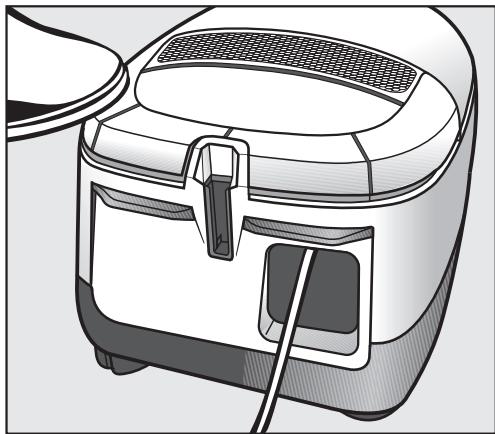
Press the rewind switch briefly - the power cord will rewind automatically. Hold the plug so that it does not whip around when rewinding.
Turning the vacuum On and Off
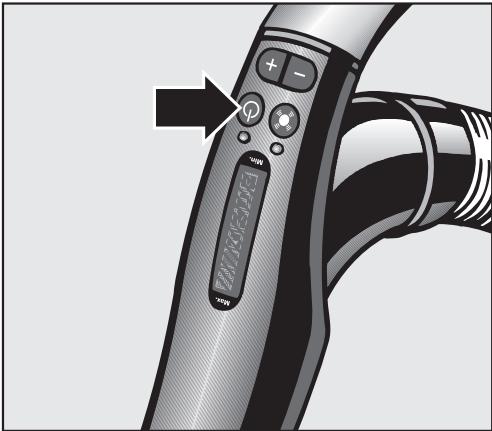
Press the On/Off switch.
On the hand piece the Standby indicator and the LED light.
The vacuum can be switched to the Standby mode during pauses.
Press the Standby button at the handpiece.
The LED at the handpiece lights and the vacuum turns off.
To turn the vacuum on:
Press the Standby button at the hand piece.
The LED goes out and the vacuum cleaner turns on to the last selected power level. The respective symbol on the hand piece lights green.
Press - to select the lowest power level.
Press + to select the highest power level.
Adjusting the suction
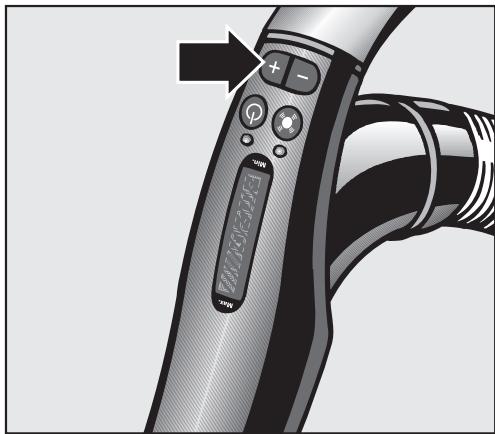
Use the + and - on the handpiece to adjust the suction to suit the type of flooring. By reducing the suction power the floor brush can be pushed easier.
The symbols on the controls indicate the type of use the settings are suitable for.
curtains, lightweight fabrics
upholstery, cushions
thick pile carpets, rugs and runners
energy saving, daily vacuuming with low noise level
lightly soiled textured carpets
textured hard flooring, and for intensive cleaning of carpets
Press and hold the + or - button until the display shows the symbol of the desired power level.
Press the ^+ control to select a higher setting.
Press the - control to select a lower setting.
Each key press of the handpiece is displayed by the indicator light.
While vacuuming
The vacuum cleaner can also stand on its end for vacuuming stairs, drapes etc.
To prevent static electricity your hand must touch the metal inlay on the underside of the vacuum handpiece. Be certain to continuously touch this inlay when vacuuming fine dust, flour or sawdust as these materials are more likely to create a static electricity. To further prevent static discharge while vacuuming, pull the vacuum along by the hose with one hand while continuing to hold the handpiece in the other hand.
Turning the Powerbrush on and off
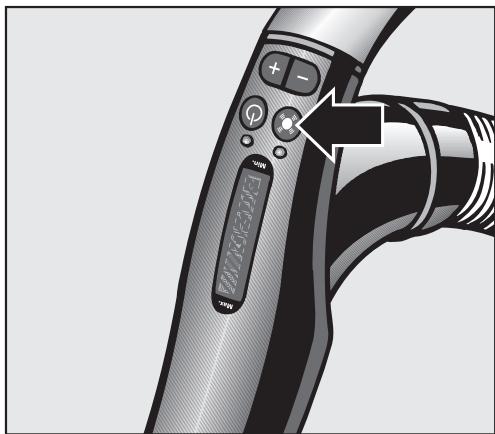
The Powerbrush is turned on and off separately from the vacuum cleaner by pressing the switch on the handpiece.
The button allows you to turn off the Powerbrush, e.g. when moving from wall-to-wall carpeting to a persian rug.
Park-System
(Unable to be used with the powerbrush SEB 236)
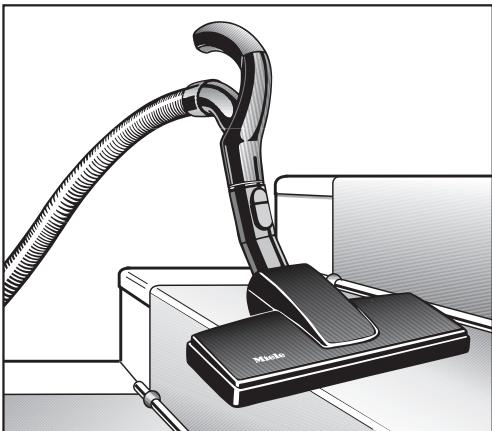
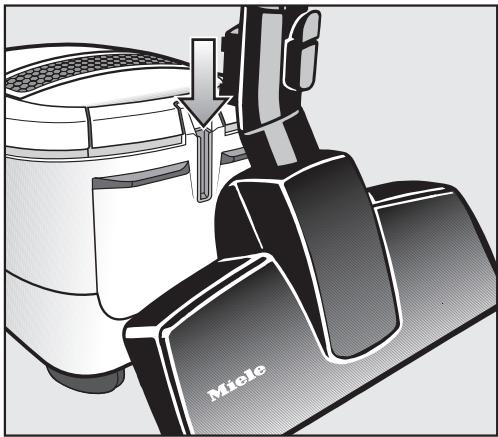
A Park-System has been designed to conveniently park the telescopic wand at the vacuum cleaner during pauses.
A special parking attachment is fitted to all floor brushes. Insert the lower clip on the floor brush into the slot on the end of the vacuum cleaner from above.
Turning on and off with the Park-System
Parking the floor brush while vacuuming automatically turns the vacuum off. Lifting the floor brush out of the Park-System turns the vacuum back on.
Transport and storage
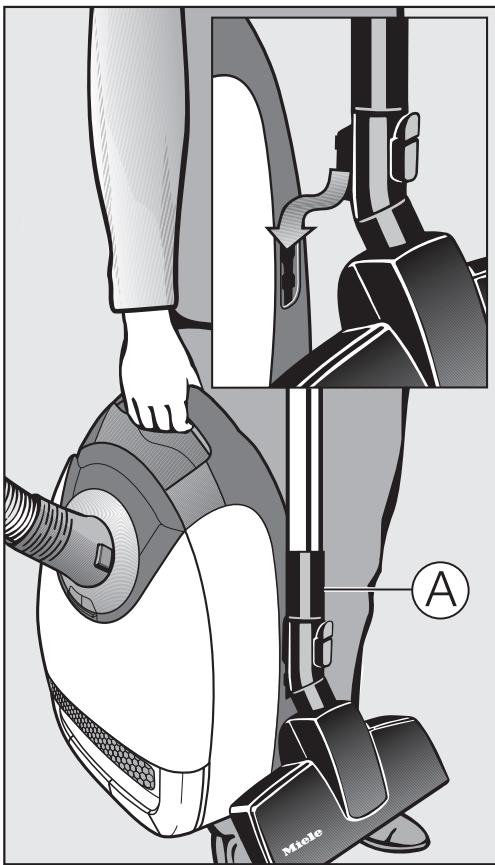
For easier transportation and storage stand the vacuum cleaner vertically.
Insert both clips of the floor brush into the two point holder on either side of the vacuum (this function cannot be used with the Powerbrush SEB 236).
To use one of the following floor tools, the supplied extension wand, A, must be inserted between the floor tool and electro telescopic wand.
- Standard floor brush
-Turbobrush - Hard floor brush
This makes the vacuum easier to carry and store. Push the parts of the electro telescopic wand into each other for greater stability.
Turn off and unplug the vacuum before performing any maintenance work.
The Miele filter system consists of the following three components.
- Dustbag
- Exhaust filter
- Dust compartment filter
Each of these filters must be changed periodically to maintain the vacuum's efficiency.
Use only Miele dustbags with the Miele quality signet and an original Miele filter. This ensures optimum performance of the suction power and also ensures that the bag is used to capacity. The use of non-Miele dustbags could cause damage to the vacuum cleaner.
Purchasing new dustbags and filters
Replacement dustbags and filters can be purchased from any authorized Miele vacuum dealer or Miele.
Which dustbags and filters are the right ones?
Purchase original Miele dustbags with the letter G/N.
A "SUPER air clean" exhaust filter and a dust compartment filter are supplied with every box of Miele dustbags. If you wish to purchase exhaust filters or dust compartment filters separately, please quote the model number on the data plate located underneath the vacuum.
You can replace the exhaust filter supplied with the vacuum cleaner with another type of filter (see "Exchanging exhaust filters").
When to change the dustbag
Change the dustbag when the colored marker in the dustbag change indicator fills the display.
Miele dust bags are disposable and made to be used only once. Do not attempt to reuse.
Checking the dustbag change indicator
- Attach the floor tool to the vacuum cleaner. Perform this test with the floor tool only, since other attachments can affect the function of the dustbag change indicator.
Turn the vacuum cleaner on and select the highest power setting. - Lift the floor brush slightly off the floor. If the marker completely fills the indicator window, the dust bag needs to be changed.
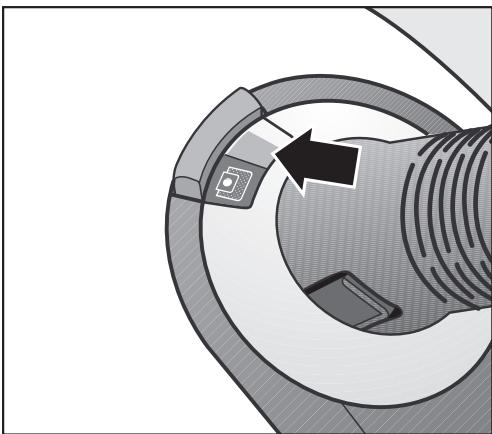
How the dustbag change indicator works
The dustbag change indicator is designed to show when the bag is full of common household dust and measures the amount of air flow through the dustbag. Normal household dust is a mixture of dust, hair, carpet fluff, threads, sand, etc.
However, if fine dust, such as drill dust, sand, plaster or flour is vacuumed, the pores of the dustbag may become blocked. The marker will indicate that the bag is "full" even when it is not. The dustbag should be changed as the suction power is greatly reduced.
If the bag is bulging with pet fur, hair, carpet fluff, etc. the indicator may not register "full". This is because the air flow of the dustbag may still be high enough not to activate the marker to show maximum. The dustbag should still be changed.
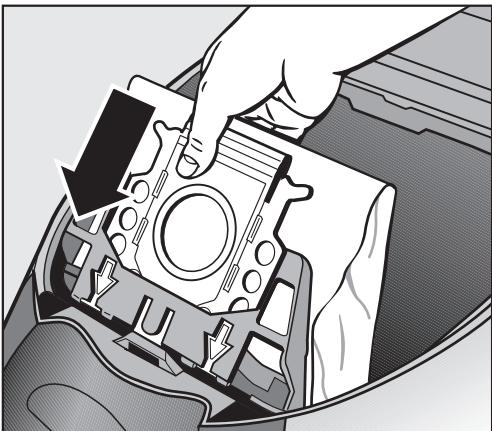
How to change the dustbag
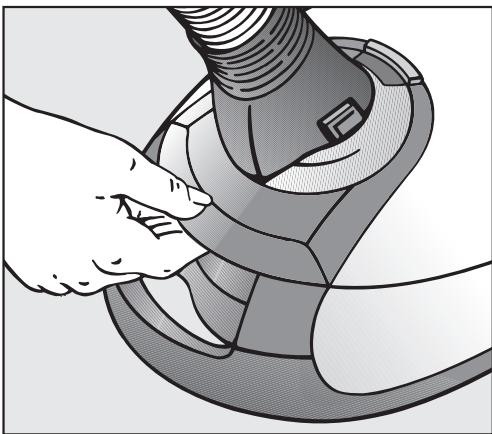
- Lift the release button for the dust compartment lid and raise the lid until it clicks into place.
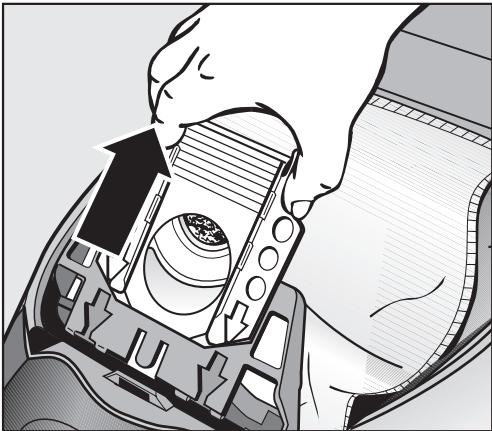
- Grasp the collar by the two finger holes and pull it out from the dustbag holder.
The dustbag has a flap which closes automatically to prevent dust from escaping when the dustbag is removed.
Insert the new dust bag as far as it will go into the dustbag holder. Do not unfold the dustbag when taking it out of the box. Keeping it folded will prevent it from getting caught when the dust compartment lid is closed.
- Close the dust compartment lid until it clicks into place. Take care not to jam the dust bag in the lid.
An empty-operation-barrier blocks the dust compartment lid from closing if no dustbag is inserted or if it is not inserted all the way. Do not force it closed!
When to change the exhaust filter
Always change the ACTIVE HEPA filter when the filter change indicator (Reset button) lights. It is designed to light after approximately 50 hours of operation which is about a year of average use. You can continue to vacuum. However, the suction power will be reduced as will the effectiveness of the filter if it is not replaced.
You can replace the "ACTIVE HEPA" filter supplied with the cleaner with a "SUPER air clean" or an "ACTIVE air clean" filter (see "Exchanging exhaust filters").

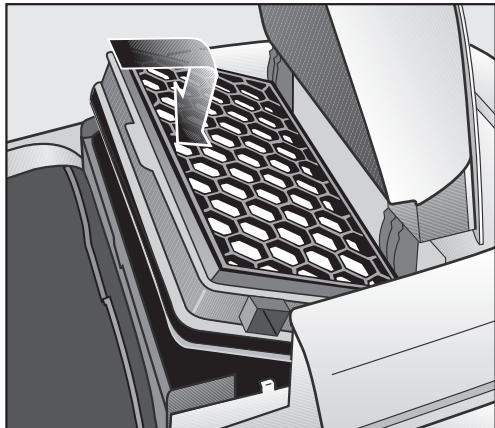
Replacing the "ACTIVE HEPA" filter
Open the dust compartment lid.
Lift and remove the filter.

Insert a new filter and press it downwards.
- Close the dust compartment lid firmly until it clicks into place.
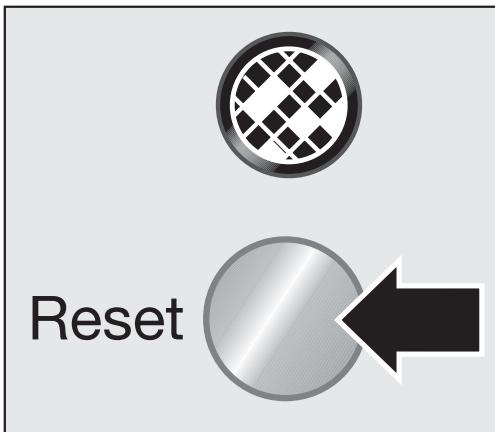
Resetting the filter change indicator
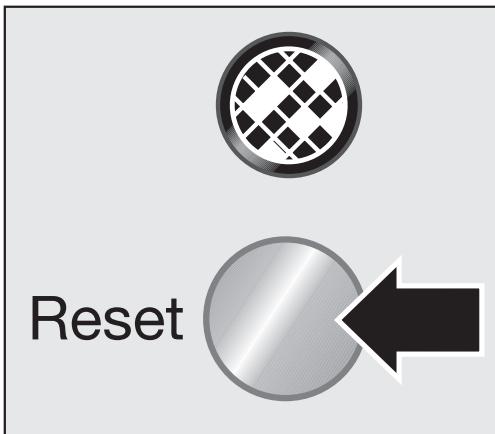
The filter change indicator (Reset button) must be reset each time the filter is replaced. To do this, the vacuum cleaner must be plugged in.
Press and hold the filter change indicator light until it goes out.
The display is now reset.
The indicator is only reset if pressed while lit. If the indicator is pressed while not lit, it will not be reset.
Exchanging Exhaust Filters
You can replace the c ACTIVE HEPA filter which is fitted as standard to your vacuum cleaner with either the:
a Super Air Clean
b Active Air Clean (black)
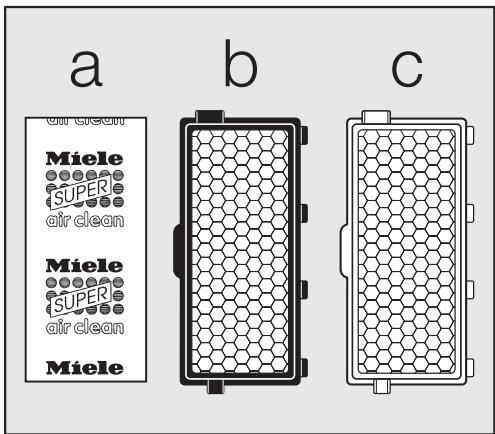
If replacing c with a, please note:
If you use the exhaust filter a you have to insert it into a filter frame, see "Included accessories".
The dust filter reset button is designed for the changing cycle of the Active Air Clean filter and the Active HEPA filter. If a Super Air Clean filter is used, the reset button can be disregarded. The Super Air Clean filter should be changed whenever a new box of Miele dustbags is opened. The indicator goes out when the reset button is pressed.
When to change the dust compartment filter
Change the filter each time you open a new box of genuine Miele dustbags. A dust compartment filter is supplied with every box of Miele dustbags.
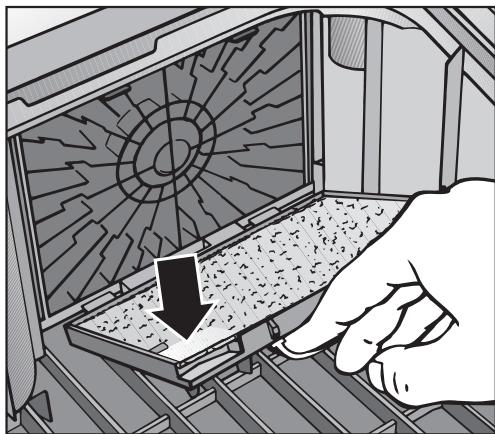
How to change the exhaust filter
Open the dust compartment lid.
- Lift the filter frame and remove the used exhaust filter at the clean side.
Insert the new filter.
Close the filter frame.
When to change the thread catcher
The thread catcher pads on the bottom of the rug and floor tool and the upholstery tool should be replaced as soon as they appear worn.
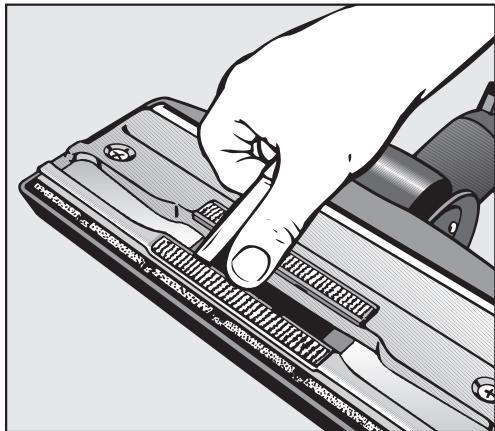
Changing the thread catcher
- Use a knife or similar object to remove the thread catcher pads from the slots.
Press the new thread catchers into the slots.
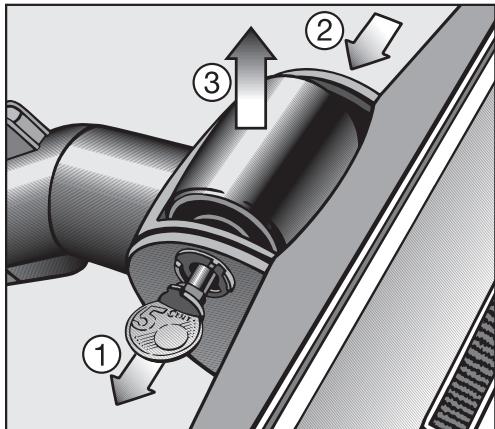
Servicing the floor roller
Use a coin to release the roller pin and pull it out.
Push and take out the roller axle.
Take out the roller.
Remove all threads, hair, etc. and reassemble the parts.
New thread catcher pads can be purchased from any authorized Miele vacuum dealer or Miele.
Turn off the vacuum and unplug it from the outlet before performing any maintenance work.
Vacuum cleaner and accessories
The vacuum cleaner and other plastic accessories can be cleaned with a damp cloth or a cleaner suitable for plastics.
Do not use abrasive, glass or all purpose cleaners! They will damage the surface.
Dust compartment
The dust compartment can, if necessary, be cleaned using a dry cloth, dusting brush or a second vacuum to remove any dust.
Monitor the change dustbag indicator and inspect all filters regularly. Clean or replace them when necessary according to these Operating Instructions.
Do not submerge the vacuum in water! If moisture gets into the appliance there is the risk of an electric shock.
What if the vacuum turns off automatically. A warning light comes on to indicate overheating.
The vacuum has overheated. The temperature limiter automatically turns the vacuum off.
This can occur if, for instance, large articles block the suction tube or when the filter bag is full or contains particles of fine dust. A heavily soiled exhaust or dust compartment filter can also be the cause of overheating. Turn the vacuum off and pull the plug from the outlet.
Check for any blockages and allow the vacuum to cool for 30 minutes.

In the event of a fault which you cannot fix yourself please contact the Miele Service Department at the phone number on the back of this booklet.
Please quote the model type of your appliance.
This can be found on the data plate on the bottom of the vacuum.
Optional accessories
Some models come equipped with one or more of the following accessories.
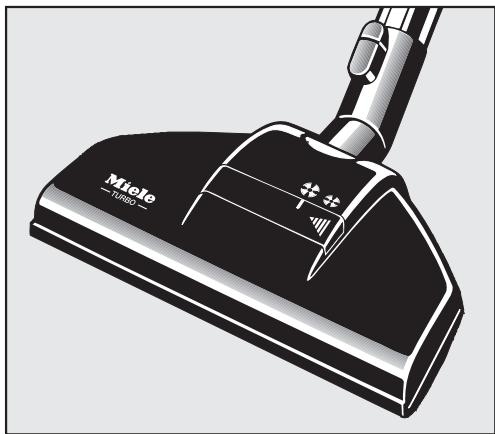
Turbobrush
Observe the cleaning instructions of the floor manufacturer.
The Turbobrush is recommended for cleaning short to medium pile carpeting. It is mechanically driven by the suction power of the vacuum. In addition to dust particles it also removes stubbornly adhered threads, hairs and carpet fluff.
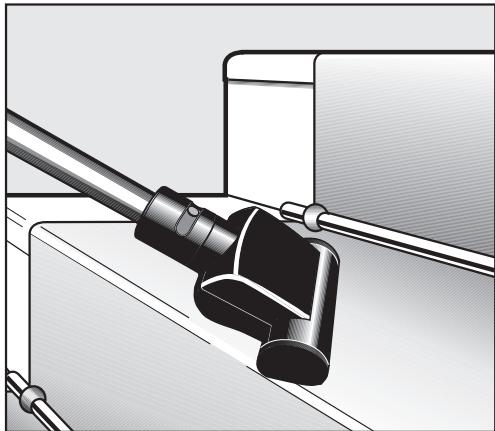
Hand Turbobrush
The Hand Turbobrush is intended for vacuuming upholstery, mattresses, car seats, carpeted stairs and other areas inaccessible with the standard Turbobrush.
Hard floor brush SBB 235-3
To vacuum sturdy hard floors, e.g. tiles and stone floors.
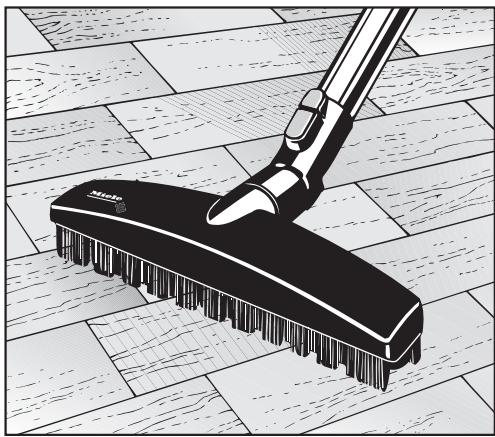
Parquet floor brush
Special brush with natural bristles intended for cleaning parquet and laminate floors, especially those susceptible to scratching.
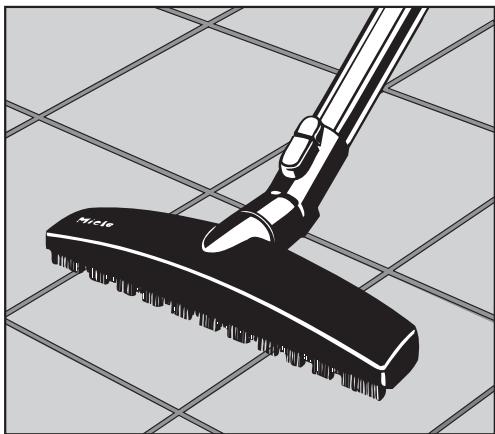
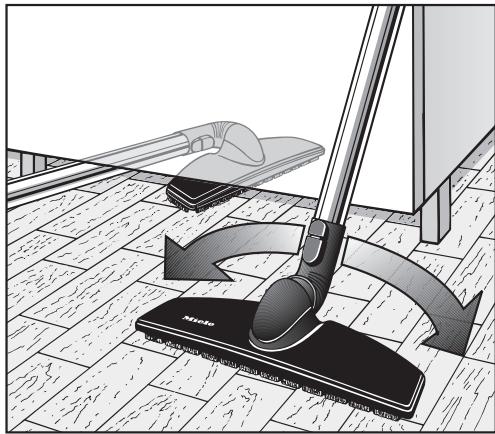
Floor tool SBB 300-3
For cleaning all hard flooring.
Especially suitable for vacuuming niches and tight spaces.
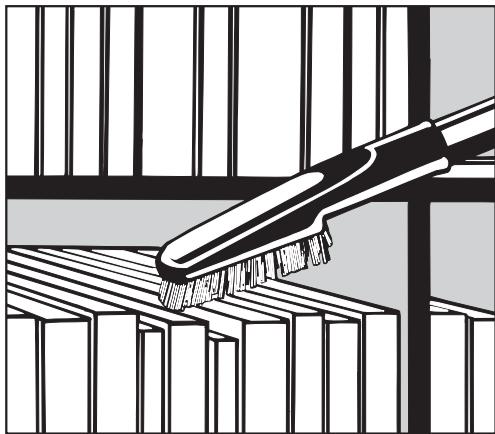
Universal brush
For dusting books, shelves, etc.
Mattress tool
For cleaning deep crevices, mattresses and upholstery.
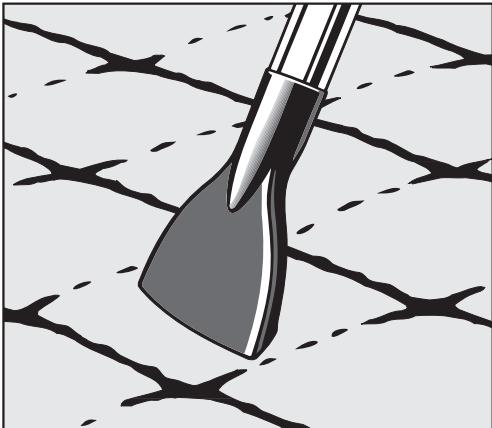
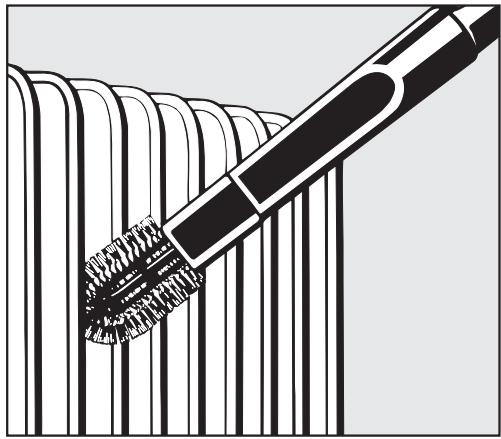
Radiator brush
(only usable with the crevice nozzle)
For cleaning radiators, narrow shelves and crevices.
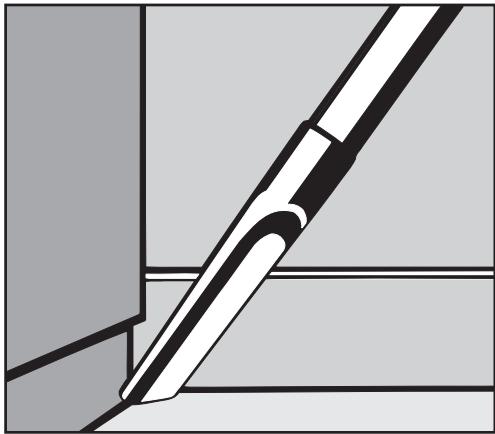
Crevicenozzle 12" (300 mm)
For cleaning in folds, crevices and corners.
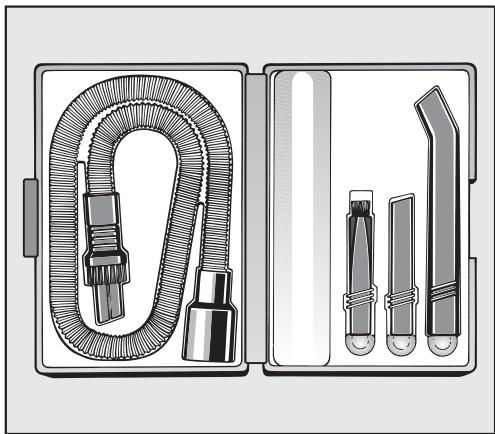
MicroSet
This set is specially designed for cleaning small objects and difficult to reach areas (such as PC keyboards, stereo equipment, carved furniture, ornaments, models, etc).
Accessory set consists of:
- Micro hose with combi nozzle (crevice nozzle and dust brush)
- Micro dust brush
- Micro crevice nozzle
- Extension
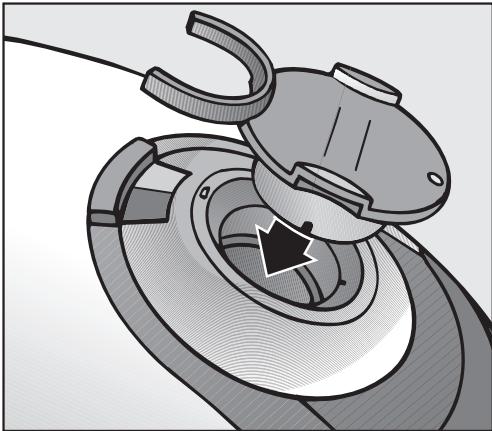
Suction socket cap with active charcoal
To minimize the escape of dust and odor when the hose is removed for transport or storage.
The cap can be fastened to the hose during vacuuming.
Active Air Clean filter
A special active charcoal filter which absorbs odors from the dust collected in the dustbag, helping to prevent odors. The "ACTIVE air clean filter" can be used in place of the existing exhaust filter.
Disposal of the packing materials
The cardboard box and packing materials protect the appliance during shipping. They have been designed to be biodegradable and recyclable.
Ensure that any plastic wrappings, bags, etc. are disposed of safely and kept out of the reach of children. These items pose a danger of suffocation.
Disposing of the dustbag and filters
Genuine Miele dustbags and filters are made of environmentally friendly materials. They can be thrown out with the household trash provided the vacuum has been used only for normal household dust.
Miele, Inc. USA
National Headquarters
9 Independence Way
Princeton, NJ 08540
Phone: 800-843-7231
609-419-9898
Fax: 609-419-4298
www.miele.com
Technical Service & Support Nationwide
Phone: 800-999-1360
Fax: 888-586-8056
Miele Limited CDN
National Headquarters
55G East Beaver Creek Road
Richmond Hill, ON L4B 1E5
Phone: 800-643-5381
905-707-1171
Fax: 905-707-0177
www.miele.ca
info@miele.ca (general enquiries)
professional@miele.ca (commercial
enquiries)
Mielecare National Service
Phone: 800-565-6435
905-850-7456
Fax: 905-850-6651
service@miele.ca (Tech. Service)