
7544BL Biggest Loser - Scale Taylor - Free user manual and instructions
Find the device manual for free 7544BL Biggest Loser Taylor in PDF.


| Product Type | Digital Bathroom Scale |
| Brand | Taylor |
| Model | 7544BL Biggest Loser |
| Color | White/Blue |
| Platform Material | Tempered Glass |
| Display Type | LCD, 1.0-inch digits |
| Weight Capacity | 400 lb / 180 kg |
| Accuracy | 0.2 lb / 0.1 kg |
| Units of Measurement | lb, kg, st |
| Power Source | 2 x CR2032 batteries (included) |
| Auto-On | Yes, step-on activation |
| Auto-Off | Yes, after 10 seconds of inactivity |
| Low Battery Indicator | Yes, displays "Lo" |
| Overload Indicator | Yes, displays "Err" |
| Platform Dimensions | 12.5 x 12.5 x 1.3 inches |
| Product Weight | 3.2 lb |
| Non-Slip Feet | Yes, 4 rubber pads |
| Cleaning | Wipe with damp cloth, mild soap if needed |
| Battery Replacement | Slide out battery compartment on bottom |
| Warranty | Limited 1-year |
Frequently Asked Questions - 7544BL Biggest Loser Taylor
User questions about 7544BL Biggest Loser Taylor
0 question about this device. Answer the ones you know or ask your own.
Ask a new question about this device
Download the instructions for your Scale in PDF format for free! Find your manual 7544BL Biggest Loser - Taylor and take your electronic device back in hand. On this page are published all the documents necessary for the use of your device. 7544BL Biggest Loser by Taylor.
USER MANUAL 7544BL Biggest Loser Taylor
by TAYLOR
Cal-Max ^TM &
Weight Scale
LeadingtheWayinAccuracy®

Thank you for purchasing a Taylor® Precision Product. Your Taylor® an example of superior design and craftsmanship. Please read this in tion manual carefully before use. Keep these instructions handy for fu erence.
For more information on NBC's The Biggest Loser, or to join The Biggest Loser Club, please visit the official Biggest Loser website at www.nbc.com/The_Biggest_Loser.com or www.biggestloserclub.com.
Get a free diet profile at www.biggestloserclub.com
HOW DOES THE CAL-MAX™ SCALE WORK?
The Cal-Max ^TM scale uses your age, height, gender and an activity level setting to calculate the estimated number of calories you can consume a day to maintain your present weight.
This estimation may gradually help you with a weight loss, gain or maintenance plan.
Following are 2 examples of the Ca^TM-Mole in use:
Jack is:
6' tall
35 years old
220 Lbs
- Cal-Max ^TM shows he needs to consume 2542 calories per day to remain at 220 pounds.
- Jack decides to cut 300 calories per day from his diet while maintaining his current activity level.
- In less than 12 days Jack may lose up to a pound (based on calories alone).
- In one year Jack may lose up to 31.29 pounds (based on calories alone).
Jill is:
5'6" tall
32 years old
140 Lbs
- Cal-Max ^TM shows she needs to consume 1708 calories per day to remain at 140 pounds.
- Jill also decides to cut 300 calories per day from her diet while maintaining her current activity level.
- In less than 12 days Jill may lose up to a pound (based on calories alone).
- In one year Jill may lose up to 31.29 pounds (based on calories alone).
IMPORTANT: Proper calorie intake and nutrition are important to maintain a healthy body. Always consult a physician before undertaking any exercise or diet program.
HOW BMI WORKS:
The scale will calculate your BMI based on your height and weight. Once you input your height into the scale and step on the platform, the will display your weight and your BMI number.
Body Mass Index (BMI) - Why Measure It?
Maintaining proper weight is essential to healthy living. Obesity has been linked to a higher risk of heart disease, diabetes and some forms of can The Body Mass Index (BMI) is calculated from a person's weight and he and is a widely accepted measurement of weight by most.
IMPORTANT: Always consult a physician before beginning any diet or exercise program.
BATTERY INFORMATION AND GENERAL SET-UP

- Select weight mode.

- Remove plastic strip. Ensure the + sign is up.

- Position scale on flat surface.
This scale operates on 1 CR2032 lithium battery (installed).
Please remove any plastic strips from the battery compartment before continuing with these instructions.
Some models have a static cling label on the lens to prevent scratching. Please remove before use.
Your scale has been set to measure in pounds and inches (LB). To change the measurement units to kilograms/centimeters, move the switch on the top side of the scale base to the left or right position (kg
When the LCD displays “Lo”, replace the battery with the “+” sign up.
The scale needs to be initialized before first use or after battery replacement. Press lightly on the scale platform.
The display will turn on and off. Your scale is now for use.
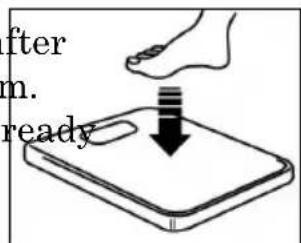
Tap to initialize
PLEASE NOTE: Illustrations are for general reference only. The design and displays for this scale may differ slightly.
Your Taylor® Cal-Max™ Scale will operate as a basic weight-reading scale. No special programming steps are required.
Once the scale is initialized, as previously described, you may simply ste the scale to obtain your current weight. For a weight only reading
- Place the scale on a flat, hard
surface. Carpeted or uneven floors may affect accuracy. - Step onto the scale platform and remain still.
- The scale will count up to your weight. The display will flash three times when the weight is locked. Your weight is now displayed.
- The scale will automatically turn off.

USING YOUR CAL-MAX™ SCALE
In order for your Cal-Max ^™ scale to estimate your calories and compute your BMI number, you must first enter your height, age, gender and an activity level selection. The scale uses these factors to calculate your result. Onscreen prompts will lead you through programming your personal information into the scale. The analyzer will then use this data to compute results.
REMINDER: The scale needs to be initialized after battery installation. scale may also need to be initialized if it is moved or bumped. At all o times, you may directly proceed with the following instructions for programing your personal data into the scale.
To initialize the scale, simply press lightly on the scale platform. The di will turn on and off. Your scale is now ready for use.
HOW TO ENTER PERSONAL DATA INTO MEMORY
This scale has 12 personal memory numbers (1-12). There is also a Guest option for one time use (appears as GUES onscreen). In order to estimate calories and compute BMI, you must first save your height, age, gender an activity level selection into memory. The scale will then use these factors to calculate your Cal-Max and BMI results.
You will store your data into memory before first use, thus eliminating the need to enter your personal information before each reading. (Note: the Guest option does not store the data). To enter your data into memory:
- Press the SET button to turn the scale on. A memory number (1-12) will blink.

- Press the (▲) or (▼) button to select a memory. Press the SET button to confirm. The height digits blink.

flowchart
graph LR
    A["-1"] --> B["→"]
    B --> C["-3"]
    C --> D["→"]
    D --> E["4 8"]
- Press the (▲) or (▼) button to increase / decrease the height value. Press the SET button to confirm displayed height. The gender digits

flowchart
graph LR
    A["4.8"] --> B["5.8"]
    B --> C["SET"]
    C --> D["."]
- Press the (▲) or (▼) button to toggle between the male and female icons. Press the SET button to confirm gender. The age digits blink.

flowchart
graph LR
    A["female icon"] --> B["arrow pointing to male icon"]
    B --> C["→ SET"]
    C --> D["25-"]
- Press the (▲) or (▼) button to increase / decrease the age value. Press the SET button to confirm your age. An activity level number blinks.

flowchart
graph LR
    A["25 AUS"] --> B["35 AUS"]
    B --> C["SET"]
    C --> D["activity level"]
- Press the (▲) or (▼) button to increase / decrease the activity level. Select your Activity Level according to the following guidelines: Level1 Sedentary / very inactive: little or no exercise Level2 Light Activity: exercise/sports 1-3 days a week Level3 Moderate Activity: exercise/sports 4-5 days a week Level4 Very active: exercise/sports 6-7 days a week Level5 Extremely active: physically demanding exercise/sports or athletic training Press SET button to confirm your activity level and all other selection

flowchart
graph LR
    A["activity level"] --> B["activity level"]
    B --> C["SET"]
    C --> D["memory number"]
    D --> E["Allow scale to turn off"]
- The memory number will flash an a “MEMORY” icon will appear. The scale will then automatically turn off. Your personal data is now save memory.
HOW TO TAKE A WEIGHT/CAL-MAX™ READING
- Press the “SET” button while the scale is off. Press the (▲) or (▼) button to until your memory displays. Press the “MEM” button. The memory number flashes.

flowchart
graph LR
    A["MEM"] --> B["•1•"]
    B --> C["•3•"]
    C --> D["•3•"]
- While the memory number flashes, step onto the scale and remain sti The scale will show a "8888" pattern while it computes your weight, rie estimates, and BMI.
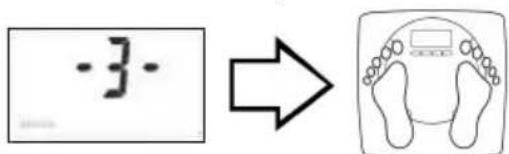
-
The scale will count up to your weight. The display will flash three 1 when the weight is locked. Your weight is now displayed.
-
Your calorie estimate and BMI will appear under the weight. The res are repeated three times, then the scale switches off.

- The scale will turn off automatically if no buttons are pressed within 20 seconds.
TO VIEW PREVIOUS RESULTS
Your scale will save the last measurement results for review. To view previous results:
Press the "Mem" button.
Press the (▲) or (▼) button until your memory number displays.
Press the “Mem” button. Results will appear three times, then the scale switches off.
TO CHANGE PERSONAL DATA:
Press the "Set" button.
Press the (▲) or (▼) button until your memory number displays.
Press the "Set" button. The current data displays. Follow the steps in "F to Enter Personal Data into "Memory" to change the data.
BODY MASS INDEX
Maintaining proper weight is essential to healthy living. Obesity has been lit to a higher risk of heart disease, diabetes and some forms of cancer. The B Mass Index (BMI) is the most widely accepted measurement of weight accord to health professionals. Use the chart below to determine your own BMI by matching your height in the left hand column with your weight in the center. Anyone, male or female, with a BMI of 25 to 29 is considered over weight body mass index of 30 is considered obese. Remember to eat right and exercise
Get a free diet profile at www.biggestloserclub.com
| Height (inches) | Body Weight (pounds) | Overweight | Obese | ||||||||||||||
| 58 | 91 | 96 | 100 | 105 | 110 | 115 | 119 | 124 | 129 | 134 | 138 | 143 | 148 | 153 | 158 | 162 | |
| 59 | 94 | 99 | 104 | 109 | 114 | 119 | 124 | 128 | 133 | 138 | 143 | 148 | 153 | 158 | 163 | 168 | |
| 60 | 97 | 102 | 107 | 112 | 118 | 123 | 128 | 133 | 138 | 143 | 148 | 153 | 158 | 163 | 168 | 174 | |
| 61 | 100 | 106 | 111 | 116 | 122 | 127 | 132 | 137 | 143 | 148 | 153 | 158 | 164 | 169 | 174 | 180 | |
| 62 | 104 | 109 | 115 | 120 | 126 | 131 | 136 | 142 | 147 | 153 | 158 | 164 | 169 | 175 | 180 | 186 | |
| 63 | 107 | 113 | 118 | 124 | 130 | 135 | 141 | 146 | 152 | 158 | 163 | 169 | 175 | 180 | 186 | 191 | |
| 64 | 110 | 116 | 122 | 128 | 134 | 140 | 145 | 151 | 157 | 163 | 169 | 174 | 180 | 186 | 192 | 197 | |
| 65 | 114 | 120 | 126 | 132 | 138 | 144 | 150 | 156 | 162 | 168 | 174 | 180 | 186 | 192 | 198 | 204 | |
| 66 | 118 | 124 | 130 | 136 | 142 | 148 | 155 | 161 | 167 | 173 | 179 | 186 | 192 | 198 | 204 | 210 | |
| 67 | 121 | 127 | 134 | 140 | 146 | 153 | 159 | 166 | 172 | 178 | 185 | 191 | 198 | 204 | 211 | 217 | |
| 68 | 125 | 131 | 138 | 144 | 151 | 158 | 164 | 171 | 177 | 184 | 190 | 197 | 203 | 210 | 216 | 223 | |
| 69 | 128 | 135 | 142 | 149 | 155 | 162 | 169 | 176 | 182 | 189 | 196 | 203 | 209 | 216 | 223 | 230 | |
| 70 | 132 | 139 | 146 | 153 | 160 | 167 | 174 | 181 | 188 | 195 | 202 | 209 | 216 | 222 | 229 | 236 | |
| 71 | 136 | 143 | 150 | 157 | 165 | 172 | 179 | 186 | 193 | 200 | 208 | 215 | 222 | 229 | 236 | 243 | |
| 72 | 140 | 147 | 154 | 162 | 169 | 177 | 184 | 191 | 199 | 206 | 213 | 221 | 228 | 235 | 242 | 250 | |
| 73 | 144 | 151 | 159 | 166 | 174 | 182 | 189 | 197 | 204 | 212 | 219 | 227 | 235 | 242 | 250 | 257 | |
| 74 | 148 | 155 | 163 | 171 | 179 | 186 | 194 | 202 | 210 | 218 | 225 | 233 | 241 | 249 | 256 | 264 | |
| 75 | 152 | 160 | 168 | 176 | 184 | 192 | 200 | 208 | 216 | 224 | 232 | 240 | 248 | 256 | 264 | 272 | |
| 76 | 156 | 164 | 172 | 180 | 189 | 197 | 205 | 213 | 221 | 230 | 238 | 246 | 254 | 263 | 271 | 279 | |
| 19 | 20 | 21 | 22 | 23 | 24 | 25 | 26 | 27 | 28 | 29 | 30 | 31 | 32 | 33 | 34 | ||
Body Mass Index
WARNING INDICATORS


Err = Initialization error. To correct, press on the platform. The display will show "8888", then "0.0", and turn off. Repeat measurement.
Err1 = Overload Warning. The maximum weighing capacity of the scale has been exceeded. Remove the weight immediately; otherwise permanent damage to the scale will occur.
Lo = Low Battery Warning. Replace the CR 2032 lithium battery with the “+” sign up.
PRECAUTIONS
- Clean exposed parts with a soft, slightly damp cloth. To remove stain use a mild soap. Never use detergents, excess water, treated cloths, harsh cleaning agents, or sprays. Do not attempt to lubricate or open scale casing as this will void your warranty.
- Although your scale is designed to be maintenance-free, it contains sensitive electronic parts. Avoid rough treatment. Do not drop, kick, or jump on it. Treat it with care to ensure the best performance.
- This scale is designed to read weights between 25 and 440 lbs / 12 kg. To prevent damage, do not place more than 440 lbs / 200 kg.
- Do not store scale where you store cleaning chemicals. The vapors fro some household products may affect the electronic components of your scale. Do not store scale on its side.
- This scale is an extremely sensitive weighing device. In order to prevent run down of the battery, do not store anything on the scale.
- Do not dispose of batteries in fire. Batteries may explode or leak. Re the battery if the scale will not be used for a long period of time.
- Should operation of the scale freeze up, remove and reinstall the batt to resume operation.
FIVE (5) YEAR LIMITED WARRANTY
This scale is warranted against defects in materials of workmanship for five (5) years for the original purchaser from date of retail purchase. It not cover damages or wear resulting from accident, misuse, abuse, commercial use, or unauthorized adjustment and/or repair. Do not return to retail. Should this scale require service (or replacement at our option) while unt warranty, please pack the item in the original packaging and return it paid, along with store receipt showing date of purchase and a note explaining reason for return to:
Taylor Precision Products
2220 Entrada Del Sol, Suite A
Las Cruces, New Mexico 88001
There are no express warranties except as listed above. This warranty given you specific legal rights, and you may have other rights which vary from state to state.
For additional product information, or warranty information in Canada or elsewhere outside the USA, please contact us through www.taylorusa.com.
©2009 Taylor Precision Products and its affiliated companies, all rights reserved. Taylor® and Leading the Way in Accuracy® are registered trademarks of Taylor Precision Products and its affiliated companies. Cal-Max™ is a trademark of Taylor Precision Products and its affiliated companies. rights reserved.
Made to our exact specifications in China. Not Legal for trade.
- by TAYLOR
- Cal-Max TM &
- Weight Scale
- HOW DOES THE CAL-MAX™ SCALE WORK?
- Following are 2 examples of the CaTM-Mole in use:
- HOW BMI WORKS:
- Body Mass Index (BMI) - Why Measure It?
- BATTERY INFORMATION AND GENERAL SET-UP
- USING YOUR CAL-MAX™ SCALE
- HOW TO ENTER PERSONAL DATA INTO MEMORY
- HOW TO TAKE A WEIGHT/CAL-MAX™ READING
- TO VIEW PREVIOUS RESULTS
- TO CHANGE PERSONAL DATA:
- BODY MASS INDEX
- WARNING INDICATORS
- PRECAUTIONS
- FIVE (5) YEAR LIMITED WARRANTY
Brand : Taylor
Model : 7544BL Biggest Loser
Category : Scale