
Easya - Loudspeaker FOCAL - Free user manual and instructions
Find the device manual for free Easya FOCAL in PDF.


| Product type | Loudspeaker (acoustic speaker) |
| Brand | Focal |
| Model | Easya |
| Category | Compact speaker |
| Dimensions (L x W x D) | 30 x 20 x 25 cm |
| Weight | 5 kg |
| Power supply | Mains 220-240V, 50/60 Hz |
| Power consumption | 50 W |
| Output power | 2 x 30 W RMS |
| Frequency response | 50 Hz – 25 kHz |
| Impedance | 8 Ω |
| Sensitivity | 89 dB |
| Connectivity | RCA input, optical input, Bluetooth 5.0 |
| Main functions | Wireless audio streaming, remote control, volume control |
| Care and cleaning | Clean with a soft, dry cloth. Do not use abrasive products. |
| Safety | Do not expose to moisture. Unplug before cleaning. |
| Spare parts and repairability | Available from Focal after-sales service |
| Included accessories | Power cable, remote control, user manual |
| Warranty | 2 years |
Frequently Asked Questions - Easya FOCAL
User questions about Easya FOCAL
0 question about this device. Answer the ones you know or ask your own.
Ask a new question about this device
Download the instructions for your Loudspeaker in PDF format for free! Find your manual Easya - FOCAL and take your electronic device back in hand. On this page are published all the documents necessary for the use of your device. Easya by FOCAL.
USER MANUAL Easya FOCAL
natural_image
Line drawing of a rectangular industrial or storage unit with a circular opening and a small lock at the bottom (no text or symbols)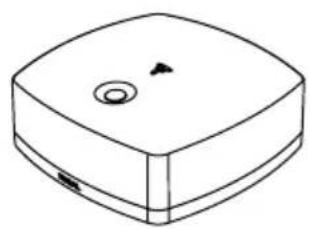
natural_image
Simple line drawing of a rectangular device with a circular top and internal components (no text or symbols)English page 16
Français page 28

 | CAUTIONRISK OF ELECTRIC SHOCKDO NOT OPEN |  |
| The lightning flash with arrowhead symbol within an equilateral triangle, is intended to alert the user to the presence of uninsulated "dangerous voltage" within the product's enclosure that may be of sufficient magnitude to constitute a risk of electric shock to persons. | Caution: to prevent yhe risk of electric shock, do not remove cover (or back). No user-serviceable parts inside. Refer servicing to qualified service personnel. | The exclamation point within an equilateral triangle is intended to alert the user to the presence of important operating and maintenance (servicing) instructions in the literature accompanying the product. |
| 1. Read these instructions.2. Keep these instructions.3. Take these warnings into consideration.4. Follow all the instructions.5. Do not use this equipment around water.6. Only clean with a dry cloth.7. Do not cover ventilation outlets. Follow manufacturer's instructions when installing the equipment.8. Do not install the equipment near a source of heat, a cooker, a heating duct or other equipment (including amplifiers) which gives off heat.9. Respect safety instructions for power cable. The power cable has two prongs, one of which is larger than the other. A grounded cable has two prongs as well as a third which is the grounding prong. The largest or third prong is there for your safety. If the power cable doesn't fit your power socket, seek the advice of an electrician and replace the old power socket.10. Make sure the cable cannot be stepped on, crushed or pinched. Extreme care must be paid to the plug and the connection of the cable to the equipment.11. Only use accessories recommended by the manufacturer.12. Only use handling equipment, legs, tripods, supports or tables recommended by the manufacturer or those sold with the equipment. When using a cart, take extra care when moving the cart and equipment to avoid injury in case something falls.13. Disconnect the equipment in case of a thunderstorm or if left unused for extended periods of time. | 14. All maintenance must be carried out by a qualified professional. Maintenance is required following any damage caused to the equipment such as deterioration of the power cable or plug, spillage of liquid or insertion of objects inside the equipment, exposure to rain or humidity, poor functioning or physical damage.15. Do not use any accessories which aren't recommended by the manufacturer to avoid any risk.16. This product should only be connected to the type of power supply as indicated on the label on the equipment. In case of uncertainty as to the type of power supply of your electrical installation, consult the manufacturer of the product or your electricity provider. For equipment requiring a battery or another power source, consult the user manual. | 17. Do not overload power sockets, extension cables or power strips. This could lead to fire or electric shock.18. Never insert objects in the ventilation outlets of the equipment. The object may come in contact with components exposed to high voltages or cause short-circuiting and lead to fire or electric shock. Never spill liquid on the equipment.19. Never try to repair this equipment yourself; opening the equipment may expose you to high voltages or other risks. For all maintenance, consult a qualified professional.20. In case a replacement part is required, make sure the maintenance technician uses parts specified by the manufacturer or which have identical specifications to the original part. Non-compliant parts may lead to fire or have other risks.21. Following any intervention or repair to the equipment, ask the technician to carry out tests to verify the product works safely.22. The equipment must not be mounted to the wall or ceiling unless the manufacturer has intended it to, and only depending on antenna cables.23. The ON/OFF switch situated at the back of the subwoofer is the power supply cut-off device. The equipment must always be accessible to the user.24. Do not expose to dripping water or splashing.25. CAUTION: May cause an explosion if battery is incorrectly replaced. Replace only with the same or equivalent type. |
CAUTION

natural_image
Symbolic illustration of a person pushing a large object through a circular frame (no text or symbols)
Thank you for choosing Focal loudspeakers. We are pleased to share with you our philosophy: "the Spirit of Sound". These high-performance speakers feature the latest technical developments from Focal in terms of speaker design, whether it is for high fidelity or Home Cinema systems. In order to enjoy the maximum of their performance, we advise you to read this user's manual and to keep it carefully so that you can consult it later.
ES
Breaking in your speakers
The drivers used in Easya are made up of complex mechanical elements and requires an adaptation period before it delivers the best of its performances. It must get adapted to the temperature and humidity conditions of their environment. This breaking-in period depends upon the encountered conditions and can last several weeks. In order to shorten this period, we advise you to let your loudspeakers operate for about twenty hours consecutively at medium level, playing standard music programs, but with a large amount of bass. Once the components of the drivers are completely stabilized, it is possible to enjoy the real performances of your Easya loudspeakers.
Carton contents:
• 2 loudspeakers, 4 mains power cables (EU, US)
- 1 user manual
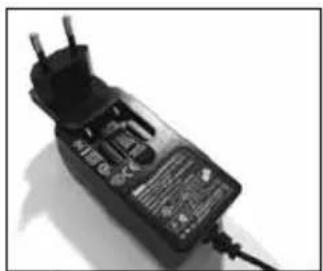
• 1 Hub, 1 power supply + 4 connectors (EU/Korea, US/Canada, China/Japon, UK) + 1 remote control
- 4 decoupling spikes
- 4 lock nuts
- 4 spike protectors
- 4 rubber foot pads
Please validate your Focal-JMlab guarantee by returning the guarantee form enclosed within 10 days.
Specifications
Aluminium/Magnesium alloy inverted dome® TNV2 Tweeter: the tweeter developed for the Easya speaker range uses Focal exclusive inverted dome technology, for optimal energy transfer and limited directivity. The dome's Aluminium/Magnesium alloy guarantees outstanding stiffness and damping. The mechanical properties of the new suspension, a system using Poron, an open cell polyurethane microcellular foam, provide numerous benefits: excellent dimensional stability and no degradation over times. The advantages of the use of Poron in this tweeter are obvious in terms of linearity and distortion reduction. This leads to a silkier, more precise sound with greater harmonic richness.
Polyglass® membrane midrange and bass drivers: impregnated paper cones with a fine layer of silica micro balls for a fully dynamic bass impact, precise and distortion-free.
BASH® amplifier : A powerful 85 W RMS BASH® amplifier is seamlessly integrated into each loudspeaker.
Optimized to work with the speakers.
Digital Wireless Transmitter: The Hub is a digital wireless transmitter which transmits the audio to the loudspeakers in a quality of sound that is absolutely identical to that of a CD. Retained wireless transmission technology (radio frequency) is independent to any Wi-Fi network, making it robust and sturdy. Thanks to its numerous inputs, the Hub connects Easya or any other compatible wireless device to all audio sources : smartphones, tablets, computers, TV, and CD players... It is also compatible with the Bluetooth® aptX® technology.
Profiled vent: powerful, distortion-free bass.
High-efficiency acoustic wadding: excellent internal damping, sustained, deeper bass.
Decoupling spikes included.
Setting up the system
Connect the speakers to the mains using the cables supplied for your region (EU or U.S.). Press the "ON" switch on the speakers to turn them "ON".
On the amplifier panel situated on the back of the speaker, select the left speaker to the "left" position and the right speaker to the "right" position (Fig. A).

Connect the outlet corresponding to your region to the Hub power supply (Fig. B).
natural_image
Close-up of a black electrical power outlet with two leads and a terminal block (no visible text or symbols)B

natural_image
Top-down view of a black plastic cup or container with handles, casting a shadow on a plain background (no text or symbols visible)
natural_image
Black plastic electronic component with two leads, no visible text or symbols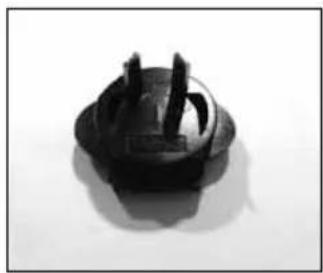
natural_image
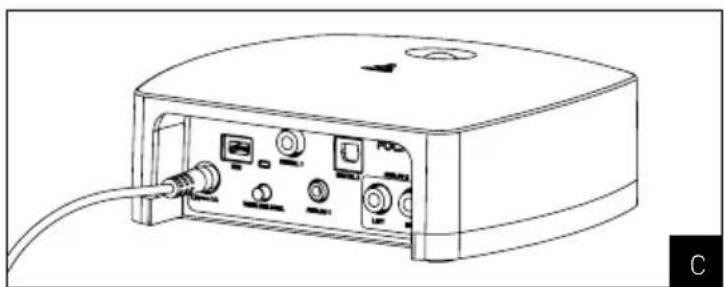
Close-up of a black plastic electrical plug socket (no text or symbols visible)Connect the Hub to the mains using the standard power supply (do not use any other power supply). Plug in the power supply into the circular plug on the Hub identified by the marking "7.5V1 = 1A" (Fig. C).
natural_image
Line drawing of a portable electronic device with ports and cables (no text or symbols)Hub Connections
There are several ways to connect your audio and video devices to the Hub:
Analogue inputs:
The Hub has 2 analogue inputs (3.5mm jack and RCA).
Digital inputs:
The Hub has 3 digital inputs (Coaxial, TOSlink and mini USB). Each of these inputs can accept sampling frequencies up to 96kHz (converted to 44.1kHz by the Hub for transmission to the speakers), and a resolution up to 24 bits/sample (converted to 16 bits per Hub for transmission to the speakers).
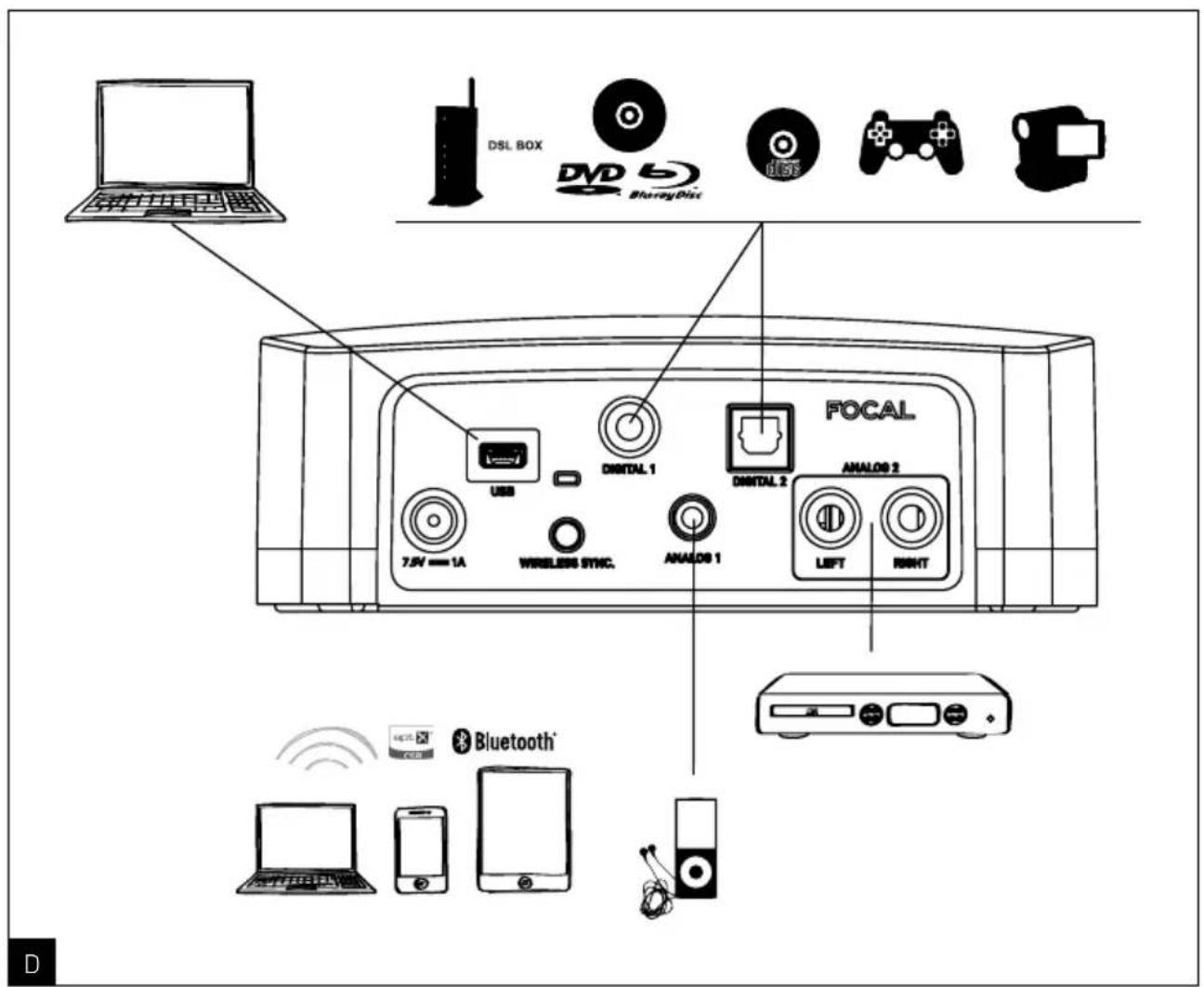
Bluetooth ^® wireless technology input:
In order to link a device with the Hub, it must be Bluetooth ^® compatible and the aptX ^® "Bluetooth ^® " input must be selected on the Hub.
There are two ways to set the Hub to linked mode:
- By pressing and holding down the sync button located on the back of the Hub for 3 seconds.
- By pressing and holding down the "Down Arrow" remote control button for 3 seconds.
When the Hub is in Bluetooth linked mode, the aptX® Bluetooth® input LED on the front starts to flash quickly. The Hub is identifiable on the linked device as "Focal Hub Bluetooth Receiver". To complete the link, please refer to the manual for your device for linking with the Hub. If no device is linked within 30 seconds, the Hub will exit linked mode.
Once a device has been linked with the Hub, it will remain in the memory. Linking only needs to take place once. The Hub can store twenty linked devices. If more than twenty devices are linked with the Hub, it replaces the oldest device with the most recent one linked.
Only one device at a time can be linked with the Hub. If you want to connect a device, ensure that no other devices are already connected.
It is advisable to increase the volume of the device connected to the Hub and to control the volume using the supplied remote control.
Remote Control
Functions and use of buttons: (Fig. E)

flowchart
graph TD
    A["ON/OFF"] --> B["Focal"]
    C["INPUT SELECT/SELECTION DES ENTREES"] --> B
    D["REMOTE LEARNING PROGRAMMATION TELECOMMANDE"] --> B
    E["PAIRING Bluetooth"] --> B
    B --> F["+/-"]
    B --> G["X"]
    B --> H["×"]
    B --> I["×"]
    B --> J["×"]
    B --> K["×"]
    style B fill:#f9f,stroke:#333,stroke-width:2px
    style C fill:#ccf,stroke:#333,stroke-width:2px
    style D fill:#cfc,stroke:#333,stroke-width:2px
    style E fill:#fcc,stroke:#333,stroke-width:2px
    style F fill:#fff,stroke:#333,stroke-width:2px
    style G fill:#fff,stroke:#333,stroke-width:2px
    style H fill:#fff,stroke:#333,stroke-width:2px
    style I fill:#fff,stroke:#333,stroke-width:2px
    style J fill:#fff,stroke:#333,stroke-width:2px
    style K fill:#fff,stroke:#333,stroke-width:2px
- Power OFF: allows you to manually set the Hub to standby mode. All LEDs on the front panel are turned off. Does not allow auto ON mode, the speaker goes straight to standby mode. Press again to return to the same status before setting Power Off. Only the Power Off button allows you to return to ON mode.
- Input selection: allows you to select different inputs for the Hub on a cyclical basis.
- Volume Control: allows you to reduce, increase or mute the Hub volume. In silent mode, the input LED selected on the front flashes. Press again to disable silent mode. When the "+" or "-" button is activated, the input LED selected flashes on the Hub, and when the minimum or maximum volume is reached, the LED stops flashing.
- Controlling tracks: these functions are valid only when the Bluetooth ^ or USB inputs are selected. Left Arrow for "previous track" and right arrow for "next track". These functions allow you to move to the next or previous tracks only i.e. it is not a fast forward or rewind function. The "Play / Pause" middle button is used to start playback or pause the source. (Please note: certain Smartphones are too old, or do not support the AVRCP protocol, and do not allow this feature to be used.)
- Bluetooth® linking: by selecting the Bluetooth® input button on the Hub, the Hub can be linked with Bluetooth® devices. Press and hold down the button for 3 seconds. When the linked mode is activated, the Bluetooth® input LED starts to flash on the front of the Hub. This mode is deactivated once the device is linked, or after 30 seconds if no device has been linked.
Remote learning
- In a process of ultimate simplification of the system, each of the functions of the Focal remote can be programme in an infrared remote control of your choice (TV, ADSL Box, CD player or universal) through the remote programming mode. The procedure is described below. Once your remote will be programmed, the keys saved by the use will control the Hub.

flowchart
graph TD
    A["Push and hold 3 seconds the up arrow button on Focal remote control in direction to the Hub"] --> B["All LED flash a couple of times"]
    B --> C["Displays the remote learning mode ON"]
    C --> D["Push once the Focal remote button to program in direction to the Hub"]
    D --> E["Push once the button you want to program on the infrared remote, in direction to the hub"]
    E --> F["To validate, push a second time the button that you want to program on the infrared remote, in direction to the Hub"]
    F --> G["When all the buttons are programmed, press and hold 3 seconds the up arrow button on Focal remote in direction to the hub to go out of the remote learning mode"]
    H["To program another button"] --> C
Note : To erase programming on the Infrared remote control, press and hold for 10 seconds the up arrow on the remote Focal. If no key is pressed for 1 minute then programming mode will become inactive.
Where to position your loudspeakers
Your Easya speakers have been designed to reproduce as faithfully as possible every kind of music. Nonetheless, it makes sense to follow some simple rules to optimise their performance and to guarantee good tonal balance and a realistic sound stage.
The loudspeakers should be positioned symmetrically, facing the listening area, ideally forming an equilateral triangle with it. It is, however, possible to vary these distances to arrive at the ideal compromise for any particular conditions (Fig. F) The loudspeakers should be positioned at the same height, in the same horizontal plane. Ideally, the tweeter should be positioned at the same height as the listener's ear when listening normally (Fig. G).
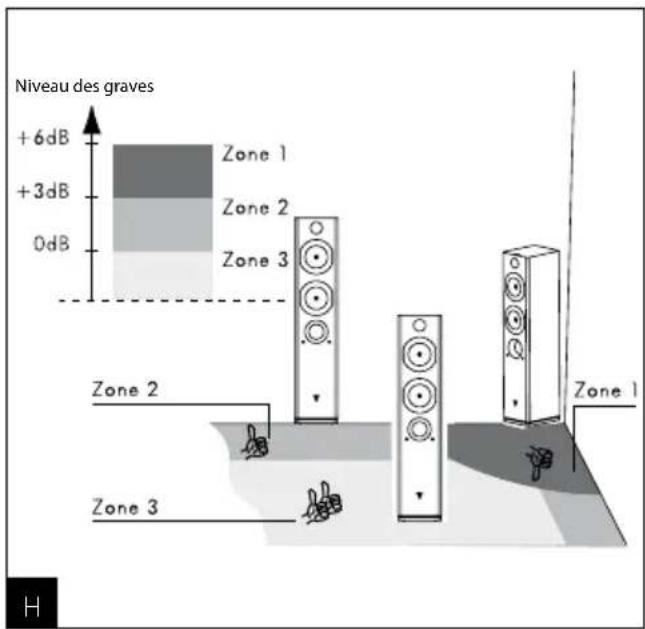
Do not position your loudspeakers too close to a corner of the room and do not place them too close to a wall. If positioned close to a wall or a corner this has the effect of exciting certain resonances within the room and artificially increasing the bass. Conversely, if the bass level is judged to be insufficient, you could try moving the loudspeakers nearer a wall to re-balance the bass level (Fig. H).
Optimisation
For perfectionists, here is the formula for optimal positioning:
If A is the distance from the centre of the woofer to the nearest floor or wall, B is the distance to the next closest floor, or wall and C the greatest distance (A < B < C) , the equation B^2 = AC defines the ideal loudspeaker position.
- For example:
If the centre of the woofer is 50~cm away from the back wall (A) and 60cm from the floor (B), then the side wall will ideally be 72cm away C = B^2 /A = 72cm (Fig. I).
Recommendations for use
The behaviour of the Easya loudspeakers depends on the acoustics in the listening room, on the correct positioning of the loudspeakers within the room and on the position of the listener. It is possible to work these elements together to correct or improve a desired effect.
Stereo perception is imprecise and poorly centred: try moving the loudspeakers closer to one another and/or have them facing the listening point.
Sound is harsh, aggressive: the acoustic in your listening room probably has too many reverberations. Consider using sound softening (carpets, upholstered furniture, wall hangings, curtains, etc.) and sound reflecting materials (furniture) to absorb or diffuse resonance.
Sound is "flat", "strangled": there are too many sound absorbent items in the room, the sound is soaked up. Look for the best compromise between sound absorbing and sound reflecting materials in your room. In general terms, it is good to aim for the wall behind the loudspeakers being reflective for the sound to develop correctly. The wall behind the listening position, on the other hand, is ideally sound absorbing to avoid rear reflections "contaminating" the stereo image. Furniture can be judiciously placed near the side walls of the room to diffuse sound waves and ensure certain frequency zones, particularly in the mid-range,
Turning Off Your Television's Speakers
If Easya loudspeakers are installed around your TV then you need to disable the speakers of your TV so that the sound is broadcast only through Easya. If you can not find the correct setting to turn off your TV speakers, please consult the user guide that was packaged with your TV.


Linking loudspeakers/Hub:
The loudspeakers and the Hub have been linked at Focal prior to carrying out the final test on your system. The Hub can only be linked to a maximum of 2 speakers. In the event that the link between the Hub and one or two speakers is lost, you can re-link the Hub with one or two speakers as follows:
How to link the Hub to one or two Easya speakers:
- Select an input on the Hub other than the aptX® Bluetooth® one.
- Press the linked button located on the rear panel of the speaker button for 3 seconds. The LED next to the linked button will flash rapidly (many times per second).
- Press the linked button at the rear of the Hub for 3 seconds. The LED next to the linked button will flash rapidly (many times per second).
Please note:
- The speakers and the Hub are linked when all the LEDs (speakers and Hub) begin to simultaneously flash slowly.
- Hub can be synchronized with only one loudspeaker at a time*.
*When the association between the Hub and the two loudspeakers is lost, repeat this procedure for each loudspeaker.
Auto Standby:
If there is no audio signal detected from the Hub input for 3 minutes, the 2 speakers and the Hub will move to standby mode. The Hub LED and speakers will light up in red. Once an audio signal is detected on the last input selected, the system will be reactivated. The Hub will provide the musical signal to the speakers after a few seconds, the LEDs on the Hub and speakers will light up in white.
Cables not included:
Analogue inputs:
• Analogue 1: 3.5mm male mini jack
- Analogue 2: 2 x RCA male audio (right red, left white)
Digital inputs:
• Digital 1: Coaxial (SPDIF) digital Audio RCA male (75 Ohms impedance recommended for 24 bits/96 kHz broadband)
• Digital 2: Optical (Toslink) male audio
• USB: Male Mini USB-B
Precautions for use
The TNV2 tweeter uses a relatively flexible Aluminium/Magnesium alloy, with a "shape memory" enabling it to withstand the majority of small impacts in the home. Nevertheless, we recommend leaving the fabric grilles in place to protect the dome. If the dome surface is marked this could have an impact on the tweeter.
Cleaning instructions
The only maintenance required for Easya is dusting with a dry cloth. If the cabinet becomes marked, we recommend simply using a damp cloth. Never use solvents, detergents, alcohol-based or corrosive products, scrapers or scourers to clean the loudspeaker surface. Keep the loudspeakers away from sources of heat.
Decoupling spikes assembling
Easya loudspeakers are intended to be floor mounted only. It is important to ensure that the loudspeakers stand firmly on the floor using the spike feet supplied whenever possible. If not use the rubber feet or the protective caps for the spikes. (Fig. J, K) To screw the spike feet or the rubber feet, stand the speaker on its top (placed on the packing cap) taking care not to damage the cabinet or the drive units during handling. Before screwing the spikes on the cabinet, screw the lock nut onto the spikes. Then screw the spikes fully into the threaded inserts of the cabinet. If the cabinet rocks when placed on the floor, unscrew one or two spikes that do not touch the floor until the cabinet rests firmly without rocking. Finally lock the nuts against the cabinet. It may be more convenient to fit and adjust the spike feet after speaker positioning has been optimised.

natural_image
Technical line drawing of a mechanical assembly with four protruding components (no text or symbols)
natural_image
Technical line drawing of a mechanical assembly with mounting holes and a curved arrow indicating rotation (no text or symbols)Specifications
| Easya | |
| Type | Powered wireless 2-1/2 way bass reflex floor standing |
| Speakers | 5" (13cm) Polyglass woofer5" (13cm) Polyglass bass/midrange1" (25mm) Al/Mg TNV2 inverted dome tweeter |
| Frequency response (+/- 3dB) | 50Hz - 28kHz |
| Low frequency point -6dB | 43Hz |
| Amplifier power (RMS) | 85W - 4 Ohms |
| Mains voltage | 100 - 240V |
| Mains frequency | 50 / 60Hz |
| Dimensions (HxWxD) | 35^5/8 × 6^3/4 × 9^7/15 (905x172x240mm) |
| Net Weight | 37.48lb (17kg)Hub |
| Type | Digital wireless transmitter |
| Transmission type Digital | |
| Transmission signal frequency 2.4GHz Kleer ^ compatible | |
| Range Around 10m without obstacle | |
| Sensitivity 0dBm | |
| Sampling Rate 44.1kHz | |
| Resolution 16 bits | |
| Mains voltage 100 - 240V | |
| Mains frequency | 50 / 60Hz |
| Power consomption(Stand by mode - ON) | 1.6 W / 2.5 W |
| Wireless Inputs Bluetooth | ^ aptX |
| Digital Inputs Coax / Toslink | |
| Analogue Inputs Jack 3.5mm / RCA | |
| External sound card USB Input | |
| Dimensions (HxLxP) | 1^15/16 × 5^11/16 × 5^2/3" (49 x 145 x 144mm) |
| Weight 0.88lb (400g) | |
conditions of warranty
Please contact your Focal dealer if you encounter any problems.
The guarantee for France on all Focal products is 2 years, non-transferable if the product is re-sold, from the date of purchase. In the case of defective equipment, the equipment must be shipped at your expense in its original packaging to the dealer who will test the equipment in order to determine the nature of the fault. If the product is still under warranty, the product will be returned to you or replaced, shipping pre-paid. If the product is not under guarantee, you will be given a repair estimate.
The warranty does not cover damage resulting from improper use or incorrect wiring (e.g. burnt out moving coils, etc.) Outside of France, Focal products are covered by a warranty whose conditions are determined locally by the official Focal-JMlab dealer in each country, in compliance with the laws in force in the respective territory.

Your Focal-JMlab product was developed and manufactured with high-quality materials and components which can be recycled and/or re-used. This symbol indicates that electrical and electronic equipment must be disposed of separately from normal garbage at the end of its operational lifetime. Please dispose of this product by bringing it to your local collection point or recycling centre for such equipment. This will help to protect the environment in which we all live.
Période de rodage
natural_image
Close-up of a black electrical power outlet with two leads and a terminal block (no visible text or symbols)B

natural_image
Top-down view of a black plastic mechanical component with two protrusions and a handle (no text or symbols visible)
natural_image
Black plastic electronic component with two leads and a small square symbol on its side (no visible text or markings)
natural_image
Close-up of a black plastic electrical plug with two leads, isolated on white background (no text or symbols)natural_image
Line drawing of a portable electronic device with ports and cables (no text or symbols)connexions du hub

Association enceintes /Hub :
natural_image
Technical line drawing of a mechanical assembly with four protruding components (no text or symbols)
natural_image
Technical line drawing of a mechanical assembly with four base points and a curved arrow indicating rotation (no text or symbols)Caractéristiques
Your Focal-JMlab product was developed and manufactured with high-quality materials and components which can be recycled and/or re-used. This symbol indicates that electrical and electronic equipment must be disposed of separately from normal garbage at the end of its operational lifetime. Please dispose of this product by bringing it to your local collection point or recycling centre for such equipment. This will help to protect the environment in which we all live.
International Guarantee
The Focal guarantee only applies if this page is returned to us within 10 days of purchase, to the following address:
Now it's possible to register on line : www.focal.com/warranty
Model: Serial number:
Name of dealer: Town:
Date of purchase: Purchase price:
Your name: ____ Age: ____ Occupation: ____
Your complete address: ____
Your email address: ____
Details of your installation (brand, model):
- iPod, iPad, iPhone®: ____ - Other music players: ____
- Tuner / Web Radio: ____. - DVD: ____.
■ Blu Ray: ____ ■ CD / SACD: ____
- Satellite / TNT: ____. - Flat screen: ____.
■Amplifier: ____ ■Others: ____
Your decision for purchasing this Focal model was made according to:
□ Dealer's advice Friend's advice □
□ Visit to an exhibition, show Press article □
□ Listening in auditorium Already own Focal products
□ Reliability / Quality Documentation □
□ Reputation French produce □
□ Guarantee Quality / Price ratio □
□ Design / Finishes Other □ ____
□ Sound
In case of purchase of new equipment, what were your former speakers?
Explain in a few words why you choose Focal...
Further comments: ____


- CAUTION
- ES
- Breaking in your speakers
- Carton contents:
- Specifications
- Setting up the system
- Hub Connections
- Remote Control
- Remote learning
- Where to position your loudspeakers
- Optimisation
- Recommendations for use
- Turning Off Your Television's Speakers
- Linking loudspeakers/Hub:
- Please note:
- Auto Standby:
- Cables not included:
- Analogue inputs:
- Digital inputs:
- Precautions for use
- Cleaning instructions
- Decoupling spikes assembling
- conditions of warranty
- Période de rodage
- connexions du hub
- Association enceintes /Hub :
- International Guarantee
- Details of your installation (brand, model):
- Your decision for purchasing this Focal model was made according to:
Brand : FOCAL
Model : Easya
Category : Loudspeaker