Series 3000 HC3410 - Beard trimmer PHILIPS - Free user manual and instructions

Find the device manual for free Series 3000 HC3410 PHILIPS in PDF.

PHILIPS Series 3000 HC3410 - Beard trimmer
📄 98 pages English EN Download 💬 AI Question 10 questions ⚙️ Specs
Notice PHILIPS Series 3000 HC3410 - page 6
Pick your language and provide your email: we'll send you a specifically translated version.
Product Type Beard Trimmer
Brand Philips
Model Series 3000 HC3410
Power Supply Mains adapter (100-240 V to <24 V safe low voltage)
Cutting Length with Comb 1-23 mm adjustable
Cutting Length without Comb 0.5 mm
Trimming Combs Included Trimming comb, adjustable beard comb (1-23 mm) for HC3410/17
Cutting Unit Removable, washable under tap
Usage Corded only (no battery)
Cleaning Method Brush and rinse cutting unit and combs; do not immerse body
Length Setting Adjuster Yes, rotary dial
On/Off Button Yes, slide switch
Accessories Included Comb, brush, scissors (HC3410/13 only), case (HC5410/83 only)
Safety Features Auto voltage selection, adapter with transformer
Replacement Parts Original Philips cutting unit available
Warranty Worldwide guarantee (see leaflet)
Environmental Disposal Do not discard with household waste; recycle at official collection point

Frequently Asked Questions - Series 3000 HC3410 PHILIPS

How do I use the beard comb?
Attach the beard comb to the trimmer, then turn the length setting adjuster to your desired length (1-23 mm for HC3410/17). Switch on and move the trimmer against hair growth direction, keeping the comb surface in contact with the skin.
Can I use this trimmer cordlessly?
No, the Philips Series 3000 HC3410 is a corded trimmer. It can only be used while connected to the mains adapter.
How do I clean the trimmer?
Switch off and unplug. Wipe the housing with a dry cloth. Remove the comb and cutting unit, then clean them with the brush or rinse under the tap. Shake off excess water before reattaching. Never immerse the body in water.
How do I adjust the cutting length?
With the comb attached, turn the length setting adjuster to your desired millimeter setting. The numbers indicate the remaining hair length after cutting. Start at a higher setting and reduce gradually.
What combs are included with the HC3410?
The HC3410/17 includes a trimming comb and an adjustable beard comb (1-23 mm). The HC3410/13 includes a trimming comb and scissors, but no beard comb. The HC5410/83 includes fixed beard combs at 1.5 mm and 3 mm.
How do I replace the cutting unit?
Press the release button to detach the old unit. Insert the lug of the new original Philips cutting unit into the guiding slot and push it back onto the appliance until it clicks.
Is the trimmer waterproof?
No, the housing is not waterproof. Only the cutting unit and combs can be rinsed under the tap. Do not immerse the trimmer body in water or use it in the shower.
How do I trim without a comb?
Remove the comb, switch on, and make well-controlled movements. The trimmer cuts hair close to the skin (0.5 mm). Use it for outlining necklines and sideburns. Be careful as it removes all hair it touches.
What maintenance is required?
Regularly clean the cutting unit and combs with the brush or rinse. Replace the cutting unit if worn or damaged. Store the appliance at a temperature between 5°C and 35°C.
How should I dispose of the trimmer at the end of its life?
Do not throw it away with normal household waste. Hand it in at an official collection point for recycling to help preserve the environment.

User questions about Series 3000 HC3410 PHILIPS

0 question about this device. Answer the ones you know or ask your own.

Ask a new question about this device

Your email remains private: it is only used to notify you if someone answers your question.

No questions yet. Be the first to ask one.

Download the instructions for your Beard trimmer in PDF format for free! Find your manual Series 3000 HC3410 - PHILIPS and take your electronic device back in hand. On this page are published all the documents necessary for the use of your device. Series 3000 HC3410 by PHILIPS.

USER MANUAL Series 3000 HC3410 PHILIPS

Always here to help you

Register your product and get support at

www.philips.com/welcome

Question? Contact Philips

HC5410/83

HC3410/17

HC3410/13

Two Philips hair styling cutters shown from different angles, no visible text or symbols on the blades or body.

User manual

Simple line drawing of an open book with a grid on the left and a closed page on the right (no text or symbols)

PHILIPS Series 3000 HC3410 - User manual - 2

ENGLISH 6

DANSK 13

DEUTSCH 20

GREEK 27

SPANISH 34

FINNISH 41

FRENCH 48

ITALIAN 55

DUTCH 62

NORWEGIAN 69

PORTUGUESE 76

SWEDISH 83

TURKISH 89

Introduction

Congratulations on your purchase and welcome to Philips! To fully benefit from the support that Philips offers, register your product at www.philips.com/welcome.

General description (Fig. 1)

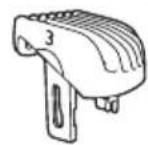
1 Cutting unit 2 Length setting adjuster 3 On/off button 4 Trimming comb 5 Beard comb 1-23mm (HC3410/17 only) 6 Beard comb 1.5mm (HC5410/83 only) 7 Beard comb 3mm (HC5410/83 only) 8 Adapter 9 Socket for small plug 10 Brush 11 Case (HC5410/83 only) 12 Scissors (HC3410/13 only) 13 Comb

Important

Read this user manual carefully before you use the appliance and save it for future reference.

Danger

- Keep the adapter dry.

Warning

  • The adapter contains a transformer. Do not cut off the adapter to replace it with another plug, as this causes a hazardous situation.
  • This appliance is not intended for use by persons (including children) with reduced physical, sensory or mental capabilities, or lack of experience and knowledge, unless they have been given supervision or instruction concerning use of the appliance by a person responsible for their safety.
  • Children should be supervised to ensure that they do not play with the appliance.

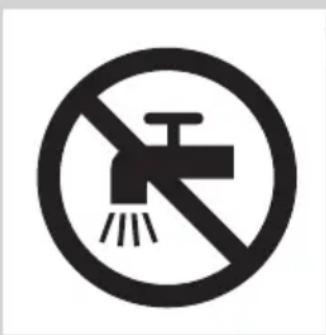
Prohibition sign showing a faucet without a shower, enclosed in a circle (no text or symbols)

No smoking sign with a faucet symbol crossed out by a diagonal line (no text)

Caution

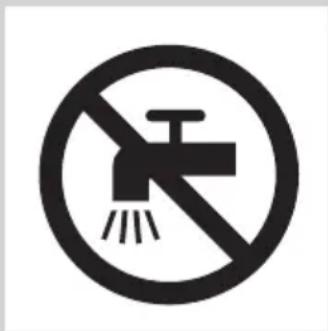
  • Never immerse the appliance in water or rinse it under the tap. Only the cutting unit can be rinsed under the tap.
  • Use, charge and store the appliance at a temperature between 5°C and 35°C.
  • Only use the adapter supplied.
  • If the adapter is damaged, always have it replaced with one of the original type in order to avoid a hazard.
  • Do not use the appliance if the cutting unit or the trimming comb is damaged or broken, as this may cause injury.

Electromagnetic fields

This Philips appliance complies with all standards and regulations regarding exposure to electromagnetic fields (EMF).

General

  • The appliance is equipped with an automatic voltage selector and is suitable for mains voltages from 100 to 240 volts.
  • The adapter transforms 100-240 volts to a safe low voltage of less than 24 volts.

Preparing for use

Note: This appliance can only be used directly from the mains.

Preparing the appliance

Diagram showing two-step battery adjustment process with power button and switch mechanism

1 Make sure the appliance is switched off.

Diagram showing hairpin installation process with labeled parts and connection arrows

2 Insert the appliance plug into the appliance (1) and put the adapter in the wall socket (2).

Using the appliance

The hair length settings are indicated in millimeters, the comb cuts the hair to a length of 1mm to 23mm. The settings correspond to the remaining hair length after cutting.

When you trim for the first time, be careful. Do not move the trimmer too fast. Make smooth and gentle movements.

Tip: Start trimming at a high length setting and reduce the length setting gradually until you have reached the desired hair length.

Trimming with comb

Illustration of a hand using a handheld device to trigger an electric shock, with arrows indicating action direction (no text or symbols)

1 Attach the comb onto the appliance.

Illustration of two hair cutters with arrows indicating compression or adjustment (no text or symbols)

2 Turn the length setting adjuster to the desired length setting.

Note: When you trim for the first time, start at the highest length setting to familiarise yourself with the appliance.

Diagram showing hand operating a remote control panel with power button and directional arrows indicating action

3 Switch on the appliance.

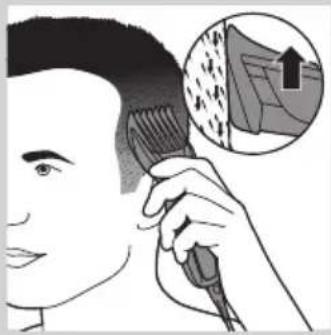
Illustration of a person using a comb with an inset showing a textured surface (no text or symbols)

4 To trim most effectively, move the trimmer against the hair growth direction. Make sure the surface of the comb always stays in contact with the skin.

Trimming without comb

Illustration of a hand holding a curved object with arrows indicating motion or force (no text or symbols)

Use the trimmer without the trimming comb to clip hair close to the skin (0.5mm) or to contour the neckline and sideburns.

Be careful when you trim without comb because the cutting element removes every hair it touches.

1 Push the comb off the appliance.

Diagram showing hand operating a remote control panel with power button and directional arrows indicating action

2 Switch on the appliance.

Illustration of a person receiving ear protection from a handheld device (no text or symbols present)

3 Make well-controlled movements. Touch the hair lightly with the trimmer.

Using the beard comb (HC5410/83, HC3410/17 only)

Line drawing of a mechanical component with a textured base and measurement label (no readable text or symbols)

1.5mm

PHILIPS Series 3000 HC3410 - Using the beard comb (HC5410/83, HC3410/17 only) - 2

3mmPHILIPS Series 3000 HC3410 - Using the beard comb (HC5410/83, HC3410/17 only) - 3

Illustration of a hairdryer with a magnified inset showing the hair mask (no text or symbols)

- The hair length settings are indicated in millimeters. HC3410/17: One adjustable beard comb that cuts the hair to a length of 1-23mm. HC5410/83: Two fixed length beardcombs that cuts the hair to a length of 1.5mm and 3mm.

1 Attach the comb onto the appliance.

15 mm, 13 mm, 11 mm, 9 mm, 7 mm

2 HC3410/17 only: Turn the length setting adjuster to the desired length setting.

Diagram showing two hands holding a remote control device with a 'Power' button, indicating left and right actions.

3 Switch on the appliance.

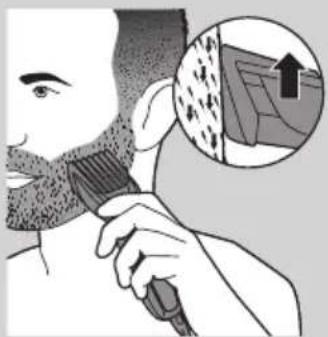
Illustration of a person brushing a beaded tooth with a brush, showing a magnified inset of the tooth structure (no text or symbols)

4 To trim most effectively, move the trimmer against the hair growth direction. Make sure the surface of the comb always stays in contact with the skin.

Cleaning

Illustration of two mechanical components with a tool, one on a flat base and the other with a spring-loaded component (no text or symbols)

Never use scouring pads, abrasive cleaning agents or aggressive liquids such as alcohol, petrol or acetone to clean the appliance.

Never immerse the appliance in water or rinse it under the tap.

Note: Only the cutting element and the comb can be cleaned with water.

1. Make sure the appliance is switched off and disconnected from the mains. 2. Wipe the housing of the appliance with a dry cloth. 3. Remove the comb and clean it with the brush or rinse it under the tap. 4. Press the release button (1). The cutting unit comes off the appliance (2).

Diagram showing two labeled arrows pointing upward to a shaded object, with numbers 1 and 2 indicating positions or directions.

5. Clean the cutting unit with the brush or rinse it under the tap.

Diagram of a mechanical component being inserted into a housing (no text or symbols visible)

6. Clean the inside of the appliance with the brush.

Never immerse the appliance in water or rinse it under the tap.

7. Shake off excess water. To reattach the cutting unit, insert the lug of the cutting unit into the guiding slot.

Illustration of a hand using a tool to clean a device with a no-smoking symbol (no text or labels)

Diagram showing a person using a device with two directional arrows labeled ① and ② indicating movement or rotation.

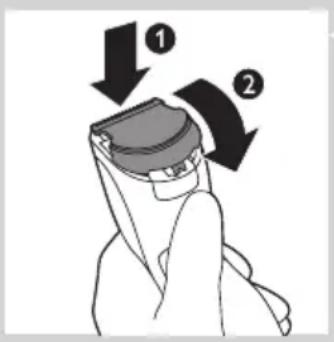
8. Insert the lug of the cutting unit into the guiding slot (1) and push the cutting unit back onto the appliance (2).

Replacement

Diagram showing two labeled arrows pointing to a mechanical or anatomical component, with numbers 1 and 2 indicating directional movement.

Only replace a worn or damaged cutting unit with an original Philips cutting unit, available from authorised Philips service centres.

1. Press the release button (1). The cutting unit comes off the appliance (2).

Diagram showing a hand holding a device with two directional arrows labeled ① and ② indicating movement or rotation.

2. Insert the lug of the new cutting unit into the guiding slot (1) and push the cutting unit back onto the appliance (2).

Ordering accessories

To buy accessories or spare parts, visit www.shop.philips.com/service or go to your Philips dealer. You can also contact the Philips Consumer Care Centre in your country (see the worldwide guarantee leaflet for contact details).

Environment

Symbol of a trash bin crossed with two crossed lines and a solid black rectangle below (no text or labels)

- Do not throw away the appliance with the normal household waste at the end of its life, but hand it in at an official collection point for recycling. By doing this, you help to preserve the environment.

Guarantee and support

If you need information or support, please visit

www.philips.com/support or read the separate worldwide

guarantee leaflet.

Introduction

Prohibition sign showing a faucet crossed out by a diagonal line, indicating no leakage or anti-poaching (no text present)

Caution

1.5mm

PHILIPS Series 3000 HC3410 - Caution - 1

3mmPHILIPS Series 3000 HC3410 - Caution - 2

Illustration of a hairdryer with a magnified inset showing the hair mask.

Diagram showing a person using a device with two directional arrows labeled ① and ② indicating movement or rotation.

Prohibition sign showing a faucet crossed out by a diagonal line, indicating no leakage.

Attention

Prohibition sign showing a faucet crossed out by a diagonal line, indicating no fire or water discharge (no text present)

Caution

Prohibition sign with a faucet and diagonal line, no text or symbols present.

Caution

Technical line drawing of a mechanical component with 3mm scale indicator (no text or symbols on the diagram itself).

Prohibition sign showing a faucet crossed out by a diagonal line, indicating no leakage or anti-poaching (no text present).

Prohibition sign showing a faucet crossed out by a diagonal line, indicating no pollution or fire resistance (no text present).

Prohibition sign with a faucet symbol and diagonal line, indicating no fire or water discharge.

3 Start the device.

Illustration of a person applying hair to their comb, with an inset showing a textured surface (no text or symbols).

2 Start the device.

Illustration of a person receiving ear protection from head and neck (no text or symbols).

Simple line drawing of a mechanical component with a 3mm scale indicator (no text or symbols on the object itself).

3 Start the device.

Illustration of a person's hair being brushed with a comb, showing a magnified inset of the hair texture (no text or symbols)

Diagram showing a person adjusting a device with labeled arrows indicating motion steps

Prohibition sign with a faucet symbol and diagonal line, indicating no fire or water discharge.

Attention

Prohibition sign with a faucet and diagonal line, no text or symbols present

Attention

Diagram of a mechanical component being inserted into a housing (no text or symbols visible).

Prohibition sign showing a faucet crossed out by a diagonal line, indicating no leakage or anti-poaching (no text present).

Attention

Prohibition sign with a faucet and diagonal line, no text or symbols present

Caution

3 Switch on the appliance.

Illustration of a person applying hair to their comb, with an inset showing a textured surface (no text or symbols)

2 Switch on the appliance.

NORWEGIAN72

Illustration of a person receiving ear protection from a handheld device (no text or symbols present)

3 Use controlled movements. Touch the hair lightly with the trimmer.

Using the beard comb (only HC5410/83, HC3410/17)

Line drawing of a mechanical component with a textured base and measurement label (no readable text or symbols)

1.5mm

PHILIPS Series 3000 HC3410 - Using the beard comb (only HC5410/83, HC3410/17) - 2

3mmPHILIPS Series 3000 HC3410 - Using the beard comb (only HC5410/83, HC3410/17) - 3

Illustration of a hairdryer with a magnified inset showing the hair mask (no text or symbols)

3 Switch on the appliance.

Illustration of a person's hair being brushed with a comb, with an inset showing a textured surface (no text or symbols)

Diagram showing a person using a device with two directional arrows labeled ① and ② indicating movement or rotation.

No smoking sign with faucet symbol (no text).

Caution

2 Insert the plug of the appliance into the appliance (1) and connect the adapter to the wall socket (2).

Using the appliance

3 Turn on the device.

Illustration of a person using a comb with an inset showing a rising trend graph (no text or symbols).

2 Turn on the device.

Illustration of a person receiving hair styling, showing two different techniques (no text or symbols present).

1.5mm

PHILIPS Series 3000 HC3410 - Using the appliance - 3

3mmPHILIPS Series 3000 HC3410 - Using the appliance - 4

Illustration of a hairdryer with a magnified inset showing the beak (no text or symbols).

3 Turn on the device.

Illustration of a person brushing a beaded mouth with a magnified inset showing texture and hair (no text or symbols).

Diagram of a mechanical component being inserted into a housing (no text or symbols visible).

Ordering accessories

Prohibition sign with a faucet and diagonal line, no text or symbols present

Caution

3 Turn on the device.

Illustration of a person applying hair to their comb, with an inset showing a textured surface (no text or symbols)

2 Turn on the device.

Illustration of a person receiving ear protection from a handheld device (no text or symbols present)

1.5mm

PHILIPS Series 3000 HC3410 - Caution - 3

3mmIllustration of a hairdryer with a magnified inset showing the hair mask (no text or symbols)

3 Turn on the device.

Illustration of a person's hair being brushed with a comb, with an inset showing a textured surface (no text or symbols)

Diagram showing a person adjusting a device with labeled arrows indicating motion steps

Prohibition sign showing a faucet crossed out by a diagonal line, indicating no fire or water discharge (no text present)

No sign depicting a faucet crossed out by a diagonal line, indicating no pollution or fire resistance (no text present)

Prohibition sign with a faucet symbol and diagonal line, indicating no fire or water discharge.

3 Turn on the device.

Illustration of a person applying hair to their comb, with an inset showing a textured surface (no text or symbols)

2 Turn on the device.

Illustration of a person receiving ear protection from a handheld device (no text or symbols present)

1.5mm

PHILIPS Series 3000 HC3410 - Caution - 12

3mmIllustration of a hairdryer with a magnified inset showing the hair mask (no text or symbols)

15 mm 13 mm 11 mm 9 mm 7 mm

Diagram showing two hands holding a remote control panel with a 'Power' button, indicating left and right actions.

Diagram showing a person using a device with two directional arrows labeled ① and ② indicating movement or rotation.

Manual assistant
Powered by Anthropic
Waiting for your message
Product information

Brand : PHILIPS

Model : Series 3000 HC3410

Category : Beard trimmer