
NWA5550-N - Access Point ZYXEL - Free user manual and instructions
Find the device manual for free NWA5550-N ZYXEL in PDF.


| Product Type | Outdoor Managed Access Point |
| Model | NWA5550-N |
| Wireless Standard | IEEE 802.11a/b/g/n |
| Frequency Bands | 2.4 GHz and 5 GHz |
| Wireless Speeds | Up to 300 Mbps (2.4 GHz) and up to 300 Mbps (5 GHz) |
| Antenna | External (not included) - connector type not specified |
| Ports | 1 x 10/100/1000 Ethernet (PoE), 1 x Console (RS-232) |
| Power Supply | Power over Ethernet (PoE) 802.3af |
| Mounting | Wall or pole mount (brackets included) |
| Operating Temperature | 0°C to 50°C (32°F to 122°F) - typical for outdoor AP |
| Humidity | 10% to 90% (non-condensing) |
| Dimensions | Approximately 260 x 200 x 60 mm (10.2 x 7.9 x 2.4 in) - estimate |
| Weight | Approximately 1.2 kg (2.65 lbs) - estimate |
| LED Indicators | Power/Sys, Ethernet, WLAN |
| Management | Managed by ZyXEL NXC5200 Wireless LAN Controller |
| Discovery Methods | Static (manual AC IP), DHCP option 138, or broadcast |
| Security | WPA2, WPA, 802.1X (with controller) |
| Regulatory Approvals | FCC Part 15, CE, BSMI |
| Outdoor Protection | Weatherproof enclosure (IP rating not specified but suited for outdoor) |
| Console Access | Default credentials: admin / 1234 |
| VLAN Support | Yes, configurable via CLI (tagged or untagged) |
| PoE Input | 802.3af compliant injector or switch |
| Warranty | Limited warranty, varies by region |
Frequently Asked Questions - NWA5550-N ZYXEL
User questions about NWA5550-N ZYXEL
0 question about this device. Answer the ones you know or ask your own.
Ask a new question about this device
Download the instructions for your Access Point in PDF format for free! Find your manual NWA5550-N - ZYXEL and take your electronic device back in hand. On this page are published all the documents necessary for the use of your device. NWA5550-N by ZYXEL.
USER MANUAL NWA5550-N ZYXEL
NWA Managed Access Point Series
USER'S GUIDE
NWA5160N 802.11a/g/n Wireless LAN Managed Access Point
NWA5560-N 802.11 a/b/g/n Dual-Radio Managed Access Point
NWA5550-N 802.11 a/b/g/n Dual-Radio Outdoor Managed Access Point
Version 1.00 Edition 1, 07/2011
ZyXEL
Indoor Models
NWA5160N
NWA5560-N
Outdoor Model
NWA5550-N
Indoor Models
Device Panels
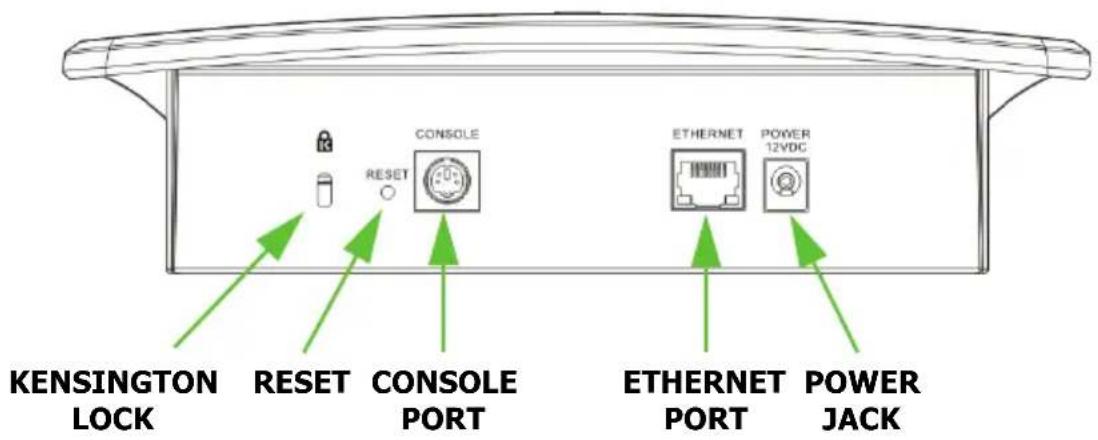
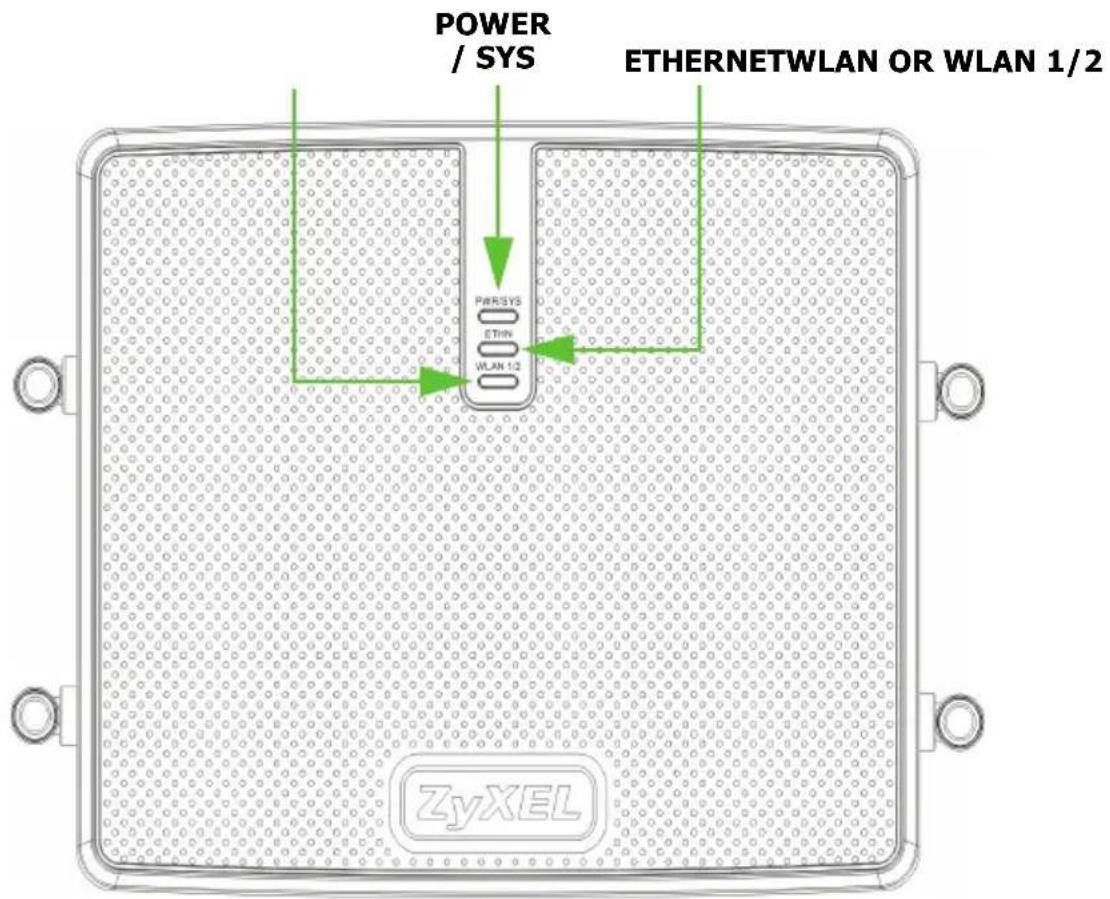
LEDs.
| LEDColorS | TATEDESCRIPION | ||
| Power / Sys | Green On | The NWA is powered on. | |
| Off The NWA is powered off. | |||
| Red Off | The NWA has successfully booted. | ||
| Flashing The NWA has encountered a system failure and cannot boot. | |||
| Ethernet Green | Green Flashing / On | The NWA has an active 10M/100M connection. | |
| Yellow Flashing / On | The NWA has an active 1000M connection. | ||
| Dark The | NWA does not have any active connections. | ||
| WLAN Green | On The | NWA's wireless module is active. | |
| Off The NWA's wireless module is inactive or disconnected from the network. | |||
| Flashing The NWA is transmitting and receiving data to and from wireless clients. | |||
Hardware Connections
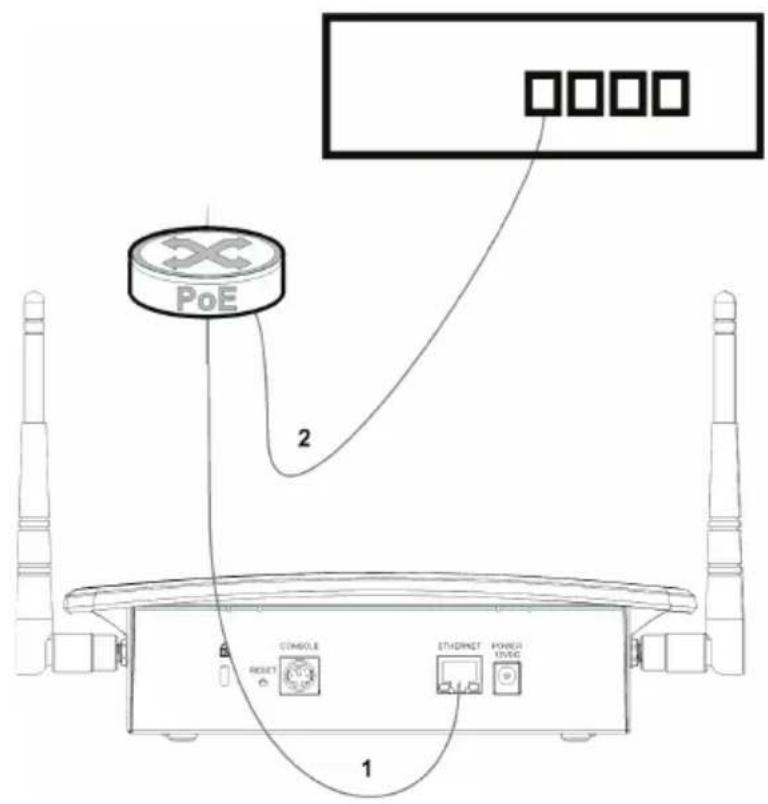
The following shows you how to make the NWA's hardware connections. The NWA5560-N is shown in these example figures.
With PoE
-
Connect the NWA to a PoE device with an 8-pin CAT5e cable.
-
Connect the PoE device to an upstream switch or directly to the NXC-5200 Wireless LAN Controller.
Without PoE
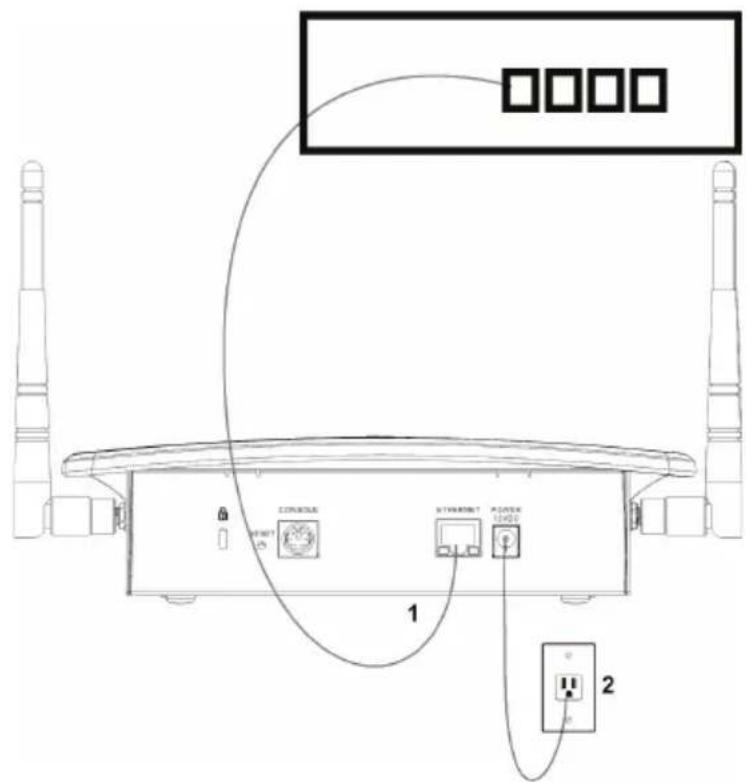
- Connect the NWA to to an upstream switch or directly to the NXC-5200 Wireless LAN Controller.
- Connect the NWA to an appropriate power outlet and turn on the power.
Console Port Configuration
The NWA is pre-configured, but you may use the console port to manually configure the NWA if necessary. Connect a PS-2 console cable from the console port on your computer to the console port on your NWA. Run a terminal emulation program such as HyperTerminal, with the following settings:
• Speed 115,200 bits per second
- 8 data bits, no parity, 1 stop bit
- No flow control.
Log in using ‘admin’ and ‘1234’ as the username and password.
Welcome to NWA5560-N
Username: admin
Password:
NWA IP Address
The NWA is pre-configured to get a dynamic IP address from a DHCP server by default.
Use these commands if you want to give the NWA a fixed IP address.
Router# configure terminal
Router(config)# capwap ap vlan ip address 192.168.1.37 255.255.255.0
Router(config)# capwap ap vlan ip gateway 192.168.1.32
Enter configuration mode
The NWA IP address and subnet mask
The NWA gateway
NWA-NXC Discovery
Use the AP Controller (NXC5200) to remotely manage the NWAs in your network. If the NXC and NWA are in the same network, then the NWA can find the NXC automatically by broadcasting.
If the NWA and NXC are not in the same network, you must configure the NWA to find the NXC in one of two ways:
- Static Discovery
Manually enter the IP address of the NXC on the NWA. You can enter up to two IP addresses for the NXC.
Router# configure terminal
Router(config)# capwap ap ac-ip
192.168.1.1 192.168.1.2
Router(config)# show capwap ap discovery-type
Discovery type : Static AC IP
Enter configuration mode
These are the NXC IP addresses
Confirm that static discovery is used to find the NXC.
AC is the AP Controller, that is, the NXC.
• Dynamic Discovery via DHCP server
If the NWA gets a dynamic IP address from a DHCP server, you can simultaneously let it get the NXC IP address by configuring it in the DHCP server using DHCP Option 138. You can configure up to two NXC IP addresses on the DHCP server.
- Test the Connection
Ping the NXC from the NWA to test the connection.
Router# ping 192.168.1.1 (the NXC IP address)
PING 192.168.1.1 (192.168.1.254) 56(84) bytes of data.
If it fails, configure the gateway IP address of the NWA.
Router# configure terminal
Router(config)# capwap ap vlan ip gateway 192.168.1.32
If the NWA and NXC are in a VLAN, configure the VLAN ID (tagged or untagged) using this command:
- capwap ap vlan vlan-id VID { tag | untag } (VID from 1 to 4094)
For example:
Router# configure terminal
Router(config)# capwap ap vlan vlan-id 2 tag
To see detailed NWA – NXC connection status, use the following command:
Router# show capwap ap info
SM-State RUN(8)
msg-buf-usage 0/10 (Usage/Max)
capwap-version 10118
Radio Number 1/4 (Usage/Max)
BSS Number 8/8 (Usage/Max)
IANA ID 037a
Description AP-0013499999FF
Wall Mounting Instructions
Do not install the NWA in an inverted horizontal position under a desk or tabletop.
To hang your NWA on a wall:
-
Select a position free of obstructions on a sturdy wall.
-
Drill two pilot holes for the screws. Make sure the distance between the centers of the holes and the size of screws match the specifications below.
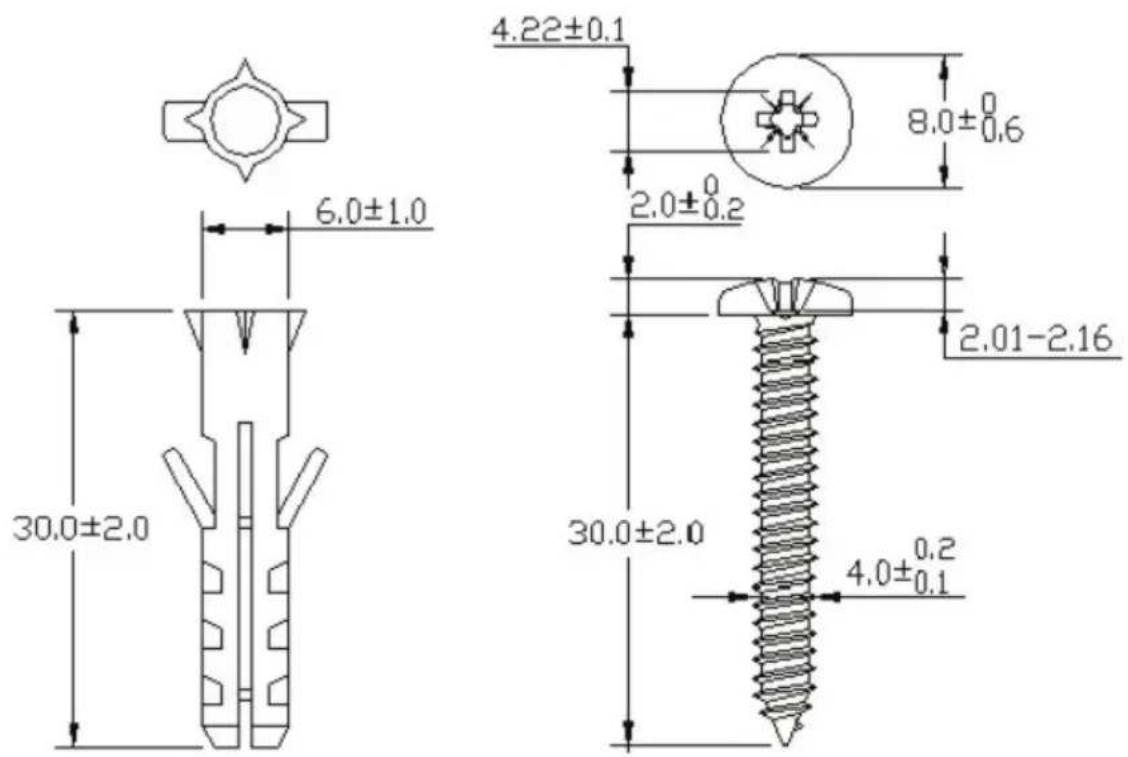
Be careful to avoid damaging pipes or cables located inside the wall when drilling holes for the screws.
- Do not screw the screws all the way into the wall. Leave a small gap of about 0.5 ~cm between the heads of the screws and the wall.
-
Make sure the screws are snugly fastened to the wall. They need to hold the weight of the NWA with the connection cables.
-
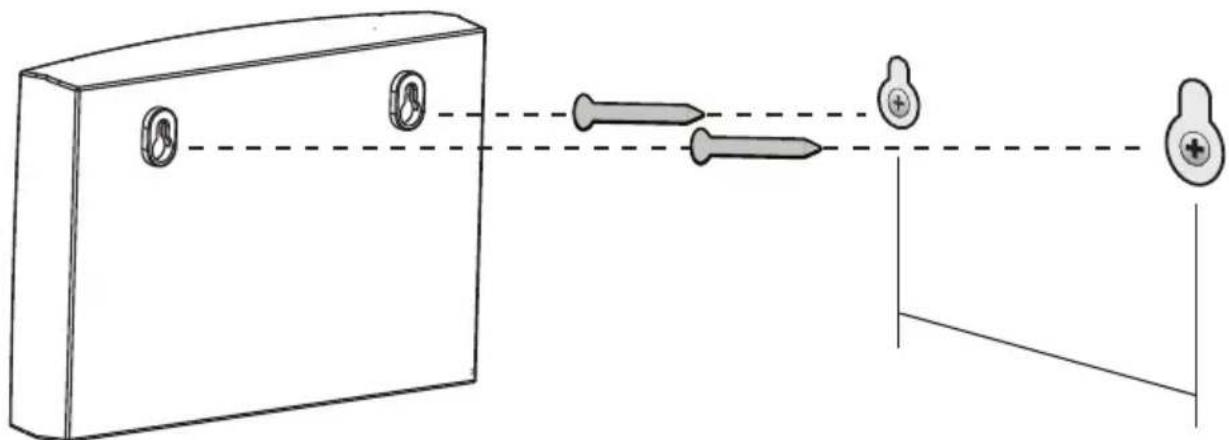
Align the holes on the back of the NWA with the screws on the wall. Hang the NWA on the screws.
natural_image
Diagram of a medical device with three pins and two medical devices on a stand, connected by a dashed line (no text or symbols)You can also use the optional Ceiling Mounting Kit (sold separately) to mount the NWA on a ceiling instead of a wall.
Outdoor Model
Device Panel
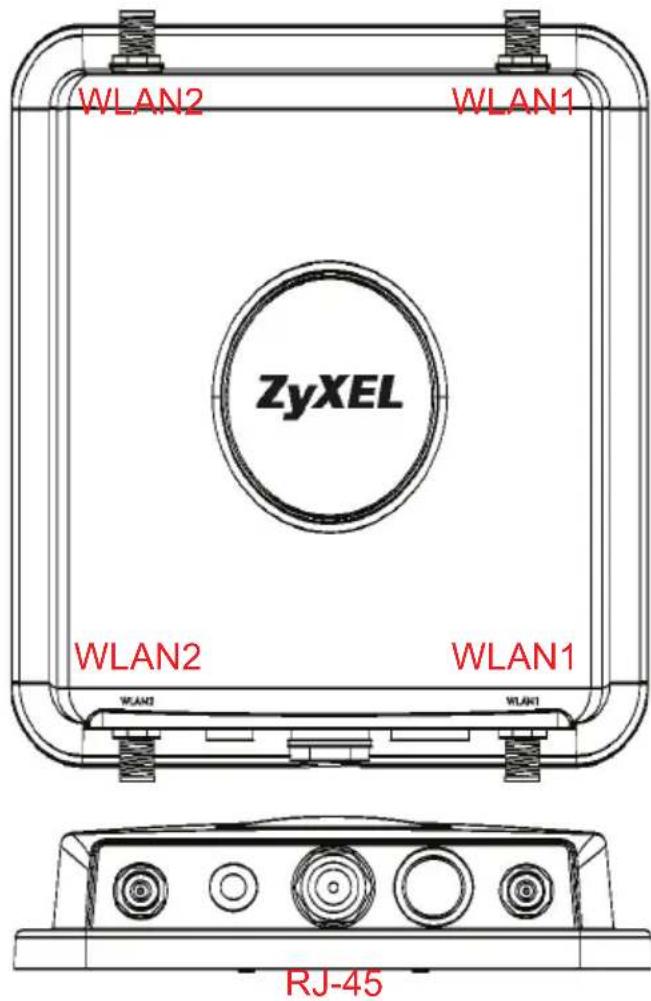
Ethernet Cable Connection
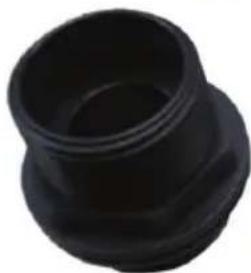
Waterproofing Kit.
natural_image
Black plastic mechanical component with flared top and hexagonal base (no text or symbols visible)A
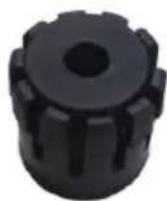
B
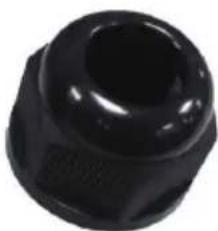
natural_image
Close-up of a black plastic mechanical component with a circular hole (no text or symbols visible)C
- Put one end of the cable through the nut (C).
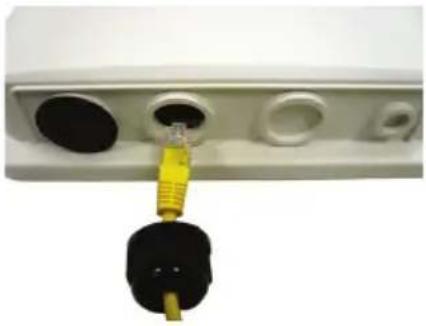
natural_image
Close-up of a white electronic device with multiple ports and a yellow connector inserted into a black socket (no visible text or symbols)- Open the claw (B) then close it tightly around the cable.
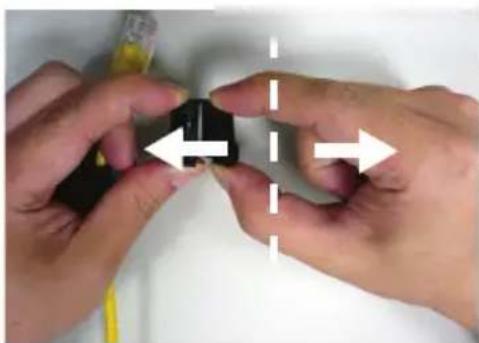
natural_image
Close-up of hands holding a small black object with directional arrows indicating movement or alignment (no text or symbols visible)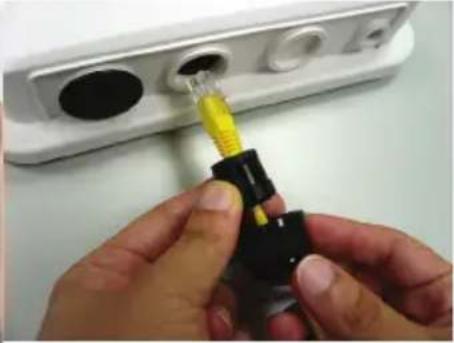
natural_image
Close-up of hands inserting a yellow plastic into a black plastic plug into a white electronic device (no text or symbols visible)- Put the body (A) over the cable then connect the end of the cable to the NWA.
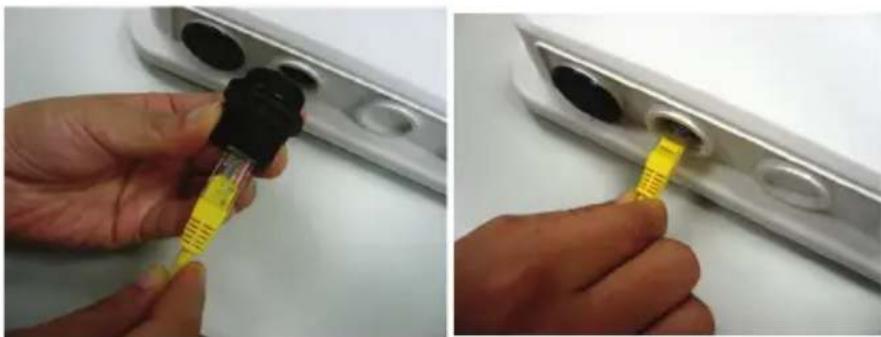
natural_image
Close-up of hands using a pipette to insert or install a small electronic component (no visible text or symbols)- Gently twist the body (A) into the NWA.
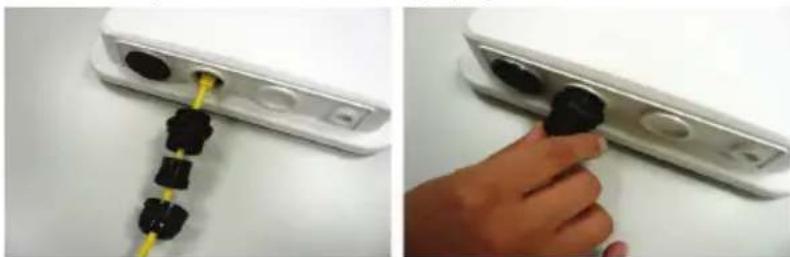
natural_image
Two-panel image showing a device with black connectors inserted into a white rack, and a hand adjusting a black knob on the right (no text or symbols visible)- Tightly secure the cable connector, the body (A) and claw (B) with the nut (C).
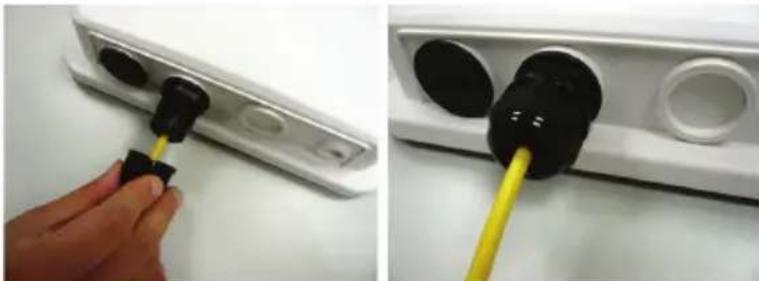
natural_image
Two-panel image showing a hand inserting a black plug into a white wall-mounted device, with no visible text or symbols.- Apply the water-proofing tape properly for enhanced protection.
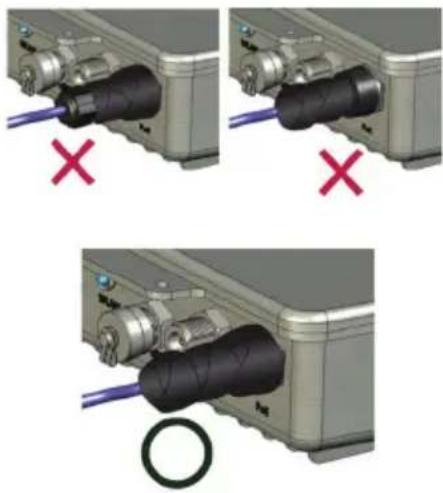
- Connect the other end of the Ethernet cable to the PoE Adaptor.
Pole Mounting
Pole Mounting Kit
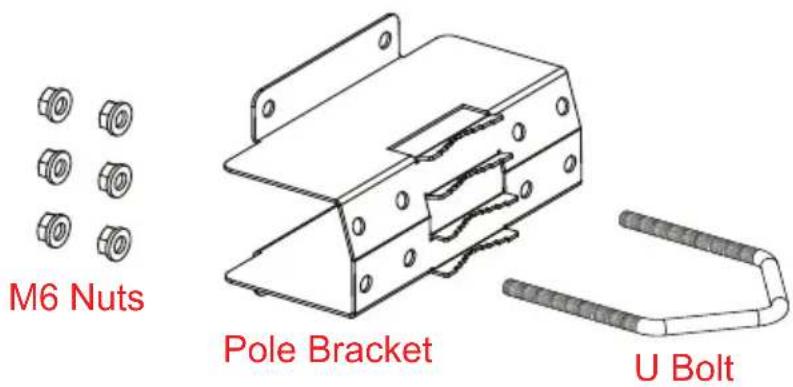
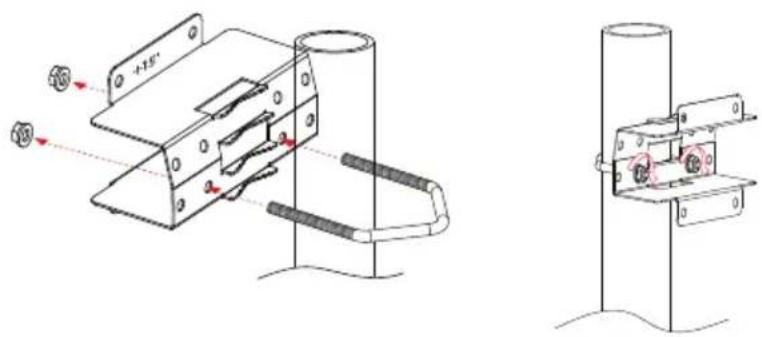
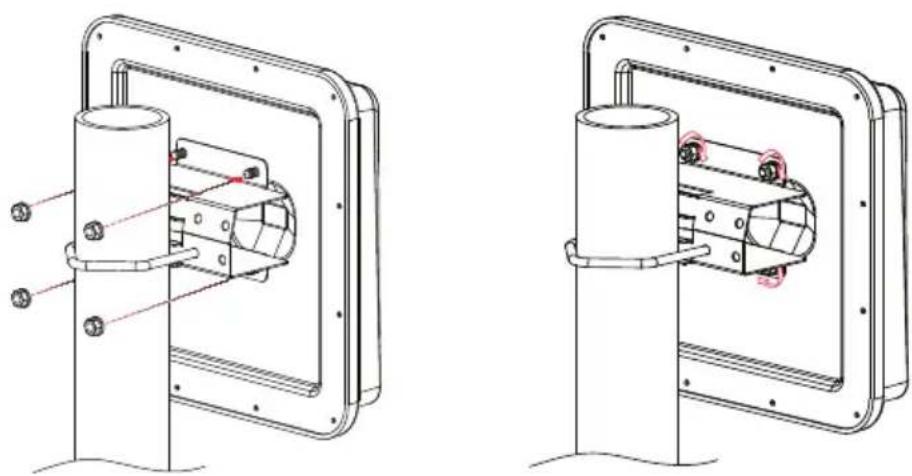
Install the NWA vertically with a +15, 0, or -15 degree angle relative to the pole..
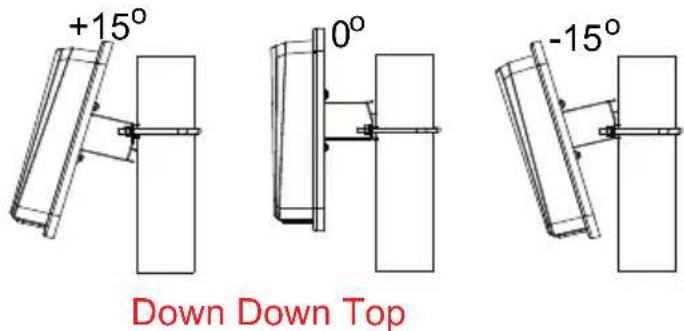
- For +15^ and 0^ angle installations, position the bracket with the +15^ mark on the top.
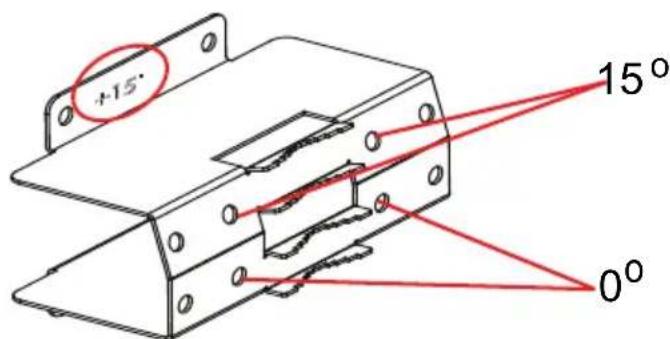
For -15^ installation, position the bracket so the -15^ mark is on top.
- This is a 0^ angle installation example. Use a wrench to tighten the nuts onto the U bolt.
- Use a wrench to tighten the four nuts onto the screws.
natural_image
Technical line drawings of two mechanical components with mounting brackets and internal components (no text or symbols)Wall Mounting
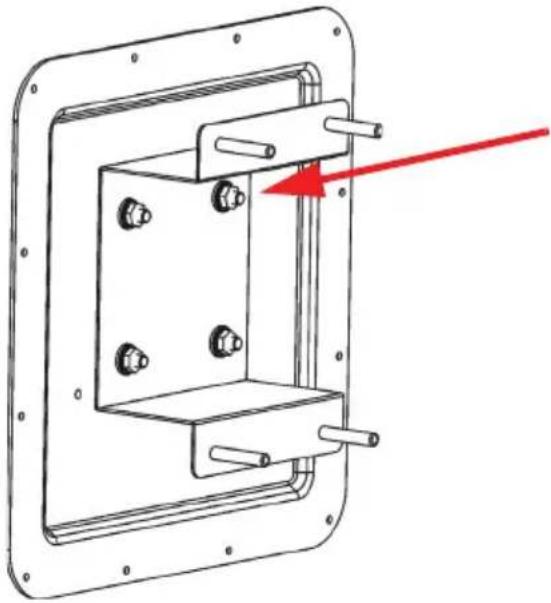
Wall Mounting Kit
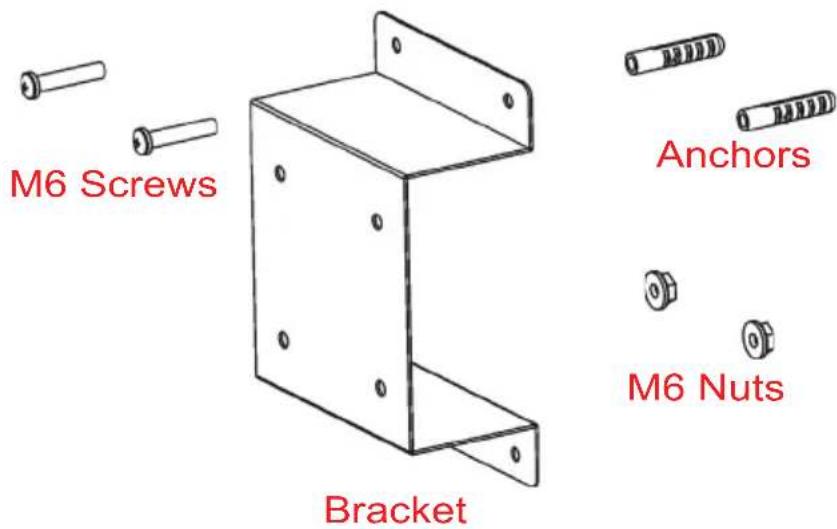
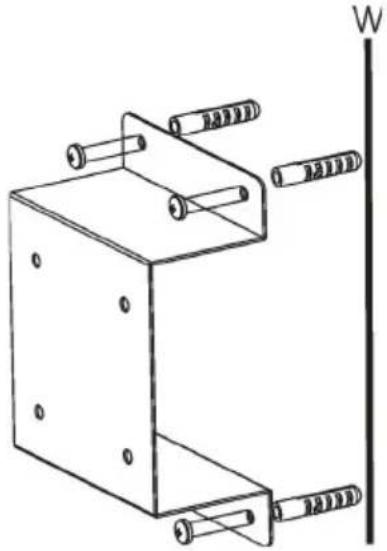
- Place the bracket where you want it on the wall (W) and mark the position of the outer holes with a pencil. Remove the bracket and drill the holes where marked. Insert the anchors in the holes. Screw the bracket to the wall.
natural_image
Technical line drawing of a metal bracket with multiple cylindrical pins and a vertical wall marker (no text or symbols)- Use the nuts and a wrench to attach the NWA to the bracket.
natural_image
Technical line drawing of a mechanical bracket with mounting holes and a red arrow indicating direction (no text or symbols)Legal
Open Source Announcements
This product uses Open Source software. To view the Open Source licenses associated with this product, see the Open Source Announcements appendix in the NXC5200 User's Guide.
Safety Warnings
- Do NOT use this product near water, for example, in a wet basement or near a swimming pool.
- Do NOT expose your device to dampness, dust or corrosive liquids.
- Do NOT store things on the device.
- Do NOT install, use, or service this device during a thunderstorm. There is a remote risk of electric shock from lightning.
- Connect ONLY suitable accessories to the device.
- Do NOT open the device or unit. Opening or removing covers can expose you to dangerous high voltage points or other risks. ONLY qualified service personnel should service or disassemble this device. Please contact your vendor for further information.
- Make sure to connect the cables to the correct ports.
- Place connecting cables carefully so that no one will step on them or stumble over them.
• Always disconnect all cables from this device before servicing or disassembling. - Use ONLY an appropriate power adaptor or cord for your device. Connect it to the right supply voltage (for example, 110V AC in North America or 230V AC in Europe).
- Do NOT allow anything to rest on the power adaptor or cord and do NOT place the product where anyone can walk on the power adaptor or cord.
- Do NOT use the device if the power adaptor or cord is damaged as it might cause electrocution.
- If the power adaptor or cord is damaged, remove it from the device and the power source.
- Do NOT attempt to repair the power adaptor or cord. Contact your local vendor to order a new one.
-
Do not use the device outside, and make sure all the connections are indoors. There is a remote risk of electric shock from lightning.
-
Do NOT obstruct the device ventilation slots, as insufficient airflow may harm your device.
• If you wall mount your device, make sure that no electrical lines, gas or water pipes will be damaged. - The POE (Power over Ethernet) devices that supply or receive power and their connected Ethernet cables must all be completely indoors.
This product is recyclable. Dispose of it properly.
Federal Communication Commission Interference Statement
FCC for Indoor Models
This equipment has been tested and found to comply with the limits for a Class B digital device, pursuant to Part 15 of the FCC Rules. These limits are designed to provide reasonable protection against harmful interference in a residential installation. This equipment generates, uses and can radiate radio frequency energy and, if not installed and used in accordance with the instructions, may cause harmful interference to radio communications. However, there is no guarantee that interference will not occur in a particular installation. If this equipment does cause harmful interference to radio or television reception, which can be determined by turning the equipment off and on, the user is encouraged to try to correct the interference by one of the following measures:
- Reorient or relocate the receiving antenna.
- Increase the separation between the equipment and receiver.
- Connect the equipment into an outlet on a circuit different from that to which the receiver is connected.
- Consult the dealer or an experienced radio/TV technician for help
This device complies with Part 15 of the FCC Rules. Operation is subject to the following two conditions: (1) this device may not cause harmful interference, and (2) this device must accept any interference received, including interference that may cause undesired operation.
FCC Caution:
Any changes or modifications to this unit not expressly approved by the party responsible for compliance could void the user authority to operate the equipment.
The users manual or instruction manual for an intentional or unintentional radiator shall caution the user that changes or modifications not expressly approved by the party responsible for compliance could void the user's authority to operate the equipment.
IMPORTANT NOTE: FCC Radiation Exposure Statement:
This equipment complies with FCC radiation exposure limits set forth for an uncontrolled environment. This equipment should be installed and operated with minimum distance 20cm between the radiator & your body.
This transmitter must not be co-located or operating in conjunction with any other antenna or transmitter.
Operations in the 5.15-5.25GHz band are restricted to indoor usage only.
End Product Labeling
This transmitter module is authorized only for use in devices where the antenna may be installed such that 20 cm may be maintained between the antenna and users (for example access points, routers, wireless ASDL modems, and similar equipment). The final end product must be labeled in a visible area with the following: "Contains TX FCC ID: M4Y-AN622V01"
Manual Information To the End User
The OEM integrator has to be aware not to provide information to the end user regarding how to install or remove this RF module in the user's manual of the end product which integrates this module.
The end user manual shall include all required regulatory information/warning as shown in this manual.
FCC for Outdoor Model
This device complies with Part 15 of FCC rules. Operation is subject to the following two conditions:
• This device may not cause harmful interference.
- This device must accept any interference received, including interference that may cause undesired operations.
FCC Warning
This device has been tested and found to comply with the limits for a Class A digital switch, pursuant to Part 15 of the FCC Rules. These limits are designed to provide reasonable protection against harmful interference in a commercial environment. This device generates, uses, and can radiate radio frequency energy and, if not installed and used in accordance with the instruction manual, may cause harmful interference to radio communications. Operation of this device in a residential area is likely to cause harmful interference in which case the user will be required to correct the interference at his own expense.
CE Mark Warning:
This is a class A product. In a domestic environment this product may cause radio interference in which case the user may be required to take adequate measures.
Taiwanese BSMI (Bureau of Standards, Metrology and Inspection) A Warning:
警告使用者
Changes or modifications not expressly approved by the party responsible for compliance could void the user's authority to operate the equipment.
注意!
依據 低功率電波輻射性電機管理辦法
ZyXEL Limited Warranty
ZyXEL warrants to the original end user (purchaser) that this product is free from any defects in material or workmanship for a specific period (the Warranty Period) from the date of purchase. The Warranty Period varies by region. Check with your vendor and/or the authorized ZyXEL local distributor for details about the Warranty Period of this product. During the warranty period, and upon proof of purchase, should the product have indications of failure due to faulty workmanship and/or materials, ZyXEL will, at its discretion, repair or replace the defective products or components without charge for either parts or labor, and to whatever extent it shall deem necessary to restore the product or components to proper operating condition. Any replacement will consist of a new or re-manufactured functionally equivalent product of equal or higher value, and will be solely at the discretion of ZyXEL. This warranty shall not apply if the product has been modified, misused, tampered with, damaged by an act of God, or subjected to abnormal working conditions.
Note
Repair or replacement, as provided under this warranty, is the exclusive remedy of the purchaser. This warranty is in lieu of all other warranties, express or implied, including any implied warranty of merchantability or fitness for a particular use or purpose. ZyXEL shall in no event be held liable for indirect or consequential damages of any kind to the purchaser.
To obtain the services of this warranty, contact your vendor. You may also refer to the warranty policy for the region in which you bought the device at http://www.zyxel.com/web/support_warranty_info.php.
Registration
Register your product online to receive e-mail notices of firmware upgrades and information at www.zyxel.com.
Copyright
Copyright © 2011 by ZyXEL Communications Corporation.
The contents of this publication may not be reproduced in any part or as a whole, transcribed, stored in a retrieval system, translated into any language, or transmitted in any form or by any means, electronic, mechanical, magnetic, optical, chemical, photocopying, manual, or otherwise, without the prior written permission of ZyXEL Communications Corporation.
Published by ZyXEL Communications Corporation. All rights reserved.
Disclaimer
ZyXEL does not assume any liability arising out of the application or use of any products, or software described herein. Neither does it convey any license under its patent rights nor the patent rights of others. ZyXEL further reserves the right to make changes in any products described herein without notice. This publication is subject to change without notice.
Regulatory Information
European Union
The following information applies if you use the product within the European Union.
Declaration of Conformity with Regard to EU Directive 1999/5/EC (R&TTE Directive)
Compliance Information for 2.4GHz and 5GHz Wireless Products Relevant to the EU and Other Countries Following the EU Directive 1999/5/EC (R&TTE Directive).
| [Czech] | ZyXEL tímto prohlašuje, že tento zařízení je ve shodě se základními požadavky a dalšími příslušnými ustanoveními směrnice 1999/5/EC. |
| [Danish] | Undertegnede ZyXEL erklærer herved, at følgende udstyr udstyr overholder de væsentlige krav og øvrige relevante krav i direktiv 1999/5/EF. |
| [German] | Hiermit erklärt ZyXEL, dass sich das Gerät Ausstattung in Übereinstimmung mit den grundlegenden Anforderungen und den übrigen einschlägigen Bestimmungen der Richtlinie 1999/5/EU befindet. |
| [Estonian] | Käesolevaga kinnitab ZyXEL seadme seadmed vastavust direktiivi 1999/5/EÜ põhinõuetele ja nimetatud direktiivist tulenevatele teistele asjakohastele sätetele. |
| English | Hereby, ZyXEL declares that this equipment is in compliance with the essential requirements and other relevant provisions of Directive 1999/5/EC. |
| [Spanish] | Por medio de la presente ZyXEL declara que el equipo cumple con los requisitos esenciales y cualesquiera otras disposiciones aplicables o exigibles de la Directiva 1999/5/CE. |
| [Greek] | ME THN ΠΑΡΟΥΣΑ ZyXEL ΔΗΛΩΝΕΙ ΟΤΙ εξοπλισμός ΣΥΜΜΟΡΦΩΝΕΤΑΙ ΠΡΟΣ ΤΙΣ ΟΥΣΙΩΔΕΙΣ ΑΠΑΙΤΗΣΕΙΣ ΚΑΙ ΤΙΣ ΛΟΙΠΕΣ ΣΧΕΤΙΚΕΣ ΔΙΑΤΑΞΕΙΣ ΤΗΣ ΟΔΗΓΙΑΣ 1999/5/EC. |
| [French] | Par la présente ZyXEL déclare que l'appareil équipements est conforme aux exigences essentielles et aux autres dispositions pertinentes de la directive 1999/5/EC. |
| [Italian] | Con la presente ZyXEL dichiara che questo attrezzatura è conforme ai requisiti essenziali ed alle altre disposizioni pertinenti stabilite dalla direttiva 1999/5/CE. |
| [Latvian] | Ar šo ZyXEL deklarē, ka iekārtas atbilst Direktīvas 1999/5/EK būtiskajām prasībām un citiem ar to saistītajiem noteikumiem. |
| [Lithuanian] | Šiuo ZyXEL deklaruoja, kad šis įranga atitinka esminius reikalavimus ir kitas 1999/5/EB Direktyvos nuostatas. |
| [Dutch] | Hierbij verklaart ZyXEL dat het toestel uitrusting in overeenstemming is met de essentiële eisen en de andere relevante bepalingen van richtlijn 1999/5/EC. |
| [Maltcse] | Hawnhekk, ZyXEL, jiddikjara li dan tagħmir jikkonforma mal-ħtiġijiet essenzjali u ma provvedimenti oħrajn relevanti li hemm fid-Dirrettiva 1999/5/EC. |
| [Hungarian] | Alulírott, ZyXEL nyilatkozom, hogy a berendezés megfelel a vonatkozó alapvető követelményeknek és az 1999/5/EK irányelv egyéb előírásainak. |
| [Polish] | Niniejszym ZyXEL oświadcza, że sprzęt jest zgodny z zasadniczymi wymogami oraz pozostałymi stosownymi postanowieniami Dyrektywy 1999/5/EC. |
| [Portuguese] | ZyXEL declara que este equipamento está conforme com os requisitos essenciais e outras disposições da Directiva 1999/5/EC. |
| [Slovcnian] | ZyXEL izjavlja, da je ta oprema v skladu z bistvenimi zahtevami in ostalimi relevantnimi določili direktive 1999/5/EC. |
| [Slovak] | ZyXEL týmto vyhlasuje, že zariadenia spĺňa základné požiadavky a všetky príslušné ustanovenia Smernice 1999/5/EC. |
| [Finnish] | ZyXEL vakuuttaa täten että laitteet tyyppinen laite on direktiivin 1999/5/EY oleellisten vaatimusten ja sitä koskevien direktiivin muiden ehtojen mukainen. |
| [Swedish] | Härmed intygar ZyXEL att denna utrustning står I överensstämmelse med de väsentliga egenskapskrav och övriga relevanta bestämmelser som framgår av direktiv 1999/5/EC. |
| [Bulgarian] | С настоящото ZyXEL декларира, че това оборудване е в съответствие със съществените изисквания и другите приложими разпоредбите на Директива 1999/5/EC. |
| [Icelandic] | Hér með lýsir, ZyXEL því yfir að þessi búnaður er í samræmi við grunnkröfur og önnur viðeigandi ákvæði tilskipunar 1999/5/EC. |
| [Norwegian] | Erklærer herved ZyXEL at dette utstyret er l samsvar med de grunnleggende kravene og andre relevante bestemmelser I direktiv 1999/5/EF. |
| [Romanian] | Prin prezenta, ZyXEL declară că acest echipament este în conformitate cu cerințele esențiale și alte prevederi relevante ale Directivei 1999/5/EC. |

National Restrictions
This product may be used in all EU countries (and other countries following the EU directive 1999/5/EC) without any limitation except for the countries mentioned below:
In the majority of the EU and other European countries, the 2,4- and 5-GHz bands have been made available for the use of wireless local area networks (LANs). Later in this document you will find an overview of countries in
which additional restrictions or requirements or both are applicable.
The requirements for any country may evolve. ZyXEL recommends that you check with the local authorities for the latest status of their national regulations for both the 2,4- and 5-GHz wireless LANs.
The following countries have restrictions and/or requirements in addition to those given in the tablelabeled "Overview of Regulatory Requirements for Wireless LANs".
| Overview of Regulatory Requirements for Wireless LANs | |||
| Frequency Band (MHz) Max Power Level (EIRP) ^1 (mW) | Indoor ONLY Indoor and Outdoor | ||
| 2400-2483.5 | 100 | V | |
| 5150-5350 | 200 | V | |
| 5470-5725 | 1000 | V | |
Belgium
The Belgian Institute for Postal Services and Telecommunications (BIPT) must be notified of any outdoor wireless link having a range exceeding 300 meters. Please check http://www.bipt.be for more details.
In Denmark, the band 5150 - 5350 MHz is also allowed for outdoor usage.
For 2.4 GHz, the output power is restricted to 10 mW EIRP when the product is used outdoors in the band 2454 - 2483.5 MHz. There are no restrictions when used indoors or in other parts of the 2.4 GHz band. Check http://www.arcep.fr/ for more details.
| Location Frequency Range(GHz) Power (EIRP) | ||
| Indoor (No restrictions) 2.4 – | 2.4835 100mW (20dBm) | |
| Outdoor | 2.4 – 2.454 100mW (20dBm) | |
| 2.454 – 2.4835 10mW (10dBm) | ||
Italy
This product meets the National Radio Interface and the requirements specified in the National Frequency Allocation Table for Italy. Unless this wireless LAN product is operating within the boundaries of the owner's property, its use requires a "general authorization." Please check http://www.sviluppoeconomico.gov.it/ for more details
The outdoor usage of the 2.4 GHz band requires an authorization from the Electronic Communications Office. Please check http://www.esd.lv for more details.
2.4 GHz frekvenèu joslas izmantoðanai ârpus telpâm nepiecieðama atïauja no Elektronisko sakaru direkcijas. Vairâk informâcijas: http://www.esd.lv.
Notes:
- Although Norway, Switzerland and Liechtenstein are not EU member states, the EU Directive 1999/5/EC has also been implemented in those countries.
- The regulatory limits for maximum output power are specified in EIRP. The EIRP level (in dBm) of a device can be calculated by adding the gain of the antenna used(specified in dBi) to the output power available at the connector (specified in dBm).
- NWA Managed Access Point Series
- USER'S GUIDE
- Indoor Models
- Hardware Connections
- Without PoE
- Console Port Configuration
- NWA IP Address
- NWA-NXC Discovery
- For example:
- Wall Mounting Instructions
- Outdoor Model
- Waterproofing Kit.
- Pole Mounting
- Pole Mounting Kit
- Wall Mounting
- Legal
- Open Source Announcements
- Safety Warnings
- Federal Communication Commission Interference Statement
- FCC for Indoor Models
- FCC Caution:
- IMPORTANT NOTE: FCC Radiation Exposure Statement:
- End Product Labeling
- Manual Information To the End User
- FCC for Outdoor Model
- FCC Warning
- CE Mark Warning:
- Taiwanese BSMI (Bureau of Standards, Metrology and Inspection) A Warning:
- 注意!
- ZyXEL Limited Warranty
- Note
- Registration
- Copyright
- Disclaimer
- Regulatory Information
- European Union
- Declaration of Conformity with Regard to EU Directive 1999/5/EC (R&TTE Directive)
- National Restrictions
- Belgium
- Notes:
Brand : ZYXEL
Model : NWA5550-N
Category : Access Point