
SoundFly Air - Docking Station JBL - Free user manual and instructions
Find the device manual for free SoundFly Air JBL in PDF.


| Type of Product | Docking Station |
| Brand | JBL |
| Model | SoundFly Air |
| Dimensions (W x H x D) | 250 x 120 x 80 mm |
| Weight | 0.8 kg |
| Power Supply | 12V DC, 2A via included adapter |
| Battery Life | Up to 6 hours |
| Bluetooth Version | 5.0 |
| Audio Output | 30W RMS |
| Frequency Response | 50 Hz – 20 kHz |
| Drivers | 2 x 50mm full-range |
| Inputs | 3.5mm auxiliary, USB (charging only) |
| Wireless Charging | Qi-compatible (5W) |
| Compatible Devices | Smartphones, tablets, laptops via Bluetooth or aux |
| Cleaning | Wipe with a soft, dry cloth. Do not use liquids or solvents. |
| Safety Warnings | Do not expose to water, extreme temperatures, or direct sunlight. |
| Spare Parts | Contact JBL customer service for replacement power adapter. |
| Warranty | 1 year limited warranty |
| Package Contents | SoundFly Air, power adapter, 3.5mm audio cable, quick start guide |
Frequently Asked Questions - SoundFly Air JBL
User questions about SoundFly Air JBL
0 question about this device. Answer the ones you know or ask your own.
Ask a new question about this device
Download the instructions for your Docking Station in PDF format for free! Find your manual SoundFly Air - JBL and take your electronic device back in hand. On this page are published all the documents necessary for the use of your device. SoundFly Air by JBL.
USER MANUAL SoundFly Air JBL
Plug-in AirPlay speaker
QUICK SETUP GUIDE

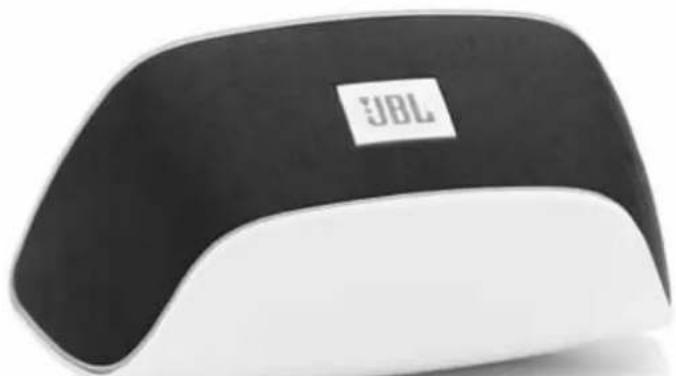
natural_image
Black and white JBL brand computer mouse with a small logo on the front panel (no visible text or symbols on device body)


WELCOME
Thank you for purchasing the JBL Soundfly™ Air plug-in AirPlay speaker. Soundfly Air will fill your room with sound from your iPod, iPhone, iPad, Mac or PC computer with iTunes, while plugging directly into an AC outlet and remaining practically invisible.
INCLUDED ITEMS

PLUG SOUNDFLY AIR INTO AN AC OUTLET
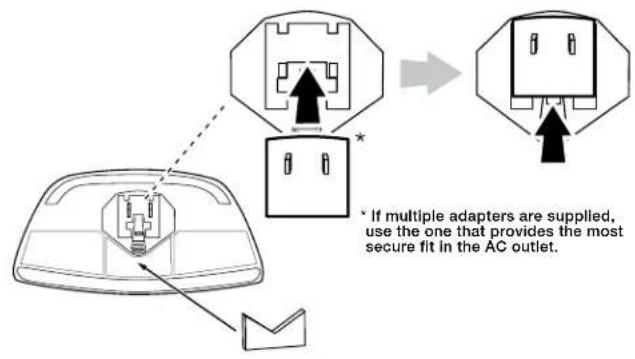

natural_image
Line drawing of a device with two electrical outlets and a label on the cover (no text or symbols present)
TURNING SOUNDFLY AIR ON AND OFF

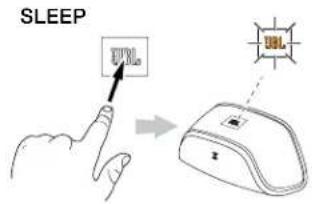
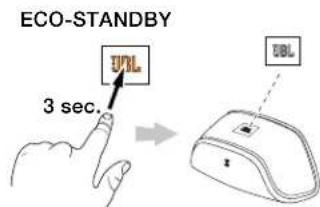
Note: Soundfly Air will automatically enter the Sleep mode after 10 minutes of inactivity.
JOIN SOUNDFLY AIR WITH YOUR WI-FF® NETWORK
Before you can stream audio to your Soundfly Air via AirPlay, you will need to join your Soundfly Air with your home Wi-Fi ^® network. You will only need to perform this operation one time.
IMPORTANT: Before performing the following steps, be sure your home Wi-Fi network is operating.
- Make sure the Wi-Fi logo button's LED is flashing amber.

- Touch the Wi-Fi logo button for at least three seconds. The button's LED will alternately flash green and amber and Soundfly Air will be in the Connect mode.

- Open your iPod's, iPhone's or iPad's Wi-Fi settings page and connect to the "JBL Soundfly Air" network.
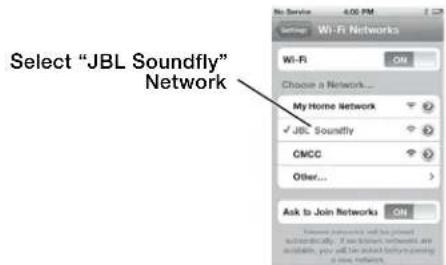
- Once the iPod, iPhone or iPad is connected to the "JBL Soundfly Air" network, open the device's Web browser (Safari, Firefox, Internet Explorer, etc.) and enter the following Web address: 192.168.1.1. This address will display the JBL Soundfly Air's Setup page.

- In the "Wireless Network SSID" drop-down box, select your home Wi-Fi network's name.

- If your network requires a password, enter it in the "WPA/WPA2 Passphrase" field.

- Once the configuration is complete, Soundfly Air will connect to your home Wi-Fi network, and its Wi-Fi button LED will change to solid green.

IMPORTANT: Restore your iPod, iPhone or iPad Wi-Fi settings back to your home Wi-Fi network.

You're now ready to enjoy AirPlay streaming audio from your iOS device!
IF THE WI-FI CONNECTION WAS UNSUCCESSFUL
If Soundfly Air was unable to connect to your Wi-Fi network, the Wi-Fi logo button LED will flash amber.

If this happens:
a) Touch the Wi-Fi button for more than three seconds to begin the connection process again.
b) Repeat steps 2 - 5 to connect to your Wi-Fi network.
STREAM AUDIO TO SOUNDFLY AIR
Your JBL Soundfly Air can play audio files or an Internet radio station that is streaming from iTunes 10.1 (or newer) on a networked computer, or from an iPod, iPhone or iPad with iOS 4.2 or later.
NOTE: Before you can begin AirPlay streaming, the JBL Soundfly Air must be joined in the Wi-Fi network. (See Join Soundfly Air With Your Wi-Fi Network, on page 3.)
To initiate streaming from the computer, launch iTunes, click on the AirPlay button that appears at the bottom of the iTunes window, and select "JBL Soundfly Air" in the pop-up list that appears.

To initiate streaming from an iPod, iPhone or iPad tap the AirPlay button on the screen and select "JBL Soundfly Air" in the speaker-selection list that appears.
- If Soundfly Air is in the Sleep mode when you press Play in iTunes or on the iPod, iPhone or iPad, Soundfly Air will automatically turn on, and begin playing the streaming audio.
USING THE SOUNDFLY APP'S EASY SETUP FUNCTION
The free JBL Soundfly App has an easy setup function that simplifies Soundfly Air's Wi-Fi setup procedure.
-
Visit the iTunes App Store and download the JBL Soundfly Air app into your iPod, iPhone or iPad.
-
Unplug Soundfly Air from the wall outlet and remove its grille as shown below.
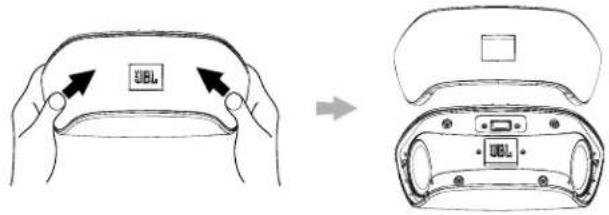
- Connect your iPod, iPhone or iPad to Soundfly Air's USB port.

natural_image
Technical line drawing of a handheld electronic device with no visible text or symbols- Plug Soundfly Air back into the wall outlet and wait until the power LED illuminates solid white.
-
Launch the Soundfly Air app on your iPod, iPhone or iPad, and select "Easy Setup."
-
Follow the prompts in the app to complete the Wi-Fi setup.
- Remove Soundfly Air from the wall outlet, remove the USB cable from Soundfly Air and replace the grille as shown below.

- Plug Soundfly Air back into the wall outlet. After the power LED illuminates solid white the Wi-Fi LED should illuminate solid green to indicate that Soundfly Air is joined with your Wi-Fi network.
NOTE: The JBL Soundfly App also allows you to change the EQ setting to get the best sound wherever you plug in Soundfly Air.
TROUBLESHOOTING
SYMPTOM POSSIBLE PROBLEM SOLUTION NOTE
| No sound (Power button LED is not illuminated) | Faulty AC connection Make sure that Soundfly Air is plugged into a working AC outlet. | The Power button LED glows white or amber when the unit is receiving AC power. | |
| No sound (Power button LED glows amber.) | Soundfly Air is in Sleep mode. Touch the Power button. The Power button LED glows white when the unit is on. | ||
| No sound (Power button LED glows white.) | Soundfly Air is not joined with your home Wi-Fi network. | Join Soundfly Air with your home Wi-Fi network. See Join Soundfly Air With Your Wi-Fi Network, on page 3. | The Wi-Fi LED illuminates solid green when Soundfly Air is joined with a Wi-Fi network. |
| The iOS device is out of range of Soundfly Air | Move the device closer to Soundfly Air. | Soundfly Air's operational range is approximately 33 feet (10m). | |
| Sound crackles, hisses or is distorted | The iOS device is overloading Soundfly Air. | Turn down the volume on the iOS device.Set the EQ on the device to “Off”. | |
| Loud hum or buzzing There is a ground loop with the AC wiring. | Unplug Soundfly Air and plug it into a different AC outlet. | ||
SPECIFICATIONS
Amplifier power: 10 watts x 2
Frequency response: 60Hz - 20kHz
Signal-to-noise ratio: 80dB
Power requirement: 100V - 240V AC, 50Hz/60Hz
Power consumption: <0.5W (standby); 30W (maximum)
Dimensions (W x H x D): 7-1/2" x 2-13/16" x 3-5/8" (71mm x 92mm x 190mm)
Weight: 0.9 lb (0.42kg)
IMPORTANT SAFETY INSTRUCTIONS
-
Read these instructions.
-
Keep these instructions.
-
Hood all warnings.
-
Follow all instructions.
-
Do not use this apparatus near water.
-
Clean only with dry cloth
-
Do not block any ventilation openings. Install in accordance with the manufacturer's Instructions
-
Do not install near any heat sources such as radiators, heat registers, slows, or other apparatus (including amplifiers) that produce heat.
-
Do not defeat the safety purpose of the polarized or grounding-type plug. A polarized plug has two blades with one wider than the other. A grounding-type plug has two blades and a third grounding prong. The wide blade or third prong is provided for your safety. If the provided plug does not fit into your outlet, consult an electrician for replacement of the obsolete outlet.
-
Protect the power cord from being walked on or pinched, particularly at the plugs, convenience receptacles and the point where they exit from the apparatus.
-
Only use attachments/accessories specified by the manufacturer.
-
Use only with the cart, stand, tripod, bracket or table specified by the manufacturer or sold with the apparatus. When a cart is used, use caution when moving the cart/apparatus combination to avoid injury from tip-over.
-
Unplug this apparatus during lightning storms or when unused for long periods of time.
-
Refer all servicing to qualified service personnel. Servicing is required when the apparatus has been damaged in any way, such as: when the power supply cord or plug has become damaged, when liquid has been spilled or objects have fallen into the apparatus, when the apparatus has been exposed to rain or moisture, when the apparatus does not operate normally, or the apparatus has been dropped.
-
Do not expose this apparatus to dripping or splashing and ensure that no objects filled with liquids, such as vases, are placed on the apparatus.
-
To completely disconnect this apparatus from the AC mains, disconnect the power supply cord plug from the AC receptacle
-
The mains plug of the power supply cord shall remain readily operable.
-
Do not expose batteries to excessive heat such as sunshine, fire or the like.

| CAUTION | ||
| RISK OF ELECTRIC STOCKDO NOT OPEN | ||
| WARNING TO REDUCE THE RISK OF FREER ELECTRIC SHOCK, DO NOT EXPOSE THIS APPEAR ATUS TO PARK OR MOUSTURE. | THE BOLT AVIATION POINT WITHIN ANEOLATRY AL TWANGLE IS INTENDED TOALRT THE USER TO THE FRISSE OFIMPORTANT OPERATING AND MAINTENVANCESURVINCING INSTRUCTIONS IN THE LITERATUREACCOMPAVING THE PRODUCT. | |
FCC AND IC REGULATIONS (USA AND CANADA ONLY)
FCC AND IC INFORMATION FOR USERS
This device complies with Part 15 of the FCC rules and Industry Canada license-exempt RSS 210. Operation is subject to the following two conditions: (1) This device may not cause harmful interference; and (2) this device must accept any interference received, including interference that may cause undesired operation.
RADIO AND TELEVISION INTERFERENCE
This equipment has been tested and found to comply with the limits for a Class B digital device, pursuant to Part 15 of the FCC rules. These limits are designed to provide reasonable protection against harmful interference in a residential installation. This equipment generates, uses and can radiate radio frequency energy and, if not installed and used in accordance with the instructions, may cause harmful interference to radio communications. However, there is no guarantee that interference will not occur in a particular installation. If this equipment does cause interference to radio or television reception, which can be determined by turning the equipment off and then on, the user is encouraged to try to correct the interference by one or more of the following measures:
- Increase the separation between the equipment and the receiver.
- Connect the equipment to a different outlet so that the equipment and receiver are on different branch circuits.
- Consult the dealer or an experienced radio/ TV technician for help.
NOTE: Changes or modifications not expressly approved by HARMAN could void the user's authority to operate the equipment.
IC STATEMENT AND WARNING (CANADA ONLY)
Hereby, HARMAN International Industries, Incorporated declares that this JBL SOUNDFLY AIR is in compliance with the essential requirements and other relevant provisions of Directive 1999/5/EC, ErP 2009/125/EC Directive and RoHS 2011/65/EU Directive. The declaration of conformity may be consulted at the support section of our Web site, accessible from www.jbl.com.

HARMAN
HARMAN International Industries, Incorporated 8500 Balboa Boulevard, Northridge, CA 91329 USA
© 2012 HARMAN International Industries, Incorporated. All rights reserved.
JBL is a trademark of HARMAN International Industries, Incorporated, registered in the United States and/or other countries. Soundfly is a trademark of HARMAN International Industries, Incorporated.
AirPlay, iPad, iPhone and iPod are trademarks of Apple Inc., registered in the U.S. and other countries. "Made for iPod," "Made for iPhone" and "Made for iPad" mean that an electronic accessory has been designed to connect specifically to iPod, iPhone and iPad, respectively, and has been certified by the developer to meet Apple performance standards. Apple is not responsible for the operation of this device or its compliance with safety and regulatory standards. iPod/iPhone/iPad not included.
Wi-Fi and the Wi-Fi Certified logo are registered trademarks of the Wi-Fi Alliance. Wi-Fi Certified is a trademark of the Wi-Fi Alliance.
Features, specifications and appearance are subject to change without notice.
Part No. JBLP3272 Rev.: A
- WELCOME
- JOIN SOUNDFLY AIR WITH YOUR WI-FF® NETWORK
- IF THE WI-FI CONNECTION WAS UNSUCCESSFUL
- STREAM AUDIO TO SOUNDFLY AIR
- USING THE SOUNDFLY APP'S EASY SETUP FUNCTION
- TROUBLESHOOTING
- SPECIFICATIONS
- IMPORTANT SAFETY INSTRUCTIONS
- FCC AND IC REGULATIONS (USA AND CANADA ONLY)
- FCC AND IC INFORMATION FOR USERS
- RADIO AND TELEVISION INTERFERENCE
- IC STATEMENT AND WARNING (CANADA ONLY)
- HARMAN
Brand : JBL
Model : SoundFly Air
Category : Docking Station