
Brilliance 19S1EB - Monitor PHILIPS - Free user manual and instructions
Find the device manual for free Brilliance 19S1EB PHILIPS in PDF.


| Product Type | 19-inch LCD Monitor |
| Display Size | 19 inches (48 cm) diagonal |
| Resolution | 1280 x 1024 (SXGA) |
| Aspect Ratio | 5:4 |
| Response Time | 5 ms (typical) |
| Brightness | 250 cd/m² |
| Contrast Ratio | 1000:1 (typical) |
| Viewing Angles | 170° horizontal / 160° vertical |
| Connectivity | VGA (D-Sub), DVI-D |
| Power Consumption | 19 W (typical), <0.5 W (standby) |
| Weight | Approx. 4.5 kg (with stand) |
| Dimensions (with stand) | 404 x 429 x 207 mm (WxHxD) |
| VESA Mount | 100 x 100 mm |
| Tilt Range | -5° to 20° |
| Height Adjustment | 70 mm |
| Pivot Function | Yes (90° clockwise) |
| Energy Star | Energy Star 5.0 compliant |
| Certifications | CE, FCC, RoHS, TCO 5.0 |
| Box Contents | Monitor, stand base, power cable, VGA cable, DVI cable, user manual |
| Warranty | 3 years (excluding backlight) |
Frequently Asked Questions - Brilliance 19S1EB PHILIPS
User questions about Brilliance 19S1EB PHILIPS
0 question about this device. Answer the ones you know or ask your own.
Ask a new question about this device
Download the instructions for your Monitor in PDF format for free! Find your manual Brilliance 19S1EB - PHILIPS and take your electronic device back in hand. On this page are published all the documents necessary for the use of your device. Brilliance 19S1EB by PHILIPS.
USER MANUAL Brilliance 19S1EB PHILIPS
Regulatory information
TCO'03 Information
☐ Recycling Information for Customers
Waste Electrical and Electronic
Equipment-WEEE
CE Declaration of Conformity
Energy Star Declaration
Federal Communications Commission (FCC) Notice (U.S. Only)
FCC Declaration of Conformity
c Commission Federale de la Communication (FCC Declaration)
EN 55022 Compliance (Czech Republic Only)
1 Polish Center for Testing and Certification Notice
North Europe (Nordic Countries) Information
U BSMI Notice (Taiwan Only)
Ergonomie Hinweis (nur Deutschland)
• Philips End-of-Life Disposal
China RoHS
Lead-free Product
Troubleshooting
Frequently Asked Questions (FAQs)
Regulatory Information
*available for selective models
TCO'03 Information

Congratulations!
The display you have just purchased carries the TCO'03 Displays label. This means that your display is designed, manufactured and tested according to some of the strictest quality and environmental requirements in the world. This makes for a high performance product, designed with the user in focus that also minimizes the impact on our natural environment.
Some of the features of the TCO'03 Display requirements.
Ergonomics
- Good visual ergonomics and image quality in order to improve the working environment for the user and to reduce slight and strain problems. Important parameters are luminance, contrast, resolution, reflectance, colour rendition and image stability.
Energy
- Energy-saving mode after a certain time-beneficial both for the user and the environment - Electrical safety
Emissions
- Electromagnetic fields - Noise emissions
Ecology
- The product must be prepared for recycling and the manufacturer must have a certified environmental management system such as EMAS or ISO 14000 - Restrictions on - chlorinated and brominated flame retardants and polymers - heavy metals such as cadmium, mercury and lead.
For more information, please visit
www.tcodevelopment.com
RETURN TO TOP OF THE PAGE
Regulatory Information
Recycling Information for Customers
There is currently a system of recycling up and running in the European countries, such as The Netherlands, Belgium, Norway, Sweden and Denmark.
In Asia Pacific, Taiwan, the products can be taken back by Environment Protection Administration (EPA) to follow the IT product recycling management process, detail can be found in web site www.epa.gov.tw
The monitor contains parts that could cause damage to the nature environment. Therefore, it is vital that the monitor is recycled at the end of its life cycle.
For help and service, please contact Consumers Information Center or F1rst Choice Contact Information Center in each country.
RETURN TO TOP OF THE PAGE
Waste Electrical and Electronic Equipment-WEEE
Attention users in European Union private households

This marking on the product or on its packaging illustrates that, under European Directive 2002/96/EC governing used electrical and electronic appliances, this product may not be disposed of with normal household waste. You are responsible for disposal of this equipment through a designated waste electrical and electronic equipment collection. To determine the locations for dropping off such waste electrical and electronic, contact your local government office, the waste disposal organization that serves your household or the store at which you purchased the product.
Attention users in United States:
Like all LCD products, this set contains a lamp with Mercury. Please dispose of according to all Local, State and Federal laws. For the disposal or recycling information, contact www.mygreenelectronics.com or www.eiae.org.
RETURN TO TOP OF THE PAGE

EPEAT
*The EPEAT (Electronic Product Environmental Assessment Tool) program evaluates computer desktops,
file:/Tjshir@y.liv/90916. Phillips 1951 tex.pdf/1951 CT/dler/manual/Ullrain/lan/1951/safety/regal.sthm 第2页/共10 [2008/9/18 下午 32:55:59]
regulatory information
laptops, and monitors based on 51 environmental criteria developed through an extensive stakeholder consensus process supported by US EPA.
EPEAT system helps purchasers in the public and private sectors evaluate, compare and select desktop computers, notebooks and monitors based on their environmental attributes. EPEAT also provides a clear and consistent set of performance criteria for the design of products, and provides an opportunity for manufacturers to secure market recognition for efforts to reduce the environmental impact of its products."
Benefits of EPEAT
Reduce use of primary materials
Reduce use of toxic materials
Avoid the disposal of hazardous waste
EPEAT'S requirement that all registered products meet ENERGY STAR's energy efficiency specifications, means that these products will consume less energy throughout their life.
RETURN TO TOP OF THE PAGE
ROHS is a European Directive aiming to control the use of certain hazardous substances in the production of new electrical and electronic equipment. Philips has completely eliminated four of six RoHS-banned substances form its products by 1998-eight full years before compliance was required and has lowered usage of the remaining substances significantly below the mandated levels.
RETURN TO TOP OF THE PAGE
CE Declaration of Conformity
This product is in conformity with the following standards
- EN60950-1:2001 (Safety requirement of Information Technology Equipment)
- EN55022:2006 (Radio Disturbance requirement of Information Technology Equipment)
- EN55024:1998 (Immunity requirement of Information Technology Equipment)
- EN61000-3-2:2006 (Limits for Harmonic Current Emission)
- EN61000-3-3:1995 (Limitation of Voltage Fluctuation and Flicker)
following provisions of directives applicable
- 2006/95/EC (Low Voltage Directive)
- 2004/108/EC (EMC Directive)
and is produced by a manufacturing organization on ISO9000 level.
The product also comply with the following standards
- ISO13406-2 (Ergonomic requirement for Flat Panel Display)
- GS EK1-2000 (GS specification)
- prEN50279:1998 (Low Frequency Electric and Magnetic fields for Visual Display)
- MPR-II (MPR:1990:8/1990:10 Low Frequency Electric and Magnetic fields)
- TCO'03, TCO Displays 5.0 (Requirement for Environment Labelling of Ergonomics, Energy, Ecology and Emission, TCO: Swedish Confederation of Professional Employees) for TCO versions
RETURN TO TOP OF THE PAGE
Energy Star Declaration
file:/Tj/kei'oy.liv/90916. Phillips 1951 tras.pdr/1951.CT/dr/manual/fllrain/lan/1951/safety/regalRegulat.htm 第3页/共10 [2008/9/18 下午 32:55:59]
regulatory information
This monitor is equipped with a function for saving energy which supports the VESA DPM standard. This means that the monitor must be connected to a computer which supports VESA DPM. Time settings are adjusted from the system unit by software.
VESA State LED Indicator Power Consumption
Normal operation ON (Active) White < 18 W (typ.)
Power Saving
Alternative 2
One step
Sleep White (blinking) < 0.8 W (typ.)
Switch Off Off < 0.5 W (typ.)

As an ENERGY STAR® Partner, we have determined that this product meets the ENERGY STAR® guidelines for energy efficiency.

We recommend you switch off the monitor when it is not in use for a long time.
RETURN TO TOP OF THE PAGE
Federal Communications Commission (FCC) Notice (U.S. Only)

This equipment has been tested and found to comply with the limits for a Class B digital device, pursuant to Part 15 of the FCC Rules. These limits are designed to provide reasonable protection against harmful interference in a residential installation. This equipment generates, uses and can radiate radio frequency energy and, if not installed and used in accordance with the instructions, may cause harmful interference to radio communications. However, there is no guarantee that interference will not occur in a particular installation. If this equipment does cause harmful interference to radio or television reception, which can be determined by turning the equipment off and on, the user is encouraged to try to correct the interference by one or more of the following measures:
- Reorient or relocate the receiving antenna.
- Increase the separation between the equipment and receiver.
- Connect the equipment into an outlet on a circuit different from that to which the receiver is connected.
- Consult the dealer or an experienced radio/TV technician for help.

Changes or modifications not expressly approved by the party responsible for compliance could void the user's authority to operate the equipment.
Use only RF shielded cable that was supplied with the monitor when connecting this monitor to a computer device.
To prevent damage which may result in fire or shock hazard, do not expose this appliance to rain or excessive moisture.
regulatory information
THIS CLASS B DIGITAL APPARATUS MEETS ALL REQUIREMENTS OF THE CANADIAN INTERFERENCE-CAUSING EQUIPMENT REGULATIONS.
RETURN TO TOP OF THE PAGE
FCC Declaration of Conformity
Declaration of Conformity for Products Marked with FCC Logo, United States Only
This device complies with Part 15 of the FCC Rules. Operation is subject to the following two conditions: (1) this device may not cause harmful interference, and (2) this device must accept any interference received, including interference that may cause undesired operation.
RETURN TO TOP OF THE PAGE
Commission Federale de la Communication (FCC Declaration)

Regulatory information
CET APPAREIL NUMERIQUE DE LA CLASSE B RESPECTE TOUTES LES EXIGENCES DU REGLEMENT SUR LE MATERIEL BROUILLEUR DU CANADA.
RETURN TO TOP OF THE PAGE
EN 55022 Compliance (Czech Republic Only)
This device belongs to category B devices as described in EN 55022, unless it is specifically stated that it is a Class A device on the specification label. The following applies to devices in Class A of EN 55022 (radius of protection up to 30 meters). The user of the device is obliged to take all steps necessary to remove sources of interference to telecommunication or other devices.
Polish Center for Testing and Certification Notice
The equipment should draw power from a socket with an attached protection circuit (a three-prong socket). All equipment that works together (computer, monitor, printer, and so on) should have the same power supply source.
The phasing conductor of the room's electrical installation should have a reserve short-circuit protection device in the form of a fuse with a nominal value no larger than 16 amperes (A).
To completely switch off the equipment, the power supply cable must be removed from the power supply socket, which should be located near the equipment and easily accessible.
A protection mark "B" confirms that the equipment is in compliance with the protection usage requirements of standards PN-93/T-42107 and PN-89/E-06251.
regulatory information
North Europe (Nordic Countries) Information
Placering/Ventilation
WARNING:
FÖRSÄKRA DIG OM ATT HUVUDBRYTARE OCH UTTAG ÄR LÄTÄTKOMLIGA, NÄR DU STÄLLER DIN UTRUSTNING PÅPLATS.
Placering/Ventilation
ADVARSEL:
S∅RG VED PLACERINGEN FOR, AT NETLEDNINGENS STIK OG STIKKONTAKT ER NEMT TILGÆNGELIGE.
Paikka/Ilmankierto
VAROITUS:
SIJOITA LAITE SITEN, ETTÄ VERKKOJOHTO VOIDAAAN TARVITTAESSA HELPOSTI IRROTTAA PISTORASIASTA.
Regulatory Information
BSMI Notice (Taiwan Only)
符合乙類資訊產品之標準
RETURN TO TOP OF THE PAGE
End-of-Life Disposal
file:///Tjshir/xy.liv/90916:Philips 1951 tex: pft/1951 CT:lerd/manual/filerz.in/an/1951/safety/regat/regulat.htm 第8页/共10 [2009/9/18 下午 32:55:59]
regulatory information
Your new monitor contains materials that can be recycled and reused. Specialized companies can recycle your product to increase the amount of reusable materials and to minimize the amount to be disposed of.
Please find out about the local regulations on how to dispose of your old monitor from your sales representative.
(For customers in Canada and U.S.A.)
This product may contain lead and/or mercury. Dispose of in accordance to local-state and federal regulations. For additional information on recycling contact www.eia.org (Consumer Education Initiative)
RETURN TO TOP OF THE PAGE
China RoHS
The People's Republic of China released a regulation called "Management Methods for Controlling Pollution by Electronic Information Products" or commonly referred to as China RoHS. All products including CRT and LCD monitor which are produced and sold for China market have to meet China RoHS request.
中国大陆RoHS
regulatory information
Lead free display promotes environmentally sound recovery and disposal of waste from electrical and electronic equipment. Toxic substances like Lead has been eliminated and compliance with European community's stringent RoHs directive mandating restrictions on hazardous substances in electrical and electronic equipment have been adhered to in order to make Philips monitors safe to use throughout its life cycle.
RETURN TO TOP OF THE PAGE
Сруководстве
О руководстве
natural_image
Line drawing of a Philips monitor with a blue circular icon highlighting the screen area (no text or symbols on the device itself)This monitor is ENERGY STAR ^® compliant. As an ENERGY STAR ^® Partner, we have determined that this product meets the ENERGY STAR ^® guidelines for energy efficiency.
* Ці дані можуть
File://D:/shiray.dtu/00018 Phillips 13S1 Insr pJF13S1 C:\mod\natural\Ukraine\FSI\product\SMART.HTM 第1页/共17 [2009/15 下午(2007/45)]
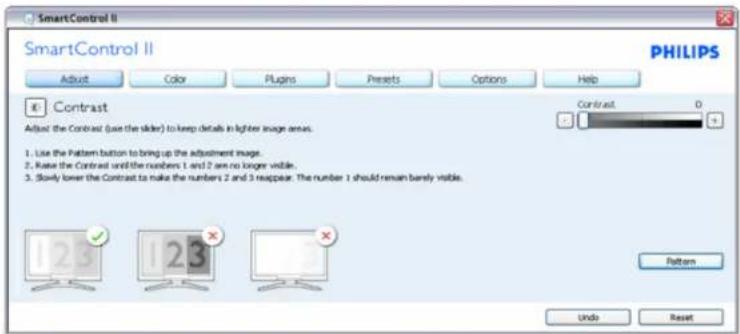
SmartControl
File://D:/shiray.dtu/00018 Phillips 13S1 Insr pJF13S1 C:\mod\natural\Ukraine\FSI\product\SMART.HTM 第3页/共17 [2009/15 下午(2:07:45)]
SmartControl


Кольорове меню:
File:/D:/shiray.liu/00018 Phillips 13S2 Insr jdF13S1 C:\Prodematal\Ukraine:F13S1\product\SMART.HTM 页4页/共17 [2006/15 下午 02:07:45]
SmartControl

natural_image
Colorful circular ring diagram with a central square, displayed on a grid background (no text or symbols)File://D:/shiray.dtu/00018 Phillips 13S1 Insr pJF13S1 C:\mod\natural\Ukraine\FSI\product\SMART.TTM 第9页/共17 [2006V15 下午 02:04:45]
SmartControl
Option>Auto Pivot (Опция >Auto Pivot)
File://D:/shirney.liu/000318_https 1352.bras.pdF1351.CNlodbanamab/UkrainiceF1351/product/SMART.TTM页12页/共17[2009]818下午02:34:40
SmartControl

SmartControl
Version 3.20
dtune-standard-R2007-01-04-1151-23
Copyright 1993-2007 Portrait Displays, Inc.
Patents Pending
File:3D@scrlley.hoC5093_Padjpe.1951trie.pd/1951.CJ/Ic/dizincinal/Ukranian/1951Install/connect.html 第1页/共2 [2006015 下午 02:08:32]
ПОДКАЮЧЕНИЕК ПК
natural_image
Line drawing of hands using a tool to cut or install a piece of paper (no text or symbols present)19S1CB/19S1CS models
OCHODa

natural_image
Line drawing of a hand holding a computer monitor with a blue arrow pointing to a small cylindrical object on a base (no text or symbols)File://Dj/shirley.fin/050918_Purips 19S1 tras pc/19S1 CD/cdkunica/Ukrainian/19S1/natal/base.htm 第2頁/共7 [2020/0/18 下午 02:58.10]
OCHODa
natural_image
Diagram of a mechanical component with a blue upward arrow indicating force or direction (no text or symbols)Сваляне на основата
Условие:
natural_image
Line drawing of a mechanical device with a hand operating a tool, no text or symbols presentnatural_image
Line drawing of a Philips air conditioner unit with mounting holes and ventilation slots (no text or symbols)file:///0:/shirlcy.lin/090918_Philips 19S1 tras pdf/19S1 CD/led/manual/Ucrainian/19S1/osd/osddesc.htm 第2页 / 共3 [2009/9/18 下午 02:58:25]
Экранное меню
Customer Care & Warranty
Customer Care & Warranty
PLEASE SELECT YOUR COUNTRY/AREA TO REVIEW DETAILS OF YOUR WARRANTY COVERAGE
WESTERN EUROPE: • Austria • Belgium • Denmark • France • Germany
• Greece • Finland • Ireland • Italy • Luxembourg • the Netherlands • Norway
- Portugal • Sweden • Switzerland • Spain • United Kingdom • Poland
EASTERN EUROPE: • Czech Republic • Hungary • Russia • Slovakia • Slovenia
• Turkey
LATIN AMERICA: • Argentina • Brasil
NORTH AMERICA: • CANADA • USA
PACIFIC: • Australia • New Zealand
ASIA: • China • Hong Kong • India • Indonesia • Korea • Malaysia • Pakistan
• Philippines • Singapore • Taiwan • Thailand • Vietnam
AFRICA: • South Africa
MIDDLE EAST: • United Arab Emirates
Philips and the Philips Shield Emblem are registered trademarks of Koninklijke Philips Electronics N.V. and are used under license from Koninklijke Philips Electronics N.V.
Вебсайт:http://www.philips.com/support
Consumer Information Centers
Consumer Information Centers
- Argentina - Australia - Brasil - Canada - New Zealand - Belarus - Bulgaria
• Croatia • Czech Republic • Estonia • United Arab Emirates • Hong Kong
• Hungary • India • Indonesia • Israel • Latvia • Lithuania • Malaysia
• Middle East + North Africa • New Zealand Pakistan • Romania • Russia
• Serbia & Montenegro • Singapore • Slovakia • Slovenia • South Africa
• South Korea • Taiwan • Philippines □ Thailand • Turkey • Ukraine • Vietnam
Eastern Europe
BELARUS
Technic al Center of JV IBA
M. Bogdanovich str. 155
BY - 220040 Minsk
Tel: +375 17 217 33 86
BELARUS
Service.BY
Petrus Brovky st. 19 - 101-B
220072, Minsk
Belarus
BULGARIA
LAN Service
140, Mimi Balkanska Str.
Office center Translog
1540 Sofia, Bulgaria
Tel: +359 2 960 2360
www.lan-service.bg
CZECH REPUBLIC
General Consumer Information Center
800 142100
Xpectrum
Lu.ná 591/4
CZ - 160 00 Praha 6 Tel: 800 100 697 or 220 121 435
Profi Service Center Ltd.
123 Kulso-Vaci Street.
H-1044 Budapest ( Europe Center )
Hungary
Tel: +36 1 814 8080
m.andras@psc.hu
LATVIA
ServiceNet LV
Jelgavas iela 36
LV - 1055 Riga,
Tel: +371 7460399
Email: serviss@servicenet.lv
LITHUANIA
ServiceNet LT
Gaiziunu G. 3
LT - 3009 KAUNAS
Tel: +370 7400088
Email: servisas@servicenet.lt
www.servicenet.lt
file:///D:/aim/yy.16/200916 Philips 19S1 mas p40/19S1 CD/d/wacma/Udavin/eqv-arcy/garcic.htm 第2只/共9 [2009/9/8 下午02:50:08]
Consumer Information Centers
ROMANIA
Blue Ridge Int'l Computers SRL
115, Mihai Eminescu St., Sector 2
RO - 020074 Bucharest
Tel: +40 21 2101969
SERBIA & MONTENEGRO
Kim Tec d.o.o.
Viline vode bb. Slobodna zona
Beograd L12/3
11000 Belgrade
Serbia
Tel. +381 11 20 70 684
SLOVAKIA
General Consumer Information Center
0800004551
Datalan Servisne Stredisko
Puchovska 8
SK - 831 06 Bratislava
Tel: +421 2 49207155
Email: servis@datalan.sk
SLOVENIA
PC HAND
Brezovce 10
SI - 1236 Trzin
Tel: +386 1 530 08 24
Email: servis@pchand.si
RUSSIA
CPS
18, Shelepihinskaya nab.
123290 Moscow
Russia
Tel. +7(495)797 3434
Profservice:
14A -3, 2Karacharovskaya str,
109202, Moscow,
Russia
Tel. +7(095)170-5401
Consumer Information Centers
TURKEY
Türk Philips Ticaret A.S.
Yukari Dudullu Org.San.Bolgesi
2.Cadde No:22
34776-Umraniye/Istanbul
Tel: (0800)-261 33 02
UKRAINE
Comel
Shevchenko street 32
UA - 49030 Dnepropetrovsk
Tel: +380 562320045
www.csp-comel.com
LLC Topaz Company
Topaz-Service Company,
Mishina str. 3,
Kiev
Ukraine-03151
Tel: +38 044 245 73 31
Latin America
ARGENTINA
Azopardo 1480.
(C1107ADZ) Cdad. de Buenos Aires
Tel: 0800 3330 856
Email: CIC.monitores@Philips.com
BRASIL
Alameda Raja Gabaglia, 188 - 10°Andar - V.
Olímpia - S. Paulo/SP - CEP 04551-090 -
Brasil
Tel: 0800-7254101
Email: lourdes.rezende@aoc.com.br
Pacific
Consumer Information Centers
AUSTRALIA
Company: AGOS NETWORK PTY LTD
Address: 4/5 Dursley Road, Yenorra, NSW 2161, Australia
Tel: 1300 360 386
Fax: +61-2-80808147
Email: philips@agos.com.au
Service hours: Mon.\~Fri. 8:00am-7:30pm
NEW ZEALAND
Company: Visual Group Ltd.
Address: 28 Walls Rd Penrose Auckland
Phone: 0800 657447
Fax: 09 5809607
E-mail: vai.ravindran@visualgroup.co.nz
Service Hours: Mon.\~Fri. 8:30am\~5:30pm
Asia
HONG KONG/Macau
Company Name: PHK Service Limited
Address: Flat A, 10/F., Pak Sun Building, 103 - 107 Wo Yi Hop Road, Kwai Chung, New Territories, Hong
Kong
Tel.: (852) 2610-6908 / (852) 2610-6929 for Hong Kong and (853) 2856-2277 for Macau
Fax: (852) 2485 3574 for Hong Kong and (853) 2856 1498 for Macau
E-mail: enquiry@phkservice.com.hk
Service Hours: Mon.\~Sat. 09:00am\~06:00pm
India
Company: REDINGTON INDIA LTD
Address: SPL Guindy House, 95 Mount Road, Chennai 600032, India
Tel: +9144-42243352/353
E-mail: aftersales@in.aocmonitor.com
Service hours: Mon.\~Fri. 9:00AM\~5:30PM; Sat. 9:00AM\~1:00PM
Consumer Information Centers
Indonesia
Company Name: PT. Gadingsari elektronika Prima
Address: Kompleks Pinang 8, JI. Ciputat raya No. 8F, Pondok Pinang, Jakarta
Tel: 021-750909053, 021-750909056
Fax: 021-7510982
E-mail: gepta@cbn.net.id
Service hours: Mon.\~Fri. 8:30am\~4:30pm; Sat. 8:30am\~2:00pm
Additional service points:
- Philips Building JI. Buncit Raya Kav 99. Jakarta Selatan.
Phone: 021-7940040, ext 1722/1724, 98249295, 70980942
- JI. Tanah Abang 1 no 12S. Jakarta Pusat.
Phone: 021-3455150, 34835453
- Rukan City Home no H31, Gading Square. Jl. Bulevar Barat. Kelapa Gading. Jakarta Utara. Phone: 021-45870601, 98131424
South Korea
Company: PCS One Korea Ltd.
Address: 112-2, Banpo-dong, Seocho-ku, Seoul, 137-040, Korea
Call Center Tel: 080-600-6600
Tel: 82 2 591 1528
Fax: 82 2 595 9688
E-mail: cic_korea@philips.com
Service hours: Mon.\~Fri. 9:00AM\~ 6:00PM; Sat. 9:00AM\~1:00PM
Malaysia
Company: After Market Solutions (CE) Sdn Bhd
Address: Lot 6. Jalan 225/51A, 46100 Petaling Jaya, Selangor DE, Malaysia.
Phone: 603 7953 3370
Philips Info Line: 1-800-880-180
Fax: 603 7953 3338
E-mail: pceinfo.my@philips.com
Service Hours: Mon.\~Fri. 8:15am\~5:15pm; Sat. 9:00am\~1:00pm
Pakistan
Philips Consumer Service
Address: Mubarak manzil, 39, Garden Road, Saddar, Karachi-74400
Tel: (9221) 2737411-16
Fax: (9221) 2721167
E-mail: care@philips.com
Website: www.philips.com.p
file:///D:/aim/yy.16/200916 Philips 19S1 mas p40/19S1 CD/d/wacma/Udavin/eqv-arcy/garcic.htm 第6页/共9 [2009/9/8 下午02:50:08]
Consumer Information Centers
Singapore
Company: Philips Electronics Singapore Pte Ltd (Philips Consumer Care Center)
Address: 620A Lorong 1 Toa Payoh, TP4 Building Level 1, Singapore 319762
Tel: (65) 6882 3999
Fax: (65) 62508037
E-mail: consumer.care.sg@philips.com
Service hours: Mon.\~Fri. 9:00am\~6:00pm; Sat. 9:00am\~1:00pm
Taiwan
Company: FETEC.CO
Address: 3F, No.6, Lane 205, Sec. 1, Chang Hsing Rd, Lu Chu Hs, Taoyuan, Taiwan R.O.C 33800
Consumer Care: 0800-231-099
Tel: (03)2120336
Fax: (03)3129184
E-mail: knlin08@xuite.net
Service hours: Mon.\~Fri. 8:30am\~7:00pm
Thailand
Company: Axis Computer System Co., Ltd.
Address: 1421 Soi Lardprao 94, Srivara Town In Town Soi 3 Road, Wangthonglang, Bangkok 10310
Thailand
Tel: (662) 934-5498
Fax: (662) 934-5499
E-mail: axis5@axiscomputer.co.th
Service Hours: Mon.\~Fri. 08:30am\~05:30pm
Vietnam
Company: Digiworld Corp
Address: 211-213 Vo Van Tan St, Ward 5, Dist.3, Ho Chi Minh city, Vietnam
Tel: 848-38266065
Fax: 848-38267307
E-mail: Digicare@dgw.com.vn
Service hours: 8:00 to 12:00 AM and 13:30 to 17:30 PM (from Monday to Friday)
Philippines
Glee Electronics Inc
Contact nos. (632) 636-3636 / 7064028 to 29
Fax no. (632) 7064026
Receiving Centers
NEO CARE - Megamall
4th Level Cyberzone, Building B,
SM Megamall, Mandaluyong City
NEO CARE - SM North EDSA
4th Level Cyberzone, Annex Bldg.
SM City North EDSA, Quezon City
441-1610
MDR Microwave Sales Inc.
Cebu Branch
N. Escario corner Clavano St., Cebu City Phils.
# 255-4415/255-3242/253-9361/4124864 to 67
Sun # 0922-8210045 to 46
Davao Office:
C. Arellano St., Davao City 8000
082-225-3021/225-3022
Sun# 0922-8210015
CDO Office:
1445 Corrales Ext., CDO City
088-856-8540/856-8541
Sun # 0922-8210080
Iloilo Office:
C. Lim Comp., Gomez St., Iloilo City
# 033 338-4159/ 033 508-3741
Sun # 0922-8808850
Africa
SOUTH AFRICA
Company name: Sylvara Technologies Pty Ltd
Address: Ho Address Palm Springs Centre Christoffel Road Van Riebeeck Park Kempton Park, South Africa
Tel: +27878084456
Fax: +2711 391 1060
E-mail: customercare@philipssupport.co.za
Service hours: Mon.\~ Fri. 08:00am\~05:00pm
Middle East
Consumer Information Centers
Middle East + North Africa
Company: AL SHAHD COMPUTER L.L.C
Address: P.O.BOX: 29024, DUBAI, UNITED ARAB EMIRATES
TEL: 00971 4 2276525
FAX: 00971 4 2276242
E-mail: shahd52@eim.ae
Service hours: Sat.\~Thur. 9:00am\~1:00pm & 4:00pm- 8:00pm
Israel
Company: Eastronics LTD
Address: 13 Rozanis St. P.O.B. 39300, Tel Aviv 61392 Israel
Tel: 1-800-567000 call free in Israel; (972-50-8353722 after service hours until 20:00)
Fax: 972-3-6458759
E-mail: eastronics@eastronics.co.il
Service hours: Sun.\~Thurs. 08:00 - 18:00
United States Guarantee
Your Philips F1rst Choice Warranty(USA)
Thank you for purchasing this Philips monitor.

All Philips monitors are designed and manufactured to high standards and deliver high-quality performance, ease of use and ease of installation. Should you encounter any difficulties while installing or using this product, please contact Philips directly to benefit from your Philips F1rst Choice Warranty. This three-year service warranty entitles you to a swap model on-site within 48 hours of your call being received within the first year of purchase. If you have any problems with your monitor within the second or third year of purchase, we will repair it after it has been sent to the service provider at your expense and returned to you within five working days, free of charge.
LIMITED WARRANTY (Computer Monitor)
Click here to access the Warranty Registration Card.
Three Years Free Labor / Three Years Free Service on Parts / One Year Exchange\*
*Product will be exchanged with a new or renewed to original specifications unit within two business days for the first year. This product must be shipped in at your expense for service during years two and three.
WHO IS COVERED?
You must have proof of purchase to receive warranty service. A sales receipt or other document showing that you purchased the product is considered proof of purchase. Attach it to this owner's manual and keep both nearby.
WHAT IS COVERED?
Warranty coverage begins the day you buy your product. For three years thereafter, all parts will be repaired or replaced, and labor is free. After three years from the day of purchase, you pay for the replacement or repair of all parts, and for all labor charges.
All parts, including repaired and replaced parts, are covered only for the original warranty period. When the warranty on the original product expires, the warranty on all replaced and repaired products and parts also expires.
United States Guarantee
WHAT IS EXCLUDED?
Your warranty does not cover:
- labor charges for installation or setup of the product, adjustment of customer controls on the product, and installation or repair of antenna systems outside of the product.
- product repair and/or part replacement because of misuse, accident, unauthorized repair or other cause not within the control of Philips Consumer Electronics.
- reception problems caused by signal conditions or cable or antenna systems outside the unit.
- a product that requires modification or adaptation to enable it to operate in any country other than the country for which it was designed, manufactured, approved and/or authorized, or repair of products damaged by these modifications.
- incidental or consequential damages resulting from the product. (Some states do not allow the exclusion of incidental or consequential damages, so the above exclusion may not apply to you. This includes, but is not limited to, prerecorded material, whether copyrighted or not copyrighted.)
- the model or production number on the product has been altered, deleted, removed or made illegible.
Where IS SERVICE AVAILABLE?
Warranty service is available in all countries where the product is officially distributed by Philips Consumer Electronics. In countries where Philips Consumer Electronics does not distribute the product, the local Philips service organization will attempt to provide service (although there may be a delay if the appropriate spare parts and technical manual(s) are not readily available).
Where CAN I GET MORE INFORMATION?
For more information, contact the Philips Customer Care Center by calling (877) 835-1838 (U.S.A. customers only) or (919) 573-7855.
Before Requesting Service...
Please check your owner's manual before requesting service. Adjustments of the controls discussed there may save you a service call.
TO GET WARRANTY SERVICE IN U.S.A., PUERTO RICO OR U.S. VIRGIN ISLANDS...
Contact the Philips Customer Care Center phone number listed below for product assistance and procedures for servicing:
United States Guarantee
Philips Customer Care Center
(877) 835-1838 or (919) 573-7855
(In U.S.A., Puerto Rico and U.S. Virgin Islands, all implied warranties, including implied warranties of merchantability and fitness for a particular purpose, are limited in duration to the duration of this express warranty. But, because some states do not allow limitations on how long an implied warranty may last, this limitation may not apply to you.)
TO GET WARRANTY SERVICE IN CANADA...
Please contact Philips at:
(800) 479-6696
Three years free parts and three years free labor will be provided at Philips Canada depot or any one of its authorized service centers.
(In Canada, this warranty is given in lieu of all other warranties. No other warranties are expressed or implied, including any implied warranties of merchantability or fitness for a particular purpose. Philips is not liable under any circumstances for any direct, indirect, special, incidental or consequential damages, howsoever incurred, even if notified of the possibility of such damages.)
REMEMBER... Please record the model and serial numbers found on the product below.
MODEL #
SERIAL #
This warranty gives you specific legal rights. You may have other rights which vary from state/province to state/province.
Before contacting Philips, please prepare the following details so we can solve your problem quickly.
- Philips type number
• Philips serial number
• Purchase date (copy of purchase may be required)
• PC environment Processor:
United States Guarantee
CUP and Graphic card name and driver version
Operating system
Application being used
- Other cards installed
Having the following information available will also help speed up the process: - Your proof of purchase indicating: date of purchase, dealer name, model and product serial number.
- The full address to which the swap model should be delivered.
Just a phone call away
Philips customer help desks are located worldwide. Within the U.S. you can contact Philips customer care Monday-Friday from 8:00 AM-9:00 PM Eastern Time (ET) and on Saturdays from 10:00 AM-5:00 PM ET hrs by using one of the contact phone numbers.
For more information on this and more great Philips products visit our website at:
Website: http://www.philips.com
Загрузка и пепать
- Regulatory Information
- TCO'03 Information
- Ergonomics
- Energy
- Emissions
- Ecology
- Recycling Information for Customers
- RETURN TO TOP OF THE PAGE
- Waste Electrical and Electronic Equipment-WEEE
- CE Declaration of Conformity
- Energy Star Declaration
- Federal Communications Commission (FCC) Notice (U.S. Only)
- FCC Declaration of Conformity
- Commission Federale de la Communication (FCC Declaration)
- China RoHS
- 中国大陆RoHS
- Customer Care & Warranty
- Consumer Information Centers
- Eastern Europe
- BELARUS
- BULGARIA
- CZECH REPUBLIC
- LATVIA
- LITHUANIA
- ROMANIA
- SERBIA & MONTENEGRO
- SLOVAKIA
- SLOVENIA
- RUSSIA
- TURKEY
- UKRAINE
- Latin America
- ARGENTINA
- BRASIL
- Pacific
- AUSTRALIA
- NEW ZEALAND
- Asia
- HONG KONG/Macau
- India
- Indonesia
- South Korea
- Malaysia
- Pakistan
- Singapore
- Taiwan
- Thailand
- Vietnam
- Philippines
- Receiving Centers
- Africa
- SOUTH AFRICA
- Middle East
- Middle East + North Africa
- Israel
- Your Philips F1rst Choice Warranty(USA)
- LIMITED WARRANTY (Computer Monitor)
- Three Years Free Labor / Three Years Free Service on Parts / One Year Exchange\*
- WHAT IS EXCLUDED?
- Where IS SERVICE AVAILABLE?
- Where CAN I GET MORE INFORMATION?
- Before Requesting Service...
- TO GET WARRANTY SERVICE IN U.S.A., PUERTO RICO OR U.S. VIRGIN ISLANDS...
Brand : PHILIPS
Model : Brilliance 19S1EB
Category : Monitor