
Daily Collection HD7446 - Coffee machine PHILIPS - Free user manual and instructions
Find the device manual for free Daily Collection HD7446 PHILIPS in PDF.


| Product Type | Drip Coffee Machine |
| Brand | Philips |
| Model | Daily Collection HD7446 |
| Power | 1000 W |
| Water Tank Capacity | 1.2 L |
| Dimensions (H x W x D) | 34 x 25 x 20 cm |
| Weight | 2 kg |
| Color | White / Black |
| Cup Capacity | Up to 10 cups |
| Brewing System | Aroma Twister for even flavor distribution |
| Anti-Drip System | Yes, removable jug allows mid-brew pause |
| Keep Warm Function | Automatic keep warm for 30 minutes |
| Filter Type | Permanent (reusable) or paper filter (#4) |
| Water Level Indicator | Yes, transparent water tank with markings |
| Descaling Indicator | Yes, LED light alerts when descaling needed |
| Auto Shut-Off | Yes, after 30 minutes of inactivity |
| Detachable Parts | Filter basket, jug, lid are removable for cleaning |
| Cleaning | Hand wash recommended; descale with vinegar or citric acid |
| Safety Features | Auto shut-off, non-slip feet, cool-touch handle |
| Warranty | 2 years (subject to conditions) |
Frequently Asked Questions - Daily Collection HD7446 PHILIPS
User questions about Daily Collection HD7446 PHILIPS
0 question about this device. Answer the ones you know or ask your own.
Ask a new question about this device
Download the instructions for your Coffee machine in PDF format for free! Find your manual Daily Collection HD7446 - PHILIPS and take your electronic device back in hand. On this page are published all the documents necessary for the use of your device. Daily Collection HD7446 by PHILIPS.
USER MANUAL Daily Collection HD7446 PHILIPS
Register your product and get support at www.philips.com/welcome
HD7448, HD7446

PHILIPS
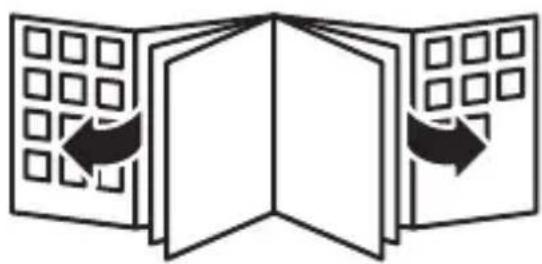

ENGLISH 6
ESPAÑOL 14
한국어 22
BAHASA MELAYU 30
TIÊNG VIÊT 38
繁體中文 46
简体中文 53
Introduction
Congratulations on your purchase and welcome to Philips! To fully benefit from the support that Philips offers, register your product at www.philips.com/welcome.
General description (Fig. 1)
A Cord with mains plug
B On/off switch
Coffeemaker
D Lid of coffeemaker
E Water tank
F Filter holder
G Lid of jug
H Jug
Important
Read this user manual carefully before you use the appliance and save it for future reference.
Danger
- Never immerse the appliance in water or any other liquid.
Warning
- Check if the voltage indicated on the appliance corresponds to the local mains voltage before you connect the appliance.
- Do not use the appliance if the plug, the mains cord or the appliance itself is damaged.
- If the mains cord is damaged, you must have it replaced by Philips, a service centre authorised by Philips or similarly qualified persons in order to avoid a hazard.
-
This appliance is not intended for use by persons (including children) with reduced physical, sensory or mental capabilities, or lack of experience and knowledge, unless they have been given supervision or instruction concerning use of the appliance by a person responsible for their safety.
-
Children should be supervised to ensure that they do not play with the appliance.
- Keep the mains cord out of the reach of children. Do not let the mains cord hang over the edge of the table or worktop on which the appliance stands.
Caution
- Do not place the appliance on a hot surface and do not let the mains cord come into contact with hot surfaces.
- Unplug the appliance before you clean it and if problems occur during brewing.
Electromagnetic fields (EMF)
This Philips appliance complies with all standards regarding electromagnetic fields (EMF). If handled properly and according to the instructions in this user manual, the appliance is safe to use based on scientific evidence available today.
Preparing for use
1 Clean the jug and the filter holder (see chapter ‘Cleaning’).
2 Put the appliance on a flat and stable surface.
3 Put the plug in an earthed wall socket.
4 To store excess cord, push it into the opening at the back of the coffee maker (Fig. 2).
Make sure that the cord does not come into contact with hot surfaces.
Flushing the appliance
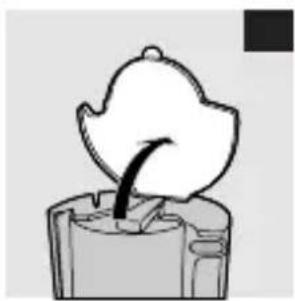
1 Open the lid (Fig. 3).
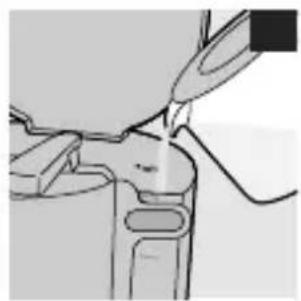
2 Fill the water tank with cold fresh water and put the jug in place (Fig. 4).
Do not put a filter and ground coffee in the filter holder.
3 Press the on/off switch to switch on the appliance. (Fig. 5) The power-on light goes on (HD7448 only).
ENGLISH8
Let the appliance run until the water tank is empty.
4 Switch off the appliance when all the water is in the jug.
5 Let the appliance cool down for at least 3 minutes before you start to brew coffee.
Using the appliance
Brewing coffee
1 Open the lid (Fig. 3).
2 Fill the water tank with fresh cold water (Fig. 6).
- The graduations on the left are for large cups (120ml).
- The graduations on the right are for small cups (80ml).
3 Close the lid.
4 Place the jug on the hotplate.
Make sure you place the jug properly on the hotplate.
Note: If you do not place the jug properly on the hotplate, the drip stop prevents the coffee from flowing into the jug and the filter. As a result, the filter may overflow.
5 Open the filter holder (Fig. 7).
6 Take a paper filter (type 1x4 or no. 4) and fold the sealed edges to prevent tearing and folding.
In some countries, this coffee maker comes with a permanent filter. In that case, do not use paper filters.
7 Put the filter in the filter holder.
8 Put pre-ground coffee (filter-fine grind) in the filter (Fig. 8).
- For large cups: use one heaped measuring spoon of ground coffee for each cup.
- For small cups: use one level measuring spoon of ground coffee for each cup.
9 Close the lid.
10 Press the on/off button to switch on the appliance (Fig. 5).
The power-on light goes on (HD7448 only).
11 When all the water has passed through the filter, you can remove the jug from the appliance.
12 Switch off the appliance after use.
13 Let the appliance cool down for at least 3 minutes before you start to brew coffee again.
14 Remove the filter holder and throw away the paper filter.
If you have used the permanent filter, empty and rinse it.
Cleaning
Always unplug the appliance before you clean it.
Never immerse the appliance in water.
1 Clean the outside of the appliance with a moist cloth.
2 Detach the filter holder.
3 Clean the jug and the removable filter holder in hot water with some washing-up liquid or in the dishwasher (Fig. 9).
4 After cleaning, rinse the jug with fresh hot water.
Descaling
Regular descaling prolongs the life of the appliance and guarantees optimal brewing results for a long time.
In case of normal use (two full jugs of coffee every day), descale the coffee maker:
- 2 or 3 times a year if you use soft water;
- 4 or 5 times a year if you use hard water.
Contact your local water board for information about the water hardness in your area.
1 Fill the water tank with white vinegar (4% acetic acid). Do not put a filter and ground coffee in the filter holder.
ENGLISH10
You can also use an appropriate liquid descaler. In this case, follow the instructions on the package of the descaler.
Do not use a descaling powder.
2 Let the appliance complete two brewing cycles.
See chapter ‘Using the appliance’. Let the appliance cool down before you start the second brewing cycle.
3 Let the appliance complete two more brewing cycles with fresh, cold water to remove all vinegar or descaler residues.
4 Clean the separate parts (see chapter ‘Cleaning’).
Accessories
- You can order a new jug from your Philips dealer or a Philips service centre under type number HD7983/70 (white) or HD7983/20 (black).
- You can order a permanent filter from your Philips dealer or a Philips service centre under reference number 4822 48050 479 (permanent nylon coffee filter).
Environment
- Do not throw away the appliance with the normal household waste at the end of its life, but hand it in at an official collection point for recycling. By doing this, you help to preserve the environment (Fig. 10).
Guarantee & service
If you need service or information or if you have a problem, please visit the Philips website at www.philips.com or contact the Philips Consumer Care Centre in your country (you find its phone number in the worldwide guarantee leaflet). If there is no Consumer Care Centre in your country, go to your local Philips dealer.
Troubleshooting
If problems arise with your coffee maker and you cannot solve them with the information below, please contact the nearest Philips service centre or the Philips Consumer Care Centre in your country.
Problem Solution
| The appliance does not work. | Make sure that: |
| - the appliance is plugged in. | |
| - the voltage indicated on the appliance corresponds to the local mains voltage. | |
| - the appliance is switched on. | |
| In all other cases, contact the Philips Consumer Care Centre. | |
| Water leaks out of the appliance. | Make sure that: |
| - the water tank has not been filled beyond the MAX level. | |
| In all other cases, contact the Philips Consumer Care Centre. | |
| The appliance takes a long time to brew coffee. | Descale the appliance (see chapter ‘Descaling’). |
| The appliance produces a lot of noise and steam during the brewing process. | Make sure that: |
- the water tank is filled with COLD water.
| Problem Solution | |
| - the appliance is not blocked by scale. If necessary, descale the appliance (see chapter 'Descaling'). | |
| Coffee grounds end up in the jug. | Make sure that: |
| - the filter holder has not overflowed because there is too much ground coffee in the filter. | |
| - the filter holder has not overflowed because the jug has not been placed correctly under the filter holder. | |
| - the opening in the bottom of the filter holder is not clogged. | |
| - you use the right size of paper filter. | |
| - the paper filter is not torn. | |
| The coffee is too weak. Make sure that: | |
| - you use the right proportion of coffee to water. | |
| - the paper filter has not collapsed. | |
| - you use the right size of paper filter. | |
| The coffee does not taste good. | Do not leave the jug with coffee on the hotplate too long, especially not if it only contains a small amount of coffee. |
| The coffee is not hot enough. | Make sure that: |
| - you place the jug properly on the hotplate. | |
| Problem Solution | |
| - the hotplate and the jug are clean (see chapter ‘Cleaning’). | |
| We advise you to brew more than three cups of coffee to ensure that the coffee has the right temperature. | |
| Tips: | |
| - use thin cups, because they absorb less heat from the coffee than thick cups. | |
| - do not use cold milk straight from the refrigerator. | |
| There is less coffee in the jug than expected. | Make sure you place the jug properly on the hotplate. If the jug is not placed properly on the hotplate, the drip stop prevents the coffee from flowing out of the filter. |
Introducción


- Register your product and get support at www.Philips.com/welcome
- Philips
- Introduction
- General description (fig. 1)
- Important
- Danger
- Warning
- Caution
- Electromagnetic fields (emf)
- Preparing for use
- Flushing the appliance
- ENGLISH8
- Using the appliance
- Brewing coffee
- Cleaning
- Descaling
- ENGLISH10
- Do not use a descaling powder
- 2 Let the appliance complete two brewing cycles
- 3 Let the appliance complete two more brewing cycles with fresh, cold water to remove all vinegar or descaler residues
- 4 Clean the separate parts (see chapter ‘cleaning’)
- Accessories
- Environment
- Guarantee & service
- Troubleshooting
- Introducción
Brand : PHILIPS
Model : Daily Collection HD7446
Category : Coffee machine