
MPblaster Snoopy - Mp3 player LENCO - Free user manual and instructions
Find the device manual for free MPblaster Snoopy LENCO in PDF.


| Product Type | MP3 Player |
| Brand | Lenco |
| Model | MPblaster Snoopy |
| Dimensions (approx.) | 90 x 60 x 20 mm |
| Weight (approx.) | 50 g |
| Power Supply | Built-in rechargeable Li-ion battery, 3.7V |
| Charging | USB 2.0 via micro-USB port |
| Storage | Internal memory (2GB) + microSD card slot (up to 32GB) |
| Audio Formats | MP3, WMA, WAV |
| Playback Modes | Normal, Repeat, Shuffle |
| Output | 3.5mm headphone jack, built-in speaker |
| FM Radio | Yes, manual and auto scan |
| Display | 1.5-inch color TFT LCD |
| Controls | Buttons for volume, skip, play/pause, menu |
| Volume Limit | Child-safe volume cap (max 85 dB) |
| Battery Life | Up to 10 hours of music playback |
| Languages | English, French, German, Dutch, etc. |
| Maintenance | Clean with dry soft cloth; avoid moisture |
| Safety | Keep away from water; not for children under 3 years |
| Spare Parts | Replacement headphones, USB cable (contact support) |
| Repairability | Battery and microSD slot user-accessible; other repairs by service center |
Frequently Asked Questions - MPblaster Snoopy LENCO
User questions about MPblaster Snoopy LENCO
0 question about this device. Answer the ones you know or ask your own.
Ask a new question about this device
Download the instructions for your Mp3 player in PDF format for free! Find your manual MPblaster Snoopy - LENCO and take your electronic device back in hand. On this page are published all the documents necessary for the use of your device. MPblaster Snoopy by LENCO.
USER MANUAL MPblaster Snoopy LENCO
User's Manual MP blaster
MP3 Player with Power Speaker
Get to know the controls on Player
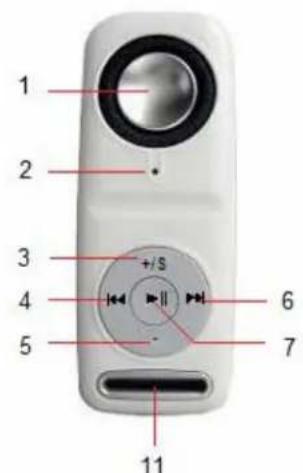
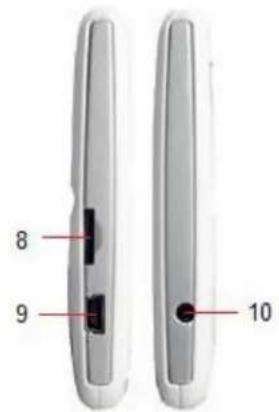
| Item | Description Item | Description | |
| 1 Speaker 7 (Play / Pause / Power ON,OFF) | ▶II | ||
| 2 LED Indicator 8 Memory Card Slot | |||
| 3 | + / S (Volume Level Increase / Shuffle) | 9 Mini USB Connector | |
| 4 | ◀◀ (Previous / Fast-Backward) | 10 | Earphone Output Jack (3.5mm) / Built-in Reset |
| 5 | - (Volume level Decrease) | 11 | Lanyard Hole |
| 6 | ▶▶ (Next / Fast-Forward) | ||
A. About Player Battery
Player has an internal, non-user-replaceable battery. For best results, the first time you use the player, let it charge for about 2 - 3 hours or until the status LED indicator stop flashing, before you use it.
Note: Player continues to use battery power after it's been turned off, if unit isn't used for a while, the battery might need to be charged.
B. Charging the Battery
You can charge the Player's battery in two ways:
- Connect player to your computer. Or,
- Use the USB power charger (available separately).
Note: For maintain the rechargeable battery performance, please disconnect the player with the computer or power charger when it is done.
C. Connecting and Disconnecting Player
You can connect the player to your computer to upload / download those music files, and charging the battery, disconnect them when you're done.
To Connecting Player:
- Plug the USB connector of Player into a USB port on your computer, then the computer will detecting and installing driver automatically. And removable disk drive(s) will display in "My computer" folder (for Windows 2000 / XP system or above). Or,
- An "Untitled" icon will display on desktop indicating the player is removable disk(s). (for MAC 9.2 system or above)
- Now the player is ready for music files upload / download with your computer.
- You can transfer the music files by using the computer mouse and drag and place, or copy and paste, in between the player and computer.
To Disconnecting Player:
It's important not to disconnect player while it's syncing. Don't disconnect, if you have uploading or downloading music files with your computer.
- To eject the connection, press and hold the button for 2 – 3 seconds, then you will see the relevant removable driver is removed and default sound for hardware remove is hear from you computer. Or,
- If you're using a Windows system PC, you can disconnect the player in My Computer or by clicking the "Safely Remove Hardware" icon in the Windows system tray, select the correspondence name of USB Device and choose Stop > Confirm > Confirm follow by the pop up windows from computer.
- If you're using a Mac, you can also disconnect player by dragging the player icon on the desktop to the Trash.
- And, now is safe to disconnect the player with your computer, unplug the player from your computer.
- If you're accidentally disconnect player without disconnect it, reconnect it to your computer and sync again. (Some media file will be loss if this circumstance happen)
D. LED Indicator Light
- In Power OFF Mode: No light.
- In Music Playing Mode: Light flashing (about once per second)
- In Music Pause Mode: Light bright.
- In PC connection / Charging Mode: Light bright
- Charging Complete: Light Off
E. Getting Start Player
The player has a power speaker design, it gives you without any wires where listen to music, so you can easily enjoy the music.
Turn Player ON / OFF and Playing Music:
-
Press and hold ▶ button to turn ON the Player, the status LED indicator will light and then flashing, the player is playing music and music sounds from power speaker.
-
Plug the stereo earphone plug into the earphone output jack, if you want to listening
music from it and the speaker sound will cut automatically.
- To turn OFF the Player, press and hold button.
To Adjust Volume Levels
-
Pressing “+ / S” button to increase volume levels.
-
Pressing “-” button to decrease volume levels.
To Play / Pause Music
-
In music playing mode, press ▶ button to pause playing music
-
Press again to continue the play.
To Changing Music
-
Press button to change to next song, press it again will change again.
-
Press Button to change to previous song, press it again will change again.
To Change Normal / Shuffle Play
-
Press and hold “+ / S” button for 2 - 3 seconds to enter “Random” play mode and the LED light will flashing slow about once per 2 seconds.
-
Press and hold “+ / S” button for 2 – 3 seconds again to return to “Normal” play mode and the LED light will flashing about once per 1 seconds.
F. Use External Memory Card
This player allows you to play those support media files from your memory card (T-Flash). Also it will increase the mobile hard disk memory capacity of the player if you use this option.
-
Turn OFF the player and then insert your T-Flash memory card into player's memory card slot; make sure memory card is firmly and correctly inserted.
-
Now you can turn ON the player by press ▶II button, the player is reading and searching the supported music files from memory card / internal memory, and found music will play automatically.
-
Player will give priority to external memory card, read and play the music files, when it has been inserted into memory card slot, and then play the built-in memory.
-
Before you want to take out / insert the memory card with player. Please turn OFF the player.
G. To Reset Player
In some circumstances the device may hanging and need to reset. This player has design with built-in a mini tact switch which located at the behind of the earphone jack, so it can provide the reset function to restart the device pass through the earphone jack hole.
To Reset
-
Use a 2mm stick or similar object (like tooth stick), and carefully insert the stick, use dull side, into the earphone jack hole until you feel to hit the end. Actually that is the tact switch button surface.
-
Then add a bit of force and you will get a click sound and feeling return from switch. The device is reset, all settings are back to factory default and the device will go into play mode automatically.
Important: Do not reset the device if it is proper working.
H. Troubleshooting:
| Play cannot turn ON ■ Check whether battery have enough energy. | |
| No sound is heard ■ Check whether Volume is set to “minimum” and connect the headphone plugs firmly.■ Check whether the headphone plug is dirty.■ Corrupted MP3 may make a static noise and the sound may cut off. Make sure that the music files are not corrupted.■ Check whether music files format are support. | |
| Download of music files fails. ■ Check whether player’s USB connector is connected with computer properly.■ Check whether driver is installed correctly.■ Check whether the player’s memory is in full. |
I. Specifications:
| Dimension 90.5mm (H) | x 35.5 (W) x 14.5mm (D) | |
| Weight | 39g | |
| PC Connection | USB1.0 / 1.1 / 2.0 | |
| Earphone Impedance | 32 Ohm | |
| Internal Memory | 1GB / 2GB / 4GB / 8GB | |
| External Memory Card | T-Flash (up to 8GB) | |
| Battery | Built-in Rechargeable Li-ion: 3.7V 250mAh | |
| Playing Time: > 8 Hours (earphone), > 2 Hours (speaker0 | ||
| Music Format | MP3 | 32kbps - 320kbps |
| WMA | 32kbps – 384kbps | |
| Audio | Max. Earphone Output Power | L: 150mVrms + R: 150mV (32 Ohm) |
| Speaker Output Power | > 800mW (8 ohm) | |
| Frequency response | 20Hz – 20,000Hz | |
| SNR | 60dB | |
| Operation Temperature | 0°C - 40°C | |
| Operation Systems | Windows 2000 / XP / Vista, MAC 9.2 or above | |
Note: Product design and specification are subject to change without prior notice.
J. Recycling
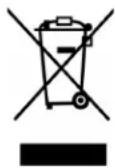
If at any time in the future you should need to dispose of this product, please note that: Waste electrical products should not be disposed of with household waste. Please recycle where facilities exist. Check with your Local Authority or Retailer for recycling advice. (Waste Electrical and Electronic Equipment Directive)
- User's Manual MP blaster
- MP3 Player with Power Speaker
- About Player Battery
- Charging the Battery
- Connecting and Disconnecting Player
- To Connecting Player:
- To Disconnecting Player:
- LED Indicator Light
- Getting Start Player
- Turn Player ON / OFF and Playing Music:
- To Adjust Volume Levels
- To Play / Pause Music
- To Changing Music
- To Change Normal / Shuffle Play
- Use External Memory Card
- To Reset Player
- To Reset
- Recycling
Brand : LENCO
Model : MPblaster Snoopy
Category : Mp3 player