Maxi ARGL 105 (EU).R - Washing machine Hotpoint Ariston - Free user manual and instructions
Find the device manual for free Maxi ARGL 105 (EU).R Hotpoint Ariston in PDF.


| Product Type | Freestanding Washing Machine |
| Model | Maxi ARGL 105 (EU).R |
| Brand | Hotpoint Ariston |
| Capacity | 8 kg |
| Maximum Spin Speed | 1050 rpm |
| Dimensions (W x D x H) | 60 x 60 x 85 cm |
| Net Weight | 68 kg |
| Power Supply | 220-240 V, 50 Hz, 10 A |
| Energy Efficiency Class | A+++ |
| Wash Programs | Cotton, Synthetics, Delicates, Wool, Quick 30', Easy Iron, Prewash, Rinse & Spin |
| Temperature Settings | Cold - 90°C |
| Special Features | Delay Timer, Child Lock, Anti-Allergy, Drum Clean |
| Water Consumption per Cycle | 50 L (approx.) |
| Noise Level (Wash/Spin) | 56 / 76 dB (approx.) |
| Maintenance | Clean pump filter regularly; clean detergent drawer; descale when needed |
| Safety Features | Child lock, door lock during cycle, aquastop hose (if applicable) |
| Spare Parts Available | Door seal, pump, drain hose, inlet hose, control board, drum bearings |
| Repairability Index | 7.5 / 10 (typical) |
| Manual Languages | English, Spanish, Portuguese, and more (available for download) |
Frequently Asked Questions - Maxi ARGL 105 (EU).R Hotpoint Ariston
User questions about Maxi ARGL 105 (EU).R Hotpoint Ariston
0 question about this device. Answer the ones you know or ask your own.
Ask a new question about this device
Download the instructions for your Washing machine in PDF format for free! Find your manual Maxi ARGL 105 (EU).R - Hotpoint Ariston and take your electronic device back in hand. On this page are published all the documents necessary for the use of your device. Maxi ARGL 105 (EU).R by Hotpoint Ariston.
USER MANUAL Maxi ARGL 105 (EU).R Hotpoint Ariston
Unpacking and levelling
Connecting the electricity and water supplies
The first wash cycle
Technical data
Description of the washing machine and starting a wash cycle, 4-5
Control panel
Indicator lights
Starting a wash cycle
Wash cycles, 6
Table of wash cycles
Personalisation, 7
Setting the temperature
Setting the spin speed
Functions
Detergents and laundry, 8
Detergent dispenser drawer
Bleach cycle
Preparing the laundry
Garments requiring special care
Load balancing system
Precautions and tips, 9
General safety
Disposal
Opening the porthole door manually
Care and maintenance, 10
Cutting off the water or electricity supply
Cleaning the washing machine
Cleaning the detergent dispenser drawer
Caring for the door and drum of your appliance
Cleaning the pump
Checking the water inlet hose
Troubleshooting, 11
Service, 12

GB
! This instruction manual should be kept in a safe place for future reference. If the washing machine is sold, transferred or moved, make sure that the instruction manual remains with the machine so that the new owner is able to familiarise himself/herself with its operation and features.
! Read these instructions carefully: they contain vital information relating to the safe installation and operation of the appliance.
Unpacking and levelling
Unpacking
- Remove the washing machine from its packaging.
- Make sure that the washing machine has not been damaged during the transportation process. If it has been damaged, contact the retailer and do not proceed any further with the installation process.
natural_image
Pure technical diagram of a mechanical or electrical component with no text, numbers, or symbols-
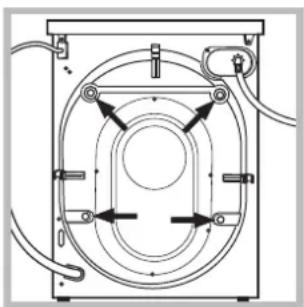
Remove the 4 protective screws (used during transportation) and the rubber washer with the corresponding spacer, located on the rear part of the appliance (see figure).
-
Close off the holes using the plastic plugs provided.
- Keep all the parts in a safe place: you will need them again if the washing machine needs to be moved to another location.
! Packaging materials should not be used as toys for children.
Levelling
- Install the washing machine on a flat sturdy floor, without resting it up against walls, furniture cabinets or anything else.
natural_image
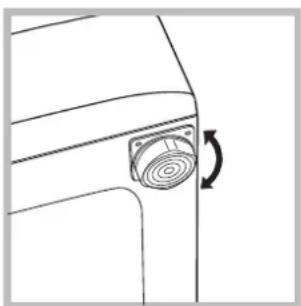
Line drawing of a door handle with a circular button and directional arrow (no text or symbols)- If the floor is not perfectly level, compensate for any unevenness by tightening or loosening the adjustable front feet (see figure); the angle of inclination, measured in relation to the worktop, must not exceed 2^ .
Levelling the machine correctly will provide it with stability, help to avoid vibrations and excessive noise and prevent it from shifting while it is operating. If it is placed on carpet or a rug, adjust the feet in such a way as to allow a sufficient ventilation space underneath the washing machine.
Connecting the electricity and water supplies
Connecting the water inlet hose
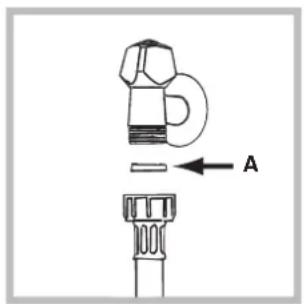
- Insert seal A into the end of the inlet hose and screw the latter onto a cold water tap with a 3/4 gas threaded opening (see figure). Before performing the connection, allow the water to run freely until it is perfectly clear.
natural_image
Diagram of a mechanical device with a valve and handle, showing rotational motion (no text or symbols)-
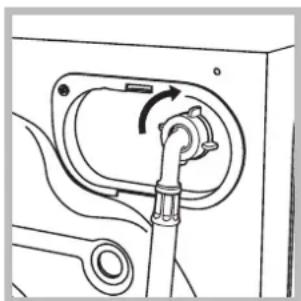
Connect the inlet hose to the washing machine by screwing it onto the corresponding water inlet of the appliance, which is situated on the top right-hand side of the rear part of the appliance (see figure).
-
Make sure that the hose is not folded over or bent.
! The water pressure at the tap must fall within the values indicated in the Technical details table (see next page).
! If the inlet hose is not long enough, contact a specialised shop or an authorised technician.
! Never use second-hand hoses.
! Use the ones supplied with the machine.
Connecting the drain hose
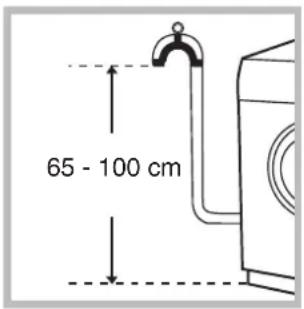
Connect the drain hose, without bending it, to a drainage duct or a wall drain located at a height between 65 and 100 cm from the floor;
natural_image
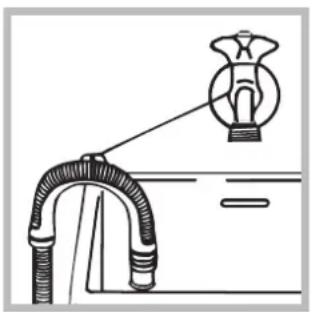
Diagram of a pipe connection with a bulb above it, no text or symbols presentalternatively, rest it on the side of a washbasin or bathtub, fastening the duct supplied to the tap (see figure). The free end of the hose should not be underwater.
! We advise against the use of hose extensions; if it is absolutely necessary, the extension must have the same diameter as the original hose and must not exceed 150 cm in length.
Electrical connections
Before plugging the appliance into the electricity socket, make sure that:
- the socket is earthed and complies with all applicable laws;
- the socket is able to withstand the maximum power load of the appliance as indicated in the Technical data table (see opposite);
- the power supply voltage falls within the values indicated in the Technical data table (see opposite);
- the socket is compatible with the plug of the washing machine. If this is not the case, replace the socket or the plug.
! The washing machine must not be installed outdoors, even in covered areas. It is extremely dangerous to leave the appliance exposed to rain, storms and other weather conditions.
! When the washing machine has been installed, the electricity socket must be within easy reach.
! Do not use extension cords or multiple sockets.
! The cable should not be bent or compressed.
! The power supply cable must only be replaced by authorised technicians.
Warning! The company shall not be held responsible in the event that these regulations are not respected.
The first wash cycle
Once the appliance has been installed, and before you use it for the first time, run a wash cycle with detergent and no laundry, using the wash cycle 2.
| Technical data | |
| Model | ARGL 105 |
| Dimensions | width 59.5 cmheight 85 cmdepth 60 cm |
| Capacity | from 1 to 8 kg |
| Electrical connections | please refer to the technical data plate fixed to the machine |
| Water connections | maximum pressure 1 MPa (10 bar)minimum pressure 0.05 MPa (0.5 bar)drum capacity 62 litres |
| Spin speed | up to 1000 rotations per minute |
| Energy rated programmes according to regulationEN 60456 | programme 7; temperature 60°C; using a load of 8 kg. |
| This appliance conforms to the following EC Directives:- 89/336/EEC dated 03/05/89(Electromagnetic Compatibility) and subsequent modifications- 2002/96/EC- 2006/95/EC (Low Voltage) | |
Description of the washing machine and starting a wash cycle
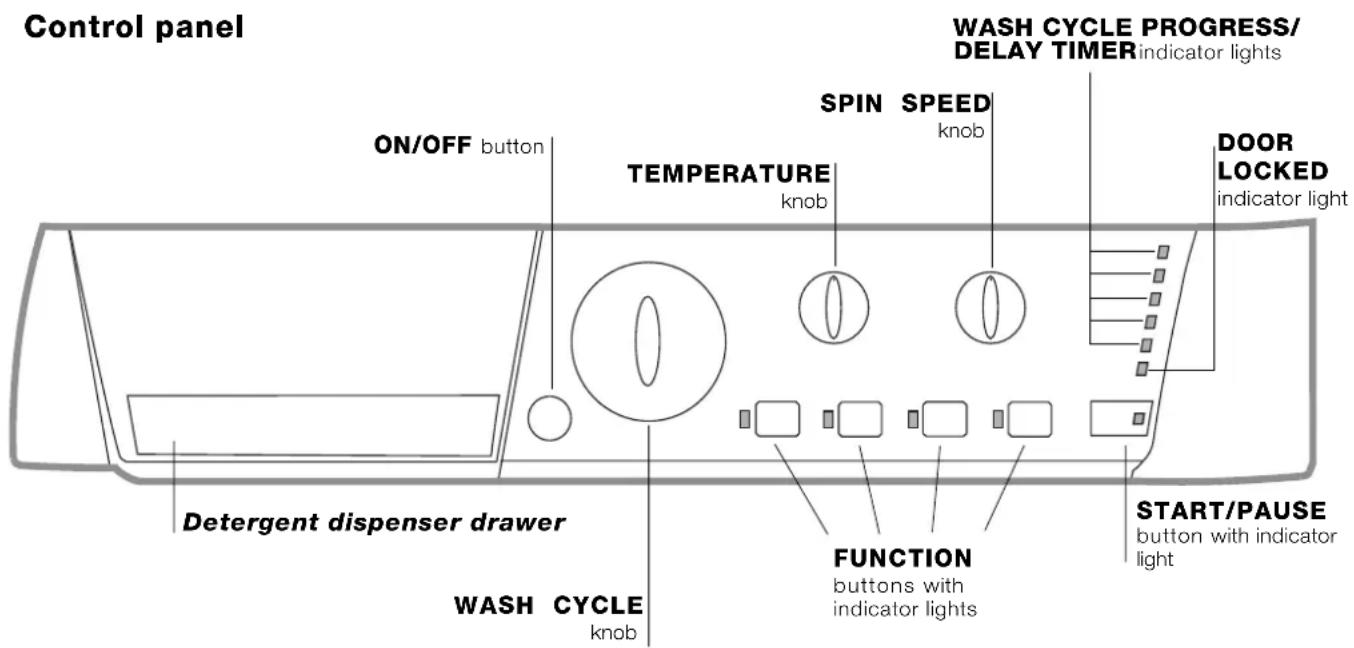
Detergent dispenser drawer: used to dispense detergents and washing additives (see "Detergents and laundry").
There is a key which provides a summary of the available wash cycles inside the detergent dispenser drawer; this may be consulted at any time.
ON/OFF button: switches the washing machine on and off.
WASH CYCLE knob: programmes the wash cycles. During the wash cycle, the knob does not move.
FUNCTION buttons with indicator light: used to select the available functions. The indicator light corresponding to the selected function will remain lit.
TEMPERATURE knob: sets the temperature or the cold wash cycle (see "Personalisation").
SPIN SPEED knob: sets the spin speed or exclude the spin cycle completely (see "Personalisation").
WASH CYCLE PROGRESS/DELAY TIMER
indicator lights: used to monitor the progress of the wash cycle.
The illuminated indicator light shows which phase is in progress.
If the Delay Timer function has been set, the time remaining until the wash cycle starts will be indicated (see next page).
DOOR LOCKED indicator light: indicates whether the door may be opened or not (see next page).
START/PAUSE button with indicator light: starts or temporarily interrupts the wash cycles.
N.B. To pause the wash cycle in progress, press this button; the corresponding indicator light will flash orange, while the indicator light for the current wash cycle phase will remain lit in a fixed manner. If the DOOR LOCKED → indicator light is switched off, the door may be opened.
To start the wash cycle from the point at which it was interrupted, press this button again.
Indicator lights
The indicator lights provide important information. This is what they can tell you:
Delayed start
If the DELAY TIMER function has been activated (see "Personalisation"), after the wash cycle has been started the indicator light corresponding to the selected delay period will begin to flash:
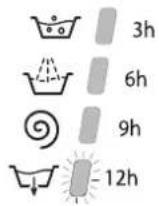
As time passes, the remaining delay will be displayed and the corresponding indicator light will flash:
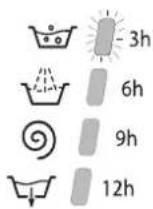
Once the set delay has elapsed, the flashing indicator light will switch off and the selected wash cycle will begin.
Wash cycle phase indicator lights
Once the desired wash cycle has been selected and has begun, the indicator lights switch on one by one to indicate which phase of the cycle is currently in progress.
Wash
Rinse
Spin
Drain
End of wash cycle
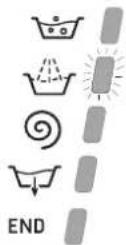
Function buttons and corresponding indicator lights
When a function is selected, the corresponding indicator light will illuminate. If the selected function is not compatible with the programmed wash cycle, the corresponding indicator light will flash and the function will not be activated. If a function which is incompatible with another function selected previously, only the most recent selection will remain active.
Door locked indicator light
If this indicator light is on, the appliance door is locked to prevent it from being opened accidentally; to avoid any damage, wait for the indicator light to switch off before you open the appliance door.
N.B. If the DELAY TIMER function is activated, the door cannot be opened; pause the machine by pressing the START/PAUSE button if you wish to open it.
! If the START/PAUSE indicator light (orange) flashes rapidly at the same time as the function indicator light, this indicates a problem has occurred (see "Troubleshooting").
Starting a wash cycle
- Switch the washing machine on by pressing the ON/OFF button. All indicator lights will switch on for a few seconds, then they will switch off and the START/PAUSE indicator light will pulse.
- Load the laundry and close the door.
- Set the WASH CYCLE knob to the desired programme.
- Set the washing temperature (see "Personalisation").
- Set the spin speed (see "Personalisation").
- Measure out the detergent and washing additives (see "Detergents and laundry").
- Select the desired functions.
- Start the wash cycle by pressing the START/PAUSE button and the corresponding indicator light will remain lit in a fixed manner, in green.
To cancel the set wash cycle, pause the machine by pressing the START/PAUSE button and select a new cycle. - At the end of the wash cycle the END indicator light will switch on. The DOOR LOCKED indicator light will switch off, indicating that the door may be opened. Take out your laundry and leave the appliance door ajar to make sure the drum dries completely.
Switch the washing machine off by pressing the ON/OFF button.
Table of wash cycles
| Wash cycles | Description of the wash cycle | Max. temp. (°C) | Max. speed (rpm) | Detergents | Max. load (kg) | Cycle duration | ||
| Bleach | Wash | Fabric softener | ||||||
| Special cycles | ||||||||
| 7 | Sanitizing cycle 90°Extremely soiled whites. | 90° 1 | 000 | ● | ● | ● | 8 | 165 |
| 7 | Sanitizing cycle 90° (1):Heavily soiled whites and resistant colours. | 60° 1 | 000 - | ● | ● | 8 | 160 | |
| 8 | Goodnigt cycle: Lightly soiled delicate colours. | 40° 8 | 00 - | ● | ● | 4 | 288 | |
| 9 | Baby cycle: Heavily soiled delicate colours. | 40° 8 | 00 - | ● | ● | 2 118 | ||
| 10 | Shirts | 40° 6 | 00 - | ● | ● | 2 | 69 | |
| 11 | Silk/Curtains: For garments in silk and viscose, lingerie. | 30° | 0 | - | ● | ● | 2 | 55 |
| 12 | Wool: For wool, cashmere, etc. | 40° 6 | 00 - | ● | ● | 2 | 55 | |
| Everyday wash cycles (Daily) | ||||||||
| 1 | Cotton + Prewash 90°: Extremely soiled whites. | 90° 1 | 000 - | ● | ● | 8 | 184 | |
| 2 | Cotton: Heavily soiled whites and resistant colours. | 60° 1 | 000 | ● | ● | ● | 8 144 | |
| 2 | Cotton (2): Heavily soiled whites and delicate colours. | 40° | 1000 | ● | ● | ● | 8 129 | |
| 3 | Coloured Cottons (3):Lightly soiled whites and delicate colours. | 40° | 1000 | ● | ● | ● | 8 | 96 |
| 4 | Synthetics resistents: Heavily soiled resistant colours. | 60° 8 | 00 - | ● | ● | 3,5 85 | ||
| 4 | Synthetics delicates:Lightly soiled resistant colours. | 40° 8 | 00 - | ● | ● | 3,5 76 | ||
| 5 | Mix 30': To refresh lightly soiled garments quickly (not suitable for wool, silk and clothes which require washing by hand). | 30° 8 | 00 - | ● | ● | 3 | 30 | |
| 6 | Mix 15': To refresh lightly soiled garments quickly (not suitable for wool, silk and clothes which require washing by hand). | 30° 8 | 00 - | ● | ● | 1,5 15 | ||
| Partials wash cycles | ||||||||
| A | Rinse | - | 1000 | - | - | ● | 8 | 36 |
| B | Spin | - | 1000 | - | - | - | 8 | 16 |
| C | Light spin | - | 800 | - | - | - | 3,5 | 12 |
| D | Drain no spin | - | 0 | - | - | - | 8 | 2 |
The information contained in the table is intended as a guide only.
For all Test Institutes:
1) Test wash cycle in compliance with regulation EN 60456: set wash cycle 7 with a temperature of 60^ C.
2) Long wash cycle for cottons: set wash cycle 2 with a temperature of 40^ C.
3) Short wash cycle for cottons: set wash cycle 3 with a temperature of 40^ C.
Specials wash cycles
Sanitizing cycle (wash cycle 7). A high-temperature hygienic wash cycle (over 60°C) which requires the use of bleach. Pour the bleach, the detergent and the additives into the relevant compartments (see paragraph entitled "Detergent dispenser drawer").
Goodnigt cycle (wash cycle 8). This is a silent cycle which can be run at night, when the electricity prices are lower. The wash cycle is designed for cottons and synthetics. At the end of the cycle the machine stops while there is still water in the drum; to spin and drain the laundry press the START/PAUSE button; alternatively the machine will perform the spin cycle and drain the water automatically after 8 hours.
Baby cycle (wash cycle 9). This wash cycle can be used to remove the soiling typically caused by babies, while ensuring that all detergent is removed from nappies in order to prevent the delicate skin of babies from suffering allergies. The cycle has been designed to reduce the amount of bacteria by using a greater quantity of water and optimising the effect of special disinfecting additives added to the detergent.
At the end of the wash cycle, the machine will slowly rotate the drum to prevent the formation of creases; to end the cycle press the START/PAUSE button.
Mix 30'll(wash cycle 5) this wash cycle was designed to wash lightly soiled garments quickly: it lasts just 30 minutes and therefore saves both energy and time. By selecting this wash cycle (5 at 30^ ), it is possible to wash different fabrics together (except for wool and silk items), with a maximum load of 3kg .
Mix 15' (wash cycle 6) this wash cycle was designed to wash lightly soiled garments quickly: it lasts just 15 minutes and therefore saves both energy and time. By selecting this wash cycle (6 at 30^ ), it is possible to wash different fabrics together (except for wool and silk items), with a maximum load of 1.5kg .
Setting the temperature
Turn the TEMPERATURE knob to set the wash temperature (see Table of wash cycles).
The temperature may be lowered, or even set to a cold wash (✗).
The washing machine will automatically prevent you from selecting a temperature which is higher than the maximum value set for each wash cycle.
Setting the spin speed
Turn the SPIN SPEED knob to set the spin speed for the selected wash cycle.
The maximum spin speeds available for each wash cycle are as follows:
Wash cycles Maximum spin speed
Cottons 1000 rpm
Synthetics 800 rpm
Wool 600 rpm
Silk drain only
The spin speed may be lowered, or the spin cycle can be excluded altogether by selecting the symbol. The washing machine will automatically prevent you from selecting a spin speed which is higher than the maximum speed set for each wash cycle.
Functions
The various wash functions available with this washing machine will help to achieve the desired results, every time. To activate the functions:
-
Press the button corresponding to the desired function;
-
the function is enabled when the corresponding indicator light is illuminated.
Note: If the indicator light flashes rapidly, this signals that this particular function may not be selected in conjunction with the selected wash cycle.

Delay timer
This timer delays the start time of the wash cycle by up to 12 hours.
Press the button repeatedly until the indicator light corresponding to the desired delay time switches on. The fifth time the button is pressed, the function will be disabled.
N.B. Once you have pressed the START/PAUSE button, the delay time may only be decreased if you wish to modify it.
!This option is enabled with all programmes.

Easy iron
By selecting this function, the wash and spin cycles will be modified in order to reduce the formation of creases. At the end of the cycle the washing machine will perform slow rotations of the drum; the EASY IRON and START/PAUSE indicator lights will flash (orange) and the END phase will remain lit in a fixed manner. To end the cycle, press the START/PAUSE button or the EASY IRON button.
For the Silk wash cycle, the machine will end the cycle while the laundry is soaking, the EASY IRON and START/PAUSE indicator lights will flash (orange) and the RINSE phase will remain lit in a fixed manner. To drain the water so that the laundry may be removed, press the START/PAUSE button or the EASY IRON button.
! This function may not be used in conjunction with wash cycles 5, 6, 7, 8, 9, 12, B, C, D.

Extra rinse
By selecting this function, the efficiency of the rinse is increased and optimal detergent removal is guaranteed. It is particularly useful for sensitive skin.
! This function may not be used in conjunction with wash cycles 5, 6, C, B, C, D.

Super Wash
Because a greater quantity of water is used in the initial phase of the cycle, and because of the increased cycle duration, this function offers a high-performance wash.
! This function may not be used in conjunction with wash cycles 5, 6, 7, 11, 12, A, B, C, D.
Detergent dispenser drawer
Good washing results also depend on the correct dose of detergent: adding too much detergent will not necessarily result in a more efficient wash, and may in fact cause build up on the inside of your appliance and contribute to environmental pollution.
! Do not use hand washing detergents because these create too much foam.
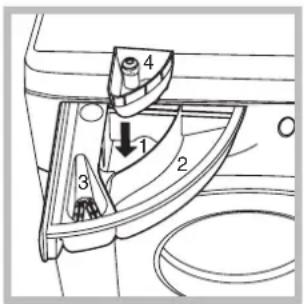
Open the detergent dispenser drawer and pour in the detergent or washing additive, as follows.
compartment 1: Pre-wash detergent (powder)
Before pouring in the detergent, make sure that extra compartment 4 has been removed.
compartment 2: Detergent for the wash cycle (powder or liquid)
Liquid detergent should only be poured in immediately prior to the start of the wash cycle.
compartment 3: Additives (fabric softeners, etc.)
The fabric softener should not overflow the grid.
extra compartment 4: Bleach
Bleach cycle
Bleaching may only be performed in conjunction with wash cycles 2, 3, 7.
Pour the bleach into extra compartment 4; pour the detergent and softener into the corresponding compartments, then select one of the abovementioned wash cycles.
This option is recommended only for very soiled cotton garments.
Preparing the laundry
- Divide the laundry according to:
- the type of fabric/the symbol on the label
- the colours: separate coloured garments from whites.
- Empty all garment pockets and check the buttons.
- Do not exceed the listed values, which refer to the weight of the laundry when dry:
Durable fabrics: max. 8 kg Synthetic fabrics: max. 3,5 kg Delicate fabrics: max. 2 kg Wool: max. 2 kg
How much does your laundry weigh?
1 sheet 400-500 g
1 pillow case 150-200 g
1 tablecloth 400-500 g
1 bathrobe 900-1200 g
1 towel 150-250 g
Garments requiring special care
Shirts: use special wash cycle 10 to wash shirts in various fabrics and colours. It guarantees maximum care is taken of the garments and minimises the formation of creases.
Silk: use special wash cycle 11 to wash all silk garments. We recommend the use of special detergent which has been designed to wash delicate clothes.
Curtains: fold curtains and place them in a pillow case or mesh bag. Use wash cycle 11.
Wool: Hotpoint/Ariston is the only washing machine manufacturer to have been awarded the prestigious Woolmark Platinum Care endorsement (M.0508) by the Woolmark Company, which means that all woollen garments may be washed in the washing machine, even those which state "hand wash only" on the label. Wash cycle 12 therefore offers complete peace of mind when washing woollen garments in the washing machine (max. load 2 kg) and guarantees optimal performance.
Load balancing system
Before every spin cycle, to avoid excessive vibrations and to distribute the load in a uniform manner, the drum rotates continuously at a speed which is slightly greater than the washing rotation speed. If, after several attempts, the load is not balanced correctly, the machine spins at a reduced spin speed. If the load is excessively unbalanced, the washing machine performs the distribution process instead of spinning. To encourage improved load distribution and balance, we recommend small and large garments are mixed in the load.
! This washing machine was designed and constructed in accordance with international safety regulations. The following information is provided for safety reasons and must therefore be read carefully.
General safety
- This appliance was designed for domestic use only.
- The washing machine must only be used by adults, in accordance with the instructions provided in this manual.
- Do not touch the machine when barefoot or with wet or damp hands or feet.
- Do not pull on the power supply cable when unplugging the appliance from the electricity socket. Hold the plug and pull.
- Do not open the detergent dispenser drawer while the machine is in operation.
- Do not touch the drained water as it may reach extremely high temperatures.
- Never force the porthole door. This could damage the safety lock mechanism designed to prevent accidental opening.
- If the appliance breaks down, do not under any circumstances access the internal mechanisms in an attempt to repair it yourself.
- Always keep children well away from the appliance while it is operating.
- The door can become quite hot during the wash cycle.
- If the appliance has to be moved, work in a group of two or three people and handle it with the utmost care. Never try to do this alone, because the appliance is very heavy.
- Before loading laundry into the washing machine, make sure the drum is empty.
Disposal
- Disposing of the packaging materials: observe local regulations so that the packaging may be re-used.
- The European Directive 2002/96/EC on Waste Electrical and Electronic Equipment, requires that old household electrical appliances must not be disposed of in the normal unsorted municipal waste stream. Old appliances must be collected separately in order to optimise the recovery and recycling of the materials they contain and reduce the impact on human health and the environment. The crossed out "wheeled bin" symbol on the product reminds you of your obligation, that when you dispose of the appliance it must be separately collected.
Consumers should contact their local authority or retailer for information concerning the correct disposal of their old appliance.
Opening the porthole door manually
In the event that it is not possible to open the porthole door due to a powercut, and if you wish to remove the laundry, proceed as follows:
natural_image
Line drawing of a washing machine with a cup beside it (no text or symbols)- remove the plug from the electrical socket.
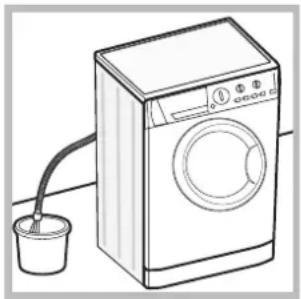
- make sure the water level inside the machine is lower than the door opening; if it is not, remove excess water using the drain hose, collecting it in a bucket as indicated in the figure.
natural_image
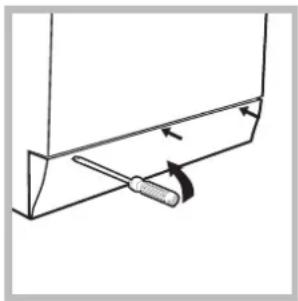
Simple line drawing of a tool inserted into a bracket with arrows indicating direction (no text or symbols)- using a screwdriver, remove the cover panel on the lower front part of the washing machine (see figure).
natural_image
Hand pressing a button on a computer interface (no text or symbols visible)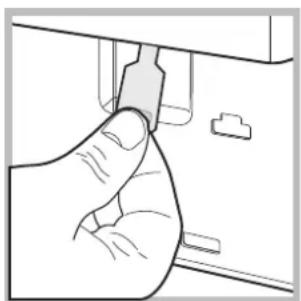
natural_image
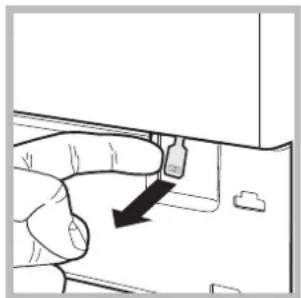
Hand inserting a small component into a device (no text or symbols visible)- pull outwards using the tab as indicated in the figure, until the plastic tie-rod is freed from its stop position; pull downwards and open the door at the same time.
- reposition the panel, making sure the hooks are securely in place before you push it onto the appliance.
Cutting off the water and electricity supplies
- Turn off the water tap after every wash cycle. This will limit wear on the hydraulic system inside the washing machine and help to prevent leaks.
- Unplug the washing machine when cleaning it and during all maintenance work.
Cleaning the washing machine
The outer parts and rubber components of the appliance can be cleaned using a soft cloth soaked in lukewarm soapy water. Do not use solvents or abrasives.
Cleaning the detergent dispenser drawer
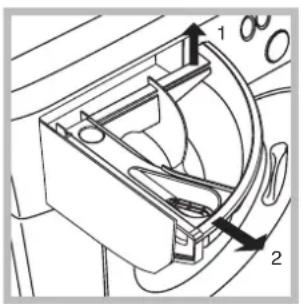
Remove the dispenser by raising it and pulling it out (see figure). Wash it under running water; this operation should be repeated frequently.
Caring for the door and drum of your appliance
• Always leave the porthole door ajar in order to prevent unpleasant odours from forming.
Cleaning the pump
The washing machine is fitted with a self-cleaning pump which does not require any maintenance. Sometimes, small items (such as coins or buttons) may fall into the pre-chamber which protects the pump, situated in its bottom part.
! Make sure the wash cycle has finished and unplug the appliance.
To access the pre-chamber:
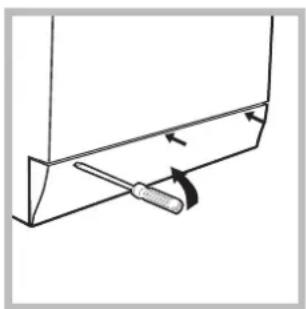
natural_image
Simple line drawing of a screwdriver inserted into a bracket (no text or symbols)- using a screwdriver, remove the cover panel on the lower front part of the washing machine (see figure);
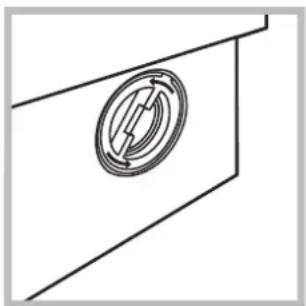
natural_image
Pure technical line drawing of a mechanical component with no text or symbols-
unscrew the lid by rotating it anti-clockwise (see figure): a little water may trickle out. This is perfectly normal;
-
clean the inside thoroughly;
- screw the lid back on;
- reposition the panel, making sure the hooks are securely in place before you push it onto the appliance.
Checking the water inlet hose
Check the inlet hose at least once a year. If there are any cracks, it should be replaced immediately: during the wash cycles, water pressure is very strong and a cracked hose could easily split open.
! Never use second-hand hoses.
Your washing machine could fail to work. Before contacting the Technical Assistance Centre (see "Assistance"), make sure that the problem cannot be not solved easily using the following list.
Problem:
The washing machine does not switch on.
The wash cycle does not start.
The washing machine does not take in water (the indicator light for the first wash cycle stage flashes rapidly).
The washing machine continuously takes in and drains water.
The washing machine does not drain or spin.
The washing machine vibrates a lot during the spin cycle.
The washing machine leaks.
The START/PAUSE indicator light (orange) and the function indicator lights flash rapidly.
There is too much foam.
Possible causes / Solutions:
- The appliance is not plugged into the socket fully, or is not making contact. - There is no power in the house.
- The washing machine door is not closed properly. - The ON/OFF button has not been pressed. - The START/PAUSE button has not been pressed. - The water tap has not been opened. - A delayed start has been set (see "Personalisation").
- The water inlet hose is not connected to the tap. - The hose is bent. - The water tap has not been opened. - There is no water supply in the house. - The pressure is too low. - The START/PAUSE button has not been pressed.
- The drain hose is not fitted at a height between 65 and 100cm from the floor (see "Installation"). - The free end of the hose is under water (see "Installation"). - The wall drainage system is not fitted with a breather pipe. If the problem persists even after these checks, turn off the water tap, switch the appliance off and contact the Assistance Service. If the dwelling is on one of the upper floors of a building, there may be problems relating to water drainage, causing the washing machine to fill with water and drain continuously. Special anti-draining valves are available in shops and help to avoid this inconvenience.
- The wash cycle does not include draining: some wash cycles require the drain phase to be started manually. - The EASY IRON function has been activated: To complete the wash cycle, press the START/PAUSE button ("Personalisation"). - The drain hose is bent (see "Installation"). - The drainage duct is clogged.
- The drum was not unlocked correctly during installation (see "Installation"). - The washing machine is not level (see "Installation"). - The washing machine is trapped between cabinets and walls (see "Installation").
- The water inlet hose is not screwed on properly (see "Installation"). - The detergent dispenser drawer is blocked (for cleaning instructions, see "Care and maintenance"). - The drain hose is not fixed properly (see "Installation").
- Switch off the machine and unplug it, wait for approximately 1 minute and then switch it back on again. If the problem persists, contact the Technical Assistance Service.
- The detergent is not suitable for machine washing (it should display the text "for washing machines" or "hand and machine wash", or the like). - Too much detergent was used.
Before calling for Assistance:
- Check whether you can solve the problem alone (see "Troubleshooting");
- Restart the programme to check whether the problem has been solved;
- If this is not the case, contact an authorised Technical Assistance Centre using the telephone number provided on the guarantee certificate.
!Always request the assistance of authorised technicians.
Have the following information to hand:
- the type of problem;
• the appliance model (Mod.);
• the serial number (S/N).
This information can be found on the data plate applied to the rear of the washing machine, and can also be found on the front of the appliance by opening the door.

Español
Sumario
Instalación, 14-15
ES
natural_image
Technical diagram of a mechanical or electrical component with concentric circular and oval shapes, no visible text or symbols.natural_image
Simple line drawing of a door corner with a scroll wheel and directional arrow (no text or symbols)natural_image
Diagram of a mechanical valve or pump assembly with directional arrow (no text or symbols)natural_image
Diagram of a pipe connection with a connector, showing tubing and a valve-like component (no text or symbols)natural_image
Line drawing of a washing machine with a bucket and a drain outlet (no text or symbols)natural_image
Simple line drawing of a tool interacting with a bracket (no text or symbols)natural_image
Hand inserting a USB into a device component (no text or symbols visible)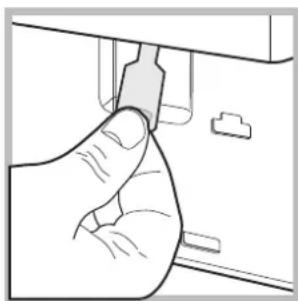
natural_image
Hand holding a small electronic component, no text or symbols visiblenatural_image
Simple line drawing of a tool interacting with a bracket (no text or symbols)natural_image
Pure technical line drawing of a mechanical component with no text or symbolsPT
natural_image
Technical diagram of a mechanical or electrical component with concentric circular and oval shapes, no visible text or symbols.natural_image
Line drawing of a car door corner with a circular button and directional arrow (no text or symbols)natural_image
Diagram of a mechanical valve or pump assembly with directional arrows indicating rotation (no text or symbols)natural_image
Diagram of a pipe connection with a hanging object above it, no text or symbols presentnatural_image
Line drawing of a washing machine with a cup beside it (no text or symbols)natural_image
Simple line drawing of a tool interacting with a bracket, showing motion arrows (no text or symbols)natural_image
Hand pressing a button on a computer mouse (no text or symbols visible)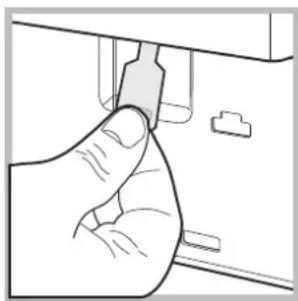
natural_image
Hand inserting a component into a device (no text or symbols visible)natural_image
Simple line drawing of a tool interacting with a bracket (no text or symbols)natural_image
Pure technical line drawing of a mechanical component without any text, numbers, or symbolsnatural_image
Technical diagram of a mechanical or electrical component with concentric circular and oval shapes, no visible text or symbols.natural_image
Simple line drawing of a door corner with a scroll wheel and directional arrow (no text or symbols)natural_image
Line drawing of a mechanical component with a valve and handle (no text or symbols)natural_image
Diagram of a pipe connection with a hanging object above it (no text or symbols)natural_image
Line drawing of a washing machine with a bucket and a drain outlet (no text or symbols)natural_image
Simple line drawing of a screwdriver inserted into a bracket (no text or symbols)natural_image
Hand holding a device with a black arrow pointing to a component (no text or symbols visible)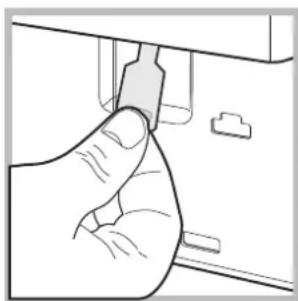
natural_image
Hand inserting a component into a device (no text or symbols visible)natural_image
Simple line drawing of a tool interacting with a bracket (no text or symbols)natural_image
Pure technical line drawing of a mechanical component with no text or symbols- Description of the washing machine and starting a wash cycle, 4-5
- Wash cycles, 6
- Personalisation, 7
- Detergents and laundry, 8
- Precautions and tips, 9
- Care and maintenance, 10
- Troubleshooting, 11
- Unpacking and levelling
- Unpacking
- Levelling
- Connecting the electricity and water supplies
- Connecting the water inlet hose
- Connecting the drain hose
- Electrical connections
- The first wash cycle
- Description of the washing machine and starting a wash cycle
- WASH CYCLE PROGRESS/DELAY TIMER
- Indicator lights
- Delayed start
- Wash cycle phase indicator lights
- Function buttons and corresponding indicator lights
- Door locked indicator light
- Starting a wash cycle
- For all Test Institutes:
- Specials wash cycles
- Setting the temperature
- Setting the spin speed
- Wash cycles Maximum spin speed
- Functions
- Delay timer
- Easy iron
- Extra rinse
- Super Wash
- Detergent dispenser drawer
- compartment 1: Pre-wash detergent (powder)
- compartment 2: Detergent for the wash cycle (powder or liquid)
- compartment 3: Additives (fabric softeners, etc.)
- extra compartment 4: Bleach
- Bleach cycle
- Preparing the laundry
- How much does your laundry weigh?
- Garments requiring special care
- Load balancing system
- General safety
- Disposal
- Opening the porthole door manually
- Cutting off the water and electricity supplies
- Cleaning the washing machine
- Cleaning the detergent dispenser drawer
- Caring for the door and drum of your appliance
- Cleaning the pump
- Checking the water inlet hose
- Problem:
- Possible causes / Solutions:
- Before calling for Assistance:
- Have the following information to hand:
- Sumario
- Instalación, 14-15
Brand : Hotpoint Ariston
Model : Maxi ARGL 105 (EU).R
Category : Washing machine