
S-direct Direct Box - Receiver SAMSON - Free user manual and instructions
Find the device manual for free S-direct Direct Box SAMSON in PDF.


| Product Type | Direct Box (DI) / Receiver |
| Brand | Samson |
| Model | S-direct |
| Dimensions (Approx.) | 4.5 x 3.5 x 1.5 inches |
| Weight (Approx.) | 0.5 lbs |
| Power Supply | Passive (no power required) |
| Input | 1/4" TS unbalanced |
| Output | XLR balanced (male) |
| Ground Lift Switch | Yes, to eliminate ground loops |
| Pad Switch | -20 dB attenuation for high-level signals |
| Frequency Response | 10 Hz - 30 kHz |
| Signal-to-Noise Ratio | Greater than 95 dB |
| Input Impedance | 1 MΩ (unbalanced) |
| Output Impedance | 600 Ω (balanced) |
| Construction | Heavy-duty metal chassis |
| Mounting | Designed for portable use or rack mount with optional kit |
| Maintenance & Cleaning | Wipe with dry cloth; avoid moisture and solvents |
| Safety Instructions | Do not expose to rain or moisture; use only with compatible cables |
| Spare Parts & Repairability | No user-serviceable parts; contact authorized service center |
| General Information | Converts unbalanced instrument signal to balanced XLR for noise-free transmission |
Frequently Asked Questions - S-direct Direct Box SAMSON
User questions about S-direct Direct Box SAMSON
0 question about this device. Answer the ones you know or ask your own.
Ask a new question about this device
Download the instructions for your Receiver in PDF format for free! Find your manual S-direct Direct Box - SAMSON and take your electronic device back in hand. On this page are published all the documents necessary for the use of your device. S-direct Direct Box by SAMSON.
USER MANUAL S-direct Direct Box SAMSON
Front and Rear Panel Layout 3
Powering S direct 3
Operating the S direct
Direct insertion of an instrument into a PA system 4
High power signals 5
Converting the output of unbalanced devices 6
Specifications 7
Copyright 2002, Samson Technologies Corp
Printed April 2002
Samson Technologies Corp
575 Underhill Blvd.
P.O. Box 903
Syosset, NY 11791-903
Phone: 1-800-3-SAMSON (1-800-372-6766)
Fax: 516-364-3888
www.samsontech.com
A K-TEAM -- P R O D U C 1
S direct Front and Rear Panel Layout
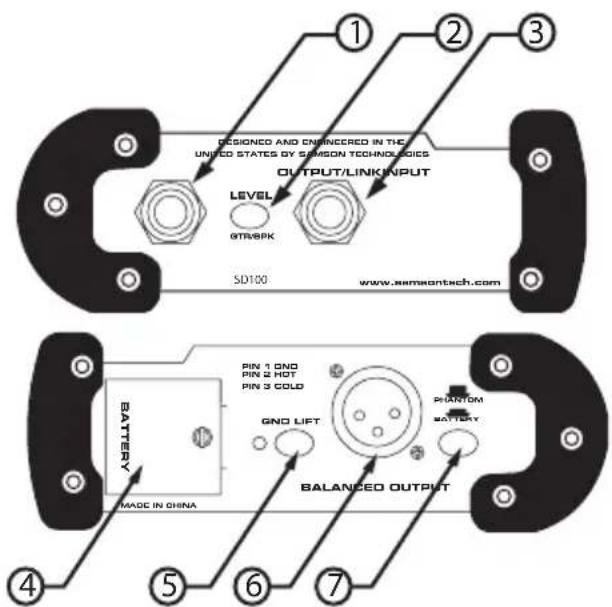
1 INPUT - 1/4" input connector.
2 LEVEL - When engaged, the level is switched from instrument GTR to amplifier speaker SPR level
3 OUTPUT/LINK - 1/4" output for passing the input signal through to a stage amplifier or monitor system.
4 BATTERY COMPARTMENT - Houses
5 GROUND LIFT - When engaged, the ground from the S direct chassis detaches from the XLR jack.
6 BALANCED OUTPUT - Male XLR connector.
7 BATTERY/PHANTOM- Switches S direct from phantom power to battery operation.
Powering S direct
The S direct can operate on a single 9 Volt battery or standard 24-48 volt phantom power. Whenever phantom power is present on the XLR cable that is connected to the Balanced Output, the S direct will automatically switch to phantom power and disconnect the 9 Volt battery. The Phantom/Battery switch can be used to turn off the battery power when the unit is not in use.
Operating the S direct
A direct box, or DI box, provides the facility for the direct insertion of an audio signal into a mixer or recorder. The S direct offers a variety of DI solutions for live sound and recording applications. You can connect all kinds of audio signals like guitars, keyboards, outboard signal processors and even the high-powered speaker output from an amplifier. The S direct enables you to tap off the signal from a guitar or bass guitar and pass the signal from the Link output to the on stage amplifier without affecting the original sound. This can eliminate the need for micing the guitar amplifier, which in many cases is preferable, especially with bass guitar. The S direct is also very useful for connecting unbalanced signals from sources like signal DJ and sub-mixers, effects processors and keyboards to a main PA or recording mixer. Unlike passive direct boxes, the S direct is active (has a power supply), so you can rely on an even frequency response on any audio signal you connect to regardless of its output impedance. Also, the S direct's balanced output provides a clean signal at a low level so long runs of cable are possible. Another benefit from a balanced connection is Common Mode Rejection, which provides cancellation of the bad sounds (hums and buzzes) while leaving the original signal pure.
Direct Insertion of an Instrument into a PA System
One of the most common applications for using a DI box is getting the signal of a bass guitar into the PA system. Simply put, the low frequencies produced by bass are difficult to mic, so use of a DI box is almost always preferable. In addition, the signal going to PA system can be tweaked by the FOH (front of house) engineer, without affecting the sound the musician dials up on stage. You can use S direct to plug a guitar directly into the PA system as well, especially acoustic guitars with pick-ups and when using electronic guitar processors and modelers. Follow the diagram and steps below to connect a guitar to a PA mixer.
- Connect the output of the guitar or bass to the S direct's INPUT.
- Connect S direct's OUTPUT/LINK to the input of the guitar or bass amplifier.
- Connect S direct's BALANCED OUTPUT to the input of main PA mixer.
Operating the S direct
NOTE: To avoid annoying pops and clicks be sure to mute (or turn down the volume control) of your mixer's output while connecting the S direct, or when switching from battery to phantom power.

Connecting to High Power Signals
The S direct provides the capability of tapping off the signals from amplifiers, such as the output of a guitar amp or power amplifier. You can even use S direct to connect to the speaker output of a consumer stereo system or boom box, for example, if you want to sample some old records or cassette tapes.
NOTE: Be sure that the LEVEL switch is set to the AMP position before connecting the signal from the output of any amplifier
Follow the diagram and steps below to connect a powered output of a guitar amplifier to a PA mixer.
- Connect the output of the guitar or bass to the guitar amp input.
• Set the Level switch to the SPK position. - Using unshielded speaker cable, connect the guitar amp's speaker output to the S direct's INPUT.
- Using another unshielded speaker cable, connect S direct's OUTPUT/LINK to the input of the guitar amplifiers speaker.
- Connect S direct's BALANCED OUTPUT to the input of main PA mixer.
Operating the S direct
NOTE: This example may appear to be the same as the previous, however in this example, the S direct is tapping the sound of the instrument and amp, as opposed to just the instrument itself.

Converting the Output of Unbalanced Devices
The S direct can be quite useful on stage or in the studio for connecting unbalanced devices, particularly keyboards. The output levels of many keyboards are low, so their signals can benefit greatly by connecting their unbalanced outputs to the S direct. By doing so the signal can be sent cleanly for long distances while benefiting from the low noise and common mode rejection provided by S direct's balanced low-level output. The diagram following shows a typical hook-up for a stereo keyboard connected to a stereo stage monitor system and the main PA mixer

flowchart
graph TD
    A["Main PA Mixer"] --> B["On Stage Keyboard Monitors"]
    A --> C["Keyboard Stereo Output"]
    A --> D["Typical Stereo Keyboard Hook-up"]
    B --> E["Signal Flow"]
    C --> F["Signal Flow"]
    D --> G["Input"]
    E --> H["Output"]
    F --> I["Output"]
    G --> J["Output"]
    H --> K["Output"]
    I --> L["Output"]
    J --> M["Output"]
    K --> N["Output"]
    L --> O["Output"]
    M --> P["Output"]
    N --> Q["Output"]
    O --> R["Output"]
    P --> S["Output"]
    Q --> T["Output"]
    R --> U["Output"]
    S --> V["Output"]
    T --> W["Output"]
    U --> X["Output"]
    V --> Y["Output"]
    W --> Z["Output"]
    X --> AA["Output"]
    Y --> AB["Output"]
    Z --> AC["Output"]
    AA --> AD["Output"]
    AB --> AE["Output"]
    AC --> AF["Output"]
    AD --> AG["Output"]
    AE --> AH["Output"]
    AF --> AI["Output"]
    AG --> AJ["Output"]
    AH --> AK["Output"]
    AI --> AL["Output"]
    AJ --> AM["Output"]
    AK --> AN["Output"]
    AL --> AO["Output"]
    AM --> AP["Output"]
    AN --> AQ["Output"]
S direct Specifications
Frequency Response 5-35 kHz, -3 dB
Noise Level (22-22kHz, Input Shorted) -104 dBu
I HD + N (10 Hz -22 kHz) 0.013% typ. @ 1 VRMS,1 kHz.
Input Impedance (GTR) > 1 Meg. Ohm
(SPK) 10 k Ohm
Max. Input Level (1% THD) +8.1 dBu (9v. Batt.)
+11.3 dBu (48v. Phantom)
GTR/SPK Input 1/4
OUTPUT/LINK 1/4
BALANCED OUTPUT XLR Connector, balanced
Phantom Power 24-48 VDC
Battery 9 Volt
Dimensions 5.6
142mm W x 101.6mm D x 50.8mm H
Weight 15 oz.
.43 Kg
" Phone Jack, unbalanced
" Phone Jack, unbalanced
"W x 4" D x 2" H
Samson Technologies Corp.
575 Underhill Blvd.
P.O. Box 903
Syosset, NY 11791-903
Phone: 1-800-3-SAMSON (1-800-372-6766)
Fax: 516-364-3888
www.samsontech.com




Brand : SAMSON
Model : S-direct Direct Box
Category : Receiver