
UC-321PBT - Scale A&D Médical - Free user manual and instructions
Find the device manual for free UC-321PBT A&D Médical in PDF.


| Product Type | Precision Health Scale |
| Brand | A&D Medical |
| Model | UC-321PBT |
| Maximum Capacity | 200 kg / 450 lb |
| Minimum Display | 0.1 kg / 0.2 lb |
| Power Source | 4 AA batteries (included) |
| Battery Life | Approximately 1000 measurements |
| Wireless Communication | Bluetooth Ver. 2.1 Class 1 HDP, Continua certified |
| Measurement Units | kg or lb (selectable via slide switch) |
| Auto Power Off | Yes, after ~15-45 seconds of inactivity |
| Special Modes | Weight A (normal), Weight B (with Bluetooth transmission) |
| Infant/Animal Mode | Tare function: step on, then add infant/animal |
| Carpet Use | Yes, with included add-on feet |
| Memory | Stores up to 25 measurements for retransmission |
| Display | Liquid crystal display, 25 mm character height |
| Certifications | CE, FCC (ID: POOWML-C40), IC (4250A-WMLC40), RoHS |
| Accessories Included | Add-on feet (4), instruction manual, 4 AA batteries |
| Maintenance | Clean with soft dry cloth or mild detergent; avoid alcohol, benzine, thinner |
| Safety Precautions | Use on solid level surface; do not step with wet feet; step gently on center |
| Spare Parts / Repairability | Contact supplier or A&D service group for support |
Frequently Asked Questions - UC-321PBT A&D Médical
User questions about UC-321PBT A&D Médical
0 question about this device. Answer the ones you know or ask your own.
Ask a new question about this device
Download the instructions for your Scale in PDF format for free! Find your manual UC-321PBT - A&D Médical and take your electronic device back in hand. On this page are published all the documents necessary for the use of your device. UC-321PBT by A&D Médical.
USER MANUAL UC-321PBT A&D Médical
Precision Health Scale
UC-321PBT-C
Instruction Manual

Bluetooth®

Continua™
CERTIFIED
Contents
Before Use
Precautions 1
Scale Components 2
Display Symbols 3
Installing (or Replacing) Batteries 3
Pairing The PBT-C Series Device With a Continua-Compliant Manager ---- 4
Operations
Basic Measurement 5
Measuring Your Weight----5
Measuring an Infant or Small Animal----6
Measuring Your Weight on a Carpet 7
References
Specifications 8
Maintaining the Scale 8
Transmitting Data to a Continua Manager 9
Before Requesting Service---- 9
Precautions
■ Please read this booklet before using your scale.
■ Place your scale on a solid level surface, such as tile, wood, or laminate flooring.
■ Do not place your scale on a soft, wet or slippery floor. If the scale must be used on a carpet, be sure to attach the plastic add-on feet as shown on Page 6.
- Your scale contains delicate, high-precision parts. Avoid extremes in temperature, humidity, direct sunlight, shock, moisture and dust.
■ Do not step on your scale with your feet wet. Be sure that your feet are dry to prevent slipping or serious injury.
■ Step on the center portion of your scale gently.
■ Do not step on the display window.
■ Holding the measurement switch for extended periods will shorten battery life.
Indications for Use
■ This scale is designed for personal use.


Scale Components
Display

Back
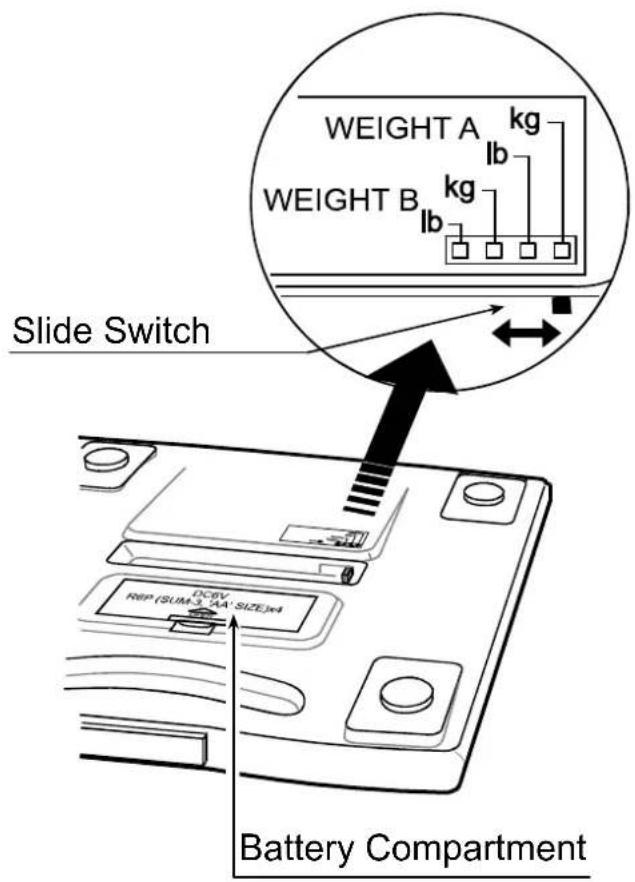
■ The following measurements can be selected by the slide switch and are classified into two categories - WEIGHT A and WEIGHT B. Within WEIGHT A and WEIGHT B, you have a choice to select and have your weight displayed in kg or lb. Use the WEIGHT B category to enable the radio to send measurement results. The radio will not function if the scale is in a WEIGHT A selection.
■ The scale has an “Automatic-power-off” function.
☐ If "0.0 kg /0.0 lb" and the Ready/Complete symbol ○ are displayed about forty-five seconds, the scale will automatically turn off.
☐ If the ○ symbol and the weight are displayed about fifteen seconds, the scale will automatically turn off.
Display Symbols
 | Ready/Complete symbol.This symbol is displayed when the measurement display is stable. |
 | Low battery indicator.If this symbol is displayed, replace all four batteries with new ones. |
Installing (or Replacing) Batteries
Caution
■ Insert each battery with its positive (+) and negative (-) terminals properly aligned with the corresponding symbols in the battery compartment.
■ Improper installation of the batteries may cause battery leakage.
- Replace all four batteries with new ones, when the symbol is displayed.
■ Do not mix new and used batteries. It may cause damage to the scale or shorten battery life.
■ The battery life is dependant upon the environmental temperature, battery type and usage.
■ Remove the batteries from the battery compartment, when the scale is not to be used for a long time. They may leak and damage the scale.
Steps for Installing (or Replacing) Batteries
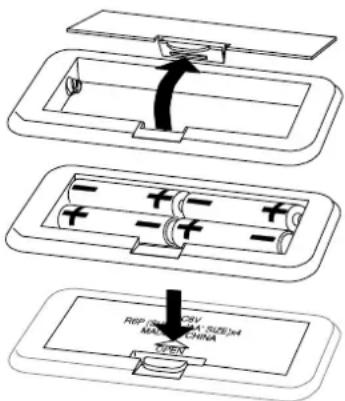
- Remove the battery compartment cover on the underside of the scale by gently pushing the hook in the direction indicated by the arrow and lifting the cover backward.
- Install four new batteries with the positive (+) and negative (-) terminals properly aligned with the corresponding symbols in the battery compartment.
- Replace the cover by sliding it into the compartment and gently pressing into place.
Pairing The PBT-C Series Device With a Continua-Compliant Manager
Model UC-321PBT-C is a PBT-C series device. PBT-C series devices are designed to be connected only with Continua Managers.
To pair the device with a Manager, please follow these steps:
- Remove the four AA batteries from the device.
- Discharge the device completely by trying to take a measurement. Press the "Measurement" switch, tap the toe switch, or tap the surface of the device as appropriate.
Note: the measurement will not proceed and the LCD will remain blank. - Insert the four AA batteries back into the device.
- Refer to the Manager's instruction manual to start a Bluetooth discovery and inquiry process.
The device will stay discoverable for 60 seconds following battery insertion. If the Manager fails to pair with the device, repeat steps 1 through 3. - Once the manager has discovered the device, enter the PIN "123456" as a password to finish the pairing process.
When the Manager supports SSP (Secure Simple Pairing), no password is required for the pairing process.

Continua ™ CERTIFIED
A device that has been certified by Continua displays this logo.

Bluetooth®
A Bluetooth device has the logo mark of Bluetooth printed on it.

The RoHS (Restriction of Hazardous Substances) Directive
Measuring Your Weight
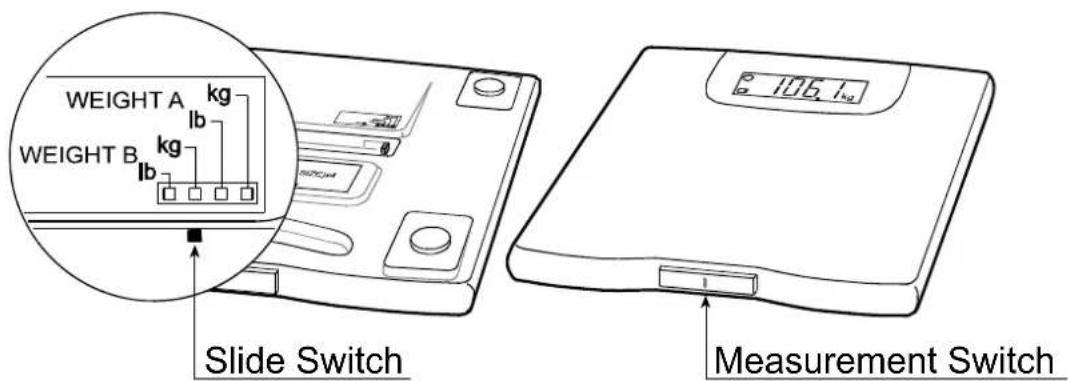
1. Set the slide switch to the correct mode.
Example: Set the slide switch to [WEIGHT B].
Set the slide switch to the correct mode
Press the measurement switch
2. Press the measurement switch gently.
All seconds.
are displayed for sev

Ready/Complete symbol
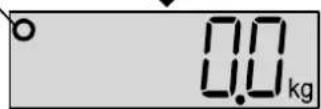
3. Wait until the ○ symbol is displayed.
Wait until "0.0 kg /0.0 lb" and the Ready/Complete symbol ○ are displayed.
Note: If "0.0 kg /0.0 lb" and the Ready/Complete symbol ○ are displayed about forty-five seconds, the scale will automatically turn off.
4. Step on the scale gently and stand still during the measurement.
You will see the display changed to dashes. Please remain still as much as you can.
5. Your weight is displayed after the symbol is displayed.
After about fifteen seconds, the scale will automatically turn off.
Step on the scale


Step off the scale
6. Step off the scale.
Measuring an Infant or Small Animal
1. Set the slide switch to the correct mode.
Example: Set the slide switch to [WEIGHT B].
2. Press the measurement switch gently and step on the scale.
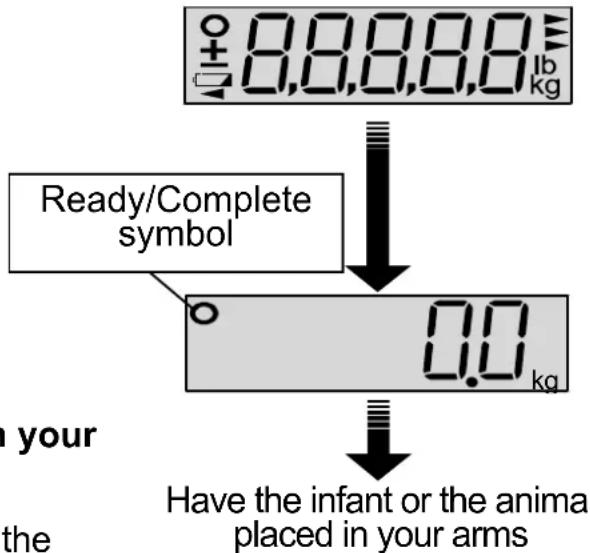
All display segments are displayed for several seconds.
Step on the scale without any baby or animal in your arms before “0.0 kg /0.0 lb” is displayed.
3. Have the infant or the animal placed in your arms
Remain on the scale and have the infant or the animal placed securely in your arms within ten seconds after the scale displays "0.0 kg /0.0 lb" and the Ready/Complete symbol ○.
Remain still during the measurement until the Ready/Complete symbol ○ is displayed. You will see the display changed to dashes. Please remain still as much as you can.
Note: If "0.0 kg /0.0 lb" and the Ready/Complete symbol ○ are displayed about forty-five seconds, the scale will automatically turn off.
4. The weight of the infant or the animal can be read after the symbol is displayed.
After about fifteen seconds, the scale will automatically turn off.
5. Step off the scale.
![graph TD A["Set the slide switch to the correct mode"] --> B["Press the measurement switch Step on the scale"]](/content/2026/06/1257080/images/f5d43e6a1734c22da9d9cb90d0d9d7d147b5126a5ce2a8a6e55b1471502e6dd8.jpg)

Measuring Your Weight on a Carpet
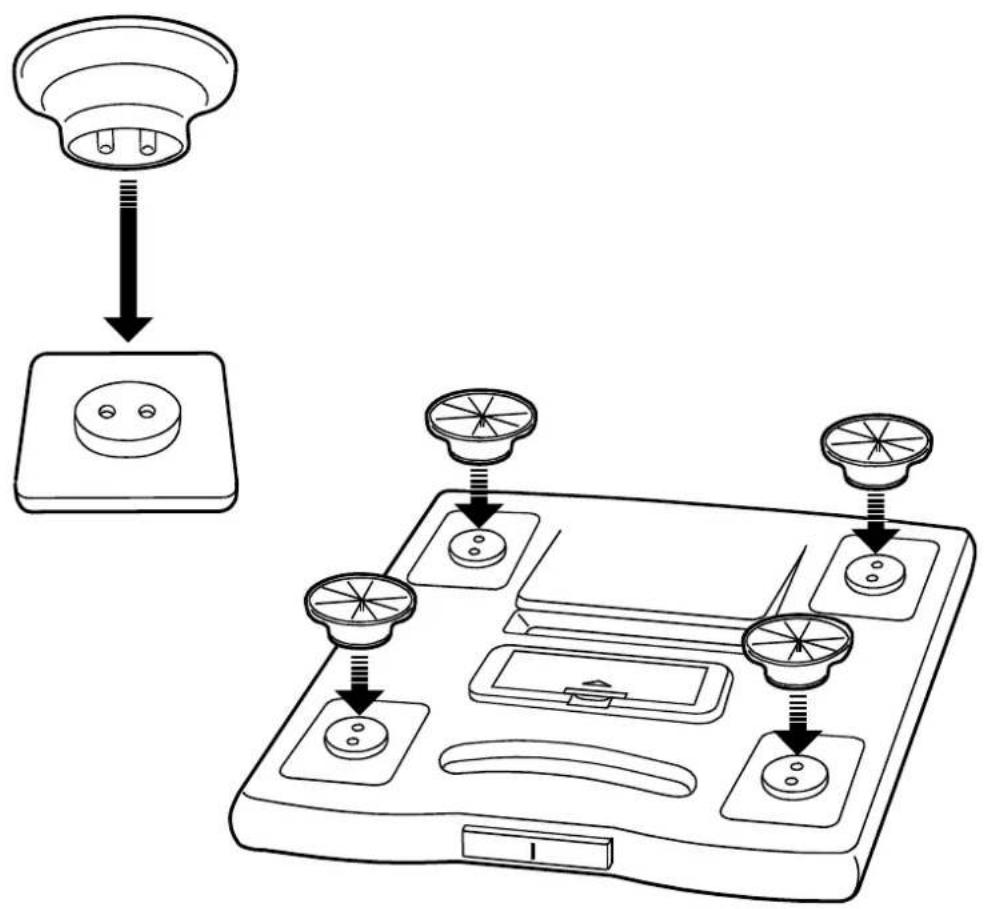
Place the scale on a solid level surface, such as tile, wood, or laminate flooring. If the scale must be used on a carpet, be sure to attach the plastic add-on feet.
Steps for Attaching the Add-on Feet
- Each add-on foot has two pins. Match those pins to the holes on the scale leg and insert firmly.
- Attach add-on feet on all four legs.
Notes
■ Please be careful not to fall when using the add-on feet.
■ We recommend using this scale on a solid and level surface.
Specifications
Digital display Liquid crystal display, 25 mm character height
Maximum capacity 200 kg / 450 lb
Minimum display 0.1 kg / 0.2 lb
Wireless communication WML-40AH (Mitsumi Electronics Co. Ltd.)
Bluetooth Ver.2.1 Class 1 HDP
Continua certified
Power source Four type AA batteries
Battery life Approximately 1000 measurements
Accessories Add-on feet (4), Instruction manual, batteries(4)
Specifications are subject to change without prior notice or any obligation on the part of the manufacturer.
Compliance with European Directives
CE The scale complies with the statutory EMC (Electromagnetic Compatibility) directive 2004/108/EC. The WML-40AH is approved in accordance to R&TTE directive transmitter module marked by € 0678, manufactured by MITSUMI incorporated to OEM product.
Notes: Indoor use only. The displayed value may be adversely affected under extreme electromagnetic influences.
Compliance with FCC Rules
The scale complies with part 15 of the FCC rules and contains the FCC ID POOWML-C40.
Compliance with Industry Canada
IC: 4250A-WMLC40.
Maintaining the Scale
■ Clean the scale with a soft dry cloth or a cloth moistened with water and a mild detergent. Never use alcohol, benzine, thinner or other harsh chemicals to clean the scale.
■ Remove the batteries from the battery compartment, when the scale is not going to be used for a long time.
Transmitting Data to a Continua Manager
Measurement results will be automatically transmitted to the paired Manager at each measurement. In the case of unsuccessful transmission, the device stores the last 25 measurements in memory. The device will send all of the data at the next successful connection and clear memory.
Before Requesting Service
| Problems | Corrective |
| Nothing is displayed by pressing the measurement switch. | Check the battery installation.Replace all four batteries with new ones. |
| “88888” remains displayed.“E-0” is displayed.The difference between an estimated weight and a measured weight is excessive. | Remove and reinstall the batteries.Place the scale on a solid level surface.Remove any foreign objects that might be touching the bottom of the scale.When the scale is placed on a carpet, be sure that the add-on feet are attached or try moving the scale to a level surface such as tile or wood. |
| ☐ is displayed. | Replace all four batteries with new ones. |
If you can not locate and fix the problem, contact your supplier, or the A&D service group. The A&D service group will support authorized suppliers with technical information, spare parts and units.

A&D Company, Limited
1-243 Asahi, Kitamoto-shi, Saitama 364-8585 JAPAN
Telephone: [81] (48) 593-1111 Fax: [81] (48) 593-1119
A&D INSTRUMENTS LTD.
Unit 24/26 Blacklands Way, Abingdon Business Park, Abingdon, Oxfordshire OX14 1DY United Kingdom
Telephone: [44] (1235) 550420 Fax: [44] (1235) 550485
A&D Australasia Pty Ltd.
32 Dew Street, Thebarton, South Australia 5031 AUSTRALIA
Telephone: [61] (8) 8301-8100 Fax: [61] (8) 8352-7409
A&D ENGINEERING, INC.
1756 Automation Parkway, San Jose, California 95131 U.S.A.
Telephone: [1] (408) 263-5333 Fax: [1] (408)263-0119
(8th Floor, Manhattan Bldg. 36-2 Yoido-dong, Youngdeungpo-ku, Seoul, KOREA)
Telephone: [82] (2) 780-4101 Fax: [82] (2) 782-4280


- PRECISION HEALTH SCALE
- UC-321PBT-C
- INSTRUCTION MANUAL
- CONTENTS
- BEFORE USE
- OPERATIONS
- REFERENCES
- PRECAUTIONS
- INDICATIONS FOR USE
- SCALE COMPONENTS
- DISPLAY SYMBOLS
- INSTALLING (OR REPLACING) BATTERIES
- CAUTION
- STEPS FOR INSTALLING (OR REPLACING) BATTERIES
- PAIRING THE PBT-C SERIES DEVICE WITH A CONTINUA-COMPLIANT MANAGER
- MEASURING YOUR WEIGHT
- SET THE SLIDE SWITCH TO THE CORRECT MODE
- PRESS THE MEASUREMENT SWITCH GENTLY
- WAIT UNTIL THE ○ SYMBOL IS DISPLAYED
- STEP ON THE SCALE GENTLY AND STAND STILL DURING THE MEASUREMENT
- YOUR WEIGHT IS DISPLAYED AFTER THE SYMBOL IS DISPLAYED
- STEP OFF THE SCALE
- MEASURING AN INFANT OR SMALL ANIMAL
- PRESS THE MEASUREMENT SWITCH GENTLY AND STEP ON THE SCALE
- HAVE THE INFANT OR THE ANIMAL PLACED IN YOUR ARMS
- THE WEIGHT OF THE INFANT OR THE ANIMAL CAN BE READ AFTER THE SYMBOL IS DISPLAYED
- MEASURING YOUR WEIGHT ON A CARPET
- STEPS FOR ATTACHING THE ADD-ON FEET
- NOTES
- SPECIFICATIONS
- COMPLIANCE WITH EUROPEAN DIRECTIVES
- COMPLIANCE WITH FCC RULES
- COMPLIANCE WITH INDUSTRY CANADA
- MAINTAINING THE SCALE
- TRANSMITTING DATA TO A CONTINUA MANAGER
- A&D COMPANY, LIMITED
- A&D INSTRUMENTS LTD
- A&D AUSTRALASIA PTY LTD
- A&D ENGINEERING, INC
Brand : A&D Médical
Model : UC-321PBT
Category : Scale