
iMT630 - Docking Station ALTEC LANSING - Free user manual and instructions
Find the device manual for free iMT630 ALTEC LANSING in PDF.


| Product Type | Portable Docking Station with Speaker |
| Brand | Altec Lansing |
| Model | iMT630 |
| Dimensions (H x W x D) | 4.2 x 6.5 x 3.8 inches |
| Weight | 1.3 lbs (590 g) |
| Power Supply | AC adapter (100-240V) or 6 D-cell batteries (not included) |
| Battery Life | Up to 20 hours on battery power |
| Speaker Output | 10 Watts RMS total |
| Frequency Response | 40 Hz - 20 kHz |
| Connectivity | Dock connector (30-pin), 3.5mm auxiliary input, FM radio (built-in antenna) |
| Compatible Devices | iPod with 30-pin connector, iPhone (first generation, 3G, 3GS) |
| Remote Control | Yes, included |
| Additional Features | Alarm clock, snooze, dual alarm, sleep timer, clock display |
| Cabinet Material | Plastic with fabric speaker grille |
| Cleaning Instructions | Wipe with dry cloth; avoid liquids and abrasives |
| Safety Certifications | UL, FCC, CE |
| Warranty | 1 year limited |
Frequently Asked Questions - iMT630 ALTEC LANSING
User questions about iMT630 ALTEC LANSING
0 question about this device. Answer the ones you know or ask your own.
Ask a new question about this device
Download the instructions for your Docking Station in PDF format for free! Find your manual iMT630 - ALTEC LANSING and take your electronic device back in hand. On this page are published all the documents necessary for the use of your device. iMT630 by ALTEC LANSING.
USER MANUAL iMT630 ALTEC LANSING
Altec Lansing inMotion ® iMT630 Slimline Speaker System
for iPhone TM and iPod ®
iMT630
User Guide
Welcome
Thank you for purchasing the Altec Lansing in Motion iMT630 slimline speaker system. Designed specifically to work with your iPhone or iPod, this docking/charging speaker system delivers precision sound that packs a punch wherever you go. All in an incredibly sleek package.
This Altec Lansing inMotion iMT630 speaker system is designed to work with:
- iPhone 4
- iPhone 3GS
- iPhone 3G
- iPhone
• iPod touch (1st, 2nd, 3rd and 4th generation) - iPod Classic
- iPod nano (1st, 2nd, 3rd, 4th, 5th and 6th generation)
Please carefully read this User Guide for instructions on setting up and using your inMotion iMT630 speaker system.
Prior to installing or operating the Altec Lansing in Motion iMT630 speaker system, refer to the important product safety information.
Getting Assistance
The answers to most setup and performance questions can be found in the Troubleshooting section of this guide. You can also consult the frequently asked questions (FAQ) in the customer support section of our Web site at www.alteclansing.com.
If you live in North America and still can't find the information you need, please call our customer service team for assistance before returning this product to your retailer under their return policy.
Tel: 1-800-ALTEC88 (Toll Free in US and Canada) Email: csupport@alteclansing.com
If you live outside of North America, please visit our Web site at www.alteclansing.com and select your region at the bottom of the page to locate your country's distributor.
For the most up-to-date information, be sure to check our Web site at www.alteclansing.com.
International Distribution
International customers: For information regarding the distribution of Altec Lansing products in your country, please visit www.alteclansing.com and click on your region at the bottom of the page.
Registering Your Product
Visit www.alteclansing.com to register your product online, so we can provide you with the best possible service and technical support.
FCC Compliance
Changes or modifications not expressly approved by the party responsible for compliance could void the user's authority to operate this equipment.
This device complies with Part 15 of the FCC Rules. Operation is subject to the following two conditions:
1) This device may not cause harmful interference, and
2) This device must accept any interference received, including interference that may cause undesired operation.
Safety Information

The lightning flash with arrowhead, within an equilateral triangle, is intended to alert the user to the presence of uninsulated "dangerous voltage" within the product's enclosure that may be of sufficient magnitude to constitute a risk of electric shock to persons.

Caution: To prevent the risk of electric shock, do not remove cover (or back). No user-serviceable parts inside. Refer servicing to qualified service personnel.

The exclamation point within an equilateral triangle is intended to alert the user to the presence of important operating and maintenance (servicing) instructions in the literature accompanying the appliance.
CAUTION
To prevent electric shock do not use this (polarized) plug with an extension cord, receptacle or other outlet unless the blades can be fully inserted to prevent blade exposure.
WARNING
To reduce the risk of fire or electric shock, do not expose this appliance to rain or moisture.
IMPORTANT SAFETY INSTRUCTIONS
- Read these instructions.
- Keep these instructions.
- Heed all warnings.
- Follow all instructions.
- Do not use this apparatus near water. This apparatus shall not be exposed to dripping or splashing, and no objects filled with liquids, such as vases, shall be placed on the apparatus.
- Clean only with dry cloth.
- Do not block any ventilation openings. Install in accordance with the manufacturer's instructions.
- Do not install near any heat sources such as radiators, heat registers, stoves, or other apparatus (including amplifiers) that produce heat.
- Do not defeat the safety purpose of the polarized or grounding-type plug. A polarized plug has two blades with one wider than the other. A grounding type plug has two blades and a third grounding prong. The wide blade or the third prong are provided for your safety. If the provided plug does not fit into your outlet, consult an electrician for the replacement of the obsolete outlet.
-
Protect the power cord from being walked on or pinched particularly at plugs, convenience receptacles, and the point where they exit from the apparatus.
-
Only use attachments/accessories specified by the manufacturer.
- The only with the cart, stand, tripod, bracket, or table specified by the manufacturer or sold with the apparatus. When a cart is used, use caution when moving the cart/apparatus combination to avoid injury from tip-over.
- Unplug this apparatus during lightning storms or when unused for long periods of time.
- Refer all servicing to qualified service personnel. Servicing is required when the apparatus has been damaged in any way, such as power-supply cord or plug is damaged, liquid has been spilled or objects have fallen into the apparatus, the apparatus has been exposed to rain or moisture, does not operate normally, or has been dropped.
- Do not install in an area which impedes the access to the power plug. Disconnecting the power plug is the only way to completely remove power to the product and must be readily accessible at all times.
Please read FOC information and important safety logos on the bottom of the unit.
(iMT702, iMT630)
WARNING There is a danger of explosion if the battery is incorrectly replaced. Replace it only with the same or equivalent type. Do not expose it to excessive heat such as sunshine, fire, etc.
BATTERY DISPOSAL The battery used in this product must be properly recycled or disposed of. Please contact your local recycling center for proper battery handling and disposal instructions.
(iMT630)
Rated Voltage: 3.7V Capacity: 1800mAh Type: McR18650
Rating plate information was located at bottom enclosure.
Contents
Welcome....ii
Safety Information 1
Package Contents....3
Speaker Features and Indicators 4
Full-featured Remote Details....5
Getting Started....5
How to Change Audio Sources....8
How to Find Your Desired Song....8
How to Play/Pause Your Music....8
How to Adjust the Volume....8
Setting EQ Controls....9
How to Listen to Your iPhone or iPod 9
How to Navigate the iPod Menu on Your iPhone or iPod .... 10
How to Charge Your iPhone or iPod ....10
How to Listen to Your Non-docking Portable Device....10
How to Pack Up Your Speaker System for Travel....11
How to Maintain Your Speaker System....11
Troubleshooting....12
Warranty 15
Package Contents
Altec Lansing in Motion IMT630 speaker system

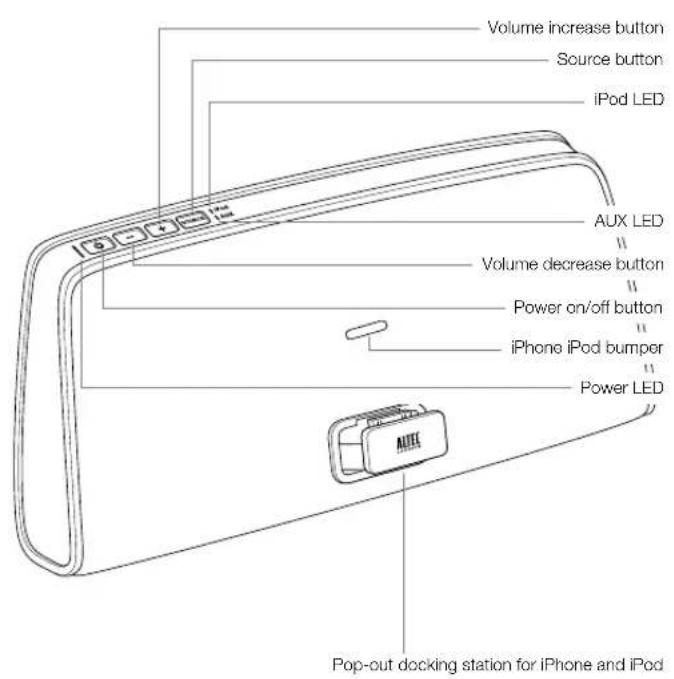
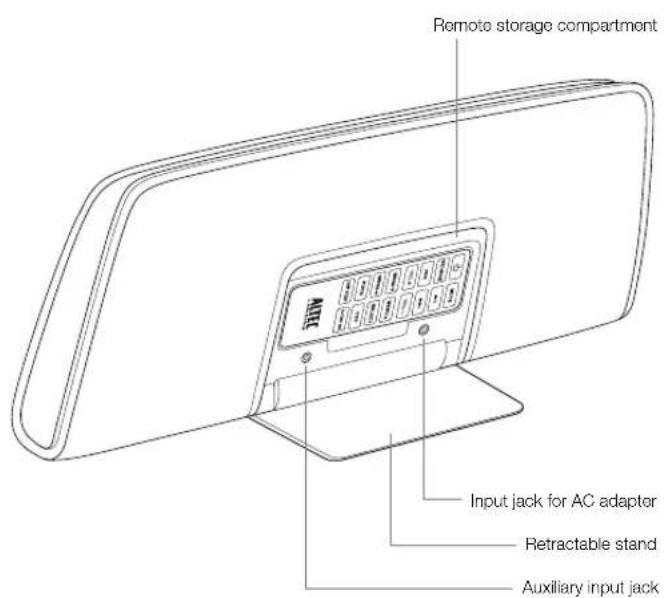
Speaker Features and Indicators
Full-featured Remote Details
NOTE For best results, aim the full-featured remote toward the inMotion iMT630 speaker system.

Getting Started
How to Set Up Your Speaker System
1 Lower the stand.
Lower the stand that's on the back of your speaker system.
NOTE Your Altec Lansing inMotion iMT630 speaker is equipped with a unique stand that supports your speaker system when opened, and when closed, switches off the speaker system to conserve battery power and encloses the full-featured remote's storage compartment.
2 Place the speaker system on a hard surface.
Place your Altec Lansing inMotion iMT630 speaker system on a desk, bookshelf, counter, or other hard surface.
3 Eject the dock connector.
Depress and release the dock connector. It's on the front of the speaker system with the Altec Lansing logo on it. The dock connector will extend into position.
WARNING In order to prevent accidentally dropping your iPhone or iPod, be sure to remove it from the dock connector before picking up the speaker system.
How to Install the AC Adapter
4 Connect the AC adapter cable plug into the speaker system's jack.
The jack is located on the back of the system behind the stand/remote storage compartment door.
5 Plug the AC adapter into the wall outlet.
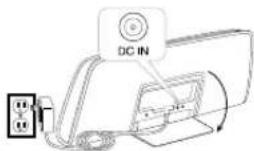
WARNING Use of another AC adapter may damage the product. Use only the supplied AC adapter.
How to Charge the Lithium-Ion Battery
Your Altec Lansing inMotion iMT630 speaker system includes a rechargeable lithium-ion battery. This battery should be fully charged before initial use of the speaker system. A full charge, indicated by a solid green power LED, will provide up to 7 hours of continuous playing time.
When the power LED turns amber, you should recharge the battery. When the power LED turns red, the speaker system is about to automatically shut down.
6 Connect the speaker system to a wall outlet.
See the How to Install the AC Adapter section. The power LED will blink green to indicate that the battery is charging.
7 Allow the battery to charge.
Charging time: Up to 4 hours for a full charge. When the battery is fully recharged, the power LED will light solid green.
WARNING During the charging process, it is typical for the battery to become warm. To be safe, keep flammable materials away from the speaker system.
Power LED status indicator
| Power LED Meaning | |
| Blinking green Your iMT630 speaker system is charging. | |
| Solid green | Your iMT630 battery is fully charged and the speaker system is running on battery power. |
| Solid amber | Your iMT630 battery's charge is low and the speaker system is running on battery power. |
| Solid red | Your iMT630 battery's charge is critically low and the speaker system is about to automatically shut down from running on battery power. |
| Blinking red | There is a battery error, such as the battery is not connected. |
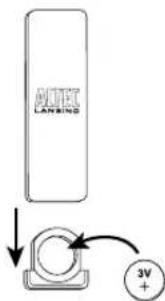
How to Install the Full-Featured Remote Battery The remote battery (included) is not installed at the factory. To install the battery, follow the steps below
1 Pull out the battery holder.
The battery holder is located on the lower end of the back of the remote. Use a fingernail inserted into one of the notches on either the side of the remote to pull the battery holder out of the remote.
2 Position the battery (included) so it sits in the battery holder correctly.
Make sure the polarity (the + and - sides of the battery) is correct.
3 Push the battery holder back into the remote, making sure the battery stays in place.
You will hear and feel the battery holder click into place.
NOTE Please discard used batteries properly.
How to Dock Your iPhone or iPod
1 Eject the dock connector, if it's not already extended.
Depress and release the dock connector. It's on the front of the speaker system and has the Altec Lansing logo on it. The dock connector will extend into position.

flowchart
graph TD
    A["Device 1"] -->|Signal| B["Device 2"]
    B --> C["Device 3"]
2 Place your iPhone or iPod into position.
Align your iPhone or iPod's connection port with the dock connector on the inMotion iMT630 speaker system. Slide your iPhone or iPod onto the dock connector.
NOTE Your iPhone or iPod can be in a skin or thin cover, but not too thick of a cover in order to dock properly.
How to Turn On Your Speaker System
1 Make sure you have power to the unit.
Ensure the AC adapter is connected to the system and plugged into the wall. See the Getting Started section for more information. If the battery is charged, the AC adapter can be disconnected.
2 Turn on the unit.
Press the ⏻ button on either the speaker system or the remote.
How to Turn Off Your Speaker System
Turn off the unit.
Press the ⏻ button on either the speaker system or the remote.
Alternately, you can close the support stand to turn off your speaker system.
NOTE Whenever you are finished listening to your music, please remember to turn off your speaker system and portable device to conserve energy.
How to Change Audio Sources How to Play/Pause Your Music
With the speaker system powered on, press the "SOURCE" button on either the speaker system or remote to toggle between iPod and AUX input modes.
How to Find Your Desired Song
Use the remote to locate the song or video you want to enjoy.
Skip to the beginning of the current song.
Press the button on the remote.
Skip to the beginning of the next song.
Press the ▶ button on the remote.
Rewind the currently playing song.
While a song is playing, press and hold the ◀ button on the remote.
This gives you high-speed reverse search of the current song.
Fast-forward the currently playing song.
While a song is playing, press and hold the ▶ button on the remote.
This gives you high-speed forward search of the current song.
The remote is capable of controlling playback on your iPhone or iPod.
Begin playing a selected music track.
Press the ▶ button on the remote. Audio from your device will start playing through the speaker.
Pause the selected track.
Press the ▶ button again on the remote. The music will be paused.
How to Adjust the Volume
Turn up the volume.
Press the “+” button on the speaker system or the “VOL +” button on the remote until the desired volume is reached.
Turn down the volume.
Press the “-” button on the speaker system or the “VOL -” button on the remote until the desired volume is reached.
Mute the sound.
Press the "MUTE" button on the remote. To unmute the sound, press the "MUTE" button again.
NOTE The source LED will blink when your iMT630 is muted.
Setting EQ Controls
How to Select Your Desired EQ Preset
On the remote control, press the button that corresponds with your desired EQ setting:
- ROCK
- POP
- HIP HOP
• ALTEC EQ
How to Listen to Your iPhone or iPod
1 Dock your iPhone or iPod in the Altec Lansing in Motion iMT630 speaker system.
2 Turn on your speaker system.
3 Select your audio source: iPod.
4 Find your desired song.
5 Start playing your song.
6 Adjust the volume.

NOTE To conserve battery power, reduce the speaker system volume level.
NOTE During battery-only operation, the speaker system automatically shuts down if no audio is detected for a few minutes. This is to conserve battery power. Press the ⏻ button to turn the speaker system back on.
NOTE Whenever your iPhone or iPod is docked and your Altec Lansing inMotion iMT630 speaker system is plugged into an AC outlet, your iPhone or iPod is charging (until fully charged)—even if the speaker system is switched off.
NOTE The speaker system is compatible with the alarm clock and sleep timer features built into the iPhone and iPod. For these features to work properly and play through the speaker system, the speaker system must be connected to a wall outlet and turned on. When an iPhone or iPod is docked, the speaker system will not shut down automatically, enabling the alarm or sleep timer to play through the speaker system. See the user guide for your iPhone or iPod for details on how to access these features.
NOTE During AC operation, if there is no iPhone or iPod docked and no audio input signal is detected for a few minutes, the speaker system automatically shuts down to conserve energy. Press the ⏻ button to turn the speaker system back on.
How to Navigate the iPod Menu on Your iPhone or iPod
In iPod mode, you can use the navigation keys on the remote to choose songs from your music library:
Press the "MENU▼" button to scroll down within a menu screen.
Press the "MENU▲" button to scroll up within a menu screen.
Press the "MENU◀" button to go up a menu level.
Press the "SELECT" button to make a selection within a menu.
How to Charge Your iPhone or iPod
Whenever your iPhone or iPod is docked and your Altec Lansing inMotion iMT630 speaker system is plugged into an AC outlet, your iPhone or iPod is charging (until fully charged)—even if the speaker system is switched off.
How to Listen to Your Non-docking Portable Device
If you have a non-docking portable audio device, you can enjoy it through your Altec Lansing in Motion iMT630 speaker system as well. Just connect it via the AUX jack. Here's how:
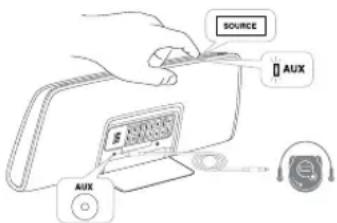
1 Locate a 3.5mm stereo cable (not included).
2 Plug one end of the stereo cable into your device.
Your device should have either a headphone or LINE OUT jack for you to plug into.
3 Plug the other end of the stereo cable into your speaker system's AUX jack.
The AUX jack is located on the back of the speaker system behind the stand/remote storage compartment door.
4 Turn on your device.
5 Turn on your speaker system.
6 Select your audio source: AUX.
7 Find your desired song.
8 Start playing the song.
9 Adjust the volume.
NOTE You may need to adjust the device volume also. Your device's volume should be set to approximately 34 volume.
NOTE When you are finished listening to your portable audio device, please remember to turn both it and your speaker system off to conserve electricity.
How to Pack Up Your Speaker System for Travel
1 Turn off the speaker system.
2 Unplug the AC adapter from the unit and the wall.
3 Stow the remote in its storage compartment in the rear of the speaker system.
4 Close the support stand.
5 Press in the dock connector until it clicks in the closed position.
How to Maintain Your Speaker System
Place your speaker system on a level surface away from sources of direct sunlight or excessive heat.
Protect your furniture with a piece of cloth or other protective material when placing your speaker system on a natural wood or lacquered finish.
Clean only with dry cloth.
Troubleshooting
| Symptom Possible Problem Solution | ||
| Speaker system doesn't respond (no power) | AC adapter isn't plugged into a wall outlet or the connector isn't plugged into the power supply jack on the back of the speaker system. | Plug the AC adapter into a wall outlet and plug the connector into the power supply jack on the back of the speaker system. |
| Wall outlet is not functioning. | Plug another device into the same outlet to confirm the outlet is working. | |
| The rechargeable battery isn't charged. | Charge the battery. (See the Getting Started section for details.) | |
| The power isn't turned on. | Turn on the speaker system by pressing the button. The Power LED lights up. | |
| The stand is in the closed position. Open the stand. | ||
| iPhone or iPod doesn't dock properly | iPhone or iPod didn't install properly. | Remove your iPhone or iPod from the dock and check for obstructions on the connectors in the dock and on your iPhone or iPod. Then reseat it in the dock. If using an iPhone or iPod skin/protective cover, check to make sure it is not blocking the dock. If necessary, remove the skin/protective cover, then reseat in the dock. |
| iPhone or iPod doesn't respond to the speaker system or remote | iPhone or iPod is not installed properly. | Remove your iPhone or iPod from the dock and check for obstructions on the connectors in the dock and on your iPhone or iPod. Then reseat it in the dock. |
| Your iPhone or iPod software is too old. | Upgrade software on your iPhone or iPod. For details, visit www.apple.com/ipod/download. | |
| iPhone or iPod is locked up. Please make sure your iPhone or iPod is working properly before docking into the unit. Please refer to your iPhone or iPod manual for details. | ||
| Using 1st- or 2nd-generation iPod, iPod shuffle or other devices. | Your speaker system cannot control those iPod models or other devices. | |
Troubleshooting
| Symptom Possible Problem Solution | ||
| iPhone or iPod didn't charge | iPhone or iPod is not installed properly. | Remove your iPhone or iPod from the dock and check for obstructions on the connectors in the dock and on your iPhone or iPod. Then reseat it in the dock. |
| iPhone or iPod is locked up. Please make sure your iPhone or iPod is working properly before docking into the unit. Please refer to your iPhone or iPod manual for details. | ||
| AC adapter isn't plugged into a wall outlet, or the connector is not plugged into the power supply jack on the back of the speaker system. | Plug the AC adapter into a wall outlet and plug the connector into the supply jack on the speaker system. | |
| Sound is distorted | Source volume level is set too high. | Decrease the source volume. |
| Audio source is distorted. | If the iPhone or iPod original audio source (music file) is of poor quality, distortion and noise are easily noticed with high-power speakers. Try a different audio source such as a music CD. | |
| Full-featured remote doesn't work | Battery is weak. Replace current battery with a new battery. | |
| Full-featured remote is not pointed toward the speaker system. | Point the full-featured remote toward the Altec Lansing speaker system and move within 10 feet of the unit. | |
| No sound from the AUX device, such as an MP3 player or CD player connected to the AUX jack | Volume on the device is set too low. | Increase the volume on the device to approximately 34 full volume. |
| Source selector is not set to AUX. | Set source selector to AUX. | |
Troubleshooting
| Symptom Possible Problem Solution | ||
| The speaker system exhibits erratic or unexpected behavior; controls do not function | Static electricity, momentary interruption of power or abnormal operating conditions may be responsible. | 1. Disconnect the AC adapter cable plug from the speaker system's jack.2. Close the stand on the back of the speaker system.3. Wait 20 to 30 seconds.4. Open the stand on the back of the speaker system.5. Reconnect the AC adapter cable plug to the speaker system's jack. |
Warranty
ALTEC LANSING ONE-YEAR LIMITED WARRANTY (TWO-YEAR LIMITED WARRANTY IN THE EUROPEAN UNION)
What Does the Warranty Cover?
Altec Lansing warrants that its products shall be free from defects in materials or workmanship, with the exceptions stated below.
What Is the Period of Coverage?
For units purchased in European Union, this warranty runs for two years from the date of purchase. For units not purchased in Europe, this warranty runs for one year from the date of purchase. The term of any warranties implied by law shall expire when your limited warranty expires. Some states and/or Member States in the European Union do not allow limitations on how long an implied warranty lasts, so the above limitation may not apply to you.
What Does the Warranty Not Cover?
This warranty does not cover any defect, malfunction or failure that occurs as a result of: improper installation; misuse or failure to follow the product directions; abuse; or use with improper, unintended or faulty equipment. (For information on proper installation, operation and use consult the manual supplied with the product. If you require a replacement manual, you may download a manual from www. alteclansing.com.) Also, consequential and incidental damages are not recoverable under this warranty. Some states do not allow the exclusion or limitation of incidental or consequential damages, so the above limitation or exclusion may not apply to you.
What Will Altec Lansing Do to Correct the Problem?
Altec Lansing will, at its option, repair or replace any product that proves to be defective in material or workmanship. If your product is no longer being manufactured, or is out of stock, at its option, Altec Lansing may replace your product with a similar or better Altec Lansing product.
How to Get Warranty Service
To get a covered product repaired or replaced, you must contact Altec Lansing during the warranty period by email (csupport@alteclansing.com). You must include in your email, your name, address, email address, telephone number, date of purchase and a complete description of the problem you are experiencing. In the United States, you may alternatively contact Altec Lansing by telephone at 1-800-ALTEC88 – please be prepared to provide the same information. If the problem appears to be related to a defect in material or workmanship, upon proof of purchase Altec Lansing will provide you a return authorization and instructions for return shipment. Return shipments shall be at the customer's expense. You should insure the shipment as appropriate because you are responsible for the product until it arrives at Altec Lansing.
How Will State Law Affect Your Rights?
This warranty gives you specific legal rights, and you may also have other rights which vary from state to state. Please note that in the European Union, you as a consumer might have other legal rights under national legislation of European Union Member States governing the sale of Altec Lansing's goods. Those rights are not affected by this guarantee.
The above limited warranties and remedies are sole warranties and remedies available to purchaser, if, and to the extent, valid and enforceable under the applicable law.
DISPOSAL OF OLD ELECTRICAL AND ELECTRONIC EQUIPMENT

This symbol on the product or on its packaging indicates that this product shall not be treated as household waste. Instead it shall be handed over to the applicable collection point for the recycling of electrical and electronic equipment. By ensuring this product is disposed of correctly, you will help prevent potential negative consequences for the environment and human
health, which could otherwise be caused by inappropriate waste handling of this product. The recycling of materials will help to conserve natural resources. For more detailed information about recycling of this product, please contact your local city office or your household waste disposal service.

www.alteclansing.com
HEADQUARTERS 9330 Scranton Road, Suite 600, San Diego, CA 92121 • 800-ALTEC-88
EUROPE Flexport 5th floor, Radarweg 60, 1043 NT, Amsterdam, The Netherlands
ASIA/PACIFIC 28/F, Jinlong Building, Caiwuwei, 139 Hongbao Road, Luohu District, Shenzhen, China 518008
"Made for iPhone" and "Made for iPod" mean that an electronic accessory has been designed to connect specifically to iPhone and iPod players, and has been certified by the developer to meet Apple performance standards. Apple is not responsible for the operation of this device or its compliance with safety and regulatory standards. Please note that the use of this accessory with iPhone or iPod may affect wireless performance.
Product specifications and appearance are subject to change without notice.
1-year limited warranty (2 years in Europe; see inside for details).
©2011 Altec Lansing, LLC. All rights reserved.
ALTEC, ALTEC LANSING, the Altec Lansing logo. Hear What's Next, and InMotion are trademarks or registered trademarks of Altec Lansing LLC.
iPhone and iPod is a trademark of Apple Inc., registered in the U.S. and other countries. All other trademarks appearing herein are the property of their respective owners.
Designed by Altec Lansing in the USA. Made in China. A14491 R01


- Welcome
- Getting Assistance
- International Distribution
- Registering Your Product
- FCC Compliance
- Safety Information
- CAUTION
- WARNING
- IMPORTANT SAFETY INSTRUCTIONS
- (iMT702, iMT630)
- (iMT630)
- Contents
- Package Contents
- Full-featured Remote Details
- Getting Started
- Lower the stand.
- Place the speaker system on a hard surface.
- Eject the dock connector.
- Connect the AC adapter cable plug into the speaker system's jack.
- Plug the AC adapter into the wall outlet.
- Pull out the battery holder.
- Position the battery (included) so it sits in the battery holder correctly.
- Push the battery holder back into the remote, making sure the battery stays in place.
- Eject the dock connector, if it's not already extended.
- Place your iPhone or iPod into position.
- Make sure you have power to the unit.
- Turn on the unit.
- Turn off the unit.
- How to Change Audio Sources How to Play/Pause Your Music
- How to Find Your Desired Song
- How to Adjust the Volume
- Setting EQ Controls
- How to Listen to Your iPhone or iPod
- How to Navigate the iPod Menu on Your iPhone or iPod
- How to Charge Your iPhone or iPod
- How to Listen to Your Non-docking Portable Device
- How to Pack Up Your Speaker System for Travel
- How to Maintain Your Speaker System
- Warranty
- ALTEC LANSING ONE-YEAR LIMITED WARRANTY (TWO-YEAR LIMITED WARRANTY IN THE EUROPEAN UNION)
Brand : ALTEC LANSING
Model : iMT630
Category : Docking Station