
S-mix Mini - Mixer SAMSON - Free user manual and instructions
Find the device manual for free S-mix Mini SAMSON in PDF.


| Product Type | Compact Analog Mixer |
| Brand | Samson |
| Model | S-mix Mini |
| Number of Channels | 4 (2 Mono + 2 Stereo) |
| Inputs | 2 x Mono (XLR/TRS combo), 2 x Stereo (RCA) |
| Outputs | 1 x Stereo Main (RCA), 1 x Headphone (1/4") |
| EQ per Channel | 2-band (High, Low) |
| Power Supply | 12V DC adaptor (included) |
| Dimensions | 120 x 100 x 40 mm |
| Weight | 0.3 kg |
| Construction | Plastic chassis |
| Phantom Power | No |
| Effects | None |
| Monitoring | Headphone output with level control |
| Main Mix Output | Stereo RCA |
| Level Controls | Volume per channel, master volume |
| LED Indicators | Power on |
| Included Accessories | Power adaptor, user manual |
| Compatibility | Microphones, instruments, line-level sources |
| Application | Podcasting, small events, home recording |
Frequently Asked Questions - S-mix Mini SAMSON
User questions about S-mix Mini SAMSON
0 question about this device. Answer the ones you know or ask your own.
Ask a new question about this device
Download the instructions for your Mixer in PDF format for free! Find your manual S-mix Mini - SAMSON and take your electronic device back in hand. On this page are published all the documents necessary for the use of your device. S-mix Mini by SAMSON.
USER MANUAL S-mix Mini SAMSON
Introduction and Features 3
Front and Rear Panel Layout 4
Operating the S mix
Setting up the S mix 5
Connecting the Input Signals 6
Typical Set-up 7
Creating a mix 7
Specifications 8
Wiring Guide 8
Copyright 2003, Samson Technologies Corp.
Printed January 2003
Samson Technologies Corp.
575 Underhill Blvd.
P.O. Box 9031
Syosset, NY 11791-9031
Phone: 1-800-3-SAMSON (1-800-372-6766)
Fax: 516-364-3888
www.samsontech.com
S mix Introduction and Features
Thank you for purchasing the S mix, miniature mixer by Samson Audio! The S mix is a 5-channel compact mixer packed with high-end mixer features. The S mix features a balanced microphone input on an XLR connector and includes phantom power for connecting condenser microphones. Adding to the mix are two Super-Z, high impedance line inputs on 1/4" connectors. Rounding out the inputs is a stereo channel with two inputs on RCA connectors. Individual volume controls for the mic, lines and stereo channels are also included for enhanced control over the connected signals.
And just because this unit is miniature, don't be surprised by its great sound and reliability thanks to high quality components and solid build construction.
S mix Features
• 5 channel miniature stereo mixer
- XLR, Balanced microphone input with Phantom Power and Volume control
- Stereo RCA inputs with Volume control
• T wo 1/4-inch, Super-Z, line level inputs with Volume control
• RCA, plus 1/4-inch TRS stereo Outputs.
- High quality, low noise op-amps for added headroom and cleaner signal
• Rugged aluminum extrusion chassis
• Large rubber bumper feet
• 18 Volt AC adapter included
S mix Front and Rear Panel Layout
Front Panel Layout
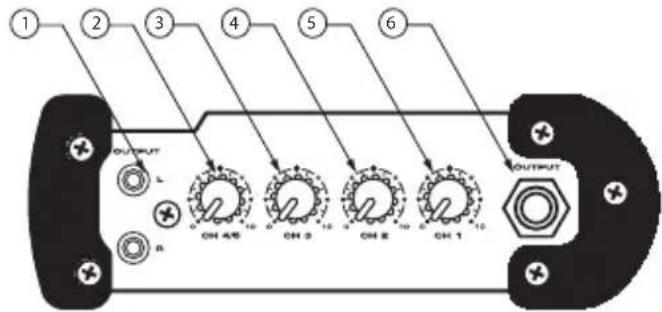
1 L & R RCA OUTPUT - Left and Right main mix OUTPUT on RCA connectors.
2 CHANNEL 4/5 VOLUME - Control knob used to adjust the level of inputs 4 and 5.
Rear Panel Layout

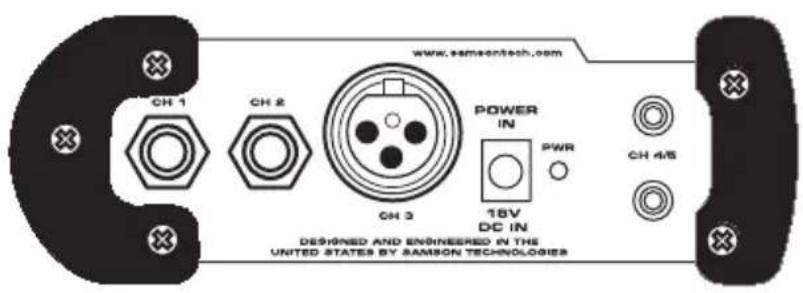
A CHANNEL 1 INPUT- 1/4-inch input for connecting Line/Instrument level signals.
B CHANNEL 2 INPUT- 1/4-inch input for connecting Line/Instrument level signals.
3 CHANNEL 3 VOLUME - Control knob used to adjust the level of input 3.
4 CHANNEL 2 VOLUME - Control knob used to adjust the level of input 2.
5 CHANNEL 1 VOLUME - Control knob used to adjust the level of input 1.
6 TRS OUTPUT - Left and Right main mix OUTPUT on TRS (TIP/RING/SLEEVE) connectors.
C CHANNEL 3 INPUT- XLR mic-level input for connecting standard microphones.
D D C P O W E R I N P U T- Connect the supplied power adapter here.
E CHANNEL 4/5 INPUTS- RCA inputs for stereo line level signals.
F P O WER LED - Red LED will illuminate when power is on indicating the S mix is ready for operation.
Operating the S mix
Setting up the S mix
The basic procedure for setting up and using your S mix miniature mixer takes only a few minutes. Remove all packing materials (save them in case of need for future service) and check to make sure that you remove the supplied AC/DC power adapter.
Note: Before plugging in and turning on, remember the "last on, first off" rule of power amplifiers and powered speakers. When powering up your system, be sure that all the wires are connected, turn your mixer and any other outboard gear on, and then last, turn your power amplifier or powered speakers on. When powering down, turn your power amplifier or powered speakers off first and then your mixer and outboard gear.
- Connect the supplied AC/DC adapter to the DC Input on the rear panel of the S mix (Figure 1), then plug the adapter into any standard AC outlet.
- Set the S mix volume control knobs to the following default positions: All off. (Figure 2):
- Connect the S mix outputs to your power amp or powered speaker using the Left and Right RCA OUTPUT, or the 1/4" TRS jack OUTPUT connectors.
Below is a wiring diagram for the 1/4"TRS stereo OUTPUT connector (Figure 3).
Figure 1

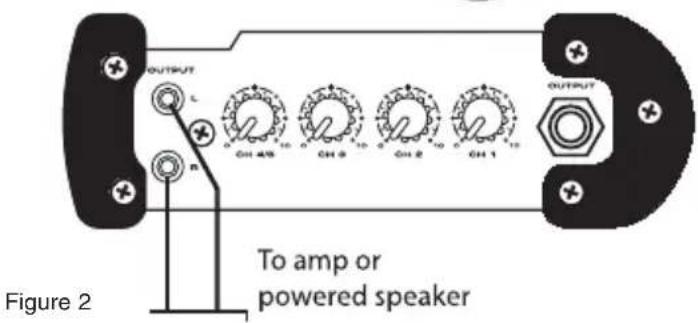

Figure 3
5
Operating the S mix
Connecting Inputs Signals to the S mix
The S mix provides the capability of receiving signals from microphone, instrument and line level devices.
Super-Z Line Inputs
Channel 1 and 2 inputs are Super-Z, line/instrument level inputs on 1/4-inch phone connectors. The inputs can accept the signal from a variety of instruments level sources like those from the outputs of guitars, bass guitars and clavinets, and line level signals like those from the outputs MIDI keyboards, signal processors and drum machines, to name some.
Mic input
The channel 3 Mic input will accept signal from any low impedance microphone. You can use dynamic or condenser microphones since the S mix has phantom power present on the microphone input at all times.
RCA Stereo Inputs
Channels 4/5 are stereo line level inputs and are ideal for connecting a CD, Cassette or Mini Disk player. You can also run the signals from other line level devices such as keyboards or drum machines here.
Operating the S mix
Typical Set-up
The diagram below shows a typical set-up for a small band using the S mix miniature mixer. The vocalist's microphone is connected to the channel 3 mic input, a bass guitar is connected to channel 2 and channel 1 has a keyboard connected. For background tracks, a CD player is connected to the channel 4/5's stereo RCA inputs.

Creating a Mix
Now that you have connected your instruments and other sound sources to the S mix inputs you can begin to create your mix. The best way to do this is to adjust one channel at a time. Slowly raise the level control for the first input until you have reached the desired level. Now, repeat the same for each additional input. You may want to go back and slightly raise or lower an individual channel until you have set the balance between all the connected inputs. Then, you have your perfect mix!
S mix Specifications
Frequency Response 10 Hz to 95 kHz
THD+N <0,005 %
Noise Level -105 dBu
Microphone Input XLR, balanced
Super-z Line Input 1/4" jack unbalanced
Left and Right Inputs RCA, unbalanced input
Left and Right Outputs RCA, unbalanced output
S mix Specifications - continued
Mono, Instrument Level Output 1/4", unbalanced
Input Impedance (Inst Chn.) 1 Meg Ohm
Output Impedance 100 Ohm
Maximum Input Level +21 dBu
Power Supply
18 V DC
Dimensions
5.65" L x 4.13" W x 2" H
(144mm L x 105mm W x 51mm H)
Weight
16.5 oz., 419 gm.
Wiring Guide

Samson Technologies Corp.
575 Underhill Blvd.
P.O. Box 9031
Syosset, NY 11791-9031
Phone: 1-800-3-SAMSON (1-800-372-6766)
Fax: 516-364-3888
www.samsontech.com

Brand : SAMSON
Model : S-mix Mini
Category : Mixer