
AZ1838 - Cd player/recorder PHILIPS - Free user manual and instructions
Find the device manual for free AZ1838 PHILIPS in PDF.


Pick your language and provide your email: we'll send you a specifically translated version.
| Product type | Portable CD player/recorder |
| Brand | Philips |
| Model | AZ1838 |
| Category | CD player/recorder |
| Optical playback | Audio CD, CD-R, CD-RW |
| Recording | Built-in recorder for audio CD-R/RW |
| Radio tuner | FM / MW with built-in antenna |
| Output power | 2 × 2 W RMS |
| Speakers | 2 full-range speakers |
| Dimensions | Approximately 380 × 150 × 230 mm |
| Weight | Approximately 2.1 kg |
| Power supply | Mains 220-240 V / R14 (C) batteries × 6 |
| Power consumption | 15 W maximum |
| Headphone jack | 3.5 mm output for headphones |
| Playback functions | Programming, repeat, shuffle |
| Display | Backlit LCD display with clock |
| Care and cleaning | Soft dry cloth; optical cleaning with suitable kit |
| Safety | Unplug before cleaning; avoid humidity and heat |
| Spare parts | Genuine parts available through authorized Philips service |
| Repairability | Do not open the optical unit; maintenance by qualified technician |
| General information | Household use; operating temperature 5 to 35 °C |
Frequently Asked Questions - AZ1838 PHILIPS
How do I clean the lens of my Philips AZ1838 CD player?
Use an optical lens cleaning disc or a dry air blower. Open the CD tray, apply the cleaner without touching the lens, then let it dry before playing.
What should I do if the CD skips during playback?
Check that the CD is not scratched or dirty, and clean it from the center outward. Make sure the device is on a stable surface and is not subject to vibrations.
Can I record on a CD-RW with this device?
Yes, the AZ1838 supports audio CD-RW. Use a compatible disc and finalize it on another player if necessary.
How do I program the playback of tracks?
Press PROGRAM, select the tracks with the previous and next buttons, then press PLAY to start the programmed list.
What type of batteries should I use?
The device operates with 6 R14 (C size) 1.5 V batteries. Remove the batteries if the device is not used for a long time.
How can I improve FM radio reception?
Deploy the built-in FM antenna and reorient it for the best signal. Keep the device away from sources of interference.
The device does not turn on, what should I do?
Check the wall outlet, the power cord, and the batteries. If using mains power, test another outlet. In case of a malfunction, take the device to an authorized Philips service center.
How can I save energy with the AZ1838?
Enable the auto power off function after a playback period, lower the volume, and turn off the device instead of leaving it on standby.
Which headphones can I use?
Use headphones with a 3.5 mm jack plug. Connect them to the headphone jack for private listening.
Where can I find spare parts and have the device repaired?
Contact Philips consumer service or an authorized repair center. Use only genuine parts for safety and compatibility.
User questions about AZ1838 PHILIPS
0 question about this device. Answer the ones you know or ask your own.
Ask a new question about this device
No questions yet. Be the first to ask one.
Download the instructions for your Cd player/recorder in PDF format for free! Find your manual AZ1838 - PHILIPS and take your electronic device back in hand. On this page are published all the documents necessary for the use of your device. AZ1838 by PHILIPS.
USER MANUAL AZ1838 PHILIPS
Be responsible Respect copyrights
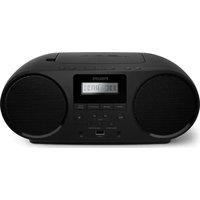


Table of contents
Click a title to access it
Manual assistant
Powered by Anthropic
Waiting for your message
Product information
Brand : PHILIPS
Model : AZ1838
Category : Cd player/recorder