
NR-B32FW2-WB - Refrigerator PANASONIC - Free user manual and instructions
Find the device manual for free NR-B32FW2-WB PANASONIC in PDF.


| Product Type | Combined Refrigerator-Freezer |
| Brand | Panasonic |
| Model | NR-B32FW2-WB |
| Height (mm) | 1800 |
| Width (mm) | 600 |
| Depth (mm) | 600 |
| Net Weight (kg) | 70 |
| Power Supply | 220-240 V, 50 Hz |
| Energy Class | A+ |
| Total Capacity (L) | 323 |
| Refrigerator Capacity (L) | 230 |
| Freezer Capacity (L) | 93 |
| Cooling Type | Ventilated (No Frost) |
| Lighting | LED |
| Defrost | Automatic for both compartments |
| Number of Shelves | 4 tempered glass shelves |
| Number of Vegetable Bins | 2 bins |
| Child Safety | Not available |
| Reversible Door | Yes, reversible |
| Spare Parts | Water filter (optional), shelves, bins |
| Cleaning | Clean the interior with a soft cloth and soapy water |
| Warranty | 2 years |
Frequently Asked Questions - NR-B32FW2-WB PANASONIC
User questions about NR-B32FW2-WB PANASONIC
0 question about this device. Answer the ones you know or ask your own.
Ask a new question about this device
Download the instructions for your Refrigerator in PDF format for free! Find your manual NR-B32FW2-WB - PANASONIC and take your electronic device back in hand. On this page are published all the documents necessary for the use of your device. NR-B32FW2-WB by PANASONIC.
USER MANUAL NR-B32FW2-WB PANASONIC
natural_image
Exterior view of a modern stainless steel refrigerator with a digital display (no visible text or symbols)Panasonic®
Operating Instructions
Refrigerator-Freezer
(Household use)
Model No.
NR-B32F X 2
NR-B32FW2
English 2-17
Thank you for purchasing this Panasonic product. Please read these instructions carefully before using this product. Please keep this manual for future reference. Included installation Instructions.
Deutsch 18-33
For authorized service centres
Für autorisierte Dienstleistungs-Service Voor geautoriseerde servicecentra Pour les centres de réparations agréés Per i centri di assistenza autorizzati zati Para centros de reparación autorizados För auktoriserade servicecenter For autoriserte serviceverksleder For autoriserede servicecentre Informacje dla autoryzowanych centrów serwisowych Pro autorizované servisni středisko
CE

Contents
Caring for the environment 2
Safety instructions ....3
Installation 5
Parts 7
Control panel 8
Setting the temperature 9
Using the handy functions ....10
Features and functions .... 11
User alert functions 11
Making ice cubes ....12
Removing and attaching shelves ....12
Care and Cleaning instructions ....13
FAQs 15
Specifications ....17

Caring for the environment

Disposing of the packaging
Please recycle where possible (e.g. cardboard, plastic bags, adhesive tape and polystyrene) and make sure you dispose of all other packing materials safely.
Keep the packaging out of the reach of babies and young children, to avoid injury or suffocation.

Information on Disposal for Users of Waste Electrical & Electronic Equipment (private households)
This symbol on the products and/or accompanying documents means that used electrical and electronic products should not be mixed with general household waste.
For proper treatment, recovery and recycling, please take these products to designated collection points, where they will be accepted on a free of charge basis. Alternatively, in some countries you may be able to return your products to your local retailer upon the purchase of an equivalent new product.
Disposing of this product correctly will help to save valuable resources and prevent any potential negative effects on human health and the environment which could otherwise arise from inappropriate waste handling. Please contact your local authority for further details of your nearest designated collection point. Penalties may be applicable for incorrect disposal of this waste, in accordance with national legislation.
For business users in the European Union
If you wish to discard electrical and electronic equipment, please contact your dealer or supplier for further information.
Information on Disposal in other Countries outside the European Union
This symbol is only valid in the European Union.
If you wish to discard this product, please contact your local authorities or dealer and ask for the correct method of disposal.
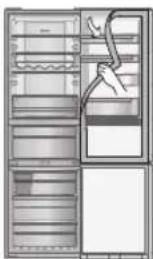
natural_image
Interior view of a refrigerator with shelves and doors, showing a hand inserting a bag (no text or symbols visible)Before disposing of your old appliance
Please follow either the disposal instructions from the manufacturer of the old appliance, or local disposal regulations for the appliance. Where this is not available, please follow the three step instructions below.
- Remove the mains plug from the socket.
- Cut the mains lead off, and safely dispose of it with the mains plug still attached.
- Until the old appliance is collected, or you take it to a Recycling Centre, make sure it's out the reach of small children.
- Remove all sealing materials from the door and leave all the shelves and drawers in place. This way, children are less likely to climb in and become trapped.
Safety instructions

What the symbols mean:

Do not

Make sure you do this Do not take apart

Indicates the appliance must be earthed to prevent electric shock


Indicates risk of death or serious injury.
This appliance is not intended for use by persons (including children) with reduced physical, sensory or mental capabilities, or lack of experience and knowledge, unless they have been given supervision or instruction concerning use of the appliance by a person responsible for their safety. Children should be supervised to ensure that they do not play with the appliance.

Do not use a multiple socket adaptor and plug several appliances into the same socket adaptor.
- This can cause overheating, fire or short circuit.
Do not pinch, knot, or bend the mains lead, or place heavy objects on it. - This increases the risk of fire or electric shock. If the mains lead or plug of the appliance is damaged, it must be replaced by the manufacturer, its service agent or similarly qualified person in order to avoid a hazard.
Do not unplug the refrigerator by pulling on the mains lead. - This can damage to the mains lead. Always grip the mains plug and pull firmly from the socket.
Do not place any water container on the top of the refrigerator.
• Water can damage insulation of electrical components and cause short circuit, fire or electric shock.
Do not spray inflammable gas near the refrigerator.
• This can cause explosion or fire.
Do not spray water onto or into the refrigerator.
• This can cause fire or electric shock.
Do not touch the mains plug with wet hands.
• This can cause electric shock.
Do not install the refrigerator in a damp place, or where it may come into contact with water.
• Deteriorated insulation of electrical parts can cause short circuit, electric shock or fire.
Do not store volatile or flammable substances in the refrigerator.
- Flammable substances such as benzene, thinners, alcohol, ether and Liquid Petroleum Gas (LPG) can cause explosions.
Do not store pharmaceuticals or other temperature-sensitive products in the refrigerator.
- You should not store products that require strict temperature controls in the refrigerator.
Do not let children climb, swing or hang on the refrigerator door.
• This can cause serious injury, as well as damaging the refrigerator.
Do not operate the refrigerator in the presence of explosive fumes or flammable gas.
• This can cause explosion or fire.
Do not store petrol or other flammable liquids and vapours in the refrigerator, or use them near the appliance.
• This can cause explosion or fire.
-WARNING:
Do not use mechanical devices or other means to accelerate the defrosting process, other than those recommended by the manufacturer.
- This can cause damage to the interior of the refrigerator or cause an explosion.
-WARNING:
Do not use electrical appliances inside the food storage compartments of the appliance, unless they are of the type recommended by the manufacturer.
-WARNING:
o not damage the refrigerant circuit.

Do not try to disassemble, repair or modify the refrigerator yourself.
- You may injure yourself – or others – with burns or electric shock, or damage the refrigerator. If your appliance needs alterations or repair, please consult authorized service centre.

Safety instructions (continued)

Ensure that the refrigerator is plugged into an earthed mains socket. DO NOT plug into an unearthed mains socket.

Make sure the mains lead and plug are not squashed or damaged.
- A damaged mains plug or lead can cause short-circuit, fire or electric shock.
- If the mains lead is damaged, it must be replaced by the manufacturer, its service agent or similarly qualified persons in order to avoid a hazard.
• DO NOT ATTEMPT TO REPLACE IT YOURSELF.
Remove any dirt or dust from the mains plug's pins before connecting to the power supply.
- Dust build-up on the mains plug can cause insulation failure, especially in humid conditions. This can cause short circuit, fire or electric shock. Unplug the mains lead and wipe it with a dry cloth. Never use a wet or damp cloth.
Plug your appliance into the socket, making sure the connection is secure. - A loosely connected mains plug can cause fire or electric shock.
Install the refrigerator in a well-ventilated area.
- The more refrigerant there is in an appliance, the larger the room it should be installed in. If there's a refrigerant fluid leak, and the appliance is in a small room, the build up of combustible gases is more likely. This can cause fire or explosion. As a guide, for every 8 g of coolant, you'll need at least 1 cubic metre of space in the room. The data plate inside the appliance tells you how much refrigerant your refrigerator contains.
The refrigerant (R600a) used in the refrigerator and the gases in the insulation material (cyclopentane) are both flammable. They also require special disposal procedures.
- Before you dispose of the appliance, make sure none of the pipes on the back are damaged. Refrigerant or gas leaks can cause fire or explosion.
Unplug the refrigerator before cleaning and servicing.
- Failure to do this can cause electric shock.
If you smell burning or see smoke coming from the refrigerator, disconnect the power immediately and please consult authorized service centre.
LED RADIATION
DO NOT VIEW DIRECTLY WITH OPTICAL INSTRUMENTS
CLASS 1M LED PRODUCT
-WARNING:
Keep ventilation openings, in the appliance enclosure or in the built-in structure, clear of obstruction.

Indicates risk of injury or damage to property.

Do not put glass bottles or containers in the freezer.
- When the contents freeze, the glass may break.
Do not touch the inside walls of the freezer or items stored in the freezer with wet hands. - Your skin can become frozen onto the interior wall, or items stored in the freezer.
Do not open or close the doors by taking hold of the door handles with both hands.
• This may cause personal injury.

If there's a power cut, avoid opening the refrigerator frequently or putting unchilled food in it.
• This can cause the temperature in the refrigerator to rise and spoil food stored inside.
If you're not going to use the refrigerator for a long time, unplug it from the mains.
Also, be careful of the gap between the fridge and freezer doors, especially if they are both open at the same time.
• This may cause personal injury.
When opening the refrigerator, be careful not to pinch your fingers at the "pinch point" areas.
• This can cause personal injury.
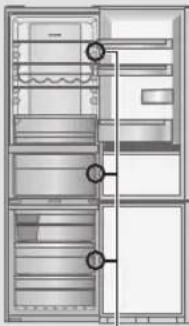
natural_image
Architectural cross-section diagram of a refrigerator showing door, front panel, and side panels (no text or labels)Potential pinch point
This section explains how to install your appliance for the most energy-efficient, safe and quiet operation.
Dimensions
W601 x D648 x H1898 (mm)
Unpacking your appliance
Remove all packaging and tape.
Choosing the right location
Ventilation
As the appliance gives off heat during operation, it should be installed in a well-ventilated, dry room with plenty of space above and behind it, as shown in Figure 1.
If you can hear it vibrating, it needs more space.
Temperature
The room temperature affects the refrigerator's energy-efficiency, i.e. how much electricity it uses to chill and freeze foods.
For the best results, install your refrigerator:
• away from direct sunlight
• away from radiators, cookers or other heat sources
- where the room temperature corresponds to the climate classification for which the appliance is designed. Refer to the Specifications Section for your appliance's climate classification.
Level
Install on a level floor that's strong enough to support a fully loaded refrigerator.
You can adjust the level of the refrigerator by screwing or unscrewing the two adjustable front legs as shown in Figure 2.
This prevents vibration and noise.
If the appliance is to stand on a carpeted or vinyl floor, put a solid board underneath it first. This will protect your floor against possible colour change due to heat given off by the appliance.
Refrigerator door

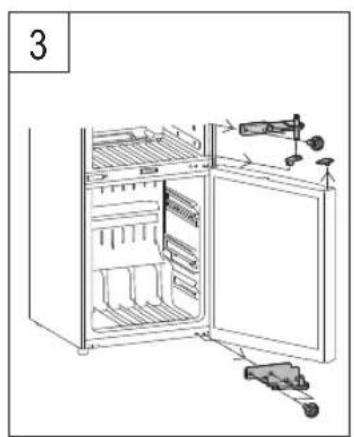
The refrigerator's door hinges can be swapped over, from the right side to the left, so that the doors open in the opposite direction. If this is more convenient in your home, please contact our service centre listed on the attached sheet or access to our Web site (http://panasonic.net). We could not be held responsible if you replace the hinges by yourself.
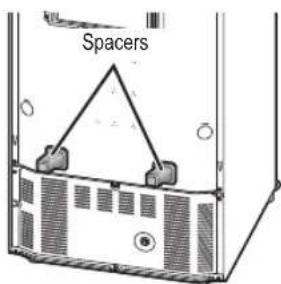
Installing the spacers
Install the spacers on the back panel of the refrigerator to ensure the minimum amount of space required to allow the heat generated by the refrigerator.
Attach to the back panel of the refrigerator after removing the double-sided tape's release liner.

Spacer (accessory)
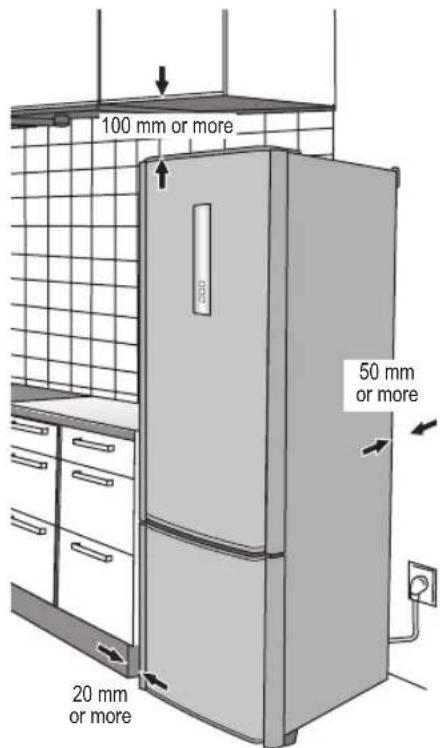
Figure 1

natural_image
Illustration of a refrigerator with curved arrows indicating rotation (no text or symbols)Figure 2

Parts for switching door opening direction (accessory)

Installation (continued)
Cleaning
After installation, wipe the appliance clean with warm water.
Connecting the mains plug to the household mains socket
You can connect the mains plug immediately after installation.
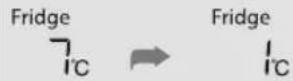
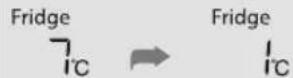
When the mains plug is connected to the household mains socket, the temperature display starts flashing as shown in the figure on the right, and cooling starts inside the refrigerator.
The temperatures displayed at this time are not the actual temperatures.
When the temperature of the fridge reaches 8 °C, the freezer reaches -12 °C and the Vitamin-Safe Zone reaches 8 °C, the temperature display stops flashing and lights, and it shows the actual temperature.
It takes about half a day to reach the set temperatures (when the room temperature is around 32^ C, there is no food inside the refrigerator, and the doors are closed).
The actual temperatures may not be displayed for a while after the temperature display stops flashing.
Place food inside the refrigerator only after confirming that the refrigerator compartment has been cooled.

Notes:
• Cooling may take longer in the summer months or at other times when the room temperature is higher.
- While the temperature display is flashing, the alarm sounds to warn that the temperature has risen. The alarm can be turned off by pressing ☐.
- If you need to unplug the refrigerator, wait at least 10 minutes before you plug it back in again. If not, you might damage the compressor.
Ambient room temperature
You'll find your refrigerator's climate classification on the rating plate in the left side of the refrigerator compartment. It shows the room temperature the appliance is designed to work in.
| Climate classification Permitted ambient temperature | |
| SN (Extended Temperate) +10°C to 32°C | |
| N (Temperate) +16°C to 32°C | |
| ST (Subtropical) +16°C to 38°C | |
| T (Tropical) +16°C to 43°C | |
For saving energy
- Install the refrigerator in a dry, cool and well-ventilated location. The colder the ambient temperature, the better the efficiency. (Please refer to Page 5 for dimensions and clearance)
- The combination of drawers and shelves that result in the largest in volume and the most efficient use of energy for the refrigerator.
- Remove all drawers in the freezer.
- Attach the drawers and shelves in the refrigerator to the positions illustrated on the section of "Parts" (P.7).
-
Do not over fill the refrigerator to allow the air to circulate.
-
Open the doors only when necessary and as briefly as possible.
-
Occasionally clean the ventilation openings at the bottom of the refrigerator with a vacuum cleaner, etc. (Take care not to damage the refrigerant pipe inside the cover)
-
When setting to "Super Freeze Mode", power consumption will be increased.
The illustration below is based on model NR-B32FX2, and may be slightly different to your refrigerator.

natural_image
Illustration of a two-tiered stainless steel refrigerator with a vertical door and front panel (no text or symbols)Refrigerator compartment
Fridge


Fridge


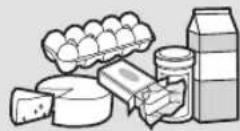
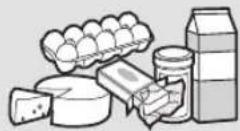
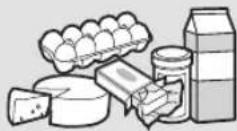
Cooked food, drinks, eggs, cakes, dairy products
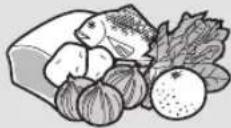
Vitamin-safe (chill) compartment
Vitamin-Safe

Vitamin-Safe


Fruit,
fresh vegetables, meat, fish
Freezer compartment
Freezer


Freezer


Frozen meat, poultry, fish, ice cream


Control panel
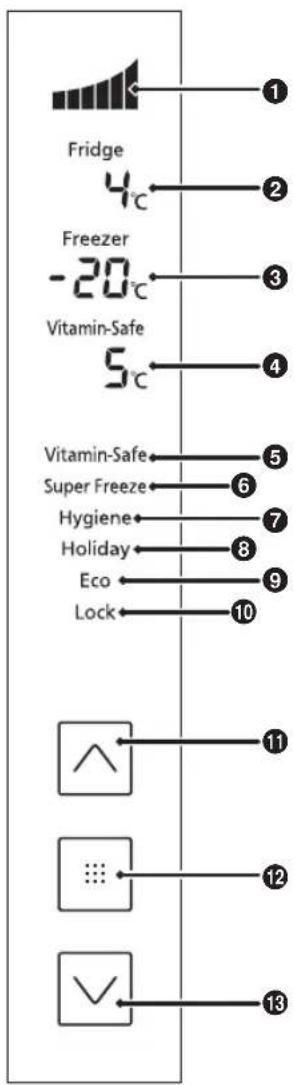
Display area
① Cooling power level
Cooling power of the refrigerator is indicated here.
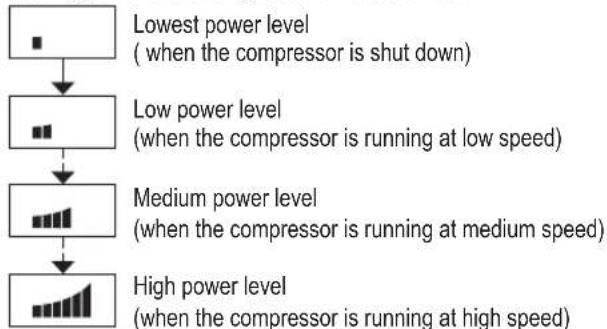
flowchart
graph TD
    A["Lowest power level\n(when the compressor is shut down)"] --> B["Low power level\n(when the compressor is running at low speed)"]
    B --> C["Medium power level\n(when the compressor is running at medium speed)"]
    C --> D["High power level\n(when the compressor is running at high speed)"]
② Fridge temperature
③ Freezer temperature
④ Vitamin-Safe Zone temperature
⑤ Vitamin-Safe Mode
⑥ Super Freeze Mode
⑦ Hygiene Active Mode
8 Holiday Mode
⑨ Eco Mode
10 Child Lock
Control area
⑪ Up button
⑫ Set button
13 Down button
Notes:
- Normally the panel displays are off. Displays appear when the buttons are operated, or the doors are opened.
- The displayed temperature may differ from the actual temperature.
- This refrigerator uses a microprocessor to control the temperature.
The temperature inside the refrigerator varies depending on such factors as changes in the room temperature, the speed at which the compressor is operating, how frequently the doors are opened and closed, and how much food is stored inside and how it is stored.
Setting the temperature

The temperatures of the fridge, freezer and Vitamin-Safe Zone can be changed.
At the time of purchase, the temperatures are set as shown below.
Fridge: 4 °C Freezer: -20 °C Vitamin-Safe Zone: 5 °C
1

②

▶


▶

▶

① The control panel lights up, the temperature inside the refrigerator is displayed.
② The temperature display starts flashing, indicating that the temperatures can be set.
③ The temperature set for the fridge starts flashing.
④ Each time the button is pressed, the flashing display changes by one step in the sequence of fridge, freezer and Vitamin-Safe Zone.
⑤ Adjust the temperature.
- Press to raise the temperature and lower it.
⑥ The display stops flashing and lights up, indicating that the temperatures are now set.
- Approximately 30 seconds later, the control panel goes off.
Note:
- The display in ① is restored if no operations are performed for 5 or so seconds during the setting process.
Fridge Set the temperature for the inside of the fridge.

Any temperature within the range from 1 °C to 7 °C can be set.
Notes:
- When the temperature is set at 1^ for a prolonged period, some food may freeze.
- In Holiday Mode, the temperature is not displayed, and the temperature cannot be set.
- In Eco Mode, the temperature cannot be set either.
Freezer
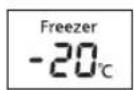
Set the temperature for the inside of the freezer.
Any temperature within the range from -17 °C to -25 °C can be set.
Note:
- In Eco Mode, the temperature cannot be set.
Vitamin-Safe Zone

Set the temperature of the Vitamin-Safe Zone.
Any temperature within the range from 0 °C to 5 °C can be set.
Notes:
- When the temperature is set between 0^ and 1^ for a prolonged period, some food may freeze.
• In Eco Mode, the temperature cannot be set either.

Using the handy functions
This refrigerator comes with a number of useful functions for specific applications.
1

flowchart
graph LR
    A["4°C Fridge"] --> B["Freezer -20°C Vitamin-Safe 5°C"]
    B --> C["✓"]
    C --> D["✓"]
    D --> E["✓"]
    E --> F["✓"]
    F --> G["✓"]
    G --> H["✓"]
    H --> I["✓"]
    I --> J["✓"]
    J --> K["✓"]
    K --> L["✓"]
    L --> M["✓"]
    M --> N["✓"]
    N --> O["✓"]
    O --> P["✓"]
    P --> Q["✓"]
    Q --> R["✓"]
    R --> S["✓"]
    S --> T["✓"]
    T --> U["✓"]
    U --> V["✓"]
    V --> W["✓"]
    W --> X["✓"]
    X --> Y["✓"]
    Y --> Z["✓"]
    Z --> AA["✓"]
    AA --> AB["✓"]
    AB --> AC["✓"]
    AC --> AD["✓"]
    AD --> AE["✓"]
    AE --> AF["✓"]
    AF --> AG["✓"]
    AG --> AH["✓"]
    AH --> AI["✓"]
    AI --> AJ["✓"]
    AJ --> AK["✓"]
    AK --> AL["✓"]
    AL --> AM["✓"]
    AM --> AN["✓"]
    AN --> AO["✓"]
    AO --> AP["✓"]
    AP --> AQ["✓"]
    AQ --> AR["✓"]
    AR --> AS["✓"]
    AS --> AT["✓"]
    AT --> AU["✓"]
    AU --> AV["✓"]
    AV --> AW["✓"]
    AW --> AX["✓"]
    AX --> AY["✓"]
    AY --> AZ["✓"]
    AZ --> BA["✓"]
    BA --> BB["✓"]
    BB --> BC["✓"]
    BC --> BD["✓"]
    BD --> BE["✓"]
    BE --> BF["✓"]
    BF --> BG["✓"]
    BG --> BH["✓"]
    BH --> BI["✓"]
    BI --> BJ["✓"]
    BJ --> BK["✓"]
    BK --> BL["✓"]
    BL --> BM["✓"]
    BM --> BN["✓"]
    BN --> BO["✓"]
    BO --> BP["✓"]
    BP --> BQ["✓"]
    BQ --> BR["✓"]
    BR --> BS["✓"]
    BS --> BT["✓"]
    BT --> BU["✓"]
    BU --> BV["✓"]
    BV --> BW["✓"]
    BW --> BX["✓"]
    BX --> BY["✓"]
    BY --> BZ["✓"]
① The control panel lights up.
② The function display starts flashing, indicating that the functions can be set.
③ "Vstarts-flashing.
4 Select the function to be used.
⑤ The display corresponding to the selected function stops flashing and lights up, indicating that the function is set.
Each time the button is pressed, the display switches from "on" to "off".
On: The function is set.
Off: The function is released.
- Approximately 30 seconds later, the control panel goes off.
Notes:
- The display in ① is restored if no operations are performed for 5 or so seconds during the setting process.
- If the temperature display is flashing, wait about 5 seconds for the display to light up before proceeding with the operations above.
Features and functions

| Vitamin-Safe ModeVitamin-Safe | Setting this mode helps to protect the vitamin C contained in vegetables and fruit. The blue and green LED lights of the Vitamin-Safe Zone are lit. |
| Super Freeze ModeSuper Freeze | In this mode, the freezer can be cooled rapidly, enabling the fresh foods, etc. which are placed there to be frozen.The Super Freeze Mode is automatically released after about 50 hours.Notes:When Super Freeze Mode is set, the temperature inside the freezer may drop below the set temperature.The compressor operates at high speed.When Super Freeze Mode is selected while Eco Mode is set, the Eco Mode is temporarily overridden.When the Super Freeze Mode ends, the refrigerator returns to Eco Mode.The effect on the stored food can be reduced if setting Super Freeze Mode several hours before storing the food in the freezer compartment.The following items are recommended in order to exert the maximum freezing capacity.1 Set Super Freeze Mode 24 hours before storing the food.2 If you wish to store a large amount of food, remove all the drawers in the freezer and place the food directly on the glass shelf or the floor of the freezer.(A bigger freezing capacity can be exerted if placing the food directly on the second glass shelf from the top.)The maximum freezing capacity within 24 hours is written in the rating label. |
| Hygiene Active ModeHygiene | The hygiene active LED comes on, and food is protected from bacteria and odours.Note:When food with strong odours are to be stored, wrap it in plastic food wrap or place it inside a tightly sealed container. Otherwise, odours may be left in the fridge even if the Hygiene Active Mode has been set. |
| Holiday ModeHoliday | Set this mode when the fridge is not going to be used for a prolonged period such as during a long vacation or when only the freezer is to be used.In this mode, the fridge temperature is not displayed and the LED lights are off.Notes:Before using the Holiday Mode, empty out the fridge, and close its door.For hygiene reason, the temperature inside the fridge is kept at about 15 °C while Holiday Mode is set.The freezer is cooled in the usual way. |
| Eco ModeEco | Set this mode when the freezer is not going to be used much such as during the winter months or at night.Note:The Eco Mode cannot be set while Super Freeze Mode is set. |
| Child LockLock | The buttons on the control panel can be locked. When the Child Lock is set, “L” is displayed on the control panel.To release this mode, hold down on the control panel for at least 3 seconds. |
English
User alert functions

The following user alert functions are activated when a door has been left ajar for a prolonged period of time or when the temperature inside the refrigerator has risen.
| Temperature display | Alarm | LED light | ||
| Door ajar | Continuous for 1 minute | Blinks Sounds once Blinks once | ||
| Continuous for 3 minutes | Blinks Sounds twice Blinks twice | |||
| Continuous for 5 minutes | Blinks* Sounds continuously Blinks continuously | |||
| Temperature rise inside the refrigerator | Freezer: -12 °C or more Blinks* Sounds continuously Normal operation | |||
| Fridge: 8 °C or more Blinks* Sounds continuously Normal operation | ||||
| Vitamin-Safe Zone: 8 °C or more Blinks* Sounds continuously Normal operation | ||||
*Blinks for 30 seconds every 30 minutes.

Making ice cubes


Water level line
Ice box

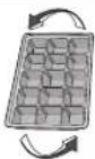
Open the freezer, pull out the upper drawer and take out the ice tray. Open the ice tray lid and fill water in the ice tray to the water level line. Then close the lid and place back the ice tray. When ice cubes are ready, pull out the upper drawer and take out the ice tray. Open the lid and slightly twist the ice tray by holding its two sides, the ice cubes will drop from the ice tray. Then, put the ice box back into its place.

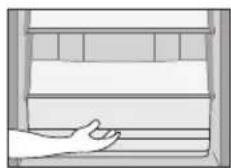
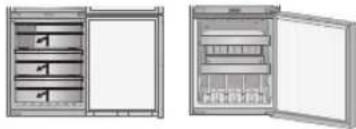
Removing and attaching shelves
Refrigerator

Glass shelves
Lift the inner side of the shelf slightly and pull it out.
Refrigerator drawer
Pull the drawer towards you, lift the front slightly and pull it out.

Door shelf, sealed box and bottle shelf
Lift it slightly and then remove it.
Wine rack
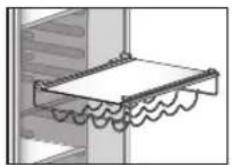
Lift the inner side of the shelf slightly and pull it out.

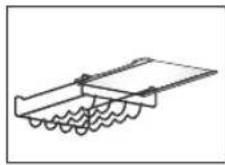
Slide the shelf horizontally.
Vitamin-Safe Zone


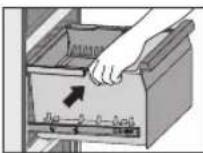
Fruit and vegetables drawer
Pull out the drawer, hold the front part and lift it up diagonally, and remove it.

Humidity control plate
Pull the vegetable drawer towards you. Then pull the plate of the humidity control plate towards you.

To put the drawer back, press it down until it fits into the hooks at all four corners. If the case fails to engage in any of the hooks, the case cannot slide in as it will hit the humidity control plate.
Freezer
Pull the drawer towards you, lift the front slightly, and pull it out.
Having removed the drawer, you can store food in the empty compartment.
natural_image
Two views of an open refrigerator with shelves and doors (no text or symbols visible)English
Care and Cleaning instructions


natural_image
Interior view of a refrigerator showing open doors, shelves, and doorways (no text or labels)Daily cleaning
Wipe regularly with a dry cloth.
Places to pay particular attention to:
Door opening seal
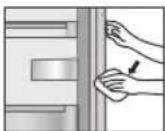
If the seal gets dirty and damaged, cold air is more likely to leak.
Bottle shelf
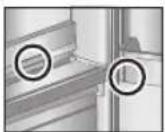
Wipe away any dirt and liquid before it builds up.
Each year, unplug your refrigerator, remove the shelves and give them a thorough clean.
Parts you can wash with water
Refrigerator Vitamin-Safe Zone

- Glass shelves
- Door shelves
- Bottle shelf
- Sealed case door shelf
- Egg tray
- Refrigerator drawer


- Vegetable drawer
- Fruit drawer
• Humidity control plate
Freezer
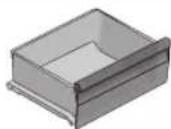
- Freezer drawers
- Ice box
- Ice tray
- Ice tray cover

Care and Cleaning instructions (continued)
Cleaning the control panel
The refrigerator's control panel is made of delicate materials. To protect its surfaces, do not clean it with solvent based chemicals. Simply wipe it with a dry or slightly damp cloth.
Cleaning the outside of the refrigerator
Use a warm, damp, soft cloth to clean the outside of your refrigerator. For more stubborn marks, use a mild kitchen detergent and wipe away with a soft damp cloth. Remove any remaining surface water with a dry cloth.
Notes for cleaning
When cleaning inside or outside your refrigerator, do not use:
- alkaline detergents - they can crack plastic parts.
- grinding dust, soap powder, oil-based cleaners, hot water, brushes, acids, benzenes, solvents or alcohol-based solutions - all can damage the refrigerator's surfaces and plastic parts.
Make sure you wipe off any stains from edible oils, which can also damage plastic parts.
Maintenance check
• Is the mains lead damaged?
- Does the mains plug get hot?
- Is the mains plug firmly in the mains socket?
If the mains lead or LED lamp are damaged, please consult an authorized service centre. DO NOT attempt to replace these items yourself.

Extended disuse
If you're not going to use the refrigerator for a long time, unplug it and clean the mains plug as described above. Then leave the doors open for 2-3 days. This lets the interior dry out properly, and prevents odour and the build up of mould.
Do not switch the refrigerator on and off repeatedly. It will last longer if you leave it switched on during normal use.
Before moving or transporting your refrigerator
① Remove all items.
② Unplug it.
③ Raise the adjustable leg.
④ Pull, or 'walk' the refrigerator towards you.
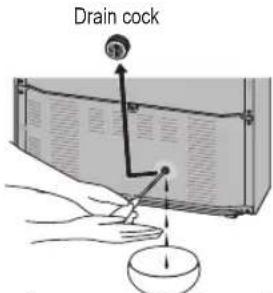
⑤ Drain the water from the evaporation pan, at the lower back of the refrigerator:
- Put a container underneath the drain cock, and slowly loosen it.
- Pierce the film on the outlet with a screwdriver or similar. Then drain the water. (The next time you do this, simply loosen the drain cock.)
- After draining, make sure you tighten the drain cock to prevent future water leaks.
(Lower back of the refrigerator)
Moving and transporting your refrigerator
At least two people are needed to carry the refrigerator safely.
① Tighten the adjustable legs.
② Hold the adjustable legs at one end, and corners at the other, as shown.
Note:
- Do not carry the refrigerator by holding its doors. Always transport the refrigerator in its normal upright position.
Secure the doors with adhesive tape

If you feel that the refrigerator is not working properly, check out the following points first.
If the trouble persists, disconnect the mains plug and contact your dealer or an authorized service centre.
General
| You hear unusual sounds from the refrigerator. | Has the refrigerator been installed on a sturdy and level floor?Have sufficient clearances been provided around the refrigerator?Is anything vibrating on the top of the refrigerator?It's normal to hear some noises when the refrigerator starts or stops operation. |
| You hear a sound after the compressor has shut down. | This is normal, and is often caused by refrigerant flowing back to the compressor. |
| You hear a sound after you have opened or closed the door. | This is normal, and is due to the difference in air pressure between the inside and outside of the refrigerator. |
| You hear the sound of air or water flowing after you have opened the door. | This is caused by refrigerant flowing the internal pipework. |
| You hear a continuous whining sound. | This sound is heard while the fan for circulating the cold air is operating.Has Super Freeze Mode been set?In the Super Freeze Mode, the fan for circulating the cold air runs at high speed so it makes a loud noise.Has the food been packed too tightly together or is the room temperature high? In cases like these, the fan for circulating the cold air runs at high speed so it makes a loud noise. |
| The compressor is quite loud. Has Super Freeze Mode been set?In the Super Freeze Mode, the compressor runs at high speed so it makes a loud noise.Has the food been packed too tightly together or is the room temperature high? In cases like these, the compressor runs at high speed so it's normal for the compressor to be louder. | |
| The compressor has been running for a long time. | When the mains plug has been connected for the first time, the compressor runs longer than usual in order to cool down the inside of the refrigerator until the set temperatures are reached.Has Super Freeze Mode been set?Have the doors been opened and closed frequently? Are the doors completely shut?Have the food items been packed too tightly together or is the room temperature high?When many food items are placed in the refrigerator at one time, the compressor will need to run for a longer period. |
| Condensation forms on the outside of the refrigerator. | Condensation may form when the humidity in the room is high and is normal.Wipe it off using a dry cloth. |
| The outside of the refrigerator feels hot to the touch. | After the power of the refrigerator is turned on, the refrigerator may become warm until the interior of the compartment is sufficiently cooled down. The refrigerator may become warm even after the compartments have been cooled down. This is due to the operation of the heat radiation pipe equipped on the refrigerator for the purpose of preventing condensation, and is not malfunction. |
| The controls on the control panel cannot be operated. | Is the power to the refrigerator on?Has the Child Lock been set? |
| The LED light does not come on. Has Holiday Mode been set?In Holiday Mode, the LED light of the fridge does not come on.Is the power to the refrigerator on? | |

FAQs (continued)
| The alarm sounds, and the temperature display of the control panel and LED light flashes. | • One or both of the refrigerator's doors have been left ajar. Close the doors. |
Fridge and freezer
| The fridge is not chilling (and the freezer is not freezing). | • Is the power to the refrigerator on? |
| The fridge is not chilling (and the freezer is not freezing) satisfactorily. | • Is the set temperature too high?• Is the refrigerator exposed to direct sunlight or positioned near a heating appliance?• Have sufficient clearances been provided around the refrigerator?• Have the food items been packed too tightly together or is the room temperature high?• Have the doors been opened and closed frequently?Are the doors completely shut?• Has Holiday Mode been set?• When warm food is put inside the refrigerator, the temperature will rise temporarily.• During the cold season or when the room temperature is low, it may feel as if the refrigerator is not chilling. |
| There is a difference between the set temperature and actual temperature. | • Has Super Freeze Mode been set?• When warm food is put inside the refrigerator, the temperature will rise temporarily. |
| Food in the fridge freezes. • Is the set temperature for the fridge too low?• Has the food been placed at the back of the fridge?The area near the back wall is where the temperatures are coldest so avoid placing food which may freeze easily here. | |
| Condensation forms in the fridge and drawers. | • Condensation may form when the door has been opened and closed frequently or when it has not been shut completely, or when the room humidity is high.Wipe off the condensation using a dry cloth. |
| Condensation forms in the fruit and vegetable drawers. | • The Vitamin-Safe Zone maintains a high humidity to keep vegetables fresh.Wipe off the condensation using a dry cloth. |
| It is hard to open the freezer door. | • The difference in air pressure between the inside and outside of the freezer may sometimes make it hard to open the freezer door. Wait a few moments, and then try opening the door. |
| It smells inside the refrigerator. | • Were any food items with strong odours sealed before they were placed in the fridge?Place the items inside a sealed container and store them or store them on the sealed case door shelf.• Odours may stick to the surfaces inside the refrigerator. Wipe the surfaces using a soft cloth which has been dipped in lukewarm water. |
Specifications

| MODEL NR-B32FX2-XE NR-B32FW2-WE NR-B32FX2-XB NR-B32FW2-WB | |||
| CATEGORY Refrigerator-Freezer | |||
| NO FROST COMPARTMENTS ALL COMPARTMENTS | |||
| CLIMATE CLASS SN-T | 1 | ||
| TOTAL GROSS VOLUME 362 L | |||
| TOTAL NET VOLUME 315 L | |||
| NET FRIDGE VOLUME 179 L | |||
| NET VITAMIN-SAFE (CHILL) VOLUME 46 L | |||
| NET FREEZER VOLUME 90 L | |||
| OUTSIDE DIMENSIONSWIDTH x DEPTH x HEIGHT | 601 mm x 648 mm x 1898 mm | ||
| NET WEIGHT 82 kg | |||
| RATED VOLTAGE 220 V - 230 V 230 V - 240 V | |||
| RATED FREQUENCY 50 Hz | |||
| ENERGY CONSUMPTION 249 kWh/year | 2 | ||
| FREEZING CAPACITY | 15 kg/24 h | ||
| NOISE LEVEL | 36 dB | ||
| MAX STORAGE WITHOUT ELECTRICITY | 16 hours | ||
| REFRIGERANT/CHARGE | R600a/70 g | ||
| BLOWING AGENT | Cyclo-Pentane | ||
English
Notes:
^1 Permitted ambient temperature: 10 °C to 43 °C
^2 The energy consumption per year is based on the standard test results for 24 hours. Actual energy consumption vary depending on how the appliance is used and where it is located.
When the doors are completely open


Inhaltsverzeichnis
natural_image
Interior view of a refrigerator with shelves and door, showing hand positioning (no text or symbols)natural_image
Architectural floor plan of a refrigerator showing door, windows, and ceiling (no text or labels)B601 x T648 x H1898 (mm)
natural_image
Illustration of a refrigerator with two curved arrows indicating rotation (no text or symbols)Abbildung 2
natural_image
Illustration of a two-tiered stainless steel refrigerator with a vertical door and front panel (no text or symbols)Kühlraumfach
natural_image
Hand placing a black arrow on a brick wall, no text or symbols presentGlasböden
natural_image
Illustration of hands using a tool to lift a rectangular object (no text or symbols visible)natural_image
Architectural line drawing of a refrigerator showing internal compartments and doorways (no text or labels)Tägliches Reinigen
natural_image
Illustration of two workers pulling a large box with ropes (no text or symbols)natural_image
Interior view of a refrigerator with shelves and door, showing hand inserting a tool (no text or symbols visible)natural_image
Architectural floor plan of a refrigerator with doors, drawers, and ventilation duct (no text or labels)Mogelijk knelpunt
natural_image
Illustration of a refrigerator with two curved arrows indicating rotation (no text or symbols)Afbeelding 2
natural_image
Illustration of a two-tiered stainless steel refrigerator with a vertical door and front panel (no text or symbols)Koelkastvak
Fridge


Fridge

Gekookte
m = 311

m = 311

m = 311

m = 311

natural_image
Interior view of a refrigerator showing open doors, shelves, and ventilation grilles (no text or labels)Dagelijks reinigen
natural_image
Illustration of two workers carrying a large rectangular object with ropes, no text or symbols presentVeelgestelde vragen

natural_image
Interior view of a refrigerator with open door and side shelves (no visible text or symbols)natural_image
Architectural cross-section diagram of a refrigerator with doors and shelves (no text or labels)natural_image
Illustration of a refrigerator with two curved arrows indicating rotation (no text or symbols)Figure 2
Installation (suite)
Nettoyage
natural_image
Illustration of a two-tiered stainless steel refrigerator with a vertical door and front panel (no text or symbols)natural_image
Interior view of a refrigerator showing open doors, shelves, and doorways (no text or labels)Nettoyage quotidien
natural_image
Illustration of two workers carrying a large box with ropes, no text or symbols presentFoire aux questions

natural_image
Interior view of a refrigerator with shelves and door, showing a hand inserting a tool into the refrigerator (no text or symbols visible)natural_image
Interior view of a refrigerator with doors, shelves, and a door (no text or symbols visible)natural_image
Illustration of a refrigerator with curved arrows indicating rotation (no text or symbols)Figura 2
natural_image
Illustration of a two-tiered stainless steel refrigerator with a vertical door and front panel (no text or symbols)Comparto frigorifero
Fridge

Fridge


natural_image
Two views of an open storage cabinet with internal compartments and labeled parts (no text or symbols visible)natural_image
Interior view of a refrigerator showing open door, front pane, and side shelves (no text or labels)Pulizia quotidiana
natural_image
Illustration of a hand holding a circular object with a pointer and scale, no text or symbols presentnatural_image
Interior view of a refrigerator with shelves and doors, showing hand holding a tool (no text or symbols visible)Antes de eliminar su electrodoméstico viejo
PRODUCTO LED CLASE 1M
natural_image
Technical line drawing of a refrigerator interior showing doors, shelves, and doors (no text or labels)natural_image
Illustration of a refrigerator with two curved arrows indicating rotation (no text or symbols)Figura 2
natural_image
Illustration of a two-tiered stainless steel refrigerator with a vertical door and front panel (no text or symbols)natural_image
Two views of an open storage unit with internal compartments and labeled parts (no text or symbols visible)natural_image
Interior view of a refrigerator showing open doors, shelves, and door (no text or labels)Limpieza diaria
Installation ....101
Delar 103
Kontrollpanel 104
natural_image
Interior view of a refrigerator with shelves and door, showing hand holding a tray (no text or symbols visible)LED-PRODUKT KLASS 1M
natural_image
Illustration of a refrigerator with curved arrows indicating rotation (no text or symbols)Bild 2
natural_image
Illustration of a two-tiered stainless steel refrigerator with a vertical door and front panel (no text or symbols)Kyl
natural_image
Two views of an open electrical cabinet with internal compartments and wiring (no text or symbols visible)natural_image
Interior view of a refrigerator showing open doors, shelves, and door (no text or labels)Daglig rengöring
Torka delarna med en torr trasa.
Stille inn temperaturen ....121
natural_image
Interior view of a refrigerator showing the door, shelves, and drawer (no text or symbols visible)Før du deponerer det gamle apparatet ditt
LED-PRODUKT I KLASSE 1M
natural_image
Architectural cross-section diagram of a refrigerator showing door, front pane, and side shelves (no text or labels)natural_image
Illustration of a refrigerator with side legs and side door, showing rotational arrows (no text or symbols)Figur 2
natural_image
Illustration of a two-tiered stainless steel refrigerator with a vertical door and front panel (no text or symbols)Kjøleskapsrom
Fridge


Fridge


Kokt mat, drikke, egg, kaker, meieriprodukt
Vitaminsikkert (kjøle) rom
Vitamin-Safe

1

min-Safe

Frukt,
⑪ Opp-knapp
⑫ Angi-knapp
⑬ Ned-knapp
Merknader:
natural_image
Two views of an open storage unit with internal compartments and labeled parts (no text or symbols visible)natural_image
Interior view of a refrigerator showing open doors, shelves, and door (no text or labels)Daglig rengjøring
natural_image
Illustration of two people pulling a rectangular object with arrows indicating motion (no text or symbols)Hjelpespørsmål

Installation ....133
Identifikation af dele ....135
Kontrolpanel 136
Indstilling af temperaturen ....137
natural_image
Interior view of a refrigerator with open doors and shelves, showing a hand inserting a component (no text or symbols visible)natural_image
Interior view of a refrigerator showing front and interior compartments with no visible text or labelsnatural_image
Illustration of a refrigerator with two curved arrows indicating rotation (no text or symbols)Figur 2
Installation (fortsat)
Rengøring
natural_image
Illustration of a two-tiered stainless steel refrigerator with a vertical door and front panel (no text or symbols)Kølerum
Fridge


Fridge

natural_image
Two views of an open refrigerator with shelves and doors (no text or symbols visible)natural_image
Interior view of a refrigerator showing the door, front pane, and side shelves (no text or labels visible)Daglig rengøring
natural_image
Interior view of a refrigerator with shelves and door, showing hand holding refrigerator (no text or symbols visible)DIODA LED PRODUKT KLASY 1M
-OSTRZEŻENIE:
natural_image
Architectural cross-section diagram of a refrigerator showing internal compartments and doorways (no text or labels)natural_image
Illustration of a refrigerator with two curved arrows indicating rotation (no text or symbols)Rysunek 2
natural_image
Illustration of a two-tiered stainless steel refrigerator with a vertical door and front panel (no text or symbols)Komora lodówki
Fridge

Fridge


natural_image
Two views of an open refrigerator with internal compartments and a closed door (no text or symbols visible)natural_image
Interior view of a refrigerator showing open doors, shelves, and door (no text or labels)natural_image
Interior view of a refrigerator with doors, shelves, and a hand holding an appliance (no text or symbols visible)natural_image
Interior view of a refrigerator with doors, shelves, and control knobs (no text or labels visible)natural_image
Illustration of a refrigerator with two curved arrows indicating rotation (no text or symbols)Obrázek 2

natural_image
Illustration of a two-tiered stainless steel refrigerator with a vertical door and front panel (no text or symbols)Prostor chladničky
Fridge

Fridge


Vařené potraviny,
nápoje, vajíčka,
koláče, mléčné
produkty
natural_image
3D rendering of a rectangular electronic device with internal ventilation slots (no text or symbols visible)natural_image
Two views of an open electrical cabinet with internal compartments and circuitry (no text or symbols visible)natural_image
Architectural line drawing of a double refrigerator showing internal compartments and doorways (no text or labels)Denní čištění
Chladnička a mraznička
For authorized service centres
natural_image
Technical line drawing of a mechanical assembly with two protruding components (no text or symbols)
natural_image
Technical line drawing of a door frame with mounting hardware and support structures (no text or symbols)
natural_image
Technical line drawing of a mechanical assembly with no visible text or symbols


natural_image
Line drawing of an open refrigerator with internal compartments and a door, showing no text or symbols

natural_image
Technical line drawing of a structural frame or bracket assembly (no text or symbols)För auktoriserade servicecenter For autoriserte serviceverksteder For autoriserede servicecentre

natural_image
Line drawing of a mechanical assembly with components and a numbered label (13), no readable text or symbols present.

natural_image
Technical line drawing of a mechanical assembly with a bracket and mounting base (no text or symbols)
Panasonic Corporation
Website : http://panasonic.net/
Pursuant to the directive 2004/108/EC, article 9(2)
Panasonic Testing Centre
Panasonic Marketing Europe GmbH
Winsbergring 15, 22525 Hamburg, Germany
©Panasonic Corporation 2011
Y0111-1011
AK-151101
Printed in P.R.C.
- Panasonic®
- Operating Instructions
- Refrigerator-Freezer
- (Household use)
- English 2-17
- Deutsch 18-33
- For authorized service centres
- Contents
- Caring for the environment
- Disposing of the packaging
- Information on Disposal for Users of Waste Electrical & Electronic Equipment (private households)
- For business users in the European Union
- Information on Disposal in other Countries outside the European Union
- Before disposing of your old appliance
- Safety instructions
- What the symbols mean:
- Indicates risk of death or serious injury.
- -WARNING:
- Safety instructions (continued)
- Indicates risk of injury or damage to property.
- Dimensions
- Unpacking your appliance
- Choosing the right location
- Ventilation
- Temperature
- Level
- Refrigerator door
- Installing the spacers
- Installation (continued)
- Cleaning
- Connecting the mains plug to the household mains socket
- Notes:
- Ambient room temperature
- For saving energy
- Refrigerator compartment
- Vitamin-safe (chill) compartment
- Freezer compartment
- Control panel
- Display area
- ① Cooling power level
- ② Fridge temperature
- ③ Freezer temperature
- ④ Vitamin-Safe Zone temperature
- ⑤ Vitamin-Safe Mode
- ⑥ Super Freeze Mode
- ⑦ Hygiene Active Mode
- Holiday Mode
- ⑨ Eco Mode
- Child Lock
- Control area
- ⑪ Up button
- ⑫ Set button
- Down button
- Setting the temperature
- Note:
- Freezer
- Vitamin-Safe Zone
- Using the handy functions
- Features and functions
- User alert functions
- Making ice cubes
- Removing and attaching shelves
- Refrigerator
- Wine rack
- Fruit and vegetables drawer
- Humidity control plate
- Care and Cleaning instructions
- Daily cleaning
- Door opening seal
- Bottle shelf
- Parts you can wash with water
- Refrigerator Vitamin-Safe Zone
- Care and Cleaning instructions (continued)
- Cleaning the control panel
- Cleaning the outside of the refrigerator
- Notes for cleaning
- Maintenance check
- Extended disuse
- Before moving or transporting your refrigerator
- Moving and transporting your refrigerator
- FAQs (continued)
- Specifications
- Inhaltsverzeichnis
- Tägliches Reinigen
- Dagelijks reinigen
- Veelgestelde vragen
- Installation (suite)
- Nettoyage
- Nettoyage quotidien
- Foire aux questions
- Pulizia quotidiana
- Antes de eliminar su electrodoméstico viejo
- Limpieza diaria
- Daglig rengöring
- Før du deponerer det gamle apparatet ditt
- Merknader:
- Daglig rengjøring
- Hjelpespørsmål
- Installation (fortsat)
- Rengøring
- Kølerum
- Daglig rengøring
- Komora lodówki
- Denní čištění
Brand : PANASONIC
Model : NR-B32FW2-WB
Category : Refrigerator