
SC5610 - Vacuum Cleaner SAMSUNG - Free user manual and instructions
Find the device manual for free SC5610 SAMSUNG in PDF.


| Product Type | Canister Vacuum Cleaner |
| Brand | Samsung |
| Model | SC5610 |
| Color | Red / Black |
| Power Consumption | 2000 W |
| Suction Power | 400 AW |
| Bag Type | Disposable dust bag |
| Bag Capacity | 3.5 L |
| Filtration | HEPA 13 filter |
| Cord Length | 8 m |
| Operating Radius | 10 m |
| Noise Level | 78 dB |
| Weight | 5.2 kg |
| Dimensions (W x D x H) | 30 x 25 x 40 cm |
| Accessories Included | Crevice tool, dusting brush, upholstery nozzle |
| Control Type | Foot pedal on/off |
| Filter Cleaning | Washable pre-motor filter |
| Filter Replacement | HEPA filter every 6 months |
| Safety Features | Motor thermal protection |
Frequently Asked Questions - SC5610 SAMSUNG
User questions about SC5610 SAMSUNG
0 question about this device. Answer the ones you know or ask your own.
Ask a new question about this device
Download the instructions for your Vacuum Cleaner in PDF format for free! Find your manual SC5610 - SAMSUNG and take your electronic device back in hand. On this page are published all the documents necessary for the use of your device. SC5610 by SAMSUNG.
USER MANUAL SC5610 SAMSUNG
Vacuum Cleaner user manual
* Before operating this unit, please read the instructions carefully.
* For indoor use only.
English
imagine the possibilities
Thank you for purchasing a Samsung product.
To receive a more complete service, please register your product at
www.samsung.com/register
SAMSUNG
safety information
SAFETY INFORMATION
- Before operating the appliance, please read this manual thoroughly and retain it for your reference.
- Because these following operating instructions cover various models, the characteristics of your vacuum cleaner may differ slightly from those described in this manual.
CAUTION/WARNING SYMBOLS USED
 | Indicates that a danger of death or serious injury exists. |
 | Indicates that a risk of personal injury or material damage exists. |
OTHER SYMBOLS USED
| [k862] | Represents something you must NOT do. |
| [x6x6] | Represents something you must NOT disassemble. |
 | Represents something you must NOT touch. |
 | Represents something you must follow. |
 | Indicates that you must disconnect the power plug from the socket. |
 | Represents a ground is needed to prevent electric shock. |
 | It is recommended that this symbol be handled by service man. |
safety information
IMPORTANT SAFEGUARDS
- Read all instructions carefully. Before switching on, make sure that the voltage of your electricity supply is the same as that indicated on the rating plate on the bottom of the cleaner.
- WARNING: Do not use the vacuum cleaner when rug or floor is wet.
Do not use to suck up water.
- Close supervision is necessary when any appliance is used by or near children. Do not allow the vacuum cleaner to be used as a toy. Do not allow the vacuum cleaner to run unattended at any time. Use the vacuum cleaner only for its intended use as described in these instructions.
- Do not use the vacuum cleaner without a dust bag. Change the dust bag before it is full in order to maintain the best efficiency.
- Do not use the vacuum cleaner to pick up matches, live ashes or cigarette butts. Keep the vacuum cleaner away from stoves and other heat sources. Heat can deform and discolour the plastic parts of the unit.
- Avoid picking up hard, sharp objects with the vacuum cleaner as they may damage the cleaner parts. Do not stand on the hose assembly. Do not put weight on the hose. Do not block the suction or the exhaust port.
- Switch the vacuum cleaner off on the body of the machine before unplugging from the electrical outlet. Disconnect the plug from the electrical outlet before changing the dust bag or dust container. To avoid damage, please remove the plug by grasping the plug itself, not by pulling on the cord.
- This appliance is not intended for use by persons (including children) with reduced physical, sensory or mental capabilities, or lack of experience and knowledge, unless they have been given supervision or instruction concerning use of the appliance by a person responsible for their safety.
• Children should be supervised to ensure that they do not play with the appliance. - The plug must be removed from the socket outlet before cleaning or maintaining the appliance.
• The use of an extension cord is not recommended. - If your vacuum cleaner is not operating correctly, switch off the power supply and consult an authorized service agent.
- If the supply cord is damaged, it must be replaced by the manufacturer or its service agent or a similarly qualified person in order to avoid a hazard.
- Don't carry the vacuum cleaner by holding the hose.
Use the handle on the vacuum cleaner set.
- Unplug the cleaner when not in use. Turn off the power switch before unplugging.
ASSEMBLING The CLEANER

05 Assembling the Cleaner
09 Maintain floor tools
09 Check filter indicator
10 Changing the dust bag
10 Cleaning inlet filter
10 Cleaning outlet filter
TROUbIE ShOOTING

assembling the cleaner
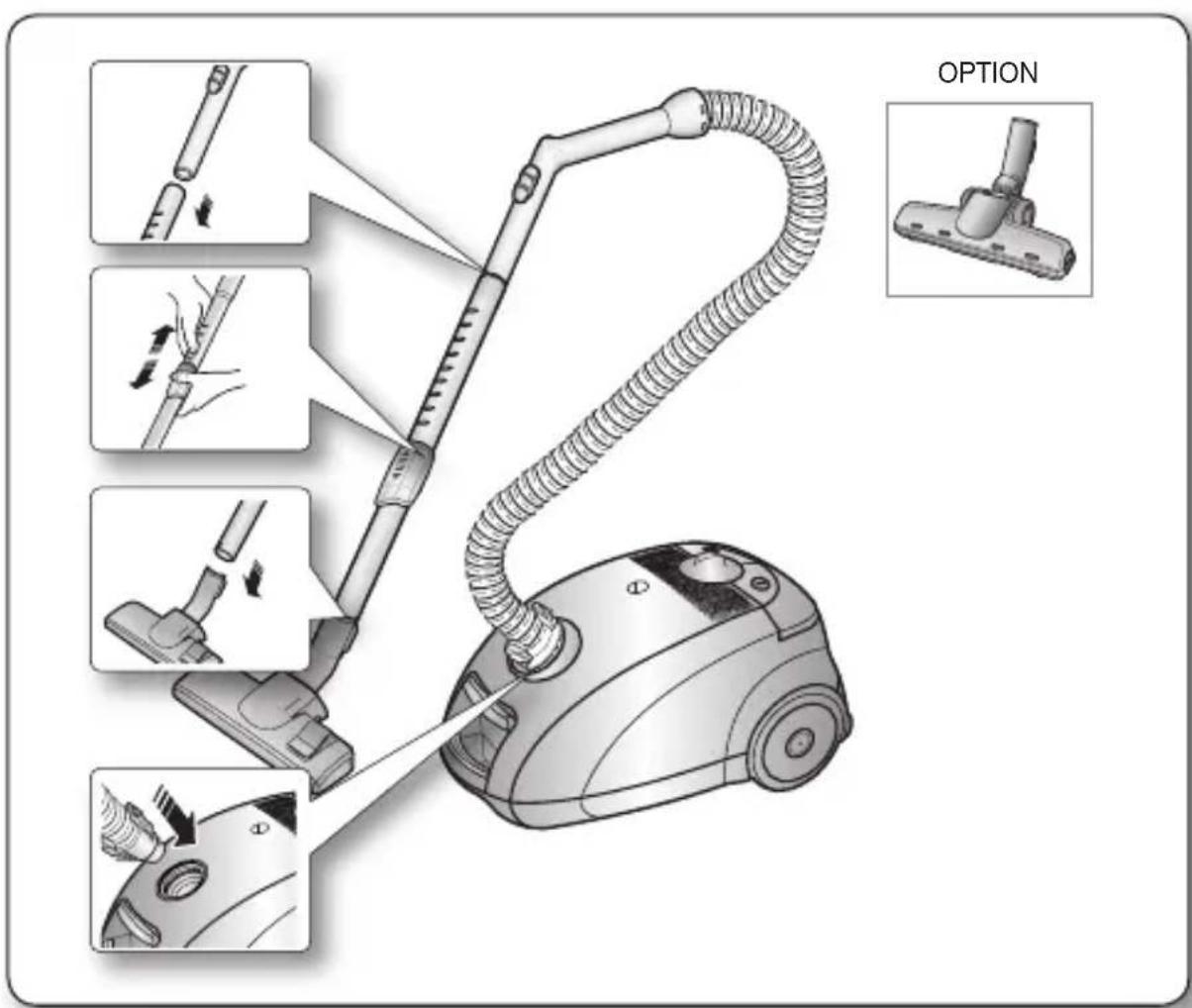

- Features may vary according to model. Refer to 5,6 page.

- For storage, park the floor nozzle.

natural_image
Technical illustration of a vehicle's front and side views, showing engine components and structural details (no text or symbols)
natural_image
Illustration of a vacuum cleaner with a close-up view showing the mechanism (no text or symbols present)assembling the cleaner _5
operating the cleaner
POWER CORD
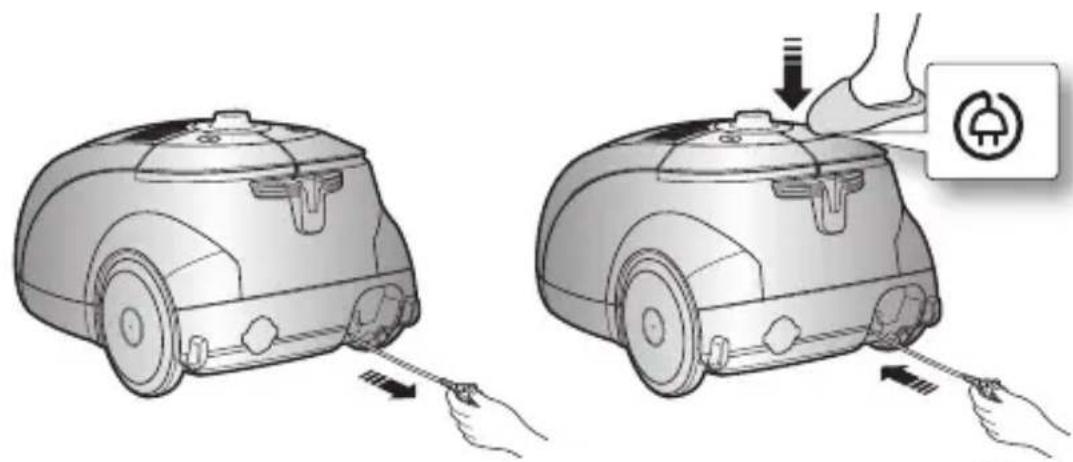

- When removing the plug from the electrical outlet, grasp the plug, not the cord.
ON/OFF SWITCH

POWER CONTROI
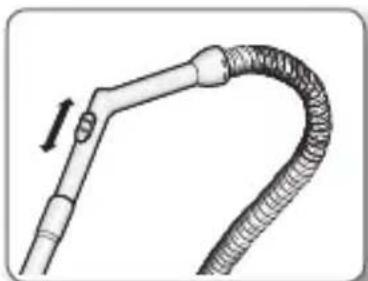
- HOSE
To reduce suction for cleaning draperies, small rugs, and other light fabrics, pull the tap air until the hole is open.
6_ operating the cleaner
natural_image
Diagram of a flexible hose with a curved neck and a pull rod, showing no text or symbolsoperating the cleaner
- bODY(VOIUME TYPE ONIY)
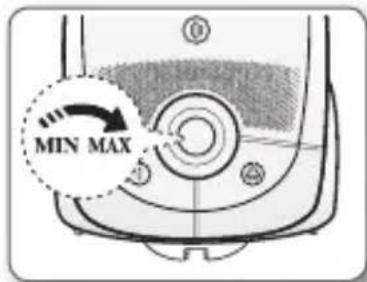
To control power level, just slide the power control bottom right and left.
MIN = For delicate fabrics, e.g. net curtains.
MAX = For hard floors and heavily soiled carpets.
- USING The bIOWER
Located on the left rear side of the cleaner.
1) Disconnect the hose from the body of the cleaner.
2) Connect the hose clamper to the blow hole.

natural_image
Illustration of a robotic vacuum cleaner with sensor placement and mechanical components (no text or symbols)maintain tools and filter
USING ACCESSORY
Accessory
- Dusting brush for furniture. shelves, books, etc.

natural_image
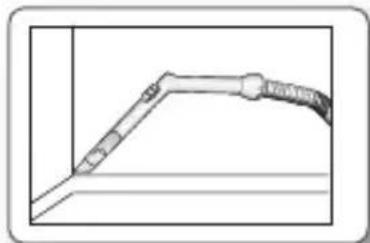
Pure diagram of a door or panel with no text, numbers, or symbols visible- Crevice tool for radiators, crevices, corners, between cushions.
natural_image
Pure technical line drawing of a pipe or pipe fitting with no text, numbers, or symbols- For efficiency. clean Floor Nozzle with Crevice Tool.

natural_image
Illustration of a mechanical tool interacting with a component (no text or symbols visible)Pipe
- Adjust the length of the telescopic pipe by sliding the length control button located in the center of the telescopic pipe back and forth.

natural_image
Simple line drawing of a cylindrical object with a blue arrow indicating direction (no text or symbols)- To check for blockages, separate the telescopic pipe and adjust to shorten. This allows for easier removal of waste clogging the tube.

natural_image
Simple line drawing of a soldering iron with a flame inside, no text or symbols presentmaintain tools and filter
MAINTAIN FLOOR TOOLS
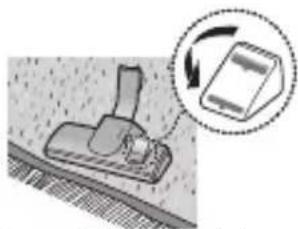
2-Step Brush
- Adjust the inlet lever according to the floor surface.
natural_image
Diagram showing a mechanical component with a magnified inset illustrating the process (no text or symbols present)
natural_image
3D diagram of a mechanical component with an arrow indicating rotation, no text or symbols presentCarpet Cleaning Floor Cleaning
- Remove waste matter completely if the inlet is blocked.

natural_image
Technical illustration of a mechanical assembly with a tool inserted into a component (no text or symbols visible)Pet Brush(Option)
For improved pick-up of pet hair and fibre on carpets.
Frequent vacuuming of hair or pet fur may cause a falling-off of the rotation due to matters tangled around the drum. In this case, clean the drum with care.

CHECK FILTER INDICATOR
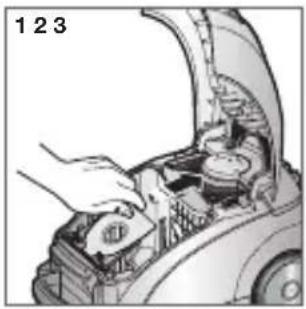
When the indicator color has changed Please replace the dust bag.

natural_image
Diagram of a device with a circular component and a magnified view of a rounded rectangle (no text or symbols)maintain tools and filter
ChANGING ThE DUST bAG
natural_image
Illustration of a hand opening the engine compartment of a car, showing internal components (no text or symbols)
natural_image
Illustration of a hand pouring liquid into a trash bin (no text or symbols)
natural_image
Close-up of a hand opening the hood of an open car, showing internal components (no text or symbols visible)OPTIONAL
- For Cloth Bag
After using, if the cloth bag is full of dust, clean the cloth bag and use it again.

You can purchase dust bags in the shops where you bought this vacuum cleaner.
paper bag can be used as you prefer(Paper-bag:VP-77)
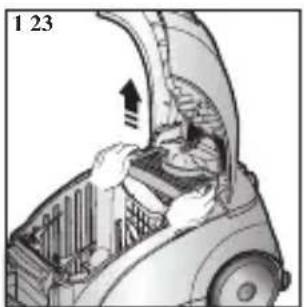
CIEANING INIET FILTER

natural_image
Diagram of a car interior showing a person operating the hood with an upward arrow, labeled '1 2 3' (no text or symbols on diagram itself)
natural_image
Illustration of a hand placing a ballot into a trash can (no text or symbols)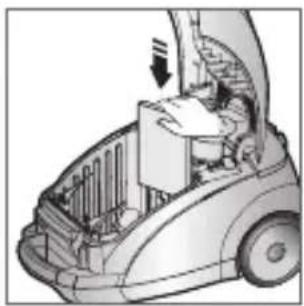
natural_image
Illustration of a person operating a car with a door open, showing internal components (no text or symbols)
Don't throw away the filter.
CIEANING OUTIET FILTER


natural_image
Simple line drawing of a trash bin with smoke and arrows indicating motion (no text or symbols)
natural_image
Diagram of a car interior showing hand positioning and structural components (no text or symbols)10_ maintain tools and filter
trouble shooting
| PROBLEM SOLUTION | |
| Motor dows not start. | Check cable, pulg and socket.Leave to cool. |
| Suction force is gradually decreasing. | Check for blockage and remove. |
| Cord does not rewind fully. | Pull the cord out 2-3m and push down the cord rewind button. |
| Vacuum cleaner dows not pick up dirt. | Check hose and replace if required. |
| Low or decreasing suction | Please check filter and, if required, clean as illustrated in the instructions. if filters are out of condition change them to new ones. |
| Body overheating | Please check filters, If required clean as illustrated in the instruction. |
| Static electricity discharge | Please decrease power suction. |
This Vacuum cleaner is approved the following.
Electromagnetic Compatibility Directive : 2004/108/EEC
Low Voltage Directive : 2006/95/EC
memo
memo

If you have any questions or comments relating to Samsung products, please contact the SAMSUNG customer care center.
| Country | Customer Care Center 📞 | Web Site |
| LITHUANIA 8-800-77777 www.samsung.com/lt | ||
| LATVIA 8000-7267 www.samsung.com/lv | ||
| ESTONIA 800-7267 www.samsung.com/ee |
Пылесос
natural_image
Technical illustration of a vehicle chassis with structural components (no text or symbols visible)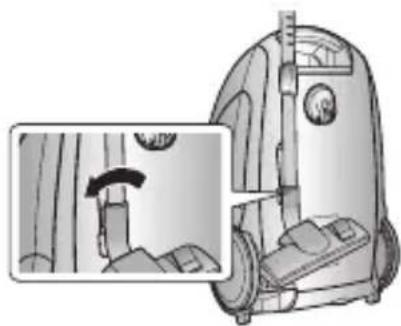
natural_image
Illustration of a vacuum cleaner with a close-up inset showing the blade and handle (no text or symbols)
НАСТРОЙКА МОЩНОСТИ
- ШЛАНГ
natural_image
Diagram of a flexible hose with a curved neck and a pull arrow indicating direction (no text or symbols)natural_image
Diagram of a robotic vacuum cleaner with mechanical components and directional arrows indicating motion (no text or symbols)natural_image
Pure line drawing of a mechanical component or tool without any text, numbers, or symbolsnatural_image
Pure technical line drawing of a mechanical component without any text, numbers, or symbolsnatural_image
Illustration of a mechanical tool interacting with a component (no text or symbols visible)Трубка
natural_image
Simple line drawing of a cylindrical object with a handle and a small protrusion, no text or symbols present.natural_image
Simple line drawing of a soldering iron with flame (no text or symbols)natural_image
Diagram showing a mechanical component with an arrow indicating rotation, no text or symbols presentnatural_image
Diagram of a mechanical component with a magnified inset showing rotation and assembly (no text or symbols)natural_image
Technical line drawing of a mechanical assembly with a tool and component (no text or symbols)natural_image
Sequence of five-step industrial sewing machine toolpath diagrams showing mechanical assembly and tool insertion (no text or labels)natural_image
Diagram of a vacuum cleaner with a magnified view showing internal components (no text or symbols)natural_image
Illustration of a hand opening the hood of an open car with internal components (no text or symbols visible)

natural_image
Illustration of a hand opening a car's hood with internal compartments (no text or symbols visible)ОПЦИЯ
natural_image
Diagram of a car interior showing a person opening the door with an upward arrow indicating motion (no text or symbols)
natural_image
Simple line drawing of a hand placing a blank sheet into a trash can (no text or symbols)
natural_image
Illustration of a car interior with a person inside and a door open, showing structural components (no text or symbols)
natural_image
Cutaway illustration of a car showing internal components and airflow direction (no text or symbols)
natural_image
Simple line drawing of a trash bin with smoke and flames, no text or symbols present
natural_image
Diagram of a car interior showing a person opening the hood with arrows indicating motion (no text or symbols)natural_image
Technical illustration of a vehicle's front suspension system, showing engine and wheel components (no text or labels)
natural_image
Illustration of a vacuum cleaner with a close-up view showing the mechanism (no text or symbols present)Siurblio naudojimas
ELEKTROS LAIDAS


ENERGIJOS KONTROLĖ
- ŽARNA.
natural_image
Diagram of a flexible hose with a curved neck and a pull rod, showing no text or symbolsnatural_image
Diagram of a robotic vacuum cleaner with two circular insets showing mechanical components (no text or labels)natural_image
Pure technical line drawing of a mechanical component without any text, numbers, or symbolsnatural_image
Mechanical component with a tool inserted into a housing (no visible text or symbols)Vamzdis
natural_image
Simple line drawing of a cylindrical tool with a handle and a small circular component, no text or symbols present.natural_image
Simple line drawing of a solder rod with a flame inside, no text or symbols presentnatural_image
Diagram showing a mechanical component with a circular arrow indicating rotation or motion (no text or symbols present)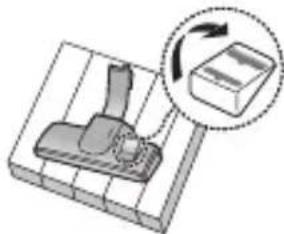
natural_image
3D diagram of a mechanical component with an arrow indicating rotation, no text or symbols presentnatural_image
Technical line drawing of a mechanical clamp or tool inserted into a rectangular component (no text or symbols visible)Parketo šepetys (Pasirinktinai)
natural_image
Sequence of five-step diagram showing a hairdryer tool being adjusted, with no text or symbols present.FILTRO INDIKATORIAUS PATIKRINIMAS
natural_image
Diagram of a vacuum cleaner with a magnified inset showing internal components (no text or symbols)natural_image
Illustration of a hand opening the engine compartment of a car, showing internal components and parts (no text or symbols)
natural_image
Illustration of a hand pouring liquid into a trash bin (no text or symbols)
natural_image
Close-up of a car's open hood with hand installing components (no visible text or symbols)PAPILDOMAI
natural_image
Cutaway illustration of a car interior showing airflow and structural components (no text or symbols)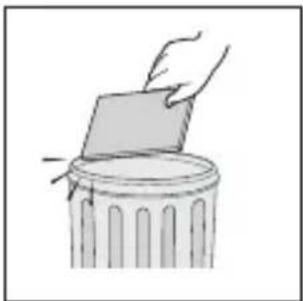
natural_image
Simple line drawing of a hand placing a blank sheet into a trash can (no text or symbols)
natural_image
Illustration of a person operating a cleaning or cleaning vehicle with a door open, showing no text or symbols.
natural_image
Cutaway illustration of a car showing internal components and a directional arrow (no text or symbols)
natural_image
Simple line drawing of a trash bin with smoke rising from it (no text or symbols)
natural_image
Diagram of a car interior showing structural components and airflow direction (no text or symbols)natural_image
Technical illustration of a vehicle's front suspension system, showing structural components and mounting bracket (no text or labels)
natural_image
Illustration of a vacuum cleaner with a close-up inset showing the mechanism (no text or symbols)natural_image
Illustration of two robotic vacuum cleaner units with hands and a foot, showing mechanical adjustment (no text or symbols)
vooLuLÜLItl
- VOOLIK
natural_image
Diagram of a flexible tube with coiled tubing and a directional arrow indicating movement (no text or symbols)6\_ Tolmuimeja kasutamine
natural_image
Diagram of a robotic vacuum cleaner with a close-up view of its internal components (no text or symbols present)Tarvikute ja filtri hooldamine
LIsaseaDMe KasutaMINe
Lisaseadmed
natural_image
Pure diagram of a door handle with a clip, no text or symbols presentnatural_image
Pure technical line drawing of a pipe or pipe joint without any text, numbers, or symbolsnatural_image
Mechanical assembly diagram showing a tool interacting with a component (no text or symbols visible)Toru
natural_image
Simple line drawing of a cylindrical object with a blue arrow indicating direction (no text or symbols)natural_image
Illustration of a soldering iron with flame emission (no text or symbols)Tarvikute ja filtri hooldamine
PÕRANDATARVIKUTE HOOLDAMINE
2-astmeline hari
natural_image
Diagram showing a mechanical component with a magnified inset illustrating rotation or change (no text or symbols)
natural_image
Diagram of a mechanical component with a lever and a magnified inset showing rotation (no text or symbols)Vaiba puhastamine Pôranda puhastamine
natural_image
Technical illustration of a mechanical clamp or tool inserted into a rectangular component (no text or symbols visible)Karvaeemaldushari (valikuline)
natural_image
Sequence of five-step industrial vacuum cleaner assembly diagrams showing mechanical components and tool path (no text or labels)KONTROLLIGE FILTRINÄIDIKUT
natural_image
Diagram of a vacuum cleaner with a close-up view of its internal components (no text or symbols)Tarvikute ja filtri hooldamine
toLMuKotl vahetaMINE

natural_image
Illustration of a hand opening the engine compartment of a car, showing battery and fuel components (no text or symbols)
natural_image
Illustration of a hand pouring liquid into a trash bin (no text or symbols)
natural_image
Illustration of a car's open hood with hand operating the engine compartment (no text or symbols visible)VALIKULINE
natural_image
Diagram of a car interior showing airflow or ventilation system with no visible text or symbols
natural_image
Simple line drawing of a hand placing a ballot into a trash can (no text or symbols)
natural_image
Illustration of a car interior with open hood and internal compartments (no text or symbols)
natural_image
Cutaway illustration of a car's engine compartment showing internal components and a directional arrow (no text or symbols)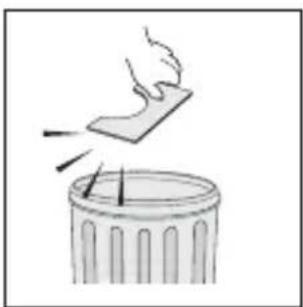
natural_image
Simple line drawing of a trash bin with smoke rising from it (no text or symbols)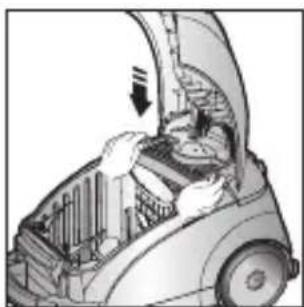
natural_image
Diagram of a car interior showing structural components and airflow direction (no text or labels)10_ Tarvikute ja filtri hooldamine
törkeotsing
natural_image
Technical illustration of a vacuum cleaner with mechanical components and a close-up view of the mechanism (no text or symbols present)JAUDAS REGULATORS
- ŠLŪTENE
natural_image
Diagram of a flexible hose with a curved neck and a pull arrow indicating direction (no text or symbols)natural_image
Illustration of a robotic vacuum cleaner with sensor components and a magnified inset showing the sensor tip (no text or symbols present)Piederumu un filtru apkope
APRĪKOJUMA IZMANTOŠANA
Uzgali
natural_image
Pure diagram of a door or panel with a handle, no text or symbols presentnatural_image
Pure technical line drawing of a mechanical component without any text, numbers, or symbolsnatural_image
Mechanical assembly diagram showing a tool interacting with a component (no text or symbols visible)Caurule
natural_image
Simple line drawing of a cylindrical object with a blue arrow indicating direction (no text or symbols)natural_image
Simple line drawing of a soldering iron with a handle and flame (no text or symbols)Piederumu un filtru apkope
GRĪDAS TĪRĪŠANAS RĪKU APKOPE
Divpakāpju suka
natural_image
Diagram showing a mechanical component with a magnified inset illustrating rotation or change (no text or symbols)
natural_image
3D diagram of a mechanical component with a lever and a box, showing rotational motion (no text or symbols)natural_image
Technical line drawing of a mechanical component with a tool inserted (no text or symbols)natural_image
Sequence of five-step diagram showing a hairdryer tool being adjusted, with no text or symbols present.FILTRA INDIKATORA PĀRBAUDE
natural_image
Diagram of a vacuum cleaner with a magnified inset showing internal components (no text or symbols)Piederumu un filtru apkope
PUTEKŁU MAISINA NOMAINA

natural_image
Illustration of a hand opening the engine compartment of a car, showing internal components and wiring (no text or symbols)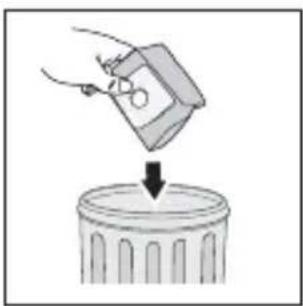
natural_image
Illustration of a hand pouring liquid into a trash bin (no text or symbols)
natural_image
Close-up of a hand opening the hood of an open car, showing internal components (no text or symbols visible)PAPILDAPRĪKOJUMS
• Auduma puteklu maisiņš
natural_image
Cutaway illustration of a car interior showing engine, fan, and door (no text or symbols)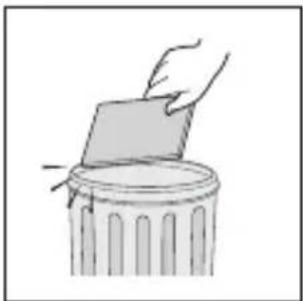
natural_image
Simple line drawing of a hand placing a rectangular object onto a trash can (no text or symbols)
natural_image
Illustration of a person operating a cleaning or cleaning vehicle with a door open, showing no text or symbols.
Neaizmetiet filtru
IZPLÜDES FILTRA TİRİŞANA
natural_image
Cutaway illustration of a car showing engine compartment with upward arrow (no text or symbols)
natural_image
Simple line drawing of a trash bin with smoke rising from it (no text or symbols)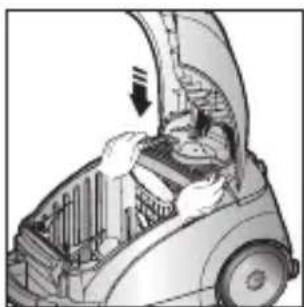
natural_image
Diagram of a car interior showing structural components and airflow direction (no text or labels)10_ Piederumu un filtru apkope
Bojājumu novēršana
- Vacuum Cleaner user manual
- imagine the possibilities
- safety information
- IMPORTANT SAFEGUARDS
- ASSEMBLING The CLEANER
- TROUbIE ShOOTING
- operating the cleaner
- POWER CORD
- ON/OFF SWITCH
- POWER CONTROI
- - HOSE
- - bODY(VOIUME TYPE ONIY)
- - USING The bIOWER
- maintain tools and filter
- USING ACCESSORY
- Accessory
- Pipe
- MAINTAIN FLOOR TOOLS
- 2-Step Brush
- Pet Brush(Option)
- CHECK FILTER INDICATOR
- ChANGING ThE DUST bAG
- OPTIONAL
- CIEANING INIET FILTER
- CIEANING OUTIET FILTER
- trouble shooting
- Пылесос
- НАСТРОЙКА МОЩНОСТИ
- - ШЛАНГ
- Трубка
- ОПЦИЯ
- Siurblio naudojimas
- ELEKTROS LAIDAS
- ENERGIJOS KONTROLĖ
- - ŽARNA.
- Vamzdis
- Parketo šepetys (Pasirinktinai)
- FILTRO INDIKATORIAUS PATIKRINIMAS
- PAPILDOMAI
- vooLuLÜLItl
- - VOOLIK
- 6\_ Tolmuimeja kasutamine
- Tarvikute ja filtri hooldamine
- LIsaseaDMe KasutaMINe
- Lisaseadmed
- Toru
- PÕRANDATARVIKUTE HOOLDAMINE
- 2-astmeline hari
- Karvaeemaldushari (valikuline)
- KONTROLLIGE FILTRINÄIDIKUT
- toLMuKotl vahetaMINE
- VALIKULINE
- törkeotsing
- JAUDAS REGULATORS
- - ŠLŪTENE
- Piederumu un filtru apkope
- APRĪKOJUMA IZMANTOŠANA
- Uzgali
- Caurule
- GRĪDAS TĪRĪŠANAS RĪKU APKOPE
- Divpakāpju suka
- FILTRA INDIKATORA PĀRBAUDE
- PUTEKŁU MAISINA NOMAINA
- PAPILDAPRĪKOJUMS
- IZPLÜDES FILTRA TİRİŞANA
- Bojājumu novēršana
Brand : SAMSUNG
Model : SC5610
Category : Vacuum Cleaner