
Gina - Scale KORONA - Free user manual and instructions
Find the device manual for free Gina KORONA in PDF.


| Product Type | Kitchen Scale |
| Brand | Korona |
| Model | Gina |
| Maximum Capacity | 5 kg |
| Accuracy | 1 g |
| Units of Measurement | g, kg, lb, oz |
| Functions | Tare, auto-zero, auto-off |
| Display | LCD display, backlit |
| Power Supply | 2 AAA batteries (1.5 V) included |
| Material | ABS plastic, tempered glass platform |
| Dimensions (L x W x H) | 20 cm x 15 cm x 2 cm |
| Net Weight | 300 g |
| Maintenance and Cleaning | Clean with a damp cloth, do not immerse in water |
| Safety | Do not exceed maximum load, avoid shocks |
| Recycling Instructions | Used batteries should be taken to collection points |
| Spare parts / repairability | Platforms and batteries are replaceable |
| Included Accessories | 1 scale, 2 AAA batteries, 1 user manual |
| Recommended Use | On a flat and stable surface |
| Warranty | 2 years |
Frequently Asked Questions - Gina KORONA
User questions about Gina KORONA
0 question about this device. Answer the ones you know or ask your own.
Ask a new question about this device
Download the instructions for your Scale in PDF format for free! Find your manual Gina - KORONA and take your electronic device back in hand. On this page are published all the documents necessary for the use of your device. Gina by KORONA.
USER MANUAL Gina KORONA
natural_image
Digital kitchen digital scale with a digital display showing 6:38, no visible text or symbols on the device itself.⑭ GLASWAAGE Gebrauchsanweisung....2...10
GB GLASS SCALE Instructions for use....11...18
F BALANCE EN VERRE Mode d'emploi....19..26
⑤ BÁSCULA DE VIDRIO Instrucciones para el uso....27...34
① BILANCIA IN VETRO Istruzioni per l'uso ....35..42
GR ΓΥΑΛΙΝΗ ΖΥΓΑΡΙΑ Οδηγίες χρήσης 43..50
RUS STEKЛЯННЫЕ ВЕСЫ Инструкция по применению .....51...59
PL WAGA SZKLANA Instrukcja obsługi 60..67
NL GLAZEN WEEGSCHAAL Gebruikershandleiding 68...75
1 Zum Kennenlernen
5 Inbetriebnahme
flowchart
graph LR
    A["User 1: 2009 8: -"] --> B["SET"]
    B --> C["User 1: 2009 8: -"]
    C --> D["User 1: 2009 8: -"]
flowchart
graph LR
    A["SET"] --> B["User: 2009-8-1 100 cm"]
    B --> C["SET"]
    C --> D["User: 2009-8-1 100 cm"]
    D --> E["SET"]
    E --> F["SET"]


Ergebnisanzeige
other
| User | M0 | BMI | | --- | --- | --- | | 2009-8-17 | 64.3 | 22.2 | | 2009-8-18 | 64.3 | 22.2 |1 Getting to know your instrument
Function of the unit
These digital glass scale allows you to weigh yourself and to calculate your personal body mass index (BMI).
The scale is intended for individual, household use.
The scale is equipped with the following functions, which can be used by up to four different people:
• Measurement of your body weight
• Calculation of your body mass index (BMI)
• Calculation of your average weight
The memory function lets up to four people access up to 50 previously measured weight values as well as the corresponding BMI values.
2 Signs and symbols
The following symbols appear in these instructions.

Warning Warning instruction indicating a risk of injury or damage to health.

Important Safety note indicating possible damage to the unit/accessory.

Note Note on important information.
3 Safety notes
Safety notes

Warning:
- Do not stand on the outer edge to one side of the scale otherwise it may tip!
- Keep children away from packaging materials (risk of suffocation).
- The surface of the scale is slippery when damp or wet.

Warning:
- Swallowing batteries can be extremely dangerous. Keep the batteries and scale out of the reach of small children. Should a child swallow a battery, seek medical assistance immediately.
- Batteries must not be recharged, taken apart, thrown into an open fire or short circuited.
- Batteries can contain toxins that are harmful to health and the environment. Always dispose of batteries in accordance with applicable legal regulations. Do not dispose of batteries with the normal household waste.

Warning:
- Replace weak batteries before they discharge completely.
• Always replace all batteries at the same time and use batteries of the same type. - Leaking batteries may damage the device. If you do not intend to use the device for longer periods, remove the batteries from the battery compartment.
- If a battery has leaked, put on protective gloves and clean the battery compartment with a dry cloth.
General notes

- The unit is for personal use only and is not intended for medical or commercial applications.
- Please note that technically related measuring tolerances are possible, as the scale is not calibrated for professional medical applications.
- The scale's maximum load is 150 kg (330 lb/24 st)
- Before submitting any complaint, fi rst check the batteries and replace them if necessary.
• Repairs must only be carried out by Customer Services or authorised suppliers. - Should you have any questions concerning the use of our devices, please contact your dealer or customer service.
- All scales comply with EC Directive 2004/108/EC.
4 Unit description
Overview
1 Up button
2 SET On/Set button
3 Down button
4 Display

5 Initial use
Inserting the batteries
Please remove the battery insulating strips and/or position the batteries correctly with regards to the polarity displayed in the battery compartment (as symbol ). If the scale fails to operate, remove the batteries completely and reinsert them.
Changing the weight unit
The scale shows the values in kg. You can set the device to measure in kilograms, pounds ('lb') and stones ('st:lb') using the switch on the back of the device.
Setting up the scale
Set up the scale on a level and solid surface. A solid surface is a prerequisite for a correct measurement.
6 Information
The measuring principle
The BMI is calculated using the height value entered and the measured weight value.
General tips
- If possible, always weigh yourself at the same time of day (preferably in the morning), after using the toilet, on an empty stomach and unclothed, in order to achieve comparable results.
7 Switch on the scale
The scale can be switched on in two ways:
- Press the button ⓊT until a signal appears in the display.
- Tap your foot quickly, forcefully and audibly on the scale to activate the vibration sensor.
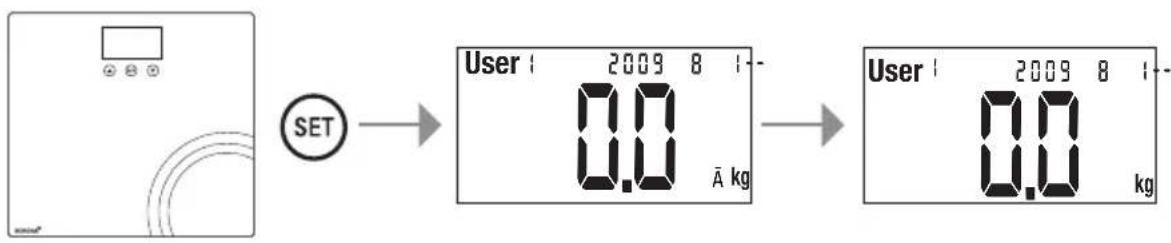
The last user and their average weight (if this has been saved) will be displayed. Wait until “0.0 kg” is displayed. If necessary, change the location where the user data is saved.
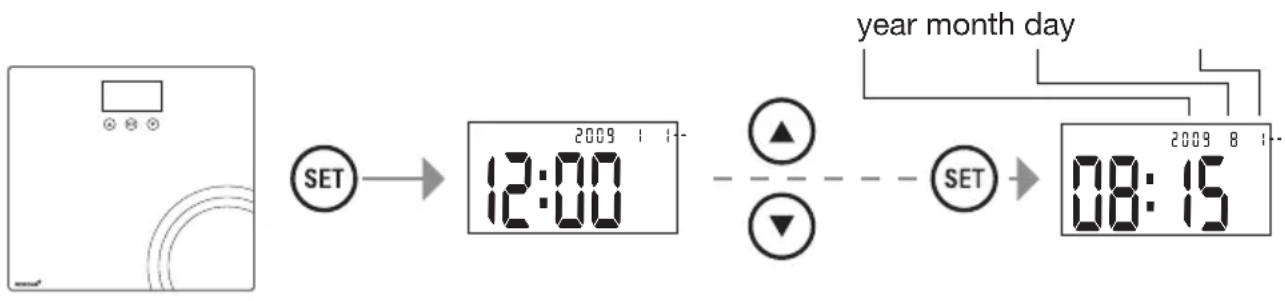
When the scale is used for the first time, and each time the batteries are changed, the device will show the date and time at the start during the basic set-up. In these instances, immediately set the current date and time.
8 Settings
flowchart
graph LR
    A["Device"] --> B["SET"]
    B --> C["12:00"]
    C --> D["SET"]
    D --> E["08:15"]
    style A fill:#f9f,stroke:#333
    style B fill:#ccf,stroke:#333
    style C fill:#cfc,stroke:#333
    style D fill:#fcc,stroke:#333
    style E fill:#cff,stroke:#333
The date and time can only be changed when the batteries are taken out and replaced. To set the current date and time, you must proceed in several stages as follows: year – month – day – hour – minute.
The setting to be changed will fl ash each time.
- To change a setting, press the buttons ▼ and ⚠
- To save the setting and move onto the next one, or to close the setting, press the Ⓗ button.
The scale will switch off automatically after this procedure.
The scale will also switch off if no buttons are pressed for more than 15 seconds.
Setting user data
The scale comes equipped with four locations for storing user data and space for more than 50 measurement values per user. You and, for example, the members of your family can save and later access the following personal settings in the storage locations:
| Sequence User data Parameters | ||
| 1 | Memory position 1 to 4 | |
| 2 | Body height 100 to 220 cm (3'-03" to 7'-03") | |
flowchart
graph LR
    A["User"] --> B["SET"]
    B --> C["User 1: 2009 8: - A kg"]
    C --> D["User 1: 2009 8: - A kg"]
Switch on the scale. When "0.0 kg" is displayed:
- Press the SET button for several seconds, until "User" begins to flash on the display.
- Press the▼ and ▲buttons to select the desired storage location. Confir rm the selection with the SET button.
- Press the▼ and▲buttons to set your height.
- Finish entering data by pressing the Ⓜ button.

flowchart
graph LR
    A["SET"] --> B["User 1 2009-8-1 100 cm"]
    B --> C["SET"]
    C --> D["User 1 2009 8-1-1 100 cm"]
    D --> E["Output"]
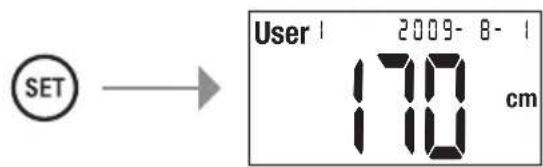

Please note: if you change the height value at a later date, all measurement data saved in your storage location up until that point will be deleted.
9 Operation
Weighing yourself and calculating BMI
To weigh yourself and to calculate your personal body mass index:
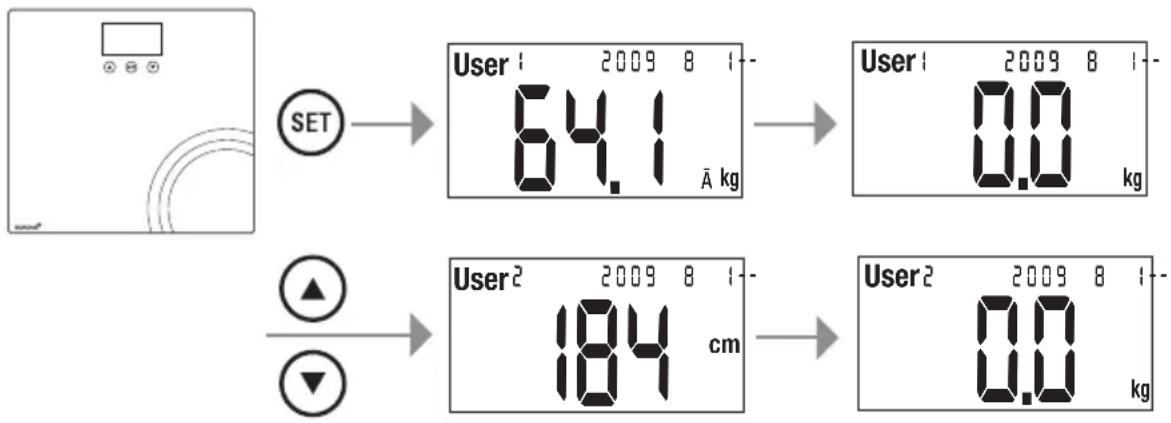
- Switch on the scale. After the display shows the average weight results which have been saved from the previous user, "0.0 kg" will be displayed.
- Then select the storage location where your settings have been saved using the ▲ or ▼ buttons. Next, your saved height value will be displayed. Wait until “0.0 kg” is displayed again. You can now use the scale. Stand still whilst weighing yourself.
flowchart
graph TD
    A["User Setup"] --> B["SET"]
    B --> C["User 1: 2009 8 1: 64.1 Å kg"]
    C --> D["User 1: 2009 8 1: 0.0 kg"]
    E["User Setup"] --> F["SET"]
    F --> G["User 2: 2009 8 1: 184 cm"]
    G --> H["User 2: 2009 8 1: 0.0 kg"]
Display of results
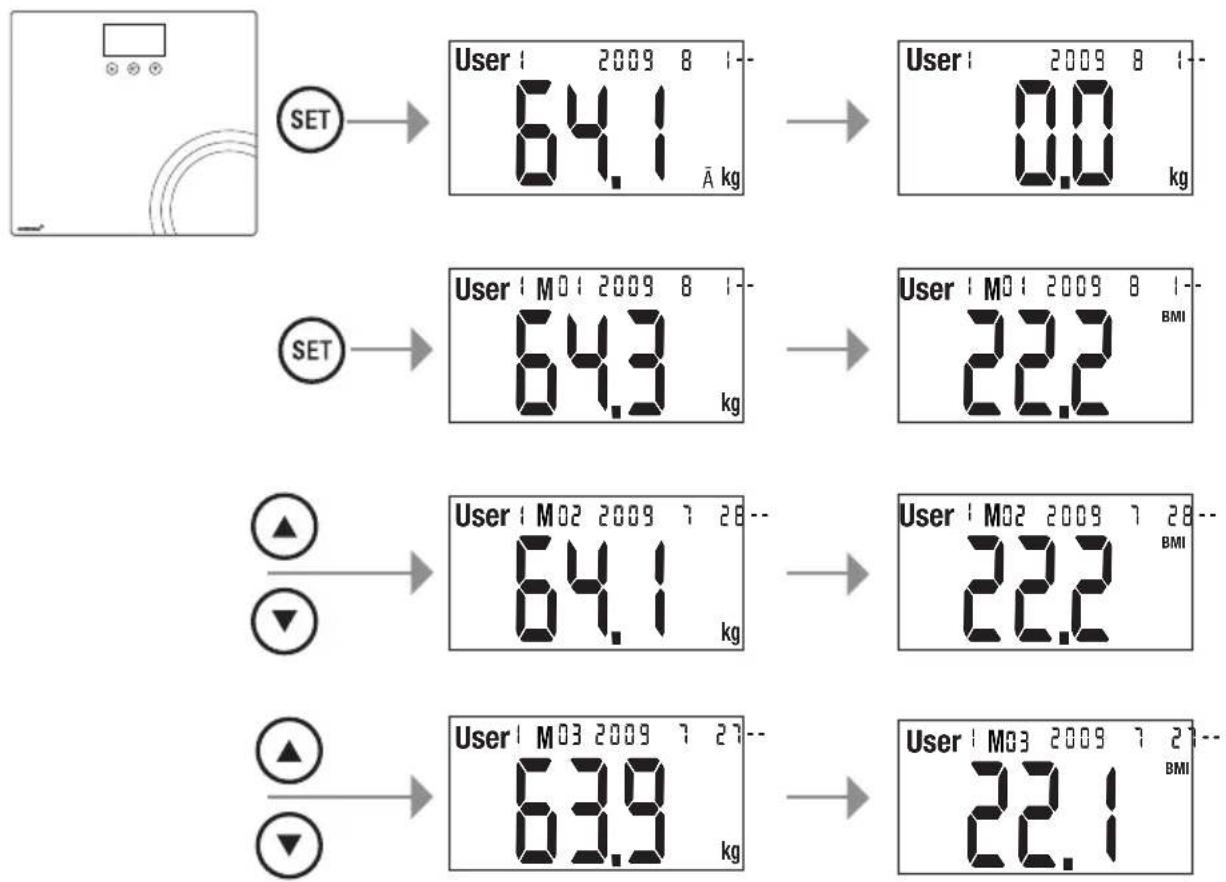
The results are automatically displayed in the following sequence:
| User : 2009-8-164.3 kg | User : M01 2009-8-122.2 BMI | User : M01 2009-8-164.3 kg |
| 1. Current weight 2. Display alternates between the body mass index and calculated weight which have currently been saved | ||
One value will be saved per day, per person. If you take several measurements per day, the most recent value will be saved. The data saved previously on that day up will be overwritten.
After displaying the weight, the scale automatically switches off.
Accessing saved measurements
To access the saved measurements of the user currently selected:
- Switch on the scale. After the display shows the average weight results which have been saved from the previous user, “0.0 kg” will be displayed.
- If you wish to change the storage location, proceed as described on the previous page.
- Briefly press the SET button once, until the "M01" display next to the storage location appears.
- Then browse through the storage locations for the saved values one by one using the ▼ or ▲ buttons.
- The date on which the value was saved will be displayed, as well as the weight and BMI values which will be shown alternately.
flowchart
graph TD
    A["User 2009 8: 64.1 A kg"] --> B["User 2009 8: 0.0 kg"]
    C["User 2009 8: 64.3 kg"] --> D["User 2009 8: 22.2 BMI"]
    E["User 2009 7: 64.1 kg"] --> F["User 2009 7: 22.2 BMI"]
    G["User 2009 7: 63.9 kg"] --> H["User 2009 7: 22.1 BMI"]
10 Evaluation of results
Body mass index (BMI)
The body mass index (BMI) is a number that is often called upon to evaluate body weight. The number is calculated from body weight and height, the formula is – body mass index = body weight : height ^2 . The measurement unit for BMI is [kg/m ^2 ]. According to the BMI, weight is classified for adults (20 years and over) using the following values (source: WHO):
| Category | BMI | |
| Underweight Severely underweight < 16 | ||
| Moderately underweight 16-16,9 | ||
| Slightly underweight 17-18,4 | ||
| Normal weight 18,5-25 | ||
| Overweight Pre-obese 25,1-29,9 | ||
| Obese (overweight) Class I obese 30-34,9 | ||
| Class II obese 35-39,9 | ||
| Class III obese ≥ 40 | ||
11 Results in relation to time

Remember that only long-term trends are important. Short-term fluctuations in weight over a few days are usually the result of a loss of fluid.
11 Replacing batteries
The batteries in the scale must be replaced if the message “Lo” appears in the display. If the batteries are too flat, then the scale will switch off automatically.

Note:
- When changing batteries, always use batteries of the same type, brand and capacity. Always replace all batteries simultaneously.
- Do not use rechargeable batteries.
- Use batteries that are free of heavy metals.
12 Storage and maintenance
The precision of the measurements and service life of the device depends on its careful handling:

Important:
- The unit should be cleaned occasionally. Use a slightly damp cloth to clean the device. You may also use a small quantity of cleaning agent if desired. Do not use abrasive detergents and never immerse the unit in water.
- Do not wash the unit in a dishwasher!
- Do not stand any objects on the scale when not in use.
- Please note that the sensor buttons react to conductive objects such as metal or water-fi lled objects.
- Protect the scale from knocks, damp, dust, chemicals, drastic changes in temperature, electromagnetic fi elds and nearby sources of heat (ovens, heaters). Do not press the buttons violently or with pointed objects.
13 Disposal
Standard and rechargeable batteries should not be disposed of separately from the household waste. As a consumer, you are legally obliged to return used batteries for proper disposal. You can hand in your used batteries at public collection points in your district or sales outlets where batteries of this type are sold.

Note:

The codes below are printed on batteries containing harmful substances:
Pb = Battery contains lead,
Cd = Battery contains cadmium,
Hg = Battery contains mercury.
For environmental reasons, do not dispose of the scale with the batteries in the household waste at the end of its useful life. Dispose of the unit at a suitable local collection or recycling point.
Observe the local regulations for material disposal.
14 What if there are problems?
If the scale detects and error when measuring, the following is displayed.
| Display Cause Remedy | ||
| Err The maximum | load capacity of 150 kg was exceeded. | Do not load the unit with over 150 kg. |
| Lo The batteries are almost empty. Replace the batteries. | ||
| no Accessing a user storage location in which no values have been saved. | The scale will switch off automatically after a short while; switch the scale on again and proceed with the measurements. | |
| ----Scale is searching for correct zero point. | Place the scale on a secure, fl at surface. Wait until “0.0 kg” is displayed. | |
No measurement possible
| Possible errors Remedy | |
| If you stand on the scale to measure your values before the display shows “0.0 kg”, the scale will not function correctly. | Correctly activate the scale (wait for “0.0 kg” to be displayed) and repeat the measurement. |
| The batteries in the scale are empty. Replace the batteries. | |
Incorrect weight measurement
| Possible errors Remedy | |
| Scale is on carpeting. Place the scale on a level and solid surface. | |
| Incorrect zero point of scale. | Switch on the scale and wait until the scale automatically switches off again (do not step onto the scale before then). Then switch on the scale again and repeat the measurement. |

natural_image
Simple line drawing of a room with a monitor, three circular buttons, and curved lines (no text or symbols)
flowchart
graph LR
    A["SET"] --> B["12:00"]
    B --> C["SET"]
    C --> D["08:15"]
flowchart
graph LR
    A["User 1: 2009 8 1-"] --> B["SET"]
    B --> C["User 1: 2009 8 1-"]
    C --> D["User 2: 0.0 kg"]
flowchart
graph LR
    A["SET"] --> B["User: 2009-8-1 100 cm"]
    B --> C["SET"]
    C --> D["User: 2009-8-1 100 cm"]
    D --> E["SET"]
    E --> F["SET"]


flowchart
graph LR
    A["User"] --> B["SET"]
    B --> C["User 1: 2009 8: -0.0 A kg"]
    C --> D["User 2: 2009 8: -0.0 kg"]

flowchart
graph TD
    A["User 1: 2009 8 1-64.1 Å kg"] --> B["User 1: 2009 8 1-0.0 kg"]
    C["User 2: 2009 8 1-184 cm"] --> D["User 2: 2009 8 1-0.0 kg"]

flowchart
graph TD
    A["User 2009 8: SET"] --> B["64.1 kg"]
    B --> C["User 2009 8: SET"]
    D["User 2009 8: SET"] --> E["64.3 kg"]
    E --> F["User 2009 8: SET"]
    G["User 2009 8: SET"] --> H["64.1 kg"]
    H --> I["User 2009 8: SET"]
    J["User 2009 8: SET"] --> K["63.9 kg"]
    K --> L["User 2009 8: SET"]
    M["User 2009 8: BMI"] --> N["22.2 kg"]
    O["User 2009 8: BMI"] --> P["22.2 kg"]
    Q["User 2009 8: BMI"] --> R["22.1 kg"]

flowchart
graph TD
    A["User 2009 8: SET"] --> B["64.1 Å kg"]
    B --> C["User 2009 8: SET"]
    D["User 2009 8: SET"] --> E["64.3 kg"]
    E --> F["User 2009 8: SET"]
    G["User 2009 8: SET"] --> H["64.1 kg"]
    H --> I["User 2009 8: SET"]
    J["User 2009 8: SET"] --> K["63.9 kg"]
    K --> L["User 2009 8: SET"]
    M["User 2009 8: SET"] --> N["22.2 BMI"]
    O["User 2009 8: SET"] --> P["22.2 BMI"]
    Q["User 2009 8: SET"] --> R["22.1 BMI"]
flowchart
graph LR
    A["User"] --> B["SET"]
    B --> C["User 1: 2009 8: -0.0 A kg"]
    C --> D["User 2: 2009 8: -0.0 kg"]

flowchart
graph TD
    A["User 1: 2009 8 1-64.1 Å kg"] --> B["User 1: 2009 8 1-0.0 kg"]
    C["User 2: 2009 8 1-184 cm"] --> D["User 2: 2009 8 1-0.0 kg"]



- Zum Kennenlernen
- Inbetriebnahme
- Ergebnisanzeige
- Getting to know your instrument
- Function of the unit
- Signs and symbols
- Safety notes
- Safety notes
- Warning:
- General notes
- Unit description
- Overview
- Initial use
- Inserting the batteries
- Changing the weight unit
- Setting up the scale
- Information
- The measuring principle
- General tips
- Switch on the scale
- Settings
- Setting user data
- Operation
- Weighing yourself and calculating BMI
- Display of results
- Accessing saved measurements
- Evaluation of results
- Body mass index (BMI)
- Results in relation to time
- Replacing batteries
- Note:
- Storage and maintenance
- Important:
- Disposal
- What if there are problems?
Brand : KORONA
Model : Gina
Category : Scale