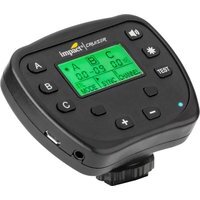
ACDC-TXS - Remote control Impact - Free user manual and instructions
Find the device manual for free ACDC-TXS Impact in PDF.


| Product Type | Remote Control |
| Brand | Impact |
| Model | ACDC-TXS |
| Dimensions (approx.) | 165 x 50 x 25 mm |
| Weight (approx.) | 120 g (with batteries) |
| Power Source | 2 x AAA batteries (not included) |
| Operating Range | Up to 10 meters (typical) |
| Key Functions | Power On/Off, Volume Control, Channel Selection, Input Source, Menu Navigation, Number Pad |
| Compatibility | TVs and audio devices from major brands supporting IR remote protocol |
| Battery Life | Approximately 6 months with normal use |
| Cleaning Instructions | Wipe with a soft, dry cloth. Do not use liquids or abrasive cleaners. |
| Safety Precautions | Keep away from water and heat sources. Do not attempt to disassemble. |
| Spare Parts | Batteries (user-replaceable); no other spare parts available |
| Repairability | Battery compartment accessible; otherwise non-repairable by user |
| Operating Temperature | 0°C to 40°C |
| Storage Temperature | -20°C to 60°C |
| Humidity | Up to 85% non-condensing |
| Included Accessories | Remote control only; batteries not included |
| Certification | CE, RoHS |
| User Manual | Available for free download in PDF format |
Frequently Asked Questions - ACDC-TXS Impact
User questions about ACDC-TXS Impact
0 question about this device. Answer the ones you know or ask your own.
Ask a new question about this device
Download the instructions for your Remote control in PDF format for free! Find your manual ACDC-TXS - Impact and take your electronic device back in hand. On this page are published all the documents necessary for the use of your device. ACDC-TXS by Impact.
USER MANUAL ACDC-TXS Impact
Thank you for choosing Impact.
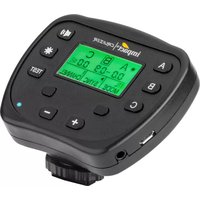
The Impact Cruiser Wireless Controller is a compact wireless 2.4 GHz transmitter that provides the Cruiser TTL 500 Monolight with TTL and high-speed sync (HSS) functionality. It allows you to control and trigger the flash from a distance of 358 feet (100 m) via 2.4 GHz wireless transmission. It also sets channels, groups, and adjusts flash and modeling lamp output.
The Cruiser Wireless Controller is compatible with most Canon, Nikon, and Sony cameras.
Overview
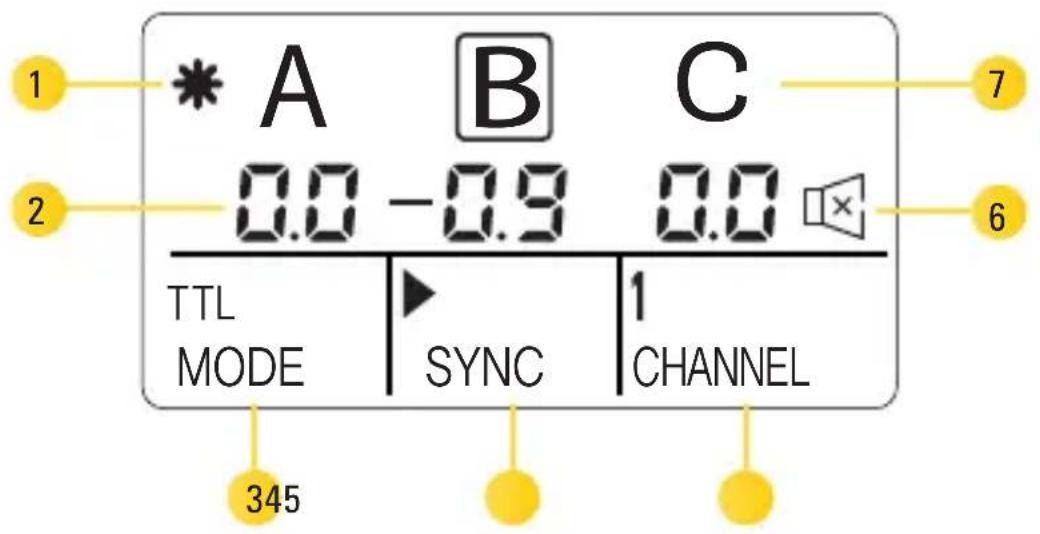
LCD screen:
- Modeling light
- Output power
- Manual/TTL
- FCS, SCS, HSS indicator
- Channel
- Sound
- Group
Overview (continued)
Controller:
1. Group buttons
Press to select group A, B, or C. The selected group is outlined. Press and hold to enable or disable a group.
2. Mode button
Selects Manual or TTL mode.
3. Sync button
(Canon and Sony)
Selects between first-curtain sync, second-curtain sync, and high-speed sync (HSS). Go to impactstudiolighting.com for information on the Cruiser's compatibility with Sony cameras.
4. Plus (+) and minus (-) buttons
Raises and lowers the output power of the selected channel. Press to change power in increments of 1/10-stop. Press and hold to rapidly scroll
through the power range.
In TTL mode, press to adjust EV compensation.
5. Power LED
Indicates when power is on.
6. Power button
7. Channel button
Selects channels 1 to 8.
8. Test button
Fires a test flash.
9. Modeling light button
Turns the modeling light on and off for the selected group, and selects between 100% and 50% brightness. The modeling light can be set independently for each group.
10. Sound button
Turns the alert sound on and off.
11. Mounting foot
12. Locking collar
13. Battery compartment
Overview (continued)

Instructions
Getting Started
- Install two AAA batteries into the battery compartment, following the orientation icons in each battery slot.
- Loosen the locking collar by turning it counterclockwise.
- Insert the mounting foot into the camera's hot-shoe mount. Make sure it is completely inserted into the shoe.
- Tighten the locking collar by turning it clockwise until secure.
- Make sure your camera has the appropriate settings. Consult the camera's user manual to set features for TTL and HSS modes.
- Press the power button. The LED screen and the power LED will light up.
Note: After approximately 20 second of inactivity, the LCD screen's illumination will go out as a power-saving measure.
Specifications
| Frequency 2.4 GHz | |
| Channels 8 (1 to 8) | |
| Groups 3 (A, B, C) | |
| Connections 3.5 mm sync port, Micro-B USB | |
| Operating range 328 ft. (100 m) | |
| Dimensions 3 × 2.37 × 2 in. (7.6 × 6 × 5.2 cm) | |
| Weight (with batteries) 3.2 oz. (90.7 g) | |
| Battery 2 × AAA 1.5 V alkaline, lithium, or NiMH batteries | |
FCC DECLARATION OF CONFORMITY:
This device complies with Part 15 of the FCC rules. Operation is subject to the following two conditions: (1) this device may not cause harmful interference, and (2) this device must accept any interference received, including interference that may cause undesired operation.
One-Year Limited Warranty
This Impact product is warranted to the original purchaser to be free from defects in materials and workmanship under normal consumer use for a period of one (1) year from the original purchase date or thirty (30) days after replacement, whichever occurs later. The warranty provider's responsibility with respect to this limited warranty shall be limited solely to repair or replacement, at the provider's discretion, of any product that fails during normal use of this product in its intended manner and in its intended environment. Inoperability of the product or part(s) shall be determined by the warranty provider. If the product has been discontinued, the warranty provider reserves the right to replace it with a model of equivalent quality and function.
This warranty does not cover damage or defect caused by misuse, neglect, accident, alteration, abuse, improper installation or maintenance. EXCEPT AS PROVIDED HEREIN, THE WARRANTY PROVIDER MAKES NEITHER ANY EXPRESS WARRANTIES NOR ANY IMPLIED WARRANTIES, INCLUDING BUT NOT LIMITED TO ANY IMPLIED WARRANTY OF MERCHANTABILITY OR FITNESS FOR A PARTICULAR PURPOSE. This warranty provides you with specific legal rights, and you may also have additional rights that vary from state to state.
To obtain warranty coverage, contact the Impact Customer Service Department to obtain a return merchandise authorization ("RMA") number, and return the defective product to Impact along with the RMA number and proof of purchase. Shipment of the defective product is at the purchaser's own risk and expense.
For more information or to arrange service, visit www.impactstudiolighting.com or call Customer Service at 212-594-2353.

IMPACT®
A Gradus Group Brand
Product warranty provided by the Gradus Group.
www.gradusgroup.com
Impact is a registered trademark of the Gradus Group.
© 2017 Gradus Group LLC. All Rights Reserved.

- Thank you for choosing Impact.
- Overview
- LCD screen:
- Overview (continued)
- Controller:
- Group buttons
- Mode button
- Sync button
- Plus (+) and minus (-) buttons
- Power LED
- Power button
- Channel button
- Test button
- Modeling light button
- Sound button
- Mounting foot
- Locking collar
- Battery compartment
- Instructions
- Getting Started
- Specifications
- FCC DECLARATION OF CONFORMITY:
- One-Year Limited Warranty
Brand : Impact
Model : ACDC-TXS
Category : Remote control