
FPPNEUSTND - Desk Stand StarTech.com - Free user manual and instructions
Find the device manual for free FPPNEUSTND StarTech.com in PDF.


| Product Type | Desk Stand |
| Brand | StarTech.com |
| Model | FPPNEUSTND |
| Material | Aluminum and Steel |
| Color | Black |
| Dimensions (W x D x H) | 25 x 20 x 5 cm (approx.) |
| Weight | 1.2 kg (approx.) |
| Weight Capacity | 10 kg |
| Screen Size Compatibility | Up to 27 inches |
| Height Adjustment | Yes, 10 cm range |
| Tilt Adjustment | Yes, -15° to +15° |
| Swivel | Yes, 360° |
| VESA Compatible | 75x75mm and 100x100mm |
| Cable Management | Yes, built-in clips |
| Mounting Type | Desk clamp and grommet mount |
| What's Included | Stand, mounting hardware, instruction manual |
| Warranty | 2 years |
| Cleaning Instructions | Wipe with a soft, dry cloth |
| Safety Notes | Do not exceed weight limit; mount securely |
Frequently Asked Questions - FPPNEUSTND StarTech.com
User questions about FPPNEUSTND StarTech.com
0 question about this device. Answer the ones you know or ask your own.
Ask a new question about this device
Download the instructions for your Desk Stand in PDF format for free! Find your manual FPPNEUSTND - StarTech.com and take your electronic device back in hand. On this page are published all the documents necessary for the use of your device. FPPNEUSTND by StarTech.com.
USER MANUAL FPPNEUSTND StarTech.com
Single-Monitor Stand - Height Adjustable - Aluminum

natural_image
Black metal monitor stand with mounting holes and a central hub (no text or symbols visible)Actual product may vary from photos
User Manual
SKU#: FPPNEUSTND
For the latest information and specifications visit
www.startech.com/FPPNEUSTND
Compliance Statements
Use of Trademarks, Registered Trademarks, and other Protected Names and Symbols
This manual may make reference to trademarks, registered trademarks, and other protected names and/or symbols of third-party companies not related in any way to StarTech.com. Where they occur these references are for illustrative purposes only and do not represent an endorsement of a product or service by StarTech.com, or an endorsement of the product(s) to which this manual applies by the third-party company in question. Regardless of any direct acknowledgement elsewhere in the body of this document, StarTech.com hereby acknowledges that all trademarks, registered trademarks, service marks, and other protected names and/or symbols contained in this manual and related documents are the property of their respective holders.
PHILLIPS® is a registered trademark of Phillips Screw Company in the United States or other countries.
Safety Statements
Safety Measures
- Product installation and/or mounting should be completed by a certified professional as per the local safety and building code guidelines.
Mesures de sécurité
To view manuals, videos, drivers, downloads, technical drawings, and more visit www.startech.com/support
Warning Statements
- Assemble this product according to the instructions.
- Read the entire manual and ensure the instructions are fully understood before assembling and/or using this product.
- Do not exceed the weight capacity of this product. Overloading this product might result in injury or property damage.
• Weight capacity of the monitor mount: 7 kg (15.4 lb.) - Do not allow children to climb on this product, or use this product without proper supervision.
- This product is intended for indoor use only and should not be used outdoors.
- Do not over-tighten the screws. If any resistance is encountered, stop tightening.
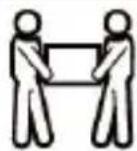
- Assembling this product is a two-person task. Do not attempt to assemble this product and install equipment without assistance.
- Before adding equipment to this product, ensure the product has been properly assembled, and that the product can support the weight of the added equipment.
- Make sure all of the equipment has been properly secured before adjusting this product.
- Tipping Hazard! This product is freestanding and therefore prone to tipping if mishandled or overloaded. Exercise caution when moving, loading, unloading and adjusting the cart. Failure to do so could result in equipment damage and/or personal injury.
Varningsmeddelanden
To view manuals, videos, drivers, downloads, technical drawings, and more visit www.startech.com/support
To view manuals, videos, drivers, downloads, technical drawings, and more visit www.startech.com/support
To view manuals, videos, drivers, downloads, technical drawings, and more visit www.startech.com/support
To view manuals, videos, drivers, downloads, technical drawings, and more visit www.startech.com/support
To view manuals, videos, drivers, downloads, technical drawings, and more visit www.startech.com/support
Table of Contents
Compliance Statements......i
Safety Statements......ii
Warning Statements......iii
Product Diagram....1
Front View....1
Product Dimensions ....2
Front View 2
Product Information....3
Package Contents .... 3
Requirements ....3
Technical Specifications....4
Installation 6
Attach the Base....6
Attach the Lever 7
Attach the Display....8
Operation 9
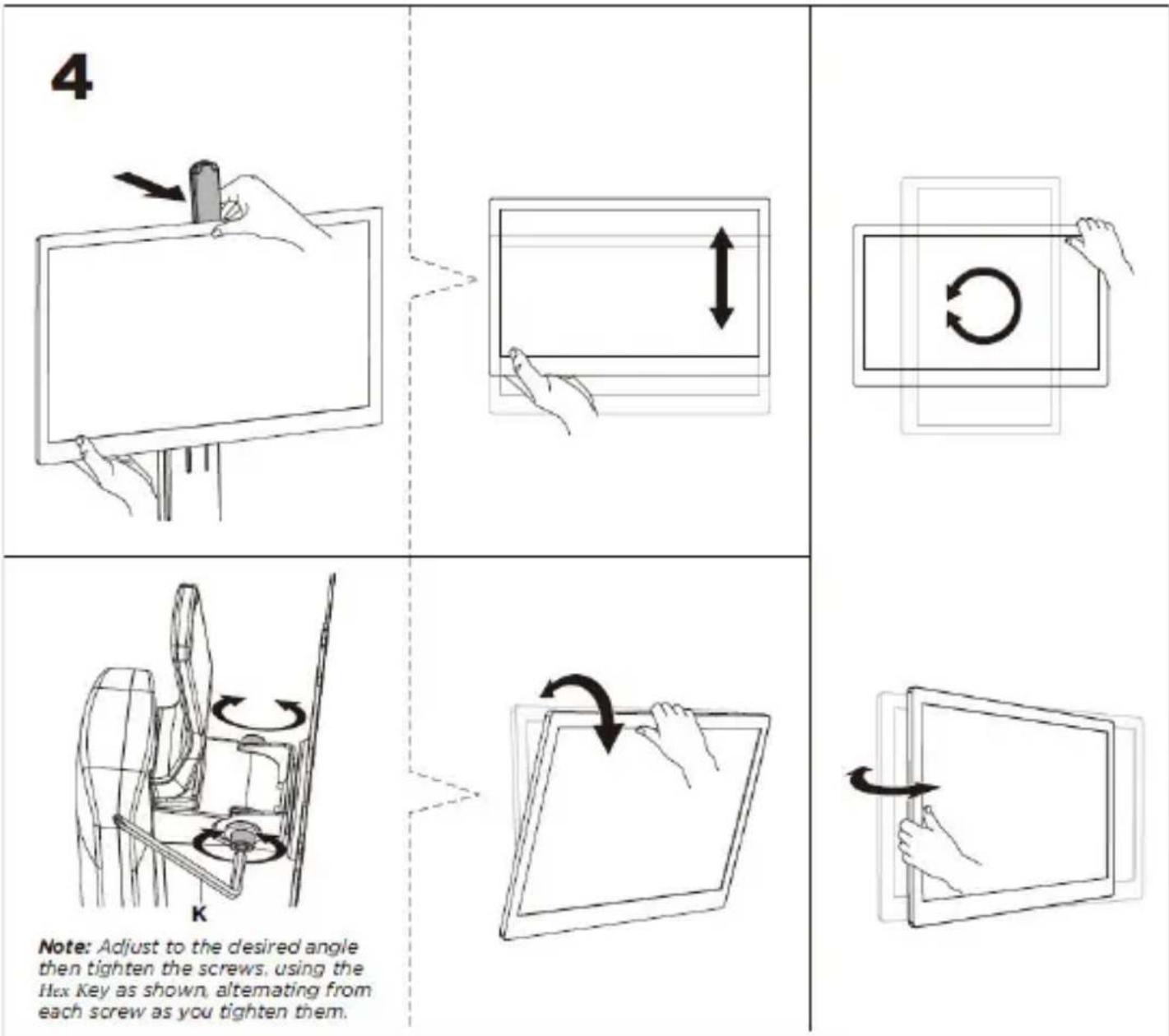
Adjust the Height, Rotation, Tilt, and Swivel of the Display 9
Product Diagram
Front View
![[Back] Lever Back Plate (D) [Front] Lever Front Cover (E) VESA Mount Assembly (C) Lift Column (A) Base (B)](/content/2026/06/1250270/images/36ec7e42fadeffed7695ad1ba5eecbd201e9bd4e3bd0c961fb85a1b8ebf9a815.jpg)
To view manuals, videos, drivers, downloads, technical drawings, and more visit www.startech.com/support
Product Dimensions
Front View

To view manuals, videos, drivers, downloads, technical drawings, and more visit www.startech.com/support
Product Information
Package Contents
Note: The following images are not to scale.

Requirements
For the latest requirements, please visit www.startech.com/FPPNEUSTND
To view manuals, videos, drivers, downloads, technical drawings, and more visit www.startech.com/support
Technical Specifications
| Type of Measurement Measurement | |
Screen Size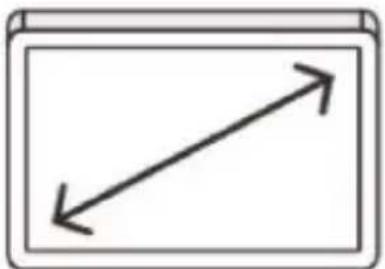 | 17" - 32" |
Weight Capacity | Monitor -- Up to 15.4 lb. (7 kg) |
VESA Compatible | 75 x 75 mm100 x 100 mm |
Height Adjustment | Minimum -- 10.4" (256 mm)Maximum -- 16.3" (415 mm) |
Monitor Tilt Range | +15° to -15° |
Monitor Swivel | +40° to -40° |
Monitor Rotation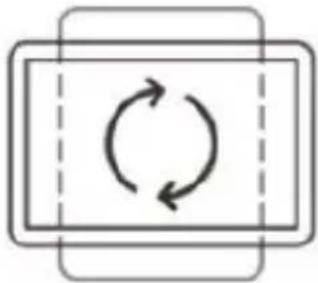 | +180° to -180° |
Cable Management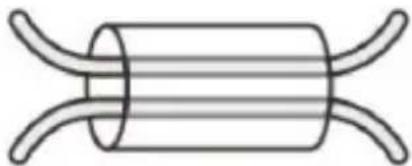 | Yes |
To view manuals, videos, drivers, downloads, technical drawings, and more visit www.startech.com/support
Installation
Note: Do not overtighten any of the screws.
Pinch hazards! Keep hands away from any pinch points created by the mechanical components when lowering or raising the display. Failure to do so may result in serious personal injury.
Attach the Base

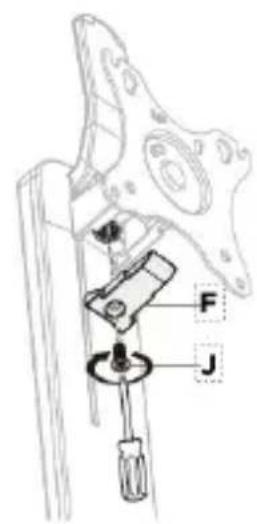
Attach the Lever
Stored Energy Hazard! This product contains a spring mechanism which can result in the product components and/or display moving forcibly and quickly upwards when actuated. Follow the provided instructions and always exercise caution when actuating the handle. When adjusting the height of the display, always support or handle the display with both hands (as shown on page 9) to safely control the raising or lowering of the display. Failure to do so may result in property damage and/or serious personal injury. Do not operate the handle prior to Step 4 of the installation procedure.
2


natural_image
Technical line drawing of a mechanical component with a close-up view showing a rotating shaft and housing (no text or symbols)
Attach the Display

natural_image
Pure electrical circuit symbols without any text or labels


Operation
Adjust the Height, Rotation, Tilt, and Swivel of the Display
To view manuals, videos, drivers, downloads, technical drawings, and more visit www.startech.com/support
Warranty Information
This product is backed by a five-year warranty.
For further information on product warranty terms and conditions, please refer to www.startech.com/warranty.
Limitation of Liability
In no event shall the liability of StarTech.com Ltd. and StarTech.com USA LLP (or their officers, directors, employees or agents) for any damages (whether direct or indirect, special, punitive, incidental, consequential, or otherwise), loss of profits, loss of business, or any pecuniary loss, arising out of or related to the use of the product exceed the actual price paid for the product.
Some states do not allow the exclusion or limitation of incidental or consequential damages. If such laws apply, the limitations or exclusions contained in this statement may not apply to you.
Hard-to-find made easy. At StarTech.com, that isn't a slogan. It's a promise.
StarTech.com is your one-stop source for every connectivity part you need. From the latest technology to legacy products — and all the parts that bridge the old and new — we can help you find the parts that connect your solutions.
We make it easy to locate the parts, and we quickly deliver them wherever they need to go. Just talk to one of our tech advisors or visit our website. You'll be connected to the products you need in no time.
Visit www.startech.com for complete information on all StarTech.com products and to access exclusive resources and time-saving tools.
StarTech.com is an ISO 9001 Registered manufacturer of connectivity and technology parts. StarTech.com was founded in 1985 and has operations in the United States, Canada, the United Kingdom and Taiwan servicing a worldwide market.
Reviews
Share your experiences using StarTech.com products, including product applications and setup, what you love about the products, and areas for improvement.
StarTech.com Ltd.
45 Artisans Crescent
London, Ontario
N5V 5E9
Canada
StarTech.com LLP
4490 South
Hamilton Road
Groveport, Ohio
43125
U.S.A.
StarTech.com Ltd.
Unit B, Pinnacle 15
Gowerton Road
Brackmills,
Northampton
NN4 7BW
United Kingdom
StarTech.com Ltd.
Siriusdreef 17-27
2132 WT
Hoofddorp
The Netherlands
FR: fr.startech.com
DE: de.startech.com
ES: es.startech.com
NL: nl.startech.com
IT: it.startech.com
JP: jp.startech.com

- Single-Monitor Stand - Height Adjustable - Aluminum
- Compliance Statements
- Use of Trademarks, Registered Trademarks, and other Protected Names and Symbols
- Safety Statements
- Safety Measures
- Mesures de sécurité
- Warning Statements
- Varningsmeddelanden
- Table of Contents
- Product Diagram
- Front View
- Product Dimensions
- Product Information
- Package Contents
- Requirements
- Installation
- Attach the Base
- Attach the Lever
- Attach the Display
- Operation
- Adjust the Height, Rotation, Tilt, and Swivel of the Display
- Warranty Information
- Limitation of Liability
- Hard-to-find made easy. At StarTech.com, that isn't a slogan. It's a promise.
- Reviews
- StarTech.com Ltd.
- StarTech.com LLP
Brand : StarTech.com
Model : FPPNEUSTND
Category : Desk Stand