
CB1S485 - Interface StarTech.com - Free user manual and instructions
Find the device manual for free CB1S485 StarTech.com in PDF.


| Product Type | RS-232 to RS-485/422 Converter |
| Brand | StarTech.com |
| Model | CB1S485 |
| Dimensions | 2.5 x 1.5 x 0.8 in (63.5 x 38.1 x 20.3 mm) |
| Weight | 3 oz (85 g) |
| Power Supply | Powered via RS-232 port (DB9) - no external power required |
| Serial Interface | RS-232 (DB9 male) to RS-485/422 (5-pin terminal block) |
| Data Rate | Up to 115.2 kbps |
| Transmission Mode | Half-duplex (RS-485) or full-duplex (RS-422) |
| Termination | On-board 120 Ohm termination resistor (selectable via jumper) |
| Protection | 15 kV ESD protection on RS-485/422 lines |
| Isolation | 2500V isolation between RS-232 and RS-485/422 |
| Connectors | DB9 male (RS-232) and 5-pin screw terminal (RS-485/422) |
| Operating Temperature | 0°C to 70°C (32°F to 158°F) |
| Humidity | 5% to 95% non-condensing |
| LED Indicators | Power, TX, RX |
| Included Accessories | Terminal block plug, quick-start guide |
| Maintenance | Wipe with a dry cloth; do not use liquids or solvents |
| Safety | Use only with compatible equipment; disconnect before servicing |
| Spare Parts | Not available; unit is not user-serviceable |
| Warranty | Lifetime warranty by StarTech.com |
| Repairability | Non-repairable; replace if defective |
Frequently Asked Questions - CB1S485 StarTech.com
User questions about CB1S485 StarTech.com
0 question about this device. Answer the ones you know or ask your own.
Ask a new question about this device
Download the instructions for your Interface in PDF format for free! Find your manual CB1S485 - StarTech.com and take your electronic device back in hand. On this page are published all the documents necessary for the use of your device. CB1S485 by StarTech.com.
USER MANUAL CB1S485 StarTech.com
1 Port CardBus (PCMCIA) RS422/485 Serial Laptop Adapter
CB1S485

*actual product may vary from photos
For the most up-to-date information, please visit: www.startech.com
FCC Compliance Statement
This equipment has been tested and found to comply with the limits for a Class B digital device, pursuant to part 15 of the FCC Rules. These limits are designed to provide reasonable protection against harmful interference in a residential installation. This equipment generates, uses and can radiate radio frequency energy and, if not installed and used in accordance with the instructions, may cause harmful interference to radio communications. However, there is no guarantee that interference will not occur in a particular installation. If this equipment does cause harmful interference to radio or television reception, which can be determined by turning the equipment off and on, the user is encouraged to try to correct the interference by one or more of the following measures:
• Reorient or relocate the receiving antenna.
- Increase the separation between the equipment and receiver.
- Connect the equipment into an outlet on a circuit different from that to which the receiver is connected.
- Consult the dealer or an experienced radio/TV technician for help.
Use of Trademarks, Registered Trademarks, and other Protected Names and Symbols
This manual may make reference to trademarks, registered trademarks, and other protected names and/or symbols of third-party companies not related in any way to StarTech.com. Where they occur these references are for illustrative purposes only and do not represent an endorsement of a product or service by StarTech.com, or an endorsement of the product(s) to which this manual applies by the third-party company in question. Regardless of any direct acknowledgement elsewhere in the body of this document, StarTech.com hereby acknowledges that all trademarks, registered trademarks, service marks, and other protected names and/or symbols contained in this manual and related documents are the property of their respective holders.
Table of Contents
Introduction ....1
Packaging Contents ....1
System Requirements....1
Hardware Guide ......2
Installation 4
Driver Installation....4
RS-485 2-wire mode....5
Baud Rate 5
Application Wiring....6
RS-422 (Transmitter buffer is always enabled)....7
Specifications 8
Technical Support 9
Warranty Information 9
Introduction Packaging Contents
• 1x Serial PCMCIA Card
- 1x Breakout Cable
- 1x Driver CD
• 1x Instruction Manual
System Requirements
- A host computer with an available CardBus Slot. Please note that CB1S485 can be used on a desktop computer, using a PCMCIA to PCI Adapter Card.
- Windows® 7 (32/64bit)/ Vista(32/64)/ XP(32/64), 2000, ME, 98SE, CE 5.0 Windows® Server 2008 R2/ 2003(32/64) Linux Kernel 2.4.x/ 2.6.x
Hardware Guide
UART Input Clock Speed Selector
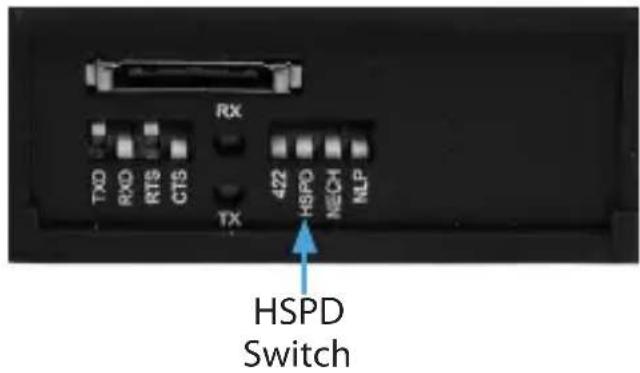
RS-422/485 Mode Selector

NOTE:
- Please note that if the mode were set at "422" mode, the other settings (NECH and NLP settings) will take no effect.
- Echo mode is used to detect data collisions. If the echoed data was not equal to the transmitted data, then data collisions are occurring.
| Switch Name | Switch Positions | Clock Speed |
| (Up) | UART Input Clock Speed = 1.8432MHZ, Maximum baud rate is 115.2Kbps | |
| HSPD | (Down) (Default) | UART Input Clock Speed = 14.7456MHZ, Maximum baud rate is 926.1Kbps (default). Setting requires adjustment from Windows Device Manager |
| Switch Name | Jumper Positions | Mode and Termination Resistor Setting |
| 422 | Up (default) | 2-wire RS-485 mode (Note) |
| Down | 4-wire RS-422 mode | |
| NECH | Up | Transmitting data will be echoed back |
| Down (default) | No echo data | |
| NLP | Up | RTS will be connected to CTS |
| Down (default) | RTS and CTS operate normally |
Terminator Settings

DB9 Connector Pinout

| Switch Name | Jumper Positions | Mode and Termination Resistor Setting |
| TXD | Up (default) | 2-wire RS-485 mode (Note) |
| Down | 4-wire RS-422 mode | |
| RXD | Up | Transmitting data will be echoed back |
| Down (default) | No echo data | |
| RTS | Up (default) | RTS will be connected to CTS |
| Down | RTS and CTS operate normally | |
| CTS | Up | CTS Terminator Disabled |
| Down (default) | CTS Terminator Enabled |
9 Pins Signal
| 1 TXD- (DATA-) |
| 2 TXD+ (DATA+) |
| 3 RXD+ |
| 4 RXD- |
| 5 GND |
| 6 RTS- |
| 7 RTS+ |
| 8 CTS+ |
| 9 CTS- |
Installation
WARNING! It is advisable to remove all possible static discharge potential from any objects that the ExpressCard may come in contact with before installation. This can be accomplished by touching a grounded metal object, prior to insertion
- With the notebook PC powered on and fully booted, insert the PCMCIA Card into an available CardBus slot on the host computer.
- Connect the 15-pin connector of the cable to your PC card, then connect the DB9 connector to your serial device.
- The Add New Hardware Wizard will launch and will guide you through the driver installation process.
Driver Installation
Windows 98, ME, 2000, XP, 2003
The necessary driver files are in ZIP format (e.g. V6515_RS422_485.ZIP) and are located in E:\IO\OXFORD\RS422_485 (where E: denotes the CD/DVD-ROM drive. Please copy the file to your local hard drive (presumably C:) and unzip it before proceeding with installation.
- When the Found New Hardware Wizard appears, click Next to continue.

- Select Install from a list or specific location (advanced) and click Next.
- Select Include this location in the search and click Browse to specify the driver's location.
- Click Next to continue, then click on Finish to complete installation.
Windows NT
Because Windows NT does not support plug and play, you will need to locate the Install_Serial.exe file (in the E:\IO\OXFORD\WinNT4 folder, where E designates the location of the CD/DVD-ROM drive), and double click on the executable file. Follow the prompts to complete installation.
RS-485 2-wire mode
To enable CB1S485 to operate in RS-485 2-wire mode:
- Right-click on My Computer. If you are using Windows 98/ME, select Properties. If you are using Windows 2000/XP, select Manage.
- Choose Device Manager and double-click on Ports.
- You will notice the added ports, listed as a PCI Communications Port. Double-click on the COM Port you wish to configure, and select Settings.
Windows 2000, XP
- In the PCI Communications Port Properties window, click on the Settings tab.
- Under Hardware config, select RS422/485, and change the RS485 buffer enable value to Active Low, using the dropdown box provided. Click OK to save and exit.

Windows 98, ME
-
In the PCI Communications Port Properties window, click on the Settings tab.
-
Change the DTR function to RS485 Buf_En Active Low, using the dropdown box provided.
Baud Rate
By default, CB1S485 is set to a baud rate of 115.2Kbps (maximum). To increase the baud rate to 921.6Kbps maximum:
Windows 2000, XP
-
As mentioned on page 2, move the HSPD switch to the down position.
-
Right-click on My Computer and select Manage.
- Choose Device Manager and double-click on Ports.
- You will notice the added port, listed as a PCI Communications Port. Double-click on the COM Port you wish to configure, select Data rate, click on Detect Crystal Frequency, then OK.

Windows 98/ME
- As mentioned on page 2, move the HSPD switch to the down position.
- Right-click on My Computer and select Properties.
- Choose Device Manager and double-click on Ports.
- You will notice the added port, listed as a PCI Communications Port. Double-click on the COM Port you wish to configure, select Data rate, and put a checkmark next to Detect Crystal Frequency by clicking in the box provided. Click on OK to save this setting.
Application Wiring
RS-485 (Transmitter is controlled by ATTATM Hardware)
NOTE: CB1S485 supports optional auto echo mode operation. When enabled, data sent to the connected RS-485 transmitter is simultaneously sent to the receiver. The current application can then use the "echoed" data to check for data collisions.
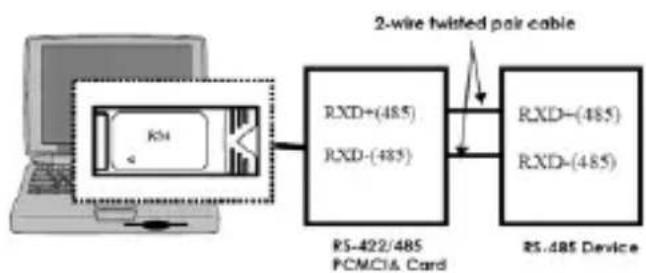
flowchart
graph LR
    A["PC"] --> B["2-wire twisted pair cable"]
    B --> C["RS-485 Device"]
    B --> D["RS-485 PCM/CA Card"]
    D --> E["RXD-(485)"]
    D --> F["RXD-(485)"]
RS-422 (Transmitter buffer is always enabled)
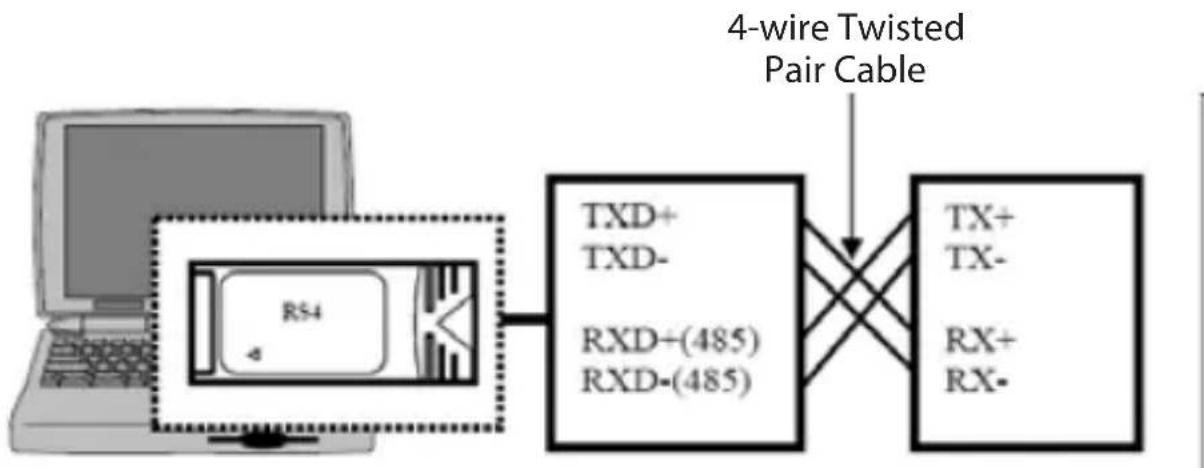
flowchart
graph LR
    A["Laptop"] --> B["Device"]
    B --> C["TXD+ TXD-"]
    B --> D["RXD+(485) RXD-(485)"]
    C --> E["4-wire Twisted Pair Cable"]
    D --> E
    E --> F["TX+ TX-"]
    E --> G["RX+ RX-"]
NOTE: CB1S485 supports 4-wire RS-422 mode, which requires cross-over twisted pair cable.
CB1S485 also provides two handshaking signals, RTS+/RTS- and CTS+/CTS- to perform hardware flow control, which requires the following wiring scheme:

flowchart
graph LR
    A["CB1S485"] --> B["RS422 Device"]
    A --> C["TXD+"]
    A --> D["TXD-"]
    A --> E["RXD+"]
    A --> F["RXD-"]
    A --> G["RTS+"]
    A --> H["RTS-"]
    A --> I["CTS+"]
    A --> J["CTS-"]
    B --> K["TXD+"]
    B --> L["TXD-"]
    B --> M["RXD+"]
    B --> N["RXD-"]
    B --> O["RTS+"]
    B --> P["RTS-"]
    B --> Q["CTS+"]
    B --> R["CTS-"]
Specifications
Regulatory Certifications ROHS, FCC, CE
Bus Type 32-bit CardBus Type-II Slot
Connectors 1x DB9 Male Connector
Maximum Data Transfer Rate 921 kbps
OS Support
Windows® 7 (32/64bit)/ Vista(32/64)/
XP(32/64), 2000, ME, 98SE, CE 5.0
Windows® Server 2008 R2/ 2003(32/64)
Linux Kernel 2.4.x/ 2.6.x
Bits Data Framing Support 5/6/7/8/9
Technical Support
StarTech.com's lifetime technical support is an integral part of our commitment to provide industry-leading solutions. If you ever need help with your product, visit www.startech.com/support and access our comprehensive selection of online tools, documentation, and downloads.
For the latest drivers/software, please visit www.startech.com/downloads
Warranty Information
This product is backed by a two year warranty.
In addition, StarTech.com warrants its products against defects in materials and workmanship for the periods noted, following the initial date of purchase. During this period, the products may be returned for repair, or replacement with equivalent products at our discretion. The warranty covers parts and labor costs only. StarTech.com does not warrant its products from defects or damages arising from misuse, abuse, alteration, or normal wear and tear.
Limitation of Liability
In no event shall the liability of StarTech.com Ltd. and StarTech.com USA LLP (or their officers, directors, employees or agents) for any damages (whether direct or indirect, special, punitive, incidental, consequential, or otherwise), loss of profits, loss of business, or any pecuniary loss, arising out of or related to the use of the product exceed the actual price paid for the product. Some states do not allow the exclusion or limitation of incidental or consequential damages. If such laws apply, the limitations or exclusions contained in this statement may not apply to you.
Hard-to-find made easy. At StarTech.com, that isn't a slogan. It's a promise.
StarTech.com is your one-stop source for every connectivity part you need. From the latest technology to legacy products — and all the parts that bridge the old and new — we can help you find the parts that connect your solutions.
We make it easy to locate the parts, and we quickly deliver them wherever they need to go. Just talk to one of our tech advisors or visit our website. You'll be connected to the products you need in no time.
Visit www.startech.com for complete information on all StarTech.com products and to access exclusive resources and time-saving tools.
StarTech.com is an ISO 9001 Registered manufacturer of connectivity and technology parts. StarTech.com was founded in 1985 and has operations in the United States, Canada, the United Kingdom and Taiwan servicing a worldwide market.
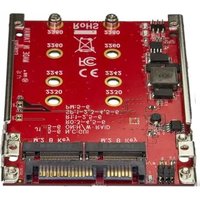


- Port CardBus (PCMCIA) RS422/485 Serial Laptop Adapter
- FCC Compliance Statement
- Use of Trademarks, Registered Trademarks, and other Protected Names and Symbols
- Table of Contents
- Introduction ....1
- Hardware Guide ......2
- Installation 4
- Specifications 8
- Technical Support 9
- Warranty Information 9
- Introduction Packaging Contents
- System Requirements
- Hardware Guide
- UART Input Clock Speed Selector
- NOTE:
- Terminator Settings
- DB9 Connector Pinout
- Installation
- Driver Installation
- Windows NT
- RS-485 2-wire mode
- Windows 2000, XP
- Windows 98, ME
- Baud Rate
- Windows 98/ME
- Application Wiring
- RS-485 (Transmitter is controlled by ATTATM Hardware)
- RS-422 (Transmitter buffer is always enabled)
- Specifications
- Technical Support
- Warranty Information
- Limitation of Liability
Brand : StarTech.com
Model : CB1S485
Category : Interface