
ICUSB232D - Interface StarTech.com - Free user manual and instructions
Find the device manual for free ICUSB232D StarTech.com in PDF.


| Product Type | USB to RS232 Serial Adapter |
| Brand | StarTech.com |
| Model | ICUSB232D |
| Interface | Serial RS-232 |
| Bus Type | USB 2.0 |
| Chipset ID | Prolific PL2303-TA |
| Connector Types | 1 - DB-9 (9-pin D-Sub) Male; 1 - USB B (4-pin) Female |
| Max Baud Rate | 128 Kbps |
| Data Bits | 5, 6, 7, 8 |
| Stop Bits | 1, 1.5, 2 |
| Parity | None, Odd, Even, Mark, Space |
| Flow Control | None, Xon/Xoff, RTS/CTS, CD/DTR/DSR |
| FIFO | 512 Bytes |
| Serial Protocol | RS-232 |
| Cable Length | 6 ft (1.8 m) |
| Dimensions (LxWxH) | 59 x 32 x 22 mm |
| Operating Temperature | 0°C to 70°C (32°F to 158°F) |
| Storage Temperature | -10°C to 80°C (14°F to 176°F) |
| Humidity | 5~95% RH (Non-Condensing) |
| Power Source | USB bus-powered |
| OS Compatibility | Windows 8/8.1/7/Vista/XP, Windows Server 2012/2008 R2/2003, Mac OS 10.6 and up, Linux 3.5/3.13 |
| Warranty | 2 years |
| Package Contents | 1x USB to RS232 Adapter, 1x 6ft USB 2.0 Cable A to B, 1x Driver CD, 1x Instruction Manual |
Frequently Asked Questions - ICUSB232D StarTech.com
User questions about ICUSB232D StarTech.com
0 question about this device. Answer the ones you know or ask your own.
Ask a new question about this device
Download the instructions for your Interface in PDF format for free! Find your manual ICUSB232D - StarTech.com and take your electronic device back in hand. On this page are published all the documents necessary for the use of your device. ICUSB232D by StarTech.com.
USER MANUAL ICUSB232D StarTech.com
USB to RS232 DB9 Serial Adapter with Detachable 6' M/M USB Cable
ICUSB232D

natural_image
Close-up of a black D-sub connector with two metallic pins (no text or symbols visible)*actual product may vary from photos
For the most up-to-date information, please visit: www.startech.com
FCC Compliance Statement
This equipment has been tested and found to comply with the limits for a Class B digital device, pursuant to part 15 of the FCC Rules. These limits are designed to provide reasonable protection against harmful interference in a residential installation. This equipment generates, uses and can radiate radio frequency energy and, if not installed and used in accordance with the instructions, may cause harmful interference to radio communications. However, there is no guarantee that interference will not occur in a particular installation. If this equipment does cause harmful interference to radio or television reception, which can be determined by turning the equipment off and on, the user is encouraged to try to correct the interference by one or more of the following measures:
• Reorient or relocate the receiving antenna.
- Increase the separation between the equipment and receiver.
- Consult the dealer or an experienced radio/TV technician for help
- Connect the equipment into an outlet on a circuit different from that to which the receiver is connected.
This device complies with part 15 of the FCC Rules. Operation is subject to the following two conditions: (1) This device may not cause harmful interference, and (2) this device must accept any interference received, including interference that may cause undesired operation.
Changes or modifications not expressly approved by StarTech.com could void the user's authority to operate the equipment.
Industry Canada Statement
This Class B digital apparatus complies with Canadian ICES-003.
Use of Trademarks, Registered Trademarks, and other Protected Names and Symbols
This manual may make reference to trademarks, registered trademarks, and other protected names and/or symbols of third-party companies not related in any way to StarTech.com. Where they occur these references are for illustrative purposes only and do not represent an endorsement of a product or service by StarTech.com, or an endorsement of the product(s) to which this manual applies by the third-party company in question. Regardless of any direct acknowledgement elsewhere in the body of this document, StarTech.com hereby acknowledges that all trademarks, registered trademarks, service marks, and other protected names and/or symbols contained in this manual and related documents are the property of their respective holders.
Table of Contents
Product Diagram....1
Front View .... 1
Rear View....1
RS232 Pinout....2
Introduction......2
Packaging Contents 2
System Requirements....2
Installation 3
Windows ^® 3
Mac OS ^® 4
Verifying Installation....4
Specifications....6
Technical Support 7
Warranty Information......7
Introduction
Packaging Contents
• 1x USB to RS232 Adapter
- 1x 6ft USB 2.0 Cable M/M - "A" to "B"
- 1x Driver CD
• 1x Instruction Manual
System Requirements
• Available USB Port
- Windows® 8 / 8.1 (32/64bit), 7 (32/64), Vista (32/64), XP (32/64), Windows Server® 2012, 2008 R2, 2003, Mac OS® 10.6 and up (Tested up to 10.10), Linux 3.5 / 3.13
Product Diagram
Front View

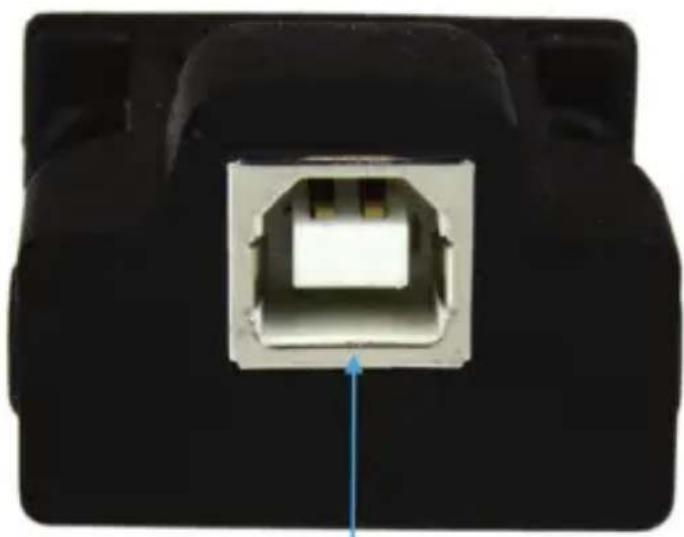
Rear View
natural_image
Close-up of a black electronic device with a white port and gray housing, showing a blue arrow pointing to the internal structure (no text or symbols visible)USB 2.0'B'
(USB 'A' to 'B' Cable Included)
RS232 Pinout

| Pin 1 | DCD |
| Pin 2 | RXD |
| Pin 3 | TXD |
| Pin 4 | DTR |
| Pin 5 | GND |
| Pin 6 | DSR |
| Pin 7 | RTS |
| Pin 8 | CTS |
| Pin 9 | RI |
Installation
Depending on your Operating System version and whether or not you have an active network connection, the USB to Serial Adapter may auto-install, or auto-download the proper drivers once connected to an available USB port on the host system. If the USB to Serial Adapter does not automatically install the drivers, follow the steps below to complete the installation process.
Windows®
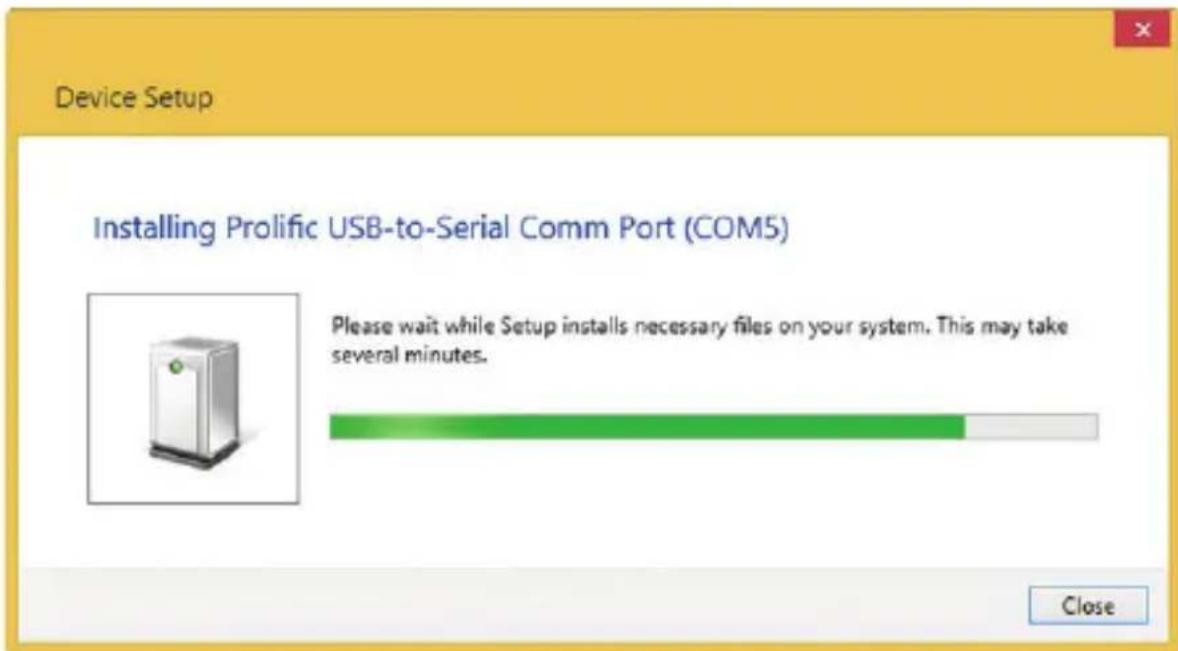
- Connect the provided USB 2.0 Cable to the USB to Serial Adapter, and then to an available USB port on the host computer. The drivers should automatically install.
-
If the drivers did not automatically download and/or install, download the latest drivers from the www.startech.com website (recommended), or insert the provided Driver CD into your computers CD/DVD drive.
-
Browse to the downloaded driver file location and run the ".exe" install application. Follow any on-screen instructions to complete the driver installation process.
-
If using the Driver CD method, select the Open folder to view files option from the AutoPlay menu. If AutoPlay is disabled on your system, browse to your CD/DVD drive.
-
Run the ".exe" install application and follow any on-screen instructions to complete the driver installation process.
Note: You may be prompted to restart your system.
- Connect your RS232 Serial Device to the DB-9 Port on the USB to Serial Adapter
Mac OS®
- Connect the provided USB 2.0 Cable to the USB to Serial Adapter, and then to an available USB port on the host computer.
- If the drivers did not automatically download and/or install, download the latest drivers from the www.startech.com website (recommended), or insert the provided Driver CD in to your computers CD/DVD drive.
- Browse to the downloaded driver file location and run the ".dmg" install application. Follow any on-screen instructions to complete the driver installation process.
- If using the Driver CD method, browse to your CD/DVD drive and run the ".dmg" install application and follow any on-screen instructions to complete the driver installation process.
Verifying Installation
Windows®
- From the main desktop or start menu, open the Device Manager by right-clicking on Computer, and then selecting Manage. In the Computer Management window, select Device Manager from the left window panel. (For Windows® 8.1, right-click on the Start button and click Device Manager).
- Expand the "Ports (COM & LPT)" section. With the USB to Serial adapter connected, on a successful install you should see the following device in the list with no exclamation points or question marks.

Mac OS®
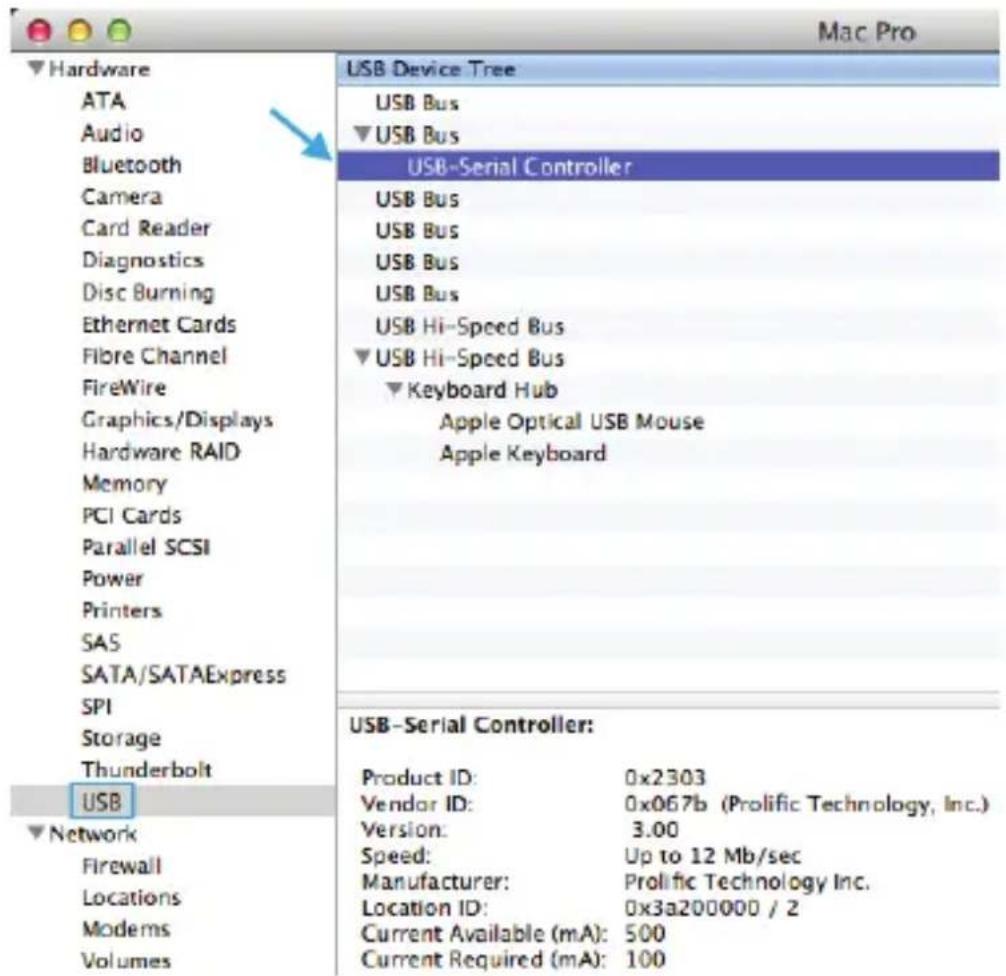
- Open the System Profiler by clicking the Apple symbol in the top left corner, selecting About this Mac, then select System Report.
- Expand the "Hardware" section and click "USB" in the left column. With the USB to Serial Adapter connected, on a successful install you should see the following device in the list.
Specifications
| Interface Serial | |
| Bus Type USB 2.0 | |
| Port Style Cable Adapter | |
| Industry Standards USB 2.0/1.1 | RS-232 |
| Chipset ID Prolific - PL2303-TA | |
| Connector Types 1 - DB-9 (9 pin; D-Sub) Male | 1 - USB B (4 pin) Female |
| Serial Protocol RS-232 | |
| Max Baud Rate 128 Kbps | |
| Data Bits 5,6,7,8 | |
| FIFO 512 Bytes | |
| Flow Control None, Xon/Xoff, RTS/CTS, CD/DTR/DSR | |
| Parity None, Odd, Even, Mark, Space | |
| Stop Bits 1, 1.5, 2 | |
| OS Compatibility | Windows® 8 / 8.1 (32/64bit), 7 (32/64), Vista (32/64), XP (32/64), Windows Server® 2012, 2008 R2, 2003Mac OS® 10.6 and up (Tested up to 10.10)Linux 3.5 / 3.13 |
| System and Cable Requirements | Available USB 1.1 (or above) port |
| Product Dimensions (LxWxH) | 59 x 32 x 22 mm |
| Cable Length 6 ft [1.8 m] | |
| Operating Temperature | 0°C to 70°C (32°F to 158°F) |
| Storage Temperature | -10°C to 80°C (14°F to 176°F) |
| Humidity | 5~95% RH (Non-Condensing) |
Technical Support
StarTech.com's lifetime technical support is an integral part of our commitment to provide industry-leading solutions. If you ever need help with your product, visit www.startech.com/support and access our comprehensive selection of online tools, documentation, and downloads.
For the latest drivers/software, please visit www.startech.com/downloads
Warranty Information
This product is backed by a two year warranty.
In addition, StarTech.com warrants its products against defects in materials and workmanship for the periods noted, following the initial date of purchase. During this period, the products may be returned for repair, or replacement with equivalent products at our discretion. The warranty covers parts and labor costs only. StarTech.com does not warrant its products from defects or damages arising from misuse, abuse, alteration, or normal wear and tear.
Limitation of Liability
In no event shall the liability of StarTech.com Ltd. and StarTech.com USA LLP (or their officers, directors, employees or agents) for any damages (whether direct or indirect, special, punitive, incidental, consequential, or otherwise), loss of profits, loss of business, or any pecuniary loss, arising out of or related to the use of the product exceed the actual price paid for the product. Some states do not allow the exclusion or limitation of incidental or consequential damages. If such laws apply, the limitations or exclusions contained in this statement may not apply to you.
Hard-to-find made easy. At StarTech.com, that isn't a slogan. It's a promise.
StarTech.com is your one-stop source for every connectivity part you need. From the latest technology to legacy products — and all the parts that bridge the old and new — we can help you find the parts that connect your solutions.
We make it easy to locate the parts, and we quickly deliver them wherever they need to go. Just talk to one of our tech advisors or visit our website. You'll be connected to the products you need in no time.
Visit www.startech.com for complete information on all StarTech.com products and to access exclusive resources and time-saving tools.
StarTech.com is an ISO 9001 Registered manufacturer of connectivity and technology parts. StarTech.com was founded in 1985 and has operations in the United States, Canada, the United Kingdom and Taiwan servicing a worldwide market.


- USB to RS232 DB9 Serial Adapter with Detachable 6' M/M USB Cable
- FCC Compliance Statement
- Industry Canada Statement
- Use of Trademarks, Registered Trademarks, and other Protected Names and Symbols
- Table of Contents
- Product Diagram....1
- Introduction......2
- Installation 3
- Specifications....6
- Technical Support 7
- Warranty Information......7
- Introduction
- Packaging Contents
- System Requirements
- Product Diagram
- Front View
- Rear View
- RS232 Pinout
- Installation
- Windows®
- Mac OS®
- Verifying Installation
- Technical Support
- Warranty Information
- Limitation of Liability
Brand : StarTech.com
Model : ICUSB232D
Category : Interface