
QWCHSTAND - Computer Accessories and Peripherals StarTech.com - Free user manual and instructions
Find the device manual for free QWCHSTAND StarTech.com in PDF.


| Product Type | Monitor Stand / Desk Mount |
| Brand | StarTech.com |
| Model | QWCHSTAND |
| Material | Steel and aluminum |
| Weight Capacity | Up to 22 lbs (10 kg) per screen |
| Number of Monitors Supported | Up to 2 monitors |
| Mounting Pattern (VESA) | 75x75mm and 100x100mm |
| Adjustment Type | Tilt, swivel, rotation, height adjustable |
| Tilt Range | -90° to +90° |
| Swivel Range | 180° |
| Rotation Range | 360° |
| Height Adjustment Range | Up to 12 inches (30.5 cm) |
| Clamp Mount Thickness | 0.4 to 2.0 inches (1 to 5 cm) |
| Cable Management | Integrated cable clips for tidy routing |
| Dimensions (Overall) | 45.7 x 12.7 x 25.4 inches (116 x 32 x 64.5 cm) |
| Weight (Product) | 8.6 lbs (3.9 kg) |
| Color | Black |
| Power Supply | Not required (mechanical stand) |
| Compliance | RoHS, TAA compliant |
| Warranty | 3 years limited warranty |
| Included Accessories | Mounting hardware, cable ties, user manual |
| Cleaning Instructions | Wipe with a soft, dry cloth. Avoid harsh chemicals. |
| Safety Notes | Ensure mount is securely fastened to desk or wall. Do not exceed weight capacity. |
| Repairability | Replacement parts available via StarTech.com support |
Frequently Asked Questions - QWCHSTAND StarTech.com
User questions about QWCHSTAND StarTech.com
0 question about this device. Answer the ones you know or ask your own.
Ask a new question about this device
Download the instructions for your Computer Accessories and Peripherals in PDF format for free! Find your manual QWCHSTAND - StarTech.com and take your electronic device back in hand. On this page are published all the documents necessary for the use of your device. QWCHSTAND by StarTech.com.
USER MANUAL QWCHSTAND StarTech.com
Wireless Charging Stand - 15W

natural_image
Technical line drawing of a circular mechanical component with hexagonal lattice pattern and labeled 'qi' (no text or symbols beyond the label)Actual product may vary from photos
User Manual
SKU#: QWCHSTAND
For the latest information and specifications visit
www.startech.com/QWCHSTAND
Compliance Statements
FCC Compliance Statement
This equipment has been tested and found to comply with the limits for a Class B digital device, pursuant to part 15 of the FCC Rules. These limits are designed to provide reasonable protection against harmful interference in a residential installation. This equipment generates, uses and can radiate radio frequency energy and, if not installed and used in accordance with the instructions, may cause harmful interference to radio communications. However, there is no guarantee that interference will not occur in a particular installation. If this equipment does cause harmful interference to radio or television reception, which can be determined by turning the equipment off and on, the user is encouraged to try to correct the interference by one or more of the following measures:
Reorient or relocate the receiving antenna.
Increase the separation between the equipment and receiver.
Connect the equipment into an outlet on a circuit different from that to which the receiver is connected.
Consult the dealer or an experienced radio/TV technician for help
This device complies with part 15 of the FCC Rules. Operation is subject to the following two conditions: (1) This device may not cause harmful interference, and (2) this device must accept any interference received, including interference that may cause undesired operation. Changes or modifications not expressly approved by StarTech.com could void the user's authority to operate the equipment.
Industry Canada Statement
This Class B digital apparatus complies with Canadian ICES-003.
This device complies with Industry Canada licence-exempt RSS standard(s). Operation is subject to the following two conditions:
To view manuals, videos, drivers, downloads, technical drawings, and more visit www.startech.com/support
(1) This device may not cause interference, and (2) This device must accept any interference, including interference that may cause undesired operation of the device.
This equipment complies with IC RSS-102 radiation exposure limit set forth for an uncontrolled environment. This equipment should be installed and operated with minimum distance 0.5cm between the radiator and your body.
Use of Trademarks, Registered Trademarks, and other Protected Names and Symbols
This manual may make reference to trademarks, registered trademarks, and other protected names and/or symbols of third-party companies not related in any way to StarTech.com. Where they occur these references are for illustrative purposes only and do not represent an endorsement of a product or service by StarTech.com, or an endorsement of the product(s) to which this manual applies by the third-party company in question. Regardless of any direct acknowledgement elsewhere in the body of this document, StarTech.com hereby acknowledges that all trademarks, registered trademarks, service marks, and other protected names and/or symbols contained in this manual and related documents are the property of their respective holders.
To view manuals, videos, drivers, downloads, technical drawings, and more visit www.startech.com/support
Safety Statements
Safety Measures
- Wiring terminations should not be made with the product and/or electric lines under power.
- Cables (including power and charging cables) should be placed and routed to avoid creating electric, tripping or safety hazards.
Mesures de sécurité
To view manuals, videos, drivers, downloads, technical drawings, and more visit www.startech.com/support
Table of Contents
Compliance Statements....1
Safety Statements....2
Product Diagram....4
Product Information 5
Package Content 5
Requirements 5
Powering the Wireless Charging Stand 6
Using the Wireless Charging Stand 7
LED Indicators......8
Product Diagram
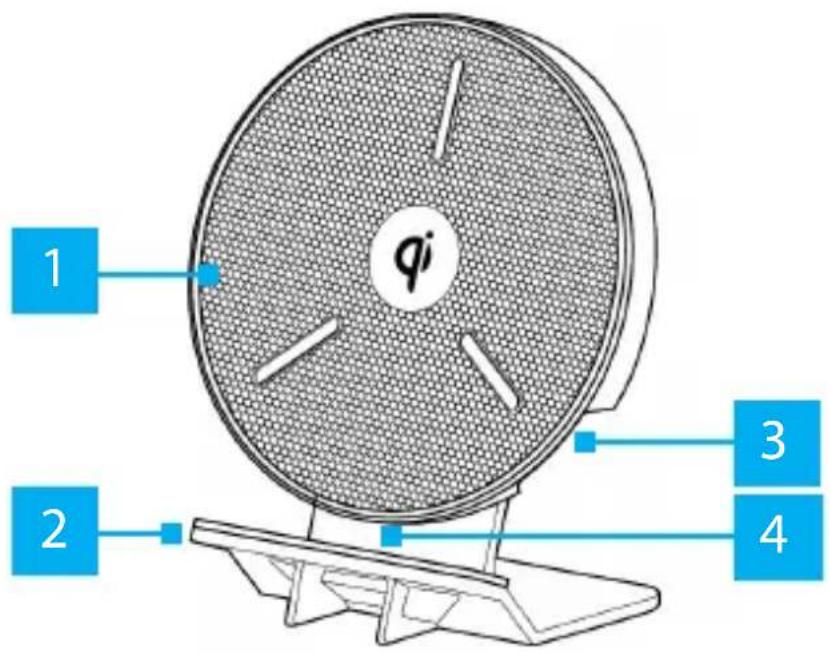
| 1 | Wireless Charging Pad |
| 2 | Stand |
| 3 | AC Power Connector (side) |
| 4 | LED Indicator (bottom) |
To view manuals, videos, drivers, downloads, technical drawings, and more visit www.startech.com/support
Product Information
Package Content
• Wireless Charging Stand x 1
• AC Power Adapter x 1
Requirements
For the latest requirements, please visit www.startech.com/QWCHSTAND
Devices
• Samsung™ 10W Fast Charge
- iPhone 7.5W Fast Charge
• Qi 5W
Powering the Wireless Charging Stand
- Connect the AC Power Adapter to the AC Power Connector on the Wireless Charging Stand and the other end to an AC Electrical Outlet.

natural_image
Diagram of a mechanical device with a circular component and a cable, showing an arrow indicating direction (no text or symbols present)Connecting the AC Power Adapter
To view manuals, videos, drivers, downloads, technical drawings, and more visit www.startech.com/support
Using the Wireless Charging Stand
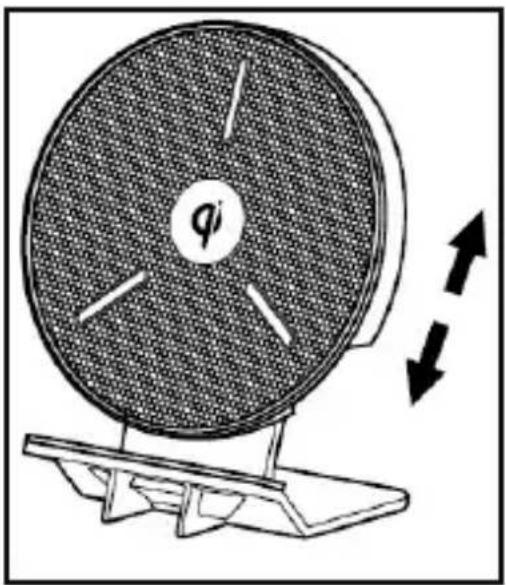
- (Optional) Adjust the height of the Wireless Charging Stand by pulling the Wireless Charging Pad up, away from the Stand.
natural_image
Diagram of a circular mechanical device with internal blades and directional arrows, no text or symbols presentAdjusting the Height
- When you have the Wireless Charging Stand at the correct height, place the Device you want to charge on the stand either horizontally or vertically. Ensure that the back of the Device is resting against the Charging Pad at the proper height.

natural_image
Two line drawings of electronic devices with stands, one showing a circular component and the other a curved screen (no text or symbols)Charging a Device
To view manuals, videos, drivers, downloads, technical drawings, and more visit www.startech.com/support
LED Indicators
| LED Function | |
| Blue Indicates that | the device is properly charging. |
| Blue Flashing Indicates | that the device is charging at a lower voltage. |
| Red Indicates that | the Wireless Charging Stand is not working correctly. You may need to reposition the Device. |
| Red Flashing Indicates | that the device you are trying to charge is not compatible with the Wireless Charging Stand. |
| Off Indicates that | the device is fully charged. |
To view manuals, videos, drivers, downloads, technical drawings, and more visit www.startech.com/support
Warranty Information
This product is backed by a two-year warranty.
For further information on product warranty terms and conditions, please refer to www.startech.com/warranty.
Limitation of Liability
In no event shall the liability of StarTech.com Ltd. and StarTech.com USA LLP (or their officers, directors, employees or agents) for any damages (whether direct or indirect, special, punitive, incidental, consequential, or otherwise), loss of profits, loss of business, or any pecuniary loss, arising out of or related to the use of the product exceed the actual price paid for the product.
Some states do not allow the exclusion or limitation of incidental or consequential damages. If such laws apply, the limitations or exclusions contained in this statement may not apply to you.
Hard-to-find made easy. At StarTech.com, that isn't a slogan. It's a promise.
StarTech.com is your one-stop source for every connectivity part you need. From the latest technology to legacy products — and all the parts that bridge the old and new — we can help you find the parts that connect your solutions.
We make it easy to locate the parts, and we quickly deliver them wherever they need to go. Just talk to one of our tech advisors or visit our website. You'll be connected to the products you need in no time.
Visit www.startech.com for complete information on all StarTech.com products and to access exclusive resources and time-saving tools.
StarTech.com is an ISO 9001 Registered manufacturer of connectivity and technology parts. StarTech.com was founded in 1985 and has operations in the United States, Canada, the United Kingdom and Taiwan servicing a worldwide market.
Reviews
Share your experiences using StarTech.com products, including product applications and setup, what you love about the products, and areas for improvement.
StarTech.com Ltd.
45 Artisans Cres.
London, Ontario
N5V 5E9
Canada
StarTech.com LLP
2500 Creekside Pkwy.
Lockbourne, Ohio
43137
U.S.A.
StarTech.com Ltd.
Unit B, Pinnacle
15 Gowerton Rd., Brackmills
Northampton
NN4 7BW
United Kingdom
FR: startech.com/fr
DE: startech.com/de
ES: startech.com/es
NL: startech.com/nl
IT: startech.com/it
JP: startech.com/jp


- Wireless Charging Stand - 15W
- User Manual
- SKU#: QWCHSTAND
- Compliance Statements
- FCC Compliance Statement
- Industry Canada Statement
- Use of Trademarks, Registered Trademarks, and other Protected Names and Symbols
- Safety Statements
- Safety Measures
- Mesures de sécurité
- Table of Contents
- Product Diagram
- Product Information
- Package Content
- Requirements
- Devices
- Powering the Wireless Charging Stand
- Using the Wireless Charging Stand
- Warranty Information
- Limitation of Liability
- Hard-to-find made easy. At StarTech.com, that isn't a slogan. It's a promise.
- Reviews
Brand : StarTech.com
Model : QWCHSTAND
Category : Computer Accessories and Peripherals