USBPS2PLATE - Computer Accessories and Peripherals StarTech.com - Free user manual and instructions
Find the device manual for free USBPS2PLATE StarTech.com in PDF.


| Product Type | Internal USB to PS/2 Keyboard and Mouse Adapter Card |
| Model Number | USBPS2PLATE |
| Brand | StarTech.com |
| Host Interface | Internal USB 4-pin header or external USB Type A (via adapter) |
| Device Connectors | 2 x 6-pin Mini-DIN PS/2 (purple keyboard, green mouse) |
| Number of PS/2 Ports | 2 (supports simultaneous keyboard and mouse) |
| Power Source | USB Bus Powered |
| Operating System Compatibility | Windows 2000/XP/Server 2003/Vista/7, Netware 4.11/5.0, HP Unix, Linux, Mac OS |
| Hot Plug Support | Yes |
| Plug and Play | Yes |
| Form Factor | Internal card, fits low-profile or standard case |
| Bracket Included | Standard and low-profile bracket |
| Cable Included | USB header to header cable (4-pin) |
| Hardware Requirements | Desktop PC with a USB port and vacant rear mounting bracket position |
| Weight | Approximately 50 g |
| Dimensions (approx.) | 10 cm x 5 cm x 1.5 cm |
| Warranty | 2 years |
| Operating Temperature | 0°C to 70°C (32°F to 158°F) |
| Storage Temperature | -10°C to 80°C (14°F to 176°F) |
Frequently Asked Questions - USBPS2PLATE StarTech.com
User questions about USBPS2PLATE StarTech.com
0 question about this device. Answer the ones you know or ask your own.
Ask a new question about this device
Download the instructions for your Computer Accessories and Peripherals in PDF format for free! Find your manual USBPS2PLATE - StarTech.com and take your electronic device back in hand. On this page are published all the documents necessary for the use of your device. USBPS2PLATE by StarTech.com.
USER MANUAL USBPS2PLATE StarTech.com
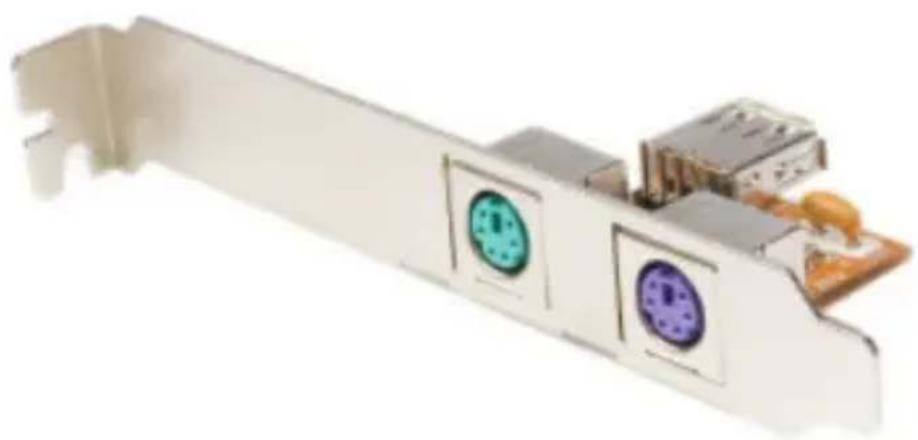
USB to PS/2 Keyboard and Mouse Converter Adapter
USBPS2PLATE
natural_image
Close-up of a white electronic device with two circular buttons and a small circuit breaker (no visible text or symbols)*actual product may vary from photos
For the most up-to-date information, please visit: www.startech.com
Table of Contents
Introduction ....1
Features....1
Package Contents....1
System Requirements....1
Hardware Guide 2
Connectors 2
USB Pin Header Pin Assignment....2
USB Header Cable (supplied): Pin Assignment....2
Installation 3
Specifications....4
Technical Support 5
Warranty Information......5
Introduction
Thank you for purchasing a StarTech.com USB to PS2 Keyboard and Mouse Adapter. This innovative product allows you to connect two PS/2 devices, such as a keyboard and mouse to an internal USB port on your desktop PC, enabling the use of a PS/2 keyboard and mouse as USB plug-and-play human interface devices (HID).
The USBPS2PLATE USB to PS2 Keyboard Mouse Adapter also allows two PS/2 devices to be used simultaneously, and allows users to hot-plug and unplug PS/2 devices without rebooting the system.
Features
- Designed with universal connectors allowing users to use either of the two PS/2 connectors for either keyboards or mice
- Installs in any low profile or standard profile case, without the clutter of having an external USB to PS/2 adapter
- Plug and Play compatible
Package Contents
- User manual
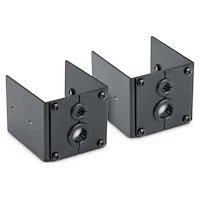
- Internal USB to PS/2 Adapter Card
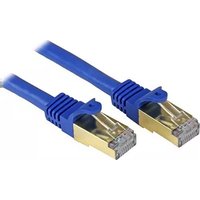
- USB header to header cable
- Low Profile Bracket
System Requirements
- Desktop PC with a USB port and a vacant rear mounting bracket position
- Windows 2000/XP/Server 2003/Vista/7/ Netware 4.11, 5.0 HP Unix, Linux, Mac OS
Hardware Guide
Connectors
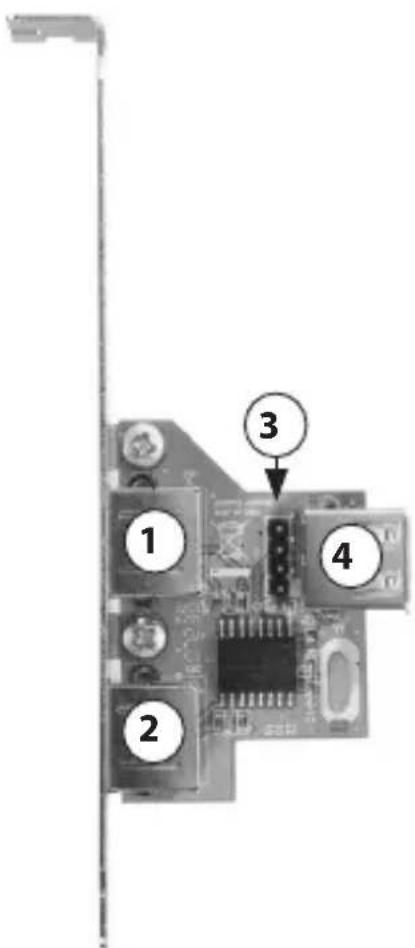
- PS/2 Mouse Connector
- PS/2 Keyboard Connector
- USB 4-pin header
- USB Female Port
USB Pin Header Pin Assignment
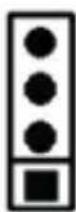
GND
D+ (USB DP)
D- (USB DM)
+5V (USB VCC)
USB Header Cable (supplied): Pin Assignment
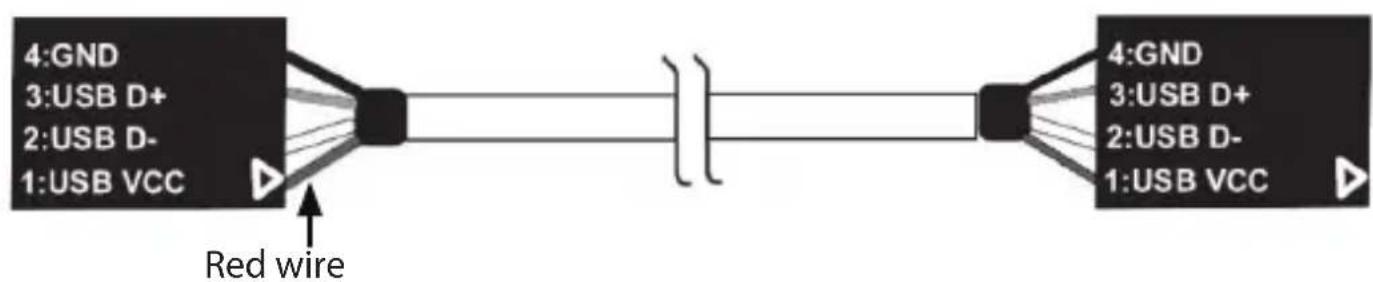
flowchart
graph LR
    A["4:GND\n3:USB D+"] --> B["Red wire"]
    C["2:USB D-"] --> B
    D["1:USB VCC"] --> B
    B --> E["4:GND\n3:USB D+"]
    B --> F["2:USB D-"]
    B --> G["1:USB VCC"]
Please note: For USB boot-up support, the USB connector must be plugged in to a built-in type A or header connector on the motherboard
Installation
- Turn off your computer and all external devices connected to it.
- Disconnect your computer from its power source.
- Open the computer case.
- Install the USB PS/2 card at any vacant rear mounting bracket position. Secure it with the bracket screw.
- Connect one end of the supplied USB cable to the J1 USB Pin Header (shown as #3 on pg. 2). Connect the remaining end of the USB cable to a vacant USB header on the motherboard as applicable. Please note the orientation of the red wire (Pin 1)
If no 4-pin USB Header connection is available on the motherboard, connect the USB Female port provided by USBPS2PLATE (shown as #4 on pg.2) to an available USB port on the rear panel of the computer. This will require a USB A-A (male/male) cable
CAUTION: Please refer to the documentation that accompanied your motherboard for the location and pin assignment of the on-board USB header. Incorrect installation of the USB cable will cause permanent damage to the USBPS2PLATE.
-
Replace the computer case cover (see step #3).
-
Connect a PS/2 peripheral to the green connector provided (shown as #1 on pg. 2)
Connect a PS/2 keyboard to the purple connector provided (shown as #2 on pg. 2).
-
Restore power to the computer. The operating system should detect the new device and automatically install the appropriate driver.
-
To enable your PS/2 Mouse or Keyboard's functionality when working in a DOS operating environment, change your motherboard's BIOS setting to enable "USB Mouse Support" or "USB Keyboard Support". For further clarification, please refer to your motherboard user manual for details.
Specifications
Connectors PS/2: 2 x 6-pin min-DIN
OS Compatibility
Any Windows operating system with a USB interface
Power Mode USB Bus Powered
Technical Support
StarTech.com's lifetime technical support is an integral part of our commitment to provide industry-leading solutions. If you ever need help with your product, visit www.startech.com/support and access our comprehensive selection of online tools, documentation, and downloads.
For the latest drivers/software, please visit www.startech.com/downloads
Warranty Information
This product is backed by a two year warranty.
In addition, StarTech.com warrants its products against defects in materials and workmanship for the periods noted, following the initial date of purchase. During this period, the products may be returned for repair, or replacement with equivalent products at our discretion. The warranty covers parts and labor costs only. StarTech.com does not warrant its products from defects or damages arising from misuse, abuse, alteration, or normal wear and tear.
Limitation of Liability
In no event shall the liability of StarTech.com Ltd. and StarTech.com USA LLP (or their officers, directors, employees or agents) for any damages (whether direct or indirect, special, punitive, incidental, consequential, or otherwise), loss of profits, loss of business, or any pecuniary loss, arising out of or related to the use of the product exceed the actual price paid for the product. Some states do not allow the exclusion or limitation of incidental or consequential damages. If such laws apply, the limitations or exclusions contained in this statement may not apply to you.
Hard-to-find made easy. At StarTech.com, that isn't a slogan. It's a promise.
StarTech.com is your one-stop source for every connectivity part you need. From the latest technology to legacy products — and all the parts that bridge the old and new — we can help you find the parts that connect your solutions.
We make it easy to locate the parts, and we quickly deliver them wherever they need to go. Just talk to one of our tech advisors or visit our website. You'll be connected to the products you need in no time.
Visit www.startech.com for complete information on all StarTech.com products and to access exclusive resources and time-saving tools.
StarTech.com is an ISO 9001 Registered manufacturer of connectivity and technology parts. StarTech.com was founded in 1985 and has operations in the United States, Canada, the United Kingdom and Taiwan servicing a worldwide market.


- USB to PS/2 Keyboard and Mouse Converter Adapter
- Table of Contents
- Introduction
- Features
- Package Contents
- System Requirements
- Hardware Guide
- Connectors
- USB Pin Header Pin Assignment
- USB Header Cable (supplied): Pin Assignment
- Installation
- Specifications
- Technical Support
- Warranty Information
- Limitation of Liability
Brand : StarTech.com
Model : USBPS2PLATE
Category : Computer Accessories and Peripherals