
M6 VR - Earphones MEE audio - Free user manual and instructions
Find the device manual for free M6 VR MEE audio in PDF.


| Product Type | Multiplatform In-Ear Gaming Headphones |
| Brand | MEE audio |
| Model | M6 VR |
| Color Options | Black (standard) |
| Connectivity | Wired 3.5 mm headset jack |
| Driver Type | Dynamic (typical in-ear) |
| Frequency Response | 20 Hz - 20 kHz (typical) |
| Impedance | 16 ohms (typical) |
| Microphone | Inline omnidirectional |
| Remote Control | Single button (play/pause, call, skip, voice assistant) |
| Cable Length | Short cable (approx. 0.5 m) + extension cable (approx. 1.5 m) + headset cable (approx. 1.2 m) |
| Detachable Cable | Yes (with twist-lock notches) |
| Fit Style | Over-ear with memory wire |
| Eartips | 6 pairs of silicone tips (various sizes) |
| Compatibility | VR headsets (Oculus Quest, etc.), PC, laptop, consoles, tablets, smartphones |
| Custom Faceplates | Available (engraved metal, optional) |
| Carrying Case | Yes (protective case included) |
| Cable Management | Velcro cable organizers and silicone cable bracket |
| Weight | Approx. 18 g (per earpiece without cable) |
| Warranty | 1 year limited manufacturer warranty |
| Safety | Hearing damage warning; not for use while driving or operating machinery |
Frequently Asked Questions - M6 VR MEE audio
User questions about M6 VR MEE audio
0 question about this device. Answer the ones you know or ask your own.
Ask a new question about this device
Download the instructions for your Earphones in PDF format for free! Find your manual M6 VR - MEE audio and take your electronic device back in hand. On this page are published all the documents necessary for the use of your device. M6 VR by MEE audio.
USER MANUAL M6 VR MEE audio
natural_image
Medical device diagram showing a stethoscope and earpiece with no visible text or symbolsM6 VR
MULTIPLATFORM IN-EAR
GAMING HEADPHONES
M6 VR SETUP GUIDE

Scan QR code or visit: MEEaudio.com/M6VRVid
M6 VR PACKAGE CONTENTS
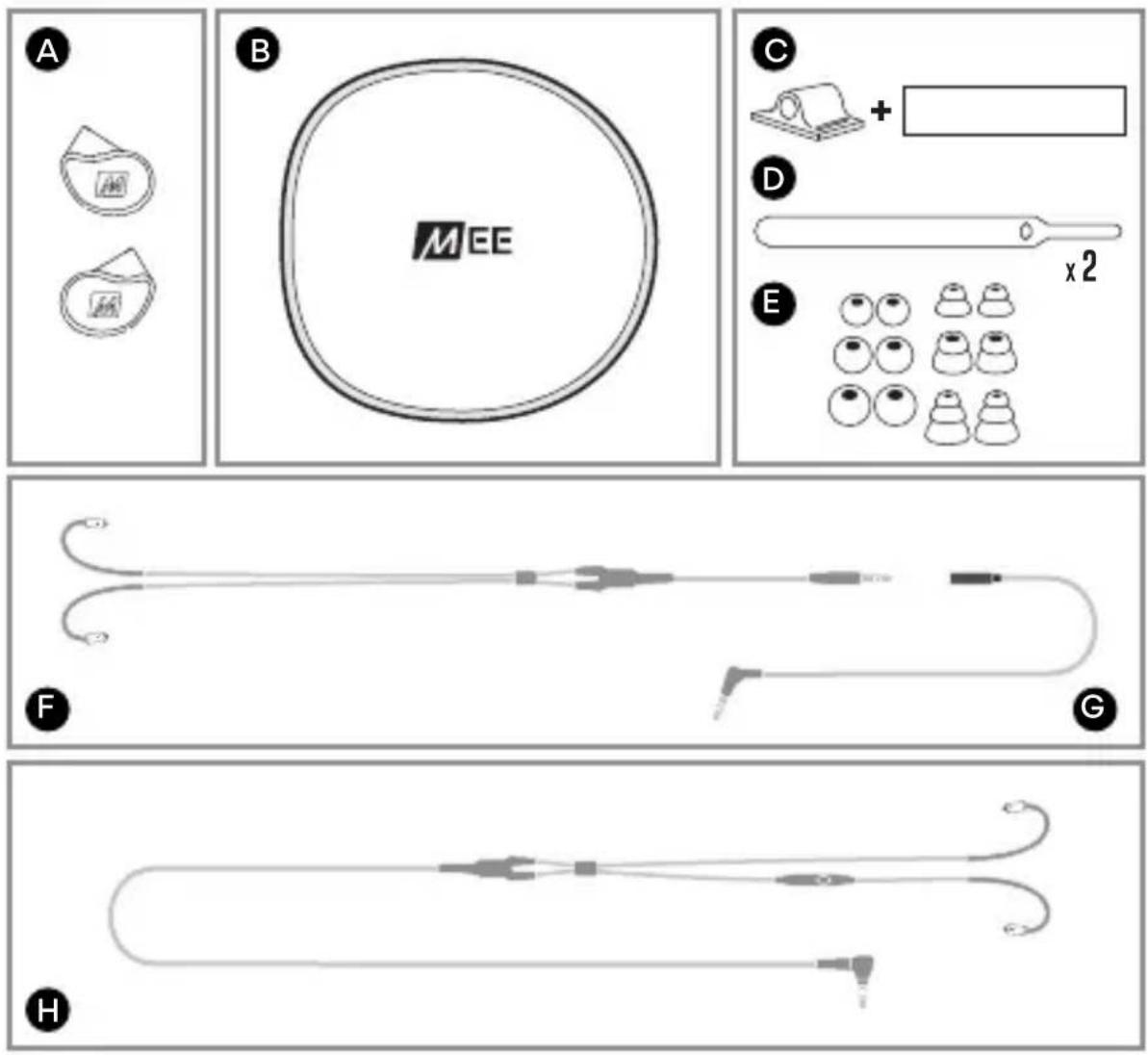
PACKAGE CONTENTS
A. Earpieces
B. Protective Carrying Case
C. Silicone Cable Bracket with Velcro Strap
D. Velcro Cable Organizers
E. Silicone Eartips (6 pairs)
F. Short Cable for VR headsets
G. Extension Cable for VR headsets
H. Headset Cable for consoles and other devices
EARTIP SELECTION

INSTALLING EARTIPS
Multiple sets of eartips are included to ensure you get the best fit with your headphones.
The correct eartips for your ear will allow the earpieces to fit flush, reduce outside noise, and provide good bass response.
Install eartips as shown. Make sure eartips are installed securely before use.
If your music sounds tinny or lacks bass, try different eartips.
INSTALLATION FOR VR HEADSET

INSTALLATION FOR VR HEADSET: OVERVIEW
The M6 VR can be used with the Oculus Quest and select other VR headsets.
Follow the instructions in steps 1-5 to install and wear your M6 VR with optimal comfort and freedom of movement.
The position of the Velcro straps and extension cable may need to be adjusted for other VR headsets.
VIEW OUR VIDEO SETUP GUIDE AT MEEAUDIO.COM/M6VRVID FOR MORE DETAILS ON VR HEADSET INSTALLATION

INSTALLATION - STEP 1

STEP 1: INSTALLING THE EXTENSION CABLE
Plug the Extension Cable (G) into the 3.5 mm jack of your VR headset.

natural_image
Diagram of a medical or anatomical procedure with labeled point '2' and curved lines, no readable text or symbols present.
natural_image
Medical illustration showing a needle inserted into a tube with a curved arrow indicating rotation (no text or symbols)STEP 2: SECURING THE EXTENSION CABLE
Route the Extension Cable (G) over the front of the headset and through the top strap.
Secure the Extension Cable (G) at the base of the top-strap using a Velcro Cable Organizer (D)*.
*Tip: secure the tail end of the Velcro Cable Organizer (D) around the cable first.

STEP 3: MOUNTING THE CABLE BRACKET
Insert the jack of the Extension Cable (G) into the Silicone Cable Bracket (C) and secure the Silicone Cable Bracket (C) to the top strap of the VR headset using the Velcro Strap.
Mount the Silicone Cable Bracket (C) as far back as possible on the strap to eliminate cable slack.
INSTALLATION - STEP 4

natural_image
Line drawing of a hand inserting an ear into a microphone (no text or symbols)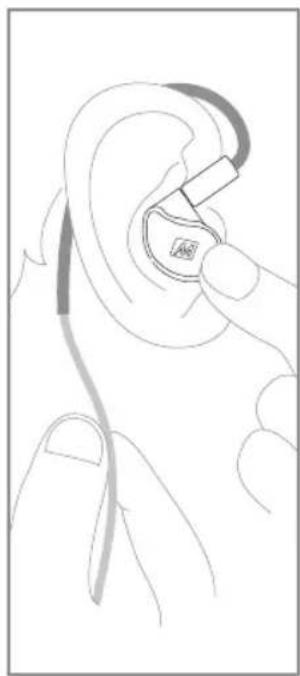
natural_image
Line drawing of a hand holding an ear with a medical device inserted (no text or symbols)
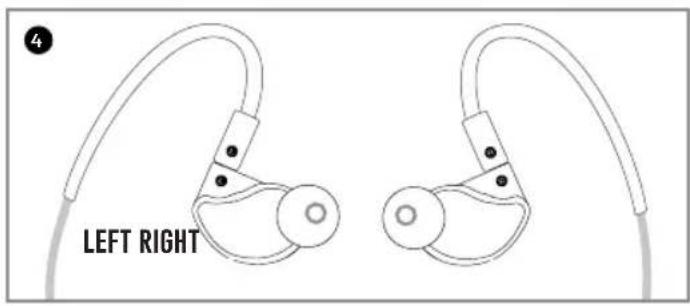
STEP 4: WEARING THE M6 VR IN-EARS
Until you become familiar with the over-the-ear fit of the earpieces, we recommend putting them on first, and then putting on your VR headset.
Identify the left and right Earpieces (A). Place the earhooks over your ears with the cable down your back. Place each earpiece in the corresponding ear, adjusting it until it fits flush in the ear and the eartip seals the ear canal.
Bend the memory wire around each ear and slide the cable cinch up to tighten for the most secure fit.

STEP 5: CONNECTING THE SHORT CABLE TO THE INSTALLED EXTENSION CABLE
Once the earpieces are in your ears, put on your VR headset and plug the Short Cable (F) into the previously installed Extension Cable (G).
You're all set!
USE WITH OTHER DEVICES
natural_image
Line drawing of a hand holding a padlock with a magnifying glass, showing motion direction (no text or symbols)The included Headset Cable (H) can be used with PCs, laptops, gaming consoles/controllers, tablets, smartphones, and other devices with a standard 3.5 mm headset jack.
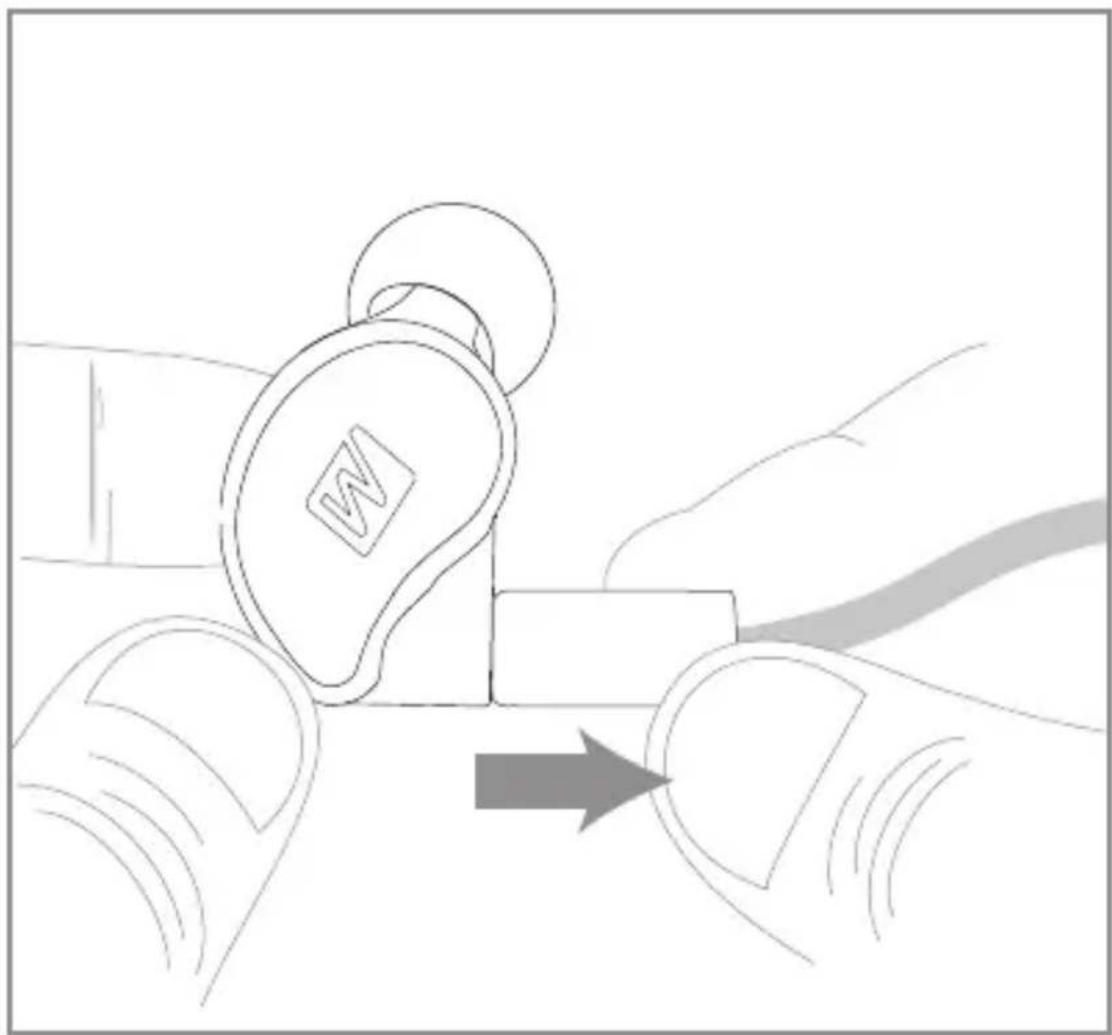
REPLACING THE CABLE
To detach the cable, grasp the earpiece and cable connector firmly, and pull straight apart without twisting.
USE WITH OTHER DEVICES (CONT.)

REPLACING THE CABLE (CONTINUED)
Attach the new cable by lining up the notches on the connectors with the grooves in the earpieces as shown. Push the connectors in until they fit securely.
Make sure to attach the cable connector marked "R" to the right earpiece and the connector marked "L" to the left earpiece.
USE WITH OTHER DEVICES (CONT.)


natural_image
Line drawings of ear earments with a probe inserted, showing ear and ear positioning (no text or symbols)HOW TO WEAR THE HEADSET CABLE
Identify the right and left earpieces.
Straighten the memory wire and put each earpiece in the corresponding ear.
Adjust each earpiece until it fits flush in your ear and the eartip seals the ear canal.
USE WITH OTHER DEVICES (CONT.)
natural_image
Line drawing of a hand inserting an ear into a microphone (no text or symbols)
natural_image
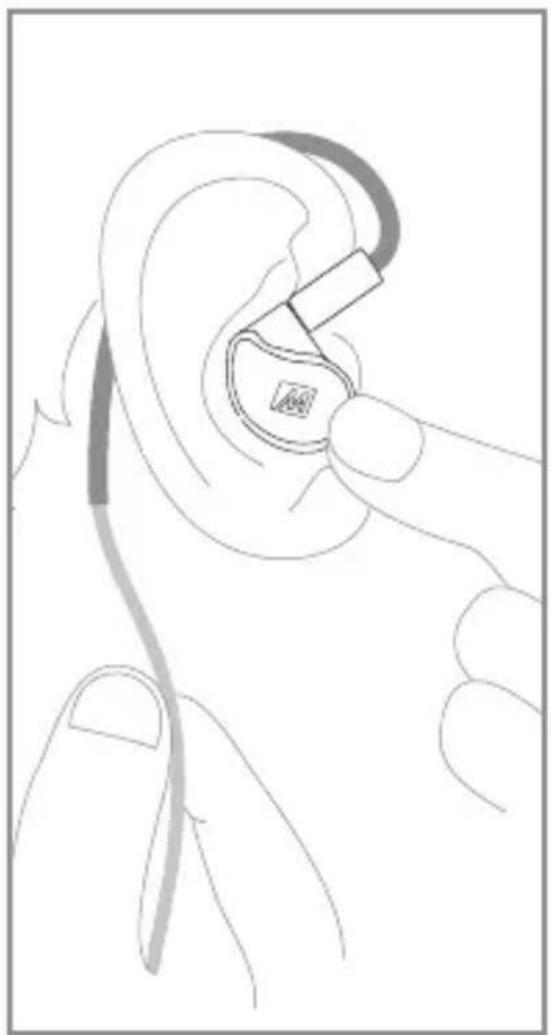
Line drawing of a hand holding an ear with a small inset ear device (no text or symbols)Holding the earpiece in place, bend the memory wire around your ear to achieve a conforming fit.
While pulling the cable gently with one hand, squeeze the memory wire behind your ear with the other hand until the fit is tight and secure.
USE WITH OTHER DEVICES (CONT.)

natural_image
Diagram showing earbuds and a hand holding a device, with no visible text or symbolsSlide the cable cinch up to tighten for the most secured fit.
Use the shirt clip to control cable movement.
MICROPHONE & REMOTE USE

natural_image
Pure diagram of a cylindrical device with a central label and two vertical bars (no text or symbols)The Headset Cable (H) features an inline microphone and remote.
Basic remote operation with mobile devices:
| Function | Operation |
| Answer / End phone call | Press the remote button |
| Play / Pause media* | Press the remote button |
| Skip to next track** | Double-press the remote button |
| Restart the track / previous track** | Triple-press the remote button |
| Activate SIRI®/ Google Assistant** | Press and hold the remote button |
*You may need to open the media player application for initial playback to start.
**Not all media players support this functionality.

+

natural_image
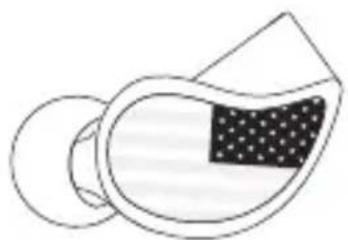
Simple line drawing of a stylized ear with a circular head and a logo (no text or symbols)Custom-Engraved Faceplates
natural_image
Simple line drawing of a mechanical component with a dotted section on one end (no text or symbols)
natural_image
Simple line drawing of a stylized object with a dotted pattern on its surface, no text or symbols present.The M6 VR can be personalized with engraved metal faceplates. Choose from our existing artwork options or submit your own custom design.
Visit the URL below to learn more and order faceplates. Use a PC or Mac for best results:
www.MEEaudio.com/Faceplates
Replacement Parts
Replacement cables and other accessories are available at www.MEEaudio.com
VIEW OUR VIDEO SETUP GUIDE
Scan QR code or enter the URL below into your web browser:
MEEaudio.com/M6VRVid

WARRANTY
MEE audio products purchased from authorized resellers are covered by a 1-year manufacturer warranty. For more information, contact your local MEE audio dealer or visit MEEaudio.com/support.
WARNING
Using headphones at high to moderate volumes for extended periods of time will result in permanent hearing damage. It is advised you keep volume levels moderate to low at all times for your safety. Do not use while driving a car, cycling, operating machinery, or performing other activities that require hearing surrounding sounds.
Keep the device and packaging out of reach of children.
DISPOSAL AND RECYCLING
Dispose of this product in accordance with all local laws and regulations. Because this product contains electronic components, it must be disposed of separately from household waste. Contact local authorities to learn about disposal and recycling options.
MEE audio and its logo are registered trademarks of S2E, Inc. All rights reserved.
Microsoft and Xbox are trademarks of the Microsoft group of companies.
Nintendo Switch ^™ is a trademark of Nintendo America Inc.
Oculus and Oculus Quest are trademarks or registered trademarks of Facebook Technologies, LLC.
"PlayStation", "PS5", "PS4" and "PS Vita" are registered trademarks or trademarks of Sony Interactive Entertainment Inc.
©2021 Valve Corporation. Valve Index and the Valve Index logo are trademarks and/or registered trademarks of Valve Corporation in the U.S. and/or other countries. All rights reserved.

IMPORTANT
PLEASE READ THIS QUICKSTART GUIDE IN ITS
ENTIRETY TO ENSURE BEST FIT AND SOUND
QUESTIONS?
WE'RE HERE TO HELP!
Phone Support: 626-965-1008
Monday \~ Friday 9:00 am to 5:00 pm PST
Email Support: support@MEEaudio.com
All emails are responded to within 2 business days



- M6 VR
- MULTIPLATFORM IN-EAR
- GAMING HEADPHONES
- M6 VR SETUP GUIDE
- M6 VR PACKAGE CONTENTS
- PACKAGE CONTENTS
- EARTIP SELECTION
- INSTALLING EARTIPS
- INSTALLATION FOR VR HEADSET
- INSTALLATION FOR VR HEADSET: OVERVIEW
- INSTALLATION - STEP 1
- STEP 1: INSTALLING THE EXTENSION CABLE
- STEP 2: SECURING THE EXTENSION CABLE
- STEP 3: MOUNTING THE CABLE BRACKET
- INSTALLATION - STEP 4
- STEP 4: WEARING THE M6 VR IN-EARS
- STEP 5: CONNECTING THE SHORT CABLE TO THE INSTALLED EXTENSION CABLE
- USE WITH OTHER DEVICES
- REPLACING THE CABLE
- USE WITH OTHER DEVICES (CONT.)
- REPLACING THE CABLE (CONTINUED)
- HOW TO WEAR THE HEADSET CABLE
- MICROPHONE & REMOTE USE
- Replacement Parts
- VIEW OUR VIDEO SETUP GUIDE
- WARRANTY
- WARNING
- DISPOSAL AND RECYCLING
- IMPORTANT
- PLEASE READ THIS QUICKSTART GUIDE IN ITS
- ENTIRETY TO ENSURE BEST FIT AND SOUND
- QUESTIONS?
- WE'RE HERE TO HELP!
Brand : MEE audio
Model : M6 VR
Category : Earphones