
Cycle PLUTVA102 - Mobile Phone Pyle - Free user manual and instructions
Find the device manual for free Cycle PLUTVA102 Pyle in PDF.


| Product Type | Mobile Phone |
| Brand | Pyle |
| Model | Cycle PLUTVA102 |
| Dimensions | 120 x 50 x 15 mm |
| Weight | 100 g |
| Display | 2.4-inch TFT color screen |
| Battery Type | Li-ion 1500 mAh |
| Standby Time | Up to 200 hours |
| Talk Time | Up to 6 hours |
| Charging Port | Micro USB |
| Main Functions | Call, SMS, FM Radio, Camera, Flashlight, Alarm, Calculator, Calendar |
| Camera | 0.3 MP rear camera |
| Memory | microSD card slot up to 32 GB |
| Connectivity | GSM 850/900/1800/1900, Bluetooth 2.1 |
| SIM Card | Dual SIM (Mini-SIM) |
| Audio Output | 3.5 mm headphone jack, built-in speaker |
| Care & Cleaning | Wipe with a dry soft cloth; avoid liquids and abrasive cleaners |
| Safety | Do not disassemble; avoid exposure to extreme temperatures or water |
| Spare Parts & Repairability | Battery and back cover replaceable; other repairs by authorized service |
| General Information | User manual available for download in PDF format |
Frequently Asked Questions - Cycle PLUTVA102 Pyle
User questions about Cycle PLUTVA102 Pyle
0 question about this device. Answer the ones you know or ask your own.
Ask a new question about this device
Download the instructions for your Mobile Phone in PDF format for free! Find your manual Cycle PLUTVA102 - Pyle and take your electronic device back in hand. On this page are published all the documents necessary for the use of your device. Cycle PLUTVA102 by Pyle.
USER MANUAL Cycle PLUTVA102 Pyle
natural_image
Product photo of PYLE Cable-based audio equipment including speaker, speaker, and power supply unit (no visible text or symbols)PLUTVA102
2 Channel Waterproof 4" UTV/ATV/
Snowmobile Marine Amplified
Thank you for making a pYUE choice marine for audio entertainment!
It's compact, waterproof design allows for flexible mounting possibilities, and makes it simple to expand the audio system capabilities for vehicle.
PLUTVA102
2 Channel Waterproof 4" UTV/ATV/Snowmobile/Marine Amplified Speaker System
One Pair 4" 2-Way Marine Speaker:
• 4" High Quality Poly Injection Cone
- Butyl Rubber Surround
• Shinny Black Plastic Enclosure
• 1" High Te&perature (EIS) )oice Coil
• 1" PEI Neody&iu& +o&e T-eeter
• 1// 0atts R1S 2 3// 0atts Peak
• 4re5uency Response6 1//73/(Hz
• I&pedance6 4 Oh&s
- Speaker Enclosure +i&ensions6
:4"(=) x 7.3"(0) x A.B"(H)
2 Channel Waterproof Marine Power Amplifier
• 3 x 1// 0atts R1S at 4 Oh&s
• 3 x 3// 0atts 1ax at 4 Oh&s
• Cnti7Thu&p Turn7On
- SoDt Turn On2ODD
- RCC =ine Input
•)olu&e Eain Re&ote Control
PLUTVA104BT
4 Channel Waterproof 4" UTV/ATV/Snowmobile/Marine
Amplified Speaker System with Bluetooth Audio Interface
Two Pair 4" 2-Way Marine Speaker:
• 4" High Quality Poly Injection Cone
- Butyl Rubber Surround
• Shinny Black Plastic Enclosure
• 1" High Temperature KEISV Voice Coil
• 1" PEI Neodymium Dome Tweeter
• 100 Watts RMS / 200 Watts Peak
• Frequency Response: 100-20KHz
- Impedance: 4 Ohms
• Speaker Enclosure Dimensions:
5.4"(L) × 7.2"(W) × 6.9"(H)
4 Channel Waterproof Marine Power Amplifier
• 4 x 100 Watts RMS at 4 Ohms
• 4 x 200 Watts Max at 4 Ohms
• Anti-Thump Turn-On
- Soft Turn On/Off
- RCA Line Input
• Volume Gain Remote Control
• T.H.D: <0.05%
• S/N Ratio: >95dB
• Channel Separation: >65dB
• Frequency Response: 10Hz-30kHz
- Fuse : 1 x 10A
What is included?
When first unpacking your new amplified waterproof speaker system, Please check first that the package contains all of the items below. If something is missing, contact the store where you purchased the product.
PLUTVA102
● One Pair 4 "2 -Way Marine Speaker
● One Piece 2 Channel Waterproof Marine Power Amplifier
● One Piece iPod /MP3 Waterproof 3.5mm Stereo to RCA Adaptor
● One Piece Remote Control for Volume Gain
PLUTVA104BT
●Two Pair 4 "2-Way Marine Speakers
●One Piece 4 Channel Waterproof Marine Power Amplifier
● One Piece Bluetooth controller
Installation precautions
Before you drill or cut any holes, investigate your vessel's layout very carefully. Take special care when you work near the gas tank, fuel lines, hydraulic lines and electrical wiring.
Never operate the amplifier when it is unmoured. Attach all audio system components securely within the amplifier to prevent damage, especially in an accident.
Do not mount this amplifier so that wire connections are unprotected in a
INSTALLATION INSTRUCTIONS:

Don't misuse the level control!
Do not mistake the input level control for a volume control! It is designed ONLY to match the output level of your audio source to the input level of your amplifier.
Do not adjust this input level of maximum unless your input level requires it. Ignoring these instructions will result in an input overload to the amplifier, and excessive audio distortion. It can also cause the protection circuit to engage.
Controls, Input and Output Cables:
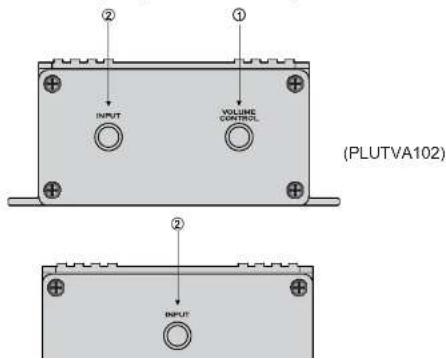
Power and Speaker Wiring
(PLUTVA102)

Power and Speaker Wiring


Bluetooth Pairing and Connection:
- Connect Bluetooth controller box to your device
- Press and Hold >|| for three seconds until power indicator lights (red)
- The system will automatically go into pairing mode The power indicator will turn red for about 7 seconds and then alternating red and blue (Bluetooth blue Power red) Please be sure that Bluetooth is turned on your device Select Pyle Audio on your device to connect Bluetooth controller (if the Bluetooth controller is connected the light will turn blue and not flash)
- When the device is out of Bluetooth range, Bluetooth will be disconnected automatically and automatically reconnect when detected in range again. (If not please just repeat steps 1 and 2)
- When Bluetooth is disconnected or the 3.5mm AUX Input is plugged in, the power indicator will glow red.
- PLUTVA102
- Channel Waterproof 4" UTV/ATV/Snowmobile/Marine Amplified Speaker System
- One Pair 4" 2-Way Marine Speaker:
- Channel Waterproof Marine Power Amplifier
- PLUTVA104BT
- Two Pair 4" 2-Way Marine Speaker:
- Channel Waterproof Marine Power Amplifier
- What is included?
- Installation precautions
- Don't misuse the level control!
- Bluetooth Pairing and Connection:
Brand : Pyle
Model : Cycle PLUTVA102
Category : Mobile Phone