
DAFT2350UPDB01 - Unknown Dash - Free user manual and instructions
Find the device manual for free DAFT2350UPDB01 Dash in PDF.


| Product Type | Countertop Appliance |
| Brand | Dash |
| Model | DAFT2350UPDB01 |
| Dimensions (W x D x H) | 10.5 x 8.0 x 12.0 inches |
| Weight | 4.5 lbs |
| Power Source | 120V AC, 60Hz |
| Wattage | 800 Watts |
| Capacity | 1.5 Liters |
| Material | BPA-free Plastic, Stainless Steel Blades |
| Color | Black with Silver Accents |
| Functions | Blend, Puree, Grind, Stir |
| Speed Settings | 2 Speeds + Pulse |
| Controls | Rotary Dial with Push-Button Pulse |
| Safety Features | Non-Slip Feet, Locking Lid, Overload Protection |
| Cleaning | Dishwasher-Safe Removable Parts (Jar, Lid, Blade Assembly) |
| Maintenance | Wipe Motor Base with Damp Cloth; Avoid Immersion |
| Warranty | 1 Year Limited Manufacturer Warranty |
| Certifications | ETL Listed, FDA Compliant Materials |
| Included Accessories | Blending Jar, Lid, Recipe Booklet |
| Repairability | Replacement Parts Available via Dash Customer Service |
Frequently Asked Questions - DAFT2350UPDB01 Dash
User questions about DAFT2350UPDB01 Dash
0 question about this device. Answer the ones you know or ask your own.
Ask a new question about this device
Download the instructions for your Unknown in PDF format for free! Find your manual DAFT2350UPDB01 - Dash and take your electronic device back in hand. On this page are published all the documents necessary for the use of your device. DAFT2350UPDB01 by Dash.
USER MANUAL DAFT2350UPDB01 Dash
natural_image
Metallic cylindrical metal grate with mesh pattern and metal bracket (no text or symbols visible)DAFT2350UPDB01
AIR FRYER OVEN
ROTATING BASKET
Instruction Manual

natural_image
Red line-drawn illustrations of food items including a chicken, garlic bulb, soda can, and onion (no text or symbols)AIR FRYER OVEN
ROTATING BASKET
Parts You Need From Your Air Fryer Oven 3
Air Fryer Oven Rotating Basket....4
Setting Up Your Rotating Basket 5-6
Using the Rotating Basket 7-8
Removing the Rotating Basket 9
Customer Support 10
Warranty 11

PARTS YOU NEED FROM YOUR AIR FRYER OVEN


natural_image
Metallic cylindrical device with perforated surface and internal structure, no visible text or symbolsClasp Rotisserie Bar
Attachment Tab
natural_image
Close-up of hands assembling a small mechanical component with a red arrow indicating upward motion (no text or symbols visible)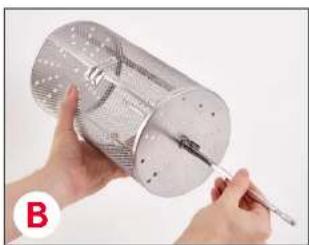
natural_image
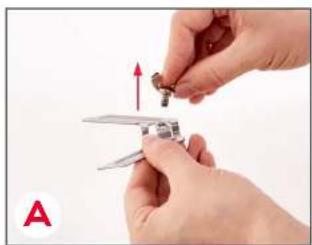
Close-up of hands holding a metallic cylindrical object with a screwdriver inserted (no visible text or symbols)1 Carefully remove the Screws from the Rotisserie Forks of your Chef Senes Air Fryer Oven (photo A). You will need the Screws and the Rotisserie Bar to assemble the Rotating Basket.
2 Insert the Rotisserie Bar through the holes on the Rotating Basket, making sure that it goes all the way through to the other side (photo B).
SETTING UP YOUR ROTATING BASKET
USING THE ROTATING BASKET

natural_image
Close-up of a hand holding a small metallic tool on a circular metal tray (no text or symbols visible)
natural_image
Metal mesh cylindrical device with internal structure and two protruding ports, labeled 'D' in bottom-left corner (no text or symbols on device itself)3 Attach the Screws through the holes on the Attachment Tab of the Rotating Basket, and tighten them so that the Rotating Basket is held in place (photo C). Make sure to secure both sides.
4 Your Rotating Basket is now ready to use (photo D)!
5 Remove any cooking trays from the Chef Series Air Fryer Oven and place the Drip Tray at the bottom of the Air Fryer Oven, beneath the heating element.

natural_image
Close-up of a hand using a tool to handle small fish inside a metal container (no text or symbols visible)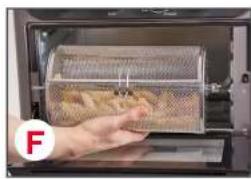
natural_image
Hand holding a tray of food inside an oven, no visible text or symbols on the tray or surroundings.
natural_image
Close-up of a metallic mechanical component with a circular logo (G) in the corner, no visible text or symbols on the main subject.
natural_image
Close-up of a mechanical component with a metallic lever and mesh texture, no visible text or symbols6 Place any items you wish to cook in the Rotating Basket and close the door of the basket firmly so the Clasp snaps shut (photo E).
7 Open the Air Fryer Oven (photo F) and put the square component of the Rotating Basket into the Rotisserie Bar Gear on the interior right side of the Air Fryer Oven (photo G), making sure it is aligned and fully inserted.
8 Place the Spin Side of the Rotating Basket in the Holder on the other side of the Air Fryer Oven (photo H).
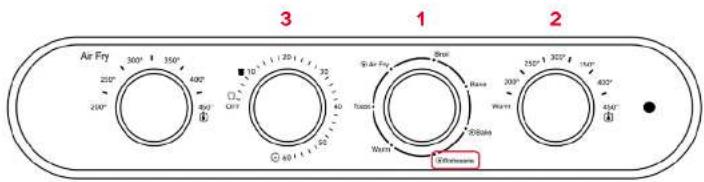
9 Turn the Function Dial (1) to the Rotisserie Setting (this will cause the Rotating Basket to rotate). Set the Temperature Dial (2) to your desired temperature. Then, turn the Timer Dial (3) to your desired cooking time to start the oven.
10 The Power Light will illuminate. The Timer Dial will ring when cooking is complete. To stop cooking at any time, turn the Timer Dial to the "Off" position.

natural_image
Interior view of an oven with a hand holding a blue glove, containing a mesh pan (no visible text or symbols)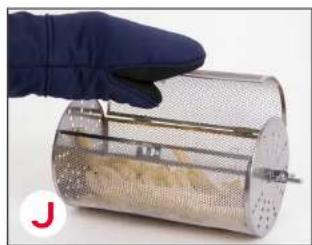
natural_image
Hand in blue glove holding a metal mesh device with granular material inside (no visible text or symbols)11 When cooking is finished, use a kitchen glove and the Removal Tool to take the Rotating Basket out of the Air Fryer Oven (photo I).
NOTE: ALWAYS use the Removal Tool and kitchen gloves, as the Rotating Basket will be hot.
12 Allow the Rotating Basket to sit for a few minutes before opening. Open the Rotating Basket using kitchen gloves (photo J).
CLEANING AND MAINTENANCE
To preserve the longevity of the Rotating Basket, it should be hand-washed using soap and water.
Do not put any electric parts of the Dash Chef Series Air Fryer Oven in water.
CUSTOMER SUPPORT
WARRANTYWAR
FEEL GOOD GUARANTEE
Dash values quality and workmanship and stands behind this product with our Feel Good Guarantee*. To learn more about our commitment to quality, visit bydash.com/feelgood.
Our US-based customer support team is at your service Monday - Friday during the times below. Reach us at 1 (800) 898-6970 or support@bydash.com
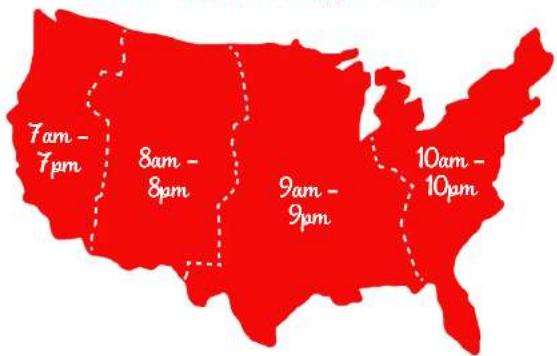
Hey Hawaii! You can reach our customer service team from 5AM to 5PM. And also, Alaska, feel free to reach out from 6AM - 6PM.
STOREBOUND, LLC - 1 YEAR LIMITED WARRANTY
Your StoreBound product is warranted to be free from defects in material and workmanship for a period of one (1) year from the date of the original purchase when utilized for normal and intended household use. Should any defect covered by the terms of the limited warranty be discovered within one (1) year, StoreBound, LLC will repair or replace the defective part. To process a warranty claim, contact Customer Support at 1-600-898-6970 for further assistance and instruction. A Customer Support agent will assist you by troubleshooting minor problems. If troubleshooting fails to fix the problem, a return authorization will be issued. Proof of purchase indicating the date and place of purchase is required and should accompany the return. You must also include your full name, shipping address, and telephone number. We are unable to ship returns to a PO box. StoreBound will not be responsible for delays or unprocessed claims resulting from a purchaser's failure to provide any or all of the necessary information. Freight costs must be prepared by the purchaser.
Send all inquiries to support@storebound.com.
There are no express warranties except as listed above.
REPAIR OR REPLACEMENT AS PROVIDED UNDER THIS WARRANTY IS THE EXCLUSIVE REMEDY OF THE CUSTOMER. STOREBOUND SHALL NOT BE LIABLE FOR ANY INCIDENTAL OR CONSEQUENTIAL DAMAGES OR FOR BREACH OF ANY EXPRESS OR IMPLIED WARRANTY ON THIS PRODUCT EXCEPT TO THE EXTENT REQUIRED BY APPLICABLE LAW ANY IMPLIED WARRANTY OF MERCHANTABILITY OR FITNESS FOR A PARTICULAR PURPOSE ON THIS PRODUCT IS LIMITED IN DURATION TO THE DURATION OF THIS WARRANTY.
Some states do not allow the exclusion or limitation of incidental or consequential damages, or limitations on how long an implied warranty lasts. Therefore, the above exclusions or limitations may not apply to you. This warranty gives you specific legal rights and you may also have other rights, which vary from state to state.
ATTENTION: This appliance is not intended for use by persons (including children) with reduced physical, sensory, or mental capabilities, or lack of experience and knowledge unless they are provided with supervision and instruction concerning use of the appliance by a person responsible for their safety.
DAFT2350UPDB01_20191016_v1 Made in China

Brand : Dash
Model : DAFT2350UPDB01
Category : Unknown