
GoboPar35 - Lighting Qtx - Free user manual and instructions
Find the device manual for free GoboPar35 Qtx in PDF.


| Product Type | Versatile 2-in-1 lighting effect (moving gobos and RGB wash) |
| Brand | Qtx |
| Model | GoboPar35 |
| Power Supply | 110-240Vac, 50/60Hz via IEC mains lead |
| Power Consumption | 35W |
| Fuse Rating | F2AL 250V (5x20mm) |
| LED Gobos | 4x3W RGBW (colour gobos) |
| LED Wash | 15x1.5W RGB (colour wash) |
| Beam Angle | 35° |
| Dimensions (without bracket) | 170x170x100mm |
| Weight | 1.1kg |
| Control Modes | DMX (12 channels), IR remote, Auto-Run (fast/smooth), Sound-Activation (with strobe options) |
| DMX Channels | 12 |
| Remote Range | Approx. 4m (IR) |
| Built-in Programs | Auto-Run, Sound-Active, Colour scroll/jump, Gobo colour scroll/jump/kaleidoscope, Colour combination, Strobe |
| Mounting | Included bracket for stand/truss; use secondary safety fixings when overhead |
| Safety | Do not expose to rain or damp; high voltage inside; no user-serviceable parts |
| Cleaning | Soft cloth with neutral detergent; vacuum ventilation grilles |
| Disposal | Waste Electrical and Electronic Equipment (WEEE) – do not dispose with household waste |
| In the Box | Main unit with bracket, remote control, UK IEC mains lead, manual |
Frequently Asked Questions - GoboPar35 Qtx
User questions about GoboPar35 Qtx
0 question about this device. Answer the ones you know or ask your own.
Ask a new question about this device
Download the instructions for your Lighting in PDF format for free! Find your manual GoboPar35 - Qtx and take your electronic device back in hand. On this page are published all the documents necessary for the use of your device. GoboPar35 by Qtx.
USER MANUAL GoboPar35 Qtx
Please read through this manual thoroughly before use, any damage Caused by misuse of product will not be covered by warranty.

natural_image
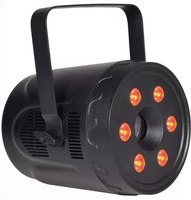
Circular black industrial lighting fixture with 12 orange-lit circular lights, mounted on a support frame (no text or symbols visible)Thank you for choosing the GoboPar35, A versatile 2-in-1 light effect, combining 4 moving colour gobos and 15 RGB colour-wash LEDs in a compact and convenient package. Power up the unit and simply control it with the included IR remote control. With a press of a button you can set it to Auto-Run, Sound-Activation and many other built-in sequences. For more advanced users, it can be connected to a DMX controller for more sophisticated control. A colourful and flexible stage lighting solution, ideal for mobile setups as well as permanent installations
In the box:
Your GoboPar35 should arrive with you in a single carton in good condition. The carton should contain 1 x main unit with bracket, 1x remote control, 1 x UK IEC mains lead and 1 x manual.
Warning:
To prevent risk of fire or electric shock, do not expose the unit to rain or damp environments. In the event of a spillage, disconnect the mains and allow the unit to dry out naturally. Qualified personnel should then check the unit before continuing use.

Please do not open cover, contains high voltage. This product is not serviceable or repairable by the end user. Please refer to qualified personnel for service and repair.
Placement:
• Use the included mounting bracket to fix to a stand or lighting truss
• Use secondary safety fixings if mounting overhead
- Keep away from damp or dusty environments
- Ensure adequate air-flow around the fixture housings
- Ensure adequate access to controls and connections
Cleaning:
• Use a soft cloth with a neutral detergent to clean the casing as required
• Use a vacuum cleaner to clear ventilation grilles of any dust or debris build-ups
- Do not use strong solvents for cleaning the unit

Rear panel controls:
- DMX Signal in
- DMX Signal out
-
IEC Mains in
-
LCD display
- Microphone
- Manual control buttons
Manual control menu:
Press the "MENU" button to enter the settings menu.
Press "UP" and "DOWN" buttons to navigate through various setting functions.
Press "ENTER" button to save the desired setting.
| Menu | Number range | Function and description |
| A001 | 001-512 | DMX address settings 12 channel mode |
| AU01 | AU01 | Gobos and colour wash fast program |
| AU02 | Gobos and colour wash smooth program | |
| AU03 | Gobos and colour wash fast and smooth autorun | |
| Sud1 | Sud1 | Sound active gobos and colour wash |
| Sud2 | Sound active colour wash strobe effect | |
| Sud3 | Sound active colour wash and strobe effect | |
| Sud4 | Sound active gobos and strobe effect | |
| or | or00 - or16 | Colour wash scroll slow to fast |
| oJ | oJ00 - oJ16 | Colour wash jump slow to fast |
| CC | CC01 - CC16 | Colour combination gobos and colour washes 1-16 |
| uJ | uJ00 - uJ16 | Gobo colour jump slow to fast |
| ur | ur00 - ur16 | Gobo colour scroll slow to fast |
| uP | uP00 - uP08 | Gobo kaleidoscope forward and reverse |
| St | St00 - St16 | Strobe effect slow to fast |
| r | r000 - r255 | Red brightness setting, low to high |
| G | G000 - G255 | Green brightness setting, low to high |
| b | b000 - b255 | Blue brightness setting, low to high |
Remote control:
GoboPar35 is supplied with an I.R. remote control for quick access to most of the basic functions of the unit. This must be aimed at the front of the unit where there is a remote receiver and has a maximum range of approximately 4m. Controls are listed on the layout drawing below.

- LED Display on/off
- Sound active/Strobe effect
- Colour brightness adjust
- Save current setting
- Colour wash scroll/Gobo colour scroll
- Number keypad
- Up select
- Gobo & colour wash/Colour combination
- Down select
- Colour wash jump/Gobo colour jump
- Gobo kaleidoscope
- Quick DMX
DMX mode:
The GoboPar35 can be controlled by DMX signal, simply connect the DMX signal source to the DMX input on the unit via a balanced XLR lead. Extra fixtures can be controlled by the same DMX signal by looping through the DMX out on the unit. To enter DMX mode, select A001 from the menu and confirm the correct start address by using the "UP" and "DOWN" buttons and "ENTER" to confirm.
This unit has 12 DMX channels as indicated in the table below:
| Channel | Function | Description |
| CH1 | Master dimmer | RGBW from low to high |
| CH2 | Red dimming | low to high |
| CH3 | Green dimming | low to high |
| CH4 | Blue dimming | low to high |
| CH5 | Pattern 1 dimming | low to high |
| CH6 | Pattern 2 dimming | low to high |
| CH7 | Pattern 3 dimming | low to high |
| CH8 | Pattern 4 dimming | low to high |
| CH9 | Whole light strobe | Slow to fast |
| CH10 | Colour wash selection | 0-50: CH1 to CH9 control51-150: Common colour output (8 types)151-200: Colour jump mode201-250: Colour scroll mode251-255: Sound active |
| CH11 | Gobo selection | 0-50: CH1 to CH9 control51-150: Common colour output (16 types)151-200: Colour jump mode201-250: colour fade out mode251-255: Sound active |
| CH12 | Gobo strobe | Slow to fast (stops at 0) |
Specifications:
| Power supply | 110-240Vac, 50/60Hz (IEC) |
| Power consumption | 35W |
| Fuse rating | F2AL 250V (5x20mm) |
| LED Gobos | 4x3W RGBW |
| LED Wash | 15x1.5W RGB |
| Beam angle | 35° |
| Dimensions | 170x170x100mm (without Bracket) |
| Weight | 1.1kg |
Troubleshooting:
| No power (mains) | Check mains voltage is correct and outlet is switched on |
| Check IEC lead and fuse (if fuse continually blows, refer to your dealer) | |
| No light output | Check control panel mode settings |
| Check DMX settings from controller (dimmer levels, blackout etc.) | |
| Unresponsive to DMX | Check that unit is in DMX mode and ensure DMX address remains lit to confirm receiving DMX signal |
| Check DMX controller is not set to black out | |
| Check DMX controller is on correct fixture/page | |
| Check master dimmer value | |
| Check correct DMX address is set | |
| Check DMX connection and leads | |
| Overheating/ cutting out | Ensure adequate ventilation and unit is not too close to a heat source |

This product is classed as Electrical or Electronic equipment and should not be disposed
with other household or commercial waste at the end of its useful life.
The goods must be disposed of according to your local council guidelines.

Brand : Qtx
Model : GoboPar35
Category : Lighting