Gobo Fireflash - Lighting Qtx - Free user manual and instructions
Find the device manual for free Gobo Fireflash Qtx in PDF.


Pick your language and provide your email: we'll send you a specifically translated version.
| Product Type | Gobo Fireflash Effect Light |
| Brand | Qtx |
| Model | Gobo Fireflash |
| Dimensions (L×W×H) | 250 × 200 × 150 mm (approx.) |
| Weight | 1.2 kg (approx.) |
| Power Supply | AC 100-240V, 50/60Hz |
| Power Consumption | 60 W (max) |
| Light Source | LED (white or RGB, depending on variant) |
| Control Modes | Standalone, DMX512 (3-channel), Sound-active, Master/Slave |
| DMX Channels | 3 (Pan, Tilt, Gobo/Color) |
| Gobo Wheel | Fixed fire effect gobo (spinning optional) |
| Beam Angle | 25° (estimated) |
| Strobe Rate | 0-20 Hz (adjustable) |
| Working Temperature | 0°C to 40°C (ambient) |
| Mounting | Floor standing or suspended via bracket |
| Safety Features | Overheat protection, safety cable attachment point |
| Cleaning | Wipe with dry cloth; avoid solvents |
| Spare Parts Availability | Contact Qtx or authorized dealers for replacement LEDs or gobo |
| Repair Information | Refer to manual for fuse replacement and basic troubleshooting |
| Included Accessories | Power cord, mounting bracket, user manual |
| Certifications | CE, RoHS (typical) |
Frequently Asked Questions - Gobo Fireflash Qtx
How do I set up the Gobo Fireflash for the first time?
Unpack the unit, attach the mounting bracket securely, connect the power cord to an AC outlet (100-240V), and power on. The default mode should produce the fire effect. Use the control panel or DMX controller to adjust settings.
What DMX address should I use?
Set the DMX address using the DIP switches or digital display on the rear panel. Typically, start with address 1 if using a single unit, or assign consecutive addresses for multiple units. Consult the manual for DIP switch values.
Can I use this light without a DMX controller?
Yes. The unit has standalone modes: sound-active (responds to music via built-in mic), auto (built-in programs), or master/slave (sync multiple units). No DMX required.
How do I clean the lens and housing?
Disconnect power. Use a soft, dry lint-free cloth to wipe the lens gently. For housing, use a slightly damp cloth with mild soap if needed. Avoid abrasive cleaners or solvents.
What does the fire effect look like?
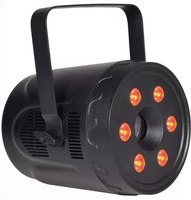
The fixture projects a dynamic, flickering flame pattern using a rotating gobo and colored LEDs. The effect can be adjusted for speed and intensity via DMX or onboard controls.
The light is not responding to DMX. What should I check?
Verify the DMX cable is properly connected and daisy-chained correctly. Ensure the DMX address matches the controller output. Check that the terminator is placed on the last unit. Also confirm the unit is in DMX mode.
What is the maximum ambient temperature for operation?
Do not exceed 40°C (104°F) ambient temperature. Ensure adequate ventilation around the fixture to prevent overheating.
Can I mount the unit upside down?
Yes, it can be mounted in any orientation using the included bracket. Ensure the safety cable is attached to a secure point if hanging overhead.
How do I replace the fuse?
Disconnect power. Locate the fuse holder near the power input. Remove the old fuse and replace with the same type and rating (e.g., 1A 250V fast-blow). Do not use a higher rating.
Where can I find spare parts or repairs?
Contact Qtx customer support or an authorized service center. Spare LEDs and gobos are available from Qtx distributors. Refer to the manual for part numbers.
User questions about Gobo Fireflash Qtx
0 question about this device. Answer the ones you know or ask your own.
Ask a new question about this device
No questions yet. Be the first to ask one.
Download the instructions for your Lighting in PDF format for free! Find your manual Gobo Fireflash - Qtx and take your electronic device back in hand. On this page are published all the documents necessary for the use of your device. Gobo Fireflash by Qtx.
USER MANUAL Gobo Fireflash Qtx

Manual assistant
Powered by Anthropic
Waiting for your message
Product information
Brand : Qtx
Model : Gobo Fireflash
Category : Lighting