
KOOV EKV-100U - Unspecified SONY - Free user manual and instructions
Find the device manual for free KOOV EKV-100U SONY in PDF.


| Product Type | Educational Robotics Kit (Trial Kit) |
| Brand | Sony / Sony Global Education, Inc. |
| Model | KOOV EKV-100U |
| Connectivity | Bluetooth 4.0 (Bluetooth Low Energy) |
| Weight | 780 g (28 oz) |
| Operating Temperature | 0°C to 40°C (32°F to 104°F) |
| Power Supply | 4 x 1.5V AA/LR6 alkaline batteries (not included) |
| Battery Type | Alkaline only; do not use carbon-zinc or rechargeable |
| Wireless Range | Up to 80 m (240 ft) (may vary with obstacles) |
| Frequency | 2.4 GHz |
| Certification | FCC Part 15 Class B digital device |
| Included Components | Core, Battery Box, USB Cable, 3-Core Cables (x2), DC Motor, Green LED, Red LED, Buzzer, IR Photoreflector, building blocks (Green/Red/White Cubes, Yellow/Blue/Orange/Purple Halfs, Yellow/Blue Prisms, Purple Beam), Base Tray (x2), 360 Connector (x4), Eye (x4), Wheel (x4), Block Remover |
| Cleaning | Wipe with soft cloth; use mild detergent if needed; avoid alcohol, benzine, or abrasives |
| Safety Precautions | Keep away from water, heat, and small children; do not disassemble; use only with Class II equipment |
| Internet Requirement | Requires internet connection for registration and app use |
| Support Contact | 1-866-935-7669 (US) for product/service inquiries |
| Help Center | https://www.koov.o/help (KOOV Help Center) |
| Trademarks | KOOV and KOOV logo are trademarks of Sony Global Education, Inc. |
| Age Recommendation | For children under adult supervision; keep away from toddlers due to small parts |
Frequently Asked Questions - KOOV EKV-100U SONY
User questions about KOOV EKV-100U SONY
0 question about this device. Answer the ones you know or ask your own.
Ask a new question about this device
Download the instructions for your Unspecified in PDF format for free! Find your manual KOOV EKV-100U - SONY and take your electronic device back in hand. On this page are published all the documents necessary for the use of your device. KOOV EKV-100U by SONY.
USER MANUAL KOOV EKV-100U SONY
To parents/guardians
WARNING: Electronic products can lead to a fire or personal injury if not used under safety instructions.
This leaflet contains important instructions to prevent accidents. Please read the instructions carefully and use this product safely. Please keep this leaflet handy for future reference.
FCC CAUTION
Changes or modifications not expressly approved by the party responsible for compliance could void the user's authority to operate the equipment.
This equipment has been tested and found to comply with the limits for a Class B digital device, pursuant to part 15 of the FCC Rules. These limits are designed to provide reasonable protection against harmful interference in a residential installation. This equipment generates, uses and can radiate radio frequency energy and, if not installed and used in accordance with the instructions, may cause harmful interference to radio communications. However, there is no guarantee that interference will not occur in a particular installation.
If this equipment does cause harmful interference to radio or television reception, which can be determined by tuning the equipment off and on, the user is encouraged to try to correct the interference by one or more of the following measures: --Reorient or relocate the receiving antenna. --Increase the separation between the equipment and receiver.
Connect the equipment into an outlet on a circuit different from that to which the receiver is connected. --Consult the dealer or an experienced radio/TV technician for help.
This device complies with part 15 of the FCC rules. Operation is subject to the following two conditions: (1) This device may not cause harmful interference, and (2) this device must accept any interference received, including interference that may cause undesired operation.
This transmitter must not be co-located or operated in conjunction with any other antenna or transmitter.
Caution Exposure to radio frequency radiation
This equipment complies with FCC radiation exposure limits set forth for an uncontrolled environment and meets the FCC radio frequency (RF) Exposure Guidelines. This equipment has very low levels of RF energy that is deemed to comply without maximum permissive exposure evaluation (MPE).
For question regarding your product or for the Sony Service Center nearest you, call 1-866-935-7669 in the United States.
Supplier's Declaration of Conformity Trade Name : SONY Model : EKV-100U Responsible Party : Sony Electronics Inc. Address : 16535 Via Espirillo, San Diego, CA 92127 U.S.A. Telephone Number : 1-858- 942-2230
Let's get started!

Basic User Guide
Registration https://www.sony.com/koov/resources
WARNING CAUTION
If you do not follow the instructions below, it can lead to a fire, or electric shock causing serious injury or death.
Keep out of reach of small children
It may lead to accidental swallowing. Please consult a doctor if swallowed.
Do not expose to water or humidity
Do not use this product in a location exposed to water or humidity. It may cause fire or electric shock.
Do not disassemble or modify
It may cause malfunction or electric shock.
Do not expose the internal system to water or drop foreign materials into it
It may cause malfunction or electric shock
Do not expose to extreme heat
It may cause fire or smoke emission.
Do not drop foreign materials into the terminals
It may cause a short circuit in the terminals and lead to malfunction.
Specifications
Network: Bluetooth 4.0 (Bluetooth Low Energy) USD 2.0
Mass : Trial Kit 780g (28oz)
Operating temperature : 0°C - 40°C (32°F 104°F )
Specifications and appearance of this product may change without notice.
If you ignore these instructions, it can lead to injuries or damages to nearby objects.
Keep this product in a stable position
It may fall and cause injuries or damages.
Do not use under direct sunlight or near a strong light source
The sensors may detect and operate unintendedy.
Do not use or store in a location subject to heat sources, high temperature or humidity
It may cause deformation, malfunction, or fire
Do not use the wireless function under unfit conditions
This product has a wireless function. Do not use on an airplane, or near automatic doors or a fire alarm. Do not use this product in other locations if you find any interference.
Trademarks
KOOV and the KOOV logo are trademarks or registered trademarks of Sony Global Education, Inc.
Certifications and compliance
Please refer to the Help Center for product compliance and certifications.
Warnings and precautions
On this product
• The product is only to be connected to Class II equipment bearing the following symbol ☐
On handling
- Do not put weight or pressure on this product as it may cause malfunction.
- Do not subject the product to excessive shock.
On cleaning
- Wipe with a soft cloth lightly. If the product gets very dirty, wipe with a soft cloth, slightly moistened with a mild detergent solution and wipe off with a dry cloth. Do not use alcohol or benzine. - Remove the dust on the cloth before wiping to avoid scratching the product.
On battery use
- Use 1.5V AV/LR6 alkaline batteries only. Do not use standard (carbon-zinc), or rechargeable (nickel-cadmium) batteries. - Batteries are to be inserted with the correct polarity. - Do not mix old and new batteries. - Exhausted batteries are to be removed from the product.
Supply terminals are not to be short-circuited.
On application
The initial registration and settings should be completed by parents/guardians.
On internet
connection
Internet connection is needed to use this product. The customer is responsible for any internet connection fees.
On Bluetooth®
communications
Bluetooth® wireless technology operates within a range of about 80 m (240 feet). Max mum communication range may vary depending on obstacles (human body, metal, wall, etc.) or electromagnetic environment
This product is using 2.4 GHz frequency which may also be used by other wireless devices. A radio wave interference may occur and result in communication speed deterioration. In such a case, use this product in a different place or discontinue use.
Microwaves emitting from a Bluetooth® device may affect the operation of electronic medical devices. Turn all this unit and other Bluetooth® devices in the following locations, as it may cause an accident: - where inflammable gas is present, in a hospital, or a petrol station - near automatic doors or a fire alarm
Do not use the unit on an airplane. Radio waves may affect instruments, causing an accident due to malfunction
Help Center Please visit the KOOV Help Center for troubleshooting, FAQ contact information, and the latest news on this product.
KOOV Help Center
https://www.koov.o/help
Sony Global Education, Inc. 2-11-17 Nishigotanda Shinagawa-ku, Tokyo 141-0031 Japan
What's inside the box?
Electronic parts
Core
Battery Box
USB Cable
3-Core Cable
DC Motor


×1×1×1×2
20cm×3
Green LED
Red LED
Buzzer
IR Photoreflector

×1×1×1


x1
Green Cube
Red Cube
White Cube
Yellow Half-A
Yellow Half-B
Blue Half-C

x12

×12

×4

×4

×4

×12
Orange Half-C
Purple Half-D
Orange Half-D
Yellow Prism
Blue Prism
Purple Beam

×12

×4

×4

×8

×8

×2
Base Tray
360 Connector
Eye
Wheel
Block Remover

×2

×4

×4

×4

×1
Names & functions
Core
This control device acts like the brain of the robot, which makes it come to life.
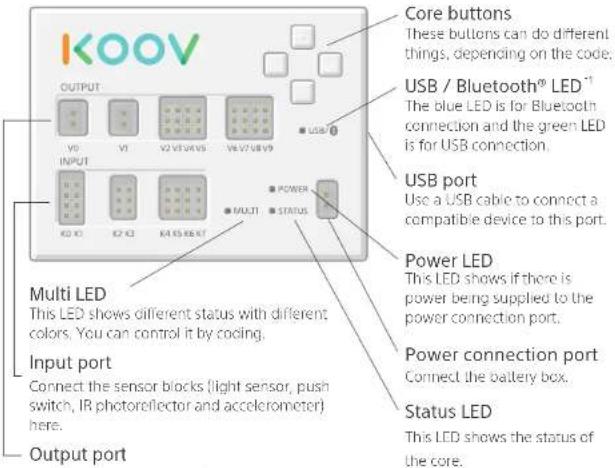
Connect the motor blocks (DC motor, servo motor), LEDs and buzzers here.
*1. Interoperability and compatibility among Bluetooth devices vary; *2. Batteries not included.
Battery box

How to install batteries

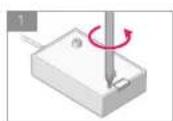
Remove the screw with a cross-head screwdriver.

Slide the cover as shown by the arrows.

Place the batteries in. Make sure to put them in the right direction.

Place the
cover back and
tighten the
screw.


- To parents/guardians
- FCC CAUTION
- WARNING CAUTION
- Keep out of reach of small children
- Do not expose to water or humidity
- Do not disassemble or modify
- Do not expose the internal system to water or drop foreign materials into it
- Do not expose to extreme heat
- Do not drop foreign materials into the terminals
- Specifications
- Mass : Trial Kit 780g (28oz)
- Keep this product in a stable position
- Do not use under direct sunlight or near a strong light source
- Do not use or store in a location subject to heat sources, high temperature or humidity
- Do not use the wireless function under unfit conditions
- Trademarks
- Certifications and compliance
- Warnings and precautions
- On this product
- On handling
- On cleaning
- On battery use
- On application
- On internet
- connection
- On Bluetooth®
- communications
- KOOV Help Center
- https://www.koov.o/help
- Electronic parts
- Names & functions
- Core
- Battery box
- How to install batteries
Brand : SONY
Model : KOOV EKV-100U
Category : Unspecified