
RN2 - Treadmills Bremshey - Free user manual and instructions
Find the device manual for free RN2 Bremshey in PDF.


| Product Type | Home Treadmill |
| Brand | Bremshey |
| Model | RN2 |
| Usage | Indoor, home |
| Maximum User Weight | 120 kg |
| Speed | 1 - 16 km/h |
| Incline | 0 - 10 % |
| Motor | 2.25 CV |
| Power Supply | 230 V AC, 50 Hz |
| Folded Dimensions (L x W x H) | 178.5 x 77.5 x 121 cm |
| Device Weight | 78 kg |
| Training Programs | 6 preset, 1 user, 1 heart rate control |
| Pulse Measurement | Hand grip pulse sensors, optional chest strap |
| Safety Key | Yes, immediate stop if removed |
| Circuit Breaker | Yes, resettable |
| Transportation | Transport wheels, foldable |
| Belt Lubrication | Every 2 months (usage 60 min/day) |
| Cleaning | Soft cloth, vacuum cleaner |
| Warranty | According to dealer, excluding normal wear |
| Repairability | Parts through dealer |
Frequently Asked Questions - RN2 Bremshey
User questions about RN2 Bremshey
0 question about this device. Answer the ones you know or ask your own.
Ask a new question about this device
Download the instructions for your Treadmills in PDF format for free! Find your manual RN2 - Bremshey and take your electronic device back in hand. On this page are published all the documents necessary for the use of your device. RN2 by Bremshey.
USER MANUAL RN2 Bremshey
RN2
RN2 3


E1
E2

MANUAL

P1.SPEED
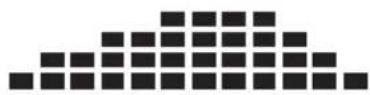
P2. SPEED
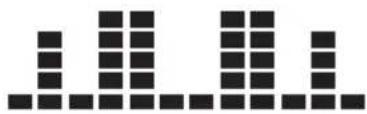
P3. SPEED
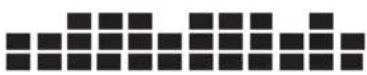
P4. INCLINE
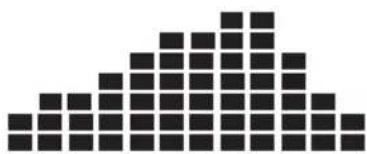
P5. INCLINE

P6. INCLINE
G

TREADMILL
Welcome to the world of Bremshey Sport!
Thank you for purchasing this piece of Bremshey equipment. Bremshey offers a wide range of home fitness equipment, including crosstrainers, treadmills, exercise bikes, rowers and vibration plates. The Bremshey equipment is suitable for the entire family, no matter what fitness level. For more information, please visit our website www.bremshey.com
Safety warnings

WARNING
- Read the safety warnings and the instructions. Failure to follow the safety warnings and the instructions can cause personal injury or damage to the equipment. Keep the safety warnings and the instructions for future reference.
- The equipment is suitable for domestic use only. The equipment is not suitable for commercial use.
- The use of this equipment by children or persons with a physical, sensory, mental or motorial disability, or lack of experience and knowledge can give cause to hazards. Persons responsible for their safety must give explicit instructions or supervise the use of the equipment.
- Before starting your workout, consult a physician to check your health.
- If you experience nausea, dizziness or other abnormal symptoms, immediately stop your workout and consult a physician.
- To avoid muscular pain and strain, start each workout by warming up and finish each workout by cooling down. Remember to stretch at the end of the workout.
- The equipment is suitable for indoor use only. The equipment is not suitable for outdoor use.
- Only use the equipment in environments with adequate ventilation. Do not use the equipment in draughty environments in order not to catch a cold.
-
Only use the equipment in environments with ambient temperatures between 10 °C and 35 °C. Only store the equipment in environments with ambient temperatures between 5 °C and 45 °C.
-
Do not use or store the equipment in humid surroundings. The air humidity must never be more than 80%.
- Only use the equipment for its intended purpose. Do not use the equipment for other purposes than described in the manual.
- Do not use the equipment if any part is damaged or defective. If a part is damaged or defective, contact your dealer.
- Keep your hands, feet and other body parts away from the moving parts.
- Keep your hair away from the moving parts.
- Wear appropriate clothing and shoes.
- Keep clothing, jewelry and other objects away from the moving parts.
- Make sure that only one person uses the equipment at a time. The equipment must not be used by persons weighing more than 120 kg.
- Do not open equipment without consulting your dealer.
Electrical safety (only applicable for equipment with electric power)
- Before use, always check that the mains voltage is the same as the voltage on the rating plate of the equipment.
- Connect the equipment to a grounded wall socket. The equipment is supplied with a grounded cable. Insert the grounded plug into a wall socket that is properly installed and grounded in accordance with the local codes and ordinances.

WARNING
- If you doubt whether the equipment is properly grounded, consult a qualified electrician. Do not alter or modify the grounded plug. If the grounded plug does not fit into the wall socket, have an appropriate wall socket installed by a qualified electrician.
- Do not use an extension cable.
- Keep the mains cable away from heat, oil and sharp edges.
- Do not alter or modify the mains cable or the mains plug.
- Do not use the equipment if the mains cable or the mains plug is damaged or defective. If the mains cable or the mains plug is damaged or defective, contact your dealer.
-
Always fully unwind the mains cable.
-
Do not run the mains cable underneath the equipment. Do not run the mains cable underneath a carpet. Do not place any objects on the mains cable.
- Make sure that the mains cable does not hang over the edge of a table. Make sure that the mains cable cannot be caught accidentally or tripped over.
- Do not leave the equipment unattended when the mains plug is inserted into the wall socket.
- Do not pull the mains cable to remove the mains plug from the wall socket.
- Remove the mains plug from the wall socket when the equipment is not in use, before assembly or disassembly and before cleaning and maintenance.
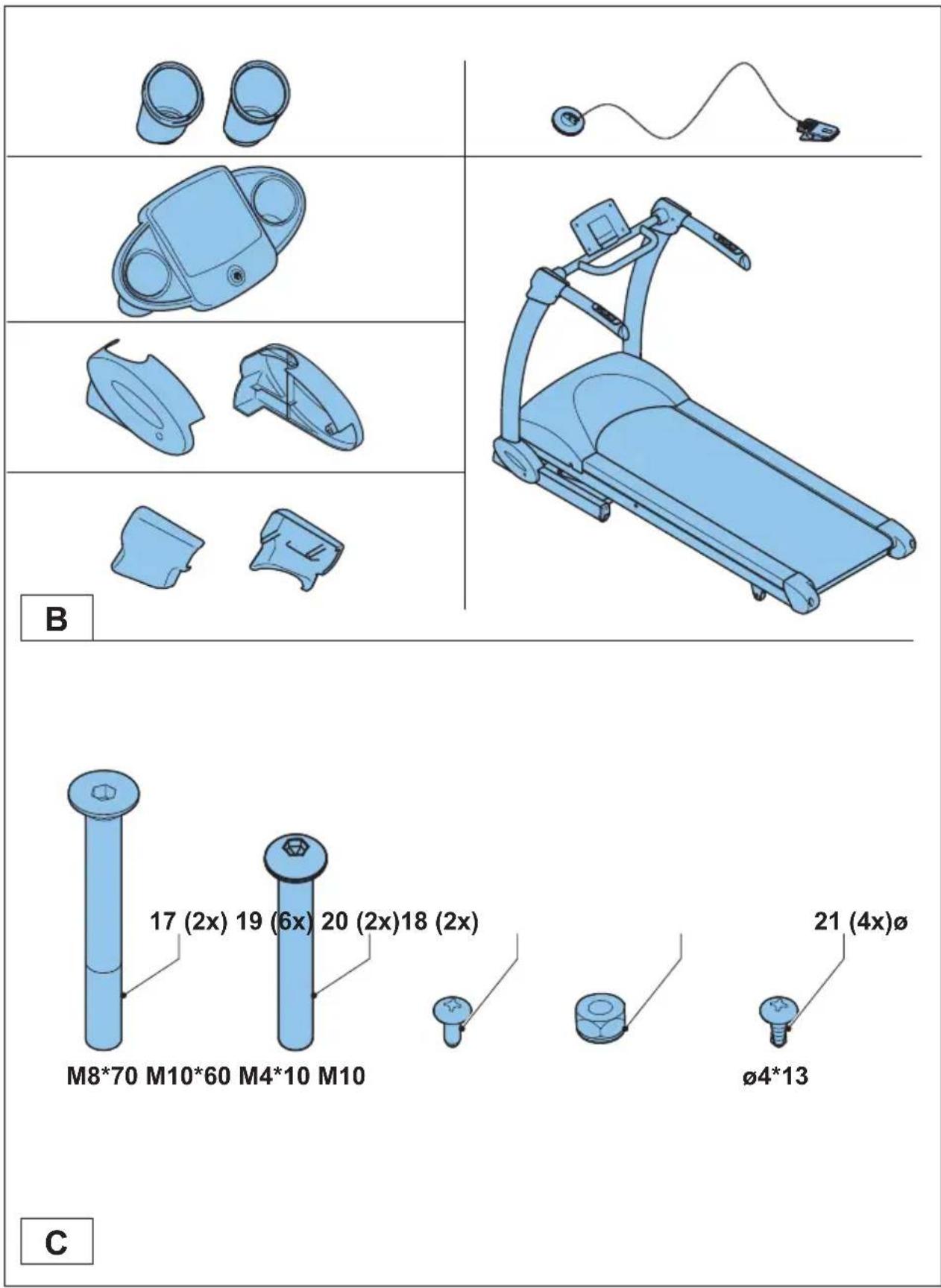
Package contents (fig. B & C)
- The package contains the parts as shown in fig. B.
- The package contains the fasteners as shown in fig. C. Refer to the section "Description".

NOTE
– If a part is missing, contact your dealer.
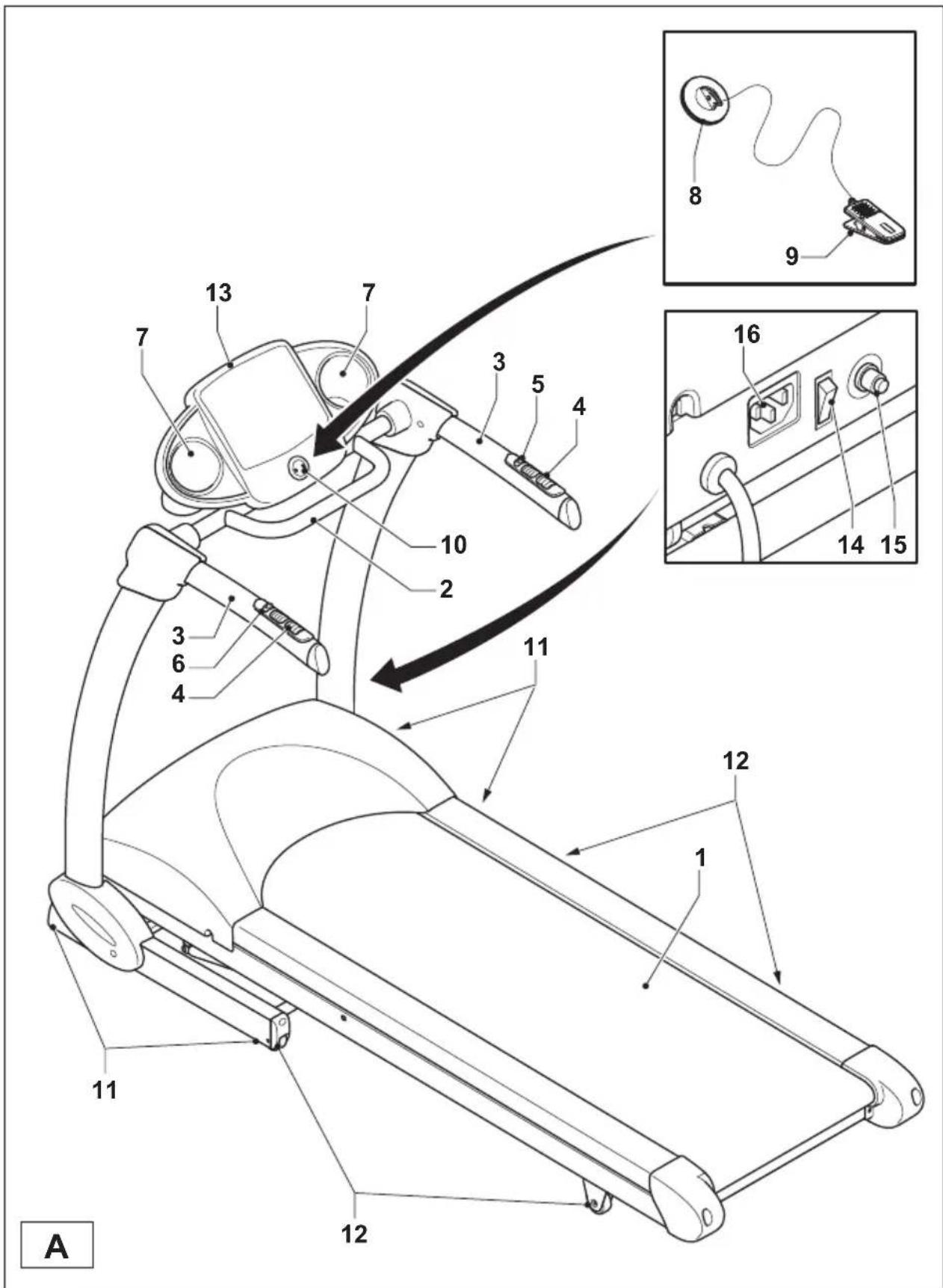
Description (fig. A)
Your treadmill is a piece of stationary fitness equipment used to simulate walking or running without causing excessive pressure to the joints.
| 1 Running belt | 9 Safety key clip |
| 2 Front handlebar | 10 Safety key slot |
| 3 Side handlebar | 11 Support foot |
| 4 Hand pulse sensor | 12 Transport wheel |
| 5 SPEED +/- button | 13 Console |
| 6 INCLINE +/- button | 14 Master power switch |
| 7 Bottle holder | 15 Circuit breaker |
| 8 Safety key | 16 Mains cable connection |
Fasteners (fig. C)
17 Allen bolt (M8*70)
18 Allen bolt (M10*60)
19 Screw (M4*10)
20 Nut (M10)
21 Screw ( 4*13 )
Assembly (fig. D)

WARNING
- Assemble the equipment in the given order.
- Carry and move the equipment with at least two persons.

CAUTION
- Place the equipment on a firm, level surface.
- Place the equipment on a protective base to prevent damage to the floor surface.
- Allow at least 200 cm of clearance behind the equipment, 100 cm in front of the equipment and 100 cm on the sides of the equipment.
- Refer to the illustrations for the correct assembly of the equipment.
Workouts
The workout must be suitably light, but of long duration. Aerobic exercise is based on improving the body's maximum oxygen uptake, which in turn improves endurance and fitness. You should perspire, but you should not get out of breath during the workout.
To reach and maintain a basic fitness level, exercise at least three times a week, 30 minutes at a time. Increase the number of exercise sessions to improve your fitness level. It is worthwhile to combine regular exercise with a healthy diet. A person committed to dieting should exercise daily, at first 30 minutes or less at a time, gradually increasing the daily workout time to one hour. Start your workout at low speed and low resistance to prevent the cardiovascular system from being subjected
to excessive strain. As the fitness level improves, speed and resistance can be increased gradually. The efficiency of your exercise can be measured by monitoring your heart rate and your pulse rate.
Hold the side handlebars when stepping on the equipment. Before use, stand on the landing rails to the left and right of the running belt. Hold the side handlebars. Do not stand on the running belt until the running belt is operating. After use, hold the side handlebars when stepping off the equipment. Remember to stretch at the end of the workout.
Pulse rate measurement (hand pulse sensors)
The pulse rate is measured by sensors in the handlebars when the user is touching both sensors at the same time. Accurate pulse measurement requires that the skin is slightly moist and constantly touching the hand pulse sensors. If the skin is too dry or too moist, the pulse rate measurement will become less accurate.

NOTE
- Do not use the hand pulse sensors in combination with a heart rate chest belt.
- If you set a heart rate limit for your workout, an alarm will sound when it is exceeded.
Heart rate measurement (heart rate chest belt)
The most accurate heart rate measurement is achieved with a heart rate chest belt. The heart rate is measured by a heart rate receiver in combination with a heart rate transmitter belt. Accurate heart measurement requires that the electrodes on the transmitter belt are slight moist and constantly touching the skin. If the electrodes are too dry or too moist, the heart rate measurement will become less accurate.

WARNING
- If you have a pacemaker, consult a physician before using a heart rate chest belt.
CAUTION
- If there are several heart rate measurement devices next to each other, make sure that the distance between them is at least 1.5 metres.
- If there is only one heart rate receiver and several heart rate transmitters, make sure that only one person with a transmitter is within transmission range.

NOTE
- Do not use a heart rate chest belt in combination with the hand pulse sensors.
- Always wear the heart rate chest belt under your clothes directly in contact with your skin. Do not wear the heart rate chest belt above your clothes. If you wear the heart rate chest belt above your clothes, there will be no signal.
- If you set a heart rate limit for your workout, an alarm will sound when it is exceeded.
- The transmitter transmits the heart rate to the console up to a distance of 1 metre. If the electrodes are not moist, the heart rate will not appear on the display.
- Some fibers in clothes (e.g. polyester, polyamide) create static electricity which can prevent accurate heart rate measurement.
-
Mobile phones, televisions and other electrical appliances create an electromagnetic field which can prevent accurate heart rate measurement.
-
Slightly moisten the electrodes on the transmitter belt with saliva or water.
- Fasten the transmitter with the belt just below the chest, firmly enough so that the electrodes are constantly touching the skin, but not so tight that you cannot breathe normally.
- Allow the electrodes to warm up properly to ensure accurate heart rate measurement.
Maximum heart rate (during training)
The maximum heart rate is the highest heart rate a person can safely achieve through exercise stress. The following formula is used to calculate the average maximum heart rate: 220 - AGE. The maximum heart rate varies from person to person.

WARNING
- Make sure that you do not exceed your maximum heart rate during your workout. If you belong to a risk group, consult a physician.
| Category Heart rate zone Explanation | ||
| Beginner 50-60% of maximum heart rate | Suitable for beginners, weight-watchers, convalescents and persons who have not exercised for a long time. Exercise at least three times a week, 30 minutes at a time. | |
| Advanced 60-70% of maximum heart rate | Suitable for persons who want to improve and maintain fitness. Exercise at least three times a week, 30 minutes at a time. | |
| Expert 70-80% of maximum heart rate | Suitable for the fittest of persons who are used to long-endurance workouts. | |
Use
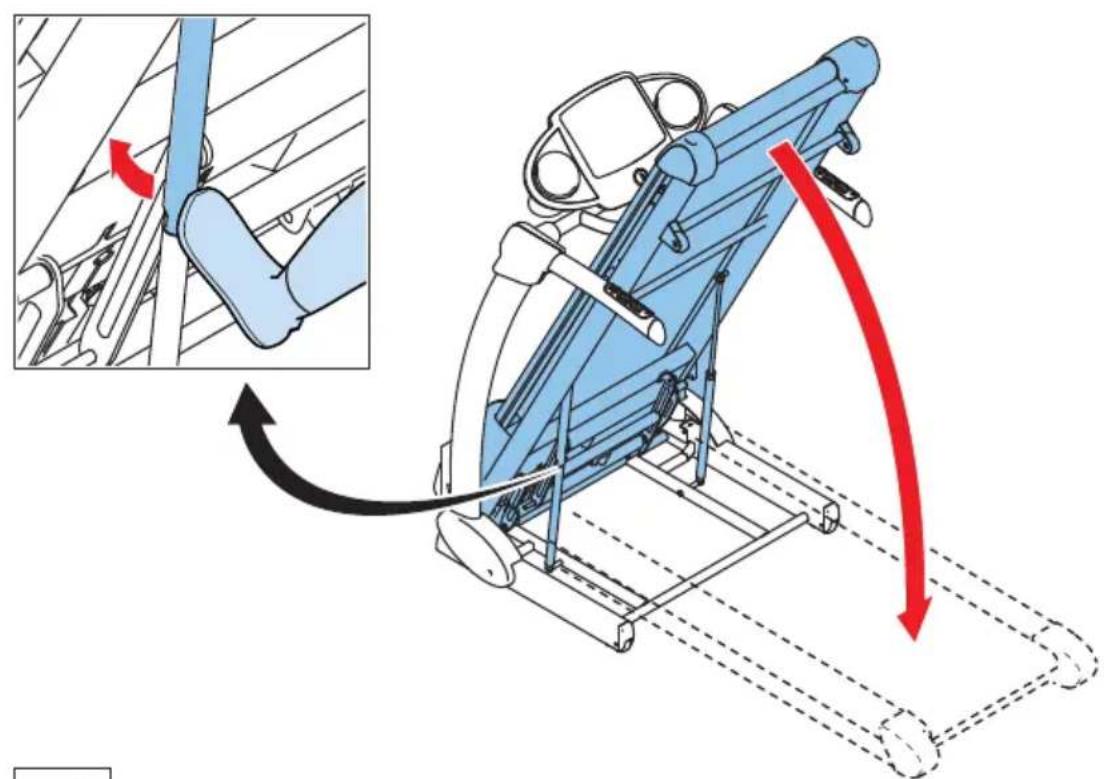
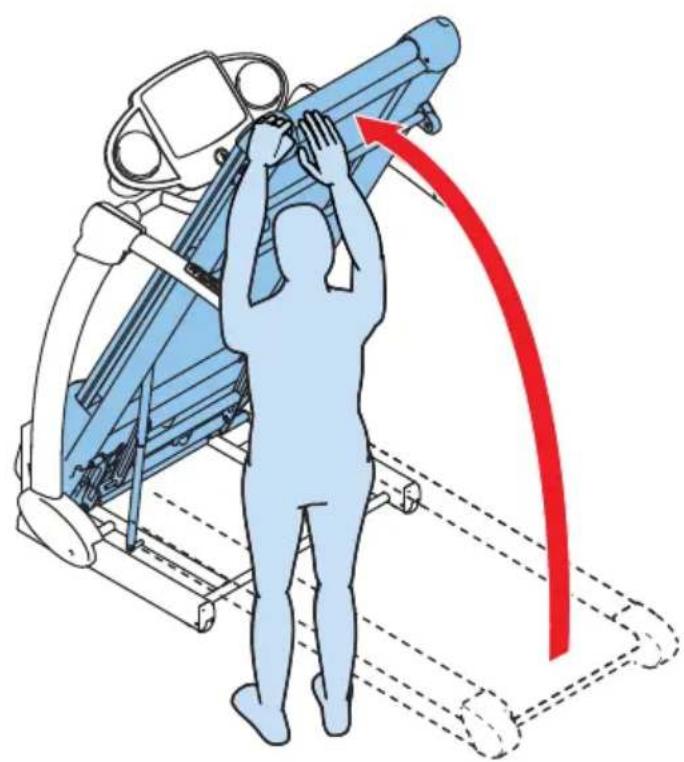
Unfolding and folding the equipment (fig. E)
The equipment can be unfolded for use (fig. E1) and folded for transport and storage (fig. E2). Refer to the illustrations for the correct way of unfolding and folding the equipment.
Master power switch
The equipment is equipped with a master power switch to shut down the equipment completely.
To start the equipment:
- Insert the mains plug into the equipment.
- Insert the mains plug into the wall socket.
- Set the master power switch to the on position.
To stop the equipment:
- Set the mains power switch to the off position.
- Remove the mains plug from the wall socket.
- Remove the mains plug from the equipment.
Safety key (fig. F)
The equipment is equipped with a safety key that must be properly inserted into the console to start the equipment. If you remove the safety key from the console, the equipment will stop immediately.
- Insert the safety key into the slot in the console.
- Make sure that the clip of the safety key is properly attached to your clothing. Make sure that the clip is not removed from your clothing before the safety key is removed from the console.
Circuit breaker
The equipment is equipped with a circuit breaker that interrupts the circuit when the electricity load is above the maximum capacity. When this occurs, the circuit breaker must be pressed.

WARNING
- Before pressing the circuit breaker, remove the mains plug from the equipment.
If the equipment shuts down, proceed as follows to restart the equipment:
- Remove the mains plug from the equipment.
- Press the circuit breaker to restart the equipment.
- Insert the mains plug into the equipment.
Adjusting the support feet
The equipment is equipped with 4 support feet. If the equipment is not stable, the support feet can be adjusted.
- Turn the support feet as required to put the equipment in a stable position.
- Tighten the locknuts to lock the support feet.
Console (fig. J)
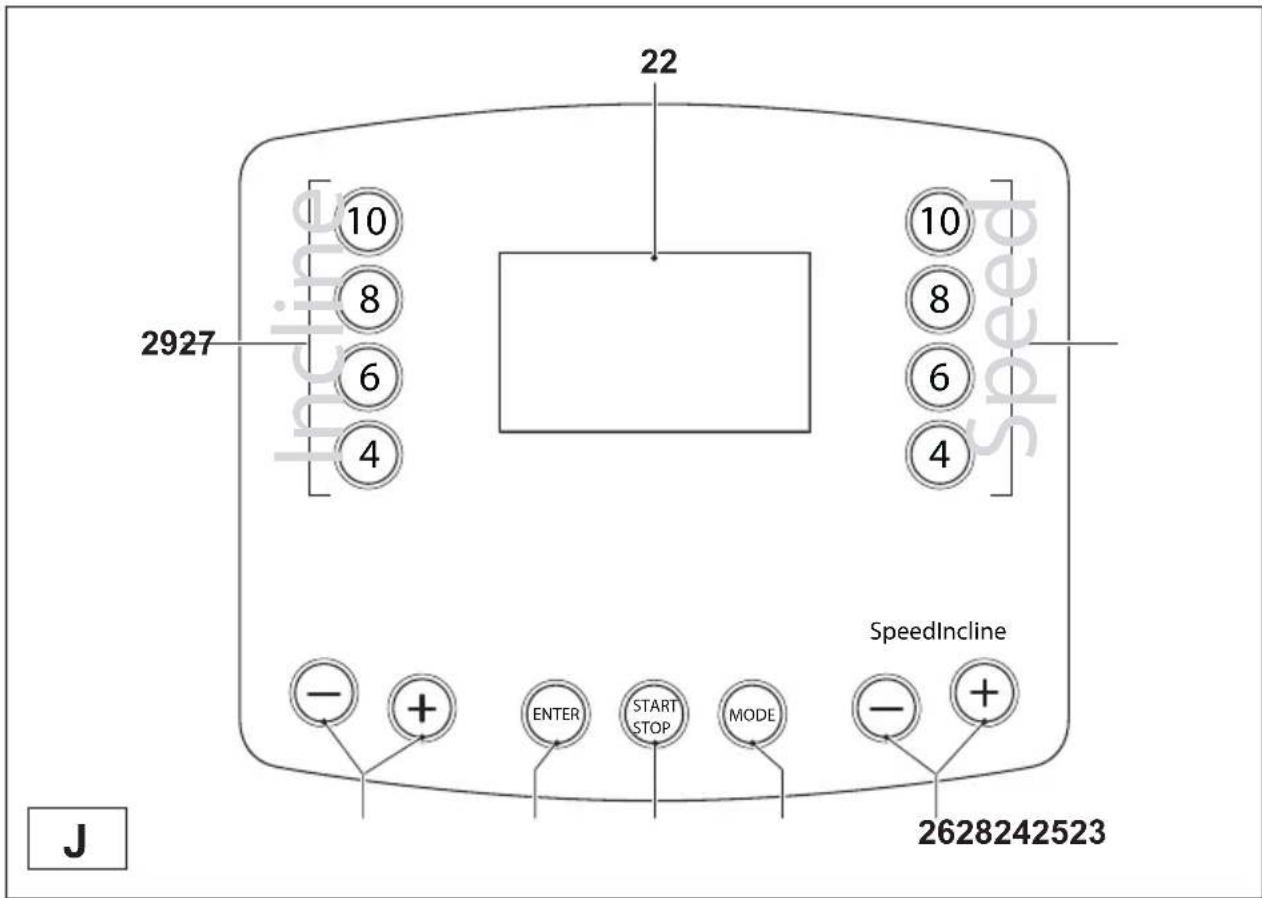
22 Main display
26 SPEED +/- buttons
23 START/STOP button
27 SPEED quick buttons
24 ENTER button
28 INCLINE +/- buttons
25 MODE button
29 INCLINE quick buttons

CAUTION
- Keep the console away from direct sunlight.
- Dry the surface of the console when it is covered with drops of sweat.
- Do not lean on the console.
- Only touch the display with the tip of your finger. Make sure that your nails or sharp objects do not touch the display.

NOTE
- The console switches to standby mode when the equipment is not used for 10 minutes. If you press one of the buttons, the equipment will be activated again.
Explanation of buttons
| Button Explanation | |
| START/STOP Press the button to start the training. Press the button again to pause the training (max. 4 minutes). Press the button again to continue the training. Press and hold the button to stop the training. | |
| MODE Press the button to show the value for a specific item: time, distance, calories, pulse, laps and scan (items one after another). | |
| ENTER Press the button to confirm your selection. | |
| SPEED +/- buttons Press the buttons to set the speed. | |
| SPEED quick buttons Press the buttons to set the speed to the mentioned value. | |
| INCLINE +/- buttons Press the buttons to set the incline. | |
| INCLINE quick buttons Press the buttons to set the incline to the mentioned value. | |
Explanation of displays
| Display Explanation | |
| Main display The display shows the selected program. The display also shows messages in specific modes. | |
| The display shows the value for a specific item: time, distance, calories, pulse, laps and scan (items one after another). | |
| The display shows the value for speed. | |
| The display shows the value for incline. | |
Modes
Quick start mode
After you switch on the console, you can start your workout immediately by pressing the START button.
- Press the START/STOP button to start the equipment.
Manual mode
- Switch on the equipment.
- Press the ENTER button.
- Press the +/- buttons to set the time (12 - 99 minutes). Press the ENTER button to confirm.
- Press the START/STOP button to start the program.
- Press the START/STOP button again to stop the program.
Program mode
- Switch on the equipment.
- Press the MODE button to select one of the preset programs.

NOTE
- The display shows a program menu with 8 programs (fig. G): 6 preset programs (P01-P06), 1 user program (U01) and 1 heart rate control program (H01).
-
Press the +/- buttons to select a program. Press the ENTER button to confirm.
-
Set the targets for the program as described below.
- Press the START/STOP button to start the program. The program will start with default settings or with adjusted values.
- Press the START/STOP button again to stop the program.
Program menu
Preset programs (P01-P06)
The equipment has 6 preset programs with different profiles.
- Press the +/- buttons to select a program. Press the ENTER button to confirm.
- Press the +/- buttons to select the intensity level of the program (L1 - L3). Press the ENTER button to confirm.
- Press the +/- buttons to set the time. Press the ENTER button to confirm.
- Press the START/STOP button to start the program.
User programs (U01)
The equipment has 1 user program. Each user program can be adjusted to personal requirements. Each user program has a maximum of 16 steps. The speed and the incline can be set for each step. Each steps takes 1/20 of the total amount of time.
- Press the +/- buttons to select a program. Press the ENTER button to confirm.
- Press the +/- buttons to set the time. Press the ENTER button to confirm. The main display shows "SE01".
- Press the SPEED +/- button to set the speed. Press the INCLINE +/- button to set the incline. Press the ENTER button to confirm.
- Repeat the above action to configure the other steps.
- Press the START/STOP button to start the program.
Heart rate control programs (H01)
The equipment has 1 heart rate control program.
- Press the +/- buttons to select a program. Press the ENTER button to confirm.
- Press the +/- buttons to set the time. Press the ENTER button to confirm.
- Press the +/- buttons to set the age. Press the ENTER button to confirm.
- Press the +/- buttons to set the heart rate limit. Press the ENTER button to confirm.
-
Press the +/- buttons to set the maximum speed. Press the ENTER button to confirm. (The program will not exceed the maximum speed in order to reach your target heart rate.)
-
Press the +/- buttons to set the maximum incline. Press the ENTER button to confirm. (The program will not exceed the maximum incline in order to reach your target heart rate.)
- Press the START/STOP button to start the program. The program will start with a warming up of 3 minutes with a speed of 3 km/h and an incline of 5%.
During a workout
Adjusting the speed
The speed (1 - 16 km/h (0.6 - 10 mph)) can be adjusted with the SPEED +/- buttons on the side handlebars or on the console. The speed can also be adjusted with the SPEED quick buttons.
SPEED +/- buttons
- Press the SPEED +/- buttons to increase or decrease the speed by 0.1 km/h (0.1 mph) at a time.
- Press and hold the SPEED +/- buttons to accelerate the process.
SPEED quick buttons
- Press the 4 button set the speed to 4 km/h (4 mph).
- Press the 6 button set the speed to 6 km/h (6 mph).
- Press the 8 button set the speed to 8 km/h (8 mph).
- Press the 10 button set the speed to 10 km/h (10 mph).
Adjusting the incline
The incline (0% - 10%) can be adjusted with the INCLINE +/- buttons on the side handlebars or on the console. The incline can also be adjusted with the INCLINE quick buttons.
INCLINE +/- buttons
- Press the INCLINE +/- buttons to increase or decrease the incline by 1% at a time.
- Press and hold the INCLINE +/- buttons to accelerate the process.
INCLINE quick buttons
- Press the 4 button set the incline to 4%.
- Press the 6 button set the incline to 6%.
- Press the 8 button set the incline to 8%.
- Press the 10 button set the incline to 10%.
Pausing the program
- Press the START/STOP button to pause the program.
- Press the START/STOP button again to continue the program.
Resetting the equipment
If you reset the equipment, the console returns to the main menu. The equipment can be reset in two ways.
- During a workout: Press and hold the START/STOP button for 3 seconds.
- At any moment: Remove the safety key from the console.
Engineer mode
- To enter the engineer mode, press the MODE button and the SPEED + button. To return to the user mode, press the START/STOP button and the SPEED + button. The display shows the software version.
- Press the ENTER button. The display shows the roller diameter.
- Press the ENTER button to confirm. The display shows the LDU version.
- Press the ENTER button to confirm. The display shows the ISP version.
- Press the ENTER button to confirm.
- Press the ENTER button to confirm. The display shows the total time for the workout.
- Press the +/- buttons to select kilometres (km) or miles (ml). Press the ENTER button to confirm. The display shows the total distance for the workout.
- Press the ENTER button to confirm. The display shows the total time for the workout.
- Press the ENTER button to return to the program menu.
Cleaning and maintenance

WARNING
- Before cleaning and maintenance, remove the mains plug from the wall socket.
-
Do not use solvents to clean the equipment.
-
Do not block the ventilation openings. Keep the ventilation openings clear from dust, dirt and other obstructions.
-
Clean the equipment with a soft, absorbent cloth after each use.
-
Clean the visible parts of the equipment with a vacuum cleaner with a small suction nozzle
- Regularly check that all screws and nuts are tight.
Lubrication (fig. H)
The running belt must be checked for lubrication once per 2 months, based on the average use of 60 minutes per day.

WARNING
– Before lubrication, remove the mains plug from the wall socket.

CAUTION
- Only lubricate the running belt if necessary. If you apply too much lubricant, the running belt will slip easily due to lack of friction.
- Stand steadily on the running belt.
- Take hold of the front handlebar and push the running belt with your feet so that it slides back and forth. The running belt must move smoothly and evenly without making sound.
- If the running belt does not move smoothly and evenly or if the running belt does not move at all, touch the underside of the running belt with your fingertips to check the lubrication:
- If you feel lubrication or your fingertips are shiny, there is sufficient lubrication on the running belt.
- If you do not feel lubrication or your fingertips are dusty or rough, apply lubricant (15-20 ml) in the middle of the running deck under the running belt and let the equipment operate at 5km/h for at least 5 minutes.
- After lubrication, do not fold the equipment before having done a workout for 20 minutes with a speed of at least 5km / h . The lubricant will be spread evenly over the running belt.
Aligning the running belt (fig. I)
The running belt must run in the center of the rollers. If the running belt is pushed to one side, the running belt must be aligned using the adjustment bolts at the rear of the equipment.

CAUTION
- Make sure that the running belt is aligned correctly to prevent damage to the edges of the running belt.
- Set the mains power switch to the on position.
- Set the speed to 5 km/h.
- If the running belt runs in the center of the rollers, the running belt is aligned correctly.
- If the running belt drifts to the left, turn the left adjustment bolt 1/4 turn clockwise and the right adjustment bolt 1/4 turn counterclockwise.
- If the running belt drifts to the right, turn the right adjustment bolt 1/4 turn clockwise and the left adjustment bolt 1/4 turn counterclockwise.
- Repeat the last 2 steps until the running belt is aligned to the centre.
Adjusting the running belt tension
The running belt tension must be adjusted when it starts to slip on the rollers. The running belt tension must be adjusted using the adjustment bolts at the rear of the equipment.

CAUTION
- Make sure that the running belt is aligned correctly to prevent damage to the edges of the running belt.
- Set the mains power switch to the on position.
- Set the speed to 5 km/h.
- Turn both adjustment bolts 1/4 turn clockwise an equal amount of times.
-
Slow down the running belt by holding onto the side handlebars and braking as you walk.
-
If the running belt slips, turn both adjustment bolts 1/4 turn clockwise and repeat the test.
- If the belt keeps slipping after several tests, contact the dealer.
Defects and malfunctions
Despite continuous quality control, defects and malfunctions caused by individual parts can occur in the equipment. In most cases, it will be sufficient to replace the defective part.
- If the equipment does not function properly, immediately contact the dealer.
- Provide the model number and the serial number of the equipment to the dealer. State the nature of the problem, conditions of use and purchase date.
Error codes
If the display shows an error code (marked with "E" + number), restart the equipment and check whether the display still shows the error code. If the display still shows the error code, immediately contact the dealer.
Transport and storage (fig. E)

WARNING
- Before cleaning and maintenance, remove the mains plug from the wall socket.
- Carry and move the equipment with at least two persons.
- Make sure that there are no other persons or objects under the equipment.
- When folding the folding the equipment, make sure that you hear the equipment lock into position to prevent the equipment from dropping back down.

CAUTION
- Before folding the equipment, make sure that the incline is 0% . If the incline is not 0% , folding will damage the mechanism.
-
Move the equipment as shown (fig. E3). Move the equipment and carefully put the equipment down. Place the equipment on a protective base to prevent damage to the floor surface. Move the equipment carefully over uneven surfaces. Do not move the equipment upstairs using the wheels, but carry the equipment by the handlebars.
-
Store the equipment in the upright position (fig. E2). Store the equipment in a dry place with as little temperature variation as possible.
Technical data
| Parameter Unit of | measurement | Value |
| Mains voltage V | AC | 230 |
| Mains voltage (North America) V | AC | 110 |
| Mains frequency Hz 50 | ||
| Motor HP 2.25 | ||
| Speed km/h | mph | 1 - 160.6 - 10 |
| Incline % 0 - 10 | ||
| Length (folded) cm | inch | 178.5 (95)71 (38) |
| Width cm | inch | 77.531 |
| Height (folded) cm | inch | 121 (155)48 (61) |
| Weight kg | lbs | 78172 |
| Max. user weight kg | lbs | 120266 |
Warranty
The product has a warranty from the date of delivery (to be documented by invoice or delivery note). Further information on warranty terms can be obtained from your local dealer. The warranty terms may vary from one country to another. Damages caused by normal wear, overloading or improper handling are excluded from the warranty. Damages caused by material or manufacturing faults are covered by the warranty and will repaired or replaced at no cost.
Declaration of the manufacturer
Accell Fitness Division BV declares that the product is in conformity with the following standards and directives: EN 957 (HB), 73/23/EEC, 89/336/EEC. The product therefore carries the CE label.
04-2011
Accell Fitness Division BV
Purmerweg 1
1311 XE Almere
The Netherlands
Disclaimer
© 2011 Accell Fitness Division BV
All rights reserved.
The product and the manual are subject to change. Specifications can be changed without further notice.
LAUFBAND
Accell Fitness Division BV
Purmerweg 1
1311 XE Almere
Niederlande
Haftungsausschluss
© 2011 Accell Fitness Division BV
Accell Fitness Division BV
Purmerweg 1
1311 XE Almere
Nederland
Disclaimer
© 2011 Accell Fitness Division BV
Accell Fitness Division BV
Purmerweg 1
1311 XE Almere
Pays-Bas
© 2011 Accell Fitness Division BV
22 Pantalla principal
23 Botón START/STOP
24 Botón ENTER
25 Botón MODE
26 Botones SPEED +/-
Accell Fitness Division BV
Purmerweg 1
1311 XE Almere
Holanda
© 2011 Accell Fitness Division BV
Accell Fitness Division BV
Purmerweg 1
1311 XE Almere
Paesi Bassi
© 2011 Accell Fitness Division BV
Accell Fitness Division BV
Purmerweg 1
1311 XE Almere
Nederländerna
Friskrivning
© 2011 Accell Fitness Division BV
Accell Fitness Division BV
Purmerweg 1
1311 XE Almere
Alankomaat
Vastuuvapauslauseke
© 2011 Accell Fitness Division BV
Accell Fitness North America Inc.
130 Hayward Ave, Suite 2
N2C 2E4
Kitchener, ON Canada
Tel: 1-888-388-6887
Fax: 1-519-576-2521
For contact information for other countries check our website:
www.accellfitness.com
www.bremshey.com

- TREADMILL
- SAFETY WARNINGS
- WARNING
- ELECTRICAL SAFETY (ONLY APPLICABLE FOR EQUIPMENT WITH ELECTRIC POWER)
- PACKAGE CONTENTS (FIG. B & C)
- NOTE
- DESCRIPTION (FIG. A)
- FASTENERS (FIG. C)
- ASSEMBLY (FIG. D)
- CAUTION
- WORKOUTS
- PULSE RATE MEASUREMENT (HAND PULSE SENSORS)
- HEART RATE MEASUREMENT (HEART RATE CHEST BELT)
- MAXIMUM HEART RATE (DURING TRAINING)
- USE
- UNFOLDING AND FOLDING THE EQUIPMENT (FIG. E)
- MASTER POWER SWITCH
- TO START THE EQUIPMENT
- TO STOP THE EQUIPMENT
- SAFETY KEY (FIG. F)
- CIRCUIT BREAKER
- ADJUSTING THE SUPPORT FEET
- MODES
- QUICK START MODE
- MANUAL MODE
- PROGRAM MODE
- PROGRAM MENU
- PRESET PROGRAMS (P01-P06)
- USER PROGRAMS (U01)
- HEART RATE CONTROL PROGRAMS (H01)
- DURING A WORKOUT
- ADJUSTING THE SPEED
- SPEED +/- BUTTONS
- SPEED QUICK BUTTONS
- ADJUSTING THE INCLINE
- INCLINE +/- BUTTONS
- INCLINE QUICK BUTTONS
- PAUSING THE PROGRAM
- RESETTING THE EQUIPMENT
- ENGINEER MODE
- CLEANING AND MAINTENANCE
- LUBRICATION (FIG. H)
- ALIGNING THE RUNNING BELT (FIG. I)
- ADJUSTING THE RUNNING BELT TENSION
- DEFECTS AND MALFUNCTIONS
- ERROR CODES
- TRANSPORT AND STORAGE (FIG. E)
- WARRANTY
- DECLARATION OF THE MANUFACTURER
- DISCLAIMER
- LAUFBAND
- HAFTUNGSAUSSCHLUSS
- FRISKRIVNING
- VASTUUVAPAUSLAUSEKE
Brand : Bremshey
Model : RN2
Category : Treadmills