B40 W - Coffee machine Bravilor Bonamat - Free user manual and instructions
Find the device manual for free B40 W Bravilor Bonamat in PDF.


User questions about B40 W Bravilor Bonamat
0 question about this device. Answer the ones you know or ask your own.
Ask a new question about this device
Download the instructions for your Coffee machine in PDF format for free! Find your manual B40 W - Bravilor Bonamat and take your electronic device back in hand. On this page are published all the documents necessary for the use of your device. B40 W by Bravilor Bonamat.
USER MANUAL B40 W Bravilor Bonamat
Operating instructions
ROUND FILTER COFFEE BREWER


natural_image
Line drawing of a three-cylinder industrial machine with control panel and piping (no text or symbols)All rights reserved.
No part of this document may be copied and/or published by means of printing, photocopying, microfilming or by any other means whatsoever without the prior written consent of the manufacturer.
This applies equally to the included drawings and/or diagrams.
The information contained in this document is based on general data concerning the construction, materials characteristics and working methods known to us at the time of publication and therefore we reserve the right to make changes without notice. For this reason the instructions given should be regarded as a guide to the installation, use and maintenance of the machine indicated on the front cover.
This document applies to the standard version of this machine. The manufacturer therefore accepts no liability for any damage arising from specifications that deviate from the standard version of the machine as delivered to you.
Every possible care has been taken in the production of this document, but the manufacturer accepts no liability for any errors in this document or for any consequences arising therefrom.
TAKE THE TIME TO CAREFULLY READ THIS DOCUMENT BEFORE USING THE MACHINE.
DURING READING KEEP THE FOLD-OUT OPEN.
ALWAYS KEEP THIS DOCUMENT NEAR THE MACHINE.
text_image
Technical diagram of a chemical reactor with labeled components and internal structure
PREFACE
Using this document
This document is intended to provide instructions for authorized users to safely install, use and maintain the machine.
In this document, such users are divided into three categories:
– random users: those who operate the machine in practice.
- Users with limited authority: those who operate the machine in practice and must therefore perform daily maintenance and solve any (minor) problems that may occur. For them particularly chapters 1., 2., 4., 5., 6., 7.1, 7.2 and 8. are important.
- Specially trained users (chief) with more comprehensive authority who must be familiar with the entire document.
All sections and paragraphs are numbered. The page numbers are placed at the bottom of each page.
The operations described in this manual are illustrated with the help of the B10 with the standard factory settings.
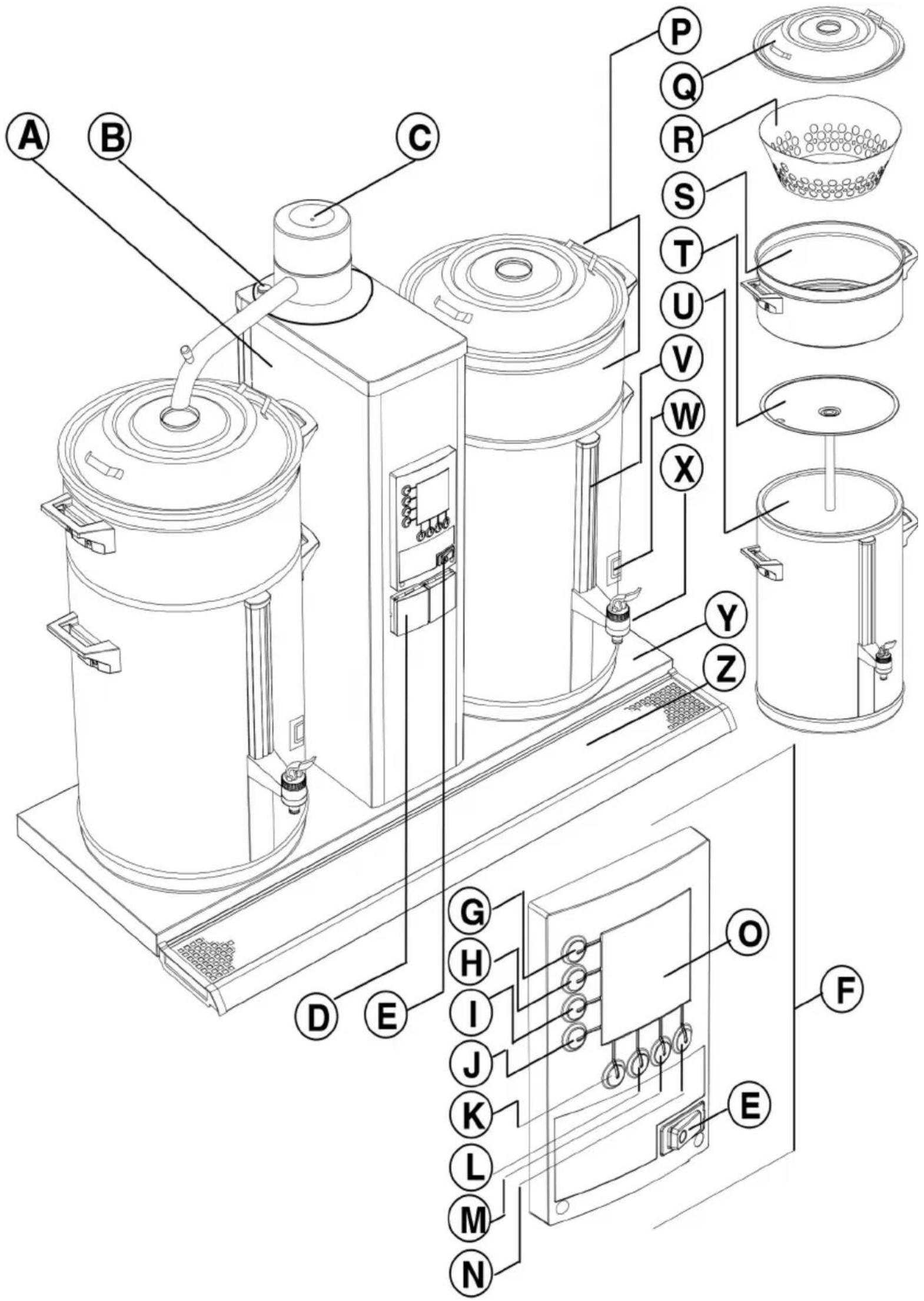
The position numbers used in this document refer to the figures in the fold-out.
Icons and symbols
In this document the following icons and symbols can be found:
TIP
- Hint, suggestion or advice to carry out certain tasks more easily or neatly.

CAUTION!
– Procedures that can result in damage to the machine, the surrounding area or the environment if they are not carried out with due care.

WARNING
△ Procedures that can result in serious damage to the machine or in physical injury if they are not carried out with due care.

WARNING
ΔRisk of electric shock.

WARNING
ΔRisk of burns.
Document code
Document codes consist of two fields:
– Field 1: document number (if required followed by the revision number)
– Field 2: revision date
Service and technical support
Please contact your dealer for information concerning the specific setting, maintenance or service activities that fall outside the scope of this document. Your dealer will always be happy to help you. When doing this, always ensure that you have the following details at hand:
- Model code
- Type number
- Serial number
These data can be found on the identification plate. Write down the data of the identification plate in the intended fields (fig.1).
Guarantee conditions
The guarantee conditions applicable to this machine form part of the terms of delivery.
Identification of the machine
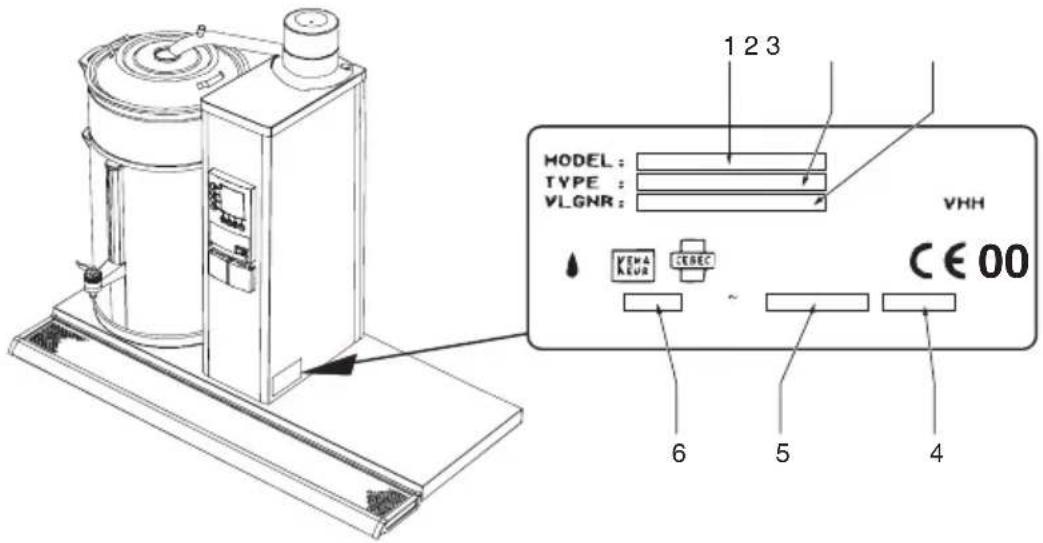
- Model code
- Type number
- Serial number
- Output capacity
- Frequency
- Supply voltage
Table of contents
Preface .... I
Using this document .... I
Icons and symbols
Related documents
Document code 1
Service and technical support Ⅱ
Guarantee conditions Ⅱ
Identification of the machine II
Safety instructions and danger warnings VIII
General VIII
Instructions for use VIII
Icons and instructions on the machine (if present) VIII
Users VIII
Proper use VIII
Technical specifications VIII
Modifications VIII
Installation IX
Use IX
Maintenance and repairing failures IX
Safety devices present X
Machines and the environment X
Packaging material X
Disposal of the machine X
Table of contents
1. Introduction ...... 1
1.1 A quick look at the machine 1
1.1.1 General description 1
1.1.2 Main components 1
1.1.3 Use of the keys 2
1.2 Brief description of operation 2
1.2.1 Coffee-making system 3
2. Technical data 4
2.1 Dimensions 4
2.2 Electrical system 4
2.3 Water system 5
2.4 Environmental conditions 5
2.5 Recommended cleaning and descaling materials 5
2.6 Recommended coffee and filter paper 5
3. Installation 6
3.1 Unpacking 6
3.2 Installation 7
3.2.1 Connection to the water and electrical system 7
3.2.2 Initial use 7
3.2.2.1 Flushing the coffee-making system 7
4. Daily use 8
4.1 Operation 8
4.1.1 Making coffee 8
4.1.2 Tapping the coffee 9
4.1.3 Pre-programmed settings 9
4.1.4 Coffee calculator 9
5. Maintenance 10
5.1 Maintenance activities that may be carried out by the daily user ..... 10
5.1.1 General cleaning 10
5.1.2 Daily cleaning of the coffee-making system 10
5.1.3 Weekly cleaning of the coffee-making system 10
5.1.3.1 Cleaning the gauge glass 11
5.2 Maintenance activities for users with limited and extended authority . 12
5.2.1 Descaling the coffee-making system 12
6. Programming carousel 13
Table of contents
7. Programming 14
7.1 The users' menu 14
7.1.1 Pre-programmed time settings for making coffee (timer) 14
7.1.2 Once-only time settings for making coffee 16
7.2 The limited programming menu 17
7.2.1 Day counter coffee-making system 18
7.2.2 Starting descaling programme coffee-making system 18
7.2.3 Descaling counter coffee-making system 20
7.2.4 Total counter coffee-making system 20
7.3 The extended programming menu 21
7.3.1 Setting total amount of water 21
7.3.2 Selected units: litres, cups, jugs or US gallon 22
7.3.2.1 Changing pre-programmed selection keys G-J (Litres) 22
7.3.3 Cup contents 23
7.3.3.1 Adjusting pre-programmed selection keys G-J (Cups) 23
7.3.4 Jug contents 24
7.3.4.1 Adjusting pre-programmed keys G-J (Jugs) 24
7.3.5 US gallon 25
7.3.5.1 Adjusting pre-programmed selection keys G-J (Gallon) 25
7.3.6 Various settings, such as language, system clock, and container preheating 26
7.3.6.1 Language setting 26
7.3.6.2 Setting the current day and time 26
7.3.6.3 Setting container preheating 27
7.3.7 Timer 28
7.3.8 Lengthening water delivery time by setting pauses 29
7.3.9 Setting dripping-on time 29
7.3.10 Setting number of grams of coffee per litre (coffee calculator) 30
7.3.11 Reading total counter coffee-making system 30
7.3.12 Setting descaling signal coffee-making system 31
7.3.13 Starting descaling program coffee-making system 31
7.3.14 Resetting day counter coffee-making system 31
8. Correcting malfunctions 32
8.1 Malfunctioning analysis general 32
8.2 Coffee-making system 33
8.3 Display messages and their meanings 34
9. Consumable items and accessories 35
9.1 Recommended consumable items 35
9.2 Accessories 35
Table of figures

Fig. 1 Identification plate II
Fig. 2 Water connecting hose 2
Fig. 3 Operating panel coffee-making system 2
Fig. 4 Display with descaling signal coffee-making system 3
Fig. 5 Display with the default options 7
Fig. 6 Starting screen 8
Fig. 7 Dripping-on time 9
Fig. 8 Placing the sight glass cover 11
Fig. 9 Placing and removing the gauge glass cover 11
Fig. 10 Carousel of the programming menu 13
Fig. 11 Example current day and time 14
Fig. 12 Default pre-programmed setting 14
Fig. 13 Waiting mode timer 15
Fig. 14 Day counter coffee-making system 18
Fig. 15 Starting the descaling programme coffee-making system 18
Fig. 16 Coffee-making system asks for descaling solution 19
Fig. 17 First level descaling programme coffee-making system 19
Fig. 18 Descaling counter coffee-making system 20
Fig. 19 Total counter coffee-making system 20
Fig. 20 Total amount of water 21
Fig. 21 Units to be selected 22
Fig. 22 The default set unit = L (litres) 22
Fig. 23 Default pre-selection keys 22
Fig. 24 Cup contents 23
Fig. 25 Adjusting pre-programmed selection keys for cups 23
Fig. 26 Jug contents 24
Fig. 27 Adjusting pre-programmed selection keys for jugs 24
Fig. 28 Pre-programmed selection key for gallons 25
Fig. 29 Adjusting pre-programmed selection keys for gallons 25
Fig. 30 Language setting 26
Fig. 31 Current day and time 26
Fig. 32 Container preheating 27
Fig. 33 Pre-programmed settings (inactive) 28
Fig. 34 Pre-programmed setting (active) 28
Fig. 35 Pause time 100% 29
Fig. 36 Dripping-on time 29
Fig. 37 Setting the coffee calculator 30
Fig. 38 Total counter coffee making system 30
Fig. 39 Descaling signal coffee-making system 31
Fig. 40 Resetting day counter coffee-making system 31
Table index
Table 1 Dimensions 4
Table 2 Electrical values 4
Table 3 Adjusting total amount of water 21
Table 4 Default settings 23
Table 5 Default pre-selection keys for cups 24
Table 6 Default pre-selection keys jugs 24
Table 7 Default pre-selection keys gallon 25
Table 8 Language option 26
Table 9 Reproduction "Days of the week" 26
Table 10 Minimum amount first charge 29
Table 11 Number of grams per litre 30
Table 12 Water hardness 31
Safety instructions and danger warnings
General
The manufacturer accepts no liability whatsoever for damage or injury resulting from a failure to (strictly) observe the safety instructions contained in this document or resulting from negligence during the installation, use or maintenance of the machine specified on the front cover of this document or of any related accessories.
Additional safety instructions may be required, depending on the specific working conditions required for the accessories used. Please contact your dealer if you think there may be any potential danger in using the machine.
The full responsibility for observing the local safety instructions and regulations always rests with the user of the machine.
Instructions for use
- Each person working with the machine should know the contents of this document and carefully follow the instructions contained. The management must instruct the personnel on the basis of this document and take all the instructions and recommendations into account.
●Never change the order in which activities must be carried out.
●Always keep this document near the machine.
Icons and instructions on the machine (if present)
- Icons, warnings and instructions attached to the machine form part of the safety provisions. They must not be covered or removed and they must be present and remain legible throughout the life of the machine. Any icon, warning or instruction that becomes illegible must be repaired or replaced immediately.
Users
- The machine may only be used by properly trained and authorized persons. Temporary staff and persons undergoing training may only use the machine under the supervision and responsibility of authorized users.
Proper use ^1
The machine is exclusively designed for delivering. Any other or further use is not in conformity with the purpose. The manufacturer does not accept any liability for damage or injury resulting from this. The machine meets the current standards and guidelines. Use the machine only if it is in perfect technical condition and only for the proper purpose as described above.
Technical specifications
The specifications given in this document may not be modified.
Modifications
Modification of (parts of) the machine is not allowed.
- "Proper use" as laid down in EN 292-1 is the use for which the technical product is suitable as stated by the manufacturer – including any instructions in the sales brochure. In cases of doubt, it is the use that is evident from the construction, version and function of the product. Proper use includes taking into account the instructions included in the "instructions for use".
Installation
- The maximum acceptable ambient temperature with which a good operation can be guaranteed is 40°C.
- Consider damage caused by freezing. Never place the machine in rooms in which the temperature can drop below 0°C. After all, with normal use there will always be water in the machine.
- Do not turn over the machine, move it upright.
●Never install the machine in places where water is sprayed or sprinkled.
- Never install the machine in front of entrances, exits or passageways intended for emergency services.
- Place the machine on a sufficiently solid, flat surface close to a water connection, water discharge and an earthed electrical power outlet.
- Leave sufficient space at the back and front of the machine for maintenance and repair purposes.
- Connect the machine to a readily accessible, manually operated water tap, so that the water supply can easily be turned off.
- Connect the machine to the electrical supply in such a way that the connection of all phases and neutral can be easily disconnected. The minimum distance between the disconnected contacts have to amount 3 mm at least.
●Ensure that the machine is correctly earthed.
●Always observe local rules and standards when installing this machine.
Use
- Inspect the machine before use and check for damages.
- Protect the machine against water and moisture. Do not allow the machine to become wet by spraying and never submerge the machine in water.
- Keep the operating controls free from dirt and grease.
●Never use sharp objects to operate the push buttons.
●Note that during use some parts of the machine become very hot.
- Disconnect the electrical supply and the water supply when the machine will not be used for long periods. Clean the machine following the instructions in chapter 5..
Maintenance and repairing failures

TIP
- In this document a clear distinction is made between maintenance activities that can be carried out by the daily user and activities which are exclusively reserved for users with limited authority and especially trained users with more extensive authority (chief).
– Repair and maintenance activities not included in this document are always reserved to service mechanics.
- If the mains lead is visibly damaged, it has to be replaced by a qualified service technician.
- Observe the given maintenance intervals. Overdue maintenance can lead to high repair costs and may cause guarantee claims to become invalid.
- Do not carry out any maintenance activities concerning the machine before having it protected against unintentional coming into operation. In such cases disconnect the electrical supply.
●Never leave the machine during maintenance activities.
- For cleaning the machine only use the cleansing agent and descaler recommended by the manufacturer.
- Always wear suitable facial protection and gloves while working with cleansing and descaling materials. Wash your hands after using these materials.
- Prevent damage of the machine caused by spilled descaler solution. Remove spilled solution as quickly as possible and follow the previously mentioned safety instructions.
Safety devices present
The machine is default provided with the following safety devices:
- ON/OFF switch (E.)
With the ON/OFF switch the supply of the electrical current is switched on and off. The supply voltage – also in the OFF position – is never switched off. In practice this switch functions as the main switch for switching the machine on and off.
- SELECTION keys (G. - J.)
With the SELECTION keys the coffee-making process is started.
- STOP key (K.)
With the STOP key the coffee-making process is stopped.
When the machine is re-started after having been stopped, the coffee-making process begins again.
– Thermal protection against boiling dry
A temperature contact in the coffee-making system makes sure that the power is interrupted as soon as the boiler temperature exceeds the boiling point by several tens of degrees Celsius.
- Overflow protection (coffee-making system)
A water meter measures the quantity of water required by each coffee-making system. If the electrically-operated water tap is opened while the water meter is not generating pulses or if this water tap is closed while the water meter is generating pulses, the coffee-making system will be switched off displaying the message:
ERR + 📞 + ≈ on the display, see § 8.3.
Machines and the environment
Packaging material
The main components of the packaging material for transport and protection of the machine are the following:
- Corrugated board
– Polystyrene elements
Generally, the packaging material can be returned through your dealer after installation of the machine. If this is not possible, ask your local authority refuse department how you can dispose of the materials.
Disposal of the machine
Machines that you wish to dispose of can usually after consultation be returned to your dealer. If this is not possible, inquire with your local authority about the possibilities for re-use or environmentally-friendly processing of the materials. All plastic parts have been clearly coded for this purpose. The printed-circuit board in the machine and the components connected to this should be consigned to electrical or electronic refuse.
1. INTRODUCTION
1.1 A quick look at the machine
1.1.1 General description
The B5–40 is a coffee-making machine developed for the professional user which delivers coffee.
All functions of the machine are fully computer-controlled. For this the machine is standard provided with a programming unit on the hot water column with which properly trained, authorized users can change various settings after having entered a safety code (rate of flow, saving temperature, etc.), can read the counters or can activate and programme the built-in descaling functions. Once programmed and set in conformity with the specific wishes and requirements, the machine can be operated easily with the help of the operating keys and the display on the column.

TIP
- The position numbers used in this document refer to the figures in the fold-out.
1.1.2 Main components
The machine consists of the following main components:
A. hot water flow column with connecting cable (without plug)
B. filling opening descaling solution for the coffee-making system
C. spray head
D. socket
E. ON/OFF switch coffee-making system with indicator lamp
F. operating panel
G. selection key amount 1 / programming key
H. selection key amount 2 / programming key
I. selection key amount 3 / programming key
J. selection key amount 4 / programming key
K. stop key
L. confirmation key
M. selection key ↓ for decreasing the set units
N. selection key ↑for increasing the set units
O. display
P. filter unit consisting of:
Q. spray cover
R. filter cone (optional)
S. filter pan
T. shackle disc with mixer pipe
U. coffee container with cable and plug
V. gauge glass with gauge glass holder
W. ON/OFF switch heating coffee container with indicator lamp
X. coffee discharge tap
Y. tray
Z. drip-tray

1.1.3 Use of the keys
In the users' menu the keys (G.-J.) are used as selection keys for selecting the required amount of coffee.
In the programming menu these keys are used for selecting a certain setting option. Key (K.) is the stop key. With this a selected function can be stopped and/or interrupted. In the programming menu the stop key is also used for returning to a higher menu. When the symbol ⊙ appears in the display, the stop key may be used. In the programming menu and with the preset time settings (timer) key (L.) functions as the confirmation key. The enter key \~appears in the display (O.) when a confirmation is required.
The keys (M.)↓ and (N.)↑ are selection keys used for decreasing or increasing the value to be set. In the programming menu these keys are used to browse through the various settings (programming turret).
The symbol in the users' menu indicates that preset time settings can be selected. For this press both selection keys (M.) and (N.) .
When the symbol appears in the menu, the setting can be reset by pressing both selection keys (M.) and (N.) .
1.2 Brief description of operation
The machine is connected with the mains lead and the separately enclosed water connecting hose (fig.2) to the electricity and water supply systems respectively. The electrically operated tap controls the water supply to the coffee-making system. With the on/off switch (E.) the machine is switched on.
TIP
- The operations described in these instructions for use are illustrated with the help of the B10 with the standard factory settings.

natural_image
Pure diagram of a U-shaped tube with connectors and a small valve, no text or symbols present.Fig. 2 Water connecting hose
text_image
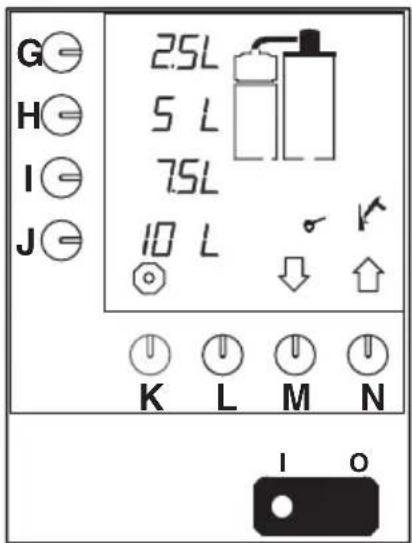
G H I J 2.5L 5 L 7.5L 10 L K L M N I OFig. 3 Operating panel coffee-making system
1.2.1 Coffee-making system
The machine is provided with a coffee-making system operated through the operating panel (fig.3). After the filter unit fitted with filter cone (if available), paper filter and ground coffee (P.) has been placed on the container, the coffee-making system is switched on with one of the selection keys (G.-J.). The value belonging to the selected selection key is indicated on the display (O.). The coffee making has started.
The water required is heated in a continuous flow system and then poured over the ground coffee in the filter pan via a spray head. Subsequently, the coffee coming from the filter is collected in the coffee container (U.) indicating the level in the container through the gauge glass (V.). The heating element mounted in the coffee container keeps the coffee at the right temperature.
With the help of the coffee discharge tap (X.) the coffee is then tapped.
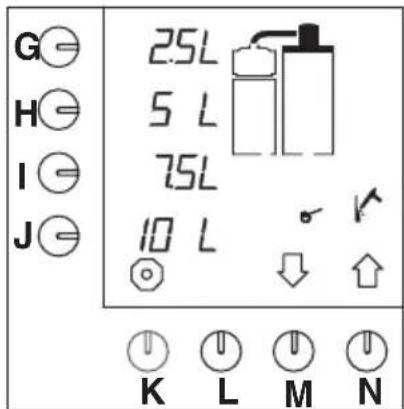
The coffee-making system has an automatic descaling signal. This is indicated on the display (fig.4). In this way the system can be descaled at the desired time by properly trained, authorized users.
The control system makes it possible to keep an accurate record of the amount of water used. These day or total countings can be read through the limited programming menu, § 7.2.
text_image
G H I J 2.5L 5 L 7.5L 10 L K L M NFig. 4 Display with descaling signal coffee-making system

2. TECHNICAL DATA
2.1 Dimensions
- See the fold out and table 1.
| Model | ABCD | FGHKL | MNPQR | ST | |||||||||||||||
| B5 | 632 | 228 | 799 | 635 | 162 | 32 | 52 | 201 | - | 330 | 138 | 351 | 42 | 281 | 351 | 129 | 149 | ||
| B10 | 877 | 300 | 840 | 955 | 162 | 32 | 80 | 203 | - | 452 | 154 | 474 | 58 | 404 | 474 | 129 | 149 | ||
| B20 | 1081 | 388 | 947 | 1173 | 162 | 32 | 80 | 221 | - | 570 | 204 | 515 | 60 | 491 | 576 | 129 | 149 | ||
| B40 | 1220 | 440 | 1101 | 1305 | 162 | 32 | 81 | 216 | - | 677 | 187 | 603 | 64 | 560 | 645 | 129 | 149 | ||
| B5 L/R | 452 | 228 | 799 | 452 | 162 | 32 | 52 | 201 | - | 149 | 138 | 171 | 42 | 281 | 351 | 129 | 149 | ||
| B10 L/R | 574 | 300 | 840 | 612 | 162 | 32 | 80 | 203 | - | 149 | 154 | 171 | 58 | 404 | 474 | 129 | 149 | ||
| B20 L/R | 695 | 388 | 947 | 739 | 162 | 32 | 80 | 221 | - | 180 | 204 | 125 | 60 | 491 | 576 | 129 | 149 | ||
| B40 L/R | 761 | 440 | 1101 | 803 | 162 | 32 | 81 | 216 | - | 180 | 187 | 143 | 64 | 560 | 645 | 129 | 149 |
Table 1 Dimensions
2.2 Electrical system
- See the identification plate for the correct values.
Class : 1
| Model | Supply voltage (50/60Hz) | Capacity coffee-making section | Total capacity | Maximum safety |
| B5 | 230V | 3,00 kW | 3,50kW | 16A |
| 240V | 3,30 kW | 3,80kW | 16A | |
| 200V~3ph | 2,80 kW | 3,20kW | 10A | |
| 230V~3ph | 3,00 kW | 3,50 kW | 10A | |
| 400V~3ph+N3,00 kW | 3,50 kW10A | |||
| 415V~3ph+N3,30 kW | 3,80 kW10A | |||
| 440V~3ph+N3,70 kW | 4,20 kW10A | |||
| B10 | 230V | 6,00 kW | 7,00 kW | 32A |
| 200V~3ph | 5,50 kW | 6,30 kW | 20A | |
| 230V~3ph | 6,00 kW | 7,00 kW | 20A | |
| 400V~3ph+N6,00 kW | 7,00 kW16A | |||
| 415V~3ph+N6,60 kW | 7,50 kW16A | |||
| 440V~3ph+N7,40 kW | 8,40 kW16A | |||
| B20 | 200V~3ph | 7,50 kW | 8,80 kW | 32A |
| 230V~3ph | 9,00 kW | 10,50 kW | 32A | |
| 230V~3ph | 9,00 kW | 10,50 kW | 32A | |
| 400V~3ph+N | 9,00 kW | 10,50 kW | 20A | |
| 415V~3ph+N | 9,90 kW | 11,40 kW | 20A | |
| 440V~3ph+N | 11,00 kW | 12,60 kW | 20A | |
| B40 | 230V~3ph | 14,80 kW | 15,60 kW | 40A |
| 400V~3ph+N | 14,80 kW | 15,60 kW | 25A | |
| 415V~3ph+N | 16,20 kW | 16,90 kW | 32A | |
| 440V~3ph+N | 18,10 kW | 18,90 kW | 32A |
Table 2 Electrical values
2.3 Water system
Water hardness : min. 5 °dH (0,9 mmol/l)
Min. water pressure (supply) : 50 kPa (0,5 bar)
Max. water pressure (supply) : 1000 kPa (10 bar)
Flow-rate : 5,5 l/min
Conductivity
: ≥100 μ Siemens/cm
2.4 Environmental conditions
In view of danger of freezing the machine may never be placed in rooms where the temperature can fall below 0^ C.
With a maximum allowed environmental temperature of 40^ C a good operation of the machine is guaranteed.
2.5 Recommended cleaning and descaling materials
Cleaning material : CLEANER
Descaler : RENEGITE

CAUTION!
– Before use first read the instructions on the packing.
See chapter 9. for ordering cleaner and descaler.
2.6 Recommended coffee and filter paper
For this machine the use of normal grind is recommended. Use the amount of ground coffee indicated at the coffee calculator ( § 4.1.4 ) dependent on your preference.
Exclusively use the provided Bravilor Bonamat® filter paper or filter paper of the same quality. See chapter 9. for ordering consumable goods.

3. INSTALLATION
3.1 Unpacking

TIP
- The operations described in these instructions for use are illustrated with the help of the B10 with the default factory settings.
- Check whether the machine is complete. The standard machine consists of a column with spray head, two containers with filter unit and a plateau or wall support. All kinds of variations on this are possible.
For the standard machine the content of the packages consists of:
Box 1:
- 1 coffee container with cover
- 1 shackle disc
Box 2:
- 1 filter unit, consisting of: filter pan, filter cone (optional) and spray cover
- 1 mixer pipe
- 1 bag of filter paper
Box 3:
- 1 column B5, B10, B20 or B40
- 1 water connection hose
- This manual
- 1 sachet of CLEANER
- 1 sachet of RENEGITE, descaler
- 1 funnel
- 1 sight glass brush
- 1 washing-up brush
Box 4 (only with plateau model):
- 1 plateau
- 1 spray head
- 1 drip-tray
- Fixation material and assembly drawing
Box 5 (only with wall model):
- 1 wall support
- 1 spray head
– Fixation material and assembly drawing
- Please contact your dealer if components are missing or damaged.
3.2 Installation

CAUTION!
- Do not overlook the risk of freezing. Never place the machine in rooms in which the temperature can drop below 0°C.
- Never install the machine in front of entrances, exits or passageways intended for emergency services.
- Place the machine on a flat, sufficiently solid surface close to a water connection and an earthed electrical power outlet. Leave sufficient space at the back and front of the machine for maintenance and repair purposes.
3.2.1 Connection to the water and electrical system
- Connect the machine to a readily accessible manually operated tap, so that the water supply can easily be turned off.

WARNING
Power supply voltages vary from one country to another. Ensure that the machine is suitable for connecting to the local power supply. Details on the required supply voltage and frequency can be found on the identification plate.
- Connect the machine to the electrical supply in such a way that the power can easily be disconnected.
- Ensure that the machine is correctly earthed.
●Never connect the machine to a power supply where heavy loads resulting from switching on other machines may cause variations in voltage.
3.2.2 Initial use

TIP
- With initial use the machine makes use of the default factory settings. These settings can, if desired, later be changed by properly trained authorised users (§ 7.3).
- With initial use the coffee-making system is exclusively flushed with water; no coffee is made.
3.2.2.1 Flushing the coffee-making system
- Place the filter unit (P.) on the coffee container (U.).
- Turn the spray head (C.) above the hole in the cover (Q.) of the filter unit (P.).
- Switch the ON/OFF switch (E.) on.
- The indicator lamp in the switch lights up. The default options appear in the display (fig. 5).
●Push the selection key for amount 2 (H.).
- A signal sounds. The coffee-making process is started. The selected amount flashes in the display.
As soon as the hot water supply through the spray head has stopped, the filter pan in the display starts flashing. This means that the dripping-on time has started. (Only when the dripping-on time is set). The dripping-on time is standard set to 2 minutes. After the dripping-on time has terminated, a signal sounds (3 short beeps) indicating that the coffee-making process has finished.
- Tap the water through the coffee tap (X.).
●Turn the spray head above the filter unit of the other container. - Repeat the above steps for the other coffee container.
After that the coffee-making system is ready for use (chapter 4.)

text_image
G H I J 2.5L 5 L 7.5L 10 K L M NFig. 5 Display with the default options

4. DAILY USE
While the machine is in use, the factory default settings may appear to be incorrect or insufficient for the circumstances under which the machine is used. These settings can be changed – by properly trained and authorized users – in conformity with the instructions in § 7.3.
The present chapter (4.) only describes therefore the normal, daily use of the machine by users with limited authority: making and tapping coffee. Maintenance activities for the daily user are described in § 5.1. Periodic maintenance activities for users with limited authority are described in § 5.2.
4.1 Operation

CAUTION!
- Inspect the machine before use and check for damages.
- Protect the machine against water and moisture. Do not allow the machine to become wet by spraying and never submerge it in water.
- Keep the operating controls free from dirt and grease.
- Never use sharp objects to operate the push buttons.
- Note that during use some parts of the machine become very hot.
- When the machine is not to be used for a long period, disconnect it from the electrical supply and shut off the water supply.
4.1.1 Making coffee
text_image
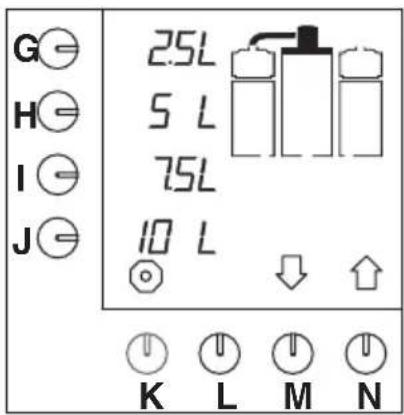
G H I J 2.5L 5 L 7.5L 10 L K L M NFig. 6 Starting screen
- Switch the ON/OFF switch (E.) to ON.
- The indicator lamp in the switch lights up. The default options appear in the display (fig.6).
- Check whether the coffee container (U.) is empty. Discharge this, if necessary, through the coffee tap (X.).
- Place the filter paper in the filter cone (R.) (if available) or in the filterpan (W) and add the required amount of ground coffee. For the recommended ground filter coffee and filter paper (quality and quantity), see § 2.6).
- Place the spray cover (Q.) on the filter pan (S.).
- Place the shackle disc with mixer pipe (T.) and the filter unit (P.) on the coffee container.
- Select the desired amount of coffee by pressing one of the selection keys (G.-J.).
- The selected amount flashes on the display.
TIP
- If the selection keys do not include the desired amount, then with the help of key (M.)↓ or (N.)↑ another amount can be selected. Subsequently press selection key (J.). A signal sounds and the coffee-making process has started.
●Make sure that the container and the spray head are in the right position.
- If not, the part concerned starts flashing on the display and the coffee making is blocked.
- Put the part in the right position and the blockade is lifted.
– A signal sounds for confirmation.
- As soon as the coffee container has been filled, the filter pan flashes on the display for the dripping-on time (fig.7).
- After the dripping-on time a signal sounds (3 short beeps) indicating that the filter pan can be removed.
- Place the cover on the container.
●The coffee can now be tapped.

text_image
G H I J 10 L K L M NFig. 7 Dripping-on time
4.1.2 Tapping the coffee
- Place a cup or jug under the coffee tap (X.) and pull the handle forward.
TIP
- The tap can be locked in the open position by pushing it fully backwards against the spring pressure.

4.1.3 Pre-programmed settings
- Making coffee at pre-programmed times is possible (§ 7.1 and § 7.2).
4.1.4 Coffee calculator
By simultaneously pressing the stop key (K.) and one of the pre-selection keys (G.-J.) it can be read how many grams of ground coffee must be used for the selected number of litres of coffee (or other programmed unit). Also when for once another number of litres is set, the programme calculates the required amount of ground coffee.

TIP
– During the coffee-making process the filter unit of the other coffee container can directly be made ready for a next coffee-making cycle.
- Wait until the coffee-making cycle for the first container has been finished.
- When the dripping-on time starts, the spray head can be placed in the right position above the other filter unit.
- Repeat the above procedure for making coffee.
- The coffee-making process can at all times be stopped by pressing the STOP key (K.). After this the coffee can be tapped or an amount can be selected again. In the second case keep in mind that there is already coffee in the container.

5. MAINTENANCE
This chapter describes the following maintenance activities:
- maintenance activities that may be carried out by the daily user (§ 5.1)
- maintenance activities reserved to users with limited and extended authority (§ 5.2)
5.1 Maintenance activities that may be carried out by the daily user
5.1.1 General cleaning
- Clean the outside of the machine with a damp cloth (if necessary, use a non-aggressive cleaning material). The taps and the drip tray require extra attention.

WARNING
Do not allow the machine to become wet by spraying and never submerge the machine in water.
5.1.2 Daily cleaning of the coffee-making system
●Rinse the coffee container (U.) with clean hot water:
●Make sure that the coffee container (U.) is completely empty.
- Place an empty filter unit (P.) on the coffee container.
- Press the key for amount 2 (H.). The container is filled with hot water.
- Remove the filter unit after the coffee-making process has been finished.
- Clean the inside of the container using a washing-up brush.
●After this totally discharge the coffee container through the coffee tap (X.).
●Wash up the filter pan (S.), the shackle disc with mixer pipe (T.), the filter cone (R.), the spray cover (Q.) and the drip tray (Z.) thoroughly and rinse them clean.
- Repeat the above procedure for the other coffee container with filter unit.
After this the machine is ready for use again.
TIP
– Persistent coffee deposit can be removed with a strong cleaning agent. For this we recommend the trusty cleaning agent CLEANER.
- Dependent on the intensity of use, it may be necessary to daily clean the machine with CLEANER. The proper cleaning frequency is determined by experience.
CAUTION!
- Before using the cleaning agent, read the instructions on the package.
- Wear suitable facial protection and protective gloves when using the cleaning agent.

5.1.3 Weekly cleaning of the coffee-making system
Carry out the cleaning procedure (§ 5.1.2) using CLEANER.
●Sprinkle the CLEANER in the filter pan (S.). Use about 5 g of CLEANER per litre water.
●Rinse the container after the cleaning procedure with hot water by pressing the key for amount 2 (H.).
- After the coffee-making process has been finished completely discharge the coffee container through the coffee tap (X.).
After this the machine is ready for use again.
5.1.3.1 Cleaning the gauge glass
text_image
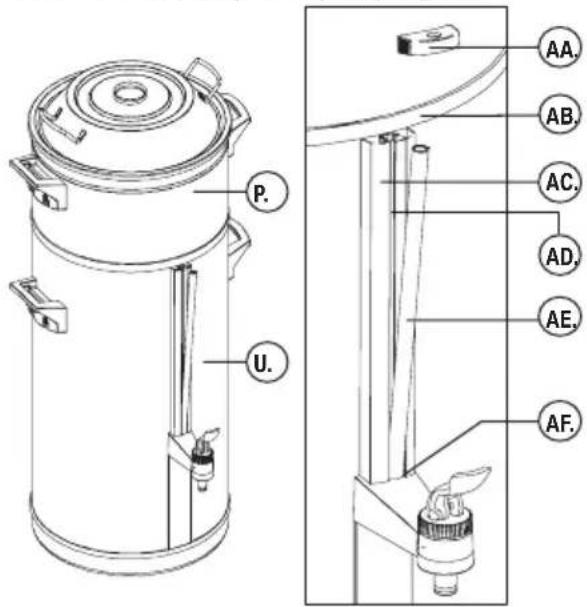
P. U. AA. AB. AC. AD. AE. AF.Fig. 8 Placing the sight glass cover
text_image
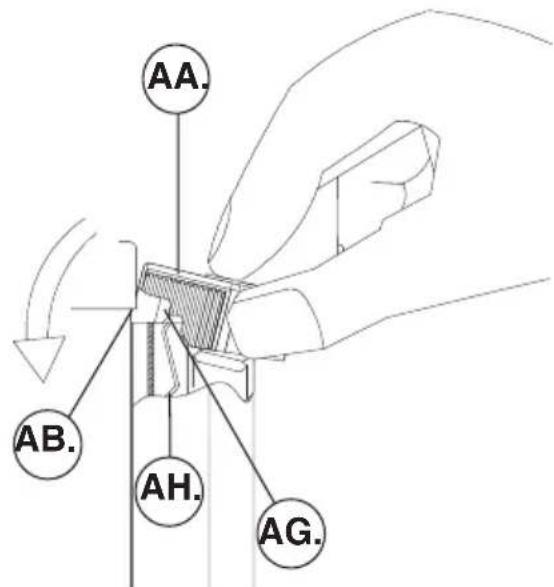
AA. AB. AH. AG.Fig. 9 Placing and removing the gauge glass cover
AA. cover
AB. container edge
AC. the sight glass holder
AD. notch
AE. gauge glass
AF. o-ring
AG.tab
AH. spring
WARNING
△If the coffee container (U.) is not completely empty, during removal of the gauge glass (AE.) hot water or coffee can flow over the hands.
●Clean the gauge glass (fig.8):
●Make sure that the coffee container (U.) is completely empty.
●Take the filter unit (P.) off the coffee container (U.).
- Remove the cover (AA.) of the gauge glass holder (AC.) by pulling this forward and upward between thumb and forefinger. Hold the gauge glass with the other hand.
- Put the forefinger on top of the gauge glass (AA.) and move the glass a little bit forward.
- The gauge glass (AE.) is clamped with an O-ring (AF.) at the bottom of the gauge glass holder (AC.). Therefore take the gauge glass between thumb and forefinger and carefully pull it upward while turning it to and fro.
- Clean the gauge glass and the notch (AD.) in the gauge glass holder (AC.) with the supplied sight glass brush.
- Moisten the bottom side of the gauge glass a little. Carefully push the gauge glass back into the notch (AD.) and O-ring (AF.) of the sight glass holder.
- Place the cover (AA.) back onto the gauge glass holder (AC.). For this hold the cover between thumb and forefinger and place it at an angle against the container wall. Press with the forefinger the cover on the gauge glass holder in such a way that the cover falls under the container edge (AB.). Make sure that the tab (AG.) of the cover falls behind the spring (AH.) of the gauge glass holder.
- Place the filter unit (P.) back onto the coffee container (U.).
TIP
- Make sure that the tab (AG.) of the cover falls behind the spring (AH.) of the gauge glass holder.
CAUTION!
- The other maintenance activities (§ 5.2) are reserved to users with extended authority.



5.2 Maintenance activities for users with limited and extended authority
5.2.1 Descaling the coffee-making system
- Users with limited authority can, after having entered the PIN code, start the descaling programme.
- Also users with extended authority can start the descaling programme after having entered the chief PIN code.

WARNING
△Wear appropriate facial protection and protective gloves when using the descaling agent.
Half-yearly
(or more frequently if the descaling indication indicates so).
- Descale the coffee-making system with RENEGITE. See § 7.2.2 for the descaling procedure.
6. PROGRAMMING CAROUSEL

CAUTION!
– The programming keys are particularly operated by properly trained authorized users.

TIP
- All settings can be read from the display.
-
By pressing the up arrow key (N.)↑, you can clockwise browse through the programming carousel.
-
By pressing the down arrow key (M.)↓, you can counter-clockwise browse through the programming carousel.
- Some display texts include numerical values; these refer to the factory default settings or to arbitrary quantities that may differ from the values displayed on your machine.
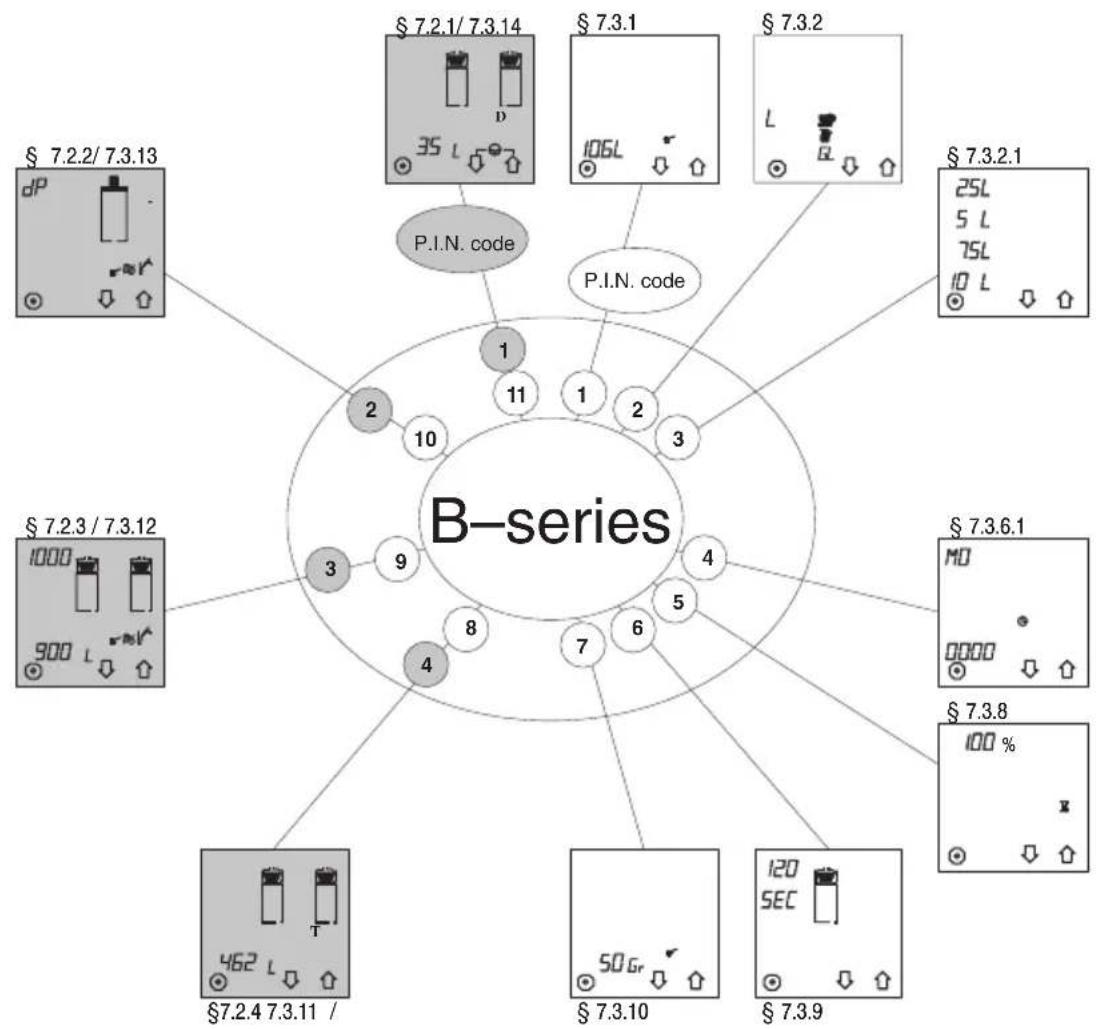
flowchart
graph TD
    A["1"] --> B["2"]
    B --> C["3"]
    C --> D["4"]
    D --> E["5"]
    E --> F["6"]
    F --> G["7"]
    G --> H["8"]
    H --> I["9"]
    I --> J["10"]
    J --> K["11"]
    K --> L["120 SEC"]
    L --> M["120 SECS"]
    N["1"] --> O["P.I.N. code"]
    P["2"] --> Q["P.I.N. code"]
    R["3"] --> S["P.I.N. code"]
    T["4"] --> U["P.I.N. code"]
    V["5"] --> W["P.I.N. code"]
    X["6"] --> Y["P.I.N. code"]
    Z["7"] --> AA["P.I.N. code"]
    AB["8"] --> AC["P.I.N. code"]
    AD["9"] --> AE["P.I.N. code"]
    AF["10"] --> AG["P.I.N. code"]
    AH["11"] --> AI["P.I.N. code"]
    AJ["12"] --> AK["P.I.N. code"]
    AL["13"] --> AM["P.I.N. code"]
    AN["14"] --> AO["P.I.N. code"]
    AP["15"] --> AQ["P.I.N. code"]
    AR["16"] --> AS["P.I.N. code"]
    AT["17"] --> AU["P.I.N. code"]
    AV["18"] --> AW["P.I.N. code"]
    AX["19"] --> AY["P.I.N. code"]
    AZ["20"] --> BA["P.I.N. code"]
    BB["21"] --> BC["P.I.N. code"]
    BD["22"] --> BE["P.I.N. code"]
    BF["23"] --> BG["P.I.N. code"]
    BH["24"] --> BI["P.I.N. code"]
    BJ["25"] --> BK["P.I.N. code"]
    BL["26"] --> BM["P.I.N. code"]
    BN["27"] --> BO["P.I.N. code"]
    BP["28"] --> BQ["P.I.N. code"]
    BR["29"] --> BS["P.I.N. code"]
    BT["30"] --> BU["P.I.N. code"]
    BV["31"] --> BW["P.I.N. code"]
    BX["32"] --> BY["P.I.N. code"]
    BZ["33"] --> CA["P.I.N. code"]
    CB["34"] --> CC["P.I.N. code"]
    CD["35"] --> DD["P.I.N. code"]
    DE["36"] --> DF["P.I.N. code"]
    DG["37"] --> DH["P.I.N. code"]
    DI["38"] --> DJ["P.I.N. code"]
    DK["39"] --> DL["P.I.N. code"]
    DM["40"] --> DN["P.I.N. code"]
☐ Carousel of the limited programming menu, protected by a user PIN code
☐ Carousel of the extended programming menu, protected with a chief PIN code
Fig. 10 Carousel of the programming menu


7. PROGRAMMING
This chapter describes the different programming options and reading of the counter device. The programming can be divided into three parts, being:
- the users' menu § 7.1; here any user can retrieve default pre-programmed settings and change these once-only if necessary. After the coffee has been made the setting returns to the default setting.
- the limited programming menu § 7.2; here a description is given of how users with limited authority can read the day and total counters with the help of a PIN code and set and start the descaling programme.
- the extended programming menu § 7.3; here a description is given of how properly trained users with extended authority (chief) can change all settings with a special PIN code.
- Pincodes: see fold out sheet at the back of these operating instructions
7.1 The users' menu

TIP
- No PIN code is needed for the settings in the users' menu.
– In the display the value to be changed is indicated by flashing.
- When an enter symbol appears in the display, the setting can be confirmed by pressing the confirmation key (L.).
- With the red stop key (K.) the setting can always be interrupted and stopped. The setting returns to the default setting.
- Make sure that a filter cone (R.) (if abvable) and coffee filter with the desired amount of coffee in the filter unit (P.) have been fitted and that the spray head (C.) is placed above that in the proper position.
- A signal sounds when the container or the spray head are not in the right position.
7.1.1 Pre-programmed time settings for making coffee (timer)
In the extended programming menu § 7.3.7 it is possible to programme 14 pre-programmed "time settings" for each day of the week. When "time settings" have been programmed, these are shown in the users' menu. These "time settings" are numbered 1 – 4.
After having confirmed a time setting, the machine will start making coffee at the set time.
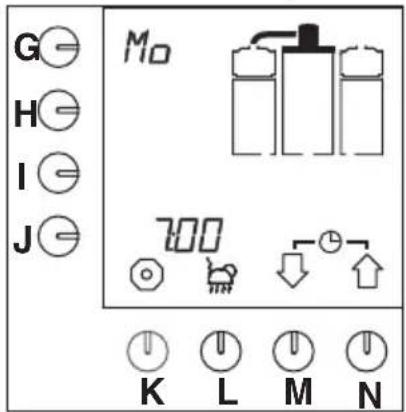
text_image
G H I J M0 K L M NFig. 11 Example current day and time
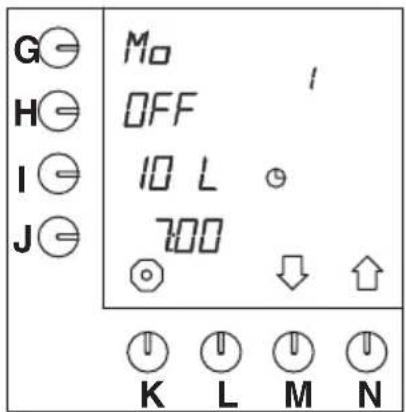
text_image
G⊖ H⊖ I⊖ J⊖ M⊕ OFF 10 L 700 ↓ K L M NFig. 12 Default pre-programmed setting
The selection is made as follows:
- Press keys (M.) and (N.) simultaneously and hold them down.
- The current day and time appear for a moment on the display (fig.11).
- Subsequently, the next pre-programmed time setting appears on the display (fig.12).

TIP
- When in the extended programming menu, § 7.3.7, no time settings have been programmed, the current day and time remain visible on the display.
- Press key (M.)↓ and (N.)↑ to select another pre-programmed setting if necessary.
- The default setting is OFF. If the set values are good, then press key (H.), OFF is changed into ON.
- An enter symbol appears ↓ on the display. The clock in the display starts flashing and the system will make coffee at the set time. The waiting mode appears on the display (fig.13).
- Now press the confirmation key (L.) to confirm.
- The clock in the display starts flashing and the system will make coffee at the set time. The waiting mode appears on the display (fig.13).
TIP
- If the settings are not good, they can be changed once-only (§ 7.1.2).
- In the waiting mode the current day and time can be viewed. Press the selection keys (M.)↓ and (N.)↑ simultaneously and hold them down for about 2 seconds.
●The current day and time appear on the display (fig.11).

text_image
G⊖ H⊖ I⊖ J⊖ M0 On 10 L 700 ⊖ K L M NFig. 13 Waiting mode timer
TIP
- The selected time setting has been protected against termination between times. However, the setting can be cancelled. This can be done as follows:
- Press stop key (K.) and keep it down for about 5 seconds.
- The protection is cancelled now.
Coffee can be made again in the normal way.

7.1.2 Once-only time settings for making coffee
These pre-programmed "time settings" can be changed for once-only use.
This is done as follows:
- Press selection keys (M.) and (N.) simultaneously and hold them down for about 2 seconds.
- The current day and time appear for a moment on the display (fig.11).
- After this the next time setting appears on the display (fig.12).
- Press programming key (G.).
- The position to be changed flashes beside the programming key on the display.
- Press selection key (M.) and (N.) to select another day, if necessary (§ 7.3.6.2, table 9).
- Confirm this by pressing the confirmation key (L.).
– The desired day has been set now.
- Press programming key (I.) to change the number of litres.
- Press selection key (M.) and (N.) to select another amount, if necessary.
- Confirm this by pressing the confirmation key (L.).
– The desired amount has been set now.
- Now press the programming key (J.) to set the time.
- The two first positions beside the programming key are flashing.
- Select with selection key (M.)↓ and (N.)↑ the desired hour.
- Press again the programming key (J.) to set the minutes.
- The two last positions beside the programming key are flashing.
- Select with selection key (M.)↓ and (N.)↑ the minutes.
- Press the confirmation key (L.).
– The desired time has been set now.
- If these settings are good, then press programming key (H.).
- OFF will be changed to ON.
●Now press the confirmation key (L.).
- The clock in the display starts flashing and the system will make coffee at the set time.
- When the coffee-making cycle has been finished, the setting returns to the default setting.
TIP
- When the container and/of the spray head are not in the correct position, a signal sounds and flashes on the display.
- Also this selected time setting has been protected, so that no one can cancel the setting between times, see the previous tip at § 7.1.1.
- Permanent changing of the default settings is described in the extended programming mode § 7.3.

7.2 The limited programming menu
Below a description is given of how users with limited authority, after having entered the users' PIN code, can read day and total counters, put these to zero and start the descaling programme.

TIP
- For the limited programming menu a users' PIN code is required, see the fold out sheet at the back of these operating instructions.
- Enter the users' PIN code. The programme starts in the carousel (fig.10) of the users' menu at § 7.2.1, "Day counter coffee-making system".
- When a wrong PIN code has been entered, wait a little while until the initial screen re-appears on the display. Re-enter the PIN code.
- Press the selection key (N.)↑to go clockwise to the next setting (§ 7.2.4), see also fig.10.
-
Press the selection key (M.)↓to counter-clockwise to the next setting (§ 7.2.2). By pressing a selection key several times, the entire carousel (fig.10) can be gone through.
-
The settings are described in the order of the carousel, counter-clockwise (fig.10).
- With the red stop key (K.) the programming can always be interrupted and stopped. The programme then returns to the users' menu (§ 7.1).
- When nothing happens in the programming menu for 20 seconds, the programme returns to the users' menu (§ 7.1). Non-confirmed settings are not saved.
- When the symbol appears in the menu, the setting can be set to zero by simultaneously pressing both selection keys (M.)↓ and (N.)↑.
- The day and total counters only give the amounts in litres. Even if the amount at § 7.3.1 has been set in cups, jugs or us-gallons.
7.2.1 Day counter coffee-making system

text_image
G H I J D 35 L K L M NFig. 14 Day counter coffee-making system
After entering the users' PIN code fig.14 appears in the display. The total number of litres that have been made that day can be read from the display.
- Press the selection keys (M.) and (N.) simultaneously to set the day counter to zero.
- Press selection key (M.)↓ to go the next setting or stop key (K.) to leave the programming menu.
7.2.2 Starting descaling programme coffee-making system
- Make sure that the spray head is in the correct position above the empty container with empty filter unit.
- Desolve 100 g of descaler in 0.75 litre lukewarm water (about 40°C). Stir the descaling solution, so that it is well desolved.
- When during the descaling programme a signal sounds, an operation is to be carried out. Finish the operation by pressing the confirmation key (L.).
- When the level blocks on the display start flashing, the coffee container is to be emptied.

text_image
G H I J dP o ≈ V K L M NFig. 15 Starting the descaling programme coffee-making system
- After having entered the users' PIN code, press selection key (M.)↓ once.
- The descaling programme appears on the display (fig.15).
- Press programming key (G.).
- The symbol dP starts flashing and the enter symbol -appears on the display.
- Press confirmation key (L.) to start the descaling programme.
- A flashing hammer symbol appears on the display.
- The waterreservoir is boiled empty and this water flows into the coffee container.
- A signal sounds and the level blocks on the display flash, indicating that the container must be emptied.
TIP
- Stopping the programme
Within 5 seconds (when the stop symbol ☐ above key (K.) still flashes):
- press key (K.).
- After 5 seconds (when the stop symbol key above key (K.) has stopped flashing): 14
- Hold programming key (G.) down until fig. 14 re—appears on the display.
- The programme can still be left by pressing the red stop key.
- After pouring in the descaler solution this is no longer possible!
●Empty the coffee container through the tap (X.).
- Press the confirmation key (L.) to confirm that the container is empty.
- A flashing hammer symbol appears on the display.

- The waterreservoir is boiled empty and this water flows into the coffee container.
- A signal sounds and the level blocks on the display flash, indicating that the container must be emptied.
●Empty the coffee container through the tap (X.).
- Press the confirmation key (L.) to confirm that the container is empty.
- A signal sounds, the hammer symbol flashes and a funnel appears on the display (fig.16).
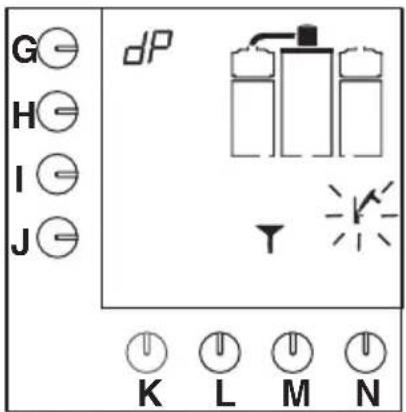
text_image
G H I J dP K L M NFig. 16 Coffee-making system asks for descaling solution
- Remove the plug of the filling hole for descaler solution (B.).
- The filling hole of the coffee-making system is found behind the spray head (C.).
-
Place the special funnel in the filling hole and carefully pour the descaler solution into the filling hole.
●After pouring in the descaler solution, press the confirmation key (L.). -
The resevoir is boiled empty to let the descaler solution run through the flow element.
– The first level block appears on the display and the hammer symbol flashes (fig.17).
– The coffee container is filled with water. - When the signal sounds and the level blocks on the display flash, the containers must be emptied.
●Empty the container through the coffee tap.
- Press the confirmation key (L.) to confirm that the container is empty.
- A sandglass appears on the display for a waiting time of 5 minutes to let the renegotiate do its job.
- Also the second level block appears on the display and the hammer symbol flashes.
●After the waiting time the coffee container is filled.
- When the signal sounds and the level blocks on the display flash, the containers must be emptied.
●Empty the container through the coffee tap.
●After this, press the confirmation key (L.) to confirm that the container is empty.
– The third level block appears on the display and the hammer symbol flashes.
- The coffee container is filled again.
- When the signal sounds and the level blocks on the display flash, the containers must be emptied.
●Empty the container through the coffee tap.
●After this, press the confirmation key (L.) to confirm that the container is empty.
– The fourth level block appears on the display.
- The coffee container is filled for the last time.
- When the signal sounds and the blocks on the display flash, the container must be emptied for the last time.
●After this, press the confirmation key (L.) to confirm that the container is empty.
- The counter appears on the display and is automatically set to zero.
- Subsequently, the programme returns to the users' menu (§ 7.1).
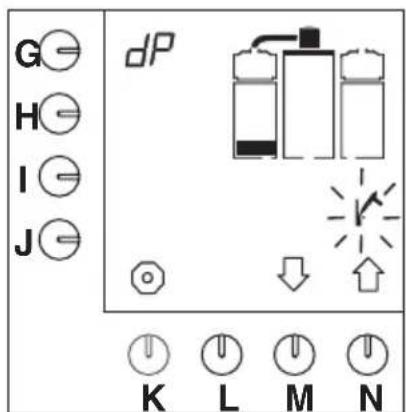
text_image
G H I J dP K L M NFig. 17 First level descaling programme coffee-making system
7.2.3 Descaling counter coffee-making system
G
H
|
J
7.2.4 Total counter coffee-making system
G
H
|
T
J
K L M N
Fig. 18 Descaling counter coffee-making system
- Press, after having entered the users' PIN code, 2 times the selection key (M.)↓.
- The descaling counter appears on the display (fig.18).
- On the display beside the programming key (G.) is shown after how many litres of coffee descaling is needed.
- Beside programming key (J.) it is shown how many litres already have been made.
- Press 1 on selection key (N.)↑ to go to the descaling programme or press selection key (M.)↓ to go to the next setting or press stop key (K.) to exit the programming menu.
K L M N
Fig. 19 Total counter coffee-making system
- Press, after having entered the users' PIN code, 1 times the selection key (N.)↑.
- The total counter appears on the display. The total number of litres of coffee that have been made during the lifetime of the machine can be read from the display (fig. 19).
- Press selection key (M.)↓ to go to the next setting or press stop key (K.) to exit the programming menu.
7.3 The extended programming menu
Below a description is given of how users with extended authority (chief), after having entered the PIN code, can view and adjust all settings.
First read this section to see which settings can be made.

TIP
- The extended programming menu needs a chief PIN code.
- Enter the chief PIN code to access the programming menu. The programme starts in the carousel (fig.10) of the extended users' menu with § 7.3.1, "Setting total amount of water".
- When a wrong PIN code has been entered, one should wait a while until the initial screen re-appears on the display. Enter the PIN code again.
- Press selection key (N.) to go clockwise to the next setting (§ 7.3.2), also see fig.10 .
- Press selection key (M.) ↓ to go counter-clockwise to the next setting (§ 7.3.14). By pressing a selection key several times the entire carousel can be browsed through (fig.10).
- The settings are described in the order of the carousel, clockwise (fig.10).
- On the display the value to be adjusted is each time indicated by flashing.
- When an enter symbol appears on the display, the setting can be confirmed by pressing the confirmation key (L.).
- With the red stop key (K.) the changing of the setting can be interrupted and cancelled. By pressing again the red stop key (K.) the programming is left and the programme returns to the users' menu. The change is not saved.
- When after confirming a changed setting no further changes are to be made, the programming menu can be left by pressing the stop key (K.). The changes are saved and the programme returns to the users' menu (§ 7.1).
- When for 20 seconds no activities have taken place in the programming menu, the programme returns to the users' menu (§ 7.1). Non-confirmed settings are not saved.
- When the symbol appears in the menu, the setting can be set to zero by pressing simultaneously both selection keys (M.) and (N.) .
7.3.1 Setting total amount of water
The total amount of water to be delivered can be adjusted, as always a certain amount of water remains behind in the coffee filter. This amount can differ by the use of different kinds of coffee and grinds. The default setting is 6% extra water. In table 3 the setting options are given:
| ModelFactory setting Setting range | ||
| B55,3litres4,8 | -5,8litres | |
| B1010,6litres9 | 6-11,6litres | |
| B2021,2litres1 | 9,2-23,2litres | |
| B4042,4litres3 | 8,4-46,4litres | |
Table 3 Adjusting total amount of water

text_image
G H I J 106L K L M NFig. 20 Total amount of water
- After having entered the chief PIN code fig.20 appears on the display.
- Press programming key (J.).
- The L with the associated value beside the programming key starts flashing.
- Press selection key (M.)↓ or (N.)↑ to select the desired extra amount of water (table 3).
- The enter symbol appears on the display.
- Press confirmation key (L.) to confirm the adjustment.
- Press selection key (N.)↑ to go to the next setting (§ 7.3.2) or press stop key (K.) to exit the programming menu.
7.3.2 Selected units: litres, cups, jugs or US gallon
The machine is default set to the unit L (= litres). This unit can be changed. (This unit is default on the display with the preference keys (fig.23)).
- A selection can be made from the following units: Litre = L, Gallon = GL (3.7853 L), Jug, or Cup (fig.21).
- The selected is also used for further settings, except with the total counters.
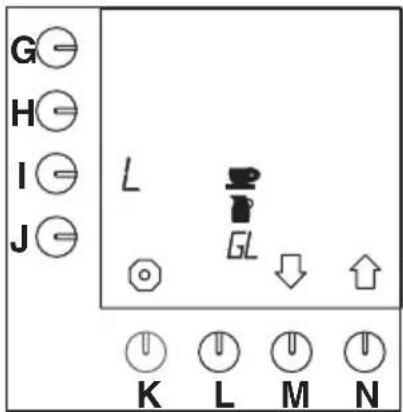
text_image
G H I J L GL K L M NFig. 21 Units to be selected
- Press programming key (I.).
- The L of litres starts flashing on the display.
- This is the default setting (fig.22).
- Press the selection key (M.)↓ or (N.)↑ until the symbol for the desired unit flashes on the display: cup, jug, GL (= US Gallon) or L (= litre).
- The enter symbol appears on the display.
- Press confirmation key (L.) to confirm the adjustment.
- The symbol for the desired unit stops flashing and the other symbols disappear.
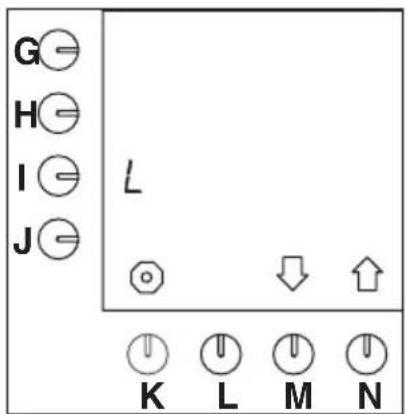
text_image
G H I J L ○ ↓ ↑ K L M NFig. 22 The default set unit = L (litres)
- Selected unit:
litre, go to § 7.3.2.1
tap, go to § 7.3.3
jug, go to § 7.3.4
US gallon, go to § 7.3.5.
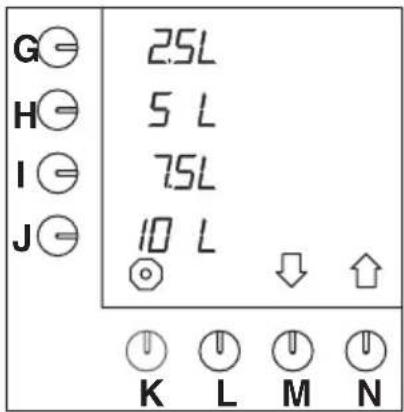
7.3.2.1 Changing pre-programmed selection keys G-J (Litres)
text_image
G⊖ 2.5L H⊖ 5 L I⊖ 7.5L J⊖ 10 L ⊖ ↓ ↑ K L M NFig. 23 Default pre-selection keys
- Press selection key (N.)↑, until fig.23 appears on the display.
- The default pre-selection of keys (G.-J.) can now be adjusted.
- Press the pre-selectionkey to be changed (G., H., I. or J.).
- Press selection key (M.)↓ or (N.)↑ to select the desired amount (table 4).
- The enter symbol appears on the display.
- Repeat these two previous steps to change other pre-selectionkeys if necessary.
- Press the confirmation key (L.) to confirm the adjustment.
- Press selection key (N.)↑ to go to the next setting (§ 7.3.6.1) or press stop key (K.) to exit the programming menu.
| ModelFactory | setting pre-programmed selectionkeys | Settingrange |
| B51-3-4-5litres | 1-5litres | |
| B102,5-5-7,5 | 10litres2-10litres | |
| B205-10-15 | 20litres4-20litres | |
| B4010-20-30 | 40litres8-40litres |
Table 4 Default settings
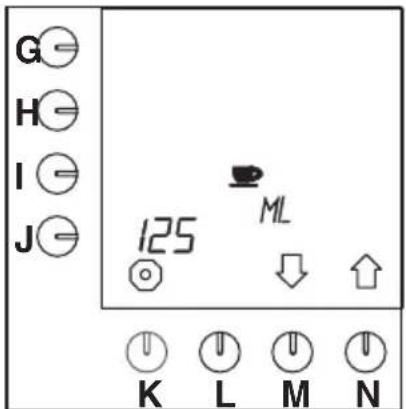
7.3.3 Cup contents
The contents of a cup can be set, as not all cups are of the same size.
- The setting range is between 50 and 200ml and can be adjusted by steps of 5ml.
- The default setting for a cup is 125ml.
text_image
G H I J 125 ML K L M NFig. 24 Cup contents
- Press selection key (N.)↑ until fig.24 appears on the display.
- Press programming key (J.).
- The position beside the programming key starts flashing.
- Press selection key (M.)↓ or (N.)↑ to select the desired amount.
- The enter symbol appears on the display.
- Press confirmation key (L.) to confirm the adjustment.
7.3.3.1 Adjusting pre-programmed selection keys G-J (Cups)
The machine calculates itself the number of cups of the default pre-selectionkeys, in relation to the preferred settings of litres divided by the content of the cup. These default pre-selectionkeys can be adjusted as desired.

text_image
G= 20 H= 40 I= 60 J= 80 K L M NFig. 25 Adjusting pre-programmed selection keys for cups
- Press selection key (N.)↑ until fig.25 appears on the display.
- The default pre-selection of keys (G.-J.) can now be adjusted.
- Press the pre-selectionkey to be changed (G., H., I. or J.).
-
Press selection key (M.)↓ or (N.)↑ to select the desired amount (table 5).
-
The enter symbol ↓ appears on the display.
- Repeat these two previous steps to change other pre-selectionkeys if necessary.
-
When cup contents other than 125ml have been selected, the values of the pre-selectionkeys will also differ from the values given in table 5.
-
Press confirmation key (L.) to confirm the adjustment.
- Press selection key (N.) ^↑ to go to the next setting (§ 7.3.6.1) or press stop key (K.) to exit the programming menu.

| Model | Factorysetting pre-programmed selectionkeys | Settingrange(cup) |
| B58,24,32,40 | cups8-40cups | |
| B1020,40,60,80 | cups20-80cups | |
| B20 | 40, 80, 120, 160 cups | 40-160 cups |
| B4080,160,240 | 320cups80-320cups |
Table 5 Default pre-selection keys for cups
7.3.4 Jug contents
The contents of a jug can be set, as not all jugs have the same size.
- The setting rage is between 50 and 3000ml and can be adjusted by steps of 10ml .
- The default setting for a jug is 250ml.

text_image
G H I J 250 PML K L M NFig. 26 Jug contents
- Press selection key (N.)↑ until fig.26 appears on the display.
- Press programming key (J.).
- The position beside the programming key starts flashing.
- Press selection key (M.)↓ or (N.)↑ to select the desired amount.
- The enter symbol ↓ appears on the display.
- Press confirmation key (L.) to confirm the adjustment.
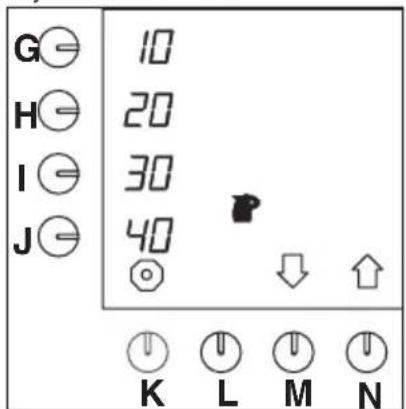
7.3.4.1 Adjusting pre-programmed keys G-J (Jugs)
The machine itself calculates the number of jugs for the default pre-selectionkeys, in relation to the preferred setting of litres divided by the contents of the jug. These default pre-selectionkeys can be adjusted as desired.
text_image
G= 10 H= 20 I= 30 J= 40 K L M NFig. 27 Adjusting pre-programmed selection keys for jugs
- Press selection key (N.)↑ until fig.27 appears on the display.
- The default pre-selection of keys (G.-J.) can now be adjusted.
- Press the pre-selectionkey to be changed (G., H., I. or J.).
- Press selection key (M.)↓ or (N.)↑ to select the desired amount (table 6).
- The enter symbol appears on the display.
- Repeat these two previous steps to change the other pre-selectionkeys if necessary.
- When jug contents other than 250ml have been selected, the values of the pre-selectionkeys will also differ from the values given in table 6.
- Press confirmation key (L.) to confirm the adjustment.
- Press selection key (N.)↑ to go to the next setting (§ 7.3.6.1) or press stop key (K.) to exit the programming menu.
| Model | Factorysetting pre-programmed selectionkeys | Settingrange (250ml/jug) |
| B5 | 4-12-16-20 jugs | 4-20 jugs |
| B10 | 10-20-30-40 jugs | 10-40 jugs |
| B20 | 20-40-60-80 jugs | 20-80 jugs |
| B4040-80-120 | 20-160 jugs 40-160jugs |
Table 6 Default pre-selection keys jugs
7.3.5 US gallon
The unit US gallon is a set value that cannot be adjusted (fig.28).
1 Us gallon = 3.7853 litres

text_image
G H I J GL K L M NFig. 28 Pre-programmed selection key for gallons
7.3.5.1 Adjusting pre-programmed selection keys G-J (Gallon)

text_image
G⊖ 06 H⊖ 13 I⊖ 19 J⊖ 26 GL ↓ ↑ K L M NFig. 29 Adjusting pre-programmed selection keys for gallons
- Press selection key (N.)↑ until fig.29 appears on the display.
- The default pre-selection of keys (G.-J.) can now be adjusted.
- Press the pre-selectionkey to be changed (G., H., I. or J.).
- Press selection key (M.)↓ or (N.)↑ to select the desired amount (table 7).
- The enter symbol appears on the display.
- Repeat these two previous steps to change the other pre-selectionkeys if necessary.
- Press confirmation key (L.) to confirm the adjustment.
- Press selection key (N.)↑ to go to the next setting (§7.3.6.1) or press stop key (K.) to exit the programming menu.
| ModelFactory | setting pre-programmed selectionkeys | Settingrange US-gallon |
| B50,30-0,65-0 | 95-1,300,30-1,30 | |
| B100,65-1,30- | 1,95-2,600,65-2,60 | |
| B201,30-2,60- | 3,95-5,251,30-5,25 | |
| B402,60-5,25- | 7,90-10,552,60-10,55 |
Table 7 Default pre-selection keys gallon


7.3.6 Various settings, such as language, system clock, and container preheating
TIP
- The settings of this chapter can all be set sequentially. Do not press the confirmation key (L.) until all settings are satisfactory (after § 7.3.6.3.).
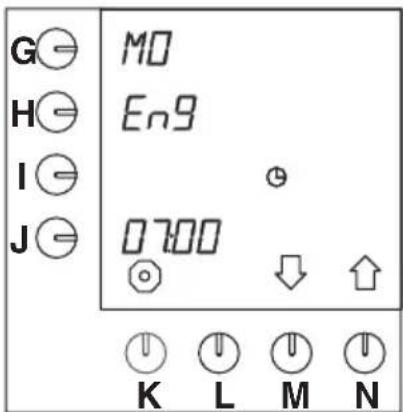
7.3.6.1 Language setting
text_image
G⊖ H⊖ I⊖ J⊖ MO En9 0700 K L M NFig. 30 Language setting
- Press selection key (N.)↑ until fig.31 (Current day and time) appears on the display.
- Press programming key (H.) and hold it down for 10 seconds.
- After 10 seconds the default setting "EnG" appears flashing beside the programming key (fig. 30).
- Press selection key (M.)↓ or (N.)↑ to select the desired language (table 8).
- The enter symbol appears on the display.
- Press confirmation key (L.) for confirmation.
- On the display appears beside the programming key (G.) the day in the language selected.
| Availablelanguages | ||||
| EnG dE | u FrA ESP | nEd | ||
Table 8 Language option
The machine works with a timer. When the time has not been set at the initial use or needs to be adjusted between times, this can be done as follows:
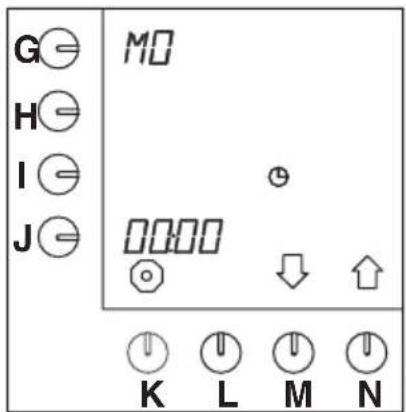
7.3.6.2 Setting the current day and time
text_image
G⊖ H⊖ I⊖ J⊖ MO ⊖ ↓ ↑ K L M NFig. 31 Current day and time
- Press programming key (G.) for the day setting.
- The position beside the programming key starts flashing.
- Press selection key (M.)↓ or (N.)↑ to select the current day (table 9).
- Press programming key (J.) for the time setting.
– The hours setting beside the programming key starts flashing (fig. 31).
- Press selection key (M.)↓ or (N.)↑ to select the present hour.
- Press again the programming key (J.).
- The minutes position beside the programming key starts flashing.
●Now fill in the present minutes.
- Press confirmation key (L.) for conformation.
| Daysoftheweek | |||||||
| EnG | Mo | tu | WE | th | Fr | SA | Su |
| dEu | Mo | di | Mi | do | Fr | SA | So |
| FrA | Lu | MA | ME | JE | VE | SA | di |
| ESP | Lu | MA | Mi | Ju | Vi | SA | do |
| nEd | MA | di | Wo | do | Vr | ZA | Zo |
Table 9 Reproduction "Days of the week"
– The letters are in capitals and small because of the limited possibilities of the digital letters.
7.3.6.3 Setting container preheating

TIP
- It is possible to preheat the coffee container five minutes before the coffee-making process.
This can be done as follows:

text_image
G⊖ H⊖ I⊖ J⊖ M⊕ OFF 700 K L M NFig. 32 Container preheating
- Press programming key (I.) and hold it down for 10 seconds.
- OFF appears on the display beside the programming key (1.) (fig.32).
- Press selection key (M.)↓ or (N.)↑ to activate the preheating.
- ON appears on the display beside the programming key (I.).
- The enter symbol appears on the display.
- Press confirmation key (L.) for confirmation.
- The container and the set value disappear from the display.
- Press stop key (K.) to exit the programming menu or press confirmation key (L.) to go to § 7.3.7.
7.3.7 Timer
There are fourteen pre-programmed "time settings" for all days of the week. As soon as these are activated through the procedure below, they will only be active and visible in the user mode. All settings can be set as desired. The fourteen settings are default (fig. 33):
- Settings 1–14 on MO (English)
- OFF, inactive
- the maximum amount
-7.00 hours

text_image
G⊖ H⊖ I⊖ J⊖ M0 OFF 10 L 700 ↓ K L M NFig. 33 Pre-programmed settings (inactive)
The time settings are changed as follows:
- Press selection key (N.)↑ until fig.33 appears on the display.
- Press confirmation key (L.) to access the programme.
- Press selection key (M.)↓ or (N.)↑ to select the desired time setting (1–14).
- Press programming key (G.).
- The position beside the programming key starts flashing.
- Press selection key (M.)↓ or (N.)↑ to select the desired day (table 9, § 7.3.6.2).
- Press programming key (I.).
- Press selection key (M.)↓ or (N.)↑ to select the desired amount.
- Now press programming key (J.) to set the desired time.
- The first two positions beside the programming key are flashing.
- Press selection key (M.)↓ or (N.)↑ to set the desired hour.
- Press again the programming key (J.) to set the minutes.
- The last two positions beside the programming key are flashing.
- Press selection key (M.)↓ or (N.)↑ to set the desired minutes.
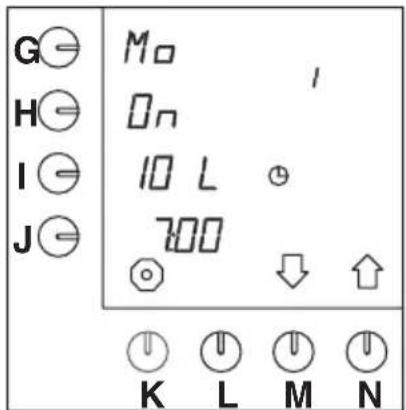
- If all settings are as desired, the setting can be put from OFF to ON.
- Press programming key (H.).
- OFF is changed into ON.
- The setting can now be selected in the user mode.
- The enter symbol ↩ appears on the display.
- Press confirmation key (L.) to confirm.
– The desired time has been set now.
- This procedure can be repeated for 14 pre-programmed time settings in total.
- Press selection key (N.)↑ to go to the next time setting (1–14) and repeat the above procedure.
- Press stop key (K.) and subsequently selection key (N.) to go to the next setting § 7.3.8 or press stop key (K.) twice to exit the programming menu.
- Put the setting to ON to make the setting selectable in the user mode. If the setting is on OFF, the setting cannot be selected in the user mode, see § 7.1.1.
text_image
G⊖ H⊖ I⊖ J⊖ M⊕ 10 L 700 ⊖ ↓ ↑ K L M NFig. 34 Pre-programmed setting (active)
7.3.8 Lengthening water delivery time by setting pauses
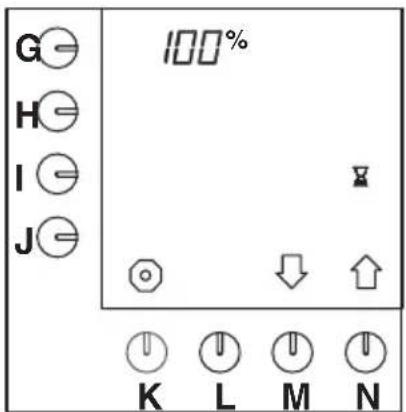
The default time required for making a full container of coffee can be lengthened by setting pauses. This is, for example, necessary when very finely ground coffee or very soft water is used. Then some more time is needed for the water to go through the coffee filter, otherwise it will overflow. The capacity is reduced. This is indicated in %.
- Default setting to 100%, so no pauses.
- The setting range is between 100% and 50%, to be set in 5% steps. After the setting, the machine calculates the pause schedule itself. It can, however, be set to when the first pause should come.
– The setting must be determined by experience by making coffee. - The minimum amount that can be set for the first pause is the volume of the filter cone +25%.
| ModelContentsfilterconeMinimumamountfirstcharge | |
| B52litres2,5litres | |
| B104litres5,0litres | |
| B208litres10,0litres | |
| B4015liter20,0liter | |
Table 10 Minimum amount first charge
text_image
G= 100% H= I= J= ○ ↓ ↑ K L M NFig. 35 Pause time 100%
- Press selection key (N.)↑ until fig.35 appears on the display.
- Press programming key (G.).
– The position beside the programming key starts flashing. - Press selection key (M.)↓ or (N.)↑ to select the desired programme.
-
The enter symbol appears on the display.
-
Press confirmation key (L.) to confirm the adjustment.
- Press programming key (I.).
TIP
- This can only be done when the percentage is not set to 100%.
- Press selection key (M.)↓ or (N.)↑ to select the desired amount of the first charge.
- The enter symbol appears on the display.
- Press confirmation key (L.) to confirm the adjustment.
- Press selection key (N.)↑ to go to the next setting or press stop key (K.) to exit the programming menu.
7.3.9 Setting dripping-on time
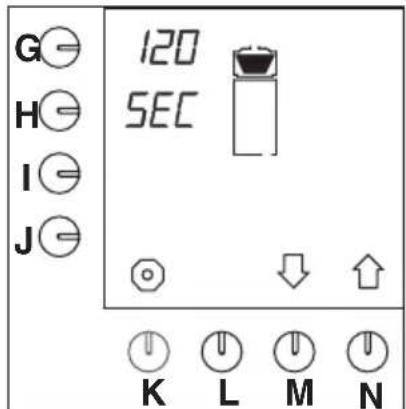
When the hot water supply through the spray head has stopped, it will take a while until the filter pan also stops dripping. The time required for this varies with different coffee brands and/or grinds. Therefore this dripping-on time can be changed.
- The default setting is on 120 seconds.
- The setting range is from 0 – 600 seconds in 10 seconds steps.
text_image
G H I J 120 SEC ↓ K L M NFig. 36 Dripping-on time
The dripping-on time can be set as follows:
- Press selection key (N.)↑ until fig.36 appears on the display.
- Press programming key (G.).
- The value beside the selection key starts flashing.
- Press selection key (M.)↓ or (N.)↑ to select the desired number of seconds.
- The enter symbol appears on the display.
- Press confirmation key (L.).
- The desired number of seconds has been set now.
- Press selection key (N.)↑ to go to the next setting or press stop key (K.) to exit the programming menu.
7.3.10 Setting number of grams of coffee per litre (coffee calculator)
In the user mode by simultaneously pressing the stop key (K.) and one of the pre-selection keys (G.-J.) it can be read how many grams of coffee must be used for the selected number of litres of coffee. For this first the amount of ground coffee per litre must be set. The programme calculates itself how much ground coffee must be used for an x number of litres.
- The default setting of the amount is 50 grams of ground coffee per litre.
- The calculation makes use of correction factors (table 11).
| Numberoflitres Defaultnumberofgramsofground coffee | |
| 1,0 50 | |
| 2,0 100 | |
| 2,5 120 | |
| 3,0 150 | |
| 4,0 200 | |
| 5,0 240 | |
| 10,0 480 | |
| 15,0 690 | |
| 20,0 900 | |
| 30,0 1280 | |
| 40,0 1600 | |
Table 11 Number of grams per litre

text_image
G H I J 50 Gr K L M NFig. 37 Setting the coffee calculator
The number of grams of ground coffee per litre can be adjusted as follows:
- Press selection key (N.)↑ until fig.37 appears on the display.
- Press programming key (J.).
- The value beside the selection key starts flashing.
- Press selection key (M.)↓ or (N.)↑ to select the desired number of grams.
- The enter symbol ↓ appears on the display.
- Press confirmation key (L.).
- The desired number of grammes has been set now.
- Press selection key (N.) ^↑ to go to the next setting or press stop key (K.) to exit the programming menu.
7.3.11 Reading total counter coffee-making system
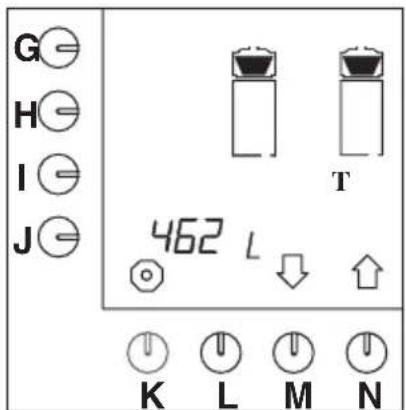
text_image
G H I J T 462 L K L M NFig. 38 Total counter coffee making system
The total amount of coffee made during the lifetime of the machine can be read. This is done as follows:
- Press selection key (N.)↑ until fig.38 appears on the display.
- Now the total amount of coffee made can be read.
- The maximum reading on the display can be 9999 litres. When over 9999 litres have been made, the number appears in a rolling movement on the display.
- Press selection key (N.)↑ to go to the next setting or press stop key (K.) to exit the programming menu.
7.3.12 Setting descaling signal coffee-making system

TIP
- The descaling signal for the coffee brewing system is for all types set to 1000 litres, see the position beside the selection key (G.).
- The setting range can be set as desired between 100 and 9900 litres in steps of 100 litres.
- The position beside the selection key (J.) gives the number of litres already made. In this way it can be checked whether the system soon needs descaling.
- When the set value is reached, the hammer symbol and the measuring spoon will flash on the display indicating that the machine needs descaling.

text_image
G H I J 1000 900 L K L M NFig. 39 Descaling signal coffee-making system
The descaling signal can be set as follows:
- Press (M.)↓ until fig.39 appears on the display.
- Press programming key (G.).
- The value beside the programming key starts flashing.
- Press selection key (M.)↓ or (N.)↑ to select the desired number of litres after which descaling is required.
- The enter symbol appears on the display.
- Press the confirmation key (L.).
- The desired amount has now been set.
- Press selection key (N.)↑ to go to the next setting or press stop key (K.) to exit the programming menu.
| Number of litres | Water hardness | ||
| °dH°TH | Description | ||
| ± 250 litres | 18 -30 | 32 - 55 | hard |
| ± 500litres | 12 -18 | 22 - 32 | fairly hard |
| ± 1000litres | 8 -12 | 15 - 22 | average |
| ± 1500litres | 4 - 8 | 7 - 15 | soft |
| ± 2000litres | 0 - 4 | 0 - 7 | very soft |
| 4,0 °dH = 0,714 mmol/litres | |||
| 5,6 °dH = 1,000 mmol/litres | |||
| 8,0 °dH = 1,429 mmol/litres | |||
| 12,0 °dH = 2,143 mmol/litres | |||
| 18,0 °dH = 3,214 mmol/litres | |||
| 30,0 °dH = 5,357 mmol/litres | |||
| 10,0 °TH = 1,000 mmol/litres | |||
Table 12 Water hardness
7.3.13 Starting descaling program coffee-making system
See § 7.2.2
7.3.14 Resetting day counter coffee-making system
TIP
- The amount is only given in litres. Even if the amount at § 7.3.1 has been set to cups, jugs or us gallons.
- Press the selection key (M.)↓ a bit longer (about 2 sec.) than in the previous programme sections to view and/or adjust the counter readings below.
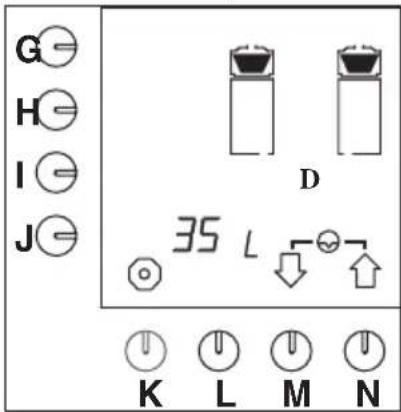
text_image
G H I J D 35 L K L M N
Fig. 40 Resetting day counter coffee-making system
The total amount of coffee made daily can be read.
The day counter can be reset daily. This is done as follows:
- Press selection key (M.)↓ until fig.40 appears on the display.
- Press selection keys (M.)↓ and (N.)↑ simultaneously.
The day counter is reset.
- Press selection key (N.)↑ to go to the next setting or press stop key (K.) to exit the programming menu.

8. CORRECTING MALFUNCTIONS
In case of malfunctions first consult the malfunctions tables. If the problem cannot be solved, consult your Bravilor Bonamat dealer, your service mechanic or one of the service desks.
WARNING
△Check first to determine if the malfunction has a mechanical or electrical origin. Work and repairs on the electrical system may only be carried out by a trained and authorized service technician.

8.1 Malfunctioning analysis general
| LIST OF MALFUNCTIONS | ||
| Symptom: Possible cause: Actions: | ||
| 1. Nothing appears on the display. | The switch E. is off. Switch ON/O | FF switch (E.) ON. |
| The supply voltage has been interrupted. | Connect the supply voltage. | |
| 2. Time is not set correctly. Set the correct time and day, see § 7.3.6.2. | ||
| 3. The machine does not work according to the timer. | All B-machines –series are standard provided with a timer-series. This must, however, be activated. | Activate the timer, see § 7.3.7. |
8.2 Coffee-making system
| LIST OF MALFUNCTIONS | ||
| Symptom: Possible cause: Actions: | ||
| 1. After pressing the 'amount key' the machine beeps every other second. | Spray head outlet is not positioned properly in relation to the filter unit (see display). | Position the spray head outlet correct above the filter unit. |
| Container is not positioned properly (see display). | Place the container in the correct position. | |
| Call in service. | ||
| 2. Filter unit runs over. | The filter paper is doubled. | Check the filter paper. |
| Due to a combination of soft water (<7° DH), too finely ground coffee or the use of flat filter paper the water cannot go through the coffee / filter paper quickly enough. | Make use of the filter cone with cone filter paper and/or use a courser ground coffee. | |
| Adjust the coffee-making capacity, see § 7.3.8. | ||
| 3. Coffee is too cold. Plug of the container is not connected to the column. | Connect the plug of the container to the socket on the column (D.). | |
| on the container switch (W.). | ||
| Internal fuse has blown due to overload. | ||
| 4. Coffee is too strong / not strong enough. | Incorrect coffee dosage. Set the correct dosage using the coffee calculator, see § 4.1.4. | |
| Incorrect setting of the amount of water. | Set the correct amount of water, see § 7.3.1. | |
| The mixer pipe is not there. Insert the mixer pipe (T.) into the container. | ||
| 5. Too much / too little coffee in the container. | Incorrect setting of the amount of water. | Set the correct amount, see § 7.3.1. |
| 6. Coffee grounds in the coffee container. | Filter paper torn or doubled. Check the filter paper. | |
| 7. After the container has been filled the symbol of the filter unit is still lit. | Drip time too long. Set the drip time again, see § 7.3.9. | |
| 8. The machine gives the signal that it is ready (3 beeps), but the container is not full yet. | Drip time too short. Set the drip time again, see § 7.3.9. | |
| 9. The machine steams while making coffee and the coffee making takes too much time. | The machine is calcified. | Descale the machine earlier, see § 7.2.2 and lower the descaling indicator value, see § 7.3.12. |

8.3 Display messages and their meanings
During normal use (e.g. in the case of malfunctions or errors) or during the setting procedure messages can appear on the display.
The table below gives an overview of these messages, as well as the possible causes and the actions to be taken (by the system or the user) to return the system to normal functioning.
| DISPLAY MESSAGES | |||
| Possible cause: Actions: | |||
| E1 | “ERR + ≈ + ≈ + beep” | The overflow safety device of the coffee-making system has been activated. | Switch the ON/OFF switch (E.) off and on again. |
| E3 | “ERR + ≈ + beep” | The water supply is open, but no water comes out. | Open the tap. |
| Call in service. | |||
| E3 | “ERR + ≈ + uninterrupted beep” | The overflow safety device of the coffee-making system has been activated. | Switch the ON/OFF switch (E.) off. |
9. CONSUMABLE ITEMS AND ACCESSORIES
The consumer goods and accessories available for the machine are given in the following list.
- Order the desired items from your dealer always mentioning the following data:
– model code, type and sequence number of the machine (see the identification plate)
– The description of the item concerned
- The ordering number
- quantity
9.1 Recommended consumable items
| Description Ordering number Quantity | ||
| Filter cups (for filter cone) B5 7.150.102.301 | 250 pieces | |
| Filter cups (for filter cone) B10 | 7.150.103.301 | 250 pieces |
| Filter cups (for filter cone) B20 7.150.104.301 250 pieces | ||
| Filter cups (for filter cone) B40 7.150.105.301 250 pieces | ||
| Filter paper B5 | 7.150.503.301 250 pieces | |
| Filter paper B10 7.150.507.301 250 pieces | ||
| Filter paper B20 7.150.505.301 250 pieces | ||
| Filter paper B40 | 7.150.508.301 | 250 pieces |
| Micro filter B5 | 7.110.203.101 | 1 pieces |
| Micro filter B10 | 7.110.303.101 | 1 pieces |
| Micro filter B20 | 7.110.403.101 | 1 pieces |
| Micro filter B40 | 7.110.503.101 | 1 pieces |
| Cleaning material (CLEANER) | 7.191.102.201 | 10 x 1 kg |
| 7.191.101.212 | 60 x 15 g | |
| Descaler (RENEGITE) | 7.190.102.101 | 6 x 1 kg |
| 7.190.103.103 | 40 x 100 g | |
9.2 Accessories
| Description | Ordering number | Quantity |
| Water connecting hose | 6.000.205.050 1 piece | |
| Cap filling opening descaler | 6.311.090.001 | 1 piece |
| Funnel | 7.094.002.101 1 piece | |
| Sight glass brush | 7.110.605.101 | 1 piece |
| Washing-up brush | 7.110.606.101 | 1 piece |
| Drip tray + grille (std) B5 | 7.110.213.501 | 1 piece |
| Drip tray + grille (std) B10 | 7.110.311.501 | 1 piece |
| Drip tray + grille (std) B20 | 7.110.412.501 | 1 piece |
| Drip tray + grille (std) B40 | 7.110.513.501 | 1 piece |



Operator code:
Push the stop key (K) and release it, thereafter push ↑↑↑↑↓↓↑.
Principal user code:
Continuously push the stop key (K) and the same time push the following keys .
BRAVILOR BONAMAT
COFFEE BREWING MACHINES
MACHINES A CAFE
KAFFEEBRUEHMASCHINEN
KOFFIEZETAPPARATEN
© 08-2010