Radio Controlled WVA-109HDE-1AVER - Watch CASIO - Free user manual and instructions
Find the device manual for free Radio Controlled WVA-109HDE-1AVER CASIO in PDF.


User questions about Radio Controlled WVA-109HDE-1AVER CASIO
0 question about this device. Answer the ones you know or ask your own.
Ask a new question about this device
Download the instructions for your Watch in PDF format for free! Find your manual Radio Controlled WVA-109HDE-1AVER - CASIO and take your electronic device back in hand. On this page are published all the documents necessary for the use of your device. Radio Controlled WVA-109HDE-1AVER by CASIO.
USER MANUAL Radio Controlled WVA-109HDE-1AVER CASIO
- The operational procedures for Modules 2734, 2758, 3748, 3749, 4773, and 4774 are identical. All of the illustrations in this manual show Modules 2734 and 2758. - Button operations are indicated using the letters shown in the illustration.
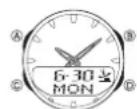
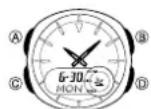
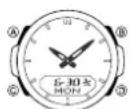
Modules 2734 and 2758 Modules 3748 and 3749 Modules 4773 and 4774
- Each section of this manual provides you with the information you need to perform operations in each mode. Further details and technical information can be found in the "Reference" section.
General Guide
- Press Ⓒ to change from mode to mode. - In any mode, press Ⓗ to illuminate the display.
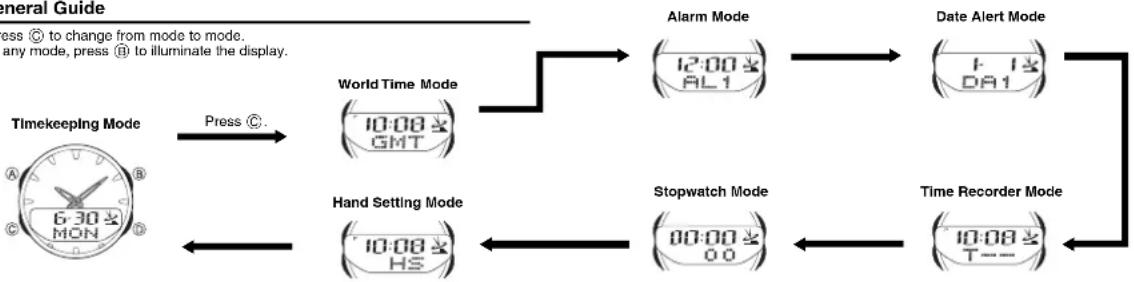
flowchart
graph LR
    A["Timekeeping Mode"] -->|Press ©| B["World Time Mode"]
    B --> C["Alarm Mode"]
    C --> D["Date Alert Mode"]
    D --> E["Stopwatch Mode"]
    E --> F["Time Recorder Mode"]
    F --> G["Hand Setting Mode"]
    G --> H["6:30 MON"]
    style A fill:#f9f,stroke:#333
    style B fill:#ccf,stroke:#333
    style C fill:#cfc,stroke:#333
    style D fill:#fcc,stroke:#333
    style E fill:#cff,stroke:#333
    style F fill:#ffc,stroke:#333
    style G fill:#cfc,stroke:#333
    style H fill:#fcc,stroke:#333
Radio-controlled Timekeeping
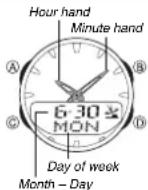
This watch receives a time calibration signal and update its time setting accordingly. The time calibration signal includes both Standard Time and Daylight Saving Time (summer time) data.
- This watch is designed to pick up the time calibration signal transmitted from Rugby, England and the signal from Mainflingen, Germany.
Current Time Setting
This watch automatically adjusts its digital time setting in accordance with a time calibration signal. You can also perform a manual procedure to set the time and date, when necessary.
- The first thing you should do after purchasing this watch is to set your Home City, which is the city where you will normally use the watch. For more information, see "To set your Home City" below.
- When using the watch that is outside of the range of the transmitters in Rugby and Mainflingen, you need to manually adjust the time as required. See "Timekeeping" for information about manual settings.
- The analog time of this watch is synchronized with the digital time. Because of this, the analog time setting is automatically adjusted whenever you change the digital setting. See “Analog Timekeeping” for more information.
To set your Home City

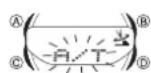
- In the Timekeeping Mode, hold down Ⓐ until the transmitter indicator (R/T, MSF, or DCF) starts to flash, which indicates the setting screen.
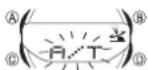
- If the displayed transmitter indicator shows something other than R / T , use to display R / T before advancing to the next step.
- Press Ⓐ to display the city code setting screen.
- Use Ⓓ (east) and Ⓔ (west) to select the city code you want to use as your Home City.
City code
- The following are the city codes for major cities in the Western Europe time zones.
PAR and BER: Paris, Berlin, Milan, Rome, Amsterdam, Hamburg, Frankfurt, Vienna, Barcelona, Madrid
- Press Ⓐ twice to exit the setting screen.
- The first press of Ⓐ displays the 12/24-hour setting screen. Pressing Ⓐ again exits the setting screen.
Important!
- Normally, your watch should show the correct time as soon as you select your Home City code. If it does not, it should adjust automatically after the next auto receive operation (in the middle of the night). You can also perform manual receive or you can set the time manually.
- If you are in an area that does not use Daylight Saving Time (summer time), turn off the DST setting.
- See "Transmitters" for details about the transmitter indicator.
Time Calibration Signal Reception
There are two different methods you can use to receive the time calibration signal: auto receive and manual receive.
•Auto Receive
With auto receive, the watch automatically picks up the time calibration signal five times a day at 0:00 a.m., 1:00 a.m., 2:00 a.m., 3:00 a.m., and 4:00 a.m. For more information, see "About Auto Receive".
•Manual Receive
Manual receive lets you start a time calibration receive operation with the press of a button. For more information, see "To perform manual receive".
Important!
- Position the watch as shown in the nearby illustration, with its 12 o'clock side facing towards a window. Make sure there are no metal objects nearby.

text_image
Resin Band Metal Band•The watch should not be on its side or facing the wrong way.
•Proper signal reception can be difficult or even impossible under the conditions listed below.

Inside or among buildings

Inside a vehicle

Near
household
appliances or
office
equipment,
or a mobile
phone

Near a construction site, airport, or other sources of electrical noise

Near high-tension power lines

Among or behind mountains
•Signal reception is normally better at night than during the day.
- Time calibration signal reception takes from two to five minutes, but in some cases it can take as long as 12 minutes. Take care that you do not perform any button operations or move the watch during this time.

text_image
1,500 kilometers Rugby 500 kilometers Mainflingen- At distances further than about 500 kilometers from a transmitter, signal reception may not be possible during certain times of year or times of day. Radio interference may also cause problems with reception.
- Even when the watch is within the reception range of the transmitter, signal reception is impossible if the signal is blocked by mountains or other geological formations between the watch and signal source.
- Signal reception is affected by weather, atmospheric conditions, and seasonal changes.
- See the information under "Signal Receive Troubleshooting" if you experience problems with time calibration signal reception.
About Auto Receive
When auto receive is turned on, the watch automatically starts to receive the time calibration signal when the digital time in the Timekeeping Mode reaches 0:00 a.m., 1:00 a.m., 2:00 a.m., 3:00 a.m., and 4:00 a.m. each day (calibration times). The watch will also perform an additional auto receive operation at 5:00 a.m. if none of regularly scheduled auto receive operations are successful.
Note
- The auto receive operation is performed only if the watch is in the Timekeeping Mode or World Time Mode when one of the calibration times is reached. It is not performed if a calibration time is reached while an alarm is sounding, or while you are configuring settings (while settings are flashing on the display).
- Auto receipt of the calibration signal is designed to be performed early in the morning, while you sleep (provided that the Timekeeping Mode time is set correctly). Before going to bed for the night, remove the watch from your wrist, and put it in a location where it can easily receive the signal.
- When auto receive is turned on, the watch receives the calibration signal for two to five minutes everyday when the digital time in the Timekeeping Mode reaches each of the calibration times. Do not perform any button operation within five minutes before or after any one of the calibration times. Doing so can interfere with correct calibration.
- Remember that reception of the calibration signal depends on the time kept in the digital display. The receive operation will be performed whenever the display shows any one of the calibration times, regardless of whether or not the displayed time is actually the correct time.
- When two, three, four, or five receptions are successful, the watch uses the data of the last reception for calibration. When only one reception is successful, the watch uses the data of the successful reception.
About the Receiving Indicator
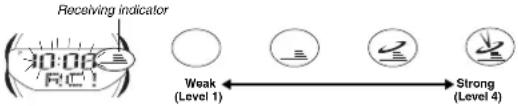
The receiving indicator shows the strength of the calibration signal being received. For best reception, be sure to keep the watch in a location where signal strength is strongest.
text_image
Receiving indicator 30:00 RC! Weak (Level 1) Strong (Level 4)- Even in an area where signal strength is strong, it takes about 10 seconds for signal reception to stabilize enough for the receiving indicator to indicate signal strength. - Use the receiving indicator as a guide for checking signal strength and for finding the best location for the watch during signal receive operations.
- The Level 4 receiving indicator remains on the display in all modes following reception of the time calibration signal and calibration of the watch's time setting. The Level 4 receiving indicator is not displayed if signal reception was unsuccessful or after manual adjustment of the current time setting.
- The Level 4 receiving indicator is displayed only when the watch is able to successfully receive both time and date data. It does not appear when only time data is received.
•The Level 4 receiving indicator indicates that at least one of the calibration signal receive operations was successful. Note, however, that the Level 4 receiving indicator is cleared from the display at 3:00 a.m. each day.
To perform manual receive
Receiving indicator

- Place the watch on a stable surface so its top (12 o'clock side) is facing towards a window.
- Note that signal reception is poor when the 12 o'clock side of the watch is not facing towards a window.
-
In the Timekeeping Mode, hold down Ⓓ for about two seconds until the watch beeps.
-
Release ① and the current time flashes to indicate that signal reception has started.
-
Time calibration signal reception takes from two to five minutes. Take care that you do not perform any button operations or move the watch during this time.
•After signal reception is complete, the display of the watch changes to the Last Signal screen.
Note
- To interrupt a receive operation and return to the Timekeeping Mode, press Ⓓ. - If the receive operation is unsuccessful, the message ERR appears on the display for about one or two minutes. After that, the watch returns to the Timekeeping Mode. - You can also change from the Last Signal or ERR screen to the normal timekeeping screen by pressing Ⓓ.
To turn auto receive on and off
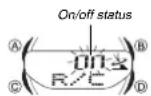
- In the Timekeeping Mode, hold down Ⓐ until the transmitter indicator starts to flash, which indicates the setting screen.
- Press © three times to move the flashing to the auto receive on/off setting.
- Press ⑥ to toggle auto receive on (ON) and off (OF). • If the current Home City setting is a city code that does not support signal receive, “- -” appears in place of the on/off indicator. This means you cannot turn auto receive on or off.
- Press Ⓐ twice to exit the setting screen.
To display the digital time and Last Signal screen
- In the Timekeeping Mode, press Ⓐ to cycle through the digital time screens as shown below.
- In the Timekeeping Mode, press Ⓞ to display the Last Signal screen (indicated by GET). The Last Signal screen shows the date and time of the last successful time calibration signal reception.

flowchart
graph TD
    A["Day of week"] --> B["6:30 MON"]
    B --> C["Month - Day"]
    C --> D["Press"]
    D --> E["6:30 MON"]
    E --> F["Day of week"]
    F --> G["6:30 MON"]
    G --> H["Time: 10:08-35"]
    H --> I["Hour: Minutes Seconds Month - Day"]
    I --> J["Press"]
    J --> K["6:30 MON"]
    K --> L["Time: 35-Seconds"]
    L --> M["6:30 MON"]
    M --> N["Time: 5:02-Receive time"]
    N --> O["Accept at two-second interval"]
    O --> P["6:30 GET"]
    P --> Q["Receive date"]
    Q --> R["Press"]
    R --> S["6:30 MON"]
Last Signal Screen
Signal Receive Troubleshooting
Check the following points whenever you experience problems with calibration signal reception.
| Problem | Probable Cause | What you should do |
| Cannot perform manual receive. | The watch is not in the Timekeeping Mode.Your current Home City is not one of the following city codes:BER, PAR, or LON.The transmitter setting is incorrect. | Enter the Timekeeping Mode and try again.Select BER, PAR, or LON as your Home City.Select the transmitter setting appropriate for your current location. |
| Auto receive is turned on, but the Level 4 receiving indicator does not appear on the display. | The transmitter setting is incorrect.You changed the time setting manually.The watch was not in the Timekeeping or World Time Mode, or you performed some button operation during the auto receive operation.Even if receive is successful, the Level 4 receiving indicator disappears every day at 3 am.Time data (hour, minutes, seconds) only was received during the last receive operation. The Level 4 receiving indicator appears only when time data and date data (year, month, day) are both received. | Select the transmitter setting appropriate for your current location.Perform manual signal receive or wait until the next auto signal receive operation is performed.Check to make sure the watch is In a location where it can receive the signal. |
| Time setting is incorrect following signal reception. | If the time is one hour off, the DST setting may be Incorrect.The Home City code setting is not correct for the area where you are using the watch. | Change the DST setting to Auto DST.Select the correct Home City code. |
- For further information, see "Important!" under "Time Calibration Signal Reception" and "Radio-controlled Timekeeping Precautions".
World Time
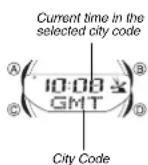
The World Time shows the current time in 30 cities (29 time zones) around the world.
- If the current time shown for a city is wrong, check your Home City time settings and make the necessary changes.
- The watch will perform a signal receive operation even if it is in the World Time Mode when a calibration time is reached. If this happens, the World Time Mode time settings will be adjusted in accordance with the Timekeeping Mode's Home City time.
- All of the operations in this section are performed in the World Time Mode, which you enter by pressing ©.
To view the time in another city
While in the World Time Mode, press Ⓓ to scroll through the city codes (time zones).
- For full information on city codes, see the "City Code Table".
To toggle a city code time between Standard Time and Daylight Saving Time 1. In the World Time Mode, use Ⓓ to display the city code (time zone) whose Standard Time/Daylight Saving Time setting you want to change. DST indicator
-
Hold down Ⓐ to toggle Daylight Saving Time (DST displayed) and Standard Time (DST not displayed).
• Note that you cannot use the World Time Mode to change the DST setting of the Home City code you currently have selected in the Timekeeping Mode. See "To change the Daylight Saving Time (summer time) setting" for information about turning the Home City code DST setting on and off. -
The DST indicator is on the display whenever you display a city code for which Daylight Saving Time is turned on.
- Note that the DST/Standard Time setting affects only the currently displayed city code. Other city codes are not affected.
Alarms


Hourly Time Signal Screen
The Alarm Mode gives you a choice of four one-time alarms and one snooze alarm. One of the one-time alarms functions as a "target alarm," which counts the time remaining from the current Home City time to the target alarm time.
Also use the Alarm Mode to turn the Hourly Time Signal on and off.
- There are five alarms named AL1, AL2, AL3, TAL (target alarm), and SNZ. You can configure SNZ as a snooze alarm only. AlarmsAL1, AL2, AL3, and TAL can be used as one-time alarms only.
- Alarm settings (and Hourly Time Signal settings) are available in the Alarm Mode, which you enter by pressing ©.
To set an alarm time
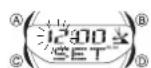
- In the Alarm Mode, use Ⓓ to scroll through the alarm screens until the one whose time you want to set is displayed.

- After you select an alarm, hold down Ⓐ until the hour setting of the alarm time starts to flash, which indicates the setting screen. •This operation automatically turns on the alarm.
- Use © to move the flashing between the hour and minute settings.
- While a setting is flashing, use Ⓓ (+) and Ⓔ (−) to change it.
-
When setting the alarm time using the 12-hour format, take care to set the time correctly as a.m. (no indicator) or p.m. (P indicator).
-
Press Ⓐ to exit the setting screen.
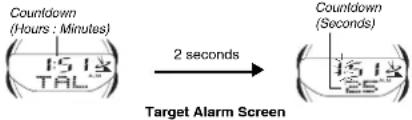
- With the target alarm ( TPI...), the time starts to countdown as soon as you set the alarm time.
flowchart
graph LR
    A["Countdown (Hours : Minutes)"] --> B["15/18 TAL"]
    B --> C["2 seconds"]
    C --> D["Target Alarm Screen"]
    D --> E["Countdown (Seconds)"]
Alarm Operation
The alarm tone sounds at the preset time for 10 seconds, regardless of the mode the watch is in. In the case of the snooze alarm, the alarm operation is performed a total of seven times, every five minutes, or until you turn the alarm off.
The target alarm counts the time remaining from the current Home City time to the target alarm time. Note that the target alarm repeats automatically each day, as long as it is turned on. You need to turn off the target alarm to disable it.
- Pressing any button stops the alarm tone operation.
- Performing any one of the following operations during a 5-minute interval between snooze alarms cancels the current snooze alarm operation.
Displaying the Timekeeping Mode setting screen
Displaying the snooze alarm setting screen
To test the alarm
In the Alarm Mode, hold down Ⓓ to sound the alarm.
To turn an alarm on and off

Snooze alarm indicator
Modules 2734, 2758,
4773, and 4774

Snooze alarm indicator
Modules 3748 and 3749
To turn the Hourly Time Signal on and off
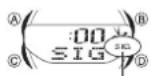
Hourly time signal on indicator
Modules 2734, 2758,
4773, and 4774
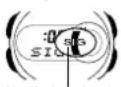
Hourly time signal
on indicator
Modules 3748 and 3749
Date Alert
Date Alert helps you to remember an important date. After you set an alert date (month and day), a date alert indicator (!) and the current date flash for 24 hours after the alert date arrives in the Timekeeping Mode. You can set up to five different date alerts.
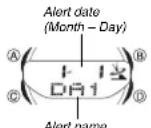
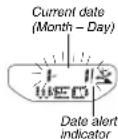
Date Alert Mode Screen Timekeeping Mode Screen
(Current date does not flash if digital time is displayed on the Timekeeping Mode screen.)
To set the alert date
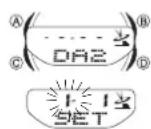
- Use Ⓐ to enter the Date Alert Mode.
-
Use ⏻ to scroll through the alert screens until the one whose date you want to set is displayed.
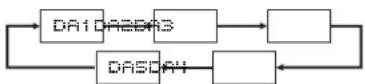
-
After you select an alert, hold down Ⓐ until the month setting of the alert date starts to flash, which indicates the setting screen.
•This operation automatically turns on the alert
-
Press (©) to move the flashing between the month and day settings.
-
While the month or day setting is flashing, use Ⓓ (+) and Ⓑ (−) to change it.
-
Press Ⓐ to exit the setting screen.
To turn an alert on and off


-
In the Date Alert Mode, use Ⓓ to select the screen for the alert (DA1 through DAS) whose alert type you want to select.
-
Press Ⓐ to toggle it on and off.
- Note that the month and day do not appear if the alert is turned off.
Time Recorder
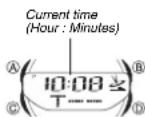
Standby Screen
The Time Recorder Mode lets you store up to 30 time entries (month, day, hour, minutes) with the touch of a button. One way you can use the Time Recorder Mode is to record the start time and the end time of a particular event. •All of the operations in this section are performed in the Time Recorder Mode, which you enter by pressing Ⓒ.
To record a Time Recorder time
-
Use © to enter the Time Recorder Mode. •This displays the Time Recorder standby screen.
-
Press (D) to record the current date and time (month, day, hour, minutes).
- The recorded time flashes for about two seconds and then assigned the next available record number, in the range of T1 through T30. Next the time recorder standby screen appears.
- A new time is recorded each time you press Ⓓ while the standby screen is on the display.
-Records are assigned numbers sequentially from Ti through T30.
- Storing a new time record when there are already 30 records stored in memory automatically deletes recordT1, shifts the remaining records upwards by 1, and stores the new record as T30.
To recall Time Recorder times
- In the Time Recorder Mode, press (A) to recall Time Recorder times.
-
If there are no time recorder times currently in memory, the standby screen remains on the display when you press (A).
-
Use Ⓞ to scroll through times stored in memory.

text_image
Recorded time (Hour : Minutes) A 10:07至 T 二 B 6-30 Alternate at two-second interval Recorded date (Month - Day) Time record number• Each press of Ⓞ scrolls through time records from higher numbered (newer) records to lower numbered records.
- If you recorded a new Time Recorder time since you last entered the Time Recorder Mode, the newest record appears first. If you have not recorded a new time, the record you were viewing when you last exited the Time Recorder Mode appears first. - Press Ⓐ to return to the standby screen.
To delete all Time Recorder times
Enter the Time Recorder Mode. While holding down Ⓐ, press Ⓓ to delete all Time Recorder times.
Stopwatch
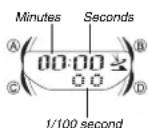
The stopwatch lets you measure elapsed time, split times, and two finishes.
•The display range of the stopwatch is 59 minutes, 59.99 seconds.
- The stopwatch continues to run, restarting from zero after it reaches its limit, until you stop it.
- Exiting the Stopwatch Mode while a split time is frozen on the display clears the split time and returns to elapsed time measurement.
- The stopwatch measurement operation continues even if you exit the Stopwatch Mode.
- All of the operations in this section are performed in the Stopwatch Mode, which you enter by pressing ©.
To measure times with the stopwatch
Elapsed Time
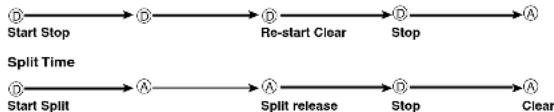
flowchart
graph LR
    A["Start Stop"] --> B["Re-start Clear"]
    B --> C["Stop"]
    C --> D["A"]
    E["Start Split"] --> F["Split release"]
    F --> G["Stop"]
    G --> H["A"]
    style A fill:#f9f,stroke:#333
    style E fill:#f9f,stroke:#333
    style D fill:#ccf,stroke:#333
    style H fill:#ccf,stroke:#333
Two Finishes

flowchart
graph LR
    A["Start Split"] --> B["A"]
    B --> C["Stop"]
    C --> D["A"]
    D --> E["Split release"]
    E --> F["A"]
    F --> G["Clear"]

    note1["First runner finishes."]
    note2["Display time of first runner."]

    A --> note1
    B --> note2
    C --> note3
    D --> note4
    E --> note5
    F --> note6
Timekeeping
Use the Timekeeping Mode to set and view the current time and date. This section also explains how to manually set the current date and time.
- All of the operations in this section are performed in the Timekeeping Mode, which you can enter by pressing Ⓒ.
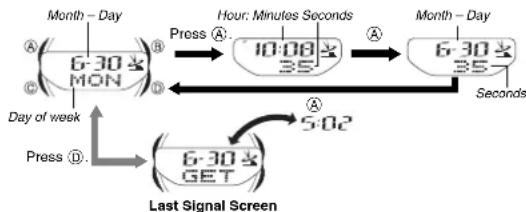
flowchart
graph TD
    A["6-30 AM MON"] -->|Press A| B["10:08 AM 35"]
    B -->|Hour: Minutes Seconds| C["6-30 AM 35"]
    C -->|Press D| D["6-30 AM GET"]
    D -->|Press E| E["Last Signal Screen"]
    E -->|Press F| F["Day of week"]
    F --> G["5:02"]
    G --> C
Setting the Digital Time and Date Manually
Make sure you select your Home City code before you change the current time and date settings. World Time Mode times are all displayed in accordance with the Timekeeping Mode settings. Because of this, World Time Mode times will not be correct if you do not select the proper Home City code before setting the time and date in the Timekeeping Mode.
To set the current digital time and date manually
-
In the Timekeeping Mode, hold down Ⓐ until the transmitter indicator starts to flash, which indicates the setting screen.
-
Use Ⓐ or Ⓐ to move the flashing in the sequence shown below to select other settings.
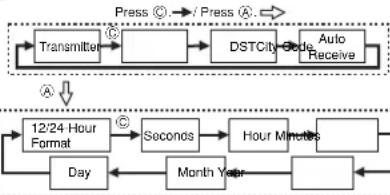
flowchart
graph TD
    A["Transmitter"] --> B["DSTCity"]
    B --> C["Auto Receive"]
    D["Day"] --> E["12/24 Hour Format"]
    E --> F["Seconds"]
    F --> G["Hour Minutes"]
    G --> H["Month Year"]
    H --> I["A"]
    I --> J["Press"]
    J --> K["Press"]
- When the setting you want to change is flashing, use Ⓗ and/or Ⓓ to change it as described below.
Transmitter/City Settings
| Screen: | To do this: | Do this: |
| Change the transmitter setting (A/T, MEF, or DCF) | Use 1. | |
| Change the city code | Use 2 (east) and 3 (west). | |
| Toggle between Daylight Saving Time (ON), Standard Time (OFF), or Auto DST (R) | Press 4. | |
| Toggle between auto receive on (ON) and off (OF) | Press 5. |
- See "City Code Table" for a complete list of available city codes.
Time/Date Settings
| Screen: To do this: | Do this: | |
| Toggle between 12-hour (12H) and 24-hour (24H) timekeeping | Press Ⓓ. | |
| Reset the seconds to 00 | Press Ⓓ. | |
| Change the hour or minutes | Use Ⓓ (+) and Ⓓ (-). | |
| Change the month, day, or year | Use Ⓓ (+) and Ⓓ (-). | |
- Use Ⓐ to exit the setting screen.
- If a Transmitter/City Setting screen is displayed, press Ⓐ twice.
- If a Time/Date Setting screen is displayed, press Ⓐ once.
- When you exit the setting screen, the analog hands are adjusted automatically to match the digital time. See "Analog Timekeeping" for more information.
Note
• See "Transmitters" for more information.
- Auto DST (A) can be selected only while IBER, PRR, LON, or ATH is selected as the Home City code. For more information, see "Daylight Saving Time (DST)" below.
- The auto receive setting is used for time calibration signal reception only. See "About Auto Receive" for details.
Daylight Saving Time (DST)
Daylight Saving Time (summer time) advances the time setting by one hour from Standard Time. Remember that not all countries or even local areas use Daylight Saving Time.
The time calibration signals transmitted from Rugby and Mainflingen include both Standard Time and DST data. When the Auto DST setting is turned on, the watch switches between Standard Time and DST (summer time) automatically in accordance with the received time signal.
- The default DST setting is Auto DST (A) whenever you select BER, PAR, LON, or ATH as your Home City code.
- If you experience problems receiving the time calibration signal in your area, it is probably best to switch between Standard Time and Daylight Saving Time (summer time) manually.
To change the Daylight Saving Time (summer time) setting
-
In the Timekeeping Mode, hold down Ⓐ until transmitter indicator starts to flash, which indicates the setting screen.
-
Press © twice and the DST setting screen appears.
-
Use ① to cycle through the DST settings in the sequence shown below.

- When the setting you want is selected, press Ⓐ twice to exit the setting screen.
Analog Timekeeping
The analog time of this watch is synchronized with the digital time. The analog time setting is adjusted automatically whenever you change the digital time.
Note
- The hands for the analog timepiece move to adjust to a new setting whenever any of the following occurs.
When you change the digital time setting manually When the digital time setting is changed by time calibration signal reception When you change the Home City code and/or DST setting
- If the analog time does not match the digital time for any reason, use the procedure described under "To adjust the analog time" to match the analog setting to the digital setting.
- Whenever you need to adjust both the digital and the analog time settings manually, make sure you adjust the digital setting first.
- Depending on how much the hands have to move in order to adjust to the digital time, it may take some time before the analog hands stop moving.
To adjust the analog time

Current time
-
In the Timekeeping Mode, press © six times to enter the Hand Setting Mode.
-
Hold down Ⓐ until the current digital time starts to flash, which indicates the setting screen.
-
Use Ⓓ (+) and Ⓔ (−) to adjust the analog setting as described below.
| When you want to do this: | Perform this button operation: |
| Move the hand setting forward 20 seconds | •Press 1. |
| Move the hand setting back 20 seconds | •Press 6. |
| Move the hand setting a short way forward at high speed | •Hold down 11.•Release 12 when the hands reach the setting you want. |
| Move the hand setting a short way back at high speed | •Hold down 13.•Release 14 when the hands reach the setting you want. |
| Move the hand setting a long way forward at high speed | • While holding down 15 to move the hands at high-speed, press 16 to lock the high-speed hand movement.•Press any button when the hands are close to the setting you want.•Hand movement stops automatically if the hour hand makes one full (12-hour) revolution. |
| Move the hand setting a long way back at high speed | • While holding down 18 to move the hands at high-speed, press 19 to lock the high-speed hand movement.•Press any button when the hands are close to the setting you want.•Hand movement stops automatically if the hour hand makes one full (12-hour) revolution. |
- Press Ⓐ to exit the setting screen.
- The minute hand will be adjusted slightly to match the seconds when you exit the setting screen.
- To return to the Timekeeping Mode, press ©.
Reference
This section contains more detailed and technical information about watch operation. It also contains important precautions and notes about the various features and functions of this watch.
Auto return features
- If you leave the watch in the Alarm (except for the target alarm screen explained on "To set an alarm time"), Date Alert, or Hand Setting Mode for two or three minutes without performing any operation, it automatically changes to the Timekeeping Mode.
- If you leave the watch with a flashing setting or cursor on the display for two or three minutes without performing any operation, it automatically saves any settings you have made up to that point and exits the setting screen.
Scrolling
The Ⓑ and Ⓞ buttons are used in various modes and setting screens to scroll through data on the display. In most cases, holding down these buttons during a scroll operation scrolls through the data at high speed.
Initial Screens
When you enter the World Time, Alarm, or Date Alert Mode, the data you were viewing when you last exited the mode appears first.
Radio-controlled Timekeeping Precautions
- Strong electrostatic charge can result in the wrong time being set.
- The time calibration signal is bounced off the ionosphere. Because of this, such factors as changes in the reflectivity of the ionosphere, as well as movement of the ionosphere to higher altitudes due to seasonal atmospheric changes or the time of day may change the reception range of the signal and make reception temporarily impossible.
- Even if the time calibration signal is received properly, certain conditions can cause the time setting to be off by up to one second.
- The current time setting in accordance with the time calibration signal takes priority over any time settings you make.
- The watch is designed to automatically update the date and day of the week for the period January 1, 2000 to December 31, 2039. Setting of the date by the time calibration signal cannot be performed starting from January 1, 2040.
- This watch can receive signals that differentiate between leap years and non-leap years.
- Though this watch is designed to receive both time data (hour, minutes, seconds) and date data (year, month, day), certain signal conditions can limit reception to time data only.
Operation Guide COMBIWVGE1
CASIO®
- Normally, the signal reception date shown by the Last Signal screen is the date data included in the received time calibration signal. When only time data is received, however, the Last Signal screen shows date as kept in the Timekeeping Mode at the time of signal reception.
- If you are in an area where proper time calibration signal reception is impossible, the watch keeps time within ±20 seconds a month at normal temperature.
- If you have problems with proper time calibration signal reception or if the time setting is wrong after signal reception, check your transmitter, current city code, DST (summer time), and auto receive settings. The following are the initial factory defaults for these settings.
| Setting | Initial Factory Default |
| Transmitter | /T |
| City code | LON (London) (Modules 2734, 3749, and 4774) |
| BER (Berlin) (Modules 2758, 3748, and 4773) | |
| DST (summer time) | (Auto switching)DST |
| Auto receive | (Auto receive) R/C |
Transmitters
This watch is designed to receive the time calibration signal transmitted from Rugby, England and the signal from Mainflingen, Germany. You can select either one of the transmitters, or you can configure the watch to automatically select the transmitter that has the strongest signal.
- The following explains how the watch determines which transmitter it should check first while the watch is configured for auto transmitter search (R/T).
Modules 2734, 3749, and 4774
| In this case: | The watch does this: |
| The first signal auto search operation after factory default settings are in effect, or after the city code has been changed | 1. Checks the Rugby signal first.2. If the Rugby signal cannot be received, checks the Mainflingen signal. |
| Any case other than the above. | 1. Checks the last successfully received signal first.2. If the last successfully received signal cannot be received, checks the other signal. |
Modules 2758, 3748, and 4773
| In this case: | The watch does this: |
| The first signal auto search operation after factory default settings are in effect, or after the city code has been changed | 1. Checks the Mainflingen signal first.2. If the Mainflingen signal cannot be received, checks the Rugby signal. |
| Any case other than the above. | 1. Checks the last successfully received signal first.2. If the last successfully received signal cannot be received, checks the other signal. |
- Since the watch checks signals from both transmitters when A/T is selected as the transmitter setting, the signal receive operation can take as long as 12 minutes.
To select a transmitter
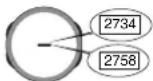
- To find out the module number of your watch, look at its back cover. The Module number (2734, 2758, 3748, 3749, 4773, or 4774) will be engraved inside the box on the back cover.
-
In the Timekeeping Mode, hold down Ⓐ until the transmitter indicator starts to flash, which indicates the setting screen.
-
Use Ⓓ to scroll through available transmitter settings until the one you want to select is displayed.
| To set up the watch to do this: | Select this transmitter setting: |
| Automatically select the Rugby or Mainflingen signal | R/T |
| Receive the Mainflingen signal | DCF |
| Receive the Rugby signal | MSP |
- Note that —— appears in place of the transmitter indicator when any city code besides LON, PAR, BER, or ATH is selected as the Home City code. This indicates that you cannot specify a transmitter.
- Press Ⓐ twice to exit the setting screen.
Timekeeping
- Resetting the seconds to 0.0 while the current count is in the range of 30 to 59 causes the minutes to be increased by 1. In the range of 00 to 29, the seconds are reset to 0.0 without changing the minutes.
- The day of the week is automatically displayed in accordance with the date (year, month, and day) settings.
•The year can be set in the range of 2000 to 2039. - The watch's built-in full automatic calendar makes allowances for different month lengths and leap years. Once you set the date, there should be no reason to change it except after you have the watch's battery replaced.
- The current time for all city codes in the Timekeeping Mode and World Time Mode is calculated in accordance with the Greenwich Mean Time (GMT) differential for each city, based on your Home City time setting.
•GMT differential is calculated by this watch based on Universal Time Coordinated (UTC*) data.
* The letters "UTC" stands for "Universal Time Coordinated," which is the world-wide scientific standard of timekeeping. It is based upon carefully maintained atomic (cestum) clocks that keep time accurately to within microseconds. Leap seconds are added or subtracted as necessary to keep UTC in sync with the Earth's rotation. The reference point for UTC is Greenwich, England.
12-hour/24-hour Timekeeping Formats
The 12-hour/24-hour timekeeping format you select in the Timekeeping Mode is also applied in all other modes.
- With the 12-hour format, the P (PM) indicator appears on the display for times in the range of noon to 11:59 p.m. and no indicator appears for times in the range of midnight to 11:59 a.m.
- With the 24-hour format, times are displayed in the range of 0:00 to 23:59. The indicator 24 indicates the 24-hour format.
Illumination Precautions
The watch has an EL (electro-luminescent) panel that causes the entire display to glow for easy reading in the dark.
In any mode, press (B) to illuminate the display for about one second.
- The electro-luminescent panel that provides illumination loses power after very long use.
- Illumination may be hard to see when viewed under direct sunlight.
- The watch may emit an audible sound whenever the display is illuminated. This is due to vibration of the EL panel used for illumination, and does not indicate malfunction.
•Illumination turns off automatically whenever an alarm sounds.
•Frequent use of illumination runs down the battery.
City Code Table
| City Code | City | GMT Differential | Other major cities in same time zone |
| —— | -11.0 | Pago Pago | |
| HNL | Honolulu | -10.0 | Papeete |
| AVC | Anchorage | -09.0 | Nome |
| LAX | Los Angeles | -08.0 | San Francisco, Las Vegas, Vancouver, Seattle/Tacoma, Dawson City |
| DEN | Denver | -07.0 | El Paso, Edmonton |
| CHI | Chicago | -06.0 | Houston, Dallas/Fort Worth, New Orleans, Mexico City, Winnipeg |
| NYC | New York | -05.0 | Montreal, Detroit, Miami, Boston, Panama City, Havana, Lima, Bogota |
| CCS | Caracas | -04.0 | La Paz, Santiago, Port Of Spain |
| NIO | Rio de Janeiro | -03.0 | Sao Paulo, Buenos Aires, Brasília, Montevideo |
| —— | -02.0 | ||
| —— — | -01.0 | Praia | |
| GMT | +00.0 | Dublin, Lisbon, Casablanca, Dakar, Abidjan | |
| LON | London | ||
| PAR | Paris | +01.0 | Milan, Rome, Madrid, Amsterdam, Algiers, Hamburg, Frankfurt, Vienna, Stockholm, Barcelona |
| BER | Berlin | ||
| ATH | Athens | +02.0 | Helsinki, Istanbul, Beirut, Damascus, Cape Town |
| CAI | Cairo | ||
| JRS | Jerusalem | ||
| JED | Jeddah | +03.0 | Kuwait, Riyadh, Aden, Addis Ababa, Nairobi, Moscow |
| THR | Tehran | +03.5 | Shiraz |
| DXB | Dubai | +04.0 | Abu Dhabi, Muscat |
| KBL | Kabul | +04.5 | |
| KHI | Karachi | +05.0 | Male |
| DEL | Delhi | +05.5 | Mumbai, Kolkata, Colombo |
| DAC | Dhaka | +06.0 | |
| RGN | Yangon | +06.5 | |
| BKK | Bangkok | +07.0 | Jakarta, Phnom Penh, Hanoi, Vientiane |
| HKG | Hong Kong | +08.0 | Singapore, Kuala Lumpur, Beijing, Taipei, Manila, Perth, Ulaanbaatar |
| SEL | Seoul | +09.0 | Pyongyang |
| TYO | Tokyo | ||
| ADL | Adelaide | +09.5 | Darwin |
| SYD | Sydney | +10.0 | Melbourne, Guam, Rabaul |
| NOU | Noumes | +11.0 | Port Villa |
| WLG | Wellington | +12.0 | Christchurch, Nadi, Nauru Island |
- Based on data as of June 2006.