Radio Controlled WV-200DE-1AVER - Watch CASIO - Free user manual and instructions
Find the device manual for free Radio Controlled WV-200DE-1AVER CASIO in PDF.


User questions about Radio Controlled WV-200DE-1AVER CASIO
0 question about this device. Answer the ones you know or ask your own.
Ask a new question about this device
Download the instructions for your Watch in PDF format for free! Find your manual Radio Controlled WV-200DE-1AVER - CASIO and take your electronic device back in hand. On this page are published all the documents necessary for the use of your device. Radio Controlled WV-200DE-1AVER by CASIO.
USER MANUAL Radio Controlled WV-200DE-1AVER CASIO
Operation Guide 3139
CASIO®
Getting Acquainted
Congratulations upon your selection of this CASIO watch. To get the most out of your purchase, be sure to read this manual carefully.
Caution!
Your watch is shipped with its Auto Display feature (which continually changes the contents of the digital display) turned on. Calibration signal reception is disabled while Auto Display is turned on. Press any button to turn off Auto Display and return to the Timekeeping Mode.
About This Manual
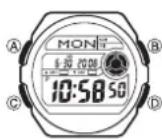
- Button operations are indicated using the letters shown in the illustration. - Each section of this manual provides you with the information you need in order to perform operations in each mode. Further details and technical information can be found in the "Reference" section.
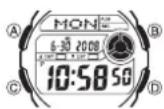
General Guide
- Press Ⓐ to change from mode to mode. - In any mode (except when a setting screen is on the display), press Ⓑ to illuminate the display. TimekeepingModeWorldTimeModeCountdown
TimerMode
AlarmModeStopwatchMode

flowchart
graph LR
    A["MONE 10:58:50"] -->|Press.©| B["NYC 8:58:50"]
    B --> C["TMR 60:00"]
    C --> D["STW 00:00:00"]
    D --> E["ALM 6:00"]
Radio-controlled Atomic Timekeeping

This watch receives a time calibration signal and updates its time setting accordingly. - Supported time calibration signals: Germany (Mainfl Ingen), England (Anthon), United States (Fort Collins), Japan. - See the information under "Signal Reception Troubleshooting" if you experience problems with time calibration signal reception.
Current Time Setting
This watch adjusts its time setting automatically in accordance with a time calibration signal. You can also perform a manual procedure to set the time and date, when necessary.
- The first thing you should do after purchasing this watch is to specify your Home City (the city where you normally will use the watch). For more information, see "To specify your Home City".
- When using the watch outside the areas covered by the time signal transmitters, you will have to adjust the current time setting manually as required. See "Timekeeping" for more information about manual time settings. - The U.S. time calibration signal can be picked up by the watch while in North America. The term "North America" in this manual refers to the area that consists of Canada, the continental United States, and Mexico.
To specify your Home City
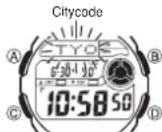
1. In the Timekeeping Mode, hold down Ⓐ until the city code starts to flash, which indicates the setting screen.
2. Press Ⓐ(east) and Ⓐ(west) to select the city code you want to use as your Home City.
• Time calibration signal reception is supported when any one of the city codes shown in the table below is selected as your Home City.
| German/U.K. Signal Japan Signal U.S. Signal | |||||||||
| City Code | City Name | City Code | City Name | City Code | City Name | City Code | City Name | City Code | City Name |
| LIS | Lisbon | ATH | Athens | HKG | Hong Kong | HNL | Honolulu | YWG | Winnipeg |
| LON | London | MOW | Moscow | BJS | Beijing | ANC | Anchorage | CHI | Chicago |
| MAD | Madrid | TPE | Taipei | YVR | Vancouver | MIA | Miami | ||
| PAR | Paris | SEL | Seoul | LAX | Los Angeles | YTO | Toronto | ||
| ROM | Rome | TYO | Tokyo | YEA | Edmonton | NYC | New York | ||
| BER | Berlin | DEN | Denver | YHZ | Halifax | ||||
| STO | Stockholm | MEX | Mexico City | YYT | St. Johns | ||||
- Press Ⓐ twice to exit the setting screen.
Important!
- Normally, your watch should show the correct time as soon as you select your Home City code. If it does not, it should adjust automatically after the next auto receive operation (in the middle of the night). You can also perform manual receive or you can set the time manually.
- The watch will receive the time calibration signal automatically from the applicable transmitter (in the middle of the night) and update its settings accordingly. For information about the relationship between city codes and transmitters, see “Home City Codes and Transmitters”.
- Under factory default settings, auto receive is turned off for all of the following city codes: HNL (Honolulu), ANC (Anchorage), MOW (Moscow), HKG (Hong Kong), and BJS (Beijing). For details about turning on auto receive for these city codes, see “To turn auto receive on and off”.
- You can disable time signal reception, if you want. See "To turn auto receive on and off" for more information.
- See the maps under "Approximate Reception Ranges" for information about the reception ranges of the watch.
- If you are in an area that does not use Daylight Saving Time (summer time), turn off the DST setting.
Time Calibration Signal Reception
There are two different methods you can use to receive the time calibration signal: auto receive and manual receive.
• Auto Receive
With auto receive, the watch receives the time calibration signal automatically up to six times a day. When any auto receive is successful, the remaining auto receive operations are not performed. For more information, see "About Auto Receive".
- Manual Receive
Manual receive lets you start a time calibration receive operation with the press of a button. For more information, see "To perform manual receive".
Important!
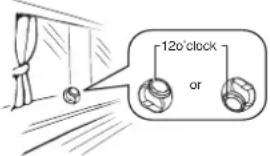
- When getting ready to receive the time calibration signal, position the watch as shown in the nearby illustration, with its 12 o'clock side facing towards a window. This watch is designed to receive a time calibration signal late at night. Because of this, you should place the watch near a window as shown in the illustration when you take it off at night. Make sure there are no metal objects nearby.
text_image
120°clock or• Make sure the watch is facing the right way.
- Proper signal reception can be difficult or even impossible under the conditions listed below.

Insideor among buildings

Insidea vehicle

Near household appliances office equipment, oramobile phone

Neara construction site, airport, or other sources of electrical noise

Near
high-tension
powerlines

Amongor
behind
mountains
• Signal reception normally is better at night than during the day.
- Time calibration signal reception takes from two to seven minutes, but in some cases it can take as long as 14 minutes. Take care that you do not perform any button operations or move the watch during this time.
- The time calibration signal the watch will attempt to pick up depends on its current Home City code setting as shown below. If you use the watch in Japan or Europe (each of which has two different transmitter locations), it will try to receive the time calibration signal from one of the transmitters in your current location. If it cannot receive the signal, it will then try to receive the time calibration signal from the other transmitter.
Home City Codes and Transmitters
| Home City Code Transmitter Frequency | ||
| LIS, LON, MAD, PAR, ROM, BER, STO, ATH, MOW ^ | Anthorn (England)Mainfl ingen (Germany) | 60.0 kHz77.5 kHz |
| HKG*, BJS*, TPE, SEL, TYO | Fukushima (Japan)Fukuoka/Saga (Japan) | 40.0 kHz60.0 kHz |
| HNL*, ANC*, YVR, LAX, YEA, DEN, MEX, YWG, CHI, MIA, YTO, NYC, YHZ, YYT | Fort Collins, Colorado(the United States) | 60.0 kHz |
* The areas covered by the HNL, ANC, MOW, HKG, and BJS city codes are quite far from the time calibration signal transmitters, and so certain conditions may cause problems with signal reception.
ApproximateReceptionRanges
U.K.andGermanSignals

text_image
Antnom 1,500kilometers Mainflingen JapanSignal 2,000miles (3,000kilometers) 600miles (1,000kilometers) FortCollins 500kilometers U.K.signal transmitter approximate receptionrange asofApril2007 Fukushima 500kilometers 1,000kilometers Fukuoka/Saga- Signal reception may not be possible at the distances noted below during certain times of the year or day. Radio interference may also cause problems with reception. Mainflingen (Germany) or Anthorn (England) transmitters: 500 kilometers (310 miles) Fort Collins (United States) transmitter: 600 miles (1,000 kilometers) Fukushima or Fukucka/Saga (Japan) transmitters: 500 kilometers (310 miles)
- In April 2007, the U.K. signal transmitter was moved from Rugby to Anthorn, which resulted in a slight shift in the approximate reception range of the signal. The shift is so slight that there is virtually no change in the ability to receive the signal.
- Even when the watch is within the reception range of a transmitter, signal reception may be impossible at times due to the effects of geographic contours, structures, weather, the season of the year, the time of day, radio interference, etc. Note that the signal becomes weaker at distances of approximately 500 kilometers from the transmitter, which means that the influence of the conditions listed above becomes even greater.
About Auto Receive
The watch receives the time calibration signal automatically up to six times a day. When any auto receive is successful, the remaining auto receive operations are not performed. The reception schedule (calibration times) depends on your currently selected Home City, and whether standard time or Daylight Saving Time is selected for your Home City.
| Your Home City | Auto Receive Start Times | ||||||
| 1 | 2 | 3 | 4 | 5 | 6 | ||
| HNL, ANC, YVR, LAX, YEA, DEN, MEX, YWG, CHI, MIA, YTO, NYC, YHZ, YYT | Standard TimeDaylightSaving Time | Midnight | 1:00 am | 2:00 am | 3:00 am | 4:00 am | 5:00 am |
| LIS, LON | Standard Time | 1:00 am | 2:00 am | 3:00 am | 4:00 am | 5:00 am | am |
| DaylightSaving Time | 2:00 am | 3:00 am | 4:00 am | 5:00 am | Midnight | 1:00 am | |
| MAD, PAR, ROM, BER, STO | Standard Time | 2:00 am | 3:00 am | 4:00 am | 5:00 am | Midnight | 1:00 am |
| DaylightSaving Time | 3:00 am | 4:00 am | 5:00 am | Midnight | 1:00 am | 2:00 am | |
| ATH | Standard Time | 3:00 am | 4:00 am | 5:00 am | Midnight | 1:00 am | 2:00 am |
| DaylightSaving Time | 4:00 am | 5:00 am | Midnight | 1:00 am | 2:00 am | 3:00 am | |
| MOW | Standard Time | 4:00 am | 5:00 am | Midnight | 1:00 am | 2:00 am | 3:00 am |
| DaylightSaving Time | 5:00 am | Midnight | 1:00 am | 2:00 am | 3:00 am | 4:00 am | |
| HKG, BJS, TPE, SEL, TYO | Standard Time | Midnight | 1:00 am | 2:00 am | 3:00 am | 4:00 am | 5:00 am |
* Next day
Note
- When a calibration time is reached, the watch will receive the calibration signal only if it is in either the Timekeeping Mode or World Time Mode. Reception is not performed if a calibration time is reached while you are configuring settings.
- Auto receive of the calibration signal is designed to be performed early in the morning, while you sleep (provided that the Timekeeping Mode time is set correctly). Before going to bed for the night, remove the watch from your wrist, and put it in a location where it can receive the signal easily.
- The watch receives the calibration signal for two to seven minutes everyday when the time in the Timekeeping Mode reaches each of the calibration times. Avoid performing any button operation within seven minutes before or after any one of the calibration times. Doing so can interfere with correct calibration.
- Remember that reception of the calibration signal depends on the current time in the Timekeeping Mode. The receive operation will be performed whenever the display shows any one of the calibration times, regardless of whether or not the displayed time actually is the correct time.
- Calibration signal reception is disabled while a countdown timer operation is in progress.
About the Receiving Indicator
The receiving indicator shows the strength of the calibration signal being received. For best reception, be sure to keep the watch in a location where signal strength is strongest.
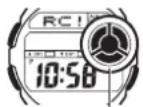
Receiving Indicator
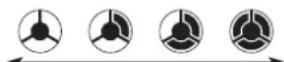
Weak (Level0)
Strong (Level3)
• Even in an area where signal strength is strong, it takes about 10 seconds for signal reception to stabilize enough for the receiving indicator to indicate signal strength.
- Use the receiving indicator as a guide for checking signal strength and for finding the best location for the watch during signal receive operations.
- Following reception of the time calibration signal and calibration of the watch's time setting, the Level 3 receiving indicator will remain on the display in all modes. The Level 3 receiving indicator will not be displayed if signal reception was unsuccessful or after you adjust the current time setting manually.
- The Level 3 receiving indicator is displayed only when the watch is able to receive both time and date data successfully. It does not appear when only time data is received.
- The Level 3 receiving indicator indicates that at least one of the auto calibration signal receive operations was successful. Note, however, that the Level 3 receiving indicator is cleared from the display when the first auto receive operation of the day is performed.
To perform manual receive
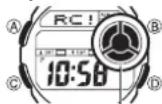
Receiving Indicator
- Place the watch on a stable surface so its top (12 o'clock side) is facing towards a window.
- In the Timekeeping Mode, hold down Ⓓ for about two seconds until RCI appears on the display.
- Time calibration signal reception takes from two to seven minutes, but in some cases it can take as long as 14 minutes. Take care that you do not perform any button operations or move the watch during this time.
• After signal reception is complete, the display of the watch changes to the Last Signal screen.
Note
• To interrupt a receive operation and return to the Timekeeping Mode, press (D).
- If the receive operation is unsuccessful, the message ERR appears on the display for about one or two minutes. After that, the watch returns to the Timekeeping Mode.
- You can also change from the Last Signal or ERR screen to the normal timekeeping screen by pressing (D).
- Calibration signal reception is disabled while a countdown timer operation is in progress.
To turn auto receive on and off
On/OffStatus

-
In the Timekeeping Mode, press Ⓓ to display the Last Signal screen.
-
Hold down (A) until the receiving indicator and current auto receive setting (ON or Q) start to flash. This is the setting screen.
- Note that the setting screen will not appear if the currently selected Home City is one that does not support time calibration reception.
-
Press Ⓓ to toggle auto receive on (ON) and off (OFF).
-
Press Ⓐ to exit the setting screen.
- For information about city codes that support signal receive, see "To specify your Home City".
To display the Last Signal screen
In the Timekeeping Mode, press Ⓓ to display the Last Signal screen (indicated by GET). The Last Signal screen shows the date and time of the last successful time calibration signal reception.
CurrentTimeandDateScreenLastSignalScreen

text_image
Month-Day Dayofweek Year MON B 6:30 20:00 10:58:50 DSTIndicator PMIndicator HomeTime (Hour:MinutesSeconds) Press.① Receivodate GET 6:30 20:00 12:03 Receive TimeSignal Reception Troubleshooting
Check the following points whenever you experience problems with calibration signal reception.
| Problem Probable Cause What you should do | ||
| Cannot perform manual receive. | The watch is not in the Timekeeping Mode.Your current Home City is not one of the following city codes:HNL, ANC, YVR, LAX, YEA, DEN, MEX,YWG, CHI, MIA, YTO, NYC, YHZ, YYT, LIS,LON, MAD, PAR, ROM, BER, STO, ATH,MOW, HKG, BJS, TPE, SEL, and TYO.The countdown timer is running. | Enter the Timekeeping Mode and try again.Select one of the cities to the left as your Home City.Stop the countdown timer and try again. |
| Auto receive is turned on, but the Level 3 receiving indicator does not appear on the display. | You changed the time setting manually.The watch was not in the Timekeeping or World Time Mode, or you performed some button operation during the auto receive operation. | Perform manual signal receive or wait until the next auto signal receive operation is performed. |
| Auto receive is turned on, but the Level 3 receiving indicator does not appear on the display. | Even if receive is successful, the Level 3 receiving indicator disappears every day when the first auto receive operation of the day is performed.Time data (hour, minutes, seconds) only was received during the last receive operation. The Level 3 receiving indicator appears only when time data and date data (year, month, day) are both received. | Perform manual signal receive or wait until the next auto signal receive operation is performed.Check to make sure the watch is in a location where it can receive the signal. |
| Time setting is incorrect following signal reception. | If the time is one hour off, the DST setting may be incorrect.The Home City code setting is not correct for the area where you are using the watch. | Change the DST setting to Auto DST.Select the correct Home City code. |
- For further information, see "Important!" and "Radio-controlled Atomic Timekeeping Precautions".
World Time

The World Time Mode shows you the current time in 48 cities (29 time zones) around the world.
- If the current time shown for a city is wrong, check your Home City time settings and make the necessary changes.
- All of the operations in this section are performed in the World Time Mode, which you enter by pressing ©.
To view the time in another city
While in the World Time Mode, press Ⓓ to scroll eastward through the city codes (time zones).
- For full information on city codes, see the "City Code Table" at the back of this manual.
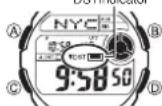
To toggle a city code time between Standard Time and Daylight Saving Time
DSTIndicator
-
In the World Time Mode, use Ⓓ to display the city code (time zone) whose Standard Time/Daylight Saving Time setting you want to change.
-
Hold down Ⓐ to toggle Daylight Saving Time (DST indicator displayed) and Standard Time (DST indicator not displayed).
- The DST indicator will appear whenever you display a city code for which Daylight Saving Time is turned on. - Note that the DST/Standard Time setting affects only the currently displayed city code. Other city codes are not affected.
Countdown Timer
TimekeepingModetime
(Hour:MinutesSeconds)

You can set the countdown timer within a range of one to 60 minutes. An alarm sounds when the countdown reaches zero.
- All of the operations in this section are performed in the Countdown Timer Mode, which you enter by pressing ©.
To set the countdown start time
- While the countdown start time is on the display in the Countdown Timer Mode, hold down Ⓐ until the current countdown start time starts to flash, which indicates the setting screen.
- If the countdown start time is not displayed, use the procedure under "To use the countdown timer" to display it.
-
While a setting is flashing, use(D) (+) and B(-) to change it.
-
Press Ⓐ to exit the setting screen.
To use the countdown timer
Press (p) while in the Countdown Timer Mode to start the countdown timer.
- When the end of the countdown is reached, the alarm sounds for 10 seconds or until you stop it by pressing any button. The countdown time is reset automatically to its starting value after the alarm stops.
- Press Ⓓ while a countdown operation is in progress to pause it. Press Ⓓ again to resume the countdown.
- To stop a countdown operation completely, first pause it (by pressing ⑤), and then press Ⓐ. This returns the countdown time to its starting value.
- Calibration signal reception is disabled while a countdown timer operation is in progress.
Stopwatch
TimekeepingModetime
(Hour:MinutesSeconds)

The stopwatch lets you measure elapsed time, split times, and two finishes.
- The display range of the stopwatch is 59 minutes, 59.99 seconds.
- The stopwatch continues to run, restarting from zero after it reaches its limit, until you stop it.
- Exiting the Stopwatch Mode while a split time is frozen on the display clears the split time and returns to elapsed time measurement.
- The stopwatch measurement operation continues even if you exit the Stopwatch Mode.
- All of the operations in this section are performed in the Stopwatch Mode, which you enter by pressing ©.
To measure times with the stopwatch
ElapsedTime

flowchart
graph LR
    A["Start"] --> B["Stop"]
    B --> C["Re-startStopClear"]
    C --> D["A"]
    E["SplitTime"] --> F["A Split (SPL displayed)"]
    F --> G["A Split release"]
    G --> H["D Stop"]
    H --> I["A Clear"]
    J["TwoFinishes"] --> K["A Split First runner finishes. Display time of first runner."]
    K --> L["A Split Second runner finishes. Display time of second runner."]
    L --> M["A Split Release"]
    M --> N["A Clear"]
Alarm
Timekeeping Mode time
(Hour : Minutes Seconds)
Alarm on indicator
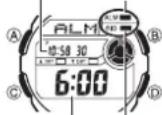
Alarm time
(Hour : Minutes)
Hourly time signal on
indicator
After you set (and turn on) the daily alarm, the alarm tone sounds when the alarm time is reached. You can also turn on an Hourly Time Signal that causes the watch to beep for about one second every hour on the hour.
- All of the operations in this section are performed in the Alarm Mode, which you enter by pressing ©.
To set the alarm time
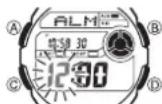
- In the Alarm Mode, hold down Ⓐ until the hour setting of the alarm time starts to flash, which indicates the setting screen.
• This automatically turns on the alarm.
2. Press© to move the flashing between the hour and minute settings.
- While a setting is flashing, use(D) (+) and (B) (-) to change it.
- When setting the alarm time using the 12-hour format, take care to set the time correctly as a.m. (no indicator) or p.m. (P indicator).
- Press Ⓐ to exit the setting screen.
Operation Guide 3139
CASIO
Alarm Operation
The alarm sounds at the preset time for about 10 seconds (in all modes), or until you stop it by pressing any button.
To test the alarm
In the Alarm Mode, hold down Ⓞ to sound the alarm.
To turn the daily alarm and the Hourly Time Signal on and off
In the Alarm Mode, press Ⓓ to cycle through the settings shown below.
AlarmOnIndicator/HourlyTimeSignalOnIndicator

- The alarm on indicator and the Hourly Time Signal on indicator are shown on the display in all modes while these functions are turned on.
Timekeeping
Use the Timekeeping Mode to set and view the current time and date.
- When setting the time, you can also configure settings for the City Code, the DST setting, the 12/24-Hour Format, Year, Month, Day, the Language setting, and the Month/Day display format.
- Pressing Ⓐ in the Timekeeping Mode will display the Last Signal screen.
CurrentTimeandDateScreenLastSignalScreen

text_image
Month-Day Day of week Year MON 6:30 2008 10:58:50 PMIndicator Home Time (Hour:Minutes:Seconds) DST Indicator D Press.① Receivedale GET# 12:03 ReceivetimeNote
- This watch is capable of displaying text for the day of the week in any one of nine different languages (English, Spanish, French, Portuguese, German, Italian, Chinese, Russian, and Japanese).
Setting the Time and Date
Make sure you select your Home City code before you change the current time and date settings. World Time Mode times are all displayed in accordance with the Timekeeping Mode settings. Because of this, World Time Mode times will not be correct if you do not select the proper Home City code before setting the time and date in the Timekeeping Mode.
To set the time and date
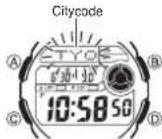
- In the Timekeeping Mode, hold down Ⓐ until the city code starts to ll ash, which indicates the setting screen.
- Press © to change the fl ashing contents in the sequence shown below to select other settings.

flowchart
graph LR
    A["City Code"] --> B["DST"]
    B --> C["12/24-Hour Format"]
    C --> D["Seconds"]
    D --> E["Hour"]
    E --> F["Minutes"]
    G["Month/Day DisplayFormat"] --> H["Language"]
    H --> I["Day"]
    I --> J["Month"]
    J --> K["Year"]
- When the setting you want to change is flashing, use Ⓑ and/or Ⓓ to change it as described below.
| Screen: To do this: Do this: | ||
| TYO | Change the city code Use | 1 (east) and 2 (west). |
| AUTO | Cycle between auto DST AUTOStandard Time (daylightSaving Time ON | Press 3. |
| 12H | Toggle between 12-hour (12H) and24-hour (24H) timekeeping | Press 4. |
| 50 | Reset the seconds to Press | 6. |
| 200810:58:00 | Change the hour, minutes, or year | Use 5 (+) and 6 (-). |
| 6-30 | Change the month or day | |
| ENG | Change the languageENG: EnglishESP Spanish FRA; FrenchFOR: Portuguese DEU; GermanITRA: Italian CHN Chinese PYC: RussianJPN: Japanese | Use 6 and 8. |
| M/D | Toggle the month/day display formatbetweenmonth/day (M/D) and day/month (D/M). | Press 9. |
- See the "City Code Table" at the back of this manual for a complete list of available city codes.
- See the "Day of the Week List" at the back of this manual for information on abbreviations used.
• Auto DST (AUTO) can be selected only while HNL, ANC, YVR, LAX, YEA, DEN, MEX, YWG, CHI, MIA, YTO, NYC, YHZ, YYT, LIS, LON, MAD, PAR, ROM, BER, STO, ATH, MOW, HKG, BJS, TPE, SEL, or TYO is selected as the Home City code. For more information, see "Daylight Saving Time (DST)" below. - Press Ⓐ to exit the setting screen.
Daylight Saving Time (DST)
Daylight Saving Time (summer time) advances the time setting by one hour from Standard Time. Remember that not all countries or even local areas use Daylight Saving Time.
The time calibration signals transmitted from Mainflingen (Germany), Anthorn (England), or Fort Collins (the United States) includes both Standard Time and DST data. When the Auto DST setting is turned on, the watch switches between Standard Time and DST (summer time) automatically in accordance with the received time signal.
The time calibration signals transmitted from Fukushima and Fukuoka/Saga (Japan) do not include summer time data.
- The default DST setting is Auto DST (AUTO) whenever you select ANC, YVR, LAX, YEA, DEN, MEX, YWG, CHI, MIA, YTO, NYC, YHZ, YYT, LIS, LON, MAD, PAR, ROM, BER, STO, ATH, MOW, HKG, BJS, TPE, SEL, or TYO as your Home City code.
- If you experience problems receiving the time calibration signal in your area, it probably is best to switch between Standard Time and Daylight Saving Time (summer time) manually.
To change the Daylight Saving Time (summer time) setting
-
In the Timekeeping Mode, hold down Ⓐ until the city code starts to flash, which indicates the setting screen.
-
Press © and the DST setting screen appears.
-
Use ① to cycle through the DST settings in the sequence shown below.

- When the setting you want is selected, press Ⓐ to exit the setting screen. • The DST indicator appears to indicate that Daylight Saving Time is turned on.
Reference
This section contains more detailed and technical information about watch operation. It also contains important precautions and notes about the various features and functions of this watch.
Auto Display
Auto Display continually changes the contents of the digital display.
To turn off Auto Display
Press any button to turn off Auto Display. This returns to the Timekeeping Mode.
To turn on Auto Display
In the Timekeeping Mode, while holding down Ⓑ, hold down Ⓓ for about two seconds until the watch beeps.
Note
- Calibration signal reception is disabled while Auto Display is being performed.
- Auto Display cannot be performed while a setting screen is on the display.
Button Operation Tone

MUTEindicator
The button operation tone sounds any time you press one of the watch's buttons. You can turn the button operation tone on or off as desired.
- Even if you turn off the button operation tone, the alarm, Hourly Time Signal, and Countdown Timer Mode alarm all operate normally.
To turn the button operation tone on and off In any mode (except when a setting screen is on the display), hold down © to toggle the button operation tone on (MUTE not displayed) and off (MUTE displayed).
- Since the Ⓐ button is also the mode change button, holding it down to turn the button operation tone on or off also causes the watch's current mode to change.
- The MUTE indicator is displayed in all modes when the button operation tone is turned off.
Auto Return Features
- If you leave the watch with the Last Signal screen in the Timekeeping Mode for one or two minutes without performing any operation, it returns to the Current Time and Date screen in the Timekeeping Mode automatically.
- If you leave the watch in the Alarm Mode for two or three minutes without performing any operation, it returns to the Timekeeping Mode automatically.
- If you leave the watch with a flashing setting on the display for two or three minutes without performing any operation, the watch exits the setting screen automatically.
Scrolling
The Ⓑ and Ⓞ buttons are used in various modes and setting screens to scroll through data. In most cases, holding down these buttons during a scroll operation scrolls through the data at high speed.
Initial Screens
When you enter the World Time or Alarm Mode, the data you were viewing when you last exited the mode appears first.
Radio-controlled Atomic Timekeeping Precautions
- The display of the watch is blank while an auto receive operation is in progress.
• Strong electrostatic charge can result in the wrong time being set.
- The time calibration signal is bounced off the ionosphere. Because of this, such factors as changes in the reflectivity of the ionosphere, as well as movement of the ionosphere to higher altitudes due to seasonal atmospheric changes or the time of day may change the reception range of the signal and make reception temporarily impossible.
- Even if the time calibration signal is received properly, certain conditions can cause the time setting to be off by up to one second.
- The current time setting in accordance with the time calibration signal takes priority over any time settings you make.
- The watch is designed to update the date and day of the week automatically for the period January 1, 2000 to December 31, 2099. Setting of the date by a time calibration signal cannot be performed starting from January 1, 2100.
- This watch can receive signals that differentiate between leap years and non-leap years.
- Though this watch is designed to receive both time data (hour, minutes, seconds) and date data (year, month, day), certain signal conditions can limit reception to time data only.
- Normally, the signal reception date shown by the Last Signal screen is the date data included in the received time calibration signal. When only time data is received, however, the Last Signal screen shows the date as kept in the Timekeeping Mode at the time of signal reception.
- If you are in an area where proper time calibration signal reception is impossible, the watch keeps time with the precision noted in "Specifications".
- If you have problems with proper time calibration signal reception or if the time setting is wrong after signal reception, check your current city code, DST (summer time), and auto receive settings. The following are the initial factory defaults for these settings.
| Setting Initial Factory Default | |
| City code | TYO (Tokyo) |
| DST (summer time) (Auto receiving) | |
| Auto receive (Auto receiving) | |
- The watch's Home City code setting will change automatically to TYO (Tokyo) whenever the battery goes dead or is replaced. TYO (Tokyo) causes the watch to receive the time calibration signals of Japan. If you are using the watch in North America or Europe, you will need to change the Home City code setting to match your location after having the watch's battery replaced.
Timekeeping
- Resetting the seconds to 00 while the current count is in the range of 30 to 59 causes the minutes to be increased by 1. In the range of 00 to 29, the seconds are reset to 00 without changing the minutes.
- The day of the week is displayed automatically in accordance with the date (year, month, and day) settings.
• The year can be set in the range of 2000 to 2099.
- The watch's built-in full automatic calendar makes allowances for different month lengths and leap years. Once you set the date, there should be no reason to change it except after you have the watch's battery replaced.
- The times for the Timekeeping Mode and all the city codes of the World Time Mode are calculated in accordance with each city's UTC offset.
- The UTC offset is a value that indicates the time difference between a reference point in Greenwich, England and the time zone where a city is located.
- The letters "UTC" is the abbreviation for "Coordinated Universal Time", which is the world-wide scientific standard of timekeeping. It is based upon carefully maintained atomic (cesium) clocks that keep time accurately to within microseconds. Leap seconds are added or subtracted as necessary to keep UTC in sync with the Earth's rotation.
12-hour/24-hour Timekeeping Formats
The 12-hour/24-hour timekeeping format you select in the Timekeeping Mode is also applied in all other modes.
- With the 12-hour format, the PM indicator (P) appears on the display for times in the range of noon to 11:59 p.m. and no indicator appears for times in the range of midnight to 11:59 a.m.
- With the 24-hour format, times are displayed in the range of 0:00 to 23:59, without any indicator.
Illumination
This watch has an EL (electro-luminescent) panel that causes the entire display to glow for easy reading in the dark. In any mode (except when a setting screen is on the display), press Ⓑ to illuminate the display for about three seconds.
Illumination Precautions
- The electro-luminescent panel that provides illumination loses power after very long use.
- Illumination may be hard to see when viewed under direct sunlight.
- The watch may emit an audible sound whenever the display is illuminated. This is due to vibration of the EL panel used for illumination, and does not indicate malfunction.
- Illumination turns off automatically whenever an alarm sounds.
- Frequent use of illumination runs down the battery.
Day of the Week List
| Sunday | Monday | Tuesday | Wednesday | Thursday | Friday | Saturday | |
| ENG | SUN MON | TUE WED THU FRI SAT | |||||
| ESP | DOM LUN | MAR HIE JUE VIE SAB | |||||
| FRA | DIM LUN | MAR HER JEU VEN SAM | |||||
| POR | DOM $EG | TER QUR QUI SEX SAB | |||||
| DEU | SON MON | DIE HIT DON FRE SAM | |||||
| ITA | DOM LUN | MAR HER GIO VEN SAB | |||||
| CHN | III | — | 三 | 三 | 四 | 五 | 六 |
| PYC | BC | NH | BT CP | CP | YT | NT | CE |
| JPN | 日 | 月 | 火 | 水 | 木 | 金 | 土 |
City Code Table
| City Code | City Differential | UTC | Other major cities in same time zone |
| PPG | Pago Pago | -11.0 | |
| HNL | Honolulu | -10.0 | Papeete |
| ANC | Anchorage | -09.0 | Nome |
| YVR | Vancouver | -08.0 | San Francisco, Las Vegas, Seattle/Tacoma, Dawson City |
| LAX | Los Angeles | ||
| YEA | Edmonton | -07.0 | El Paso |
| DEN | Denver | ||
| MEX | Mexico City | -06.0 | Houston, Dallas/Fort Worth, New Orleans |
| YWG | Winnipeg | ||
| CHI | Chicago | ||
| MIA | Miami | -05.0 | Montreal, Detroit, Boston, Panama City, Havana, Lima, Bogota |
| YTO | Toronto | ||
| NYC | New York | ||
| CCS* | Caracas | -04.0 | La Paz, Santiago, Port Of Spain |
| YHZ | Halifax | ||
| YYT | St. Johns | -03.5 | |
| RIO | Rio de Janeiro | -03.0 | Sao Paulo, Buenos Aires, Brasília, Montevideo |
| RAI | Praia | -01.0 | |
| LIS | Lisbon | +00.0 | Dublin, Casablanca, Dakar, Abidjan |
| LON | London | ||
| MAD | Madrid | +01.0 | Milan, Amsterdam, Algiers, Hamburg, Frankfurt, Vienna |
| PAR | Paris | ||
| ROM | Rome | ||
| BER | Berlin | ||
| STO | Stockholm | ||
| ATH | Athens | +02.0 | Helsinki, Istanbul, Beirut, Damascus, Cape Town |
| CAI | Cairo | ||
| JRS | Jerusalem | ||
| MOW | Moscow | +03.0 | Kuwait, Riyadh, Aden, Addis Ababa, Nairobi |
| JED | Jeddah | ||
| THR | Tohran | +03.5 | Shiroz |
| DXB | Dubai | +04.0 | Abu Dhabi, Muscat |
| KBL | Kabul | +04.5 | |
| KHI | Karachi | +05.0 | Male |
| DEL | Dolhi | +05.5 | Mumbai, Kolkata, Colombo |
| DAC | Dhaka | +06.0 | |
| RGN | Yangon | +06.5 | |
| BKK | Bangkok | +07.0 | Jakarta, Phnom Penh, Hanoi, Vientiane |
| HKG | Hong Kong | +08.0 | Singapore, Kuala Lumpur, Manila, Perth, Ulaanbaatar |
| BJS | Beijing | ||
| TPE | Taipei | ||
| SEL | Seoul | +09.0 | Pyongyang |
| TYO | Tokyo | ||
| ADL | Adeelaide | +09.5 | Darwin |
| GUM | Guam | +10.0 | Melbourne, Rabaul |
| SYD | Sydney | ||
| NOU | Noumea | +11.0 | Port Vila |
| WLG | Wellington | +12.0 | Christchurch, Nadi, Nauru Island |
• Based on data as of March 2008.
- The rules governing global times (GMT differential and UTC offset) and summer time are determined by each individual country.
* In December 2007, Venezuela changed its offset from -4.0 to -4.5. Note, however, that this watch displays an offset of -4.0 (the old offset) for the CCS (Caracas, Venezuela) city code.