Edifice EQW-A1000DB-1AER - Watch CASIO - Free user manual and instructions
Find the device manual for free Edifice EQW-A1000DB-1AER CASIO in PDF.


User questions about Edifice EQW-A1000DB-1AER CASIO
0 question about this device. Answer the ones you know or ask your own.
Ask a new question about this device
Download the instructions for your Watch in PDF format for free! Find your manual Edifice EQW-A1000DB-1AER - CASIO and take your electronic device back in hand. On this page are published all the documents necessary for the use of your device. Edifice EQW-A1000DB-1AER by CASIO.
USER MANUAL Edifice EQW-A1000DB-1AER CASIO
Operation Guide 5142
CASIO®
ENGLISH
Congratulations upon your selection of this CASIO watch.
Note that the product illustrations in this manual are intended for reference only, and so the actual product may appear somewhat different than depicted by an illustration.
This watch does not have a city code that corresponds to the UTC offset of -3.5 hours. Because of this, the radio-controlled atomic timekeeping function will not display the correct time for Newfoundland, Canada.
Note that CASIO COMPUTER CO., LTD. assumes no responsibility for any damage or loss suffered by you or any third party arising through the use of this product or its malfunction.
E-1
About This Manual

In this manual, operations are performed using the watch's crown, and the three buttons indicated by the letters Ⓐ, Ⓡ and Ⓒ.
Hands and Indicators
1 Hour Hand
2 Second Hand
3 Minute Hand
4 Mode Disk: Rotates to indicate the current mode and other information.
5 Chronograph Signal
6 Day
This User's Guide uses numbers shown above to identify watch hands and indicators.
E-2
Using the Crown
The crown of this watch has a button part and a ring part. You can use the crown's button and ring to perform a number of different crown operations.
Locking the Crown

To lock the crown, push down its ring part as far as it will go as you rotate the ring away from you until it is relatively tight. While the crown is locked correctly, the only crown operations possible are pressing the crown button and unlocking the crown.
Important!
- Push down on the ring as you slowly rotate it. You should be able to feel it screwing securely into place.
- You should normally have the crown locked during normal daily use. Leaving the crown unlocked creates the risk of unintended operations or even damage due to impact.
E-3
- Note that rotating the ring without pushing it down as far as it will go will change the settings of the watch. When looking the crown, be sure to press down firmly on the ring as you rotate it.
Unlocking the Crown

Crown ring
Rotate the ring part of the crown towards you until it loosens completely.
Pressing the Crown Button

You can press the crown button while the crown is locked.
E-4
Pulling the Crown Out

After unlocking the crown, grasp the ring and pull the crown out.
Rotating the Crown

With the crown pulled out, grasp the ring and rotate the crown towards you to move the hands of the watch. You can also perform high-speed hand movement using the operations described below. Note that there are two levels of high-speed movement (High-speed 2 is faster).
Use High-speed 2 when changing the minute hand setting in the Timekeeping Mode, Timer Mode, and Alarm Mode.
E-5
High-speed 1

With the crown pulled out, rotate it rapidly away from you two times.
High-speed 2

After starting the High-speed 1 operation, rotate the crown rapidly away from you two more times.
High-speed Cancel

Rotate the crown towards you or press any button.
E-6
Note
- You can use high-speed hand movement when confl guring lime settings in the Timekeeping Mode, Alarm Mode, or Countdown Timer Mode, or when adjusting the home positions of the hands.
Pushing the Crown In

Carefully press the button of the crown the push the crown back in.
Important!
•To prevent unintentional operation, the button press operation of the crown becomes disabled automatically for about eight seconds after you push the crown back in. It will become re-enabled after about eight seconds.
E-7
Note
- If you do not perform any operation for more than three minutes after pulling out the crown, crown operations will become disabled automatically. If this happens, push the crown back in and then pull it out again to re-enable crown operations.
Disabling Crown Button Mode Switching
You can use the following operation to disable crown button mode switching. This helps to prevent accidental mode changes while wearing the watch.
To disable crown button mode switching
Hold down the crown button for at least two seconds until the watch beeps and 1, then press Ⓐ.
At this time the Second Hand will move to the 3 o'clock position.
Release both buttons.2.
The watch will return to normal timekeeping.
- While crown button mode switching is disabled, pressing the crown button will cause the [2] Second Hand to move to the 3 o'clock position. The [2] Second Hand will resume normal timekeeping when you release the crown button.
To re-enable crown button mode switching
Hold down the crown button as you press Ⓐ.
E-8
E-9
Operation Guide 5142
CASIO®
Things to check before using the watch
- Press and hold the crown button (without unlocking the crown) for at least two seconds to enter the Timekeeping Mode, and then observe the movement of the Second Hand.

flowchart
graph TD
    A["Is the ② Second Hand moving smoothly at one-second intervals?"] --> B{NO}
    B -->|Yes| C["The watch is charged sufficiently. For details about charging, see "Charging the Watch" (page E-16)."]
    B -->|No| D["Is the ② Second Hand moving at two-second intervals or is it stopped completely?"]
    D --> E{YES}
    E -->|Yes| F["Power is low. Charge the watch by placing it in a location where it is exposed to light. For details, see "Charging the Watch" (page E-16)."]
    E -->|No| G["Go to step 2."]
E-10
- Check the Home City and the daylight saving time (DST) settings.
Use the procedure under "To configure Home City settings" (page E-45) to configure your Home City and daylight saving time settings.
Important!
Proper time calibration signal reception depends on correct Home City, time, and date settings in the Timekeeping Mode. Make sure you configure these settings correctly.
- Set the current time.
• To set the time using a time calibration signal
See "To get ready for a receive operation" (page E-30).
• To set the time manually
See "Configuring Current Time and Date Settings Manually" (page E-55).
The watch is now ready for use.
For details about the watch's radio controlled timekeeping feature, see "Radio Controlled Atomic Timekeeping" (page E-24).
E·11
Contents
E-2 About This Manual
E-3 Using the Crown
E-8 To disable crown button mode switching
E-9 To re-enable crown button mode switching
E-10 Things to check before using the watch
E-16 Charging the Watch
E-23 To recover from the sleep state
E-24 Radio Controlled Atomic Timekeeping
E-30 To get ready for a receive operation
E-33 To perform manual receive
E-35 To check the result of the latest receive operation
E-37 Mode Reference Guide
E-12
E-40 To determine the watch's current mode
E-40 To return to the Timekeeping Mode from any other mode
E-41 To select a mode
E-44 Timekeeping
E-45 Configuring Home City Settings
E-45 To configure Home City settings
E-51 To toggle the Home City time between standard time and daylight
saving time
E-53 To manually override a time calibration standard time/daylight saving time setting
E-55 Configuring Current Time and Date Settings Manually
E-55 To change the current time setting manually
E-59 To change the current date setting manually
E-63 Using the Stopwatch (Stopwatch Split Mode)
E-65 To perform elapsed time measurement
E-13
E-65 To perform an elapsed time operation
E-65 To pause at a split time
E-69 Using the Stopwatch (Stopwatch lap mode)
E-70 To enter and exit the Stopwatch Lap Mode
E-71 To perform an elapsed time operation
E-71 To perform lap time measurement
E-72 To recall lap data
E-73 Using the Countdown Timer
E-74 To specify the countdown start time
E-76 To perform a countdown timer operation
E-77 To stop the alarm
E-78 Using the Alarm
E-79 To change the alarm time setting
E-82 To check the AM/PM setting of the alarm
E-82 To turn the alarm on or off
E-14
E-82 To stop the alarm
E-83 Checking the Current Time in a Different Time Zone
E-84 To view the time in another time zone
E-86 To check whether a time zone is AM or PM
E-86 To specify standard time or daylight saving time (DST) for a city
E-88 Adjusting Home Positions
E-89 To adjust home positions
E-93 Troubleshooting
E-105 Specifications
E-15
Charging the Watch
The face of the watch is a solar panel that generates power from light. The generated power charges a built-in rechargeable battery, which powers watch operations. The watch charges whenever it is exposed to light.
Charging Guide

Whenever you are not wearing the watch, be sure to leave it in a location where it is exposed to light. ■Best charging
performance is achieved by exposing the watch to light that is as strong as possible.

When wearing the watch, makes sure that its face is not blocked from light by the sleeve of your clothing.
•The watch may enter a sleep state (page E-22) if its face is blocked by your sleeve oven only partially.
Warning!
Leaving the watch in bright light for charging can cause it to become quite hot. Take care when handling the watch to avoid burn injury. The watch can become particularly hot when exposed to the following conditions for long periods.
On the dashboard of a car parked in direct sunlight
Too close to an incandescent lamp
Under direct sunlight •
Important!
Keep the watch in an area normally exposed to bright light when storing it for long periods. This helps to ensure that power does not run down.
Storing the watch for long periods in an area where there is no light or wearing it in such a way that it is blocked from exposure to light can cause power to run down. Make sure that the watch is exposed to bright light whenever possible.
E-16
E-17
Power Levels
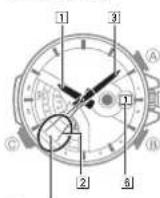
You can get an idea of the watch's power level by observing the movement of the 2 Second Hand in the Timekeeping Mode.
If the 2 Second Hand is moving normally at one-second intervals, power is at Level 1.
4 If the 2 Second Hand is moving at two-second intervals, power is at Level 2, which is quite low. Expose the watch to light as soon as possible so it can charge.
Moves at two-second
intervals
E-18
| Level Hand Movement Function Status | ||
| 1 Normal. All functions enabled | ||
| 2 | 2 Second Hand moves at two-second intervals6 Day changes to 1 (home position); | Baccar, time calibration signal reception, and countdown timer operation disabled |
| 3 | 2 Second Hand stopped,11 Hour Hand and 12 Minute Hand stopped at 12 o'clock. | All functions disabled |
- When power drops to Level 3, all functions will be disabled but the watch will continue to keep time internally for about one week. If you recharge the battery sufficiently during this period, the analog hands will move automatically to the correct setting and regular timekeeping will resume. After one week, all settings (including timekeeping) will be cleared. Recharging the battery will reset all settings to their initial factory defaults.
E-19
Operation Guide 5142
CASIO®
- A short while after exposing the watch to light after its battery charge has run down will cause the 23 Second Hand to move counterclockwise until it stops at second 57 on the face. This indicates that charging has started. See page E-21 for information about required charging times.
Power Recovery Mode
The watch is designed to go into a power recovery mode that stops hand operation temporarily whenever power suddenly drops below a certain level due to overuse of the alarm tone over a short period. Note that all operations are disabled while the watch is in the power recovery mode.
The hands will move to the correct positions and the watch will resume normal operation after power recovers (in about 15 minutes). Putting the watch in a location where it is exposed to light will help power to recover sooner.
Charging Times
| Exposure Level (Brightness) | Daily Operation *1 | Level Change *2 | ||
| Level 3 | Level 2 | Level 1 | ||
| → | → | |||
| Outdoor sunlight (50,000 lux) | 8 minutes | 2 hours | 23 hours | |
| Window sunlight (10,000 lux) | 30 minutes | 6 hours | 87 hours | |
| Window sunlight on cloudy day (5,000 lux) | 48 minutes | 9 hours | 140 hours | |
| Indoor fluorescent lighting (500 lux) | 8 hours | 94 hours | ||
* 1 Approximate exposure each day to generate power for normal daily operation.
* 2 Approximate exposure to take power up one level.
•The above times are for reference only. Actual times depend on lighting conditions.
- For details about the operating time and daily operating conditions, see the "Power Supply" section of the Specific cations (page E-108).
E-20
E·21
Power Saving
Power Saving enters a sleep state automatically whenever the watch is left for a certain period in an area where it is dark. The table below shows how watch functions are affected by Power Saving.
There actually are two sleep state levels: "second hand sleep" and "function sleep".
| Elapsed Time In Dark Operation | |
| 60 to 70 minutes (second hand sleep) | Second Hand only stopped, all other functions enabled |
| 6 or 7 days (function sleep) | All functions, including analog timekeeping, disabledWorld Time Mode time stopped at the point the Timekeeping Mode time reached 0.00 |
- The watch will not enter a sleep state between 6:00 AM and 9:59 PM. If the watch is already in a sleep state when 6:00 AM arrives, however, it will remain in the sleep state.
The watch will not enter a sleep state while it is in the Stopwatch Split Mode, Stopwatch Lap Mode, or Countdown Timer Mode.
E-22
To recover from the sleep state
Move the watch to a well-lit area, press any button, or perform a crown operation (push in, pull out, rotate).
E-23
Radio Controlled Atomic Timekeeping
This watch receives a time calibration signal and updates its time setting accordingly. However, when using the watch outside of areas covered by time calibration signals, you will have to adjust the settings manually as required. See "Confi guring Current Time and Date Settings Manually" (page E-55) for more information.
This section explains how the watch updates its time settings when the city code selected as the Home City is in Japan, North America, Europe, or China, and is one that supports time calibration signal reception.
| If your Home City Code setting is this: | The watch can receive the signal from the transmitter located here: |
| LON (LONDON), PAR (PARIS), ATH (ATHENS) | Anthom (England), Mainflingen (Germany) |
| HKG (HONG KONG) Shangqiu City (China) | |
| TYO (TOKYO) | Fukushima (Japan), Fukuoka/Saga (Japan) |
| FNI (HONOLULU), ANC (ANCHORAGE), LAX (LOS ANGELES), DEN (DENVER), CHI (CHICAGO), NYC (NEW YORK) | Fort Collins, Colorado (United States) |
E-24
E-25
Important!
- The areas covered by HNL (HONOLULU) and ANC (ANCHORAGE) are quite far from the calibration signal transmitters, so certain conditions may cause reception problems.
- WhenHNL (HONOLULU) or HKG (HONG KONG) is selected as the Home City, only the time and date are adjusted according to the time calibration signal. You need to switch manually between standard time and daylight saving time (DST) if required. See "To toggle the Home City time between standard time and daylight saving time" (page E 51) for information about how to do this.
Approximate Reception Ranges
UK and German Signals North American Signal
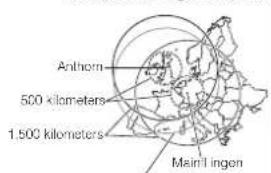
text_image
Anthorn 500 kilometers 1.500 kilometers Main MillenThe Anthem signal is receivable within this area.
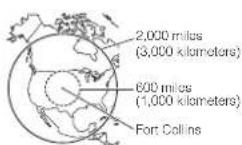
E-26
E-27

text_image
Japanese Signals Chinese Signal Fukushima 500 kilometers Fukushima/Sega 1,000 kilometers Changchun500 kilometers Beijing Shanghai Shanghai Chengdu Hong Kong 1,500 kilometersE-28
- Even when the watch is within range of a transmitter, signal reception may be impossible due to the effects of geographic contours, structures, weather, the time of year, the time of day, radic interference, etc. The signal becomes weaker at distances of approximately 500 kilometers, which means that the influence of the conditions listed above becomes even greater.
- Signal reception may not be possible at the distances noted below during certain times of the year or day. Radio interference may also cause problems with reception.
Mainflingen (Germany) or Anthorn (England) transmitters: 500 kilometers (310 miles)
Fort Collins (United States) transmitter: 600 miles (1,000 kilometers) - Fukushima or Fukuoka/Saga (Japan) transmitters: 500 kilometers (310 miles) Shangqiu (China) transmitter: 500 kilometers (310 miles) -
- As of December 2010, China does not use Daylight Saving Time (DST). If China does go to the Daylight Saving Time system in the future, some functions of this watch may no longer operate correctly.
- Using this watch in a country covered by a time calibration signal that is different from the countries it supports may result in incorrect time indication due to local application of daylight saving time (summer time), etc.
E-29
Operation Guide 5142
CASIO®
To get ready for a receive operation
-
Confirm that the watch is in the Timekeeping Mode. If it isn't, push in and hold the crown for at least two seconds to enter the Timekeeping Mode.
-
Place the watch in a location where signal reception is good.
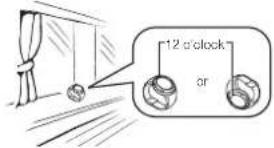
text_image
12 o'clock orPosition the watch as shown in the nearby illustration, with 12 o'clock pointed towards a window. Make sure there are no metal objects nearby.
- Signal reception normally is better at night.
The receive operation takes from two to seven minutes, but in some cases it can take as long as 14 minutes. Take care that you do not perform any button operation or move the watch during this time.
- Signal reception may be difficult or even impossible under the conditions described below.

Inside or among buildings

Inside a vehicle

Near household appliances offi ca equipment, or a mobile phone

Near a construction site, airport, or other sources of electrical noise

Near high-tension power lines

Among or behind mountains
E-30
E-31
3. What you should do next depends on whether you are using Auto Receive or Manual Receive.
*Auto Receive: Leave the watch over night in the location you selected in step 2. See "Auto Receive" on page E-32 for details.
- Manual Receive: Perform the operation under "To perform manual receive" on page E-33.
Auto Receive
- With Auto Receive, the watch performs the receive operation each day automatically up to six times (up to five times for the Chinese calibration signal) between the hours of midnight and 5 a.m. (according to the Timekeeping Mode time). When any receive operation is successful, none of the other receive operations for that day are performed.
- When a calibration time is reached, the watch will perform the receive operation only if it is in the Timekeeping Mode. The receive operation is not performed if a calibration time is reached while you are continuing settings.
E-32
To perform manual receive
- In the Timekeeping Mode (page E-44), keep Ⓑ depressed (for about two seconds) as the 2 Second Hand goes through the following sequence.
- Moves to Y (or YES for some models) or N (NO) to indicate the last signal reception result, then to R (READY).
- The 2 Second Hand indicates the operations the watch is currently performing.

| When the [2] Second Hand is pointed here: | It means this: |
| R (READY) | Welch is selling up for reception. |
| W (WORK) | Reception is in progress. |
| Y (YES) | Reception was completed successfully. |
| N (NC) | Reception failed for some reason. |
- If signal reception is unstable, the ② Second Hand may move between W (WORK) and R (READY). - When the receive operation is successful, the watch adjusts the time setting accordingly, and then resumes normal timekeeping. It does not adjust the setting if the operation failed.
E-34
E-33
Note
To interrupt a receive operation and return to the Timekeeping Mode, press any button.
To check the result of the latest receive operation
In the Timekeeping Mode, press ⑧. ④The② Second Hand will move to Y (YES) for about one second if the latest receive operation was successful, or N (NO) if it was not. After that, regular timekeeping will resume. ⑤You can return to the Timekeeping Mode manually by pressing ⑥ while the ② Second Hand is pointing to Y (YES) or N (NO).
Note
The 2 Second Hand will indicate N (NO) if you have adjusted the time or date setting manually since the latest receive operation.
E-35
Radio-controlled Atomic Timekeeping Precautions
• Strong electrostatic charge can result in the wrong lime selling.
- Even if a receive operation is successful, certain conditions can cause the time setting to be off by up to one second.
•The watch is designed to update the date and day of the week automatically for the period January 1, 2000 to December 31, 2009. Updating of the date by signal reception will no longer be performed starting from January 1, 2100.
- If you are in an area where signal reception is not possible, the watch keeps time with the precision noted in "Specili cations" (page E-105).
- The receive operation is disabled under any of the following conditions. - White power is at Level 2 or lower (page E-18)
- While the watch is in the power recovery mode (page E-20)
- While the watch is in the function sleep state (power saving, page E-22)
- While a countdown time operation is in progress (page E-73)
- A receive operation is cancelled if an alarm sounds while it is being performed.
E-36
Mode Reference Guide
Your watch has six "modes". The mode you should select depends on what you want to do.
| To do this: Enter this mode: See: | ||
| View the current time in your Home City and in one of 29 other cities around the globeView the current date in the Home City •Confi gure Home City and daylight saving time (DST) settingsPerform a time calibration receive operation •Confi gure time and date settings manually • | ▪Timekeeping Mode E-44 | |
| Measure elapsed time and split times | Stopwatch Split Mode (spill measurement) | E-63 |
| Measure elapsed time and lap times, and recall lap times | Stopwatch Lap Mode (lap measurement) | C 69 |
| Use the countdown timer Countdown Timer Mode E-73 |
E-37
| To do this: Enter this mode: See: | ||
| Set an alarm time /Alarm Mode E-78 | ||
| View the current time in one of 29 cities around the globe | World Time Mode E-89 |
Mode Disk Pointers
The 4 Mode Disk uses three different pointers to indicate a variety of different information: a mode pointer, a split pointer, and a lap pointer.
Mode Pointer
The mode pointer is in a fixed position. Whenever you enter a mode, the Mode Disk will rotate until the current mode indicator (AL, TR, ST, TM, or WT) is aligned with the mode pointer. The mode pointer is also used for indication of standard time (STD or STD-AT) and daylight saving time (DST or DST-AT).
Split Pointer
The split pointer is marked on the Mode Disk. Whenever you enter the Stopwatch Split Mode (page E-63), it indicates the current status of the stopwatch operation. While a normal stopwatch elapsed time measurement operation is in progress, the split pointer will point to RUN. When a split time is indicated by the hands (which are temporarily stopped), the split pointer will point to SPL. Stopping the elapsed time measurement operation will cause the split pointer to move to STP (stop).
Lap Pointer
The lap pointer is marked on the 4 Mode Disk. Whenever you press to perform lap time measurement in the Stopwatch Mode, the 4 Mode Disk will rotate so the lap pointer points at the current lap number (1 through 5). If the current lap number is greater than 5, the lap pointer will point at ▶.
E-38
E-39
Operation Guide 5142
CASIO®
Selecting a Mode
With this watch, everything starts from the Timekeeping Mode.
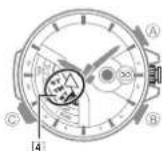
To determine the watch's current mode
Check what the mode pointer is indicating on the 4 Mode Disk as shown under "To select a mode" (page E-41).
To return to the Timekeeping Mode from any other mode
Press and hold the crown button (without unlocking the crown) for at least two seconds.
To select a mode
Each press of the crown button cycles through the modes in the sequence shown below. The 4 Mode Disk rotates so the selected mode is indicated by the mode pointer.
Movement of the 4 Mode Disk may cause the watch hands to move slightly. This is due to fine adjustment of hand positions and does not indicate malfunction.
E-40
E41
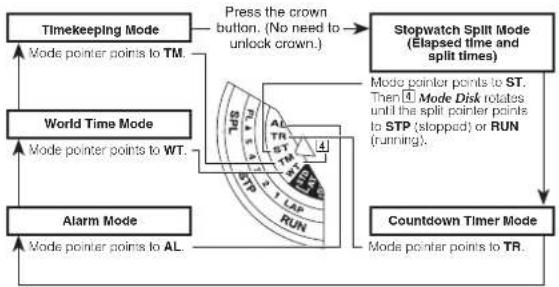
flowchart
graph TD
    A["Alarm Mode"] --> B["World Time Mode"]
    B --> C["Timekeeping Mode"]
    C --> D["Stopwatch Split Mode"]
    D --> E["Countdown Timer Mode"]
    E --> F["Mode pointer points to AL."]
    F --> G["Mode pointer points to WT."]
    G --> H["Mode pointer points to TM."]
    H --> I["Press the crown button. (No need to unlock crown.)"]
    I --> J["Stopwatch Split Mode (Elapsed time and split times)"]
    J --> K["Mode pointer points to ST. Then 4 Mode Disk rotates until the split pointer points to STP (slotted) or RUN (running)."]
    K --> L["Stopwatch Split Mode (Elapsed time and split times)"]
    L --> M["Stopwatch Split Mode (Elapsed time and split times)"]
    M --> N["Stopwatch Split Mode (Elapsed time and split times)"]
E-42
From any other mode, hold down © for about two seconds to enter the Stopwatch LAP Mode. The 4Mode Disk will rotate until the lap pointer points at the current lap number (1 through 5, or ▶).
To return to the Timekeeping Mode, hold down © or the crown button for about two seconds.
E-43
Timekeeping
Use the Timekeeping Mode to set and view the current time and date. To enter the Timekeeping Mode from another mode, press and hold the crown button (without unlocking the crown) for at least two seconds.

Hands and Indicators
1 Hour Hand
2 Second Hand
③ Minute Hand
4. Mrda Disk: TM aligned with more popular
6 Day
Configuring Home City Settings
There are two Home City settings: actually selecting the Home City and selecting either standard time or daylight saving time (DST).
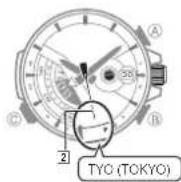
To configure Home City settings
Note
- This watch does not have a city code that corresponds to Newfoundland.
Press and hold the crown button (without unlocking 1. the crown) for at least two seconds.
•This will enter the Timekeeping Mode (page E-42).
Unlock the crown and then pull it out.2.
•This will cause the 2 Second Hand to move to the
city code of the currently selected Home City
- This indicates the city code setting mode.
E-45
E-44

If you do not perform any operation with the crown - for about three minutes after pulling it out, crown operations will become disabled and the watch hands will no longer move when you rotate the crown. If this happens, push the crown back in and then pull it out again;
- For details about city codes, see the "City Code Table" at the back of this manual.
Rotate the crown to move the ② Second Hand to the city code you want to select as your Home City.
Each time you change to a different city code, the 1 Hour Hand, 3 Minute Hand and 6 Day move to the current time and date for that city code. Also, the 4 Mode Disk rotates until the mode pointer is pointing at STD. STD-AT, DST, or DST-AT (see step 4 of this procedure below).
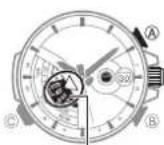
4
Press 4. Ⓐ to toggle the currently selected city code between standard time and daylight saving time.
In the city code setting mode, the4 Mode Disk indicates STD (standard time) or DST (daylight saving time).
- No AT batting (STD-AT or DST-AT) will be indicated only if the currently selected city code is one that supports time calibration signal reception
- WhileAT is selected, the watch will switch between STD and DST automatically in accordance with time calibration signal data.
- The initial default setting is STD-AT when any one of the following city codes is selected as the Home City code: LON (LONDON), PAR (PARIS), ATH (ATHENS), NYC (NEW YORK), CHI (CHICAGO), DEN (DENVER), LAX (LOS ANGELES), ANC (ANCHORAGE), or TYO (TOKYO).
For details about the Daylight Saving Time setting, see "Daylight Saving Time (DST)" (page E-48).
E-46
E-47
After the settings are the way you want, push the crown back in to return to the 5. Timekeeping Mode. Next, lock the crown.
- Rotating the ring without pushing it down as far as it will go will change the settings of the watch. When locking the crown, be sure to press down firmly on the ring as you rotate it.
Daylight Saving Time (DST)
Daylight Saving Time (summer time) advances the time setting by one hour from Standard Time. Remember that not all countries or even local areas use Daylight Saving Time.
The time calibration signals transmitted from Mainfl ingen (Germany), Anthom (England), or Fort Collins (the United States) include both Standard Time and DST data.
- Note that an AT setting (STD-AT or DST-AT) will be indicated only if the currently selected only code is one that supports time calibration signal reception. While AT is selected, the watch will switch between STD and DST automatically in accordance with time calibration signal data.
| STD-AT | When a transmitted daylight saving time signal is received, switches to daylight saving time (DST-AT) automatically. |
| DST-AT | When a transmitted standard time signal is received, switches to standard time (STD-AT) automatically. |
| STD | Even if a transmitted daylight saving time signal is received, standard time (STD) setting does not change. |
| DST | Even if a transmitted standard time signal is received, daylight saving time (DST) setting is not changed. |
- The initial default setting is STD-AT when any one of the following city codes is selected as the Home City code: LON (LONDON), PAR (PARIS), ATH (ATHENS), NYC (NEW YORK), CHI (CHICAGO), DEN (DENVER), LAX (LOS ANGELES), ANC (ANCHORAGE), or TYO (TOKYO).
For information about manually overriding the time calibration STD/DST setting, see "To manually override a time calibration standard time/daylight saving time selling" (page E-53).
E-48
E-49
Operation Guide 5142
CASIO®
- Note that you cannot switch between STD (standard lime) and DST (daylight saying lime) while UTC* is selected as your Home City.
* Coordinated Universal Time, the world-wide scientific standard of timekeeping. The reference point for UTC is Greenwich, England. • If you experience problems receiving the time calibration signal in your area, it probably is best to switch between Standard Time and Daylight Saving Time (summer time) manually (page E-53).
STD/DST Switching
STD/DST switching can be performed either automatically or manually, depending on time calibration signal reception conditions in your area, the use of daylight saving time in your area, etc.
- To configure the watch to switch between STD and DST automatically in accordance with a time calibration signal, see "To toggle the Home City time between standard time and daylight saving time" (page E-51). - To override time calibration data and use a fixed STD/DST setting, see "To manually override a time calibration standard time/daylight saving time setting" (page E-53).
To toggle the Home City time between standard time and daylight saving time

Perform steps 1 through 3 under "To configure Home 1. City settings" on page E-45.
•Each time you select a city code, the 1 Hour Hand and 3 Minute Hand move to the current time for that city code.
Press 2. Ⓐ to toggle the time for the currently selected city code between standard time and daylight saving time.
- The mode pointer will point to either STD (standard time) or DST (daylight saving time) on the 4 Mode Disk, which indicates the current daylight saving time setting.
While auto setting (AT) is enabled, the Mode Disk pointer will point to either STD-AT or DST-AT to indicate the current STD/DST setting.
E-50
E·51
After the settings are the way you want, push the crown back in to return to the 3. Timekeeping Mode. Next, lock the crown.
- Rotating the ring without pushing it down as far as it will go will change the settings of the watch. When locking the crown, be sure to press down firmly on the ring as you rotate it.
Note
- Selecting some city codes makes it possible for the watch to receive the time calibration signal for the corresponding area automatically. See page E-24 for details.
E-52
To manually override a time calibration standard time/daylight saving time setting
STD by manual setting
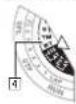
- Perform steps 1 and 2 under "To configure Home City settings" on page E-45. Each time you select a city code, the ① Hour Hand, ③ Minute Hand, and ④ Mode Disk move to the current time for that city code.
Hold down 2. Ⓐ for about three seconds until the mode pointer will point to DST.
- This is the STD/DST manual/auto switching mode - Performing the above step selects manual DST switching.
- Note that you cannot switch between manual and auto switching while the currently selected city code of the Home City is one that does not support time calibration signal reception.
- Each press of Ⓐ toggles between STD and DST as shown in the illustration to the left.
E-53
- Push the crown back in to return to the Timekeeping Mode. Next, lock the crown. • Rotating the ring without pushing it down as far as it will go will change the settings of the watch without locking the crown. Be sure to press down firmly on the ring as you rotate it.
Configuring Current Time and Date Settings Manually
You can confi gure current time and date settings manually when the watch is unable to receive a time calibration signal.

To change the current time setting manually
In the Timekeeping Mode, unlock the crown and then 1. pull it out.
This will cause the Second Hand to move to the city code of the currently selected Home City.
•At this time, the mode pointer will point to the current daylight saving time setting (STD, STD-AT, DST or DST-AT).
- If you do not perform any operation with the crown for about three minutes after pulling it out, crown operations will become disabled and the hand will not move if you relate the crown. If this happens, push the crown back in and then pull it out again.
E-54
E-55
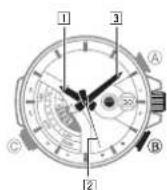
- Change the Home City and daylight saving time (DST) settings, if you want.
For details about these settings, see steps 3 and 4 under "To configure Home City settings" (page E-45).
Hold down 3. (B) for about two seconds. This will enter the time setting mode.
The[2] Second Hand will move to A (AM) or P (PM). In the following steps, each press of ⑧ cycles between settings as shown below.

flowchart
graph TD
    A["Home city,DST"] --> B["Hour,Minute"]
    B --> C["Hour"]
    C --> D["Day"]
    B --> E["Year"]
    B --> F["Month"]
    E --> G["Return"]
    F --> H["Return"]
E-56
Rotate the crown to adjust the time (hour and minute) setting.4.
- Rotating the crown two full consecutive turns away from you will cause the 3 Minute Hand to start moving clockwise. Rotating the crown another two full consecutive turns away from you will cause the 3 Minute Hand to start moving at high speed. To stop hand movement, press any button or rotate the crown one full turn towards you.
Press 5. Ⓑ to switch to the hour setting mode.
The 1 Hour Hand will move slightly left and right to indicate the 1 Hour Hand selling mode.
41 you want to change the hour selling without changing the minute selling, skip step 4 above.
- Rotate the crown to adjust the hour setting only.
Rotating the crown two full consecutive turns away from you will cause the 1 Hour Hand to start moving clockwise.
- When adjusting the setting, check to make sure that the 2 Second Hand correctly indicates A (AM) or P (PM).
E-57
- If you want to change the date setting at this time, press Ⓐ and perform the procedure starting from step 3 under "To change the current date selling manually" (page E-S9)
After the settings are the way you want, push the crown back in to return to the 7. Timekeeping Mode. Next, lock the crown.
- This causes timekeeping to resume with the [2] Second Hand starting from 12 o'clock. - Rotating the ring without pushing it down as far as it will go will change the settings of the watch. When locking the crown, be sure to press down firmly on the ring as you rotate it.
To change the current date setting manually

In the Timekeeping Mode, unlock the crown and then 1. pull it out.
•This will cause the 2 Second Hand to move to the city code of the currently selected Home City.
Hold down 2. Ⓑ for about two seconds.
•The2 Second Hand will move to A (AM) or P (PM).
Use 3. Ⓑ to enter the time and date setting mode (page E-56).
The 6 Day will move slightly left and right to indicate the setting mode.
Rotate the crown to adjust the date setting.4.
E-58
E-59
Operation Guide 5142
CASIO®
text_image
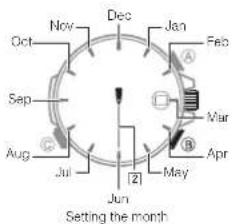
Dec Jan Feb Oct Sep Aug Jul Jun May Apr Mar [2] Setting the month-
After the ⑥ Day stops moving, press ⑧. This will enter the month setting mode. The ② Second Hand will move to the currently selected month. This is the month setting mode.
-
Rotate the crown to adjust the month setting.
-
Press Ⓑ. This will enter the year setting mode.
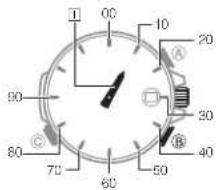
The 1 Hour Hand will move to the number that represents the tens digit of the year and the 3 Minute Hand will move to the number that represents the ones digit. The 2 Second Hand will move to 12 o'clock and stop there.

Setting the year (ones digit)
text_image
00 10 20 90 30 80 70 60 50 40Setting the year (tens digit)
E-60
E·61
- Rotate the crown to adjust the year setting.
- If you want to change the time setting at this time, press (B) and then perform the procedure starting from step 4 under "To change the current time setting manually" (page E-55).
- After the settings are the way you want, push the crown back in to return to the Timekeeping Mode. Next, lock the crown.
This causes timekeeping to resume with the ② Second Hand starting from 12 o'clock.
Rotating the ring without pushing it down as far as it will go will change the settings of the watch. When locking the crown, be sure to press down firmly on the ring as you rotate it.
Note
- The watch's built-in full automatic calendar makes allowances for different month lengths and leap years. Once you set the date, there should be no reason to change it except after you have the watch's rechargeable battery replaced or after power drops to Level 3.
E-62
Using the Stopwatch (Stopwatch Split Mode)
The stopwatch measures elapsed time and split times.
What is a split time?
A split time is the time elapsed from the start point of a race up to any point along the way in the race.
Example: Split times at the 10km point and at other points along the way in a marathon
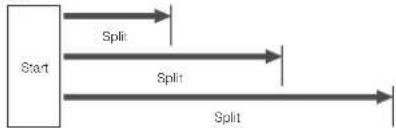
flowchart
graph TD
    A["Start"] --> B["Split"]
    A --> C["Split"]
    A --> D["Split"]
E-63
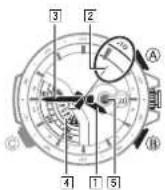
Hands and Indicators
① Hour Hand: Indicates the stopwatch minute count (1 revolution = 60 minutes).
② Second Hand: Indicates the 1/20 (0.05)-second count during slopwatch operation.
3 Minute Hand: Indicates the stopwatch seconds count.
4 Mode Disk: Mode pointer points to ST. Then disk rotates until the split pointer points to STP (stopped). RUN (running), or SPL (split).
5 Chronograph Signal
To perform elapsed time measurement
Press the crown button to navigate to the Stopwatch Split Mode.1.
- The third pointer will point to [4] Mode Disk. Then the disk will rotate until the split pointer points to STP (stopped). RUN (running), or SPL (split).
Now you can perform either of following stopwatch operations.2.
To perform an elapsed time operation

To pause at a split time

E-65
E-64
The5 Chronograph Signal changes in accordance the operation being performed: SIP (slopped). RUN (running), or SPL (split).
STP (stopped) RUN (running) SPL (split)
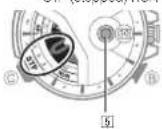

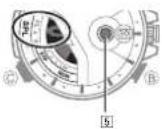
Note
The Stopwatch Split Mode can indicate elapsed time up to 59 minutes, 59.95 seconds.
The watch's bezel is marked in 1/20 (0.05)-second units.
E-66
- An ongoing stopwatch operation will continue even if you pull out the crown to perform some selling operation.
- In the following cases, the hands of the watch are moving, so pressing Ⓑ will not perform a reset operation.
While the hands are moving to elapsed timekeeping after you enter the Stopwatch Split Mode While the watch is changing dates at midnight. - While the watch is changing dates at midnight
- Once started, stopwatch timing continues until you press Ⓐ to stop it, even if you exit the Stopwatch Split Mode to another mode and even if timing reaches the stopwatch limit defined above.
- You can press to start an elapsed time operation immediately after entering the Stopwatch Split Mode, even if the watch's hands are still moving to their initial Stopwatch Split Mode positions. Note, however, that if the stopwatch was not reset after the last elapsed time operation, timing will restart from where it was last stopped, and not from 12 p'clock.
E-67
The ② Second Hand indicates the 1/20 (0.05)-second count for the first 30 seconds of a slopwatch elapsed time operation. After that, the hand stops at 12 o'clock, but 1/20 (0.05)-second timing continues internally after the first 30 seconds. The ② Second Hand will jump to the current value whenever Ⓐ (Stop) is prossod.
Using the Stopwatch (Stopwatch lap mode)
You can use the Stopwatch Lap Mode to measure elapsed time and lap times, and to recall lap times. Up to fi ve lap times can be stored in memory. There is also memory to record the fastest lap time. Though no more lap times are stored after fi ve times are in memory, the fastest lap time continues to be updated as required. Starting a new elapsed time operation clears all of the memories (including fastest lap time).
What is a lap time?
A lap time is the time elapsed over a specific segment of a race.
Example: Car race on an oval track
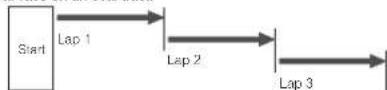
E-68
E-69
Operation Guide 5142
CASIO®

Hands and Indicators
① Hour Hand: Indicates the stopwatch minute count (1 revolution = 60 minutes).
② Second Hand: Indicates the 1/20 (0.05)-second count during stopwatch operation.
3 Minute Hand: Indicates the stopwatch seconds count.
4 Mode Disk: Mode disk rotates until the lap pointer points to a lap number.
To enter and exit the Stopwatch Lap Mode
From any other mode, hold down © for about two seconds to enter the Stopwatch Lap Mode.
The 4 Mode Disk will rotate until the lap pointer points to the current lap number (1 through 5, or ▶)
To return to the Timekeeping Mode, hold down © or the crown button for about two seconds.
To perform an elapsed time operation

To perform lap time measurement

With each lap time measurement, the 4 Mode Disk will move so the lap pointer points to the next sequential lap number. Performing another lap time measurement after LAP 5 is indicated will cause ▶ (too many laps) to be indicated.
E-70
E·71
To recall lap data
- While in the Stopwatch Lap Mode, unlock the crown and then pull it out to enter the Data Recall Mode. •The 4] Mode Disk will move until the lap pointer points to LAP 1, and the hands of the watch will move until they indicate the time recorded for LAP 1.
2. Rotate the crown to select other laps.
- Rotate the crown away from you to select laps sequentially in ascending sequence (2, 3, 4, 5), and towards you to select laps in descending sequence. Rotating the crown until FL (Fastest) is selected will show the time of the fastest lap.
3. To return to the Stopwatch Lap Mode, push the crown back in. Next, lock the crown.
- Rotating the ring without pushing it down as far as it will go will change the settings of the watch. When locking the crown, be sure to press down firmly on the ring as you rotate it.
Using the Countdown Timer
The countdown timer can be configured within a range of one minute to 60 minutes. An alarm sounds for about 10 seconds when the timer reaches zero, and a count up elapsed time operation starts.
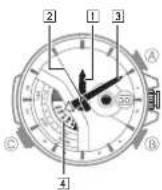
Hands and Indicators
1 Hour Hand: Indicates the elapsed time hour.
2 Second Hand: Indicates countdown or elapsed seconds.
3 Minute Hand: Indicates countdown or elapsed minutes.
4 Mode Disk: TR aligned with mode pointer.
- All hands move counterclockwise during a countdown. They automatically switch to clockwise movement when elapsed time measurement begins after the countdown is complete.
E-73
E-72
To specify the countdown start time
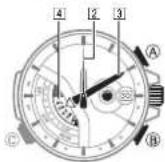
- Press the crown button to navigate to the Countdown Timer Mode.
The Rodelpointer will point to Disk.
4 Mode
- Unlock the crown and then pull it out. This enters the countdown start time setting mode.
If you do not perform any operation with the crown for about three minutes after pulling it out, crown operations will become disabled and the watch hands will no longer move when you rotate the crown. If this happens, push the crown back in and then pull it out again.
- Rotate the crown to set the countdown start time.
Rotating the crown two full consecutive turns away from you will cause the 3 Minute Hand to start moving clockwise. Rotating the crown another two full consecutive turns away from you will cause the 9 Minute Hand to start moving at high speed. To stop hand movement, press any bullion or rotate the crown one full turn towards you. The maximum countdown start time setting is 60 minutes. To set a countdown start time of 60 minutes, move the 14 Minute Hand to 12 o'clock.
- Push the crown back in to exit the countdown start time setting mode. Next, lock the crown.
- Rotating the ring without pushing it down as far as it will go will change the settings of the watch. When locking the crown, be sure to press down firmly on the ring as you rotate it.
E-74
E-75
To perform a countdown timer operation

Start Stop Reset
- Pressing @ while the Countdown Timer is stopped resets the displayed time to the start time specified by you.
- Pressing Ⓐ will not perform a reset while the watch is performing any of the following operations.
- While the hands are moving to the current timer time after you enter the Countdown Timer Mode.
- While the displayed date is changing at midnight.
Before starting a countdown timer operation, check to make sure that the countdown timer is not already operating (indicated by a moving 2 Second Hand). If it is, press A to stop it and then B to reset to the countdown start time. All hands move counterclockwise during a countdown. They automatically switch to clockwise movement when elapsed time measurement begins after the countdown is complete. An elapsed time measurement operation will continue until you press A to stop it.
E-76
- Pulling out the crown to perform a crown operation while a Countdown Timer countdown or elapsed time measurement is in progress will automatically stop the ongoing Countdown Timer operation and reset to the countdown start time.
Elapsed Time Measurement Following Countdown
When the countdown reaches zero, the watch starts to count up elapsed time in one-second increments, for up to 24 hours. When the watch switches to elapsed time measurement, the hands automatically switch to clockwise movement.
o@camphuan and restart an elapsed time operation by pressing
apsed time operation is paused, pressing Ⓗ resels to the countdown start time.
To stop the alarm
Press any button or press the crown button.
Note
- Pressing any button or pressing the crown button while the alarm is sounding simply stops the alarm sound. It does not stop the elapsed time operation that started when the end of the countdown was reached. To stop the elapsed time operation, press Ⓐ.
E-77
Using the Alarm
When the alarm is turned on, an alarm will sound for about 10 seconds each day when the time in the Timekeeping Mode reaches the preset alarm time. This is true even if the watch is not in the Timekeeping Mode.

Hands and Indicators
① Hour Hand: Indicates the currently set alarm time hour.
② Second Hand: Indicates the current alarm ON/OFF selling.
Pressing uses the 2 Second Hand to move to the current A (AM) or P (PM) setting.
3 Minute Hand: Indicates the currently set alarm time minute.
4 Mode Disk: AL aligned with mode pointer.
To change the alarm time setting
Press the crown button to navigate to the Alarm Mode.1. The ALMode Nepaler will point to 4 Mode Disk.
Unlock the crown and then pull it out to enter the alarm setting mode.2. The 2| Second Hand will move to either A (AM) or P (PM).
- If you do not perform any operation with the crown for about three minutes after pulling it out, crown operations will become disabled and the watch hands will no longer move when you rotate the crown. If this happens, push the crown back in and then pull it out again.
- You can loggle between the hour and minute setting mode, and the hour only setting mode by pressing Ⓗ.

E-78
E-79
- Rotate the crown to set the alarm time.
•Rotating the crown two full consecutive turns away from you will cause the [3] Minute Hand to start moving clockwise. Rotating the crown another two full consecutive turns away from you will cause the [3] Minute Hand to start moving at high speed. To stop hand movement, press any button or rotate the crown one full turn towards you.
Press 4. Ⓑ to switch to the hour setting mode.
•The 1 Hour Hand will move slightly left and right to indicate the 1 Hour Hand setting mode.
- If you want to change the hour setting without changing the minute setting, skip step 4 above.
- When adjusting the alarm time setting, check to make sure that the ② Second Hand correctly indicates A (AM) or P (PM).
- Rotate the crown to adjust the hour setting only.
- Rotating the crown two full consecutive turns away from you will cause the 1 Hour Hand to start moving clockwise.
- After the setting is the way you want, push the crown back in to exit the alarm setting mode. Next, lock the crown.
The alarm always works based on the time kept in the Timekeeping Mode.
- The watch will return to the Timekeeping Mode automatically if you do not perform any operation in the Alarm Mode for about two or three minutes.
- Rotating the ring without pushing it down as far as it will go will change the settings of the watch. When locking the crown, be sure to press down if rmly on the ring as you rotate it.
E-80
E·81
To check the AM/PM setting of the alarm
In the Alarm Mode, press Ⓑ and the 2 Second Hand will move to either A (AM) or P (PM).
•The 2 Second Hand will return to the current ON/OFF setting after about one second.
To turn the alarm on or off
In the Alarm Mode, press Ⓐ to toggle the alarm between on and off. The ② Second Hand will indicate the current ON/OFF setting.
To stop the alarm
Press any button or press the crown button.
Checking the Current Time in a Different Time Zone
You can use World Time to view the current time in one of 29 time zones around the globe. The currently selected city is called the "World Time City".
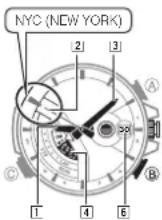
Hands and Indicators
① Hour Hand: Indicates the hour of the current time in the World Time City.
② Second Hand: Indicates the currently selected World Time City.
- Pressing Ⓑ causes the 2 Second Hand to move to A (AM) or P (PM).
3 Minute Hand
4 Mode Disk: WT aligned with mode pointer. 6 Day
E-83
E-82
To view the time in another time zone
Unlock the crown and then pull it out.1.
•The 2 Second Hand points to the currently selected World Time city code.
- The mode pointer will point to either STD (standard time) or DST (daylight saving time) on the 4 Mode Disk, which indicates the current daylight saving time setting.
- If you do not perform any operation with the crown for about three minutes after pulling it out, crown operations will become disabled and the watch hands will no longer move when you rotate the crown. If this happens, push the crown back in and then pull it out again.
Rotate the crown to move the 2. Second Hand to the city code you want to select as the World Time City.
•Each time you select a city code, the ① Hour Hand, ③ Minute Hand, and ⑥ Day move to the current time and date for that city code. For details about city codes, see the "City Code Table" at the back of this manual.
- If you think that the time indicated for the selected World Time City is not correct, it probably means that there is something wrong with your Home City settings. Use the procedure under "To configure Home City settings" (page E-45) to correct the Home City settings.
- After selecting the city you want, push the crown back in to return to the World Time Mode. Next, lock the crown.
Rotating the ring without pushing it down as far as it will go will change the settings of the watch. When locking the crown, be sure to press down firmly on the ring as you rotate it.
E-85
E-84
To check whether a time zone is AM or PM
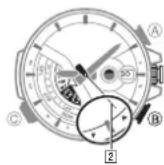
In the World Time Mode, press Ⓗ and the ② Second Hand will move to either A (AM) or P (PM).
The 2 Second Hand will return to the city code you selected after about one second.
To specify standard time or daylight saving time (DST) for a city
In the World Time Mode, unlock the crown and then pull 1. it out to enter the city setting mode.
Rotate the crown to move the 2. Second Hand to the city code whose setting you want to change. See "To view the time in another time zone" (page E-84) for more information.
E-86
Press 3. Ⓐ to toggle the time for the currently selected city code between STD (standard time) and DST (daylight saving time).

text_image
Diagram showing a mechanical watch with labeled parts and directional arrows indicating motion or movement.The auto mode (STD-AT, DST-AT) settings cannot be selected in the World Time Mode.
Push the crown back in to return to the World Time 4. Mode. Next, lock the crown.
•Note that you cannot switch between STD (standard time)/DST (daylight saving time) while UTC is selected as the World Time City.
•Note that the STD (standard time)/DST (daylight saving time) setting affects only the currently selected time zone. Other time zones are not affected.
- Rotating the ring without pushing it down as far as it will go will change the settings of the watch. When locking the crown, be sure to press down firmly on the ring as you rotate it.
E-87
Adjusting Home Positions
Strong magnetism or impact can cause the hands and/or day of the watch to be off, even if the watch is able to perform the signal receive operation. If this happens, perform the applicable home position adjustment procedures in this section.
- Hand home position adjustment is not required if the time and day settings are correct.
Note
•Any time after you enter the home position adjustment mode in step 2 of the following procedure, you can return to the Timekeeping Mode by pushing the crown back in. In either case, any adjustments you made before the watch returned to the Timekeeping Mode will be applied.
- If you do not perform any operation with the crown for about three minutes after pulling it out, crown operations will become disabled and hands will not move if you rotate the crown. If this happens, push the crown back in and then pull it out again.
To adjust home positions
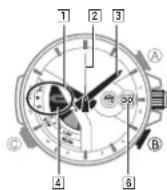
Press and hold the crown button (without unlocking 1. the crown) for at least two seconds to enter the Timekeeping Mode.
Unlock the crown and then pull it out.2. This will cause the ^24 Second Hand to move to the city code of the currently selected Home City.
Hold down 3. (B) for about seven seconds. The Second Hand will stop at 12 o'clock. The 4 Mode Disk should rotate until the lap pointer is pointed at ▶.
This indicates the home position adjustment mode. First is 4 Mode Disk home position adjustment.
- If the lap pointer is pointed at ▶, it is in the correct home position. If it isn't, rotate the crown to move the lap pointer to ▶.
E-88
E-89
• Each press of Ⓑ while the watch is in the home position adjustment mode will cycle through the adjustment settings as shown below.

flowchart
graph LR
    A["4"] Mode Disk --> B["1"] Hour --> C["3"] Minute --> D["2"]
    E["6"] Day --> F["2 Second"]
    B --> G["8"]
    C --> H["8"]
    D --> I["8"]
- Be sure to rotate the crown away from you only when adjusting home positions. You cannot adjust home positions by rotating the crown towards you. - Rotating the crown two full consecutive turns away from you will cause the hand you are adjusting to start moving clockwise. To stop hand movement, press any button or rotate the crown one full turn towards you.

After confi rming that the 4 Mode Disk is at the proper home position, press Ⓑ. This will advance to [1] Hour Hand home position adjustment.
- If the 1 Hour Hand moves to 12 o'clock, it is in the correct home position. If it doesn't, rotate the crown to move it to 12 o'clock.
After confi rming that the 15 Hour Hand is at the proper home position, press Ⓑ. This will advance to 3 Minute Hand home position adjustment.
- If the 3 Minute Hand moves to 12 o'clock, it is in the correct home position. If it doesn't, rotate the crown to move it to 12 o'clock.
After confirming that the 6 Minute Hand is at the proper home position, press (B). This will advance to 2 Second Hand home position adjustment.
If the 2 Second Hand moves to 12 o'clock, it is in the correct home position. If it doesn't, rotate the crown to move it to 12 o'clock.
E-90
E·91
After confi rming that the 7 Second Hand is at the proper home position, press 8 This will advance to day home position adjustment.
•The 6] Day is in the correct home position if it shows 1. If it doesn't, rotate the crown to change the day to 1.
Push the crown back in to return to the Timekeeping Mode. Next, lock the crown.8. •This will cause the hands to return to their normal positions and resume regular timekeeping. Wait until everything stops moving before performing any other operation.
- Rotating the ring without pushing it down as far as it will go will change the settings of the watch. When locking the crown, be sure to press down firmly on the ring as you rotate it.
E-92
E-93
■ The Second Hand is moving at two-second intervals.
All the watch's hands are stopped at 12 o'clock and none of the buttons work. Power may be low. Expose the watch to light until the [2] Second Hand starts moving normally, at one-second intervals (page E-18).
■ The hands of the watch suddenly start moving at high speed, even when I do not perform any operation.
This could be due to any one of the following causes. In all cases, the hand movement does not indicate malfunction, and should stop shortly.
The watch is recovering from a sleep state (page E-23).
- The time setting is being adjusted following a successful auto time calibration signal receive operation (page E-24).
- The watch is returning to the Timekeeping Mode automatically from the Alarm Mode (page E-78).
E-94
Troubleshooting
Hand Movement and Position
■ I lost track of what mode the watch is in.
Refer to "To select a mode" (page E-41). To return directly to the Timekeeping Mode from any other mode, press and hold the crown button (without unlocking the crown) for at least two seconds.
■ When pressing the crown button to enter the Stopwatch Split Mode from the Timekeeping Mode, the crown needs to be held down longer than when switching to another mode.
The watch is designed this way in order to ensure that the Timekeeping Mode is not exited unintentionally due to accidental pressing of the crown button. When entering the Stopwatch Split Mode from the Timekeeping Mode, press the crown button and hold it down until the mode changes.
■ Hands suddenly stop moving. Button operation also is disabled.
The watch may be in the power recovery mode (page E-20). Do not perform any operation until the hands return to their normal positions (in about 15 minutes). The hands should return to their correct positions when normal operation returns. To help power recover, leave the watch in a location where it is exposed to light.
■ The current time setting is off by hours.
Your Home City setting may be wrong. Check your Home City setting and correct it, if necessary (page E-45).
■ The current time setting is off by one hour.
If you are using the watch in an area where time calibration signal reception is possible, see "To configure Home City settings" (page E-45).
- The watch's STD-AT (standard time)/DST-AT (daylight saving time) selling can be configured for auto switching in accordance with a time calibration signal. You also can manually override the STD/DST setting configured by the calibration signal. If you use manual override to select a setting, timekeeping will be off by one hour following an STD/DST switching data in your area, even if the watch is receiving a time calibration signal. Select the correct STD (standard time)/DST (daylight saving time) setting to suit your current location (page E-48). If you are using in the watch in an area where time calibration signal reception is not possible, you may need to change your Home City's STD (standard time)/DST (daylight saving time) setting manually. Use the procedure under "To toggle the Home City time between standard time and daylight saving time" (page E-51) to change the STD/DST selling.
■ The hands and/or day indications are off.
This could indicate that the watch has been exposed to magnetism or strong impact, which has caused problems with proper hand and day alignment. Adjust the watch's hand and day home position alignment (page E-88).
E-96
E-95
Crown Operations
The watch seems to change modes on its own.
The watch will change modes whenever you press the button part of the crown. You can disable mode switching when the crown button is pressed, if you want. See "To disable crown button mode switching" (page E-8).
The watch will not change modes.
Crown button mode switching may be disabled. Re-enable crown button mode switching. See iTo is enable crown button mode switching" (page 5.2)
Nothing happens when I rotate the crown while it is pulled out.
You did not perform any operation for more than three minutes while the crown was pulled out, causing operation to become disabled automatically. Push the crown in and pull it back out again to re-enable operation. See "Using the Crown" (page E-3).
E-97
Nothing happens when I press the crown button.
To prevent unintentional operation, the button press operation of the crown is disabled automatically for about eight seconds after you push the crown back in. It will become re-enabled after about eight seconds. See "Pushing the Crown In" (page E-7).
Charging
■ The watch does not resume operation after I expose it to light.
This can happen after the power level drops to Level 3 (page E-18). Continue exposing the watch to light until the 2 Second Hand starts moving normally (at one-second intervals).
The ■ Second Hand starts to move at one-second intervals, but then suddenly returns to moving at two-second intervals.
The watch probably is not sufficiently charged yet. Continue keeping it exposed to light.
E-98
Time Calibration Signal
The information in this section applies only when LON (LONDON), PAR (PARIS), ATH (ATHENS), HNL (HONOLULU), ANC (ANCHORAGE), LAX (LOS ANGELES), DEN (DENVER), CHI (CHICAGO), NYC (NEW YORK), HKG (HONG KONG), or TYO (TOKYO) is selected as the Home City. You need to adjust the current time manually when any other city is selected as the Home City.
E-99
Operation Guide 5142
CASIO®
■ The ② Second Hand Indicates N (NO) when I check the result of the latest receive operation.
| Possible Cause | Remedy | Page |
| You are wearing or moving the watch, or performing a button operation during the signal receive operation.The watch is in an area with poor reception conditions. | Keep the watch in an area where reception conditions are good while the signal receive operation is being performed. | E-30 |
| You are in an area where signal reception is not possible for some reason. | See "Approximate Reception Ranges" | F-27 |
| The calibration signal is not being transmitted for some reason. | Check the website of the organization that maintains the time calibration signal in your area for information about its down limits.Try again later. | — |
■ The current time setting changes after I set it manually.
You may have the watch configured for Auto Receive of the time calibration signal (page E-32), which will cause the time to be adjusted automatically according to your currently selected Home City. If this results in the wrong time setting, check your Home City setting and correct it, if necessary (page E-45).
E-100
E·101
■ Auto Receive Is not performed or I cannot perform Manual Receive.
| Possible Cause | Remedy | Page |
| The watch is not in the Timkeeping Mode. | Auto Receive will not be performed if the watch is not in the Timkeeping Mode.Push in and hold the crown for at least two seconds to enter the Timkeeping Mode. | E-40 |
| Your Home City setting is wrong | Check your Home City setting and correct it, if necessary. | E-11E-15 |
| A countdown timer operation is in progress. | Both Auto Receives and Manual Receives are impossible while a counton is in progress. In the Counton Timer Mode, stop the timer operation and then return to the Timkeeping Mode. | E-73 |
| There is not enough power for signal reception. | Expose the watch to light to charge it. E-16 |
■ Signal reception is being performed successfully, but the time and/or day is wrong.
| Possible Cause | Remedy | Page |
| Your Home City setting is wrong. | Check your Home City setting and correct it. I necessary. | E-11E-45 |
| The watch may have been exposed to magnetism or strong impact, which has caused problems with proper hand and day alignment. | Adjust the watch's hand and day home positions. | E-88 |
E-102
E-103
Alarm
■ The alarm does not sound.
- Power may be low. Expose the watch to light until the ② Second Hand starts moving normally, at one-second intervals (page E-18).
• The crown may be pulled out. Push the crown back in:
World Time
■ The Indicated World Time is wrong.
There is a problem with your Home City settings.
Check your Home City settings.
See "To configure Home City settings" (page E-45).
■ The indicated World Time is one hour off.
The daylight saving time (summer time) setting for the World Time city is wrong. See "To specify standard time or daylight saving time (DST) for a city" (page E-86).
Specifications
Accuracy at normal temperature: ± 15 seconds a month (with no signal calibration)
Timekeeping: Hour, minutes (hand moves every 10 seconds), seconds, day
Calendar system: Full Auto-calendar pre-programmed from the year 2000 to 2099
Other: Home City code (can be assigned one of 29 city codes and Coordinated
Universal Time); Daylight Saving Time (summer time) / Standard Time
Time Calibration Signal Reception: Auto receive up to six times a day (5 times a
day for the Chinese calibration signal; Remaining auto receives
cancelled as soon as one is successful); Manual receive
Receivable Time Calibration Signals: Mainflingen, Germany (Call Sign: DCF77, Frequency: 77.5 kHz); Anthom, England (Call Sign: MSF, Frequency: 60.0 kHz); Fukushima, Japan (Call Sign: JYY, Frequency: 40.0 kHz); Fukuoka/Saga, Japan (Call Sign: JYY, Frequency: 60.0 kHz); Fort Collins, Colorado, the United States (Call Sign: WWVB, Frequency: 60.0 kHz); Shangqiu City, Henan Province, China (Call Sign: BPC, Frequency: 68.5 kHz)
E-104
E-105
World Time: 29 cities (29 time zones) and Coordinated Universal Time
Other: Daylight Saving Time (summer time) / Standard Time
Stopwatch: Measuring capacity: 59'59.95"
Measuring unit: 1/20 (0.05) seconds
Measuring mode: Elapsed time
Lap time (Memories: 5, Fastest lap memory)
Countdown Timer:
Measuring unit: 1 second
Input range: 1 to 60 minutes (1-minute increments)
Other: Elapsed time
Alarm: Daily alarm
Other: Power Saving
Power Supply: Solar panel and one rechargeable battery
Approximate battery operating time: 5 months (no exposure to light after a full charge; 6 hours of stopped second hand, one signal reception of approximately 4 minutes per day)
E-106
City Code Table


L-1
City Code Table
| City Code City | UTC Offset/GMT Differential | ||
| PAGO PAGO | {PPG} | Pago Pago -11 | |
| HONOLULU | {HNL} | Honolulu | -10 |
| ANCHORAGE | {ANC} | Anchorage | -9 |
| LOS ANGELES | {LAX} | Los Angeles -8 | |
| DENVER | {DEN} | Denver -7 | |
| CHICAGO | {CHI) Chicago | -6 | |
| NEW YORK | {NYC} | New York | -5 |
| SANTIAGO | {SCL} | Santiago | -4 |
| RIO | Rio De Janeiro | -3 | |
| F. DE NORONHA | {FEN} | Fernando de Noronha | -2 |
| PRAIA | {RAI} | Praia | -1 |
| UTC | 0 | ||
| LONDON (LON) | London | ||
| PARIS | {PAR} | Paris | +1 |
| ATHENS | {ATH} | Athens | +2 |
L-2
| City Code City | UTC Offset/GMT Differential | |
| JEDDAH (JED) Jeddah +3 | ||
| TEHRAN (THR) Tehran +3.5 | ||
| DUBAI (DXB) Dubai +4 | ||
| KABUL (KBL) Kabul +4.5 | ||
| KARACHI (KHI) Karachi +5 | ||
| DELHI (DEL) Delhi | +5.5 | |
| DHAKA (DAC) Dhaka | +6 | |
| YANGON (RGN) | Yangon | +6.5 |
| BANGKOK (BKK) | Bangkok | +7 |
| HONG KONG (HKG) | Hong Kong | +8 |
| TOKYO (TYO) | Tokyo | +9 |
| ADELAIDE (ADL) | Adelaide | +9.5 |
| SYDNEY (SYD) | Sydney | +10 |
| NOUMEA (NOU) | Noumea | +11 |
| WELLINGTON (WLG) | Wellington | +12 |
L-3
Operation Guide 5142
CASIO®
- Based on data as of December 2010. - The rules governing global times (UTC offset and GMT differential) and summer time are determined by each individual country.