2011 - Pressure washer Topcraft - Free user manual and instructions
Find the device manual for free 2011 Topcraft in PDF.


User questions about 2011 Topcraft
0 question about this device. Answer the ones you know or ask your own.
Ask a new question about this device
Download the instructions for your Pressure washer in PDF format for free! Find your manual 2011 - Topcraft and take your electronic device back in hand. On this page are published all the documents necessary for the use of your device. 2011 by Topcraft.
USER MANUAL 2011 Topcraft
For your safety, read carefully and keep in this vehicle.
FOREWORD
NISSAN NAVIGATION SYSTEM HELP-DESK CONTACT INFORMATION
For assistance or inquiries about the NISSAN Navigation System, or to order updated map data, contact the NISSAN NAVIGATION SYSTEM HELPDESK at:
- ADDRESS: P.O. Box 1588, Orem, UT 84059-992
• E-MAIL: Nissan-Navi-Info@navteq.com - WEB SITE: www Numigation.com or www.nissan.ca
- PHONE: 1-888-661-9995
• HOURS: 6:00 AM to 5:00 PM (Pacifi c
NISSAN CONSUMER AFFAIRS DEPARTMENT
For assistance or inquiries about the NISSAN warranty, service or general questions, contact the NISSAN Consumer Affairs Department at:
For U.S. customers
Nissan North America, Inc.
Consumer Affairs Department
P.O. Box 685003
Franklin, TN 37068-5003
1-800-NISSAN-1
(1-800-647-7261)
Time)
For Canadian customers
Nissan Canada Inc.
5290 Orbitor Drive
Mississauga, Ontario L4W 4Z5
1-800-387-0122
Thank you for purchasing a NISSAN vehicle
This user's manual is for the navigation system only. This manual contains operating instructions for the NISSAN Navigation System offered in your NISSAN vehicle.
Please read this manual carefully to ensure safe operation of the navigation system.
- Because of possible specification changes and optional equipment, sections of this manual may not apply to your vehicle.
- All information, specifications and illustrations in this manual are those in effect at the time of printing. NISSAN reserves the right to change specifications or design at any time without notice.
- Do not remove this manual from the vehicle when selling this vehicle. The next user of this navigation system may need the manual.
Tableof Contents
Introduction
Gettingstarted
Mapsettings
Navigation
Othersettings
Generalsysteminformation
Troubleshootingguide
Index
1 Introduction
Howtousethismanual....1 - 2
Forsafeoperation....1 - 2
Referencesymbols....1 - 2
Safetyinformation....1 - 2
Laserproduct....1-3
HOWTOUSETHISMANUALSAFETYINFORMATION
Thismanualusesspecialwords, symbolsand iconsthatareorganizedbyfunction.
Pleaserefertothefollowingitemstounderstand howtousethismanualproperly.
FORSAFEOPERATION

WARNING
Indicate the presence of a hazard that could cause death or serious personal injury. To avoid or reduce risk, the procedures must be followed precisely.

CAUTION
Indicate the presence of a hazard that could cause minor or moderate personal injury or damage to your vehicle. To avoid or reduce the risk, the procedures must be followed carefully.

NOTE:
Indicatesitemsthathelpyouunderstand andmaximizetheperformanceofyour vehicle.lfignored,theymayleadtoamal-functionorpoorperformance.
REFERENCESYMBOLS

INFO:
Indicates information that is necessary for efficient use of your vehicle or accessories.

Referencepage:
Indicatesthetitleandpagethatyoushouldrefer to.
MAP:
Thisisanexampleofhowabuttononthecontrol panelwillbeshown.
"Route":
Thisisanexampleofakey/itemdisplayedonthe screen.
This system is primarily designed to help you reach your destination, and it also performs other functions as outlined in this manual. However, you, the driver, must us the systems safely and properly. Information concerning road conditions, traffic signs and the availability of services may not always be up-to-date. The system is not a substitute for safe, proper and legal driving.
Beforeusingthenavigationsystem, pleaseread thefollowingsafetyinformation.Alwaysusethe systemasoutlinedinthismanual.

WARNING
•Tooperatethenavigationsystem, firstparkthevehicleinasafelocationandsettheparkingbrake.Operatingthesystemwhiledrivingcan distractthedriverandmayresultina seriousaccident.
- Donotrelyonrouteguidancealone. Alwaysbesurethatalldrivingmaneuversarelegalandsafeinorderto avoidaccidents.
- Donotdisassembleormodifythis system.Ifyoudo,itmayresultin accidents,fireorelectricalshock.
LASERPRODUCT
- If you notice any foreign objects in the system hardware, spill liquid on the system or notices smokeora smell coming from, stop using the system immediately and contact a NISSAN dealer. Ignorings such conditions may lead to accidents, fire or electrical shock.

CAUTION
- Donotusethissystemifyounotice anymalfunctionssuchasafrozen screenorthelackofsound.Continueduseofthesystemmayresultin accidents,fireorelectricalshock.
- Somestates/provincesmayhave lawslimitingtheuseofvideo screenswhiledriving. Usethissystemonlywhereitislegaltodoso.
- Extremetemperatureconditions[below-4°F(-20°C)andabove158°F (70°C)]couldaffecttheperformance ofthesystem.

NOTE:
Donotkeepthenavigationsystemrunning withtheenginestopped.Doingsomay dischargethevehiclebattery.Whenyou usethenavigationsystem,alwayskeep theenginerunning.

WARNING
- Donotdisassembleormodifythis system.Therearenouserservice-ablepartsinthisnavigationsystem.
- If maintenance, adjustments and operations other than those specified in this manual are attempted, injury duetolaserradiation and exposure could occur.
RequiredXMRadio ^® andNavTraffic ^®
monthlysubscriptions soldseparately.XM
NavTraffic®only
availableinselect
markets.Formore
information,see
www.xmradio.com/
navtraffic.

MEMO
1-4 Introduction
2Gettingstarted
Controlbuttonsandfunctions. 2 - 2
Controlpanel. 2 - 2
Steeringwheelswitch.... 2 - 3
Basicoperation....2-4
Functionsdisabledwhiledriving....2-4
Touchscreenoperation....2-5
Menuscreenoperation....2-6
Howtoinputcharacters....2 - 7
CONTROLBUTTONSANDFUNCTIONS

text_image
1 2 3 4 NAV TRAF MAP SETUP BACK 5 6 7 8 9 10LNV0915
CONTROLPANEL
1 🙏/2 button:
Presstochangethedisplaybrightnessbetweendayandnightmodes. While the modeisbeingdisplayed, the brightness can be adjusted using the scroll knob.
Pressandholdtoturnthedisplayoff.Press againtoturnthedisplayon.

"DISPLAYSETTINGS" (page5-3)
2 Touchscreendisplay
3 MAPbutton:
Presstodisplaythecurrentlocationmap screen.
4 NAVbutton:
PresstoaccessthefunctionsoftheNavigationsystem.
5 TRAFbutton:
Presstoviewtrafficinformationonthe route.
6 SETUPbutton:
Presstoaccessthesystemsettings.
7 BACKbutton:
Presstoreturntothepreviousscreen.
8 Scrollknob:
Turntoscrollthroughtheitemsinalist. Presstoselectamenuitem.Whenthe screenisnotdisplayalistormenu,the knobisusedtocontroltheaudiosystem.
9 SD-cardlocation:
AnSD-cardwithMAPdatacanbeinserted here.
10 Volumecomcontrolknob/ON-OFFbutton:
Rotateclockwisetoincreasethevolumeor counterclockwisetolowerthevolume. Presstoturntheaudiosystemonoroff.
2-2 Gettingstarted

text_image
Diagram showing a device with icons for display, function buttons, and audio interface elements connected to a button labeled '1'WNV0996

flowchart
graph TD
    A["Input"] --> B["Processing"]
    B --> C["Output"]
    D["1"] --> E["Feedback Loop"]
Sentra
WNV0997
Versa
STEERINGWHEELSWITCH
Thevolumecontrolbuttonsonthesteering wheel 1 canbeusedtocontrolthevolume levelofthevoiceguidancegivenbytheNavigationSystem.Pressthe+buttontoincreasethe volumeorthe=buttontodecreasethevolume whilethevoiceguidanceisspeaking.Ifthevolumecontrolbuttonsarepressedatanyother time,onlythevolumeoftheaudiosystemis adjusted.
Theothersteeringwheelswitchesareusedfor the audiosystemandBluetooth®Hands-Free Phonesystemandarenotusedtocontrolthe NavigationSystem.
Formoreinformationabouttheaudiosystemand Bluetooth®Hands-FreePhonesystem,seethe vehicle'sOwner'sManual.
BASICOPERATION
FUNCTIONSDISABLEDWHILE DRIVING
flowchart
graph TD
    A["Street Destination BY: 2:19"] --> B["Place: Whereby Restaurants"]
    B --> C["Search All Places Arounds"]
    C --> D["Previous Destination: Cherry Hill ST"]
    D --> E["Street WEST 1433"]

    subgraph A
        A1["Street Address"] --> A2["Address Book"]
        A3["Places"] --> A4["My Places"]
        A5["Map"] --> A6["Intersection"]
    end

    subgraph B
        B1["Place: Whereby Restaurants"] --> B2["Nearby Gas Stations"]
        B3["Search All Places Arounds"]
        B4["Lurent Location"] --> B5["A City Name"]
    end

    subgraph C
        C1["Place: Whereby Restaurants"] --> C2["Nearby Gas Stations"]
        C3["Search All Places Arounds"]
    end

    subgraph D
        D1["Street WEST 1433"] --> D2["Place: Cherry Hill ST"]
        D3["DARDANELLA, LIVOMIA, MI"] --> D4["ST VINCENT'S HOSP AND HEDm"]
        D5["IMPLIAL IRUNAN HLST AURANT"] --> D6["Previous Destination: Cherry Hill ST"]
        D7["DARDANELLA, LIVOMIA, MI"] --> D8["ST VINCENT'S HOSP AND HEDm"]
        D9["IMPLIAL IRUNAN HLST AURANT"] --> D10["Previous Destination: Cherry Hill ST"]
        D11["DARDANELLA, LIVOMIA, MI"] --> D12["ST VINCENT'S HOSP AND HEDm"]
        D13["IMPLIAL IRUNAN HLST AURANT"] --> D14["Previous Destination: Cherry Hill ST"]
        D15["DARDANELLA, LIVOMIA, MI"] --> D16["ST VINCENT'S HOSP AND HEDm"]
        D17["DARDANELLA, LIVOMIA, MI"] --> D18["Previous Destination: Cherry Hill ST"]
        D19["DARDANELLA, LIVOMIA, MI"] --> D20["ST VINCENT'S HOSP AND HEDm"]
        D21["DARDANELLA, LIVOMIA, MI"] --> D22["Previous Destination: Cherry Hill ST"]
        D23["DARDANELLA, LIVOMIA, MI"] --> D24["ST VINCENT'S HOSP AND HEDm"]
        D25["DARDANELLA, LIVOMIA, MI"] --> D26["Previous Destination: Cherry Hill ST"]
        D27["DARDANELLA, LIVOMIA, MI"] --> D28["ST VINCENT'S HOSP AND HEDm"]
        D29["DARDANELLA, LIVOMIA, MI"] --> D30["Previous Destination: Cherry Hill ST"]
        D31["DARDANELLA, LIVOMIA, MI"] --> D32["ST VINCENT'S HOSP AND HEDm"]
        D33["DARDANELLA, LIVOMIA, MI"] --> D34["Previous Destination: Cherry Hill ST"]
        D35["DARDANELLA, LIVOMIA, MI"] --> D36["ST VINCENT'S HOSP AND HEDm"]
        D37["DARDANELLA, LIVOMIA, MI"] --> D38["Previous Destination: Cherry Hill ST"]
        D39["DARDANELLA, LIVOMIA, MI"] --> D40["ST VINCENT'S HOSP AND HEDm"]
        D41["DARDANELLA, LIVOMIA, MI"] --> D42["Previous Destination: Cherry Hill ST"]
        D43["DARDANELLA, LIVOMIA, MI"] --> D44["ST VINCENT'S HOSP AND HEDm"]
        D45["DARDANELLA, LIVOMIA, MI"] --> D46["Previous Destination: Cherry Hill ST"]
        D47["DARDANELLA, LIVOMIA, MI"] --> D48["ST VINCENT'S HOSP AND HEDm"]
        D49["DARDANELLA, LIVOMIA, MI"] --> D50["Previous Destination: Cherry Hill ST"]
        D51["DARDANELLA, LIVOMIA, MI"] --> D52["ST VINCENT'S HOSP AND HEDm"]
        D53["DARDANELLA, LIVOMIA, MI"] --> D54["Previous Destination: Cherry Hill ST"]
    end

    subgraph Legend
        LegendA["Location Code"]
        LegendB["Location Code"]
    end
LNV2000
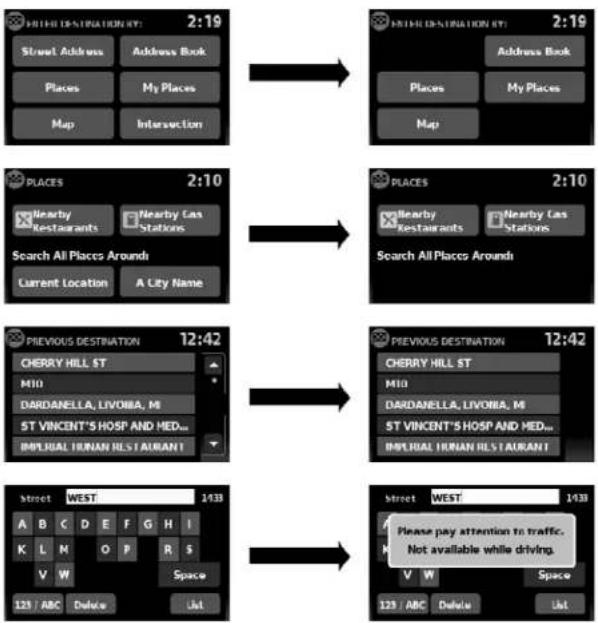
Toensuresafedriving, somefunctions cannot be operated or havelimited operation when the vehicle drivingspeed is above 5 mph (8 km/h).
Theon-screentextandkeysfortheserestricted functionswillbe"grayed-out"ormutedandcan-
2-4Gettingstarted
notbeselectedwhiledriving.Insomecases,a screenmessagewillappearindicatingare-strictedfunction.
Restrictedfunctionswhiledrivinginclude:
- Character(letterandnumber)inputscreen duringdestinationentry(streetaddress, places, intersection)
- Placesearchbynameandcityname
- Scrollingandviewingofcertainnavigation lists
- Adding/editingaddressbookentries
- Adding/editinghomelocation
- Storingcurrentposition,information,destinations
These functions will become available again when the vehicles speed is reduced to 5 mph (8 km/h).
Destinationfunctionsavailablewhiledrivinginclude:
Home
●Previousdestinations
●Nearbyplaces
-Addressbook
•Myplaces
●Mapinput
Examplesoftouchscreenoperation
Selectinganitem:
When any itemistouched, then next screen is displayed.

text_image
NAVIGATION SETUP 22:45 Map Setup: Voice Guidance On Volume Show Position / CPS Informationtext_image
Select City Name: 5:42 DENVER DEPAUVILLE DFFW DEPOSIT DEPOSIT, TOWN OF
text_image
Diagram of a device control panel with labeled buttons and a hand pointing to the screenAdjusting:
Touchthe“+”, “-”, “>” or“<” keytoadjusta setting.
Scrollingthroughamessageorlist:
Touchthe ▲ (up)or(down)keyson thescreenrepeatedlytoscrollthroughhamesageoralist.Whenscrollalengthylist,you canalsotouchthescreenandslideyourfinger alongthescrollbarwhereshowntoscrollmore quickly.
MENUSCREENOPERATION
Menuscreensandtheirpurpose
Pressoneoftheapplicationbuttonstoactivate thecorrespondingmenuscreen:
- NAV(Navigation)
●MAP - SETUP(Settings)
- TRAF(Traffic)
Howtoselectamenuitem
- Asanalternativetousingthetouchscreen, turnthescrollingdialclockwiseorcounterclockwisetoscrollthroughthemenuitems untilthepreferreditemishhighlighted.
2-6Gettingstarted
- Toselect the preferred item, pressthe scrolling dialtoenter.
3.Pressthe BACKbutton.Thepreviousscreenwillbedisplayedandthe changeswillbesaved.
HOWTOINPUTCHARACTERS
Character(letterandnumber)input screen
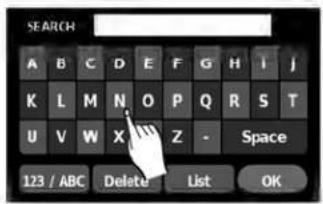
Alphanumeric characters are used when setting a destination, searching for an address, editing stored locations, etc.
text_image
SEARCH A B C D E F G H I J K L M N O P Q R S T U V W X Z - Space 123 / ABC Delete List OKLNV0922
- Touch characters on the touch keyboard and they will appear in the field at the top of the screen. When the entry is complete, touch the "OK" key.
Alternatively, usethescrollingdialtohigh-lightacharacterandpressthedialtoselect thatcharacter.
NOTE:
- Pressthe BACKbuttontoreturn tothepreviousscreen.
- Oneverycharacterentry, thetouchkeyboarddisplaywillnarrowtoonlythelettersthatarepossibletoenterafterthe currentletter.
- Symbolandnumberkeysareavailable whenthe"123/ABC"keyistouched.

text_image
Name: 1 2 3 4 5 6 7 8 9 0 A A A /E C E E E E I I I I Ñ Ó Ó Ó Space 123 / ABC Delete OKLNV0923
- Touchthe"123/ABC"keytotoggle the displaybetweenthetouchkeyboardfor lettersandthetouchkeyboardformnumbersandsymbols.
- Todeletethelastentry, touch the "Delete" keyorholdittodeleteallentriesatonce.
- Afterfinalizing the entries, touch the "List" or "OK" key for the completed lists screen.
MEMO
2-8Gettingstarted
3Mapsettings
Maptypes....3-2
2-Dimensional(2D)view....3-2
3-Dimensional(3D)view....3-2
Screeninformation(2Dor3D).... 3 - 3
Movingamap....3-4
Returningtothecurrentvehiclelocation. . . . . . . . . 3 - 4
Mapoptionsmenuscreen....3 - 5
Changingthemapscale.... 3 - 5
Mapscale....3-5
Lookingatinformationonthemap....3-6
Mapsymbols. 3-6
Mapsettingsforthemapscreen....3 - 7
MapSD-card....3-8
HowtohandletheSD-card....3-8
SD-cardreplacement.... 3 - 9
Howtoordermapdataupdates....3 - 9
Aboutthemapdata. 3-9
End-userterms....3-10
MAPTYPES
text_image
Track 05 2:21 View Menu PROSPECT PARK OR 2:34 0.7m 150ftLNV0934

text_image
N-JOY 11:15 Voice W 42ND ST 300ft 6/8B... 40.1ms ME S T BROADWAY 160ft MenuLNV0935
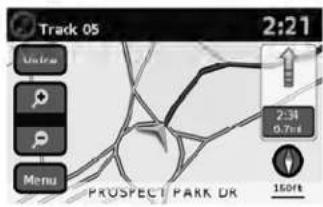
2D
The2Dmapisatwo-dimensional(flat)representationofthemapdata,similartoaroadmap,focusedonthevehicle'sposition(vehicleicon).

"SCREENINFORMATION(2Dor 3D)"(page3-3)

"MAPSETTINGSFORTHEMAP SCREEN"(page3-7)
3D
The3Dmapdisplaysthemapfromanelevated perspective, providingapanoramicviewovera longdistance.
Themapin3Dviewalwaysappearswiththecurrentforwarddirectionfacingup(headingup).

"SCREENINFORMATION(2Dor 3D)"(page3-3)

"MAPSETTINGSFORTHEMAP SCREEN"(page3-7)
3-2Mapsettings
text_image
N-JOY 11:15 Voice W 42ND ST 300ft 6:48pm 401ml 13 12 Menu BROADWA 150ft 11 10 2 3 4 5 6 7 8 9SCREENINFORMATION(2Dor3D)
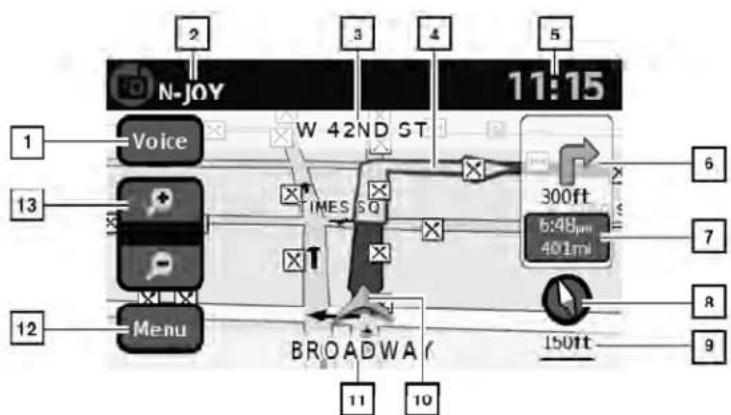
① "Voice"key
Touchtorepeatthevoiceguidancewhilea routeisactive.Touchandholdtoswitchthe voiceguidanceonandoff.
2 Audioinformation
Indicatestheradiostation, CDtracknumberorotheraudioinformationcurrently playing.
3 Nextmaneuverroadname
LNV0936
Indicatesthenameofthenextroadinthe routeguidance.Thisisonlyshownifroute guidanceisactive.
4 Suggestedroute
Appearsasaboldbluelineduringroute guidance.
5 Clock
Indicatesthecurrenttime.
6 Directionindicatoranddistancetonextmaneuverontheroute
When route guidance is active but you have deviated from the route, this are displayed as a compassicon with an arrow indicating the destination direction.
When route guidance is active and you are on the route, this are indicate the distance (in miles or kilometers) to then next point and the turning direction at that point.
7 Estimatedtimeofarrivalanddistanceto destinationorremainingtimeoftraveland distancetodestination.
Whentouchingthisbutton, the indicator will switch between estimated arrival time and theremaining travel time.
This indicator only appears on the destination issue and other route guidance is initiated.
8 Compassicon
Indicate the direction of themap. When in 2D mode, touching this icon will switch the map view between the North Up and Heading Up (or actual direction) modes.
9 Scaleindicator
Indicatesthescaleofthemap.
MOVINGAMAP
10 Vehicleicon
Indicate the current location and direction of the vehicle.
11 Currentroadindicator
Thelocationofwherethecarispositioned.
12 "Menu"key
Whentouchingthiskey, the items "Store CurrentPosition", "ShowPosition/GPS Information", "ShowDestinationInformation" or "MapSetup" can be selected.

"MAPOPTIONSMENU SCREEN"(page3-5)
13 Zoominandzoomoutkeys
Usetozoomthemapinorout.
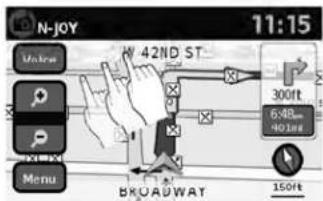
text_image
N-JOY 11:15 Molms 42ND ST 300ft 648... NO.1mg BROADWAT 150ft MenuLNV0937
Toscrollthemapineitherdirection:
-
Touchandreleasethescreenanywhereon themap.
-
Touch the screen again and move your fingering along the screen in the direction you wish to scroll.
Afterreleasingandtouchingthemapagain,a markerwillbedisplayedatthepointtouched and,ifpossible,thepositiondetermined.

NOTE:
- Ifthemapisin3Dview,touchingthemapto scrollwillautomaticallyswitchthemaptothe 2Dviewandwillautomaticallyorientatethe mapNorthUp.
- Ifthemapisin2Dview, themapwillbeorientedNorthUp.
- When the current location of the vehicle is recognized, the street namen will be displayed at the bottom of the screen. If the location is not recognized by the system, coordinates corresponding to the marker's position will be displayed.
RETURNINGTOTHECURRENTVE- HICLELOCATION
The basic mapscreen display the current location of the vehicle. The current location can be displayed again even after them apismoved, or after themenuscreen is displayed.
PressMAPorthe BACKbuttonandthe currentlocationwillbedisplayedonthemap.
3-4Mapsettings
MAPOPTIONSMENUSCREEN
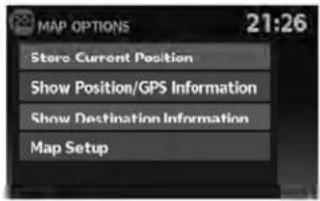
TheMapOptionsmenuallowsyoutoquickly storethecurrentposition,showpositioninformationordestinationinformation,andadjustthe mapsettings.
text_image
MAP OPTIONS 21:26 Store Current Position Show Position/GPS Information Show Destination Information Map SetupLNV0938
- Touch the "Menu" keywhiletherouteguid-ancemapisdisplayed.
-
The following options are available for selection:
-
StoreCurrentLocation
●ShowPosition/GPSInformation
●ShowDestinationInformation - MapSetup
CHANGINGTHEMAPSCALE

text_image
N-JOY 11:15 Voice W 42ND ST 300ft 6:48- 401ms BROADWAT 150ft Menu MEG 1LNV0939
Whenzoominginorout, the scale on the bottom right side of the screen changesto indicate the new scale level.
MAPSCALE
The following scales are available depending on themapview:
| 2Dview3Dview | |
| Perapproximately1/2inch(1cm) | Perapproximately1/2inch(1cm) |
| 150ft(50m)150ft(50m) | |
| 300ft(100m)300ft(100m) | |
| 600ft(200m)600ft(200m) | |
| 1/4mile(500m)1/4mile(500m) | |
| 1/2mile(1km)1/2mile(1km) | |
| 1mile(2km)1mile(2km) | |
LOOKINGATINFORMATIONONTHE MAP
| 2Dview3Dview | |
| 2.5mi(5km)— | |
| 5mi(10km)— | |
| 10mi(20km)— | |
| 25mi(50km)— | |
| 50mi(100km)— | |
| 100mi(200km)— | |
| 250mi(500km)— |
Iconsofvariouscategoriesoflocationscanbe displayedonthemap.
MAPSYMBOLS
Thisnavigationsystemusessymbolstodisplay varioustypesoffacilities. The followingiconsare usedonthemapscreen:

Hotel / Motel
Restaurant

Gas Station

Parking
LNV0998
3-6Mapsettings
MAPSETTINGSFORTHEMAP SCREEN
Othersettingsareavailableforthemapscreen, suchasswitchingthemapvieworchangingthe mapdirection.
- PresstheSETUPbutton.
- Touchthe"Navigation"key.

text_image
NAVIGATION SETUP 22:45 Map Setup Voice Guidance On Volume - + Show Position / GPS Information
text_image
MAP SETUP 21:33 Map View 3D North / Heading Up Map Head Auto Zoom On Show Places On Map OnLNV0940LNV0942
- Touchthe "MapSetup" key.
Whenselected, thesystemwillofferthefollowingmapsettingoptions:
- MapView
Touchthe"MapView"keytotogglebetweenthe2Dor3Dmapview.
●North/HeadingUpMap
Touchthe "North/HeadingUpMap" keyto togglethedisplaybetweenHeadingUpand NorthUp.When "Head" isselected,the screenshotsthemapinthedriving direction.When "NorthUp" isselected,the topofthemapisalwaysorientatednorth.
●AutoZoom
Touchthe"AutoZoom"keytotoggleautomaticzoomingonandoff.
MAPSD-CARD
●ShowPlacesonMap
Touchthe"ShowPlacesonMap"keytoactivateordeactivatethedisplayofplaceiconsonthemap.Whentheicononthemapistouched,placeinformationwillbe displayed.
●ShowIncidents
Touchthe "ShowIncidents" keytoenable trafficincidentinformationonthemap screen.

"TRAFFICFEATURE" (page4-30)
●ShowTrafficFlow
Touchthe"ShowTrafficFlow"keytoenable trafficflowinformationonthemapscreen.

"TRAFFICFLOWFEATURE" (page4-32)
●MapDataInformation
Touchthe"MapDataInformation"keyand thefollow-upscreenwilldisplaytheversion of thecurrentinstalledmap.

"MAPSD-CARD"(page3-8)

text_image
Diagram of a car dashboard with control panel, fan buttons, and navigation interface showing 'MAP' labelLNV0941
TheSD-cardslotislocatedonthefrontofthe unit.Whenyoupurchasethissystem,anSD-cardwithmapdataisprovided.

NOTE:
●BeforeinsertingthemapSD-cardconfirmthatthereisnoSD-cardalreadyin theslot.
- The SD-card slot can only read the SD-card with map data provided specifically for use with the vehicle's navigation system. Thesystem will not read other SD-cards.
HOWTOHANDLETHESD-CARD
When handling the SD-card, please be careful and adhered to the following instructions:

CAUTION
●HandletheSD-cardwithcare.Never touchthemetalcontacts.
- Donotuseanyconventionalcleaner, benzine,thinner,orantistaticspray.
- If you need to clean the SD-carduse asoftcloth.
- NeverattempttouseanSD-cardthat has been cracked, deformedorre-paired using adhesive. Doingsomay damagetheequipment.
- DonottrytobendtheSD-card.Do notuseanySD-cardthatisbentor cracked.
- Donotputonanystickerorwrite anythingoneithersurface.
- HandletheSD-cardcarefully to avoid contamination or flaws. Otherwise, the datamay not beread properly.
3-8Mapsettings
- DonotstoretheSD-cardinlocations exposedtodirectsunlight,orinhigh temperaturesorhumidity.
●AlwaysplacetheSD-cardinitsstor-agecasewhennotinuse.
SD-CARDREPLACEMENT
ForadditionalSD-cardswithmapdata,contact theNissanNavigationHelpdesk.
HOWTOORDERMAPDATAUP- DATES
Toorderupdatedmapdata,visit www.nissannavigation.comorcontactthe NissanNavigationHelpdesk.
ABOUTTHEMAPDATA
- Boschhascompiledthedigitizedmapdata intoausableformat.©2009RobertBosch GmbHHallrightsincompilationsoftware reserved.Duetotheproductiontimingofthe mapdata,somenewroadsmaynotbe included,orsomenamesandroadsmaybe differentfromthoseinuseatthetimethismap dataisused.
- Trafficcontrolandregulationdatausedin this mapdatamaybedifferentfromthoseinuseat thetimethismapdataisused. Whendriving, followtheactualtrafficcontrolsignsandnoticesontheroads.
●Reproducingorcopyingthismapsoftwareis strictlyprohibitedbylaw.

WARNING
- This navigation system should not be used to replace your own judgement. No itinerary suggested by this navigation system should ever override any freeway regulations, your own judgement, or a knowledge of safe driving practices. Don't follow the navigation system's suggested itinerary if it would cause you to perform an dangerous illegal act, place you in dangerous situation, or take you into an area you consider unsafe.
●Theadviceprovidedbythenavigationsystemistoberegardedasa suggestiononly.Theremaybetimes whenthenavigationsystemdisplays the vehicle's location incorrectly, failstosuggesttheshortestroute,or failstodirectyoutoyourdesired destination.Insuchinstances,rely onyourownjudgementtakinginto accountthedrivingconditionsatthe time.
- Donotusethenavigationsystemto locateemergencyservices. Thedata-basedoesnotcontain a complete listingofemergencyservicessuchas policestations,firestations,hospitalsandwalk-inclinics.Pleaseshow discretionandaskfordirectionsin suchinstances.
- Asthedriver, youaloneareresponsible for your drivingsafety.
-Inordertoavoidatrafficaccident, donotoperatethesystemwhile driving.
-Inordertoavoidatrafficaccident, operatethesystemonlywhenthe vehicleisstoppedatasafeplace andtheparkingbrakeison.
-Inordertoavoidatrafficaccident ortrafficoffence,rememberthat actualroadconditionsandtraffic regulationstakeprecedenceover theinformationcontainedonthe navigationsystem.
- Thesoftware may contain in accurate or incomplete information dueto the passage of time, changing circumstances, and the sources of information used. Pleaserespect current traffic conditions and regulations at all times while driving.
-Whereactualroadconditionsand highwayregulationsdifferfrom theinformationcontainedonthe navigationsystem,abidebythe highwayregulations.
-Keeptheamountoftimespent viewingthescreenwhiledriving toastrictminimum.
Thenavigationsystemdoesnotprovide, norrepresentinanywayinformationon:trafficand highwayregulations;technicalaspectsofthevehicleincludingweight,height,width,loadand speedlimits;roadconditionsincludinggrade, percentageofinclineandsurfaceconditions; obstaclessuchastheheight andwidth of bridgesandtunnels;andothercurrentdrivingor roadconditions.Alwaysrelyonyourownjudgementwhendrivingacar,takingintoaccountcurrentdrivingconditions.
The company trademarks used in this product to identify locations and business offices are the trademark of their respective owners. Their use does not represent sponsorship, approval or recommendation of this product by these companies.
END-USERTERMS
Thedata("Data")isprovidedforyourpersonal, internaluseonlyandnotforresale.Itisprotectedbycopyright,andissubjecttothefollowingtermsandconditionswhichareagreedtoby you,ontheonehand,andNISSANanditslicensors(includingtheirlicensorsandsuppliers)on theotherhand.
©2009NAVTEQ.Allrightsreserved.
The Dataforareas of Canada includes information taken with permission from Canadian authorities, including: © Her Majesty the Queen in Right of Canada, © Queen's Printer for Ontario, © Canada Post Corporation, GeoBase®, © Department of Natural Resources Canada.
NAVTEQholdsanon-exclusivelicensefromthe UnitedStatesPostalService®topublishandsell ZIP+4®information.
©UnitedStatesPostalService®2009. Prices are not established, controlled or approved by the United States Postal Service®. The following trademarks and registrations are owned by the USPS: United States Postal Service, USPS, and ZIP+4.
The Datamayincludeorreflectdataoflicensors, including Her Majesty the Queen in the Right of Canada ("Her Majesty"), Canada Post Corporation ("CanadaPost") and the Department of Natural Resources Canada ("NRCan"). Such data is licensed on "asis" basis. The licensors, including Her Majesty, Canada Post and NRCan, makenoguarantees, representations or warranties respecting such data, either expressor implied, arising by law or otherwise, including but not limited to, effectiveness, completeness, accuracy or fitness for a particular purpose.
Thelicensors, including Her Majesty, Canada Postand NRCan, shall not be liable in respect of any claim, demand or action, irrespective of the nature of the cause of the claim, demand or action alleging any loss, injury or damages, direct or indirect, which may result from the use or possession of the data or the Data. Thelicensors, including Her Majesty, Canada Postand NRCan, shall not be liable in any way for loss of revenues or contracts, or any other consequential loss of any kind resulting from any defect in the data or the Data.
EndUsershallindemnifyandsaveharmlessthe licensors,includingHerMajesty,CanadaPost andNRCan,andtheirofficers,employeesand agentsfromandagainstanyclaim,demandor action,irrespectiveofthenatureofthecauseof theclaim,demandoraction,allegingloss,costs, expenses,damagesorinjuries(includinginjuries resultingindeath)arisingoutoftheuseorpossessionofthedataortheData.
Termsandconditions
PersonalUseOnly:
YouagreetousethisDatatogetherwith NISSANAutomotiveProductsforthesolely personal,non-commercialpurposesforwhich youwerelicensed,andnotforservicebureau, timesharingorothersimilarpurposes. Accordingly,butsubjecttotherestrictionsset
forthinthefollowingparagraphs,youmaycopy thisDataonlyasnecessaryforyourpersonaluse toviewit,andsaveit,providedthatyoudonot removeanycopyrightnoticesthatappearanddo notmodifytheDatainanyway.Youagreenotto otherwisereproduce,copy,modify,decompile, disassembleorreverseengineeranyportionof thisData,andmaynottransferordistributeitin anyform,foranypurpose,excepttotheextent suchrestrictionsareexpresslyprohibitedorlimitedbyapplicablelaw.
Restrictions:
ExceptwhereyouhavebeenspecificallylicensedtodosobyNISSANandwithoutlimiting theprecedingparagraph,youmaynot:
a. usethis Datawithanyproducts, systems, or applications installed or otherwise connected to or in communication with vehicles, capable of vehiclene navigation positioning, dispatch, realtimerouteguidance, fleet management or similar applications;
b. usethis Data with or in communication with any positioning devices or an mobile or wireless-connected electronic computer devices, including without limitation mobile phones, palmtop and handheld computers, pagers, and personal digital assistants or PDAs.
Warnings:
The Datamaycontaininaccurateorincomplete informationduetothepassageoftime, changing circumstances, sourcesusedandthenatureof collectingcomprehensivegeographicdata, any of which may lead to incorrect results.
No Warranty:
This Data is provided to you "as is," and you agreetouseitatyourownrisk.NISSANandits licensors(andtheirlicensorsandsuppliers) makenoguarantees,representationsorwarrantiesofanykind,expressorimplied,arisingbylaw or otherwise, including but not limited to, content, quality, accuracy, completeness, effectiveness,reliability,fitness for aparticular purpose, usefulness, use or results to be obtainedfromthisData,orthattheDataorserver willbeuninterruptedorerror-free.
DisclaimerofWarranty:
NISSAN ANDITS LICENSORS (INCLUDING THEIR LICENSORSANDSUPPLIERS)DISCLAIMANYWARRANTIES,EXPRESSOR IMPLIED, OF QUALITY, PERFORMANCE, MERCHANTABILITYFITNESSFORAPARTICULAR PURPOSE OR NON-INFRINGEMENT.
Some countries, locallawsandterritoriesdonot allow certain warranty exclusions, sotothat extent the above exclusion may not apply to you.
DisclaimerofLiability:
NISSANANDITSLICENSORS(INCLUDING THEIR LICENSORSANDSUPPLIERS) SHALL NOTBELIABLETOYOU:INRESPECTOF ANYCLAIM,DEMANDORACTION,IRRESPECTIVEOFTHENATUREOFTHECAUSE OFTHECLAIM,DEMANDORATIONAL-LEGINGANYLOSS,INJURYORDAMAGES, DIRECTORINDIRECT,WHICHMAYRESULT FROMTHEUSEORPOSSESSIONOF THE INFORMATION;ORFORANYLOSSOF PROFIT,REVENUE,CONTRACTSOR SAVINGS,ORANYOTHERDIRECT, INDIRECT,INCIDENTAL,SPECIALORCON-SEQUENTIALDAMAGESARISINGOUTOF YOURUSEOFORINABILITYTOUSETHIS INFORMATION, ANY DEFECT IN THE INFORMATION,ORTHEBREACHOFTHESE TERMSORCONDITIONS,WHETHERINAN ACTIONINCONTRACTORTORTORBASED ONAWARRANTY,EVENIFNISSANORITS LICENSORS(OR THEIR LICENSORS SUPPLIERS)HAVEBEENADVISEDOF THE POSSIBILITYOFSUCHDAMAGES.
Some countries or local laws donotallow certain liability exclusions or damages limitations, so to that extent the abovemay not apply to you.
Exportcontrol:
Youagreenottoexportfromanywhereanypart of the Data provided to you or any direct product thereofexcept incompliancewith,and withalllicenses and approvals required under, applicable exportlaws,rulesandregulations.
EntireAgreement:
The set terms and conditions constitute the entire agreement between NISSAN (and its licensors, including their licensors and suppliers) and you pertaining to the subject matter hereof, and supersedes in the entire retyany and all written or oral agreements previously existing between us with respect to such subject matter.
4Navigation
Aboutrouteguidance....4-2
Voiceguidanceduringrouteguidance. 4 - 2
Navigationscreen. 4 - 3
Basicoperation....4-3
Availablesettingitems. 4 - 3
Routecalculationsettings. 4 - 4
Settingadestination....4-5
Availabledestinationsettingmethods. 4 - 6
Settingadestinationfromastreetaddress. 4 - 6
Settingadestinationfromtheaddressbook. . . . . . . 4-10
Settinganewentrytotheaddressbook.....4-10
Settinganentryasadestination....4-13
Settingadestinationfromplaces....4-14
Searchingfornearbyrestaurantsorgas
stations....4-15
Searchingforplacesnearcurrentlocation.....4-16
Searchingforplacesinanothercity. 4-18
MyPlaces/User-definedpointsofinterest
(POIs)....4-21
Settingdestinationbymap....4-26
Settinganintersectionasadestination. 4-28
Trafficfeature. 4-30
Displayingtrafficeventsalongroute....4-30
Trafficicons....4-32
Trafficflowfeature. 4-32
ABOUTROUTE GUIDANCE
Aftersettingthedestination,select"Start"tobeginrouteguidance.
During route guidance, the system navigates you through the guide points using visual and voice guidance.

CAUTION
- Thenavigationsystemvisualand voiceguidanceisforreferencepurposesonly.Thecontentsoftheguidancemaybeinappropriateddependingonthesituation.
- Whendrivingalongthesuggested route, followalltrafficregulations (forexample, one-waytraffic).

"Routeguidance" (page6-2)

flowchart
graph TD
    A["Vehicle"] --> B["Tank"]
    B --> C["1"]
    C --> D["2"]
    D --> E["3"]
    E --> F["4"]
    F --> G["Exit"]
    style A fill:#f9f,stroke:#333
    style G fill:#ccf,stroke:#333
LNV0943
VOICEGUIDANCEDURINGROUTE GUIDANCE
When approaching a guide point (intersection or corner), destination, etc., during route guidance, voice guidance announce the remaining distance and/or turning direction.
Touch"Voice"ontheupperleftofthescreento repeatthevoiceguidance.
Exampleofvoiceguidance:
1 "Inaboutonequartermile(400meters),right (orleft)turn.""Right(orleft)turnahead."
2 "Inaboutonequartermile(400meters) freewayentranceonyourrightonto(road number and direction)." "Freeway entrance on your right onto (road number and direction)."
3 "In about one mile (1.6 kilometers), exit on your right." "Takethesecondexitonyour right."
4 "Youhavereachedyourdestination.Ending routeguidance."
4-2 Navigation
NAVIGATIONSCREEN
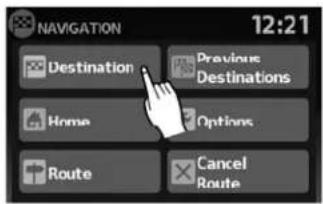
Severalmethodsareavailabletosetyour destination.
BASICOPERATION
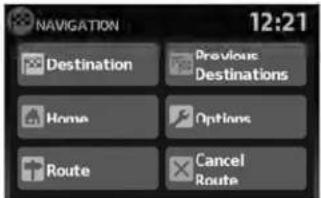
- PresstheNAVbutton.
text_image
NAVIGATION 12:21 Destination Previous Destinations Home Options Route Cancel RouteLNV0944
- Select the appropriate destination setting method by touching the screen or scrolling with the scrolling dial.
AVAILABLESETTINGITEMS
-DESTINATION:
Setand/orsaveadestination.
Severalmethodsareavailabletosetyour destination.

"SETTINGADESTINATION" (page4-5)
●PREVIOUSDESTINATIONS:
Searchesforadestinationfromthepreviousdestinationsinthedestinationmemory.
Upto50previousdestinationswillbeautomaticallystored.Ifthenumberofpreviousdestinationsexceeds50,theoldestonewillberemovedfromthelistandthenewestonewillbeadded.
Tomanuallydeleteapreviousdestination entry,touchthe"Delete"keyonthePreviousDestinationslistscreen.Touch"Del. All"todeleteallpreviousdestinationsonthe list.
Touchthe"Save"keytoaddapreviousdestinationtotheaddressbook.

NOTE:
Itisnotpossibletoretrievedeletedpreviousdestinationentries.
HOME:
Yourhomeaddressscanbeenteredasa destination.
- OPTIONS:
Changesthesettingsthesystemusesto calculatetheroute.

"ROUTECALCULATION SETTINGS"(page4-4)

text_image
ROUTE LIST 2:13 ARIZONA ST 2:14 MERRIMAN RD 0.9 mi MFBRIMAN RD 0.2 mi SCHOOLCRAFT RD 16.6 mi 196, JEFFRIES FWY 2:11LNV0945LNV0946LNV0993
text_image
ROUTE LIST 1.3 mi, 3:41, MANHATTAN BRG 3:33 List
text_image
ROUTE OPTIONS 2:09 Use Traffic Info. Prompt Route Type Fastest Minimize Freeways Off Minimize Toll & Ferry Off•ROUTE
Aroutelistisavailable.
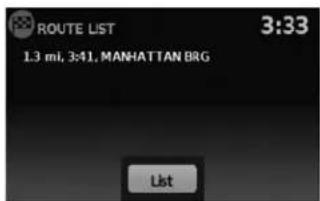
Ifyoutouch"Route",alistisshown.
Bytouchingapartoftheroute,youcansee moredetailedinformation.
●CANCELROUTE
Touch"CancelRoute"tocanceltheroute guidance.

NOTE:
Ifrouteguidanceisnotactive,both "Route"and"CancelRoute"cannotbe operated.
ROUTECALCULATIONSETTINGS
Thesettingsthesystemusestocalcatethe routetoadestinationcanbeadjustedtosuit yourneeds.
- PressNAV.
2.Touch"Options".
- Adjust the setting stothedesired level.
- UseTrafficInfo:
Setto "Off" to disable traffic info. Setto "Automatic" for traffic alertstobe controlled automatically. Setto "Prompt" for traffic alertstobedisplayed when prompted.
4-4Navigation
SETTINGADESTINATION
-RouteType:
Setto "Fastest" to calculate the fastest route. Setto "Economy" to calculate the most economical route. Setto "Shortest" to calculate the route of shortest distance.
- MinimizeFreeways:
Toggleonorofftominimizetheuseoffree-waysonacalculatedroute.
- MinimizeToll&Ferry:
Toggleonorofftominimizetheuseoftoll roadsandferriesonacalculatedroute.
text_image
NAVIGATION 12:21 Destination Previous Destinations Home Options Route Cancel Route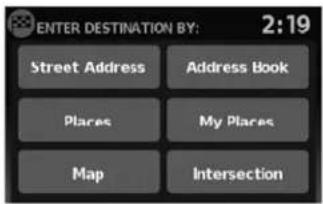
text_image
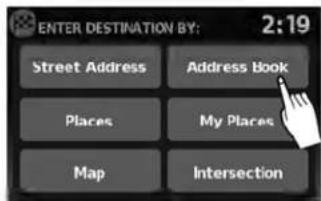
ENTER DESTINATION BY: 2:19 Street Address Address Book Places My Places Map IntersectionLNV0947LNV0948
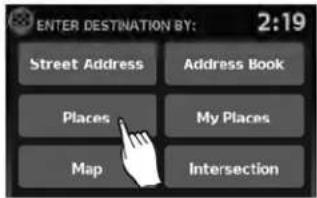
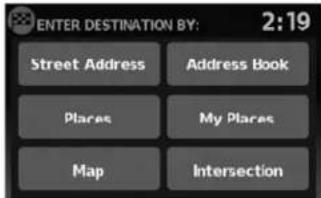
Themethodsforsettingadestinationareshown.
Severalmethodsareavailabletosetyour destination.
Fromthenavigationscreen,touch"Destination".
SETTINGADESTINATIONFROMA STREETADDRESS
text_image
NAVIGATION 2:47 There is a route in progress. Add as Waypoint Replace Route Cancel Route•"Places"

"SETTINGADESTINATION FROMPLACES"(page4-14)
• "MyPlaces"

"MYPLACES/USER-DEFINED POINTSOFINTEREST(POIs)" (page4-21)
LNV0949LNV0850Map"
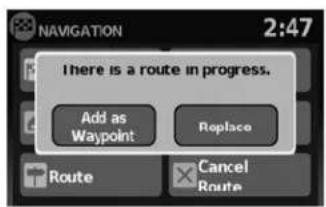
Ifrouteguidanceisactive,youcanchoosehow tousethenewdestination.Select"AddasWaypoint"tokeepthecurrentdestinationandtoadd thecurrentdestinationasawaypointalongthe route.Select"Replace"tocancelthecurrent routeandreplacethecurrentdestinationwith thenewdestination.
AVAILABLEDESTINATIONSETTING METHODS
- "StreetAddress"

"SETTINGADESTINATION FROMASTREETADDRESS" (page4-6)
- "AddressBook"

"SETTINGADESTINATION FROMTHEADDRESSBOOK" (page4-10)
4-6Navigation
text_image
STREET ADDRESS 2:30 Search In: MICHIGAN Change State/ Province Enter By: Street City
"SETTINGADESTINATIONBY MAP"(page4-26)
●"Intersection"

"SETTINGANINTERSECTION ASADESTINATION" (page4-28)
-
PresstheNAVbutton.
-
Touch "Destination".
-
Touch "StreetAddress".
-
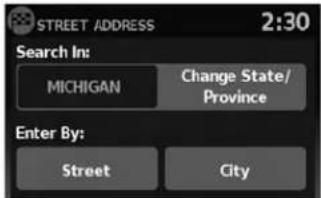
If the state or provinces hownonthescreen is correct, proceed to step 6. If the state or provinces hownonthescreen is not correct, touch "Change State/Province".

text_image
State/Prov. 65 A B C D E F G H I J K L M N O P Q R S T U V W X Y Z - Space 123 / ABC Delete ListLNV0951LNV0950LNV0956
5.Enterthenameofthestateorprovince.The displayshowsthetouchkeyboard.

"HOWTOINPUTCHARAC- TERS"(page2-7)
Thekeyboardhasanintelligentspelling setting,soitexcludesnon-existing combinations.Onthetoprightofthe screen,thenumberofmatchesisshown.

text_image
STREET ADDRESS 2:30 Search In: MICHIGAN Change State/ Province Enter By: Street City6.Touch"Street"

NOTE:
Itispossibletochoose "City" at this step if you want to manually enter the city name. However, the system can automatically narrow down the city in most cases when you enter the street name first. Entering by street can also be useful if you are unsure of the city's correct spelling.
text_image
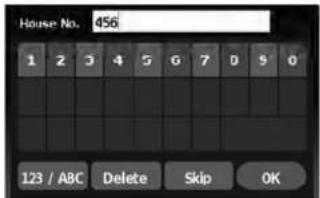
House No. 456 1 2 3 4 5 6 7 8 9 0 123 / ABC Delete Skip OK- Thedisplayshowsatouchkeyboardtoenterthehousenumberofthedestination.If thehousenumberisnotknown,touch "Skip"andadefaultlocationonthestreet willbeused.

"HOWTOINPUTCHARAC- TERS"(page2-7)

NOTE:
If you choose "Skip", a default location is chosen by the system and you will have a chancetochangethe position on the map is displayed. Seestep12 form more instructions on changing the default location.

text_image
Street GEORGE 302 A B C D E F G H J K L M N O P Q R S T U V W X Y Z - Space 123 / ABC Delete List
text_image
Select Street Name: 4:04 PORTLAND AVE PORTLAND AVE, N PORTLAND AVE, S PORTLAND CT PORTLAND PKY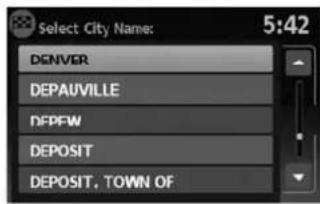
text_image
Select City Name: 5:42 DENVER DEPAUVILLE DFPFW DEPOSIT DEPOSIT, TOWN OFLNV0954LNV0955LNV0953
- Thedisplayshowsatouchkeyboardtoenterthestreetname.Enterthenameofthe street.Atanytime,touchthe"List"keyto displayalistofpossiblestreetnamesbased ontheletterscurrentlyentered.Whenthe numberofmatchesisreducedtofiveor less,thestreetlistwillbeshown automatically.

"HOWTOINPUTCHARAC- TERS"(page2-7)
- Touchthestreetnameonthelist. 10. Ifthestreetnameyouchooseisfoundin
onlyonecityinthestate,thesystemwillautomaticallyproceedtostep11.However,if thestreetnameyouchooseisfoundinmultiplecitiesthroughoutthestate(for example,acommonnamesuchasMain Street),youwillneedtochoosethenameof thecitybytouchingitonthescreen.
4-8Navigation
text_image
City DE 55 A C D E F G H I J K L M N O P Q R S T U V W X Y Z - Space 123 / ABC Delete ListLNV0952LNV0957LNV0958
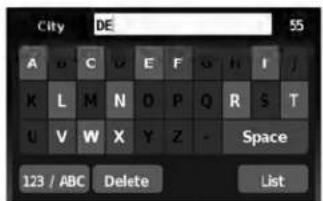
Ifthelistofcitiesistoolarge,youmaybeasked tospellthecitynametonarrowdownthenumberofmatches.

"HOWTOINPUTCHARACTERS" (page2-7)
text_image
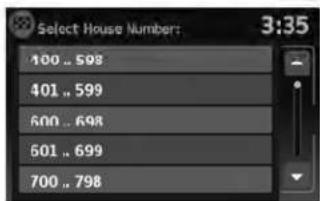
Select House Numbers: 3:35 400 .. 598 401 .. 599 600 .. 698 501 .. 699 700 .. 798- If the house number entered in step 7 does not exist on the street in the chosen city or if "Skip" was chosen in step 7, as screen will be displayed, asking if you want to use default location on the street or instead view a list with ranges of valid house numbers. If you choose to view the list, select an age by touching it on the screen. A default location within that range of addresses will be used.

NOTE:
Youwillhaveachancetochangethepositionfromthedefaultlocationoncethe mapisdisplayed.Seestep12formoreinstructionsonchangingthedefault location.

text_image
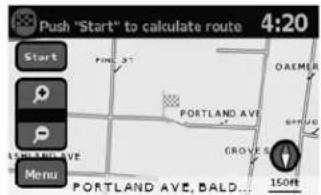
Push "Start" to calculate route 4:20 Start PINE ST OAKMER PORTLAND AVE GROVES 150Hz PORTLAND AVE, BALD...12.Amapofthedestinationisdisplayedonthe screen.Touch"Start"tocalculatetheroute.
Themapofthedestinationisalwaysdisplayedin 2DNorthUp.Oncethe"Start"keyistouched, thesystemreturnstothecurrentmapsettings.

NOTE:
If you did not enter an exact street address earlier in the process, the system will have chosen default location, either along the street or within a range of addresses on that street. Tomovethemap from that default position, touch the "Menu" key. A message will be displayed asking if you want to move or store the location.
SETTINGADESTINATIONFROMTHE ADDRESSBOOK

text_image
Touch to mark destination: 17:38 PROSPECT AVE PROSPECT PARK OF OK 150ftThisoptionallowsyoutosetandstorethedestinationintheaddressbookandusethestoreddestinationstocalculatearoute.
LNV1016LNV0959
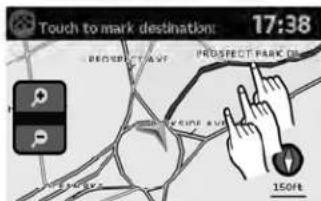
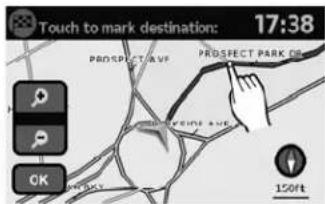
Touch"Move".Amapscreenwillbedisplayed thatallowsyoutotouchanewlocationforthe destination.Touch"OK"whencomplete.
Ifyoutouchthe"Store"keyafterthe"Menu"keyistouched,youcanstorethelocationintheaddressbook.

"SETTINGANEWENTRYTOTHE ADDRESSBOOK"(page4-10)
text_image
ENTER DESTINATION BY: 2:19 Street Address Address Book Places My Places Map IntersectionSETTINGANEWENTRYTOTHE ADDRESSBOOK
- PresstheNAVbutton.
- Touch "Destination".
3.Touch"AddressBook".
4-10Navigation

text_image
ADDRESS BOOK 13:24 Add New Entry 42ND NY C1 INC DINE AT PIER 1 GRANDMA LOUISE
text_image
Add to Address Book Using: 14:27 Street Address Previous Destinations Current Destination Current Position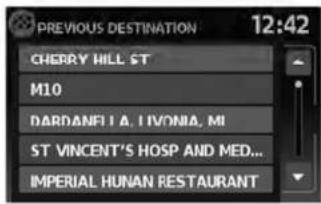
text_image
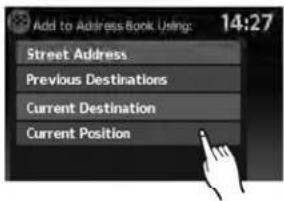
PREVIOUS DESTINATION 12:42 CHERRY HILL ST M10 DARDANELIA, IVONIA, MI ST VINCENT'S HOSP AND MED... IMPERIAL HUNAN RESTAURANT- Touch "AddNewEntry". There are four possibilities shown:
NOTE:
Upto50addressbookentriescanbe stored.Ifthenumberofaddressbooken- triesexceeds50,onemustbedeletedbe- forethenewonecanbeadded.

"SETTINGANENTRYASADESTINATION"(page4-13)
- "StreetAddress"
Thisoptionallowsyoutosaveanewentry byselectingtheaddress.

"SETTINGADESTINATIONFROMA STREETADDRESS"(page4-6)
●"PreviousDestination"
Thisoptionallowsyoutosaveadestination intheaddressbookfromalocationstored inthepreviousdestinationmemory.
Touchthedestinationyouwouldliketosave intotheaddressbook.

text_image
Name: CLINIC A B C D E F G H I I K L M M O P Q R S T U V W X Y Z - Space 123 / ABC Delete OKLNV0963LNV0964LNV0963
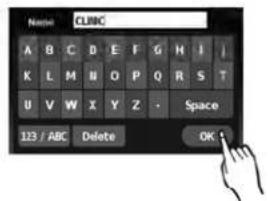
Thetouchkeyboardgivestheoptiontochange thenameoftheselecteddestination.
Touch"OK".Thesystemconfirmstheentryand addsittotheaddressbook.

text_image
Add to Address Book Using: 14:27 Street Address Previous Destinations Current Destination Current Position- "CurrentDestination"
Thisoptionallowsyoutostorethecurrently setdestinationintheaddressbookwhena routeisactive. Thisoptionisnotavailable whenarouteisnotactive.
Touch"CurrentDestination".

text_image
Name: CLINIC A B C D E F G H I / K L M N O P Q R S T U V W X Y Z - Space 123 / ABC Delete OKThetouchkeyboardgivestheoptiontochange thenameofthedestination.
Touch"OK".Thesystemconfirmstheentryand addsittotheaddressbook.
4-12Navigation
text_image
Add to Address Book Using: 14:27 Street Address Previous Destinations Current Destination Current PositionLNV0965LNV0963WNV0995
●“CurrentPosition”
Thisoptionallowsyoutosetthecurrentpositionasadestinationintheaddressbook.
Touch"CurrentPosition".
text_image
Name: CLUBC A B C D E F G H I I K L M N O P Q R S T U V W X Y Z - Space 123 / ABC Delete OKThetouchkeyboardgivestheoptiontochange thenameofthedestination.
Touch"OK".Thesystemconfirmstheentryand addsittotheaddressbook.
text_image
ADDRESS BOOK 13:24 Add New Entry 42ND NY C1 IMC DINE AT 1 GRANDMA HOUSESETTINGANENTRYASADESTINATION
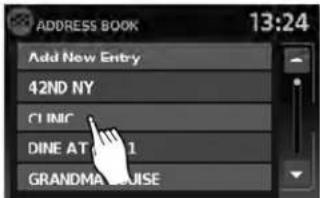
Insteadoftouching "AddNewEntry", you can touch any previously saved address (for example, CLINIC, GRANDMALOUISE, etc.).

text_image
ADDRESS BOOK 3:30 66 PRE 19 SAN FRANCISCO CALIFORNIA Rename Del. All Delete OKLNV0966LNV0967
Thedetaileddescriptionoftheentryisshown.
Youcanrenameordeletetheentry.Fromthis window,itisalsopossibleto deleteallentries in theaddressbook.Touch"OK"tosethentryas adestination.

text_image
PREVIOUS DESTINATION 12:42 CHEORY WILL ST. Calculating route... ST VINCENT'S HOSP AND MED... IMPERIAL HUNAN RESTAURANTThesystemwillcalculatetheroutetohead-dresschosen.

NOTE:
Touch"DeleteAll"todeletetheentireaddressbook.Aconfirmationscreenwillbe displayedtoverifythatyouwanttodelete theentireaddressbook.
SETTINGADESTINATIONFROM PLACES
Thesystemfeaturesadatabaseofplacesuch asrestaurants,hotels,banksandmoretoassist youinnavigation.Theseplacescanbesetas destinationsandthesystemcanthencalculatea route.

"MYPLACES/USER-DEFINED POINTSOFINTEREST(POIs)" (page4-21)
4-14Navigation
text_image
ENTER DESTINATION BY: 2:19 Street Address Address Book Places My Places Map Intersection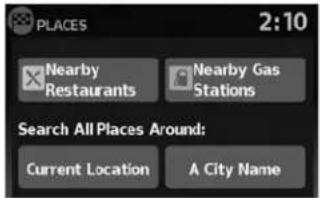
text_image
PLACES 2:10 Nearby Restaurants Nearby Gas Stations Search All Places Around: Current Location A City Name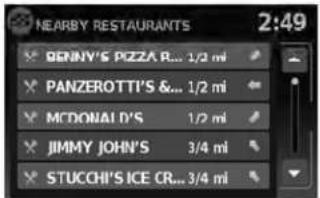
text_image
NEARBY RESTAURANTS 2:49 BENNY'S PIZZA R... 1/2 mi PANZEROTTI'S &... 1/2 mi MCDONALD'S 1/2 mi JIMMY JOHN'S 3/4 mi STUCCHI'S ICE CR... 3/4 miLNV0968LNV0969LNV0970
SEARCHINGFORNEARBYRESTAURANTSORGASSTATIONS
Whileawidevarietyofplacescanbesearched inthesystem,shortcutbuttonsareavailablefor restaurantsandgasstations.
- PresstheNAVbutton.
- Touch "Destination".
-
Touch "Places".
-
Touch "NearbyRestaurants" or "Nearby GasStations".
-
Thesystemsearchesfordestinationswithin 50miles(80km)ofthecurrentposition.
-
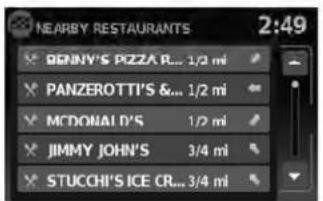
Placesareshownbasedonthestraightline distancetothecurrentposition.Thearrow ontherightshowsthedirectionofthe destination.Touchthedesireddestinationonthelist.

NOTE:
A maximum of 200 destinations will be listed when searching with this method.

text_image
NEARBY RESTAURANTS 2:03 MCDONALD'S Restaurant XXXX XXXXXX telXXXX-XXXXXXXX List StartLNV0971LNV0969LNV0973
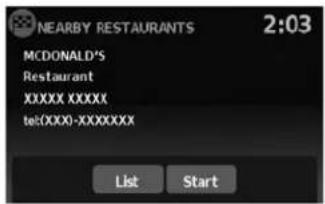
- Adetailed description of the destination is provided.
Touch"List"togobackandpickanother destination.Touch"Start"andthesystemcalculatetheroutetothedestination.

text_image
PLACES 2:10 Nearby Restaurants Nearby Gas Stations Search All Places Around: Current Location A City NameSEARCHINGFORPLACESNEAR CURRENTLOCATION
- PresstheNAVbutton.
- Touch "Destination".
- Touch "Places".
4.Touch"CurrentLocation".
text_image
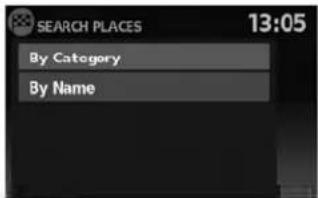
SEARCH PLACES 13:05 By Category By Name-
Touch "ByCategory" or "ByName".
-
If you choose "ByCategory", you can browse destinations from a variety of categories and subcategories, including:
●Automotive
●Banking&Business
●CityCenter
Emergency
●Hotel/Motel
•Leisure
●PublicPlaces
Restaurant
●Shopping
●Travel
4-16Navigation
If you choose "ByName", you can search for places using as specific name. Thetouchkeyboard is shown.

"HOWTOINPUTCHARACTERS" (page2-7)
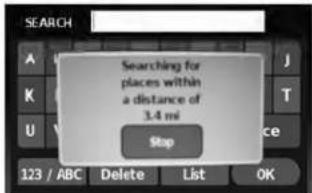
text_image
SEARCH Searching for places within a distance of 3.4 mi Stop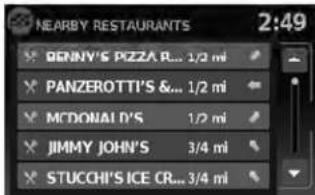
text_image
NEARBY RESTAURANTS 2:49 BENNY'S PIZZA R... 1/2 mi PANZEROTTI'S &... 1/2 mi MCDONALD'S 1/2 mi JIMMY JOHN'S 3/4 mi STUCCHI'S ICE CR... 3/4 miLNV0974LNV0970

NOTE:
- Whensearching "ByCategory", thesystem willsearchforupto200matcheswithin50 miles(80km)ofthecurrentposition.
- Whensearching "ByName", thesystemwill searchforupto30matcheswithin50miles (80km)ofthecurrentposition.
- If the destination is not found within the 50 mile (80km) search radius, you can search for places around specific city name.

"SEARCHINGFORPLACESINAN-OTHERCITY"(page4-18)
- Destinationsareshownbasedonthedistancetotheselectedposition.Thearrowontherightshowsthedirectionofthedestination.Thedistanceshownisa straightlinedistance.
Touchthedesireddestinationfromthelist.
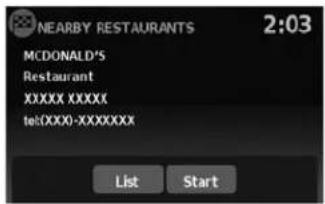
text_image
NEARBY RESTAURANTS 2:03 MCDONALD'S Restaurant XXXX XXXXXX tel(XXX0-XXXXXXXX) List StartLNV0971LNV0969LNV1000
- Adetailed description of the destination is provided.
Touch"List"togobackandpickanother destinationortouch"Start"tohavethesystemcalculatetheroutetothedestination.
text_image
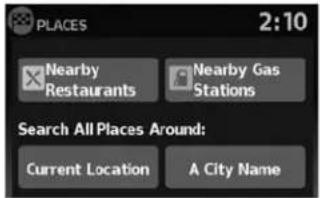
PLACES 2:10 Nearby Restaurants Nearby Gas Stations Search All Places Around: Current Location A City NameSEARCHINGFORPLACESIN ANOTHERCITY
- PresstheNAVbutton.
- Touch "Destination".
- Touch "Places".
4.Touch"ACityName".
text_image
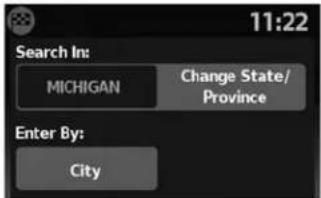
11:22 Search In: MICHIGAN Change State/ Province Enter By: City- Touch "ChangeState/Province" if the state or provinces shown is not correct.
4-18Navigation
text_image
State/Prov. 65 A B C D E F G H I J K L M N O P Q R S T U V W X Y Z - Space 123 / ABC Delete ListLNV0951LNV0952LNV0953
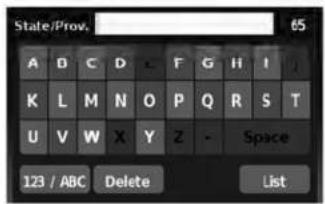
- If necessary, enter the name of the state or province.
Thedisplayshowsthetouchkeyboard.

"HOWTOINPUTCHARAC- TERS"(page2-7)
Thekeyboardhasanintelligentspelling setting,soitexcludesnon-existing combinations.Onthetoprightofthe screen,thenumberofmatchesisshown.
text_image
City DE 55 A B C D E F G H I J K L M N O P Q R S T U V W X Y Z - Space 123 / ABC Delete List-
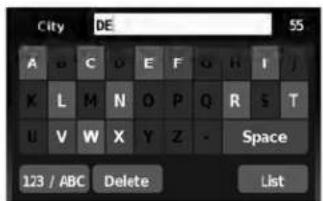
Touch "City".
-
Atouchkeyboarddisdisplayed.Enterthe nameofthedesiredcity.

text_image
Select City Name: 5:42 DENVER DEPAUVILLE DFPFW DEPOSIT DEPOSIT, TOWN OFPress "List" at any timetodisplayalist of remaining cities. Touch the desired city.

text_image
SEARCH PLACES 13:05 By Category By NameIf you choose "ByName", you can search for places using as specific name. Thetouchkeyboard disshown.

"HOWTOINPUTCHARACTERS" (page2-7)

text_image
SEARCH Searching for places within a distance of 3.4 mi StopLNV0973LNV0974
-
Touch "ByCategory" or "ByName".
-
If you choose "ByCategory", you can browse destinations from a variety of categories and subcategories, including:
●Automotive
●Banking&Business
●CityCenter
Emergency
Hotel/Motel
•Leisure
●PublicPlaces
Restaurant
●Shopping
●Travel
4-20Navigation

NOTE:
- Whensearching "ByCategory", thesystem will search for up to 200 matches within 50 miles (80km) of the current position.
- Whensearching "ByName", thesystemwill searchforupto30matcheswithin50miles (80km) of the current position.
text_image
NEARBY RESTAURANTS BENNY'S PIZZA R... 1/2 mi PANZEROTTI'S &... 1/2 mi MCDONALD'S 1/2 mi JIMMY JOHN'S 3/4 mi STUCCHI'S ICE CR... 3/4 mi 2:49LNV0970LNV0971
- Destinationsareshownbasedonthedistancefromtheselectedposition.Thearrow ontherightshowsthedirectionofthe destination.Thedistanceshownisa straightlinedistancefromthecitycenter.
Touchthedesireddestinationfromthelist.
text_image
NEARBY RESTAURANTS 2:03 MCDONALD'S Restaurant XXXX XXXXXX tel(XXXX-XXXXXXXX) List Start- Adetailed description of the destination is provided.
Touch "List" togobackandpickanother destinationortouch "Start" tohavethesystemcalculatetheroutetothedestination.
MYPLACES/USER-DEFINED POINTSOFINTEREST(POIs)
Apointofinterest(POI)intheMyPlacesdatabaseisaspecificlocationofinterestsuchasa gasstationorbank.ThePOIconsistsofalongitudevalue,alatitudevalueandaname.
AdditionalPOIscanbeaddedtothesystemusingthevehicle'sUSBport.Formoreinformation aboutusingtheUSBport,seeyourvehicle's owner'smanual.
ThePOIscanbesetasadestinationorbesetup toactivatePOIwarningsthatdisplayapop-up messagewhenthevehicleapproachescertain areassuchashazardspotwarnings.

NOTE:
- Inordertosavetheuser-definedpointsofinterestdata,aUSBmassstoragedeviceis required. Theuser-definedpointsofinterest data cannot besaved on the SD-card which contains thenavigation data.
- User-definedpointsofinterestarenotshown inthemaprepresentation.
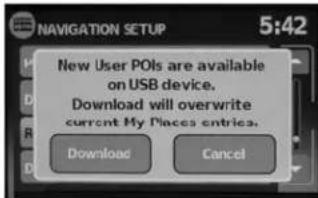
- Thesystemrecognizestheuser-defined pointsofinterest(POI)dataandthenasksthe userviaapop-upmessageifthedataneeds tobedownloadedintothesystem.
- If you confirm the download, the available user Places in the system internal memory will be deleted and thenewones in the USB mass storage device will be downloaded into the internal memory of the system.
●The progressofthedownloaddisshownbya progress-bar. Whenthedownloaddisfinished, theuserisnotifiedthattheUSBmassstorage devicecanberemoved.
text_image
File Edit View Window Help A B C D E F 1 -4.05494, $3.800651 (Silverstone) Silverstone 2 3 4 5 6 7 8 1 2 3 4 Save As: Save as type: Silverstone.com Save as type: U-PR-RD Plan Save Cancel 5LNV1017
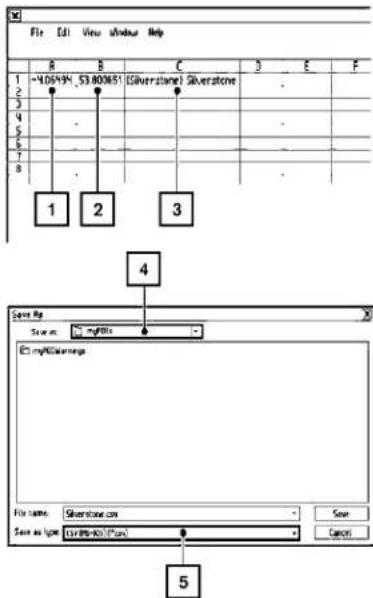
Creatinguser-definedpointsofinterest(POIs)
1 Longitude
2 Latitude
3 Name
4 Location/Foldertosave
5 Filename
POldatacanbedownloadedfromtheInternet orcreatedinasimpletexteditorinCSV(Comma SeparatedVariable)fileformat.
TherearetwokindsofPOldatasupportedby thesystem:
-UserPOIs-user-definedpointsofinterest (POI)thatcanlaterbesetasadestination andfoundusingrouteguidance.
- POI-warnings-user-suppliedareassuchas hazardspotsthatthesystemdisplaysina pop-upwindowwhenthevehicleisapproachingthedesignatedarea.
Perform the following procedure to create your own User POIs:
- ConnectaUSBmassstoragedeviceto yourpersonalcomputer.
- Useastandardsoftwareprogramtocreate alistofPOIs.Makesurethesoftwarecan supporttheCSVfileformat.
- In the first column, enter the longitude value of the position of the POI.
- In these second column, enter the latitude value of the position of the POI.
- In the third column, enter the name of the POI. Information entered in the fourth column, such as address or phonenumber, will be appended to the name of the POI.
6.Addmorerowsifnecessary. - Savethefilewiththeextension.csv(for example, myplacesfile.csv).
NOTE:
Thenameofthe.CSVfilewillbeusedto createaMyPlacescategoryinthesystem. Createseparate.CSVfileswithdifferent namestocreateotherMyPlaces categories.
- MakesuretoselecttheUSBmassstorage deviceasthelocationtosave, using theexactfoldername "/myPOIs" for UserPOIs or "/myPOIs/myPOI warnings"
forPOI-warnings. Forexample, iftheUSB massstoragedevice'srootfolderisrepresentedbyf:, savethefiletothefolder "f:/myPOIs" forUserPOIsortothefolder "f:/myPOIs/myPOIwarnings"
forPOI-warnings.
- ConnecttheUSBmassstoragedeviceto thevehicle'sUSBport. FormoreinformationabouttheUSBport, seeyourvehicle's owner'smanual.
text_image
ENTER DESTINATION BY: 2:19 Street Address Address Book Places My Places Map IntersectionLNV0948LNV1001
Addinguser-definedpointsofinterest (POIs)
Perform the following procedure to add your UserPOIstothesystem:
- PresstheNAVbutton.
- Touch "Destination".
- Touch "MyPlaces".
text_image
NAVIGATION SETUP 5:42 New User POIs are available on USB device. Download will overwrite current My Places entries. Download Cancel- IfaUSBmassstoragedevicewiththenew POIdataisconnected,thesystemwillautomaticallyaskifyouwanttotransferthePOI data.Touch"Download"tobeginthetransferor"Cancel"tocanceltheprocedure.
NOTE:
NewPOldatawilloverwritePOldataal-readyintheinternalmemory.

text_image
NAVIGATION SETUP 5:42 Copying your places to the system. Please wait ... CancelLNV1002LNV1003LNV0958
- The POI data on the USB mass storage device is transferred to the vehicle.

NOTE:
Amaximumof8MBofPOldatacanbe addedtothesystem.

text_image
MyP0I 5:43 Pat's House NTCNA Lexington Kentucky Albany Saratoga New York-
Oncethedownloadprocessiscomplete, theavailablePOlsaredisplayedinaliston thescreen.
-
TouchthenameofaPOlonthelisttosetit asthedestination.
text_image
Push "Start" to calculate route 4:20 Start P OAKMER PORTLAND AVE GROVES 150ft PORTLAND AVE, BALD...- Touch "Start" to calculate etheroute.
4-24Navigation

text_image
ENTER DESTINATION BY: 2:19 Street Address Address Book Plares My Plares Map Intersectiontext_image
NAVIGATION SETUP 5:42 Places Alert Distance Download User POIs (My Places) Remove User Places From System Demo Mode OnDeletinguser-definedpointsofinterest(POIs)
Perform the following procedure to delete the user-defined POIs stored in the MyPlaces memory:
- PresstheSETUPbutton.
- Touch "Navigation".
- Scrolltothebottomofthelistandtouch "RemoveUserPlacesFromSystem".
SETTINGDESTINATIONBYMAP

text_image
NAVIGATION SETUP Do you want to delete all User POIs (My Places) from system? Yes No Demo Mode OnThismethodallowsyoutosearchfordestinationbyscrollingthemap,thenhavethesystem calculatearoutetothedestinationorstorethe positionintheAddressbook.
- PresstheNAVbutton.
- Touch "Destination".
3.Touch"Map".
LNV1005LNV1018 Thesystemisautomaticallysettothe2D,North Upsetting.
text_image
Touch to mark destination: 17:38 PROSPECT PARK 150Hz- Scrollthemapandtouchthescreenatthe preferredlocation.
4.Apop-upisdisplayedtoconfirmthatyou wanttodeleteallUserPOIs(MyPlaces) fromthesystem.Touch"Yes"todeletethe UserPOIsor"No"tocancel.
4-26Navigation
text_image
Touch to mark destination: 17:38 PROSPECT AVF PROSPECT PARK OF OK 150ftChoose "Save" tostorethelocationintheaddressbook. Thetouchkeyboarddisdisplayedso thatanamefortheentrycanbestored.

text_image
N-JOY 11:15 W 42ND ST. 300ft 648m 401m Calculate rote... BROADWAY 150ft MenuChoose "StartGuidance" to calculate etheroute and begin route guidance to the chosen location.
SETTINGANINTERSECTIONASA DESTINATION
text_image
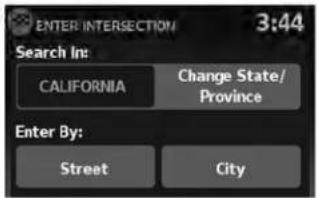
ENTER INTERSECTION 3:44 Search In: CALIFORNIA Change State/ Province Enter By: Street CityLNV0979LNV0951LNV0952
Anintersectionoftwostreetscanbesetasa destination. Tosetanintersectionasthedestination:
1.PresstheNAVbutton.
2. Touch "Destination".
3. Touch "Intersection".
4. Touch "ChangeState/Province" if the state or province displayed is not correct.
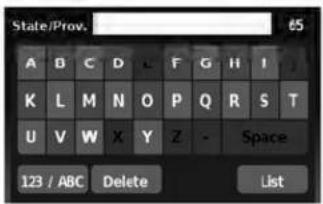
- If necessary, enter the name of the state or province.
Thedisplayshowsthetouchkeyboard.

"HOWTOINPUTCHARACTERS" (page2-7)
text_image
State/Prov. 65 A B C D E F G H I J K L M N O P Q R S T U V W X Y Z - Space 123 / ABC Delete List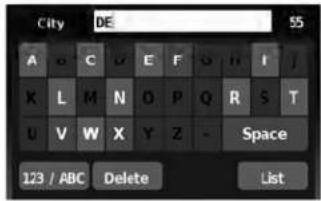
text_image
City DE 55 A B C D E F G H I J K L M N D P Q R S T U V W X Y Z - Space 123 / ABC Delete List- Touch "City".
Thedisplayshowsthetouchkeyboard.

"HOWTOINPUTCHARAC- TERS"(page2-7)
Itispossibletoenteronlyapartofthecity name. Thekeyboardhasanintelligentspell- ingsetting,soitexcludesnon-existing combinations. Onthetoprightofthe screen,thenumberofmatchesisshown.
Touch"OK".
4-28Navigation
text_image
Select City Name: 5:42 DENVER DEPAUVILLE DFPEW DEPOSIT DEPOSIT. TOWN OFLNV0953LNV0954LNV0955
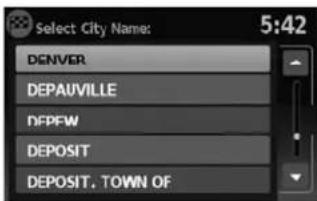
- Press "List" at any time and a list of remaining cities will be shown. Touch the desired city.
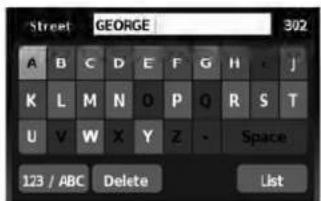
text_image
Street GEORGE 302 A B C D E F G H J K L M N O P Q R S T U V W X Y Z - Space 123 / ABC Delete List- Touch "Street".
Thedisplayshowsthetouchkeyboard.

"HOWTOINPUTCHARAC- TERS"(page2-7)

text_image
Select Street Name: 4:04 PORTLAND AVE PORTLAND AVE, N PORTLAND AVE, S PORTLAND CT PORTLAND PKY- Touchthenameofthedesiredstreet.
10.Alistofintersectingstreetswillbeshownif fiveorlessexist. Otherwise, thetouchkeyboardwillbedisplayedagainsothatthe nameofthesecondstreetintheintersectioncanbeentered.Enterthesecondstreet name.
- Selecttheintersectingstreet.
TRAFFICFEATURE

text_image
Push "Start" to calculate route 4:20 Start P P 150km/VE Menu PORTLAND AVE, BALD... FIND ST PORTLAND AVE CROVES OAKME SPRING 150ftTheNavigationSystemreceivestrafficinformationfromXMNavTraffic®toinformyouoftraffic eventsandguideyoutoanalternateroute.Trafficeventsincludeaccidents,roadconstruction, heavytrafficandotherfactorsthataffectthe routeahead.
LNV0958LNV0986
12.Touch"Start".
Theroutetotheintersectionwillbe calculated.
text_image
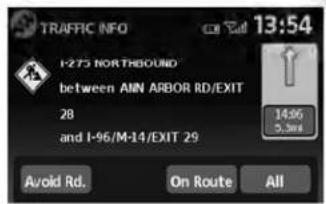
TRAFFIC INFO 13:54 I-275 NORTHBOUND between AMN ARBOR RD/EXIT 28 and I-96/M-14/EXIT 29 Avoid Rd. On Route All 14:96 5.3mDISPLAYINGTRAFFICEVENTS ALONGROUTE
Whenarouteisactive, presstheTRAFbuttonto displaythetrafficeventnearestthecurrentvehiclelocation. Thelocationandnatureofthetrafficeventisdisplayedonthescreen. Threemenu optionsareavailableonthescreen.
4-30Navigation

text_image
TRAFFIC EVENTS ON ROUTE 13:59 I-275 N - Road construction... M-39 S - Road constructionLNV0987LNV0988LNV0989
- "OnRoute"
Touchthe"OnRoute"keytodisplayalistofall trafficeventsthatarepresentalongthecurrent route.Touchthelineofaspecificeventonthe screentoseemoredetailsaboutthatitem.
text_image
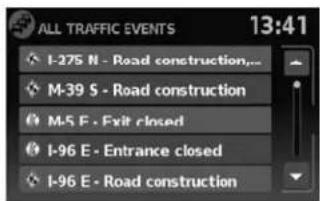
ALL TRAFFIC EVENTS 13:41 I-275 N - Road construction... M-39 S - Road construction M-5 E - Exit closed I-96 E - Entrance closed I-96 E - Road construction•“All”
Touchthe"All"keytodisplayalistofalltraffic eventsinthearea,includingthosewhicharenot directlyalongthecurrentroute.Touchthelineof aspecificeventonthescreentoseemoredetailsaboutthatitem.

text_image
AVOID ROADS 12:11 Avoid Road Ahead Avoid Segment of Route List Cancel Avoid Road Ahead Cancel Avoid Segment●"AvoidRd."
Touchthe"AvoidRd."keytodirectthenavigationsystemtoavoidtheareaimpactedbythe listedtrafficevent. Thenextscreenlisttwo options.
text_image
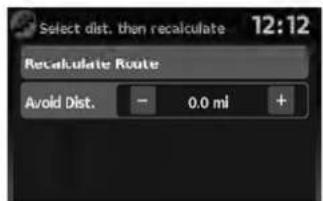
Select dist. then recalculate 12:12 Recalculate Route Avoid Dist. - 0.0 ml +LNV0990LNV0991
Touchthe"AvoidRoadAhead"keytoavoid the roadlistedonthetrafficevent.Youcanchoose thedistanceoverwhichthesystemavoidsthe affectedroad.Touchthe+"or"-keytoseth the distanceandthentouch"RecalculateRoute" to calculatethenewroute.

text_image
Select 2 roads then recalculate 12:17 Recalculate Route 0.0 mi OHIO ST 12:17 WISCONSIN ST 12:18 MAINE ST 0.1 mi PENN STTouchthe"AvoidSegmentofRouteList"keyto avoidaseriesofroadsontheroutelistduetothe trafficevent.Theroutelistisdisplayedonthe screen.Touchthenamesoftwostreetsonthelist toavoidthatportionoftherouteandthentouch "RecalculateRoute"tocalculatethenewroute.
TRAFFICICONS
The following trafficiconsareused:

:Accident

:Entrance/ExitClosed

:Incident

:Information

:NarrowLanes

:RoadConstruction

:TrafficJam

NOTE:
Ablacklineisdrawnovertheroadand route(ifactive)toindicateroadconstructionareasandlength.
TRAFFICFLOWFEATURE
UsinginformationreceivedfromXMNavTraffic®, thesysteminformsyouoftrafficlevelsoncertain highwaysandroadsintheareaalongtheroute. Whenarouteisactive,presstheMAPbuttonto displaythemapofthecurrentvehiclelocation. Anyroadswithtrafficflowinformationwillappear coloredasfollows:
●Green:trafficislightandmovingatnormal speeds.(>45mph)
●Yellow:trafficisheavyandmovingslowly. (10-45mph)
●Red:trafficisgridlockedandnotmoving. (<10mph)
4-32Navigation
5Othersettings
Systemsettings....5-2
Touchclicks. 5 - 2
Beeptones....5-2
Resetsettings. 5 - 2
Displaysettings....5-3
Display....5-3
Brightness....5-3
Clocksettings. 5-4
Setclock....5-4
Languagesettings....5 - 5
SYSTEMSETTINGS
Thesystemcanbecustomizedaccordingto your preference.
- PresstheSETUPbutton.
- Touch "System".
- Select the preferred setting item on the screen and then next screen will be shown. You may need to set the scrolling dial or the touchscreen scroll if more than one screen of options is available.
The followingsettingsareavailable:
- Display

"DISPLAYSETTINGS" (page5-3)
- Clock

"CLOCKSETTINGS"(page5-4)
●Language

"LANGUAGEANDUNIT SETTINGS"(page5-5)
- Touchclick

"TOUCHCLICKS"(page5-2)
- Beeptones

"BEEPTONES"(page5-2)
- "ResetAllSettings/Memory"

"RESETSETTINGS"(page5-2)
- Select the button of the preferred item and adjust these setting. (Alternatively, use the scrolling dial or steering wheel scrolling switch).
5.Pressthe BACKbuttontoreturnto theprevioussscreenorpresstheNAVbuttontoreturntothecurrentlocationmap screen.
TOUCHCLICKS
Usethissettingtochangetheaudibleconfirmationbetweentheonoroffpositionwhena screenbuttonistouched.
Selectthe"TouchClicks"keytotogglebetweenOnandOff.
BEEPTONES
Usethissettingtochangetheaudibleconfirmationwhen:
- abuttonontheunitispressedandheldfor abouttwoseconds,suchasthe 📋/D button.
- apop-upmessageappearsonthescreen.
Selectthe"BeepTones"keytotogglebetween OnandOff.
RESETSETTINGS
Usethissettorestorethefactorydefault settings.
Touchthe"ResetAllSettings/Memory"keyand thenconfirmthemessage.Ifyouchoose"Yes", thesystemwillresetthesettingstothedefault settings.Ifyouchoose"No",thedefaultsettings willnotberestoredandthedisplayreturnstothe systemsettingsscreen.
5-2 Othersettings
DISPLAYSETTINGS

text_image
Diagram of a hand interacting with a control panel interface, showing buttons and a display areaDISPLAY
Switchingthedisplayonoroff
Thissettingallowsyoutoturnthedisplayonor off. Whenthedisplayisturnedoff, theclockwill stillbedisplayed.
Toturnoffthedisplay,pressandholdthe buttonformorethan2seconds.
Thedisplaywillswitchonwhen:
●the 📞/ Dj buttonispressed.
●anyotherbuttonispressed.
●receivingincomingcallsorduringaphone call.Whenthecallisended,thedisplayreturnstoclockdisplay.
Voiceguidance(ifactive)continuesevenwhen thedisplayisturnedoff.
Changingday-nightbrightness
Pressthe 📞/3 buttonforlessthantwosecondstotoggle:
- betweendayandauto(night)whenheadlightsareon.
- betweennightandauto(day)whenheadlightsareoff.
WNV0980LNV0981 While the display is showing the current brightness mode, you can turn the scroll knob to adjust the brightness.
Thedayornightmodecanalsobetoggledfrom theDisplaySettingsmenu.
☀️/
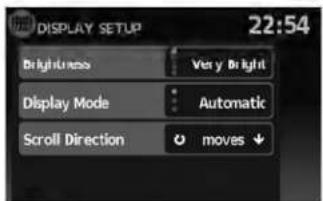
text_image
DISPLAY SETUP 22:54 Brightness Very Bright Display Mode Automatic Scroll Direction moves ↓BRIGHTNESS
Thismenuallowsyoutoadjustthebrightnessof thescreen.
1.PresstheSETUPbutton.
2. Touchthe "System" key.
3. Touchthe "Display" key.
4. Touch the "Brightness" key repeatedly. Each timethe keyistouched the brightness modewill change as follows:
Very Bright → Bright → Default → Dark → VeryDark → VeryBright
5.Tosavethesetting,pressthe buttontoreturntothepreviousscreen.

BACK
CLOCKSETTINGS

text_image
CLOCK SETUP 13:11 Time Format 24 h Use GPS Clock On Set Clock Manually Daylight Savings Time OnLNV0982LNV0983
Thissettingallowsyoutomakeclock adjustments.
- PresstheSETUPbutton.
- Touchthe "System" key.
- Touch the "Clock" key.
- Select the preferred setting item and make an adjustment.
- "TimeFormat":
Touchthe"TimeFormat"keytochangethe clockformatbetween12-hourand24-hour.
- "UseGPSClock":
Touchthe"UseGPSClock"keytohavethe clockautomaticallyadjustedbytheGPS satellite.
5-4 Othersettings
- "SetClockManually":
Allowsyoutosettheclockmanually.

"SETCLOCK"(page5-4)
- "DaylightSavingsTime":
Touchthe "DaylightSavingsTime" keyto toggledaylightsavingstimeonoroff. "Use GPSClock" mustbesettoOnforthisfeaturetobeused.
- "TimeZone":
Selectandtouchanappropriatetimezone of the current vehicle location to bypass the GPS satellite. "UseGPSClock" must be settoOnforthisfeaturetobeused.
NOTE:
If"DaylightSavingsTime"issetto"On" andatimezoneischosenforanareathat doesnotobserveDaylightSavingsTime, the "DaylightSavingsTime" settingremains"On"andmustbeturnedoff manually.
- After adjusting the desired settings, press
the BACKbuttontoreturntothe previousscreen.Youcanalsopressthe NAVbuttontoreturntothecurrentlocation mapscreenortheFM,AM,CDorAUXbuttontoreturntotheaudioscreen.

text_image
SET CLOCK 5:50 Hour 3 1 Minute - 50 +SETCLOCK
Adjustthehourorminuteusingthe"+"and"-" keystoadjustthehourorminuteupordown.
LANGUAGE SETTINGS
Thissettingallowsyoutochangethelanguage usedbythesystem.
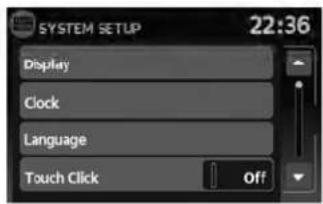
text_image
SYSTEM SETUP 22:36 Display Clock Language Touch Click OffLNV0984
- PresstheSETUPbutton.
- Touchthe "System" key.
- Touch the "Language" key.
- Select the appropriatelanguage. The available languages are:
-English
-Français
-Espanol
- The program loadingscreen is displayed. Upon completion, the start-up screen is automatically displayed.
MEMO
5-6 Othersettings
6Generalsysteminformation
Safetyinformation. 6 - 2
Featuresofthisnavigationsystem....6 - 2
Routeguidance....6-2
Placesdirectory....6-3
Addressbook. 6 - 3
XMNavTraffic®information....6-3
Voiceguidance. 6-3
Currentvehiclelocation....6-4
Displayofcurrentvehiclelocation....6-4
WhatisGPS(GlobalPositioningSystem)?......6-4
Detailedmapcoverage(MCA)forthe navigationsystem....6 - 4
Whenagrayroadisdisplayonthemap. . . . . . . 6 - 4
Routecalculation. 6 - 4
Routeguidance. 6-6
Basicsofvoiceguidance....6-6
Directionsprovidedandthedistance to guidepoints. 6 - 6
Repeatingvoiceguidance....6-6
Notesonvoiceguidance....6-6
Howtohandlethedisplay....6-7
Characteristicsofaliquidcrystaldisplay. . . . . . . . 6 - 7
Maintenanceofthedisplay....6-8
SAFETYINFORMATION
This system is primarily designed to help you reach your destination, and it performs other functions as outlined in this manual. However the driver must us the system safely and properly. Information concerning road conditions, traffic signs and the availability of services may not always be up to - date. The system is not a substitute for safe, proper and legal driving.
Beforeusingthenavigationsystem, pleaseread thefollowingsafetyinformation.Alwaysusethe systemasoutlinedinthismanual.

WARNING
- Whenthedriverwantstoooperatethe navigationsystem,firstparkthevehicleinasafelocationandsetthe handbrake.Operatingthesystem whiledrivingcandistractthedriver andmayresultinaseriousaccident.
- Donotrelyonrouteguidancealone. Alwaysbesurethatalldrivingmaneuversarelegalandsafeinorderto avoidaccidents.
-
Donotdisassembleormodifythis system.Ifyoudo,itmayresultin accidents,fireorelectricalshock.
-
Donotusethissystemifyounotice anymalfunctionssuchasafrozen screenorlackofsound.Continued useofthesystemmayresultin accidents,fireorelectricalshock.
- If you notice any foreign objects in the system hardware, spill liquid on the system notices smoke or a smell, stop using the system immediately and contact a NISSAN dealer. Ignorings such conditions may lead to accidents, fire electrical shock.

CAUTION
- Somestatesorprovincesmayhave lawslimitingtheuseofvideo screenswhiledriving. Usethissystemonlywhereitislegaltodoso.

NOTE:
Donotkeepthenavigationsystemrunning withtheenginestopped.Doingsomay dischargethevehiclebattery.Whenyou usethenavigationsystem,alwayskeep theengine running.
FEATURES OF THIS NAVIGATION SYSTEM
ROUTEGUIDANCE
ThemainfeaturesoftheNISSANNavigation Systemarevisualguidanceandvoiceguidance inselectedmapcoverageareas.UtilizinganetworkofGPS(GlobalPositioningSystem) satellites,theNISSANNavigationSystemtracks thelocationonthemapandnavigatestoapreferredlocation.
Onceyousetthedestinationinamapcoverage area,theNISSANNavigationSystemwillcalculatearoutefromyourcurrentlocationtoyourdestination.Thereal-timemapdisplayandturn-by-turnvoiceguidanceleadsthedriveralongthe route.Thesefeaturescanbeespeciallyhelpful whendrivingtounfamiliarlocations.
Thesystemmaybeabletosetadestination and/orcalculatearoutewhentedestinationis outsidethemap coveragearea.Additionally, voiceguidancemaynotbeavailableifthedestinationisoutsidethemapcoveragearea.For moreinformationonhowtosetadestination,refertoSection4.
PLACESDIRECTORY
TheNISSANNavigationSystemoffersanextensivePlacesdirectoryinmapcoverageareas. Thisdirectoryincludesawidevarietyof destinations.ByaccessingthePlacesdirectory, youcansearchforaddressesforadestination, andjustbypushingabutton,theNISSANNavigationSystemwillcalculatearoutetothe destination.
ThePlacesdirectoryhasmanyuses. For example, the directory can be sorted by the various types of restaurants near your current location. If you need a bank or a gas station, the NISSANNavigation System can navigate you to the closest preferred location using the Places entered in the system.

"SETTINGADESTINATIONFROM PLACES"(page4-14)
ADDRESSBOOK
Theaddressbookcanstoreupto50locations frommapcoverageareasintoapersonal directory. Thisisespeciallyusefulforfrequently visitedlocations,suchasclients,relativesand friends.Theaddressbookfunctionallowseasy accessofrequentlyvisitedlocationswhensettingthemasyourdestination.

"SETTINGADESTINATIONFROM THEADDRESSBOOK"(page4-10)
XMNAVTRAFFIC®INFORMATION
Whenavailable,theXMNavTraffic®Information broadcastmayhelptoavoiddelaysduetotraffic incidents.Trafficjams,roadwork,closedroads aroundthecurrentlocation,etc.arerepresented graphicallyonthemapbyiconsdepicting the natureoftheevent.Incidentsontherouteare automaticallydisplayedwhentheyare approached.
The XMNavTraffic® Informationfeature, viathe guidancemode, may help to detouraroundtrafficproblems. Formoreinformation on the XM NavTraffic® Informationfeature, refertosection 4.

text_image
N-JOY 11:15 W 42ND ST 300ft 6:48... RUTEN BROADWAY 120ft MenuLNV0985
VOICEGUIDANCE
Routeguidanceisprovidedthroughvoiceand visualinstructions.Voiceguidanceannounces theappropriatedirectionswhenapproachingan intersectionatwhichyouneedtoturn.Torepeat thevoiceguidance,touchthe"Voice"key.
The voice guidance can be alternately enabled or disabled by touching and holding the "Voice" key on the screen for about two seconds. When the voice guidance is disabled, the "Voice" key on the screen will appear grayed out.
CURRENTVEHICLELOCATIONROUTECALCULATION
DISPLAYOFCURRENTVEHICLE LOCATION
This navigation system combines the data obtained from the vehicle (by gyrosensor) and from GPS (Global Positioning System) satellite to calculate the current location of the vehicle. This positionist displays throughout route guidance to a destination.
WHATISGPS(GlobalPositioning System)?
GPSisapositiondetectingsystemthatuses satellitesdeployedbytheU.S.government.This navigationsystemreceivesradiosignalsfrom threeormoredifferentsatellitesthatorbit 13,049miles(21,000km)abovetheearthin space,anddetectsthepositionofthevehicleby utilizingtheprincipleoftriangulation.
DETAILEDMAPCOVERAGE(MCA) FORTHENAVIGATIONSYSTEM
Thissystemisdesignedtohelpyoureachyour destination,andalsoperformsotherfunctionsas outlinedinthismanual.However,you,thedriver, mustusethesystemsafelyandproperly.Informationconcerningroadconditions,trafficsigns andtheavailabilityofservicesmaynotalwaysbe up-to-date.Thesystemisnotasubstitutefor safe,proper,andlegaldriving.
6-4 Generalsysteminformation
MapdataisavailableontheprovidedSD-card. ForinformationaboutthemapSD-card,contact aNISSANdealer.
Mapdataincludes2typesofareas:"Detailed coverageareas"providingalldetailedroaddata andotherareasshowing"Mainroadsonly".
NOTE:
Detailedmapdataisnotavailableinmany areasandisgenerallylimitedtoselectmajormetropolitanareas.
WHENAGRAYROADISDIS- PLAYEDONTHEMAP
- Routecalculationmaynotbepossiblewhena destinationorthecurrentvehiclelocationis nearagrayroad.
- Routeguidance(enlargedviewandvoice guidance)maynotbedoneattheintersection wheretheroadyourvehicleisdrivingonanda grayroadintersect.
-
Placesinformationandstreetnamesnear grayroadsarenotcontainedinthemapdata.
-
TheNISSANNavigationSystemmaynotcalculatearouteifthecurrentvehiclelocationis toofarawayfromthedestination.Inthiscase, pleasedivideyourtripbyselectingoneortwo intermediatedestinations.
- Toreachyourdestination, refertothemap screen. Always follow actual roads and regulations and drives safely.
- Thesuggestedroutemaynotbetheshortest, norareothercircumstancessuchatraffic jamsconsideredunlesstheXMNavTraffic®is active.
- Because of the inevitable difference in road conditions and circumstances between the time you use this system and the time the information was produced for them, data, theremay based discrepancies in roads and regulations. In such cases, follow the actual information available.
- Duringroute calculation, themap will not scroll, however the vehicle icon will move with the actual vehicle's movement.
- Insomecases, after the calculation is complete, the calculated routemay not be immediately displayed.
- Ifyouscrollthemapwhilethesuggested routeisbeingdrawn, itmaytakemoretimeto finishdrawing.
- Ifwaypointsareset, thesystemcalculates multiplieroutesbetweenwaypointssimultaneously,andthefollowingmayresult.
- If one section between waypoints cannot be calculated, none of the result will be displayed.
-Theroutemaynotconnectcompletelyat somewaypoints.
-TheroutemayrequireaU-turncloseto somewaypoints.
- Routecalculationmaynotbecompleted in the following cases.
-If there is nomain road with in a range of 1.5 miles (2.5 km) from the vehicle, a message will then appear on the screen. Try recalculating when the vehicle is closerto amain road.
-Ifthevehicleistoooclosetothedestina-
tionoriftherearenoroadstothe
destination,amessagewillthenappear
onthescreen.
-Ifitisimpossibletoreachthedestination orwaypointsbecauseoftraffic regulations,etc.
-Iftheonlytargetroutetothedestination orwaypointsisextremelycomplicated.
- The following may occur when there is displayed.
-If you calculate a route on an main road, the starting point of other out of may not exactly match the current vehicle location.
-The endpoint of the outermay not exactly match the destination.
-If you calculate a route on an main road, the system may display a route from another main road. This maybe because the position of the vehicle icon is not accurate. In this case, park the vehicle in as a location and reset the vehicle icon, or continued driving to see if the position of the vehicle icon is automatically adjusted before recalculating the route.

"VEHICLEICON"(page7-3)
-Insomecases, thesystemshowsanindirectroutetothedestinationorway-pointsifyousetthemfromstoredorplacesinformation. Inordertocorrect, youmustbecarefulaboutthetraffic direction, especiallywhenlaneswithdifferenttraveldirectionsareshown separately,suchasinterchangesand serviceareas.
-Evenifthefreewaypreferenceissetto OFF,aroutethatusesthefreewaymay besuggested.
-EvenifthepreferenceissettoOFF, a routethat usesa ferryline maybe suggested.
-Ferrylines, excluding those that are only for pedestrians, bicycles and motorcycles, are stored in this system. Take into consideration the travel time required and operational condition before deciding whether to set a certain number of possible decisions.
ROUTEGUIDANCE
BASICSOFVOICEGUIDANCE
The voice guidance announces which direction to follow when approaching an intersection where a turn is required.
Aftersettingtheroute, select "Start" to begin routeguidance.
During route guidance, the system navigates you through the guide points using visual and voice guidance.

NOTE:
- Thenavigationsystemvisualandvoiceguidanceisforreferencepurposesonly.Thecontentsoftheguidancemaybeinappropriate dependingonthesituation.
- Theremaybesomecasesinwhichvoice guidanceandactualroadconditionsdonot correspond. Thismayoccurecauseofdiscrepanciesbetweentheactualroadandthe informationonthemapdata,orduetothevehicle'sspeed.
- Incasevoiceguidancedoesnotcorrespond totheactualroadconditions,followtheinformationobtainedfromtrafficsignsornoticed ontheroad.
- Routeguidanceprovidedbythenavigation systemdoesnottakecarpoollanedrivinginto consideration,especiallywhencarpoollanes areseparatedfromotherroadlanes.
DIRECTIONSPROVIDEDANDTHE DISTANCESTOGUIDEPOINTS
Directionswilldiffer,dependingontheroad type.

INFO:
Distancesmayvary,dependingonthevehicle speed.
Notificationwhenapproachingthe destination
Ordinaryroad:
The voice guidance will warn you when approaching your destination. Toreach your destination precisely, referto themapscreen.
REPEATINGVOICEGUIDANCE
This function is available throughout a route guidance, from the time after the route calculation is completed until the vehicle arrives at the destination.
Touchthe"Voice"key.
Voiceguidancewillberepeated.

INFO:
- Ifyoutouchthe"Voice"keywhenyouhave deviatedfromthesuggestedroute,voice guidancewillannounce,"Proceedtothe highlightedroute."
- Ifyoutouchthe"Voice"keywhenyouaregoingthewrongdirection,voiceguidancewill announce:"PleasemakealegalU-turnif possible."
NOTESONVOICEGUIDANCE
●Voiceguidanceinthissystemshouldberegardedasasupplementaryfunction.When drivingyourvehicle,checktherouteonthe mapandfollowtheactualroadsandtraffic regulations.
●Voiceguidanceisactivatedonlyforintersectionswithcertainconditions.
●Theremaybecaseswherethevehiclehasto turn,butvoiceguidanceisnotprovided.
●Voiceguidancecontentsmayvary, depending onthedirectionoftheturnandthetypeof intersection.
●Thevoiceguidancetimingwillvarydepending onthesituation.
HOWTOHANDLETHEDISPLAY
- Whenthevehiclehasdeviatedfromthesuggestedroute,voiceguidanceisnotavailable. Thesystemwillnotannouncethistoyou.Refertothemapandrecalculatetheroute.
- Voiceguidancemaynotaccuratelycorrespondwithroadnumbersanddirectionsat freewayjunctions.
●Voiceguidancemaynotaccuratelycorrespondtostreetnamesatfreewayexits. - Thedisplayedstreetnamesmaysometimes differfromtheactualnames,or"UNKNOWN STREETNAME"maybedisplayed.
- VoiceguidanceisnotavailablewhenthefeatureisdisabledintheSETUPmenu.
- Voiceguidancewillstartwhenthevehicleentersthesuggestedroute.Refertothemapfor directionstothestartingpointoftheroute.
-
When approaching awaypoint, voiceguidance will announce, "You havereached your intermediated destination on the (left/right) side." Voiceguidance will switch to then next section of other route. When voiceguidance is not available, referto themapford directions.
-
Insomecases, voiceguidanceendsbefore arrivalatthedestination. Refertothedestinationicononthemaptoreachthedestination.
- If the system recognizes on which sidethe destination (waypoint) is located, voice guidance will announce "ontheright/left" after an-nouncing the arrival at the destination.
- Voiceguidancemaybepartiallyoperationalor inoperativeduetotheangleofroadsatan intersection.
- Because it is not possible to consider data concerning road that a seasonally available or unavailable, a routemaybed displayed that does not match the actual traffic restrictions. Besureto follow the actual traffic restrictions while driving.
- CanadaandAlaskacontainmanyroadswith incompletemapdata.Asaresult,when searchingforaroute,theroutemayinclude roadswithincompletedata.Inregionswhere roaddataisnotcomplete,voiceguidance maystopforlongperiodsoftime.Besureto followthe actualtraffic restrictionswhile driving.
Thedisplayisaliquidcrystaldisplayandshould behandledwithcare.

WARNING
Neverdisassemblethedisplay. Some parts utilize extremely highvoltage. Touchingthemmayresultinserious personalinjury.
CHARACTERISTICSOFALIQUID CRYSTALDISPLAY
- If the temperature inside the vehicle is especially low, the display will stay relatively dim or themovement of the images may be slow. These conditions are normal. The display will function normally when the interior of the vehicle has warmed up.
- Somepixelsinthedisplayaredarkeror brighterthanothers. Thisconditionisaninherentcharacteristicofliquidcrystaldisplays, anditisnotamalfunction.
- Aremnantofthepreviousdisplayimagemay remainonthescreen. This screen burnisin- herentindisplays, and its notamalfunction.

INFO:
Thescreenmaybecomedistortedbystrong magneticfields.
Generalsysteminformation
MAINTENANCEOFTHEDISPLAY

CAUTION
- Tocleanthedisplay,neverusea roughcloth,alcohol,benzine, thinner,anykindofsolvent,orpaper tissueswithchemicalcleaning agent.Theywouldscratchordeterioratethepanel.
- Donotsplashanyliquidsuchaswaterorcarfragranceonthedisplay. Contactwithliquidwillcausethe systemtomalfunctionanddamage thehardware.
Forcleaning, useadrysoftcloth. If additional cleaning is necessary, useasmallamount of neutral detergent with asoftcloth. Neverspray the screen with waterordetergent. Dampenthe cloth first, then wipethescreen.
6-8 Generalsysteminformation
7Troubleshootingguide
Basicoperations....7-2
Vehicleicon....7-3
MapSD-cardroutecalculationandvisualguidance...7-5
Voiceguidance....7-6
BASICOPERATIONS
| SymptomPossiblecausePossiblesolution | ||
| Noimageisdisplayed.Thebrightnessisatthelowestsetting.Adjustthebrightnessofthedisplay. | ||
| Thedisplayisturnedoff. Pressthe 📋/&D buttonoturnonthedisplay. | ||
| Thesystemisinoverheatmodeduetoexcessive highttemperature. Waituntilthesystemcoolsdown. | ||
| Novoiceguidanceisavailable.orThevolumeistoohighortoolow. | Thevolumeisnotsetcorrectly,oritisturnedoff.Adjustthevolumeofvoiceguidanceorturnvoiceguidanceon. | |
| Nomapisdisplayedonthescreen.ThemapSD-cardisnotinserted.InsertthemapSD-cardcorrectly. | ||
| Ascreenotherthanmapscreenisdisplayed.PressMAP. | ||
| The screen is too dim. The movement is slow. | The temperature in the interior of the vehicle is low. Wait until the interior of the vehicle has warmed up. | |
| Somepixelsinthedisplayaredarkerorbrighterthanothers. | Thisconditionisaninherentcharacteristicofliquid crystaldisplays. Thisisnotamalfunction. | |
| Somemenuitemscannotbeselected.Somemenuitemsbecomeunavailablewhilethe vehicleisdriven. | Parkthevehicleinasafelocation,andthenoperatethenavigationsystem. | |

NOTE:
Locations stored in the Address Book and other memory functions may be lost if the vehicle's battery is disconnected or is discharged. If this occurs, servicethevehicle's battery as necessary and re-enter the information in the AddressBook.
7-2 Troubleshootingguide
VEHICLEICON
| SymptomPossiblecausePossibleSolution | ||
| Namesofroadsandlocationsdifferbetween2D and3Dmode. | Thisisbecausethequantityofthedisplayedinformationis reducedsothatthescreendoesnotbecomedifficulttoread.Thereisalsoachancethatnamesoftheroadsorlocations maybedisplayedseveraltimes,andthenamesappearingon thescreenmaybedifferentbecauseofaprocessing procedure. | Thisisnotamalfunction. |
| Thevehicleiconisnotdisplayedinthecorrect position. | Thevehiclewastransportedaftertheignitionswitchwas turnedoffbyaferryorcartransporter,forexample. | DrivethevehicleforawhileonaroadwhereGPSsignalscan bereceived. |
| Thepositionanddirectionofthevehicleiconmaybeincor-rectdependingonthedrivingenvironmentsandthelevelsof positioningaccuracyofthenavigationsystem. | Thisisnotamalfunction.Drivethevehicleforawhiletoauto-maticallycorrectthepositionanddirectionofthevehicleicon."CURRENTVEHICLELOCATION"(page6-4) | |
| Whenthevehicleistravelingonanewroad,the vehicleiconislocatedonanotherroadnearby. | Thesystemautomaticallyplacesthevehicleicononthenear-estavailableroad,becausethenewroadisnotstoredinthe mapdata. | Updatedroadinformationwillbeincludedinthenextversionof themapSD-card. |
| Themapdoesnotscrollevenwhenthevehicleis moving. | Thecurrentlocationmapscreenisnotdisplayed.PresstheMAPbutton. | |
| Thevehicleiconisnotdisplayed.Thecurrentlocationmapscreenisnotdisplayed.PresstheMAPbutton. | ||
| TheGPSindicatoronthescreenremainsgray.GPSsigna | scannotbereivedundercertainconditions,suchasinaparkinggarage,onaroadwithmanytall buildings,etc. | Driveonanopen,straightroadforawhile. |
| A sufficient number of GPS satellites is not available. | Wait for the satellites to move to locations available for the navigationsystem. | |
| Thelocationofthevehicleiconismisalignedfrom theactualposition. | Whenusingtirechainsorreplacingthetires,speedcalculationsbasedonthespeedsensormaybeincorrect. | Drivethevehicleforawhile(atapproximately19MPH[30km/h]forabout30minutes)toautomaticallycorrectthevehicleicon position.Ifthisdoesnotcorrectthevehicleiconposition,contactaNISSANdealer. |
| Themapdatahasamistakeorisincomplete(thevehicle iconpositionisalwaysmisalignedinthesamearea). | Updatedroadinformationwillbeincludedinthenextversionof themapdata. | |
7-4 Troubleshooting guide
MAP SD-CARD ROUTE CALCULATION AND VISUAL GUIDANCE
| SymptomPossiblecausePossibles | solution | |
| Themessage"Error"appears.TheSD-cardisnotrecognizedby | thesystem.ReplaceethemapSD-cardifyouseeanydamage. | |
| Intheautomaticreroutecalculation,thewaypointisnot included. | Awaypointthatyouhavealreadypassedisnotincludedintheauto- maticreroutecalculation. | Ifyouwanttogotothatwaypointagain,youneedto additbacktotheroute. |
| Route information is not displayed. | Route calculation has not yet been performed. | Set the destination and perform route calculation. |
| Thevehicleisnotonthesuggestedroute.Driveonthesuggestedroute. | ||
| Routeguidanceiscancelled.Turnonrouteguidance. | ||
| Theautomaticreroutecalculation(ordetourcalculation) suggeststhesamerouteastheonepreviously suggested. | Routecalculationstookpriorityconditionsintoconsideration,but thesameroutewascalculated. | Thisisnotamalfunction. |
| The suggested route is not displayed. | Roads near the destination cannot be calculated. | Reset the destination to a main or ordinary road, and recalculatetheroute. |
| Thestartingpointanddestinationaretooclose.Setamoredistantdestination. | ||
| Thestartingpointanddestinationaretoofaraway.Dividethetripbyselecting | oneortwointermediate destinations,andperformroutecalculationsmultiple times. | |
| Anindirectrouteissuggested.Iftherearerestrictions(suchaso | one-waystreets)onroadscloseto thestartingpointordestination,thesystemmaysuggestanindirect route. | Adjustthelocationofthestartingpointor destination. |
| Thesystemmaysuggestanindirectroutebecauseroutecalculation doesnottakeintoconsiderationsomeareassuchasnarrowstreets (grayroads). | Resetthedestinationontoamainorordinaryroad,and recalculatetheroute. | |
| Thelandmarkinformationdoesnotcorrespondtothe actualinformation. | Thismaybecausedbyinsufficientorincorrectdataonthemap SD-card. | Updatedinformationwillbeincludedinthenextver- sionofthermapSD-card. |
| Thesuggestedroutedoesnotexactlyconnecttothe startingpointordestination. | There is no data for route calculation closer to these locations. | Set the starting point and destination on a main road, andperformroutecalculation. |
VOICEGUIDANCE
| SymptomPossiblecausePossibleSolution | ||
| Voiceguidanceisnotavailable.Insomecases,voiceguidanceisnotavailableevenwhenthe vehicleshouldmakeaturn. | Thisisnotamalfunction. | |
| Thevehiclehasdeviatedfromthesuggestedroute.Gobacktothesuggestedrouteorrequestroutecalculation again. | ||
| Voiceguidanceissettooff.Turnonvoiceguidance. | ||
| Theguidancecontentdoesnotcorrespondtothe actualcondition. | Thecontentofvoiceguidancemayvary,dependingonthetypesofintersectionsatwhichturnsaremade. | Followalltrafficrulesandregulations. |
7-6 Troubleshooting guide
8Index
A
Addressbook. . . . . . . . . . . . . . . . . . . . . . . . . . . . . . . . . . . . . . . . . . . . . . . . . . . . . . . . . . 6-3
B
Basicoperations. . . . . . . . . . . . . . . . . . . . . . . . . . . . . . . . . . . . . . . . . . . . . . . . . . . . 7-2
Basicsofvoiceguidance. . . . . . . . . . . . . . . . . . . . . . . . . . . . . . . . . . . . . . . . . . . . . . . . . . . . . . . . . . 6-6
C
Clocksettings. . . . . . . . . . . . . . . . . . . . . . . . . . . . . . . . . . . . . . . . . . . . . . . . . . . 5-4
Controlbuttonsandfunctions. . . . . . . . . . 2-2
Currentvehiclelocation. . . . . . . . . . . . . . . . . . . . . . . . . . . . . . . . . . . . . . . . . . . . . . . . . . . . . . . . . . . . 6-4
D
Directionsprovidedandthedistancestoguide
points. . . . . . . . . . . . . . . . . . . . . . . . . . . . . . . . . . . . . . . . . . . . . . . . . . . . . . . . . . . . 6-6
Displayofcurrentvehiclelocation. . . . . . . .6-4
Displaysettings. . . . . . . . . . . . . . . . . . . . . . . . . . . . . . . . . . . . . . . . . . . . . . 5-3
F
Featuresofthisnavigationsystem. . . . . . .6-2
Forsafeoperation. . . . . . . . . . . . . . . . . . . 1-2
Functionsdisabledwhiledriving. . . . . . . .2-4
H
Howtousethismanual. . . . . . . . . . . . . . . 1-2
L
Laserproduct. . . . . . . . . . . . . . . . . . . . . . . . . . . . . . . . . . . . . . . . . 1-3
M
Movingamap. . . . . . . . . . . . . . . . . . . . . . . . . . . . . . . . . . . . . . . . . . . . . 3-4
MyPlaces. 4-21
N
Notesonvoiceguidance. . . . . . . . . . . . . . . 6-6
P
PointsOfInterest(POI)directory. . . . . . . .6-3
R
Referencesymbols. . . . . . . . . . . . . . . . . . . . . . . . 1-2
Repeatingvoiceguidance. . . . . . . . . . . . . . . . . . . . . . . . . . . . . . . . . . . . . . . . . . . . . . . . . . . . . . . . . . . 6-6
Returningtothecurrentvehiclelocation....3-4
Routecalculation. . . . . . . . . . . . . . . . . . . . . . . . . . . . . . . . . . . . . . . . . . . . . . . . . . . . . . 6-4
Routecalculationandvisualguidance. . . . .7-5
Routeguidance. . . . . . . . . . . . . . . . . . . . . . . . . . . . . . . . . . . . . . . . . . . . . . . . . . . . . . . 6-2
s
Safetyinformation. . . . . . . . . . . . . . . . . . . . . . . . . 1-2
Steeringwheelswitch. . . . . . . . . . . . . . . . . 2-3
U
User-definedpointsofinterest(POIs)....4-21
v
Vehicleicon. 7-3
Voiceguidance....6-3,7-6
W
WhatisGPS(GlobalPositioningSystem)?..6-4
Whenagrayroadisdisplayonthemap...6-4

Printing: April 2011
Publication No.: N11E LCNXU2
Printed in U.S.A.
LCN-D