
RAMSES 812 top2 - Thermostat THEBEN - Free user manual and instructions
Find the device manual for free RAMSES 812 top2 THEBEN in PDF.


| Product Type | Programmable Room Thermostat |
| Model | RAMSES 812 top2 |
| Brand | Theben |
| Power Supply | 230-240 V~, 50-60 Hz (mains powered) |
| Power Reserve | 4 hours (for timekeeping) |
| Dimensions | Approx. 80 x 80 x 30 mm (estimated) |
| Weight | Approx. 150 g (estimated) |
| Display | LCD with backlight (RAMSES 832 top2 only; 812 top2 has no backlight) |
| Temperature Range | +4 °C to +30 °C in 0.2 °C increments |
| Control Type | PD or hysteresis (selectable) |
| Switching Capacity | Max. 6 A (1) / 250 V~ (resistive) |
| Protection Class | II (for designated installation) |
| Ingress Protection | IP20 |
| Number of Programs | 3 preset programs (P1, P2, P3), up to 42 switching times total |
| Special Functions | Party, ECO, holiday mode, key lock, optimization, pump protection |
| External Input | Not available on RAMSES 812 top2 (only on 831/832 top2) |
| Mounting | Wall installation, height approx. 1.5 m |
| Ambient Temperature | 0 °C to +55 °C |
| Time Accuracy | ≤ 1 s/day at 20 °C |
| Memory Locations | 42 |
Frequently Asked Questions - RAMSES 812 top2 THEBEN
User questions about RAMSES 812 top2 THEBEN
0 question about this device. Answer the ones you know or ask your own.
Ask a new question about this device
Download the instructions for your Thermostat in PDF format for free! Find your manual RAMSES 812 top2 - THEBEN and take your electronic device back in hand. On this page are published all the documents necessary for the use of your device. RAMSES 812 top2 by THEBEN.
USER MANUAL RAMSES 812 top2 THEBEN
Operating instructions for RAMSES 811 top2\_812 top2 and RAMSES 831 top2\_832 top2
Dear client,
if you have the newer device, please use page 1 to 33
theben
RAMSES
RAMSES 811 top2 RAMSES 831 top2 8119132 8319132
RAMSES 812 top2 RAMSES 832 top2 8120132 8320132
Montage- und
Bedienungsanleitung
Raumthermostat
309358 06


RAMSES 832 top2
and if you have the older one, please use page 34 to 65 of this pdf.
theben
RAMSES
RAMSES 811 top2 RAMSES 831 top2 811 9 132 831 9 132
RAMSES 812 top2 RAMSES 832 top2 812 0 132 832 0 132
Montage- und
operating instructions
Room thermostat
D GB F
E I NL
309358 06
GB

RAMSES 832 top2
Contents
Basic safety instructions 3
Screen and keys 4
Operating instructions 4
Connection/installation/uninstallation 5
Fit/change batteries 7
Reset 7
Initial start-up 8
User operating level 9
INFO key 9
T°/H key – Setting the "Timer function 10
6°C key – Set fixed temperature 10
Change target temperature 11
Temperature programs 12
MENU – Overview 13
PROGRAMMING
Reset switching time 15
Change or clear switching time 16
View switching time 17
Delete program 17
TIME/DATE
Set date, time and summer/winter time 18
HOLIDAY
Set holiday program etc. 19
USER SETTINGS
Set language 21
Set display 22
Set LCD backlight 23
Set contrast 23
Set keypad lock 24
Set factory settings 24
Operating level for specialist personnel 25
PROFESSIONAL SETTINGS
Set wall compensation 25
Set optimisation 26
Set pump protection 27
Set external input 27
Set controller 30
Set maintenance period 31
Technical data 32
Basic safety instructions
GB


WARNING
Danger of death through electric shock or fire!
➢ Installation should only be carried out by a qualified electrician!
- The device is designed for wall installation
• Corresponds to type 1 B in accordance with IEC/EN 60730-1
Designated use
- The room thermostat controls the room temperature in houses, offices etc.
- It is used in dry rooms with normal levels of domestic cleanliness
Disposal
Dispose of device and batteries in an environmentally sound manner
Screen and keys
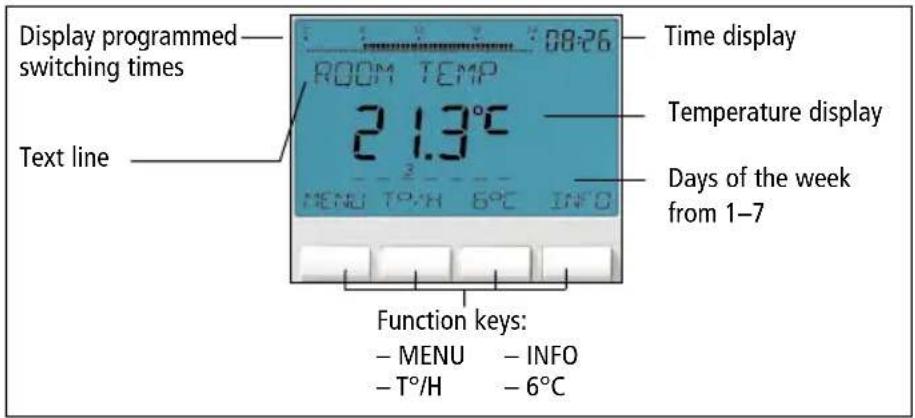
Operating instructions
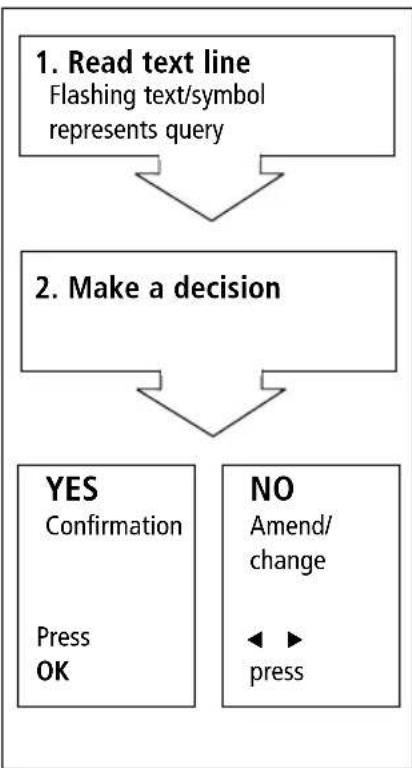
flowchart
graph TD
    A["1. Read text line\nFlashing text/symbol\nrepresents query"] --> B["2. Make a decision"]
    B --> C["YES\nConfirmation\nPress\nOK"]
    B --> D["NO\nAmend/change\n◄► press"]

Connection/installation
GB


WARNING
Warning, danger of death through electric shock!
▶ Must be installed by qualified electrician!
▶ Disconnect power source.
▶ Cover or shield any adjacent live components.
▶ Ensure device cannot be switched on!
▶ Check power supply is disconnected.
Earth and bypass.

controlling burners or gas water heaters

controlling circulation pump or actuator
* external input, only with RAMSES 831_832 top2
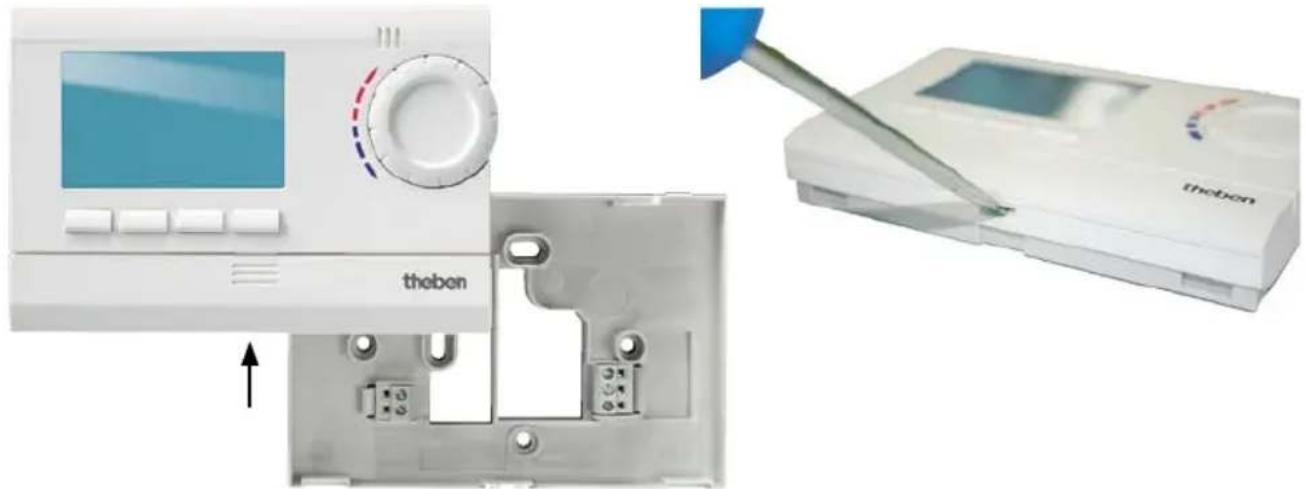
Installation
➢ Fix plate to wall and attach device.
➢ Ensure installation height of approx. 1.5 m.
Dismantling
➢ Insert screwdriver from below, push detent hooks up and open device.
natural_image
Medical device setup showing a monitor with control panel and a handheld device labeled 'thebon' (no visible text or symbols on main components)Insert batteries
Only be carried out by a qualified electrician.
Only use alkaline 1.5 V AA batteries.
➢ Ensure correct polarity when fitting batteries.
➢ Dispose of batteries in an environmentally sound manner.
Reset
➢ Press a pointed object into the opening on the left hand side of the device.
Replace batteries
- Battery symbol flashes on display, controller remains active. The batteries should be replaced.
- If the display flashes, the controller is no longer active; the relay remains permanently switched on. The batteries must be replaced immediately.
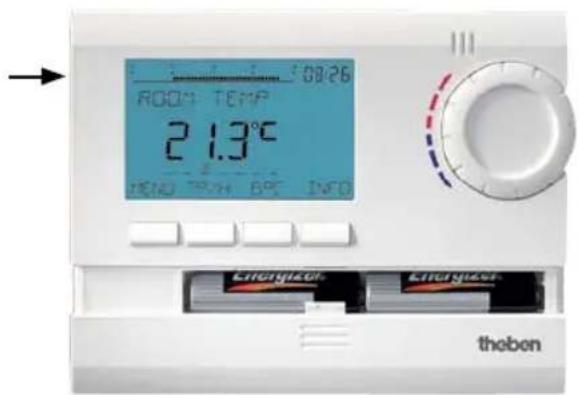
Initial start-up
With mains devices, after connecting mains lead or with battery devices, after inserting batteries, press the right key for more than 3 s and follow on-screen instructions (see fig.).
Date, time and summer/winter rule can be set via MENU menu under TIME/DATE.
Date and time have to be set with the RAMSES 811 top2 and RAMSES 812 top2 models, RAMSES 831 top2 and RAMSES 832 top2 are factory-set.
RAMSES 811 top2 and RAMSES 831 top2 are battery devices; RAMSES 812 top2 and RAMSES 832 top2 are mains devices.

flowchart
graph TD
    A["ENGLISH"] --> B["YEAR"]
    B --> C["MONTH"]
    C --> D["DAY"]
    D --> E["HOUR"]
    E --> F["MINUTE"]
    F --> G["ROOM TEMP 21.6°C"]

User information
GB
Note:
The whole screen, except for temperature and time, is faded out after 5 seconds. Press the INFO key to restore screen.
This setting can be changed under USER SETTINGS/DISPLAY.
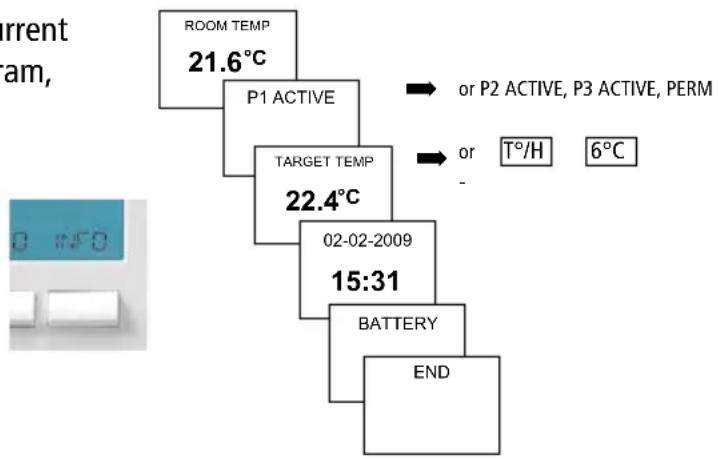
INFO key – View settings
The INFO key allows you to access current room temperature, temperature program, target temperature, date/time or battery status.
➢ Press INFO key repeatedly.
flowchart
graph TD
    A["ROOM TEMP 21.6°C"] --> B["P1 ACTIVE"]
    B --> C["TARGET TEMP 22.4°C"]
    C --> D["02-02-2009 15:31"]
    D --> E["BATTERY"]
    E --> F["END"]
    G["OR T°/H"] --> H["PERM 6°C"]
T°/H key – Setting the timer function
➢ Press irc/H key. REQUIRED TEMPERATURE (6 °C–30 °C) appears.
➢ Use the + or - keys on the rotary control to set the value.
➢ Confirm with OK. DURATION appears.
➢ Use the + or - buttons on the rotary control to set duration (from 0:30 – 24:00).
➢ Confirm with OK. COUNTDOWN appears.
Provided the whole screen is shown, the Tirc/H button flashes to display the set countdown. The set temperature is maintained for the selected period.
Delete T°/H function
➢ Press EXIT key.
RETURN TO PROGRAM appears.
6°C key – Set fixed temperature
➢ Press 6ircC key. REQUIRED TEMPERATURE ( 6ircC-30ircC ) appears.
Use the + or - buttons on the rotary control to set the value.
➢ Confirm with OK. QUIT PROGRAM appears.
Provided the whole screen is shown, the 6irc C button flashes to display the current function. The set temperature is maintained until the function is switched off manually
➢ Press EXIT key. RETURN TO PROGRAM appears.
Change target temperature
Use rotary control to make changes
In standard operation mode, you can temporarily change current target temperature via the rotary control. It is not stored in the program and is replaced by the set value at the next programmed switching time.
The following applies to all programs:
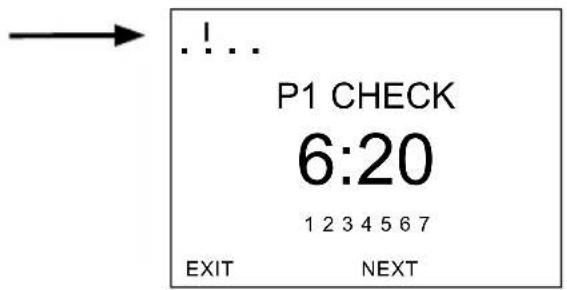
The broken bar in the top left of the display shows the number of menu points in the relevant menu. The flashing cursor indicates the point in the menu that you are currently in.

natural_image
Circular object with dashed red and blue curved lines, no visible text or symbols➢ Turn rotary control up or down to change temperature setting (in 0.2 °C increments).
Temperature programs
RAMSES top2 devices have several preset programs.
- P1
- P2
- P3
Use the MENU/PROGRAMMING key to access selection of active temperature program.
Change temperature programs (P1, P2, P3)
The programs are adjusted using the MENU, key in the PROGRAMMING menu (see page 15ff.)
Mo Tu We Thu Fr Sa Su


MENU – Overview
GB

flowchart
graph TD
    A["PROGRAMMING"] --> B["PROG P1"]
    B --> C["PROG P2"]
    C --> D["PROG P3"]
    D --> E["CLEAR PROG"]
    B --> F["TIME/DATE"]
    F --> G["YEAR"]
    G --> H["MONTH"]
    H --> I["DAY"]
    I --> J["HOUR"]
    J --> K["MINUTE"]
    K --> L["SU-WI RULE"]
    L --> M["EUROPA"]
    F --> N["HOLIDAY USER SETTINGS"]
    N --> O["START HOLIDAY"]
    O --> P["YEAR"]
    P --> Q["MONTH"]
    Q --> R["DAY"]
    R --> S["END HOLIDAY"]
    S --> T["..."]
    T --> U["TARGET TEMP"]
    N --> V["LANGUAGE"]
    V --> W["DISPLAY"]
    W --> X["LCD BACKLIGHT"]
    X --> Y["CONTRAST"]
    Y --> Z["KEY LOCK"]
    Z --> AA["FACTORY SET"]
    AA --> AB["PUMP PROTECTION"]
    AB --> AC["OPTIMISE"]
    AC --> AD["*"]
    AD --> AE["EXT INPUT"]
    AE --> AF["CONTROLLER"]
    AF --> AG["SERVICE"]
    AG --> AH["INFO"]
    AD --> AI["* only with RAMSES 831 top2/RAMSES 832 top2"]
PROGRAMMING
Programs P1–P3 are preset but they can be amended or deleted.
A maximum of 24 switching times can be set per program, up to a total of 42.

flowchart
graph TD
    A["MENU"] --> B["PROGRAMMIE-RUNG"]
    B --> C["PROG P1"]
    C --> D["PROG P2"]
    D --> E["PROG P3"]
    E --> F["CLEAR PROG"]
| Program P1 (preset)Mon–Fri 21 °C 6.00–22.00otherwise 17 °CSat–Sun 21 °C 7.00–23.00 |
| Program P2 (preset)Mon–Fri 21 °C 6.00–8.0016.00–22.00otherwise 17 °CSat–Sun 21 °C 7.00–23.00 |
| Program P3 (preset)Mon–Fri 21 °C 12.00–20.00otherwise 17 °CSat–Sun 21 °C 7.00–22.00 |
Reset switching time
➢ Press MENU key. The display shows PROGRAMMING.
➢ Confirm by pressing OK.
The display shows, for example, PROG P1.
Confirm by pressing OK.
➢ Selected P1 NEW using the + or - keys or the rotary control.
Confirm by pressing OK.
➢ Selected desired days using the + or - keys or the rotary control (e.g. Mon–Fri, Sat–Sun, individual days or daily).
Confirm by pressing OK.
Enter switching time in hours, minutes and target temperature using the + or - keys or the rotary control.
Confirm by pressing OK.

flowchart
graph TD
    A["MENU"] --> B["PROGRAMMING"]
    B --> C["P1 NEW"]
    C --> D["P1 MON-FRI 12345--"]
    C --> E["P1 SAT-SUN 67"]
    C --> F["DAILY 1234567"]
    C --> G["P1 MONDAY 1----"]
    D --> H["P1 HOUR 2:00 1234567"]
    E --> H
    F --> H
    G --> H
    H --> I["P1 MINUTE 2:20 1234567"]
    I --> J["TARGET TEMP 20.0°C"]
Change or clear switching time
➢ Press MENU key. The display shows PROGRAMMING.
Confirm by pressing OK.
The display shows, for example, PROG P1.
Confirm by pressing OK.
➢ Selected P1 CHANGE or P1 CLEAR using the + or - or the rotary control.
➢ Confirm P1 CHANGE by pressing OK.
Select switching time for desired days using the + or - keys or the rotary control (e.g. Mon-Fri, Sat-Sun, individual days or daily).
Confirm by pressing OK.
Enter switching time in hours and minutes using the + or - keys or rotary control and confirm by pressing OK.

flowchart
graph TD
    A["PROGRAMMING"] --> B["P1 CHANGE P1 CLEAR"]
    C["MENU"] --> A
    D["PROG P2PROG P1"] --> B
    E["P1 MON-FRI --:-- 12345--"] --> F["P1 SAT-SUN --:-- ----67"]
    G["DAILY --:-- 1234567"] --> F
    H["P1 MONDAY --:-- 1----"] --> I["P1 HOUR 2:00 1234567"]
    F --> J["P1 HOUR 2:00 1234567"]
    J --> K["P1 MINUTE 2:20 1234567"]
    K --> L["TARGET TEMP 20.0°C"]
Check switching time
➢ Press MENU key. The display shows PROGRAMMING.
➢ Confirm by pressing OK.
The display shows, for example, PROG P1.
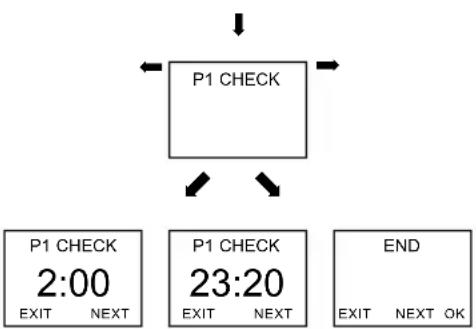
➢ Confirm by pressing OK. The display shows P1 CHECK.
Confirm by pressing OK.
➢ Press NEXT key. All programmed switching times can be viewed in succession.
flowchart
graph TD
    A["P1 CHECK"] --> B["EXIT"]
    A --> C["NEXT"]
    D["P1 CHECK 2:00"] --> E["EXIT"]
    D --> F["NEXT"]
    G["P1 CHECK 23:20"] --> H["EXIT"]
    G --> I["NEXT"]
    J["END"] --> K["EXIT"]
    J --> L["NEXT OK"]
Delete program
▶ Confirm PROGRAMMING by pressing OK.
▶ Select CLEAR PROG using the + or - keys.
➢ Confirm by pressing OK. The display shows CLEAR P1.
➢ Confirm by pressing OK. The display shows CONFIRM.
Confirm by pressing OK.

flowchart
graph TD
    A["MENU"] --> B["PROGRAMMING"]
    B --> C["CLEAR PROGPROG P1"]
    C --> D["CLEAR P1"]
    D --> E["CONFIRM"]
TIME/DATE
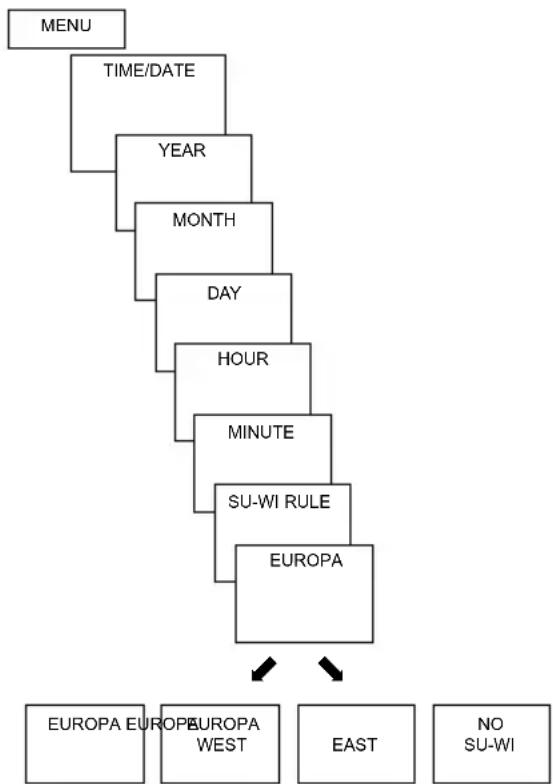
Set date, time and summer/winter rule
➢ Press MENU key. The display shows PROGRAMMING.
➢ Selected TIME/DATE using the + or - keys or the rotary control.
➢ Confirm by pressing OK. The display shows YEAR.
Change hours, minutes etc. in succession using the + or - keys or the rotary control.
The display shows SU-WI RULE.
➢ Confirm by pressing OK. The display shows EUROPA, EUROPA WEST, EUROPA EAST or NO SU-WI.
▶ Select summer winter rule by pressing OK.
flowchart
graph TD
    A["MENU"] --> B["TIME/DATE"]
    B --> C["YEAR"]
    C --> D["MONTH"]
    D --> E["DAY"]
    E --> F["HOUR"]
    F --> G["MINUTE"]
    G --> H["SU-WI RULE"]
    H --> I["EUROPA"]
    I --> J["EUROPA EUROPA WEST"]
    I --> K["EAST"]
    I --> L["NO SU-WI"]
HOLIDAY
Set Holiday program
➢ Press MENU key. The display shows PROGRAMMING.
➢ Selected TIME/DATE using the + or - keys or the rotary control.
➢ Confirm by pressing OK. The display shows START HOLIDAY.
▶ Select year, month, day etc. in succession.
➢ Use + or – keys or rotary control to change value.
▶ Confirm each setting by pressing OK.
➢ Finally, enter END HOLIDAY in same way as START HOLIDAY entry.
➢ Set desired temperature for the holiday period using the + or – keys and confirm with OK.

flowchart
graph TD
    A["MENU"] --> B["HOLIDAY"]
    B --> C["START HOLIDAY"]
    C --> D["YEAR"]
    D --> E["MONAT"]
    E --> F["MONTH"]
    F --> G["HOUR"]
    G --> H["END HOLIDAY"]
    H --> I["..."]
    I --> J["TARGET TEMPERATURE"]
A maximum of one holiday period can be entered.
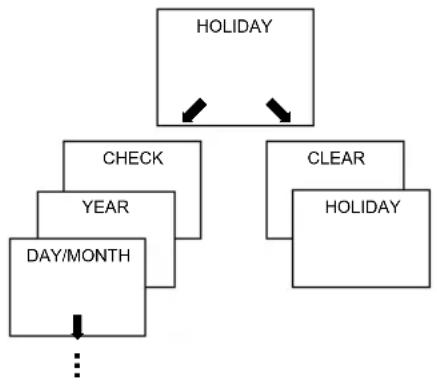
Check/clear holiday program
(only possible with a programmed holiday period)
flowchart
graph TD
    A["HOLIDAY"] --> B["CHECK"]
    A --> C["CLEAR"]
    B --> D["YEAR"]
    C --> E["HOLIDAY"]
    D --> F["DAY/MONTH"]
    E --> F
    F --> G["..."]
Switch off holiday program
HOLIDAY is displayed on screen during the programmed holiday period. The controller can only be operated once the holiday mode has been switched off.
➢ Confirm HOLIDAY on display with OFF.
The display shows HOLIDAY OFF.

Briefly interrupt holiday program and restart
The program can be interrupted during the holiday period and restarted with the available data.
➢ Confirm HOLIDAY on screen by pressing OK.
The display shows RESTART.
Confirm by pressing OK. The display shows HOLIDAY.

HOLIDAY
RESTART
HOLIDAY
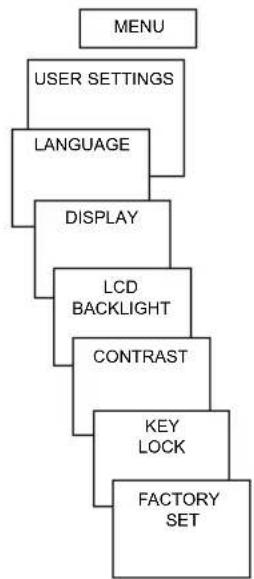
USER SETTINGS
Set language
➢ Press MENU key. The display shows PROGRAMMING.
➢ Selected USER SETTINGS using the + or - keys or the rotary control.
➢ Confirm by pressing OK. The display shows LANGUAGE.
➢ Confirm by pressing OK.
The display shows, for example,
ENGLISH.
Use + or – keys or rotary control to select language.
Confirm by pressing OK.

flowchart
graph TD
    A["MENU"] --> B["USER SETTINGS"]
    B --> C["LANGUAGE"]
    C --> D["DISPLAY"]
    D --> E["LCD BACKLIGHT"]
    E --> F["CONTRAST"]
    F --> G["KEY LOCK"]
    G --> H["FACTORY SET"]
Set display
➢ Confirm DISPLAY by pressing OK.
➢ Use + or – keys or rotary control to select values 1–4.
Confirm by pressing OK.
flowchart
graph TD
    A["MENU"] --> B["USER SETTINGS"]
    B --> C["LANGUAGE"]
    C --> D["DISPLAY"]
    D --> E["LCD BACKLIGHT"]
    E --> F["CONTRAST"]
    F --> G["KEY LOCK"]
    G --> H["FACTORY SET"]

1 = Standard display: after 5 seconds all display content except for temperature and e faded out (factory
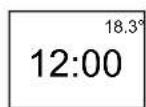
2 = Standard display as in 1, but time and temperature are swapped round

3 = complete display
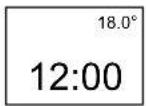
4 = complete display as in 3, but time and temperature are swapped round
Set LCD backlight
(only with RAMSES 831 top2/
RAMSES 832 top2)
The brightness of the backlighting can be set at different levels.
➢ Confirm LCD BACKLIGHT by pressing OK.
The display shows, for example, 3.
➢ Use + or – keys or the rotary control to select 0-3.
Confirm by pressing OK.
Set contrast
Screen contrast can be set at different levels.
➢ Confirm CONTRAST by pressing OK. The display shows, for example, 8.
➢ Use + or – keys or the rotary control to select 0-15.
Confirm by pressing OK.
Keypad lock
The device is fitted with a keypad lock that is switched on or off via software program. When the keypad lock is switched on, a key symbol appears on the display and pressing a key shows KEY LOCK on the display.
Set key lock
➢ Confirm KEY LOCK by pressing OK.
The display shows WITH or
NO KEY LOCK.
▶ Confirm selection by pressing OK.
Briefly interrupt keypad lock
The keypad lock can be interrupted to allow programming etc. The keypad lock is reactivated once changes are completed and the standard operating mode is returned to.
➢ Press INFO key for more than 3 seconds.
Set factory settings
The factory settings return all controller settings to delivery status.
➢ Confirm FACTORY SET by pressing OK.
The display shows CONFIRM.
Confirm by pressing OK.

Operating level for specialist personnel
GB
PROFESSIONAL SETTINGS – Set wall compensation
If the installation site is not in a good place, this may lead to a variation in temperature between the detected and actual room temperature. This can be corrected by using wall compensation.
➢ Press MENU key. The display shows PROGRAMMING.
➢ Selected PROFESSIONAL SETTINGS using the + or - keys or the rotary control.
➢ Confirm by pressing OK. The display shows WALL COMP.
Confirm by pressing OK.
Use + or – keys or rotary control to change the temperature setting and confirm by pressing OK.


flowchart
graph TD
    A["MENU"] --> B["PROFESSIONAL SETTINGS"]
    B --> C["WALL COMP"]
    C --> D["OPTIMISE"]
    D --> E["PUMP PROTECTION"]
    E --> F["EXT INPUT"]
    F --> G["CONTROL"]
    G --> H["SERVICE"]
    H --> I["INFO"]
Set optimisation
(only with RAMSES 831 top2/RAMSES 832 top2)
The optimisation function allows you to achieve a certain room temperature at a desired switching point. The display shows how many minutes earlier the heating has to be started. This time applies per K of temperature difference between actual temperature and the desired setpoint temperature.
Example:
In the bathroom at 06.00 a change is programmed from reduction (17 °C) to comfort temperature(23 °C).
Without the optimisation function, the room thermostat stops heating request for bathroom at 06.00. Depending on the size of the room and heating system used, the bathroom reaches the desired 23 °C at 06.30, for example.
With a set optimisation of 5 min/K, the thermostat requests the heating requirement earlier as follows:
• Target temperature at 06.00 --> 23 °C
• Actual temperature --> 17 °C
• i. e. Delta T = 6 K
- 6 K* 5 min / K = 30 min
The controller starts the heating 30 mins earlier and reaches the target temperature at 06.00. The optimisation value depends on spatial and heating setup.
▶ Confirm OPTIMISE by pressing OK.
➢ Use the + or – keys or rotary control to set the value (of 1–60) and confirm by pressing OK.
Set pump protection
Pump protection is not activated in the factory. But it can be set in the PROFESSIONAL SETTINGS menu.
➢ Confirm PUMP PROTECTION by pressing OK.
Use the + or - keys or the rotary control to select ON or OFF and confirm by pressing OK.
➢ Set TIME and DURATION using the + or - keys or the rotary control and confirm by pressing OK.

flowchart
graph TD
    A["PUMP PROTECTION ON"] --> B["TIME 11:30"]
    B --> C["DURATION 0.40"]
    C --> D["PUMP PROTECTION"]
Set external input
The external input on the RAMSES 831 top2/ RAMSES 832 top2 can be configured for various external sensors.
CAUTION! Input is active, therefore do not use external voltage. The connected contact must be floating and electrically isolated.
▶ Confirm EXT INPUT by pressing OK.
➢ You can choose from UNUSED INPUT, FLOOR SENSOR, ROOM SENSOR, WINDOW SWITCH, PHONE SWITCH, PRESENCE DETECTOR.
➢ Confirm desired sensor/contact by pressing OK. Select available options and confirm by pressing OK.
The following options are available with the individual sensors/contacts
| Floor sensor: Mode 1 no options, floor temperature control,floor temperature is shown on screenMode 2 Floor temperature control, floor temperature levelcan be set between 20 °C and 30 °C, room temperatureis shown on display; floor sensor (907 0 321) |
| Room sensor: no options, internal temperature sensor is switched off; externaltemperature sensor (IP 65) (907 0 459) |
| Presence detector: Temperature selection this temperature is controlled when the HVACoutput on the presence detector is switched on. If nopresence is detected, the set program is used. |
| Window switch: no options,provided the window switch is switched on, the thermostat controls to frost protectiontemperature level; WINDOW SWITCH is shown in display. |
| Phone switch: Temperature selection Select temperature level for controller when the phone switch is switched on. |
| Time selection Select time until phone switch turns off automatically. |
| PHONE SWITCH is shown on screen if the phone switch is switched on. The switched contact must be switched off manually to allow the control to be used again. A safety shutdown switches the contact off again automatically at the preset time. The telephone remote switch used should have a pulse output. |
Set controller
Controller characteristics of pulse duration controller
With adapted heating systems, a PD controller is noted for its short transient time, minimal overshoot and therefore high control, accuracy.
Controller characteristics of a hysteresis-/on/off controller
With over or undersized heating systems, hysteresis controllers are noted for their minimal switching frequency and low temperature variations.
➢ Use + or – keys or rotary control to implement settings and confirm by pressing OK.
▶ Confirm CONTROL by pressing OK.
You can choose between PD CONTROL or HYST CONTROL.

flowchart
graph TD
    A["CONTROL"] --> B["PD CONTROL"]
    A --> C["HYST CONTROL"]
    B --> D["AMPLITUDE 1.2 °C"]
    C --> E["HYSTERESIS 0.2 °C"]
    D --> F["PERIOD 10"]
    E --> G["HYST CONTROL"]
    F --> H["CONTROL OFFSET 0.1 °C"]
    G --> I["PD CONTROL"]
Set maintenance period
With maintenance, it is a question of a "reminder function".
➢ Confirm SERVICE by pressing OK.
The display shows
MONTHS BEFORE NEXT SERVICE.
➢ Use the + or – keys or the rotary control to enter the value and confirm by pressing OK.

flowchart
graph TD
    A["SERVICE"] --> B(MONTHS BEFORE NEXT SERVICE)
    B --> C["12"]
Technical data
Mains device:
Nominal voltage: 230 -240 V\~, +10 %/-15 %
Frequency: 50–60 Hz
Power reserve: 4 hours
Power consumption: typically 0.5 VA capacitive
Contact: Two-way switch, switching of choice of external wires is permitted
max. 6 A (1) /250 V\~
min. 1 mA/5 V DC (SELV/PELV
switching is not permitted)
Battery-operated device:
Batteries: 2 x alkaline batteries 1.5 V, AA type
Power reserve during
battery change: 10 minutes
Mode of operation: Type 1 B in accordance with EN 60730-1
Contact: Two-way switch, floating max. 6 (1) A/250 V\~ min. 1 mA/5 V DC
Contact material: AgSnO
Temperature range: +4 °C to +30 °C in increments of 0.2 °C
Permissible ambient
temperature: 0 °C ... +55 °C
Control period: 5–30 min. (PD controller)
Control capture range: ±0.2 K to 5 K (PD controller)
Switching hysteresis: ±0.2 K to ±1.0 K (hysteresis controller)
Memory locations: 42
Protection class: II in accordance with EN 60730-1 for designated installation
Protection rating: IP 20 in accordance with EN 60529
Time accuracy: ≤ 1 s/day at 20 °C
Pollution level: 2
Load current: max. 5 A internal NTC max. 6 A external NTC
theben
RAMSES
RAMSES 811 top2 RAMSES 831 top2
811 9 132 831 9 132
RAMSES 812 top2 RAMSES 832 top2
812 0 132 832 0 132
Installation and
operating instructions
Room thermostat
D
GB
F
E
I
NL
309358 04
GB

RAMSES 832 top2
Contents
Basic safety instructions 3
Screen and keys 4
Operating instructions 4
Connection/installation/uninstallation 5
Initial start-up 7
Fit/change batteries 7
Reset 7
Initial start-up 8
User operating level 9
INFO key 9
PARTY key 10
ECO key 10
Temperature programs 11
MODE key – Change/program settings 13
MODE – Settings– Overview 14
Change target temperature 15
Set date, time and summer/winter time 15
Set holiday program etc. 16
Programming 18
Reset switching time 19
Change or clear switching time 20
View switching time 21
Delete program 21
Set language 22
Set display 22
Set LCD backlight 23
Set contrast 23
Set keypad lock 24
Set factory settings 24
Operating level for specialist personnel 25
Set wall compensation 25
Set optimisation 26
Set pump protection 27
Set external input 27
Set controller 30
Set maintenance period 31
Technical data 32
Basic safety instructions
GB


WARNING
Danger of death through electric shock or fire!
➢ Installation should only be carried out by a qualified electrician!
- The device is designed for wall installation
• Corresponds to type 1 B in accordance with IEC/EN 60730-1
Designated use
- The room thermostat controls the room temperature in houses, offices etc.
- It is used in dry rooms with normal levels of domestic cleanliness
Disposal
Dispose of device and batteries in an environmentally sound manner
Screen and keys
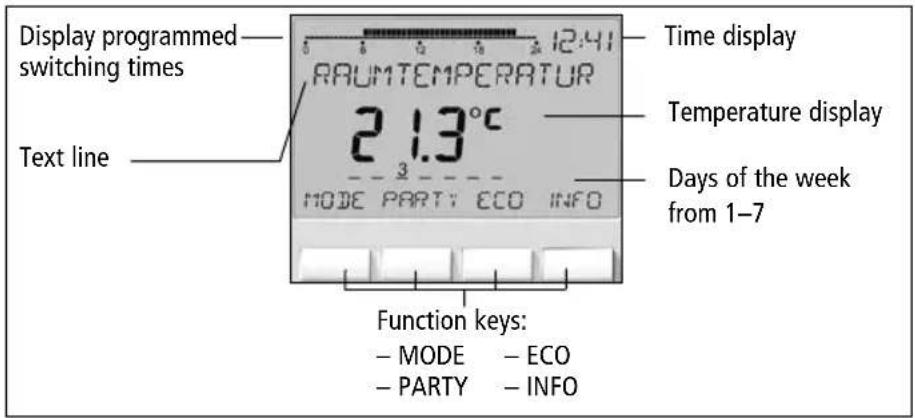
Operating instructions

flowchart
graph TD
    A["1. Read text line\nFlashing text/symbol\nrepresents query"] --> B["2. Make a decision"]
    B --> C["YES\nConfirmation\nPress\nOK"]
    B --> D["NO\nAmend/change\n◄► press"]

flowchart
graph TD
    A["ESC"] --> B["Leave menu"]
    B --> C["<<-->"]
    C --> D["Scroll through menu or"]
    D --> E["-/+"]
    E --> F["change values"]
    G["OK"] --> H["Store selection"]
    G --> I["Confirm selection"]
Connection/installation
GB


WARNING
Warning, danger of death through electric shock!
▶ Must be installed by qualified electrician!
▶ Disconnect power source.
▶ Cover or shield any adjacent live components.
▶ Ensure device cannot be switched on!
▶ Check power supply is disconnected.
Earth and bypass.

flowchart
graph TD
    A["9"] --> B["③"]
    A --> C["②"]
    A --> D["①"]
    B --> E["T1"]
    C --> F["T2"]
    D --> G["L"]
    D --> H["N"]
    I["⑧"] --> J["⑦"]
    K["L"] --> L["N"]
* external input, only with RAMSES 831_832 top2

flowchart
graph TD
    A["9"] --> B["3"]
    A --> C["2"]
    A --> D["1"]
    A --> E["6"]
    A --> F["5"]
    A --> G["4"]
    B --> H["8*"]
    C --> H
    D --> H
    E --> H
    F --> H
    G --> H
    H --> I["△"]
controlling circulation pump or actuator controlling burners or gas water heater
Installation
➢ Fix plate to wall and attach device.
➢ Ensure installation height of approx. 1.5 m.
Dismantling
➢ Insert screwdriver from below, push detent hooks up and open device.
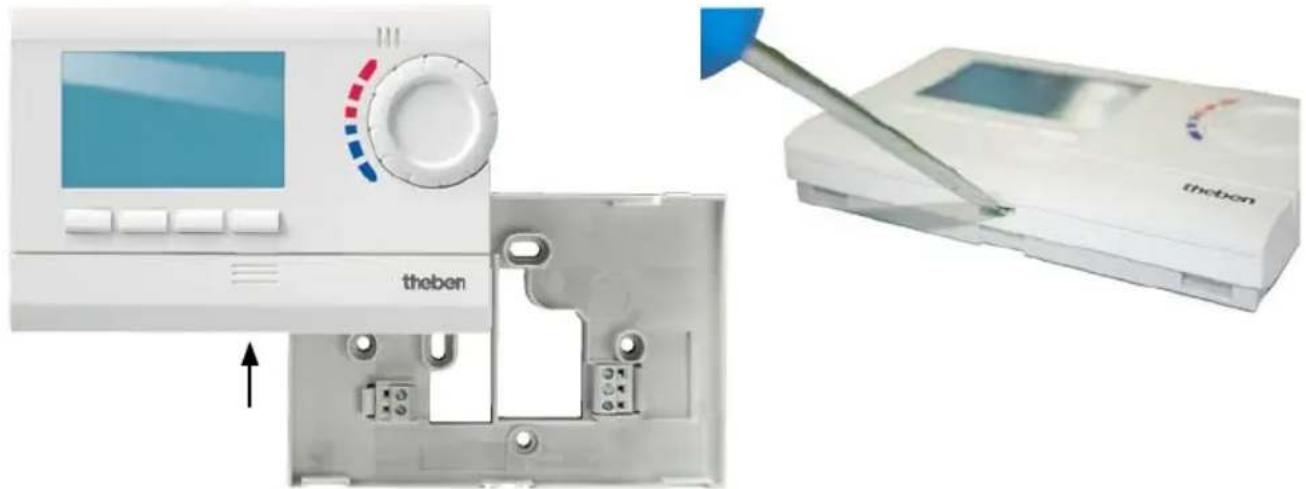
natural_image
Medical device setup showing a monitor with a red control knob, a device labeled 'theben' inserted into a plastic housing, and a tool interacting with the screen (no visible text or symbols on main components)Insert batteries
Only be carried out by a qualified electrician.
Only use alkaline 1.5 V AA batteries.
➢ Ensure correct polarity when fitting batteries.
➢ Dispose of batteries in an environmentally sound manner.
Reset
➢ Press a pointed object into the opening on the left hand side of the device.
Replace batteries
- Battery symbol flashes on display, controller remains active. The batteries should be replaced.
- If the display flashes, the controller is no longer active; the relay remains permanently switched on. The batteries must be replaced immediately.
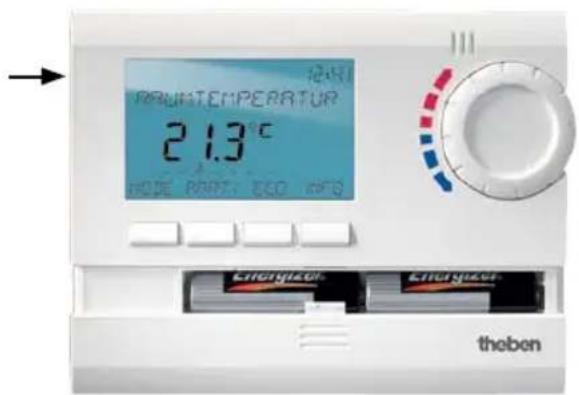
Initial start-up
With mains devices, after connecting mains lead or with battery devices, after inserting batteries, press the right key for more than 3 s and follow on-screen instructions (see fig.).
Date, time and summer/winter rule can be set via MODE menu under TIME/DATE.
Date and time have to be set with the RAMSES 811 top2 and RAMSES 812 top2 models, RAMSES 831 top2 and RAMSES 832 top2 are factory-set.
RAMSES 811 top2 and RAMSES 831 top2 are battery devices; RAMSES 812 top2 and RAMSES 832 top2 are mains devices.

flowchart
graph TD
    A["GERMAN"] --> B["YEAR"]
    B --> C["MONTH"]
    C --> D["DAY"]
    D --> E["HOUR"]
    E --> F["MINUTE"]
    F --> G["ROOM TEMP 21.6°C"]

User information
GB
Note:
The whole screen, except for temperature and time, is faded out after 5 seconds. Press the INFO key to restore screen.
This setting can be changed under OPTIONS/DISPLAY.
INFO key – View settings
The INFO key allows you to access current room temperature, temperature program, setpoint temperature, date/time or battery status.
➢ Press INFO key repeatedly.

flowchart
graph TD
    A["ROOM TEMP 21.6°C"] --> B["P1 ACTIVE"]
    B --> C["TARGET TEMP 22.4°C"]
    C --> D["02-02-2009 15:31"]
    D --> E["BATTERY"]
    E --> F["ROOM TEMP 21.6°C"]
    style A fill:#f9f,stroke:#333
    style B fill:#ccf,stroke:#333
    style C fill:#cfc,stroke:#333
    style D fill:#fcc,stroke:#333
    style E fill:#cff,stroke:#333
    style F fill:#ffc,stroke:#333
PARTY key – Set PARTY function
➢ Press PARTY key.
The display shows PARTY TARGET TEMP 23.0 °C.
Provided the whole screen is shown, the PARTY key flashes to display the set party mode. The INFO key plus the PARTY key appear once the contents of the screen are faded out.
Delete PARTY function
➢ Press PARTY key.
The display shows PARTY OFF.
Change PARTY TARGET TEMP
The rotary control adjusts the PARTY TARGET TEMP up or down.
ECO key – Set ECO function
➢ Press ECO key.
The display shows ECO TARGET TEMP 17.0 °C.
Provided the whole screen is shown, the ECO key flashes to display the set party mode. The INFO key plus the ECO key appear once the contents of the display are faded out.
Clear ECO function
▶ Press ECO key.
The display shows ECO OFF.
Change ECO TARGET TEMP
The rotary control adjusts the ECO TARGET TEMP up or down.
Temperature programs
RAMSES top2 devices have several preset programs.
- P1
- P2
- P3
- PERM COMFORT
- PERM REDUCED
- FROST PROTECTION
Use the MODE key to access selection of active temperature program.
Change temperature programs (P1, P2, P3)
The programs are adjusted using the MODE, key in the SETTINGS menu (see page 13ff.)
Use rotary control to make changes
In standard operation mode, you can temporarily change current setpoint temperature via the rotary control. It is not stored in the program and is replaced by the set value at the next programmed switching time.

natural_image
Circular object with red and blue square markings, no visible text or symbols➢ Turn rotary control up or down to change temperature setting (in 0.2 °C increments).
The following applies to all programs:
The broken bar in the top left of the display shows the number of menu points in the relevant menu. The flashing cursor indicates the point in the menu that you are currently in.

MODE key – Change/program settings
GB
Using the MODE key and selecting the SETTINGS menu point brings up the programming and setting mode.
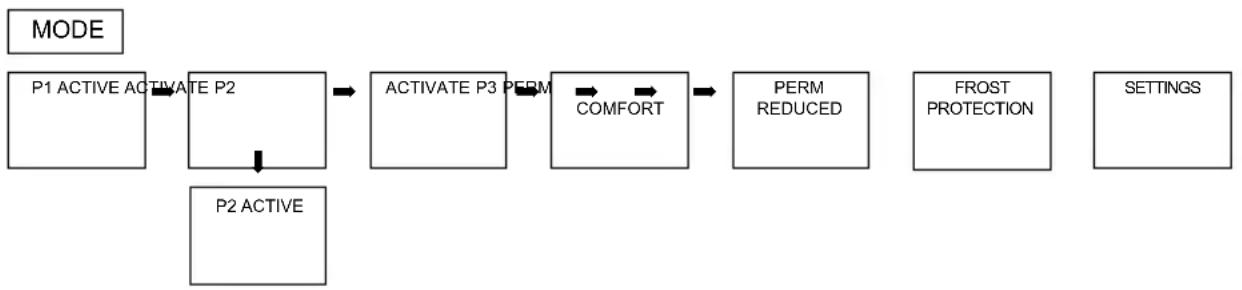
Select preset program
➢ Press MODE key.
flowchart
graph LR
    A["P1 ACTIVE ACTIVATE P2"] --> B["ACTIVATE P3 PERM"]
    B --> C["COMFORT"]
    C --> D["PERM REDUCED"]
    D --> E["FROST PROTECTION"]
    E --> F["SETTINGS"]
    G["P2 ACTIVE"] --> A
➢ Use <- or -> to scroll through menu points, select desired program and confirm by pressing OK.
MODE – Settings– Overview

flowchart
graph TD
    A["SETTINGS"] --> B["TARGET TEMP"]
    B --> C["COMFORT 3"]
    C --> D["TIME/ DATE"]
    D --> E["PROGRAMMING"]
    E --> F["PROG P1"]
    F --> G["PROG P2"]
    G --> H["PROG P3"]
    H --> I["CLEAR PROG"]
    I --> J["START HOLIDAY"]
    J --> K["LANGUAGE"]
    K --> L["DISPLAY"]
    L --> M["LCD BACKLIGHT"]
    M --> N["CONTRAST"]
    N --> O["KEY LOCK"]
    O --> P["FACTORY SET"]
    P --> Q["EXIT INPUT"]
    Q --> R["PUMP PROTECTION"]
    R --> S["OPTIMISE"]
    S --> T["SERVICE"]
    T --> U["INFO"]
    U --> V["FROST PROTECTION"]

    subgraph Settings
        B
        C
        D
        E
        F
        G
        H
        I
        J
        K
        L
        M
        N
        O
        P
        Q
        R
        S
        T
        U
    end

    subgraph Temperature Levels
        B
        C
        D
        E
        F
        G
        H
        I
        J
        K
        L
        M
        N
        O
        P
        Q
        R
        S
        T
        U
    end

    subgraph Time Periods
        D
        E
        F
        G
        H
        I
        J
        K
        L
        M
        N
        O
        P
        Q
        R
        S
        T
        U
    end

    subgraph Program Details
        D -->|*| E --> F --> G --> H --> I --> J --> K --> L --> M --> N --> O --> P --> Q --> R --> S --> T --> U
    end

    note right of B: * only with RAMSES 831 top2/RAMSES 832 top2
Change setpoint temperature
➢ Confirm TARGET TEMP by pressing OK.
The display shows COMFORT 3.
➢ Use + or – keys or rotary control to change value.
Confirm by pressing OK.
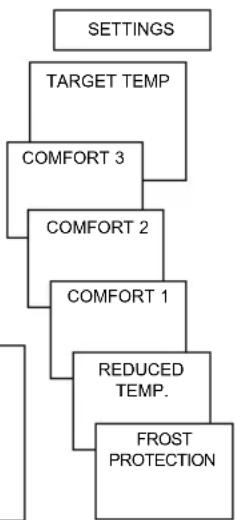
The other setpoint values (for comfort 2, frost protection etc.) are set accordingly.
All 3 comfort temperatures are available as required:
- Comfort 1–3: 10.2 °C...30 °C
- Reduced temperature: min. 10 °C, max. 0.2 K under Comfort 1
– Frost protection: from 4 °C...10 °C
flowchart
graph TD
    A["SETTINGS"] --> B["TARGET TEMP"]
    B --> C["COMFORT 3"]
    C --> D["COMFORT 2"]
    D --> E["COMFORT 1"]
    E --> F["REDUCED TEMP."]
    F --> G["FROST PROTECTION"]
Set date, time and summer/winter time
➢ Confirm TIME/DATE by pressing OK. The display shows HOUR.
➢ Change hours, minutes etc. in succession using the + or - keys or the rotary control.
➢ Confirm by pressing OK.

flowchart
graph TD
    A["EUROPE EUROPE WEST"] --> B["SU-WI RULE"]
    C["EAST"] --> B
    D["NO SU-WI"] --> B
    E["EUROPE EUROPE"] --> B
    F["YEAR"] --> B
    G["MINUTE"] --> B
    H["TIME/DATE"] --> B
    I["SETTINGS"] --> B
Set Holiday program
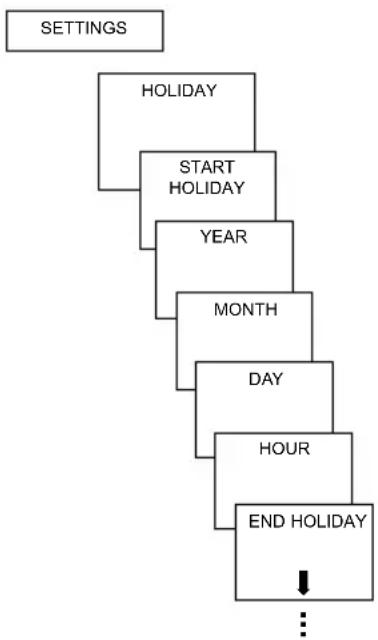
➢ Confirm HOLIDAY by pressing OK. The display shows START HOLIDAY.
Select year, month, day etc. in succession.
➢ Use + or – keys or rotary control to change value.
➢ Confirm each setting by pressing OK.
➢ Finally, enter END HOLIDAY in same way as START HOLIDAY entry.
➢ Set desired temperature for the holiday period using the + or - keys and confirm with OK.
A maximum of one holiday period can be entered.
flowchart
graph TD
    A["SETTINGS"] --> B["HOLIDAY"]
    B --> C["START HOLIDAY"]
    C --> D["YEAR"]
    D --> E["MONTH"]
    E --> F["DAY"]
    F --> G["HOUR"]
    G --> H["END HOLIDAY"]
    H --> I["..."]
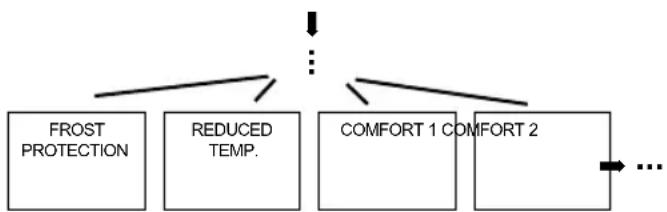
Set temperature preselection
flowchart
graph TD
    A["FROST PROTECTION"] --> B["REDUCED TEMP."]
    B --> C["COMFORT 1 COMFORT 2"]
    C --> D["..."]
View/clear holiday program
(only possible with a programmed holiday period)

flowchart
graph TD
    A["HOLIDAY"] --> B["CHECK"]
    A --> C["CLEAR"]
    B --> D["YEAR"]
    C --> E["HOLIDAY"]
    D --> F["DAY/MONTH"]
    E --> F
    F --> G["..."]
Switch off holiday program
HOLIDAY is displayed on screen during the programmed holiday period. The controller can only be operated once the holiday mode has been switched off.
➢ Confirm HOLIDAY on display with OFF.
The display shows HOLIDAY OFF.

Briefly interrupt holiday program and restart
The program can be interrupted during the holiday period and restarted with the available data.
▶ Confirm HOLIDAY on screen
by pressing OK.
The display shows
RESTART.
Confirm by pressing OK.
The display shows
HOLIDAY.

flowchart
graph TD
    A["SETTINGS"] --> B["HOLIDAY"]
    B --> C["RESTART"]
    C --> D["HOLIDAY"]
Programming
Programs P1–P3 are preset but they can be amended or deleted.
A maximum of 24 switching times can be set per program, up to a total of 42.
Program P1 (preset)
Mon–Fri comfort 1 6.00–22.00
otherwise reduction temperature
Sat-Sun comfort 1 7.00–23.00
Program P2 (preset)
Mon-Fri Comfort 1 6.00-8.00
16.00–22.00
otherwise reduction temperature
Sat-Sun Comfort 1 7.00–23.00
Program P3 (preset)
Mon–Fri comfort 1 12.00–20.00
otherwise reduction temperature
Sat-Sun comfort 1 7.00–22.00
SETTINGS
PROGRAMM ING
PROG P1
PROG P2
PROG P3
CLEAR PROG
Reset switching time
MODE – SETTINGS– PROGRAMMING
➢ Confirm PROGRAMMING by pressing OK. The display shows, for example, PROG P1.
▶ Confirm PROG P1 by pressing OK.
Press NEW key.
➢ Selected desired days using the + or – or the rotary control (e.g. Mon–Fri, Sat–Sun, individual days or daily).
Confirm by pressing OK.
➢ Select desired temperature using the + or - keys or the rotary control (comfort 1–3, reduced temp, frost protection).
Confirm by pressing OK.
➢ Enter switching time in hours and minutes using the + or - keys or the rotary control.
Confirm by pressing OK.
GB

flowchart
graph TD
    A["PROG P1"] --> B["NEW"]
    B --> C["P1 Mon - Fri\n1 2 3 4 5--"]
    B --> D["P1 Sat-Sun\n----6 7"]
    B --> E["DAILY\n1 2 3 4 5 6 7"]
    B --> F["P1 MONDAY\n1----"]
    C --> G["P1 COMFORT 1\n0:00\n1 2 3 4 5 6 7"]
    D --> G
    E --> G
    F --> G
    G --> H["P1 COMFORT 1\n2:20\n1 2 3 4 5 6 7"]
    H --> I["PROG P1"]
Change or delete switching time
➢ Confirm PROGRAMMING by pressing OK. The display shows, for example, PROG P1.
▶ Confirm PROG P1 by pressing OK.
➢ Press EDIT key. The display shows CHANGE or CLEAR.
▶ Confirm CHANGE by pressing OK.
Select switching time for desired days using the + or - keys or the rotary control (e. g. Mon–Fri, Sat–Sun, individual days or daily).
Confirm by pressing OK.
➢ Select temperature using the + or – keys or the rotary control (comfort 1–3, reduced temp, frost protection) and confirm by pressing OK.
➢ Enter switching time in hours and minutes using the + or - keys or rotary control and confirm by pressing OK.

flowchart
graph TD
    A["PROG P1"] --> B["EDIT"]
    B --> C["CHANGE 6:00 ---- 67"]
    B --> D["CLEAR 6:00 ---- 67"]
    C --> E["P1 Mon - Fri 1 2 3 4 5 --"]
    D --> F["P1 Sat-Sun 1 2 3 4 5 67"]
    D --> G["DAILY 1 2 3 4 5 6 7"]
    D --> H["P1 MONDAY 1 ----"]
    E --> I["P1 COMFORT 1 0:00 1 2 3 4 5 6 7"]
    F --> I
    G --> I
    H --> I
    I --> J["P1 COMFORT 1 2:20 1 2 3 4 5 6 7"]
    J --> K["PROG P1"]
View switching time
➢ Confirm PROGRAMMING by pressing OK. The display shows, for example, PROG P1.
▶ Confirm PROG P1 by pressing OK.
➢ Press NEXT key repeatedly.
All programmed switching times can be viewed in succession.

flowchart
graph TD
    A["PROG P1"] --> B["NEXT"]
    B --> C["P1 COMFORT 1\n2:20\n1 2 3 4 5 6 7"]
    C --> D["P1 COMFORT 1\n6:20\n1 2 3 4 5 6 7"]
    D --> E["END"]
Delete program
➢ Confirm PROGRAMMING by pressing OK.
Select CLEAR PROG using the + or - keys.
Confirm by pressing OK.
The display shows CONFIRM.
Confirm by pressing OK.

flowchart
graph TD
    A["PROGRAMM ING"] --> B["PROG P1"]
    B --> C["PROG P2"]
    C --> D["PROG P3"]
    D --> E["CLEAR PROG"]
    E --> F["CONFIRM"]
    F --> G["OUTPUT"]
    style A fill:#f9f,stroke:#333
    style G fill:#bbf,stroke:#333
Set language
➢ Confirm LANGUAGE by pressing OK.
The display shows, for example, GERMAN.
Use + or -
keys or rotary control to select language
Confirm by pressing OK.
Set display
➢ Confirm DISPLAY by pressing OK.
Use + or - keys or rotary control to select values 1-3.
Confirm by pressing OK.

flowchart
graph TD
    A["SETTINGS"] --> B["OPTIONS"]
    B --> C["LANGUAGE"]
    C --> D["DISPLAY"]
    D --> E["LCD BACKLIGHT"]
    E --> F["CONTRAST"]
    F --> G["KEY LOCK"]
    G --> H["FACTORY SET"]

1 = Standard display: after 5 seconds all display content except for temperature and e faded out.
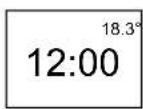
2 = Standard display: Time and temperature are swapped round

3 = complete display
Set LCD backlight
(only with RAMSES 831 top2/RAMSES 832 top2)
The brightness of the backlighting can be set at different levels.
➢ Confirm LCD BACKLIGHT by pressing OK. The display shows, for example, 3.
➢ Use + or – keys or the rotary control to select 0-3.
▶ Confirm by pressing OK.
Set contrast
Screen contrast can be set at different levels.
➢ Confirm CONTRAST by pressing OK. The display shows, for example, 8.
➢ Use + or – keys or the rotary control to select 0-15.
Confirm by pressing OK.
Keypad lock
The device is fitted with a keypad lock that is switched on or off via software program. When the keypad lock is switched on, a key symbol appears on the display and pressing a key shows KEY LOCK on the display.
Set key lock
➢ Confirm KEY LOCK by pressing OK.
The display shows WITH or
NO KEY LOCK.
▶ Confirm selection by pressing OK.
Briefly interrupt keypad lock
The keypad lock can be interrupted to allow programming etc. The keypad lock is reactivated once changes are completed and the standard operating mode is returned to. Press INFO key for more than 3 seconds.
Set factory settings
The factory settings return all controller settings to delivery status.
➢ Confirm FACTORY SET by pressing OK.
The display shows CONFIRM.
Confirm by pressing OK.

Operating level for specialist personnel
GB
Set wall compensation
If the installation site is not in a good place, this may lead to a variation in temperature between the detected and actual room temperature. This can be corrected by using wall compensation.
▶ Confirm SERVICE by pressing OK.
The display shows WALL COMP.
➢ Confirm WALL COMP by pressing OK.
Use + or - keys or rotary control to change the temperature setting and confirm by pressing OK.


flowchart
graph TD
    A["INFO"] --> B["SERVICE"]
    B --> C["CONTROL"]
    C --> D["EXT INPUT"]
    D --> E["PUMP PROTECTION"]
    E --> F["OPTIMISE"]
    F --> G["WALL COMP"]
    G --> H["SERVICE"]
    H --> I["SETTINGS"]
Set optimisation
(only with RAMSES 831 top2/RAMSES 832 top2)
The optimisation function allows you to achieve a certain room temperature at a desired switching point. The display shows how many minutes earlier the heating has to be started. This time applies per K of temperature difference between actual temperature and the desired setpoint temperature.
Example:
In the bathroom at 06.00 a change is programmed from reduction (17 °C) to comfort temperature(23 °C).
Without the optimisation function, the room thermostat stops heating request for bathroom at 06.00. Depending on the size of the room and heating system used, the bathroom reaches the desired 23 °C at 06.30, for example.
With a set optimisation of 5 min/K, the thermostat requests the heating requirement earlier as follows:
- Setpoint temperature at 06.00 --> 23 °C
• Actual temperature --> 17 °C
• i. e. Delta T = 6 K - 6 K* 5 min / K = 30 min
The controller starts the heating 30 mins earlier and reaches the setpoint temperature at 06.00. The optimisation value depends on spatial and heating setup.
▶ Confirm OPTIMISE by pressing OK.
➢ Use the + or - keys or rotary control to set the value (of 1–60) and confirm by pressing OK.
Set pump protection
Pump protection is not activated in the factory. But it can be set in the SERVICE menu.
➢ Confirm PUMP PROTECTION by pressing OK.
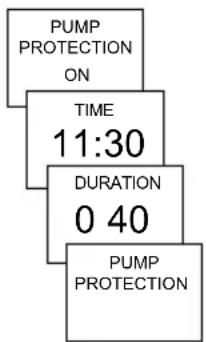
Use the + or - keys or the rotary control to select ON or OFF and confirm by pressing OK.
➢ Set TIME and DURATION using the + or - keys or the rotary control and confirm by pressing OK.
Set external input
The external input on the RAMSES 831 top2/ RAMSES 832 top2 can be configured for various external sensors.
CAUTION! Input is active, therefore do not use external voltage. The connected contact must be floating and electrically isolated.
▶ Confirm EXT INPUT by pressing OK.
➢ You can choose from UNUSED INPUT, FLOOR SENSOR, ROOM SENSOR, WINDOW SWITCH, PHONE SWITCH, PRESENCE DETECTOR.
➢ Confirm desired sensor/contact by pressing OK. Select available options and confirm by pressing OK.
The following options are available with the individual sensors/contacts
Floor sensor: Mode 1 no options, floor temperature control, floor temperature is shown on screen
Mode 2 Floor temperature control, floor temperature level can be set between 20 °C and 30 °C, room temperature is shown on display; floor sensor (907 0 321)
Room sensor: no options, internal temperature sensor is switched off; external temperature sensor (IP 65) (907 0 459)
Presence detector: Temperature selection this temperature is controlled when the HVAC output on the presence detector is switched on. If no presence is detected, the set program is used.
Window switch: no options, provided the window switch is switched on, the thermostat controls to frost protection temperature level; WINDOW SWITCH is shown in display.
Phone switch: Temperature selection Select temperature level for controller when the phone switch is switched on.
Time selection Select time until phone switch turns off
automatically.
TELEPHONE SWITCH is shown on screen if the phone switch is switched on. The switched contact must be switched off manually to allow the control to be used again. A safety shutdown switches the contact off again automatically at the preset time. The telephone remote switch used should have a pulse output.
Set controller
Controller characteristics of pulse duration controller
With adapted heating systems, a PD controller is noted for its short transient time, minimal overshoot and therefore high control, accuracy.
Controller characteristics of a hysteresis-/on/off controller
With over or undersized heating systems, hysteresis controllers are noted for their minimal switching frequency and low temperature variations.
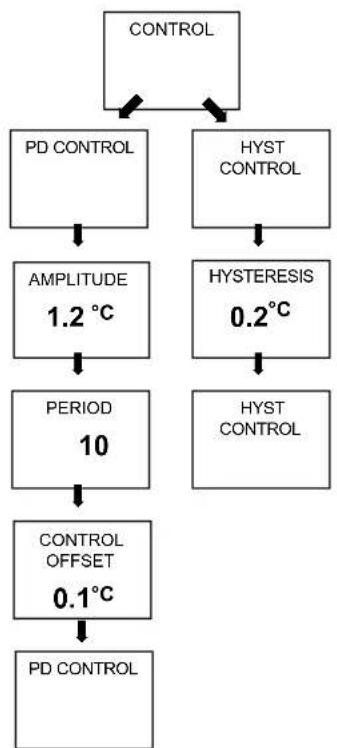
▶ Confirm CONTROL by pressing OK.
You can choose between PD CONTROL or HYST CONTROL.
➢ Use + or – keys or rotary control to implement settings and confirm by pressing OK.
flowchart
graph TD
    A["CONTROL"] --> B["PD CONTROL"]
    A --> C["HYST CONTROL"]
    B --> D["AMPLITUDE 1.2 °C"]
    C --> E["HYSTERESIS 0.2 °C"]
    D --> F["PERIOD 10"]
    E --> G["HYST CONTROL"]
    F --> H["CONTROL OFFSET 0.1 °C"]
    G --> I["PD CONTROL"]
Set maintenance period
With maintenance, it is a question of a "reminder function".
➢ Confirm SERVICE by pressing OK.
The display shows
MONTHS BEFORE NEXT SERVICE.
➢ Use the + or - keys or the rotary control to enter the value and confirm by pressing OK.

Technical data
Mains device:
Nominal voltage: 230 -240 V\~, +10 %/-15 %
Frequency: 50–60 Hz
Power reserve: 4 hours
Power consumption: typically 0.5 VA capacitive
Contact: Two-way switch, switching of choice of external wires is permitted
max. 6 A (1) /250 V\~
min. 1 mA/5 V DC (SELV/PELV
switching is not permitted)
Battery-operated device:
Batteries: 2 x alkaline batteries 1.5 V, AA type
Power reserve during
battery change: 10 minutes
Mode of operation: Type 1 B in accordance with EN 60730-1
Contact: Two-way switch, floating max. 6 (1) A/250 V\~ min. 1 mA/5 V DC
Contact material: AgSnO
Temperature range: +4 °C to +30 °C in increments of 0.2 °C
Permissible ambient
temperature: 0 °C ... +55 °C
Control period: 5–30 min. (PD controller)
Control capture range: ±0.2 K to 5 K (PD controller)
Switching hysteresis: ±0.2 K to ±1.0 K (hysteresis controller)
Memory locations: 42
Protection class: II in accordance with EN 60730-1 for designated installation
Protection rating: IP 20 in accordance with EN 60529
Time accuracy: ≤ 1 s/day at 20 °C
Pollution level: 2
Load current: max. 5 A internal NTC max. 6 A external NTC



- Operating instructions for RAMSES 811 top2\_812 top2 and RAMSES 831 top2\_832 top2
- theben
- RAMSES
- Contents
- PROGRAMMING
- TIME/DATE
- HOLIDAY
- USER SETTINGS
- Operating level for specialist personnel 25
- PROFESSIONAL SETTINGS
- Basic safety instructions
- WARNING
- Danger of death through electric shock or fire!
- Designated use
- Disposal
- Connection/installation
- Warning, danger of death through electric shock!
- Installation
- Dismantling
- Insert batteries
- Reset
- Replace batteries
- Initial start-up
- User information
- Note:
- INFO key – View settings
- T°/H key – Setting the timer function
- 6°C key – Set fixed temperature
- Change target temperature
- Use rotary control to make changes
- The following applies to all programs:
- Temperature programs
- Change temperature programs (P1, P2, P3)
- MENU – Overview
- Reset switching time
- Change or clear switching time
- Check switching time
- Delete program
- Set date, time and summer/winter rule
- Set Holiday program
- Check/clear holiday program
- Switch off holiday program
- Briefly interrupt holiday program and restart
- Set language
- Set display
- Set LCD backlight
- Set contrast
- Keypad lock
- Set key lock
- Briefly interrupt keypad lock
- Set factory settings
- Operating level for specialist personnel
- PROFESSIONAL SETTINGS – Set wall compensation
- Set optimisation
- Example:
- Set pump protection
- Set external input
- Set controller
- Controller characteristics of pulse duration controller
- Controller characteristics of a hysteresis-/on/off controller
- Set maintenance period
- Technical data
- Mains device:
- Battery-operated device:
- PARTY key – Set PARTY function
- Delete PARTY function
- Change PARTY TARGET TEMP
- ECO key – Set ECO function
- Clear ECO function
- Change ECO TARGET TEMP
- MODE key – Change/program settings
- Select preset program
- Change setpoint temperature
- Set date, time and summer/winter time
- View/clear holiday program
- MODE – SETTINGS– PROGRAMMING
- Change or delete switching time
- View switching time
- Set wall compensation
- The following options are available with the individual sensors/contacts
Brand : THEBEN
Model : RAMSES 812 top2
Category : Thermostat