W 5877 WPS Edition 111 - Washing machine MIELE - Free user manual and instructions
Find the device manual for free W 5877 WPS Edition 111 MIELE in PDF.


User questions about W 5877 WPS Edition 111 MIELE
0 question about this device. Answer the ones you know or ask your own.
Ask a new question about this device
Download the instructions for your Washing machine in PDF format for free! Find your manual W 5877 WPS Edition 111 - MIELE and take your electronic device back in hand. On this page are published all the documents necessary for the use of your device. W 5877 WPS Edition 111 by MIELE.
USER MANUAL W 5877 WPS Edition 111 MIELE
Operating instructions

natural_image
Illustration of a person cleaning a car window with hexagonal tile pattern (no text or symbols)for Washing machine W 5877 WPS Edition 111
To avoid the risk of accidents or damage to the machine it is essential to read these instructions before it is installed and used for the first time.
e n - G B
M.-Nr. 09 378 190
Disposal of the packing material
The transport and protective packing has been selected from materials which are environmentally friendly for disposal and should be recycled.
Ensure that any plastic wrappings, bags etc. are disposed of safely and kept out of the reach of babies and young children. Danger of suffocation!
Disposal of your old machine
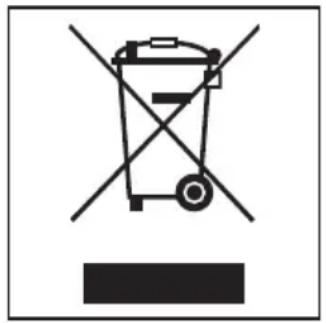
Electrical and electronic machines often contain materials which, if handled or disposed of incorrectly, could be potentially hazardous to human health and to the environment. They are, however, essential for the correct functioning of your machine. Please do not therefore dispose of it with your household waste.
natural_image
Symbol of a trash bin with crossed lines indicating no waste or discharge, and a solid black rectangle below (no text or labels)Please dispose of it at your local community waste collection / recycling centre or contact your Dealer for advice. Ensure that it presents no danger to children while being stored for disposal.
Caring for our environment 2
Warning and Safety instructions 6
Operating the washing machine....13
Control panel 13
Optional programme packages....15
Before using for the first time....16
Washing environmentally and economically 17
Energy and water consumption 17
Detergent 17
Eco feedback....18
How to wash correctly....19
Spinning 24
Final spin speed 24
Delay start. 25
Programme chart 26
Extras 30
Short. 30
Stains 30
Further extras 30
Steam smoothing 30
Pre-wash 31
Soak 31
Garment care label symbols 33
Programme sequence 34
Changing the programme sequence 36
Cancelling a programme....36
Interrupting a programme 36
Making changes to a programme 36
Adding or removing laundry after a programme has started . . . . . . . . . . . . . . . 37
Safety lock 37
Contents
Detergent 38
The correct detergent 38
Water softener 40
Washing with several components 40
Fabric conditioners and liquid starch 41
Colour run and dye removers/dyes 41
Cleaning and care 42
Cleaning the drum (Hygiene info) 42
External casing and fascia panel 42
Cleaning the detergent dispenser drawer....42
Cleaning the filter in the water inlet 44
Problem solving guide 45
The programme does not start 45
The following fault messages appear in the display and the programme stops. . 46
The following fault messages appear in the display 47
General problems 48
An unsatisfactory wash result 50
The drum door will not open 51
Opening the drum door in the event of a blocked drain outlet and/or power failure 52
Blocked drain outlet 52
After sales service 54
Future updates (PC) 54
Guarantee 54
Optional spare parts and accessories 54
Installation and connection 55
Front view. 55
Rear view 56
Installation surface. 57
Transporting the washing machine to its installation site . . . . . . . . . . . . . . . . . 57
Removing the transit bars 57
Re-fitting the transit bars 59
Levelling the machine 60
Screwing out and adjusting the feet....60
Building under a continuous worktop/in a kitchen run 61
Washer and Dryer stack....61
The Miele Waterproof system 62
Connection to the water supply 63
Connection to the drainage system....65
Electrical connection U.K. 66
Technical data 67
Consumption data 68
Notes for test institutes: 69
Settings 70
To access Settings 70
To select a Setting 70
To alter a Setting....70
To come out of Settings 70
Language 70
Total usage 71
Water plus 71
Soak 7
Gentle action 72
Suds cooling 72
Code 72
Temperature unit 73
Buzzer 73
Keypad tone 73
Brightness 73
Standby display 74
Memory 74
Anti-crease. 74
Optional accessories. 75
CareCollection 75
This washing machine conforms to current safety requirements. Inappropriate use can, however, lead to personal injury and damage to property.
To avoid the risk of accidents and damage to the washing machine, please read these instructions carefully before using it for the first time. They contain important information on its installation, safety, use and maintenance.
Keep these instructions in a safe place and ensure that new users are familiar with the content. Pass them on to any future owner.
Correct application
This washing machine is not designed for commercial use. It is intended for use in domestic households and in similar working and residential environments.
The washing machine is not intended for outdoor use.
It must only be used as a domestic appliance to wash items which are specified by the manufacturer as being washable on the care label.
Any other usage is not supported by the manufacturer and could be dangerous. Miele cannot be held liable for damage resulting from incorrect or improper use or operation of the washing machine.
The washing machine can only be used by people with reduced physical, sensory or mental capabilities, or lack of experience and knowledge, if they are supervised whilst using it or have been shown how to use it in a safe way and understand the hazards involved.
Safety with children
Children 8 years and older may use, clean or maintain the washing machine without supervision only if they have been shown how to do so in a safe way and understand the hazards involved.
Children under 8 years of age must be kept away from the machine unless they are constantly supervised.
The washing machine is not a toy! To prevent the risk of injury, do not allow children to play with it or near it, or to play with the controls.
For machines with a 'porthole' door, remember that the porthole glass will be hot when washing at high temperatures Do not let children touch it.
Technical safety
Before setting up the washing machine, check it for any externally visible damage.
Do not install or use a damaged washing machine.
Before connecting the washing machine, ensure that the connection data on the data plate (voltage and frequency) match the mains electricity supply. If in any doubt, consult a qualified electrician.
The electrical safety of this washing machine can only be guaranteed when correctly earthed. It is most important that this basic safety requirement is observed and regularly tested, and where there is any doubt the household wiring system should be inspected by a qualified electrician. The manufacturer cannot be held liable for the consequences of an inadequate earthing system (e.g. electric shock).
Do not connect the washing machine to the mains electricity supply by an extension lead. Extension leads do not guarantee the required safety of the machine (e.g. danger of overheating).
▶ Faulty components must only be replaced by genuine Miele original spare parts. Only when these parts are fitted can the safety standards of the machine be guaranteed.
▶ Unauthorised repairs could result in unforeseen dangers for the user, for which Miele cannot accept liability. Repairs should only be undertaken by a Miele approved service technician.
If the connection cable is faulty it must only be replaced by a Miele approved service technician to protect the user from danger.
The machine must be isolated from the electricity supply in the event of a fault and during installation, maintenance and repair work.
The Miele "Water protection system" protects from water damage provided the following conditions have been met:
- the machine is correctly plumbed in and connected to the electricity supply.
- if a fault has been identified, the machine must be examined by a competent person before further use, and repaired if necessary.
In areas which may be subject to infestation by cockroaches or other vermin, pay particular attention to keeping the machine and its surroundings in a clean condition at all times. Any damage which may be caused by cockroaches or other vermin will not be covered by the guarantee.
This machine must not be used in a non-stationary location (e.g. on a ship).
Do not make any alterations to the washing machine, unless authorised to do so by Miele.
Correct use
Do not install your washing machine in rooms where temperatures below freezing may occur. Frozen hoses may burst or split. The reliability of the electronic control unit may be impaired at temperatures below freezing point.
Before using the washing machine for the first time, check that the transit bars at the rear of the machine have been removed (see section on "Installation and connection"). During spinning, a transit bar which is still in place may result in damage to both the machine and adjacent furniture or appliances.
▶ Turn off the stopcock if the machine is to be left for any length of time (e.g. holiday), especially if there is no floor drain (gully) in the immediate vicinity.
▶ Flooding danger.
If hooking the drain hose into a wash basin, check that the water can drain off quickly enough to prevent the sink from overflowing. Make sure the drain hose is secure, so that the force of the water flowing out of the hose does not dislodge it.
▶ Take care to ensure that foreign objects (e.g. nails, pins, coins, paper clips) do not find their way into the machine with the laundry. These may damage components of the machine (e.g. suds container, drum), which in turn can result in damage to the laundry.
Take care when opening the drum door after using the steam function. Danger of burning due to escaping steam and the high temperature of the surface of the drum as well as the porthole glass. Stand back away from the machine and wait until the steam has dissipated.
If the correct amount of detergent is dispensed, the machine should not need to be descaled. If, however, you do wish to descale the machine only use proprietary non-corrosive descaling agents and strictly observe the instructions on the packaging. A special descaling agent is available to order from the Miele Spare Parts Department or via the internet on www.miele-shop.com.
Textiles which have been pre-treated in solvent based cleaning agents must be thoroughly rinsed in clean water before being washed in the machine.
Do not use solvent based cleaning agents, e.g. those containing benzine, in this machine, as this may result in damage to component parts and create toxic fumes. Such agents also pose a fire and explosion hazard.
Do not use solvent based cleaning agents, e.g. those containing benzine, to clean the outside surfaces of this machine. They can cause damage to plastic surfaces.
Only use dyes specified by the manufacturer as being suitable for use in a domestic washing machine. Always observe the manufacturer's instructions carefully.
Colour run and dye removers contain sulphur compounds which can cause damage such as corrosion. Do not use these products in this machine.
If detergent comes into contact with the eyes, rinse them thoroughly with lukewarm water immediately. If swallowed, seek medical assistance immediately and retain the packaging or label for reference. Those with skin problems or sensitive skin should avoid their skin coming into contact with detergent.
Accessories
▶ Accessory parts may only be fitted when expressly approved by Miele. If other parts are used, guarantee, performance and product liability claims will be invalidated.
Miele cannot be held liable for damage caused by non-compliance with these Warning and Safety instructions.
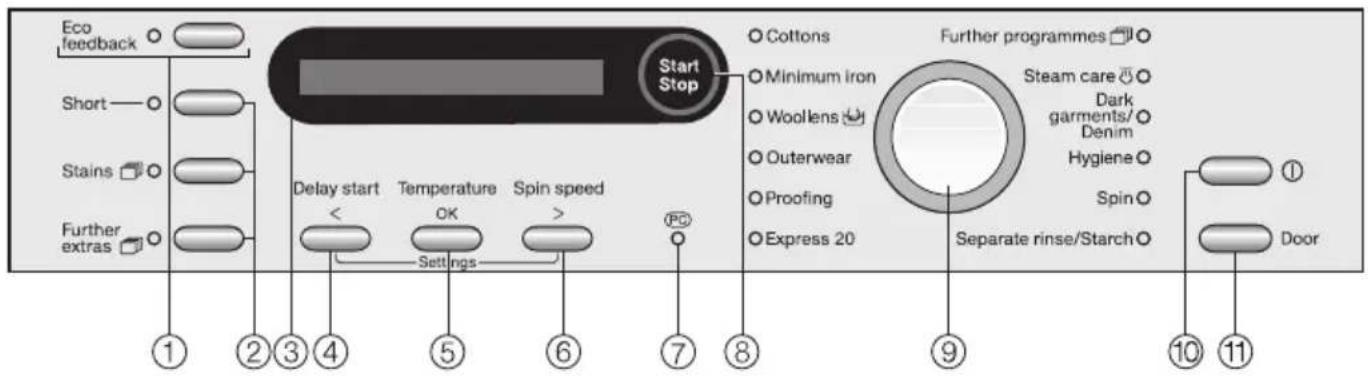
Control panel
text_image
Eco feedback Short Stains Further extras 1 2 3 4 5 6 7 8 9 10 11 Start Stop Cottons Minimum iron Woolens Outerwear Proofing Express 20 Further programmes Steam care Dark garments/ Denim Hygiene Spin Separate rinse/Starch Door① Eco feedback button
See "Eco feedback" in "Washing environmentally and economically" for more details about this function.
② Extra option buttons
Various Extra options can be added to the washing programmes.
③ Display
See the following page for more information.
④ Delay start button (<)\*
For delaying the start time of a programme.
⑤ Temperature button (OK) ^*
For selecting a temperature.
⑥ Spin speed button (>)\*
For selecting the final spin speed or Rinse hold/ or No © (No spin).
* () = These have a second function, please see the following page
⑦ PC/Optical interface
This is used by service technicians to run diagnostic checks on your machine and can also be used to update programming data in the future.
⑧ Start/Stop button
For starting the programme selected and cancelling a programme once it has started.
⑨ Programme selector
For selecting a programme. The indicator light next to the selected programme will come on. The programme selector can be turned clockwise or anti-clockwise.
⑩ ① Button
For switching the washing machine on and off.
To save energy, the washing machine will switch itself off automatically 15 minutes after the end of the programme/anti-crease phase or after being switched on, if no other selection is made.
⑪ Door button
Opens the machine door.
Second function of the Delay start (<), Temperature (OK) and Spin speed (>) buttons

text_image
Start Stop Delay start < Temperature OK Spin speed >These buttons have a second function when Further programmes is selected and also in the Settings. The second function is represented by symbols in the display.
- The Delay start (<) button scrolls through the list of options to the right or decreases values.
- The Spin speed (>) button scrolls through the list of options to the left or increases values.
- The Temperature (OK) button confirms the programme selected, the value set or opens the sub menu of the Setting selected.
Programme duration
After the start of a programme, the estimated programme duration will appear in the display in hours and minutes.
When delay start is being used, the programme duration will appear after the delay start time has elapsed.
During the first 8 minutes the washing machine measures how much water is being absorbed by the laundry and uses this to calculate the load. The programme duration may be longer or shorter depending on this absorbency rate.
Delay start
The delay start time selected will appear in the display.
After the machine has started, the delay start time counts down. If the delay start time is more than 10 hours, it will count down by the hour. If it is less than 9 hours and 59 minutes it will count down minute by minute.
Once the delay start time has elapsed, the programme will begin and the estimated programme duration will appear in the display.
Settings
The Settings can be used to tailor machine to suit your personal preferences.
Optional programme packages
You can have additional programme packages (containing a number of individual programmes) loaded into your machine.
These have to be downloaded by a Miele service engineer.
The following programme packages can be downloaded into your machine if they were not supplied with your machine ex-works (depending on model):
Eco
- Cottons Eco
- Cottons Eco plus
- Minimum iron Eco
Home
- Curtains
- Down filled items
- Pillows
- Silks/lingerie
Home XL
- Bathrobes
- Curtains
- Down filled items
- Pillows
Hygiene & kids
- Kids' quick wash
- Minimum iron hygiene
- Toy building blocks
Medic
- First wash
- Minimum iron hygiene
- Nappies
- Pillows
Nursery
- Baby towelling
- Baby Wear
- Kids' sleeping bags
- Nappies
- Soft toys
Sport & leisure
- Bathrobes
- Sportswear
- Trainers
The new programmes can then be selected by turning the programme selector to Further programmes ☐.
Before using the machine for the first time ensure that it is correctly installed and connected. Also check that the drain filter is securely tightened to prevent the risk of leaks during use. See "Installation and connection".
This washing machine has undergone a complete functional test at the factory and there will be some residual water in the drum from this process.
For safety reasons, spinning is not possible until the machine has been prepared for using for the first time. To activate the spinning function you must run a wash programme without laundry and without detergent.
Using detergent could result in an excessive build-up of foam.
This also activates the ball valve. The ball valve prevents detergent escaping from the suds container into the sump during a wash programme, thus making maximum use of the detergent.
■ Press the Ⓘ button.
If the washing machine is being switched on for the first time, the welcome screen will appear.
The welcome screen will appear in the display every time the washing machine is switched on until a programme lasting longer than 1 hour has been completed.
Setting the language
You will be asked to select the language you require for the display. It is possible to change the language at any time via the Settings.
deutsch
■ If the language shown is not the one you want, select the language you do want by turning the programme selector. Confirm your selection by pressing the Start/Stop button.
Reminder to remove transport bars
To avoid the risk of damage, the transport bars must be removed before the machine is used for the first time. See "Installation and connection" for instructions on how to do this.
■ After removing the transport bars (if this has not already been done by your fitter), press the Start/Stop button.
Running your first programme
Cottons 60°C will be selected automatically. Run this programme without any laundry and without detergent.
■ Open the stopcock.
■ Press the Start/Stop button.
■ At the end of the programme switch the machine off.
The washing machine is now ready for use.
Energy and water consumption
- Water consumption and energy usage are determined by the size of the load.
To make the most out of your machine, load the maximum dry load for the programme you are using. - When smaller amounts of laundry are washed, the automatic load recognition system will reduce the amount of water, time and energy used. This may mean that the time left shown in the display is adjusted during the course of the wash programme.
- Use the Express 20 programme for small loads.
- Modern detergents make it possible to wash at lower temperatures (e.g 20^ ). Washing using lower temperature settings will save energy.
- To maintain the hygiene of the washing machine, carry out a hot wash (60°C or above) using powder detergent at regular intervals. The Hygiene Info message will appear in the display to remind you to carry out a hot wash.
Detergent
- Do not exceed the amounts of detergent recommended by the manufacturer on the packaging.
- Adjust the dosage to the degree of soiling of the laundry.
- Reduce the amount of detergent with smaller loads (approx. 1/3 less than the amount recommended can be used when washing a half load).
Choosing the correct Extra option (Short, Pre-wash and Soak)
Select:
- A wash programme together with the Short extra option for light soiling where there are no obvious marks.
- A wash programme without any extra options for normal to heavy soiling with visible staining.
- A wash programme together with the Soak extra option for very heavily soiled laundry.
- The Pre-wash extra option for laundry with large amounts of dirt (e.g. dust, sand).
When drying with a tumble dryer
Selecting the highest possible spin speed for the wash programme will save energy when drying in a tumble dryer afterwards.
Eco feedback
The Eco feedback button is used for calling up information about the machine's energy and water consumption.
The Eco feedback button must be held in to display this information.
Pressing the Eco feedback button gives two different types of information:
- Before and during the programme an estimate is shown.
-
At the end of the programme it shows actual water and energy consumption.
-
Estimate

text_image
Eco feedback Short — ○ Stains ○ Further extras ○■ Press and hold the Eco feedback button after selecting the programme.
The probable consumption levels will then be displayed by a bar chart.
Energy III Water II
The more bars (I) in the display, the more energy or water will be used.
The estimate is influenced by the programme selected, the temperature and any Extra options selected.
2. Actual usage
The actual amount of energy and water used can be shown in the display before opening the door at the end of a programme.
■ Press and hold the Eco feedback button.
1.5 kWh 55 l
Opening the door or automatic switching off at the end of the programme resets the data to the estimated values.
Total usage
The Total usage Setting gives details of energy and water consumption over a period of time.
Energy consumption is always given in whole numbers, rounded up or down.
For more information see "Settings".
Brief instructions
The headings numbered 1, 2, 3, . . . show the operating sequence and can be used as brief instructions.
① Sort the laundry

natural_image
Illustration of a person with wings and clothing, surrounded by flying objects (no text or symbols)■ Empty all pockets.
⚠️ Foreign objects (e.g. nails, coins, paper clips, etc.) can cause damage to garments and components in the machine.
■ Badly soiled areas, stains etc. should be cleaned as soon as possible, preferably whilst still fresh. Spillages should be carefully dabbed off using a soft colourfast cloth. Do not rub!
Badly soiled areas can be pre-treated with liquid detergent, stain removers etc. first, following the manufacturer's instructions. With particularly stubborn stains ask your dry cleaner for advice.
⚠️ If you use a solvent-based cleaning agent (e.g. one containing benzene) to pre-treat a stain, make sure that any plastic parts (e.g. buttons) are protected, and that the cleaning agent is rinsed off before washing the garment in the machine.
⚠ Do not use solvent-based cleaning agents in or on this machine.
■ Sort the laundry by colour and by care label. Most garments have a textile care label in the collar or side seam.
Dark textiles often contain excess dye and should be washed separately several times before being included in a mixed load. Always wash whites and coloureds separately.
- Curtains: Remove lead weights first or place in a laundry bag.
- Underwiring and collar stiffeners: Any loose wiring in bras, shirt collar stiffeners, etc. should be removed or sewn in.
- Knitted garments, trousers and jeans, T-shirts and sweat shirts: Turn inside out, if recommended by the manufacturer.
- Close any zips, fasten hooks and eyes etc before washing.
- Fasten duvet covers etc. to prevent small items from being rolled up inside them.
Do not wash any items in this machine which are specified by the manufacturer as not washable on the care label. (☒ symbol)
② Switch on the washing machine
The interior drum lighting will come on.
The drum lighting will go out automatically after five minutes. Press the Door button to switch the drum lighting back on again.
③ Load the drum
■ Press the Door button to open the drum door.
natural_image
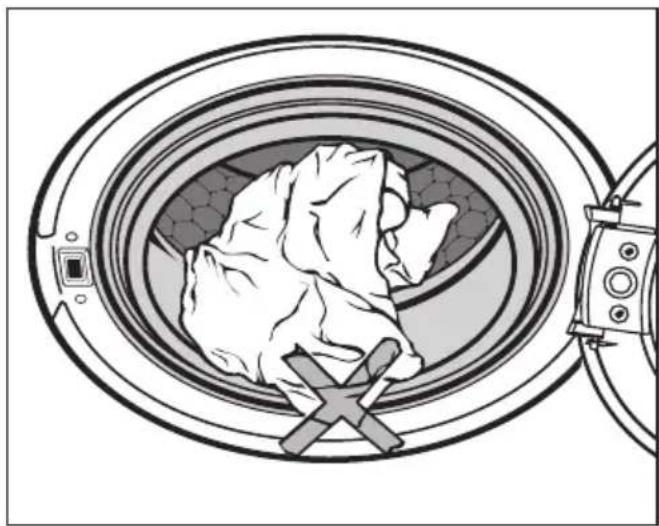
Illustration of a person inside a circular device with a cross symbol, next to a camera lens (no text or symbols present)■ Unfold the laundry and load loosely into the drum. Mixing both large and small items gives better wash results and also helps distribute the load evenly during spinning.
The most efficient use of energy and water is achieved when a full load is washed. However, do not overload as this causes creases and reduces cleaning efficiency.
■ Shut the door with a gentle swing.
Make sure that items do not get caught between the drum door and the seal.
4 Select a programme
A. Selecting programmes using the programme selector

text_image
Cottons Minimum iron Woollens Outerwear Proofing Express 20 Further programmes Steam care Dark garments/ Denim Hygiene Spin Separate rinse/Starch■ Turn the programme selector clockwise or anti-clockwise to the required programme. The programme indicator light for the programme selected will come on.
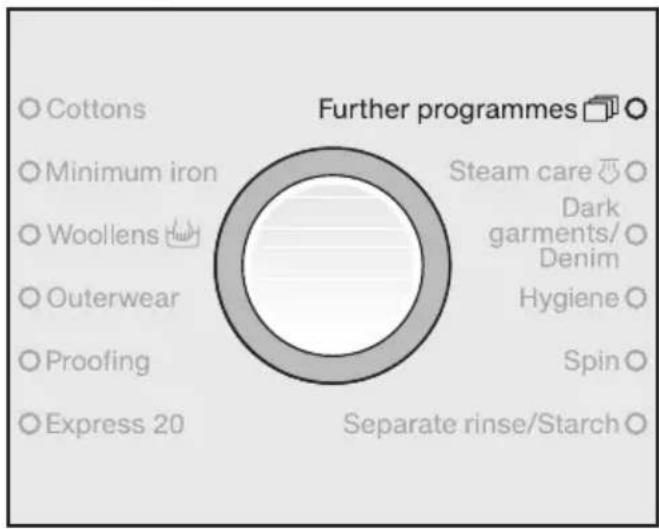
Further programmes are available under the programme setting Further programmes 📄.
B. Selecting programmes using the programme selector at the Further programmes position and the display
text_image
Cottons Minimum iron Woollens Outerwear Proofing Express 20 Further programmes Steam care Dark garments/ Denim Hygiene Spin Separate rinse/Starch■ Turn the programme selector clockwise until the indicator light for Further programmes 📄 comes on.
■ The following will appear in the display:

text_image
Maintenance prog. Start Stop Delay start < Temperature OK Spin speed >■ Scroll through the list using the Delay start (<) and Spin speed (>) buttons.
■ When the programme you want shows in the display, confirm your selection by pressing the Temperature (OK) button.
⑤ Select a temperature / spin speed
The suggested temperature and/or spin speed can be changed.
1:59 60° 1600
■ Press the Temperature button to alter the temperature and press the Spin speed button to alter the spin speed.
⑥ Select any Extra option(s)

text_image
Eco feedback Short — O Stains O Further extras O■ Select any Extra options by pressing the appropriate button. The relevant indicator light will come on to show which Extra option has been selected.
Not all Extra options are suitable for use with every programme.
You can only select Extra options which are compatible with the programme being used.
See "Extra options" for more information.
⑦ Select Delay start (if required)
The start of a programme can be delayed from 15 minutes up to 24 hours, allowing you to make use of night-time economy electricity rates, for example.
See "Delay start" for more information.
8 Add detergent
It is important to dispense the correct amount, because...
... too little detergent results in:
- Laundry not getting properly clean and with time it may become grey and hard to the touch.
- Greasy particles clinging to the laundry.
- Limescale deposits on the heater elements.
... too much detergent results in:
- Excessive foam which causes a low level of agitation and poor wash, rinse and spin results.
- Higher water consumption (an additional rinse cycle will automatically switch in).
- A burden to the environment.
natural_image
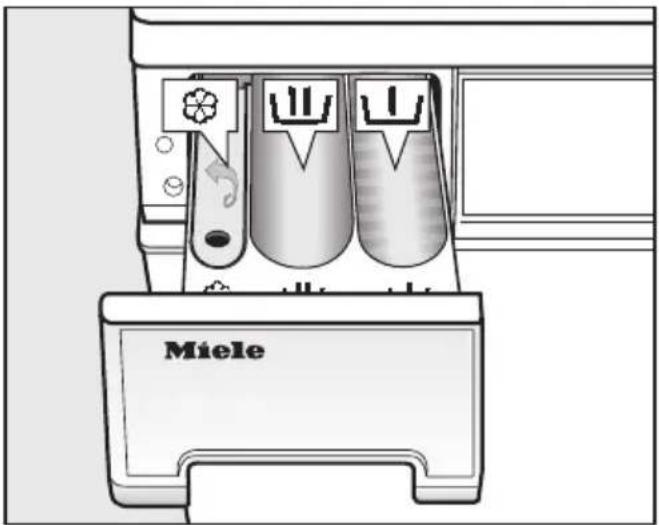
Diagram of a Miele washing machine with three washers and a handle (no text or symbols)■ Pull out the detergent drawer and add detergent to the compartments as follows:

Detergent for the pre-wash. Divide the total recommended amount as follows: add 13 to compartment and 23 to compartment

Detergent for the main wash, including Soak if selected

Fabric conditioner and liquid starch
■ Close the detergent drawer.
See "Detergent" for further information on detergent dispensing.
9 Start the programme
■ Press the flashing Start/Stop button.
If a Delay start time has been selected, then this will count down in the display. At the end of the delay start time or immediately after the programme has started (if a delay start time has not been selected) the estimated programme duration will appear in the display. During the first 8 minutes the machine measures how much water is being absorbed by the laundry. The programme duration may be longer or shorter depending on this absorbency rate.
The programme sequence is also shown in the display. The machine lets you know which section of the programme has been reached.
The drum lighting switches off once the programme has started.
10 Remove the laundry when the programme has finished
In the anti-crease phase after the programme has finished, the following will appear alternately in the display:
0:00 Anti-crease
and
0:00 Finish
The machine will switch off automatically 15 minutes after the end of the anti-crease phase. You will need to press the Ⓐ button to switch it back on again.
■ Press the Door button to open the drum door.
■ Remove the laundry.
Check that all items have been removed from the drum. Items left in the drum could discolour other items in the next wash or become discoloured themselves.
natural_image
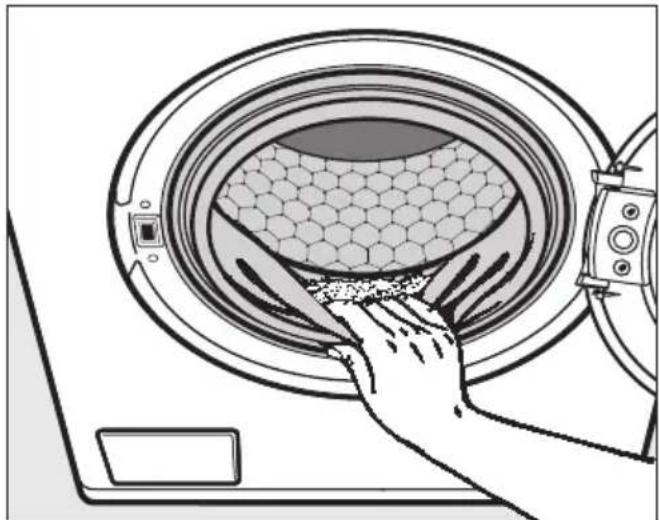
Illustration of a hand cleaning a large washing machine with hexagonal mesh pattern (no text or symbols)■ Check the folds in the door seal for any small articles, e.g. buttons, which might be lodged there.
■ Switch the machine off with the Ⓐ button.
■ Close the drum door. Otherwise there is the danger of objects being placed inadvertently in the drum. If these remained unnoticed and were washed in the next load, they could damage the laundry.
Final spin speed
| Programme rpm | |
| Cottons 1600 | |
| Minimum iron 1200 | |
| Woollens 📋 1200 | |
| Outerwear | 800 |
| Proofing 1000 | |
| Express 20 1600 | |
| Maintenance prog. – | |
| Down duvets | 1200 |
| Delicates 600 | |
| Automatic plus 1200 | |
| Shirts 600 | |
| Steam care – | |
| Dark garments / Denim 1200 | |
| Hygiene 1600 | |
| Spin 1600 | |
| Separate rinse/Starch 1200 |
You can reduce the final spin speed. However, you cannot select a final spin speed higher than that shown in the chart above.
Rinse and interim spin
There is a spin after the main wash and between the rinses. A reduction in the final spin speed will also reduce the interim spin speed. If a spin speed of less than 700 rpm is selected for a Cottons programme, an additional rinse is introduced.
To omit the final spin (Rinse hold)
■ Select the Rinse hold (☐) setting using the Spin speed button. The laundry will not be spun and will remain suspended in the final rinse water. This reduces creasing if the laundry is not going to be removed from the drum immediately after the end of the programme.
- To start the final spin:
The washing machine will display the maximum spin speed possible. You can select a spin speed lower than this. Start the final spin by pressing the Start/Stop button.
- To end the programme :
Press the Door button. The water will drain away. Press the Door button again to open the door.
To omit rinse and interim spin and the final spin (No Ⓤ)
■ Select the No Ⓤ setting using the Spin speed button.
The laundry is not spun after the final rinse. The water will drain away and the machine will go straight into the anti-crease stage.
With some programmes an additional rinse is introduced if this setting is selected.
Delay start allows you to choose when you want the programme to start. The start of a programme can be delayed from 15 minutes up to a maximum of 24 hours, allowing you to make use of night-time economy electricity rates, for example.
Selecting delay start
■ Press the Delay start button. The following will appear in the display:
0:15 60° 1600
■ Each press on the Delay start button increases the start time:
- in 15 minute steps up to 1 hour,
- in 30 minute steps up to 10 hours,
– in 1 hour steps from 10 hours upwards.
If you keep the Delay start button pressed in, the time will continue to count up to 24 hours.
Activating delay start
■ Press the Start/Stop button to activate delay start. The following will appear in the display:
4:30 until start
After the delay start time has elapsed, the washing programme will start and the estimated programme duration and the programme sequence will show in the display.
Altering delay start
You can change the delay start time at any time by pressing the Delay start button.
Cancelling delay start before delay start has been activated
■ Press the Delay start button until 24 h is showing in the display. Then press the Delay start button again briefly to cancel delay start.
If you cancel delay start after the Start/Stop has been pressed, the washing programme will start immediately.
| Please refer to the separate booklet for information on programmes available as additional programme packages. |
| Cottons95604030* cold to 90°C Max. load 8.0 kg | |
| Use for | Cotton, linen or cotton mix fabric, e.g. table linen, towelling, underwear, T-shirts etc. |
| Note | The 60°/40°C programmes differ from the Eco60/Eco40 programmes as follows:- Shorter programme duration- Longer temperature holding times- Higher energy consumptionWhere particularly high levels of hygiene are required please select a temperature of 60°C or higher. |
| Cottons Eco60/Eco40 Max. load 8.0 kg | |
| Use for | Normally soiled cotton garments |
| Notes | - These settings are the most efficient in terms of energy and water consumption for washing cottons.- With Eco60the actual wash temperature reached will be lower than 60°C although the wash performance is the same as with the standard Cottons 60°C programme. |
| Note for test institutes:The test programme conforms to EN 60456 and the energy label with Directive 1061/2010. | |
| Minimum iron cold to 60°C Max. load 3.5 kg6050403060504030* | |
| Use for | Synthetic, mixed fibre and easy care cotton. If fabrics have a high proportion of man-made fibres it is advisable to programme the machine for "Gentle action". |
| Note | Reduce the spin speed for fabric which creases easily. |
| Woollens4030* cold to 40°C Max. load 2.0 kg | |
| Use for | Machine-washable or hand-washable wool or wool blend fabrics.If the care label does not specify a temperature, wash using the cold setting. |
| Note | Reduce the spin speed for items which crease easily. |
| Outerwear cold to 40°C Max. load 2.5 kg | |
| Use for | Outerwear made from membrane fabric such as Gore-Tex®, SYMPATEX®, WINDSTOPPER® etc. |
| Notes | - Zip up jackets before washing.- Do not use fabric conditioner.- If wished these garments can also be re-proofed using the Proofing programme. Proofing should not be done every time the garment is washed. |
| Proofing 40°C Max. load 2.5 kg | |
| Use for | Treating microfibre fabric, skiwear, and table linen made from mainly synthetic fibres to provide a water and stain resistant finish. |
| Notes | - The items should be freshly laundered and spun or dried before proofing.- For best results, the items should be heat-treated afterwards, either in a tumble dryer or by ironing. |
| Express 20 40 30* cold to 40°C Max. load 3.5 kg | |
| Use for | Cotton and minimum iron garments that have hardly been worn or are only very lightly soiled. |
| Note | The Short extra option will be activated automatically. |
| Maintenance prog. 75°C Empty | |
| With frequent washing at low temperatures, there is the danger of a build-up of bacteria in the washing machine.Cleaning the washing machine will significantly reduce bacteria, fungus and biofilm and help prevent the build-up of unpleasant odours. | |
| Notes | - Optimum results can be achieved by using Miele machine cleaner. Alternatively a universal powder detergent can be used.- Dispense the machine cleaner or universal powder via the detergent compartment.- Do not load any laundry. The drum must be empty for the maintenance programme. |
| Down duvets cold to 60°C Max. load 2.5 kg1 down duvet2.20m x 2.00m | |
| Use for Down filled duvets. | |
| Note Please observe the manufacturer's care label. | |
| Delicates 60 50 40 30 40 30* cold to 60°C Max. load 2.5 kg | |
| Use for | Delicate garments made from synthetic fibre, mixed fibre, rayon and easy care cotton.Curtains, including net curtains, specified as machine-washable by the manufacturer. |
| Notes | - Dust in curtains usually makes using a programme with pre-wash advisable.- Select No (No spin) for items which crease easily. |
| Automatic plus 40 30 40 30* cold to 40°C Max. load 5.0 kg | |
| Use for | Mixed loads of garments suitable for the Cottons and Minimum iron programmes. Sort according to colour. |
| Note | The wash parameters (e.g. water level, wash rhythm and spin speed) are adjusted automatically in this programme to ensure the best possible care and wash result for each item. |
| Shirts cold to 60°C Max. load 2.0 kg | |
| Notes | - Pre-treat collars and cuffs if necessary.- Wash silk shirts and blouses in the Delicates programme. |
| Steam care Max. load 2.0 kg | |
| Use for | Reducing the amount of creasing in damp, freshly washed and spun garments. |
| Notes | - 5-6 shirts make up a load of approx. 2.0 kg.- Smaller loads give a better result.- Remove garments as soon as the programme has finished and then tumble dry using the Smoothing or Gentle smoothing programme or place on a hanger to dry. |
* Please note that the "buckets" represent garment care label symbols. See "Garment care label symbols".
| Dark garments / Denim cold to 60°C Max. load 3.0 kg | |
| Use for | Black and dark garments made from cotton, mixed fibre or denim. |
| Notes | - Wash inside out.- Denim often contains excess dye and may run during the first few washes. Wash light and dark coloured items separately. |
| Hygiene 30°C to 90°C Max. load 7.0 kg | |
| Use for | Cotton and linen fabric which have been in direct contact with the skin, e.g. underwear, nappies, towelling, bed linen, pillow and mattress covers or where high standards of hygiene are required. |
| Notes | - For optimum hygiene results select a temperature of 60°C or above.- Observe the manufacturer's care label. |
| Spin | |
| Notes | - To drain only: Select No © (No spin).- Make sure you select the appropriate spin speed. |
| Separate rinse/Starch Max. load 7.0 kg | |
| Use for - Rinsing hand-washed items.- Starching table cloths, serviettes and workwear | |
| Notes | - Reduce the spin speed for fabrics which crease easily.- Items for starching should be freshly laundered but not treated with fabric conditioner.- You can achieve a particularly good rinse result with two rinses by activating the Water plus extra option. For this, the Extra rinse option of the Water plus Setting must be activated (see "Settings" at the end of this booklet). |
Extra options are selected or deselected by pressing the appropriate button and via the display.
text_image
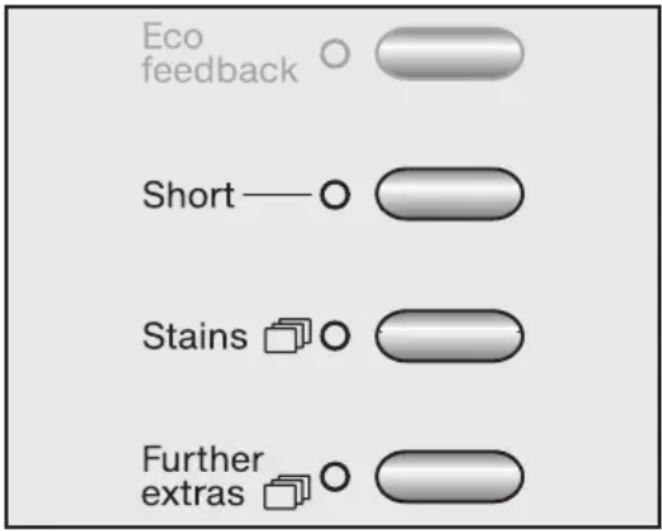
Eco feedback Short — O Stains O Further extras O■ Press the Short button or the Stains button and/or the Further extras button.
Short
For light to normal soiling with no visible staining.
This shortens the programme running time.
Stains

There is a choice of various types of stains for achieving the optimum wash result with stain removal. The wash programme is optimised for the type of stain. One stain type can be selected per wash programme.
If the "Short" extra option was selected previously, it will be deselected automatically.
Press the Stains button again to come out of the Stains sub-menu.
Further extras

The Further extras sub-menu will open in the display.
Extra options available for that programme are shown in the display.
◄Steam smoothing ►
- Scroll through the list using the Delay start (<) and Spin speed (>) buttons. Press the Temperature (OK) button to select the Extra option you want.
Only one further Extra option may be selected.
■ The Extra option can be deselected by pressing the Further extras button again.
Steam smoothing
At the end of the programme, the laundry is dampened with steam in order to reduce creasing. The maximum load is 2.0 kg, as smaller loads give a better result.
Water plus
The water level in the main wash and the rinses will be increased.
You can select other settings for Water plus. These are described in "Settings".
Pre-wash
For laundry with large amounts of dirt e.g. dust, sand.
Soak
For heavily soiled items with protein stains.
You can select a soak time of between 30 minutes and 2 hours in 30 minute steps. This is described in "Settings".
The default setting is 2 hours.
Extra quiet
If using your washing machine during quiet periods, you can reduce the noise levels even more.
If the Extra quiet option is selected, the machine will activate the Rinse hold option and not spin. The programme duration is longer.
To deactivate Rinse hold
■ Use the Spin button to select the spin speed you want.
By using Delay start you can make sure the final spin occurs outside quiet periods in the home.
The following Extra options can be selected in addition to the programme:
1) This extra option is activated automatically as part of the programme but can be deactivated
| Washing | |
| The figure quoted in the bucket is the maximum temperature the garment can be washed at. The number of bars under the symbol indicates the level of agitation permitted. | |
| 95 | No bar under the symbol: = normal agitation |
| 60 | One bar under the symbol: = reduced agitation |
| 30 | Two bars under the symbol: = much reduced agitation |
| Hand wash (if no temperature is specified use the lowest temperature or cold) | |
| Do not wash | |
| Drying | |
| The number of dots indicates the drying temperature | |
| ◎ Normal temperature | |
| ◎ Low temperature | |
| ☒ Do not tumble dry |
| Ironing | |
| The number of dots indicates the ironing temperature | |
| Hot iron (max sole plate temp. approx. 200°C) | |
| Medium hot iron (max sole plate temp. approx. 150°C) | |
| Cool iron (max sole plate temp. approx. 110°C). Do not steam iron garments carrying this symbol. | |
| Do not iron | |
| Professional cleaning | |
| F | Dry clean only. The letters indicate the type of cleaning agent required. |
| P | |
| W | Professional Wet Clean only |
| ⊗ Do not dry clean | |
| Bleaching | |
| △ Any oxidising bleaching agent can be used | |
| △ | Only use an oxygen based bleach or a non-chlorine bleach |
| ★ Do not bleach | |
Programme sequence
| Main wash Rinses Spinning | ||||||
| Water level | Wash rhythm | Water level | Rinses Interim spin | Final spin | ||
| Cottons A 2-4 | 1)2) | √ | √ | |||
| Minimum iron C 2-3 | 3) | √ | √ | |||
| Woollens | F | 2 | √ | √ | ||
| Outerwear | D | 3 | \( \checkmark^4) | √ | ||
| Proofing | D | - | - | - | √ | |
| Express 20 B 1-3 | 3) | √ | √ | |||
| Maintenance prog. | A | 2 | - | - | ||
| Down duvets5) | 3 | - | √ | |||
| Delicates | D | 3 | - | √ | ||
| Automatic plus | ABC | 2-33) | √ | √ | ||
| Shirts | C | 2 | - | √ | ||
| Dark garments / Denim | 3-√ | |||||
| Hygiene B 3-4 | 2) | √ | √ | |||
| Spin | - | - | - | - | - | √ |
| Separate rinse/ Starch | - | - | 1 | - | √ | |
| Please see next page for description of the symbols | ||||||
Low water level
= Medium water level
= High water level
Ⓐ = Intensive rhythm
⑧ = Normal rhythm
© = Gentle rhythm
(D) = Sensitive rhythm
⑧ = Ultra sensitive rhythm
⑤ = Handwash rhythm
This machine has fully electronic controls with automatic load recognition. It takes in the right amount of water required for the programme depending on the amount of laundry and its absorbency rate. This means that programme cycles and durations can vary.
The programme sequences outlined in the chart are based on the basic programme with a full load. Extra options which can be selected have not been taken into account.
The display shows the stage the programme has reached.
Special features in the programme sequences:
Anti-crease:
At the end of every programme, with the exception of the Woollens programme, the drum continues to turn at intervals for up to 30 minutes to help prevent creasing.
The door can be opened and laundry removed at any time during the anti-crease phase.
1) A second rinse is carried out when a temperature between 60^ C and 90^ C has been selected. A third rinse is carried out when a temperature below 60^ C is selected.
2) A third or fourth rinse is carried out if:
– there is too much foam in the drum
- a spin speed lower than 700 rpm has been selected
- The spin speed has been deselected.
3) A third rinse is carried out if:
- The spin has been deselected.
4) In the Outerwear programme, laundry is only spun after the main wash.
5) Run-up to spin: A run-up to spin is carried out before the wash process begins, to deflate down-filled items. Subsequent water intake for the main wash is through compartment ☐.
6) Pre-rinse: A pre-rinse without detergent is carried out automatically to remove dust.
Cancelling a programme
You can cancel a programme at any time after it has started.
■ Press the Start/Stop button.
Cancel programme
■ Press the flashing Start/Stop button again.
The suds will be pumped away.
If you want to remove the laundry:
■ Press the Door button.
If you want to select a different programme:
■ Switch the machine off with the ① button.
■ Switch the washing machine back on again.
- Check that there is still detergent in the detergent drawer. Add detergent, if necessary.
■ Select a new programme.
Interrupting a programme
■ Switch the machine off with the ⏻ button.
To continue with the same programme:
■ Switch the machine back on again with the ① button.
Making changes to a programme
After the start of a programme it is no longer possible to select a different programme.
Temperature
It is possible to select a different temperature up to 5 minutes after the programme has started, except with the Cottons programme.
■ Press the Temperature button.
Spin speed
It is possible to change the spin speed up until the final spin begins.
■ Press the Spin speed button.
Extra options
It is possible to select or deselect the Short, Water plus and Extra Quiet Extra options up to five minutes after the programme has started.
A programme cannot be cancelled or changed if the safety lock has been activated.
Adding or removing laundry after a programme has started
■ Press the Door button to open the drum door.
■ Add or remove items.
■ Close the drum door.
The programme will continue automatically.
Please note:
Once a programme has started the machine cannot recognise any adjustment to the load.
For this reason, if laundry is added or removed after the start of a programme, the machine will always complete the programme cycle assuming a full load which can lead to an increase in the programme duration shown in the display.
The door cannot be opened, if:
- the suds temperature is above 55^ .
– the water is above a certain level.
– the programme has reached the Final spin stage.
If you press the Door button when the above conditions are present, the following will appear in the display:
i Door locked
Safety lock
The safety lock prevents the machine from being opened and programmes from being cancelled during a wash programme.
To activate the safety lock
■ Press and hold in the Start/Stop button after the programme has started.
Stop or in 3 secs
- Keep the Start/Stop button pressed in until the time has elapsed and the following appears in the display:
Locked
The safety lock is now activated. It is deactivated automatically at the end of the programme.
To deactivate the safety lock
■ Press and hold in the Start/Stop button after the programme has started.
Unlock in 3 secs
- Keep the Start/Stop button pressed in until the time has elapsed and the following appears in the display:
Unlocked
The correct detergent
All modern detergents produced for automatic washing machines are suitable. Use dispensing aids, e.g. balls, if these are supplied with the detergent. Tablets are suitable for full loads, but note that it may be impractical to reduce tablets for smaller loads. Some tablets do not dissolve as rapidly as others, and may not be suitable for programmes with short durations.
Do not use biological detergents on silk as the enzymes may damage the silk! Instructions for use and recommended dosage amounts are given on the detergent packaging.
See "Optional accessories" at the end of this booklet for details of Miele branded care products including detergents and fabric conditioner.
| Universal detergent | Detergent for coloureds | Detergent for delicates | Specialist detergent* | Proofing agent** | Fabric conditioner | |
| Cottons X X -- - | X | |||||
| Minimum iron X X -- - X | ||||||
| Woollens 🎨 - | - | - | X | - | X | |
| Outerwear^1) | - | - | X | X | - | - |
| Proofing -- - - X - | ||||||
| Express 20^1) | X | X | - | - | - | X |
| Maintenance programme | X | - | - | X | - | - |
| Down duvets^1) | - | X | X | X | - | - |
| Delicates X X X -- X | ||||||
| Automatic plus | X X -- - X | |||||
| Shirts | X X -- - X | |||||
| Dark garments / Denim ^1) | X | X | X | - | - | X |
| Hygiene^2) | X | - | - | - | - | X |
| Separate rinse/ Starch | - | - | - | X | - | X |
| ^1) Liquid detergentFor programmes with a pre-wash you will need to purchase a special container from the Miele Spare Parts Department which sits in the main wash compartment 🎨. Add liquid detergent to this container for the main wash and to compartment 🎨 for the pre-wash ^2) Use powder detergent ^* Specialist detergentDetergent designed specifically for the wash programme or type of fabric. ^** Only use proofing agents containing fluorochemical compounds which are stated by the manufacturer as being "suitable for use on membrane textiles".Do not useproofing agents which contain paraffin. Add proofing agents to compartment ⚙. | ||||||
The right amount to dispense will depend on the following:
- The quantity of laundry
- The soiling level of the laundry
Lightly soiled
No visible dirt or stains. Possibly slight body odour.
Normally soiled
Visibly dirty and/or just a few slight stains.
Heavily soiled
Visible dirt and stains and/or dried on soiling.
- The water hardness level.
Check with your local water supplier if you do not know the hardness level in your area.
Water hardness levels
| Hardness scale | Hardness level mmol/l | German °d |
| I (soft) | 0 - 1.5 | 0 - 8.4 |
| II (medium) | 1.5 - 2.5 | 8.4 - 14 |
| III (hard) Above 2.5 Above 14 | ||
Refill packs of detergent
When purchasing detergent buy refill packs wherever possible. This helps reduce the amount of waste packaging.
Water softener
A water softener can be used to cut down on the use of detergents in hard water areas. Dispense according to the amount specified on the packaging. First add detergent and then the water softener.
Miele branded water softening tablets are available from the Miele Spare Parts Department or via the internet on www.miele-shop.com.
Use a quantity of detergent as for soft water.
Washing with several components
If you wash using several components (e.g. special application detergents), we recommend always dispensing the agents into compartment ⏚ in the following order:
- Detergent
- Water softeners
- Stain remover
This way the agents are distributed more evenly.
Fabric conditioners and liquid starch
Starch
Stiffens and gives body to items of laundry, e.g. shirts, tablecloths and bed linen.
Fabric conditioners
Make garments soft to handle and help prevent static cling when tumble drying.
Automatic dispensing of fabric conditioner or liquid starch to laundry at the end of a programme

text_image
MAX.■ Add the fabric conditioner or liquid starch to compartment ⚙. Do not exceed the maximum level mark.
It will be dispensed automatically in the last rinse. At the end of the programme a small amount of water remains in the fabric conditioner compartment ✉.
If starching frequently, thoroughly clean the dispenser compartment, especially the siphon tube and fabric conditioner channel, regularly. See "Cleaning the detergent dispenser drawer". Do not use powder starch formulations or viscous liquid starch in the ✿ compartment as it will clog up.
Adding fabric conditioner or starch separately
■ Dispense in accordance with manufacturer's instructions on the packaging.
■ Dispense liquids into the ✿ compartment and powder or viscous formulations into the ⊥ compartment.
■ Turn the programme selector to Separate rinse/Starch.
■ Select a spin speed.
■ Press the Start/Stop button.
Colour run and dye removers/dyes
■ Do not use colour run or dye removers in this machine.
■ Dyes suitable for use in domestic washing machines can be used. However, please note that the salt used in the dyeing process can cause corrosion to stainless steel components in the machine if you dye frequently. Follow the manufacturer's instructions carefully.
Cleaning and care
A range of Miele branded cleaning and conditioning products is available to order from Miele or the internet at www.miele-shop.com.
Cleaning the drum (Hygiene info)
Washing at low temperatures and/or using liquid detergent can cause bacteria and unpleasant odours to build up in the machine. The washing machine can be cleaned using the Maintenance programme. This should be done regularly, at the latest when the Hygiene Info message appears in the display.
⚠️ Disconnect the machine from the mains electricity supply and withdraw the plug from the socket before cleaning the machine.
⚠ The machine must not be hosed down.
External casing and fascia panel
■ Clean the casing using a Miele E-cloth or with a mild non-abrasive cleaning agent or soap and water using a well wrung-out cloth. Wipe dry with a soft cloth.
■ The drum can be cleaned with a proprietary stainless steel cleaning agent, following the manufacturer's instructions on the packaging.
Do not use solvents, abrasive cleaners, glass cleaners or multi-purpose cleaning agents. These could damage plastic surfaces and other parts.
Cleaning the detergent dispenser drawer
The pre-wash and main wash compartments of the detergent dispensing drawer are self-cleaning. For hygiene reasons, clean the entire drawer at regular intervals.

text_image
Miele■ Pull out the detergent dispenser drawer until a resistance is felt. Press down the release catch and at the same time pull the drawer right out of the machine.
■ Clean the drawer with hot water.
■ Clean the siphon.

text_image
Technical diagram showing a mechanical assembly with labeled parts and directional arrows indicating movement or force.-
Remove the siphon from compartment ⚙ and rinse under hot running water. Clean the siphon tube in the same way.
-
Replace the siphon.
If starching frequently, thoroughly clean the siphon and siphon tube regularly. A build-up of liquid starch will cause them to get clogged.
Cleaning the detergent dispenser drawer housing
natural_image
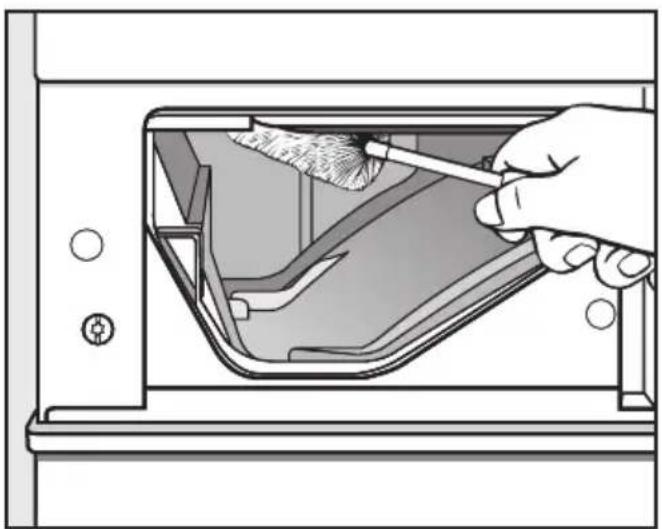
Illustration of a hand using a tool to clean or remove a component inside a device (no text or symbols visible)■ Use a bottle brush to remove detergent residues and limescale from the jets inside the detergent dispenser drawer housing.
Cleaning the filter in the water inlet
The washing machine has a filter to protect the water inlet valve.
The accessible filter in the union in the open end of the inlet hose should be checked every six months, or more often if there are frequent interruptions to the external water supply.
■ First turn off the stopcock.
■ Unscrew the threaded union connecting the free end of the inlet hose to the stopcock.

text_image
Technical diagram of a faucet assembly with numbered parts for identification■ Remove the rubber seal 1 from the recess.
■ Using pointed pliers, take hold of the plastic filter bar 2 and remove.
■ Clean the plastic filter.
■ Put the filter and seal back in the reverse order and reconnect the hose.
Turn on the stopcock and check the connection is watertight. If water drips out, tighten the connection.
Never forget to put the filter back in place after cleaning.
With the help of the following notes, minor faults in the performance of the machine, some of which may result from incorrect operation, can be put right without contacting the Service Department.
⚠️ Repair work to electrical appliances should only be carried out by a suitably qualified person in strict accordance with current local and national safety regulations. Repairs and other work by unqualified persons could be dangerous. The manufacturer cannot be held liable for unauthorised work.
| The programme does not start | ||
| Problem Possible cause Remedy | ||
| The display remains dark, and the Start/Stop button indicator light does not come on. | There is no power to the machine. | Check whether– the mains plug is plugged in and switched on.– the fuse or circuit breaker has tripped. |
| The washing machine has turned itself off automatically to save energy. | Switch the machine back on again with the 1 button. | |
| You are asked to enter a code. | Access via a code has been activated. | Enter the code and confirm the entry. Deactivate the code if you do not wish this message to appear in the display the next time the machine is switched on. |
| The display is dark. | The display has switched off automatically to save energy (Standby mode). | Press a button. The machine will come out of standby mode. |
| The following fault messages appear in the display and the programme stops | ||
| Fault message | Possible cause | Remedy 1 |
| Drain fault | - The water outlet is blocked or restricted.- The drain hose has been fixed too high. | - Clean the drain filter and the drain pump.- The maximum delivery head is 1 m . |
| Water inlet fault | The water inlet is blocked or restricted. | Check whether- the stopcock is opened properly.- the inlet hose is kinked.- the water pressure is too low. |
| The filter in the water inlet hose is dirty. | Clean the filter. | |
| Waterproof fault | The water protection system has reacted. | - Close the stopcock.- Call the Service Department. |
| Technical fault | There is a fault. | Start the programme again.If the fault message appears again, contact the Service Department. |
① To switch off the fault message: Switch the machine off with the ① button.
| The following fault messages appear in the display | ||
| Fault message Possible cause Remedy | ||
| Heating fault | The washing machine is not heating up the water. | Start the programme again.If the fault message appears again, contact the Service Department. |
| Chk detergent | Excessive foam has built up during washing. | Use less detergent next time and follow the manufacturer's instructions on dosage given on the packaging. |
| Hygiene info | A programme using a temperature above 60°C has not been run for a long time. | In order to prevent bacteria and unpleasant odours building up in the machine, run the Maintenance programme using Miele machine cleaner or a universal powder detergent. |
The messages are displayed at the end of the programme and when the washing machine is switched on.
Problem solving guide
| General problems | ||
| Problem Possible | cause Remedy | |
| The machine shakes during the spin cycle. | The machine feet are not level. | Level the machine (see "Installation and connection"). |
| The laundry has not been spun properly and is still wet. | The machine detected an imbalance during the final spin and reduced the spin speed automatically. | Include both large and small items in the load as this will give better distribution during spinning. |
| The pump makes strange noises. | This is not a fault.These noises occur at the end of a pump sequence as a normal part of the operation. | |
| Noises while steam is being generated. | This is not a fault.These noises occur when steam is being generated and when steam is being injected into the drum. | |
| Steam comes out of the detergent dispenser drawer while steam is being generated. | This is not a fault.Some steam may emerge from the detergent dispenser drawer, depending on the amount of laundry and the ambient temperature. | |
| Problem Possible | cause Remedy | |
| Large amounts of detergent residue remain in the detergent dispenser drawer. | The water pressure is too low. | - Clean the filter in the water inlet.- It may be useful to select the Water plus extra option. |
| Powder detergent used in conjunction with water softeners tends to become sticky. | In future, add washing powder into the dispenser drawer first, and then add the water softener. | |
| Fabric conditioner is not completely dispensed or too much water remains in the ⚙ compartment. | The siphon tube is not correctly positioned or is clogged up. | Clean the siphon (see "Cleaning and care - Cleaning the detergent dispenser drawer"). |
| The display is in a different language. | A different language has been selected using the "Language ⚠" setting. | Set the language you want. The flag symbol will guide you. |
| When laundry is dry it feels hard to the touch. | Too vigorous wash action. | Programme in gentle action and more water. |
| Not enough detergent. | Increase detergent dose to prevent limescale build-up in laundry. | |
| No fabric conditioner used. | Use fabric conditioner in the last rinse. | |
| An unsatisfactory wash result | ||
| Problem Possible cause Remedy | ||
| Liquid detergent does not give the required result. | Liquid detergents usually contain no bleaching agents. They do not remove fruit, coffee and tea stains. | - Use a general purpose detergent containing a bleaching agent.- Add stain removers into compartment of the detergent dispenser drawer and liquid detergent into a dispenser ball.- Never put stain removers and liquid detergent together in the dispenser drawer. |
| Grey, greasy particles cling to washed laundry. | Insufficient amounts of detergent were used to break down the particles of grease in heavily soiled laundry. | - Use more detergent.- Before the next wash, run the Maintenance programme using Miele machine cleaner or a universal powder detergent. |
| White residues which look like powder detergent are seen on dark textiles after washing. | The detergent contained compounds (zeolites) to aid water softening which are not soluble in water. They have ended up on the laundry. | - Try and brush off the residues with a soft brush once the laundry is dry.- Wash dark textiles using a detergent which contains no zeolites. Liquid detergents usually contain no zeolites.- Use the Dark garments / Denim programme for dark coloured laundry. |
| The drum door will not open | |
| Possible cause Remedy | |
| The washing machine is not connected to the electricity supply and/or is not switched on. | Insert the plug in the socket and switch on and / or switch the machine on with the ➊ button. |
| The safety lock has been activated. | Deactivate the safety lock as described in "Changing the programme sequence - Safety lock". |
| Access via a code has been activated. | Deactivate the code as described in "Settings". |
| Power cut. | Open the drum door as described in the next section. |
| The door was not correctly engaged. | Press hard against the lock side of the drum door and then press the Door button. |
| There is still water in the drum and the machine is unable to drain. | Clean the drain filter and drain pump as described in the next section. |
| The door will not open after the Steam care programme has finished. | The Steam care programme has been started several times one after the other. The steam has caused the temperature in the drum to rise above 55°C and the door will not open to prevent the risk of burning. Wait a few minutes until the temperature in the drum has decreased. |
| For safety reasons the drum door cannot be opened if the suds temperature is higher than 55°C. | |
Opening the drum door in the event of a blocked drain outlet and/or power failure
■ Switch the washing machine off.
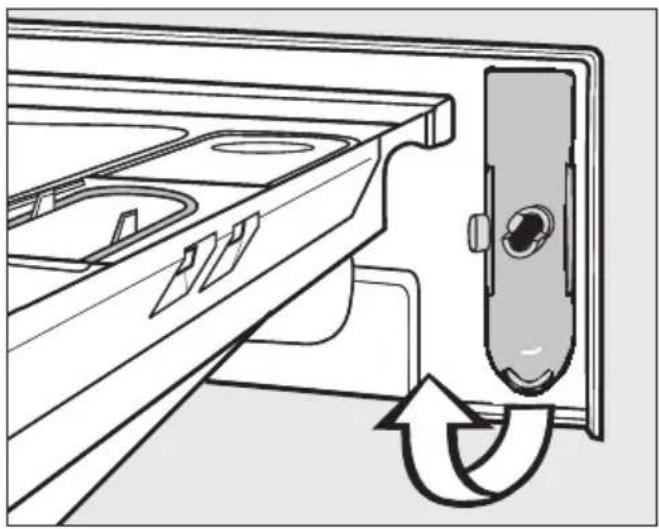
There is a lever behind the detergent drawer fascia panel.
natural_image
Diagram of a refrigerator interior showing the door, sink, and drawer with a circular arrow indicating rotation (no text or symbols)■ Remove the lever.
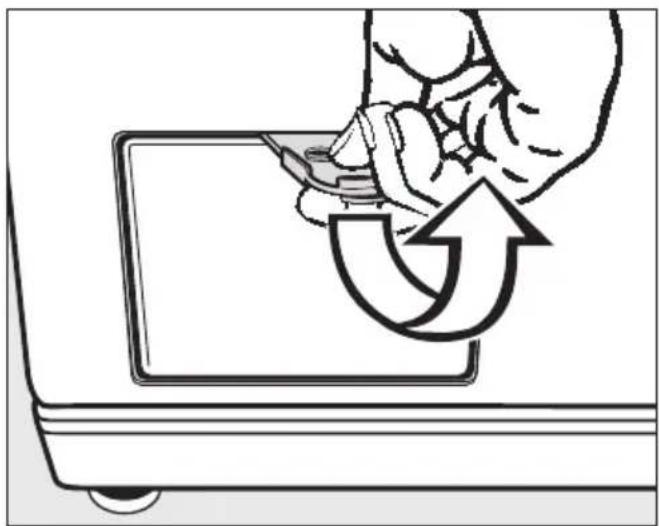
natural_image
Illustration of a hand using a tool to rotate or rotate a device into a screen (no text or symbols present)■ Use it to open the access flap.
Blocked drain outlet
If the drain outlet is blocked, up to 25 litres of water will be retained in the machine.
Caution: if laundry has been washed at a high temperature, water draining out of the machine will still be hot. Danger of scalding!
Procedure for draining the machine
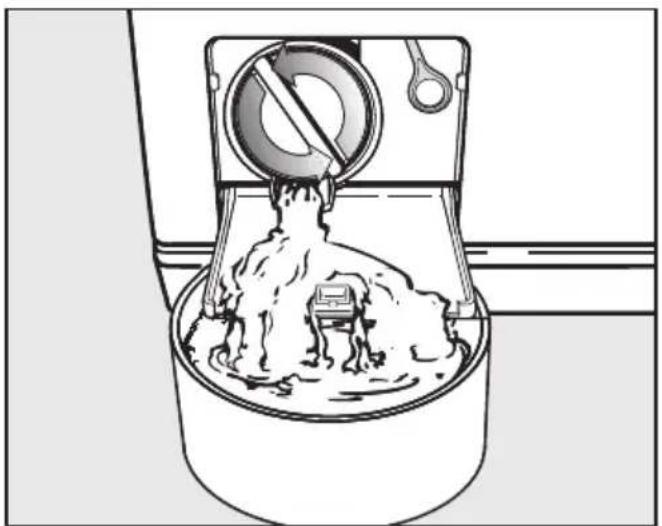
Be careful not to release too much water at once. If the flow of water is too strong, some water can seep into the washing machine base and activate the water protection system float switch. This will prevent the washing machine from functioning.
natural_image
Diagram of a mixing bowl with a rotating stand mixer, showing powder and liquid (no text or symbols)■ Place a suitable container under the access flap.
When draining water from the machine, do not unscrew the drain filter completely or take it right out.
■ Slowly and carefully unscrew the drain filter to let the water out.
If you need to interrupt the flow of water:
■ Tighten the drain filter back up again.
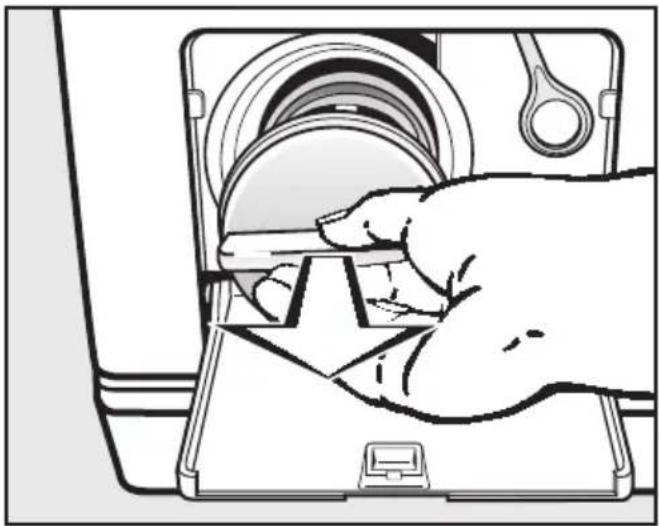
Once the flow of water ceases:
natural_image
Illustration of a hand inserting a component into a device (no text or symbols visible)■ Remove the drain filter completely.
■ Clean it thoroughly.

natural_image
Diagram of a mechanical device with internal components and a handle, no text or symbols present■ Remove any foreign objects (e.g. buttons, coins, etc.) and fluff from the filter housing. Turn the impeller by hand to check that it rotates freely. Any foreign object causing an obstruction should be removed.
■ Put the drain filter back in place and secure.
⚠️ Make sure the drain filter is securely tightened. Otherwise there is a risk of water leakage during use.
To avoid loss of detergent, pour approx. 2 litres of water into the detergent dispenser drawer after cleaning the drain filter. Excess water will be pumped out automatically before the next wash programme.
Opening the drum door
△! Always make sure that the drum is stationary before reaching into the machine to remove laundry. Reaching into a moving drum is extremely dangerous.
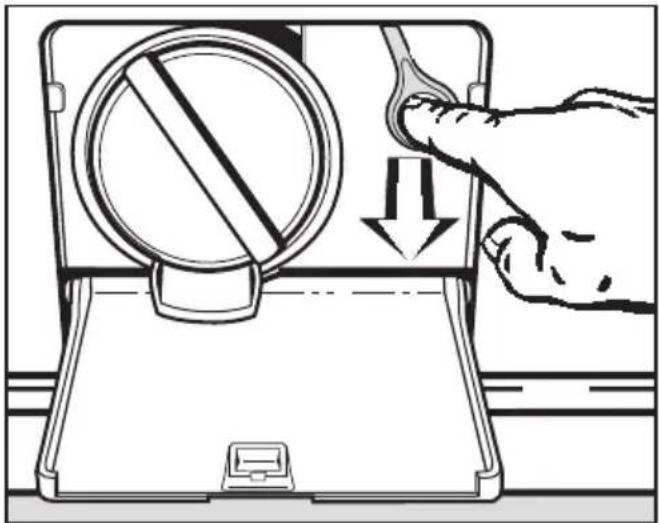
natural_image
Illustration of a hand pressing down on a device with a circular dial and downward arrow (no text or symbols)■ Pull the emergency release downwards (see illustration). The drum door will open.
In the event of any faults which you cannot remedy yourself, please contact:
- your Miele Dealer or
- Miele (see back cover for contact details).
When contacting your Dealer or Miele, please quote the model and serial number of your machine, both of which are shown on the data plate visible above the porthole glass when the door is open.
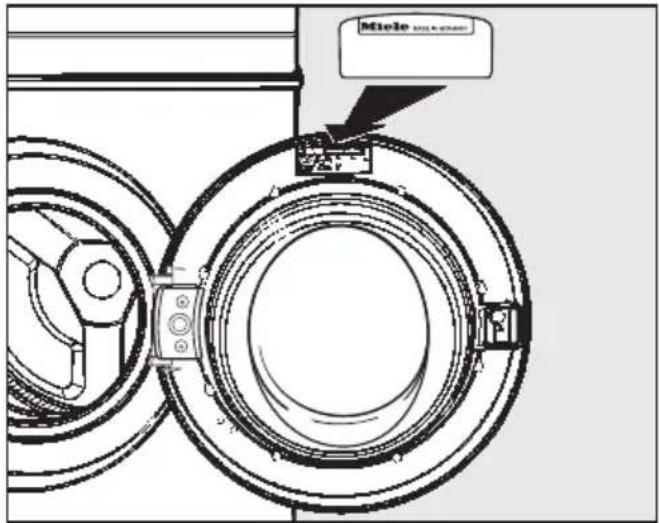
text_image
Miole SALO & CHINAN.B. A call-out charge will be applied for service visits where the problem could have been resolved as described in these instructions.
Future updates (PC)
The indicator light marked PC is the interface used by Miele service technicians during servicing work for testing purposes and for updating the machine's programme data.
Guarantee
For information on the appliance guarantee specific to your country please contact Miele. See back cover for contact details.
In the U.K. your appliance is guaranteed for 2 years from the date of purchase. However, you must activate your cover by calling 0845 365 6640 or registering online at www.miele.co.uk.
Optional spare parts and accessories
Optional spare parts and accessories for this washing machine are available from your Miele Dealer, the Miele Spare Parts Department or via the internet at www.miele-shop.com.
Please note that telephone calls may be monitored and recorded for training purposes.
Front view
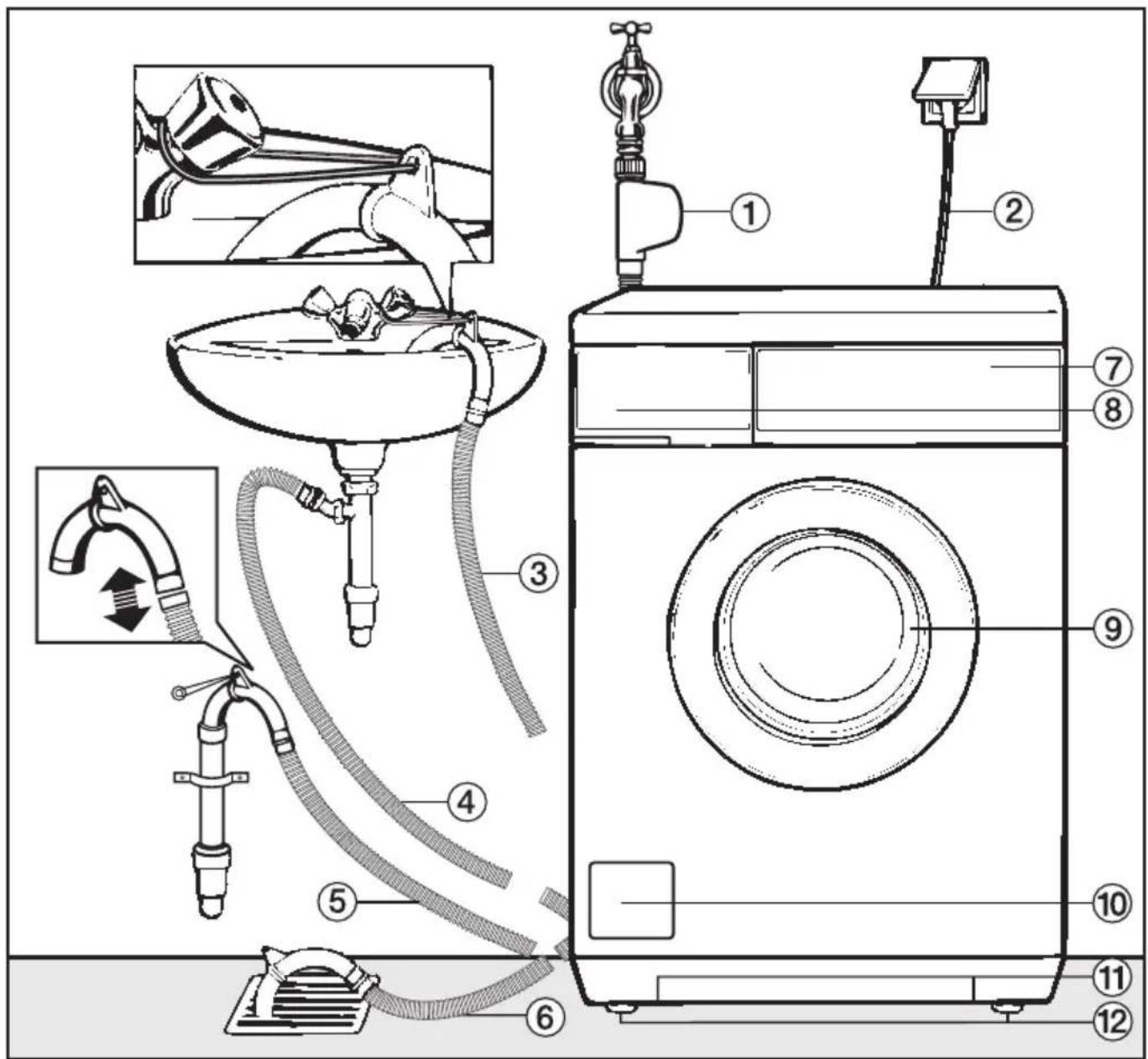
text_image
Diagram of a washing machine with numbered parts for assembly or maintenance, showing components like drain, hose, and fan.① Inlet hose with "Waterproof" system
② Electricity supply cable
③ - ⑥ Flexible drain hose (with detachable swivel elbow)
⑦ Control panel
⑧ Detergent dispenser drawer
⑨ Drum door
⑩ Access to drain filter, drain pump and emergency release
⑪ Handle recesses for moving the machine
⑫ Four height adjustable feet
Rear view

text_image
Technical diagram of a mechanical device with numbered components for identification① Protruding lid for holding when moving the machine
② Electricity supply cable
③ Inlet hose with "Waterproof" system
④ Drain hose
⑤ Transport clip for inlet and drain hoses
⑥ Safety cap for transit bars
⑦ Transport clip for inlet and drain hoses and for storing transit bars when not in use.
Installation surface
A concrete floor is the most suitable installation surface for a washing machine, being far less prone to vibration during the spin cycle than wooden floorboards or a carpeted surface.
Please note:
■ The machine must be level and securely positioned.
■ To avoid vibrations during spinning, the machine should not be installed on soft floor coverings.
If installing on a wooden joist floor:
■ We recommend a plywood base (at least 59x52x3 cm). The base should span several joists and be bolted to the joists and not only to the floorboards. Check for the presence of pipes and cables first.
If possible, install the machine in a corner, as this is usually the most stable part of the floor.
⚠️ If the machine is installed on a raised plinth, it has to be secured against slippage during spin using retaining clips (available from the Miele Spare Parts Dept). Otherwise there is the danger of the machine moving and falling off the plinth.
Transporting the washing machine to its installation site
To manoeuvre the machine out of its packing case to its installation site, hold it by the edge of the lid where it protrudes to the rear of the machine as well as by the handle recesses at the front.
⚠ Ensure that the machine feet and the floor are dry to prevent the machine from slipping during the spin cycle.
Removing the transit bars
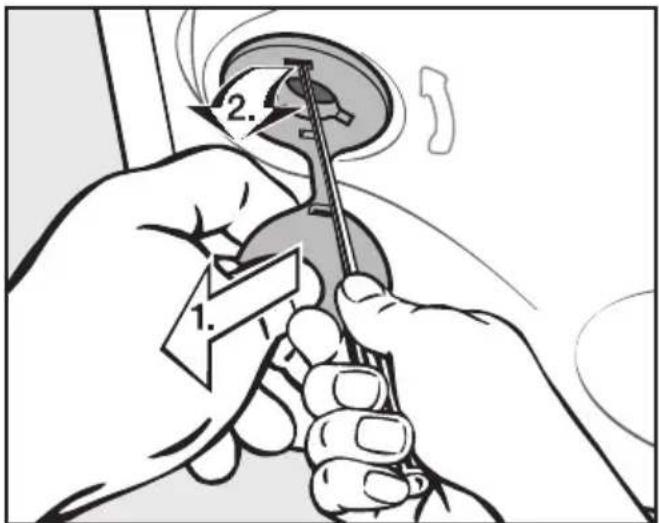
text_image
Diagram showing hands using a tool to adjust or install a component, labeled with numbers 1 and 2.■ To remove the left and right covers
- Pull on the attached stopper,
- then use a screwdriver to release the catch at the top.
Installation and connection

natural_image
Diagram of a car wheel and steering wheel with directional arrows indicating motion (no text or symbols)■ Using the spanner supplied, turn the left-hand transit bar 90°, then
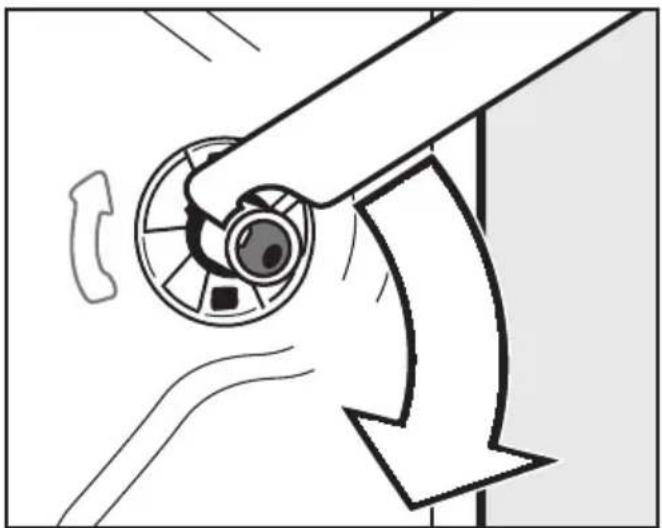
natural_image
Diagram of a hand operating a circular device with a curved arrow indicating motion or direction (no text or symbols)■ Turn the right-hand transit bar 90°, then
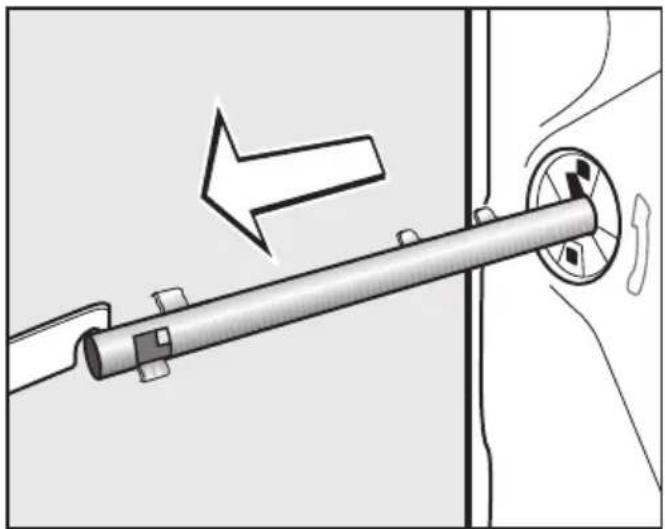
natural_image
Mechanical diagram showing a lever mechanism with an arrow indicating direction (no text or symbols present)■ withdraw the transit bar.

natural_image
Diagram of a door handle mechanism with a directional arrow indicating motion (no text or symbols present)■ withdraw the transit bar.
⚠️ To avoid the risk of injury the holes for the transit bars must be covered after the transit bars have been removed.
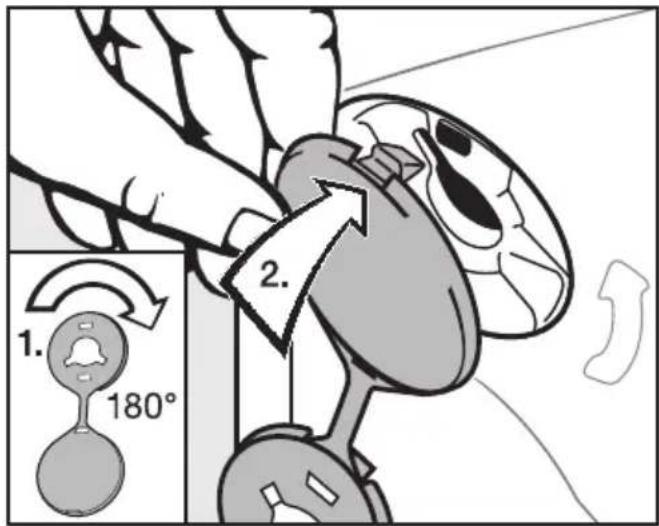
text_image
1. 180° 2.■ Plug the holes with the plastic caps as illustrated.

natural_image
Technical diagram showing mechanical assembly with two components and directional arrows indicating movement (no text or symbols)- Secure the transit bars to the back of the washing machine. Make sure that the top catch is located above the holder.
The machine must not be moved without the transit bars in place. Store them as shown or keep them in a safe place for future use. They must be re-fitted if the machine is to be moved again (e.g. when moving house).
Re-fitting the transit bars
Re-fitting is carried out by reversing the procedure.
Levelling the machine
The machine must stand perfectly level on all four feet to ensure safe and proper operation.
Incorrect installation may increase electricity and water consumption and may cause the machine to move about.
Screwing out and adjusting the feet
The four adjustable screw feet are used to level the machine. All four feet are screwed in when the machine is delivered.

text_image
1 2■ Using the spanner supplied turn counternut 2 in a clockwise direction. Then turn counternut 2 together with foot 1 to unscrew.

natural_image
Line drawing of a front-loading washing machine with front panel and side door (no text or symbols)■ Use a spirit level to check the machine is standing level.
■ Hold foot 1 securely with a pipe wrench. Turn counternut 2 again using the spanner supplied until it sits firmly up against the housing.
All four counternuts must be firmly up against the housing. Please also check this for the feet which did not need adjustment. Otherwise there is the danger of the machine moving about.
The fitting of building-under kits* and stacking kits* must only be undertaken by qualified and competent persons, in accordance with the instructions supplied with the kit.
Building under a continuous worktop/in a kitchen run
If you wish to push your machine under a worktop and there is space to do this without removing the lid, the conversion kit is not necessary. Otherwise the conversion kit is essential.
- A special building-under conversion kit* is required.
To ensure electrical safety, the washing machine lid must be replaced by the cover plate supplied with the conversion kit. - For installation under a work surface 900/910 mm from the floor, a raising kit* is required.
- Connections for electricity, water and drainage should be installed in such a way that they remain accessible when the machine is in place.
Fitting instructions are supplied with the conversion kit.
All parts marked* are available from your Dealer, the Miele Spare Parts Department or via the internet at www.miele-shop.com.
Washer and Dryer stack
A Miele tumble dryer can be stacked with the washing machine. A "WTV" stacking kit* is necessary.
Please note:
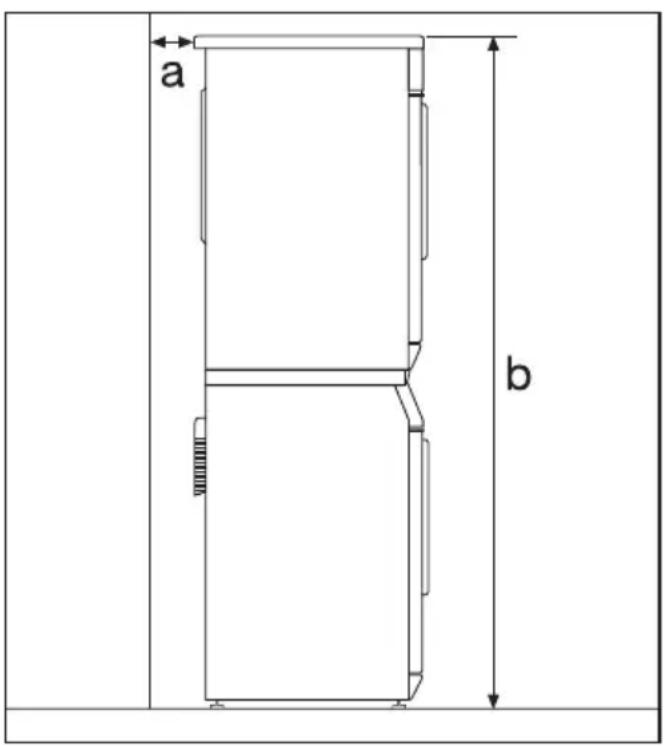
text_image
a ba Safety distance to wall: at least 2 cm
b Height: Stacking kit with pull-out shelf: approx. 169 cm Stacking kit without pull-out shelf: approx. 170 cm
The Miele Waterproof system
The Miele Waterproof system protects the washing machine from water damage.
The system consists of three main components:
1) the inlet hose
2) the electronic unit and the washing machine housing
3) the drain hose
1) Inlet hose
- The inlet hose is fitted with an additional electrical safety valve which works like an automatic stopcock and is housed in the inlet hose connection box.
- It is pressure tested to between 7,000 and 10,000 kPa.
- The inlet hose has a protective sleeve.
Any leaking water from the inlet hose is fed into the sump through this protective sleeve. A float switches off the safety valve, preventing any more water from flowing into the machine and water in the suds container is pumped away.
2) Electronic unit and washing machine housing
- Sump
Any leaking water is collected in a sump in the base of the machine. A float switches off the safety valves, preventing any more water from flowing into the machine and water in the suds container is pumped away.
- Overflow protection
This prevents the washing machine taking in too much water. If the water level exceeds a certain level, the drain pump switches in and pumps the excess water away.
3) Drain hose
The drain hose is protected by a ventilation system which prevents the washing machine from being emptied completely.
Connection to the water supply
The plastic casing of the safety valve contains electrical components. The Waterproof system must only be connected to its own stopcock. It must not be connected to mixer taps or similar and must not be fitted in areas where there is the risk of water or other liquids reaching it.
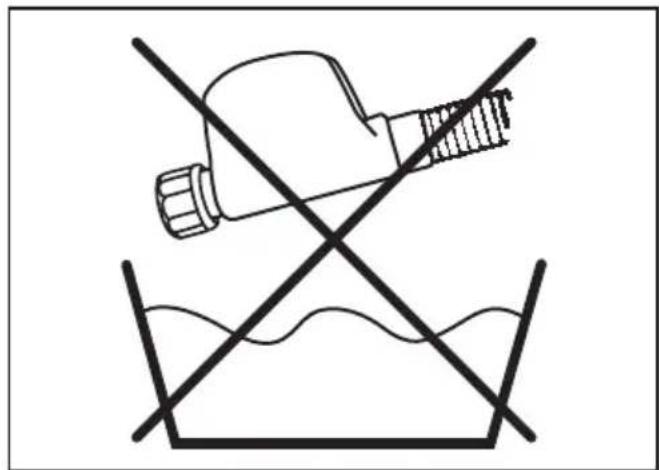
text_image
Safety warning symbol showing a tool crossed over a surface with water flowing, indicating no protection or hazard.Do not get wet.

text_image
Diagram illustrating a tool cutting through a pipe with scissors and falling debris, showing incorrect safety rules.The protective sleeve of the hose must not be damaged or kinked.
The machine should be connected to the mains water supply in accordance with local and national safety regulations. The German authorities do not require it to have a non-return valve as the washing machine has been designed to comply with DIN regulations.
The machine is designed to operate with a flow pressure of between 100 and 1,000 kPa (1-10 bar). If it is higher than 1,000 kPa it is essential to fit a pressure reducing valve.
Connection to the mains water supply should incorporate a mains stopcock with 34 " thread. The stopcock should be fitted by a qualified plumber.
The connection point is subject to mains water pressure. Turn on the stopcock slowly and check for leaks. Correct the position of the washer and union if appropriate.
The washing machine is not suitable for connection to a hot water supply.
Maintenance and care
If you intend to unscrew the Miele Waterproof system hose from the stopcock it is essential to disconnect the machine from the electricity supply first.
Only use a Miele Waterproof system hose should you need a replacement.
In order to protect the water inlet valve, the dirt filter in the water inlet valve connection must not be removed.
Extension hose
A 1.5 metre long (metal) extension hose is available from your Miele dealer or the Miele Spare Parts Department as an optional extra.
This hose is tested to withstand pressures of up to 14,000 kPa and can be used as a flexible extension to the water supply.
N.B. Using this hose renders the Waterproof system safety valve on the inlet hose ineffective.
Connection to the drainage system
The machine drains via a drain pump with a delivery head of 1 metre*. The drain hose must not be kinked as this restricts drainage. The swivel elbow at the end of the hose can be turned in either direction, or can be detached if required, with a sharp twist and pull.
If required, the drain hose can be extended to a length of 5 m. The necessary parts can purchased from the Miele Spare Parts Department or your Miele dealer.
* For a delivery head of more than 1 m (up to a max. of 1.8 m) a replacement drain pump will need to be fitted. Please contact the Miele Spare Parts Department or your Miele Dealer.
Drain hose connection:
- Direct into a sink or basin:
Please note the following:
- Hook the hose over the edge and secure.
-
Make sure that the water can drain away freely without hindrance. Otherwise there is a risk of water overflowing or of some of the drained water being sucked back into the machine.
-
Connected securely to a plastic drain pipe with a rubber nipple. There is no need to use a non-return valve.
-
Connected securely to a standpipe.
-
Connected securely to a floor gully.
Please note:
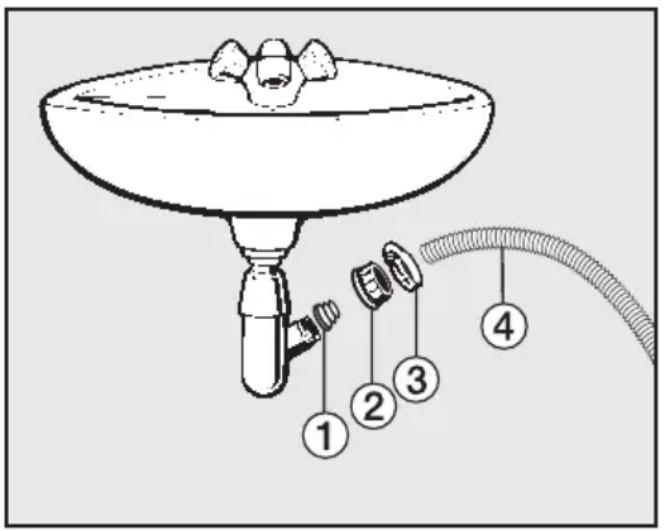
text_image
Diagram of a funnel with labeled parts including a handle, three sensors, and a cable, illustrating a mechanical or fluid system setup.① Adapter
② Nut
③ Hose clip
④ End of the hose
■ Fit adapter ① to the sink drain outlet using nut ②.
■ Attach the end of the hose ④ to adapter ①.
■ Use a screwdriver to tighten hose clip ③ up close to the nut.
Electrical connection U.K.
All electrical work should be carried out by a suitably qualified and competent person, in strict accordance with current national and local safety regulations (BS 7671 in the UK).
Ensure power is not supplied to the appliance until after installation work has been carried out.
The appliance is supplied with a mains cable with moulded plug ready for connection to a 230-240V mains supply.
Please ensure the connection data quoted on the data plate match the household mains supply.
Connection should be made via a suitable switched socket which is easily accessible after installation.
For extra safety it is advisable to protect the machine with a suitable residual current device (RCD). Contact a qualified electrician for advice.
Do not connect via an extension lead. Extension leads do not guarantee the required safety of the appliance (e.g. danger of overheating).
Non-rewireable plugs BS 1363
The fuse cover must be refitted when changing the fuse, and if the fuse cover is lost, the plug must not be used until a suitable replacement is obtained. The colour of the correct replacement cover is that of the coloured insert in the base of the plug, or the colour that is embossed in words on the base of the plug (as applicable to the design of plug fitted).
Replacement fuses should be ASTA approved to BS 1362 and have the correct rating. Replacement fuses and fuse covers may be purchased from your local electrical supplier.
WARNING: THIS APPLIANCE MUST BE EARTHED
| Height 850 mm | ||||||
| Width 595 mm | ||||||
| Depth 615 mm | ||||||
| Depth with door open 993 mm | ||||||
| Height for building under | 820 mm | |||||
| Width for building under | 600 mm | |||||
| Depth for building under | 600 mm | |||||
| Weight 98 kg | ||||||
| Capacity 8 kg dry laundry | ||||||
| Voltage See data plate | ||||||
| Connected load | See data plate / plug | |||||
| Fuse rating See data plate | ||||||
| Consumption data See "Consumption data" | ||||||
| Water flow pressure minimum | 100 kPa (1 bar) | |||||
| Water flow pressure maximum | 1000 kPa (10 bar) | |||||
| Inlet hose length 1.60 m | ||||||
| Drain hose length | 1.50 m | |||||
| Mains connection cable length | 1.60 m | |||||
| Delivery head max. | 1.00 m | |||||
| Maximum drainage length | 5.00 m | |||||
| LEDs | Class 1 | |||||
| Test certificates awarded | See data plate | |||||
| Power consumption when switched off | 0.1 W | |||||
| Power consumption when not switched off | 2.5 W | |||||
| Load Consumption data | ||||||
| Cottons | 90°C | 8.0 kg | 2.30 | 64 | 2 h 29 min | 50% |
| 60°C | 8.0 kg | 1.52 | 55 | 1 h 59 min | 50% | |
| 60°C | 4.0 kg | 1.15 | 47 | 1 h 59 min | 50% | |
| Eco^60* | 8.0 kg | 0.94 | 55 | 2 h 59 min | 44% | |
| Eco^60* | 4.0 kg | 0.94 | 47 | 2 h 59 min | 44% | |
| 40°C | 8.0 kg | 0.96 | 72 | 2 h 29 min | 44% | |
| 40°C | 4.0 kg | 0.83 | 47 | 2 h 29 min | 44% | |
| Eco^40 | 8.0 kg | 0.80 | 55 | 2 h 59 min | 44% | |
| Eco^40* | 4.0 kg | 0.66 | 47 | 2 h 59 min | 44% | |
| Minimum iron | 40°C | 3.5 kg | 0.56 | 52 | 1 h 52 min | 30% |
| Woollens 📋 | 30°C | 2.0 kg | 0.23 | 39 | 39 min | - |
| Outerwear | 40°C | 2.5 kg | 0.45 | 55 | 1 h 02 min | - |
| Proofing 40°C 2.5 kg 0.35 12 40 min - | ||||||
| Express 20 | 40°C | 3.5 kg | 0.32 | 30 | 20 min | - |
| Maintenance prog. | 75°C | 0 kg | 0.80 | 42 | 43 min | - |
| Down duvets | 40°C | 2.5 kg | 0.70 | 43 | 1 h 24 min | - |
| Delicates 30°C 2.0 kg 0.38 69 59 min - | ||||||
| Automatic plus | 40°C | 5.0 kg | 0.52 | 62 | 1 h 29 min | - |
| Shirts | 60°C | 2.0 kg | 0.95 | 59 | 1 h 11 min | - |
| Steam care | 2.0 kg | 0.23 | - | 16 min | - | |
| Dark garments/Denim | 40°C | 3.0 kg | 0.60 | 52 | 1 h 12 min | - |
| Hygiene | 60°C | 7.0 kg | 1.70 | 80 | 2 h 35 min | - |
Notes for test institutes:
* The test programme conforms to EN 60456 and the energy label with Directive 1061/2010.
Consumption data can vary from the nominal values given depending on water pressure, water hardness, water inlet temperature, room temperature, type and volume of load, fluctuations in the electricity supply and any extra options selected.
The consumption data displayed using the Eco feedback function may differ from the values shown above. The deviation relates to the manner in which data is captured on the machine. For example, water consumption is calculated according to how long the water inlet valve is opened for. Fluctuations in the water supply, or a water pressure under 170 kPa can cause values to differ.
The Settings are used to alter the machine's electronics to suit changing requirements. Settings can be altered at any time.
To access Settings
Before you begin, ensure that:
- The washing machine is switched on.
- The machine door is closed properly.
■ Press the Delay start (<) and Spin speed (>) buttons at the same time until:
Language ↗ ...
appears in the display. You are now in Settings.
To select a Setting
■ Press the Spin speed (>) or Delay start (<) button until the Setting you want appears in the display.
- Use the Delay start (<) button to scroll through the list of options to the left.
- Use the Spin speed (>) button to scroll through the list of options to the right.
■ Press the Temperature (OK) button to confirm your selection.
To alter a Setting
■ You can see the different options available for a Setting by pressing the Spin speed (>) button.
The option which is currently set will have a tick √ beside it.
■ When the option you want appears in the display, press the Temperature (OK) button to activate this option.
To come out of Settings
■ Press the Spin speed (>) or Delay start (<) button repeatedly until Back appears in the display.
■ Press the Temperature (OK) button.
Language
The display can be set to appear in one of several different languages.
The flag ▶ after the word Language acts as a guide to prevent a language which will not be understood from being set.
The language selected is saved to memory.
Total usage
This gives the sum total of all energy and water consumption.
Energy
This gives the sum total of all energy consumption.
Water
This gives the sum total of all water consumption.
Reset function
This resets the total consumption data figure back to zero.
Water plus
You can increase the amount of water used in the wash programmes.
There are four different options:
Off
(The machine is delivered with this option selected.)
The water level is not increased.
Water +
The water level is increased in the wash and rinse stages.
Extra rinse
An extra rinse is introduced.
Water+ & Extra rinse
The water intake is increased in the wash and rinse stages and an extra rinse is carried out.
Soak
The soak time can be set between 30 minutes and 2 hours 30 minutes.
The washing machine is delivered with a two hour soak time set as standard.
Gentle action
Activating Gentle action reduces the drum action and is suitable for washing slightly soiled items more gently. It should be activated for garments with a single bar under the "bucket" in the care label and for articles which feel too hard after they have been dried.
Gentle action can be activated for the Cottons and the Minimum iron programmes.
The machine is delivered with this option deactivated.
Suds cooling
When this is activated, additional water flows into the drum at the end of the main wash to cool the suds down. Hot suds can damage plastic drainage pipes.
Suds cooling takes place when temperatures of 90^ C and 75^ C are selected.
Suds cooling should be activated:
- to prevent the danger of scalding if the drain hose is hooked over the edge of a sink or basin.
- where the drainage pipes do not comply with DIN 1986.
The machine is delivered with this option deactivated.
Code
The code prevents the washing machine being used without your knowledge.
To activate the code
■ Select activate and confirm this by pressing the Temperature (OK) button.
You will be prompted to enter a code. The code is 125 and cannot be altered.
■ Press the Spin speed (>) button until the first number appears in the display.
■ Confirm your selection of the number by pressing the Temperature (OK) button.
■ Repeat the process until all three numbers have been entered.
■ Press the Temperature (OK) button.
To use the washing machine when the code is activated
When the washing machine is switched on again, the display will request the code.
■ Enter code 125 as described above and confirm the entry.
The washing machine is now unlocked and ready for use.
To deactivate the code
Proceed as for activating the code.
Temperature unit
You can choose for the temperature to be displayed in °C/Celsius or °F/Fahrenheit.
The machine is delivered with ^ C/Celsius as the default setting.
Buzzer
When the buzzer function has been activated, an audible tone sounds at the end of a programme or when Rinse hold is reached.
There are two volumes:
Off
(The machine is delivered with this option selected.)
The buzzer is switched off.
Normal
The buzzer sounds at normal volume at the end of a programme or when Rinse hold is reached.
Loud
The buzzer sounds at maximum volume (Loud) at the end of a programme or when Rinse hold is reached.
Keypad tone
An audible tone sounds each time a button is pressed.
The machine is delivered with the keypad tone deactivated.
Brightness
There are ten different display brightness settings.
The bar chart shows you the setting.
The washing machine is delivered with the display brightness on setting 5.
The brightness will change as soon as a different setting is chosen.
Standby display
To save energy, the display goes out and the indicator light for the Start/Stop button will start flashing slowly.
The display will always go out,
- if a programme is not selected within 10 minutes of the machine being switched on.
- 10 minutes after the end of a programme.
Pressing one of the buttons switches the display back on again.
You can also choose whether you want the display to go out 10 minutes after a programme has started or to remain visible throughout the programme.
On
The standby function is switched on. When this option is selected, the display will go out 10 minutes after a programme has started.
Not in current prog.
(the machine is delivered with this option selected)
The standby function is switched off. The display will remain visible during a programme.
Memory
The washing machine will store the most recently selected settings (programme, temperature, spin speed and any extra options) in memory once the programme has started.
These settings will appear in the display the next time the machine is switched on.
The machine is delivered with the memory function deactivated.
Anti-crease
Anti-crease helps prevent creasing if laundry is not normally removed immediately after the end of a programme.
The drum will turn at intervals for up to 30 minutes after the programme has finished.
The door can be opened and laundry removed at any time during the anti-crease phase.
On
(the machine is delivered with this option selected)
Anti-crease is activated.
Off
Anti-crease is deactivated.
Miele washing machines offer perfect care for your laundry and feature a wide range of special programmes designed to suit the fabric being washed. Miele have also developed a range of specialist CareCollection detergents and conditioning products to offer you a complete package for cleaning and caring for your laundry.
The Miele CareCollection detergents and conditioning products are listed below. You can order these and many other useful products via the internet at:

text_image
Miele www.miele-shop.comAll the products can also be ordered via the Miele Customer Contact Centre (see back cover for contact details).
CareCollection
Miele specialist detergents
"Outdoor wear"
This specialist detergent will clean your water-repellent outerwear with care.
"Sportswear"
The Miele Sportswear detergent is designed to clean sportswear and remove odours whilst taking care of the special microfibres used in these garments.
"Down Items"
This special-purpose detergent contains a mild tenside and has been specially formulated to keep down-filled items supple and to give them bounce.
Miele proofing agent
This special finishing agent reproofs garments against wind and water and provides a dirt-repellent finish whilst retaining elasticity and breathability.
"UltraWhite" detergent
This multi-purpose powder detergent has excellent stain removal properties and is suitable for white and light coloured laundry as well as heavily soiled coloured items.
"UltraColor" detergent for coloured garments
This liquid detergent is particularly suitable for cleaning coloured and dark garments. The special formulation offers effective stain removal, even at low temperatures, while helping to prevent colours fading.
Liquid detergent "For Delicates"
This liquid detergent is ideal for the gentle treatment of delicate fabrics, such as wool and silk. Its special formulation cleans effectively at temperatures as low as 20°C, while protecting the colour of your delicate garments.
Fabric conditioner
The Miele fabric conditioner will give your laundry a fresh, natural fragrance. It makes garments soft to handle and prevents static build-up during tumble drying.
United Kingdom
Miele Co. Ltd.
Fairacres, Marcham Road
Abingdon, Oxon, OX14 1TW
Tel: 0845 365 0555
Fax: 0845 365 0777
Customer Contact Centre Tel: 0845 365 6600
E-mail: info@miele.co.uk
Internet: www.miele.co.uk
Australia
Miele Australia Pty. Ltd.
ABN 96 005 635 398
1 Gilbert Park Drive, Knoxfield, VIC 3180
Tel: (03) 9764 7130, Fax: (03) 9764 7149
Internet: www.miele.com.au
China
Miele (Shanghai) Trading Ltd.
1-3 Floor, No. 82 Shi Men Yi Road
Jing' an District
200040 Shanghai, PRC
Tel: +86 21 6157 3500
Fax: +86 21 6157 3511
E-mail: mieleshanghai@cn.miele.com
Miele (Hong Kong) Limited
41/F - 4101, Manhattan Place
23 Wang Tai Road
Kowloon Bay
Hong Kong
Tel: (852) 2610 1331
Fax: (852) 2610 1013
Email: mielehk@miele.com.hk
India
Miele India Pvt. Ltd.
Ground Floor, Copia Corporate Suites
Plot No. 9, Jasola
New Delhi - 110025
Tel: 011-46 900 000, Fax: 011-46 900 001
E-mail: customercare@miele.in
Internet: www.miele.in
Manufacturer: Germany - Miele & Cie. KG
Citywest Business Campus, Dublin 24
Tel: (01) 461 07 10, Fax: (01) 461 07 97
E-Mail: info@miele.ie, Internet: www.miele.ie
New Zealand
Miele New Zealand Limited
Unit L, 10-20 Sylvia Park Road
Mt. Wellington, 1060, Auckland, NZ
Tel: 0800 264 353, Fax: 0800 463 453
Internet: www.miele.co.nz
Singapore
Miele Southeast Asia
Miele Pte. Ltd.
163 Penang Road
# 04 - 02/03 Winsland House II
Singapore 238463
Tel: +65 6735 1191, Fax: +65 6735 1161
E-Mail: infosea@miele.com.sg
Internet: www.miele.sg
South Africa
Miele (Pty) Ltd
63 Peter Place, Bryanston 2194
P.O. Box 69434, Bryanston 2021
Tel: +27 (0) 11 548-1900
Fax: +27 (0) 11 548-1935
E-mail: info@miele.co.za
Internet: www.miele.co.za
United Arab Emirates
Miele Appliances Ltd.
P.O. Box 11 47 82
Gold & Diamond Park
Sheikh Zayed Road
Building 6 / Offices Nos. 6-214 to 6-220
Dubai
Tel: +971-4-341 84 44
Fax: +971-4-341 88 52