HJ-304-E Walking Style X - Pedometer OMRON - Free user manual and instructions
Find the device manual for free HJ-304-E Walking Style X OMRON in PDF.


User questions about HJ-304-E Walking Style X OMRON
0 question about this device. Answer the ones you know or ask your own.
Ask a new question about this device
Download the instructions for your Pedometer in PDF format for free! Find your manual HJ-304-E Walking Style X - OMRON and take your electronic device back in hand. On this page are published all the documents necessary for the use of your device. HJ-304-E Walking Style X by OMRON.
USER MANUAL HJ-304-E Walking Style X OMRON
natural_image
Simple curved line drawing without any text, numbers, or symbols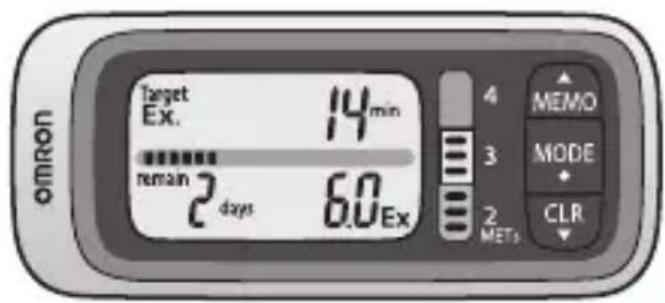
text_image
Target Ex. 14min remain 2 days 6.0Ex 4 MEMO 3 MODE 2 METs CLR omronStep counter Walking style X
- Instruction Manual 1
- Mode d'emploi 19
- Gebrauchsanweisung 37
• Manuale di istruzioni 55
1 Introduction
The OMRON Walking style X can measure the intensity and amount of exercise from your walking, in addition to measuring the number of steps and the number of calories burned. This makes it a useful guide for planning an exercise program based on the intensity and amount of activity. These are expressed as METs for intensity of exercise and Ex (Exercise) for the amount of exercise.
■ METs (Metabolic equivalents)
Indicates the intensity of exercise as a ratio to the intensity used when resting. On average, when sitting at rest we use 1 MET, when walking at normal pace (4 km/h) we use 3 METs.
■ Ex (Exercise units)
Indicates the amount of exercise as Ex quantity.
This is the intensity of exercise multiplied by time (hours). A shorter period of vigorous physical activity will equal 1 Ex more quickly than more leisurely activity will.
- Walking at 3 METs for 1 lx:1 B#M#E3TEsx
- Walking at 3 METs for 30 min: 3 METs × 0.5 h = 1.5 Ex
* The (2007) guidelines from the American College of Sports Medicine recommends at least 30 min of exercise of 3 METs or more per day (referred to in Chapter 13).
■The OMRON Walking style X Features
This unit is set for the weekly target of 21 Ex. (3 METs×1 h = 3 Ex, 3 Ex × days = 21 Ex)
Ex (Exercise) steps
Only counts steps of 3 METs or more.
Walking intensity (METs) indicator
Displays the intensity of the last 1 minute's walk (2 to 4 METs). Try to walk at a pace so that the indicator for walking intensity is 3 METs or more.
Ex remaining this week
Displays the remaining Ex quantity required to reach the weekly target. The ⚙ symbol appears if you have done 21 Ex within a week.
Remaining Ex required indicator
Displays as segments the remaining number of Ex quantity required to reach the weekly target.
Time required to reach Ex target
Displays the amount of walking time required each day to reach the weekly target. Depending on the length of walking time the previous day, the time required will vary.
2 Use of the OMRON Walking style X
2.1 Cautions
- Contact your doctor or healthcare provider before beginning a weight reduction or exercise program.
- Keep the unit out of the reach of young children.
- If young children swallow any small piece, immediately consult a doctor.
- Do not swing the unit by the strap. Swinging the unit while holding the strap may cause an injury.
- Do not put the unit in the back pocket of your shorts or trousers. It could be damaged if you sit down while the unit is still in your pocket.
- If battery fluid should get in your eyes, immediately rinse with plenty of clean water. Consult a doctor immediately.
- If battery fluid should get on your skin or clothing, immediately rinse with plenty of clean water.
- Do not insert the battery with the polarities in the wrong direction.
- Replace a worn battery with a new one immediately.
- Remove the battery from this unit when you are not going to use it for a long period of time (approximately 3 months or more).
- Do not throw the battery into fire because it may explode.
3 Overview
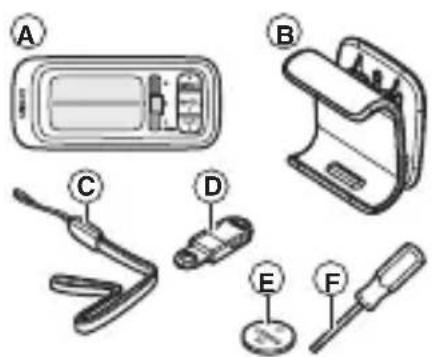
A Main unit
B Holder
C Strap
D Clip
E Battery
* The battery is already installed in the unit.
F Screwdriver
text_image
Diagram showing labeled parts of a mobile phone control panel with five numbered componentsHolder
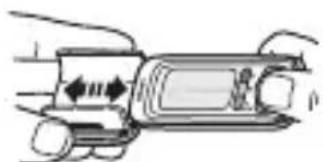
Use this holder when attaching the unit to your belt or the top of your pants.
Attach/remove the holder as shown in the illustrations below.
natural_image
Diagram of a vehicle's side profile showing dashboard and front wheel (no text or symbols)Note:
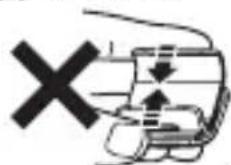
When attaching the holder, do not grip it strongly at the top and bottom.
4 Know your unit
■ Main Unit

text_image
MEMO (Memory) button MODE button CLR (Clear) button Display(Back of unit)
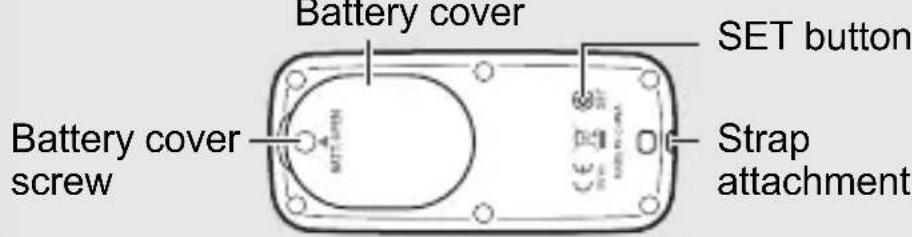
text_image
Battery cover SET button Battery cover screw Strap attachment■ Display
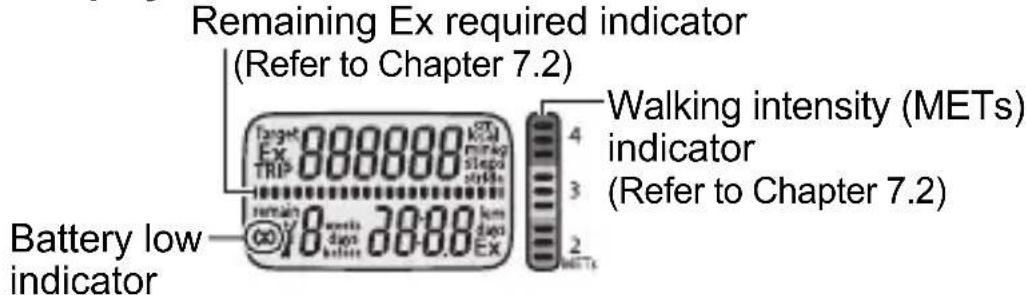
text_image
Remaining Ex required indicator (Refer to Chapter 7.2) Target Ex 888888 100 TRIP 18 weeks 30-88 EX Walking intensity (METs) indicator (Refer to Chapter 7.2) Battery low indicatorNote: This illustration displays all items.
EN
5 Settings
5.1 Determine your stride length
Measure your stride length first for accurate measurement.
How to measure your stride length?
Correct stride length is from a tip of your foot to another one. To measure the correct average stride length, divide the total length of 10 steps you walked by the number of steps (10).
Calculate the stride length as shown in the following formula.
Example: When you walk 5.5 meters, 5.5 m (total length) / 10 (number of steps) = 0.55 m (55 cm)
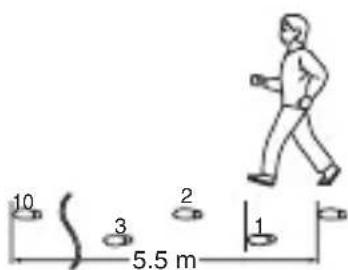
text_image
10 3 2 1 5.5 m5.2 Setting the Time, Weight, Height and Stride Length
When you use the unit for the first time or you want to change settings, follow the steps below.
1 Press the SET button on the back of the unit with a thin, sturdy, stick that will not break easily.
Note: Do not press the button with a sharp point. This could cause damage.
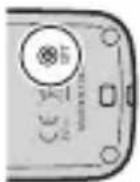
The hour flashes on the display.
Note: If no settings are made for more than 5 minutes...
- When setting up the unit for the first time
→ The display will be turned off. - When adjusting the settings
→ The display will revert to the Target display.
* Setting range details refer to Chapter 14 "Technical data".
2 Setting the hour.
(1) Press or to select the desired value for a setting.
- Press ( ) to advance (go back) one.
- Hold (N) down to advance (go back) rapidly.
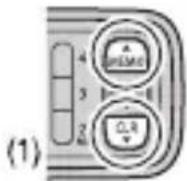

(2) Press to confirm the setting.
3 Repeat steps (1) to (2) to set the minute.
4 Repeat steps (1) to (2) to set the weight.
5 Repeat steps (1) to (2) to set the height.
6 Repeat steps (1) to (2) to set the stride length. This completes the setup.
6 Using the OMRON Walking style X
6.1 Assemble the OMRON Walking style X
1 Attach the strap to the unit.
2 Attach the clip to the strap.
3 Open and close the clip.
Note: Press the clip open to remove the unit.

text_image
123Depending on the material, the clip may cause damage or scratches to your clothes if it is attached or removed roughly.
6.2 How to attach the OMRON Walking style X
We recommend attaching the unit to your belt, your pocket, your bag or hanging it from your neck.
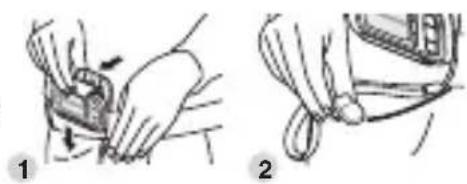
Belt
1 Clip the holder with the unit to the band or belt of your shorts or trousers.
natural_image
Illustration showing two-step medical procedure: hand positioning on a device and holding a tool, with no visible text or symbols.2 Clip the strap to your shorts or trousers.
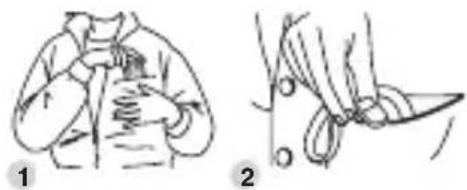
1 Put the unit in your upper front or trousers pocket.
natural_image
Illustration showing two steps of a person's garment being adjusted to cut a piece of scissors (no text or symbols present)2 Clip the strap to the edge of your pocket.
Note: Do not put the unit in the back pocket of your shorts or trousers.
Bag
1 Put the unit in your bag.
Notes:
- Be sure you can hold the bag tightly.
- Be sure the unit is securely fastened to your bag.
- Clip the strap to the edge of your bag.
Neck
1 Attach a commercially available string, strap or key cord to the unit and hang it from your neck.

Note: The included strap and clip are to prevent the unit from falling. Do not hang the unit from your waist or a bag.
6.3 Actual use of the OMRON Walking style X
1 Start walking.
Note: In order to avoid counting steps that are not part of a walk, the unit does not display the step count for the first 4 seconds of walking. If you continue walking for more than 4 seconds, it displays the step count for the first 4 seconds and then continues to count.
2 After you walk, press to read the data (refer to Chapter 7 "Checking the measurement result").
Note: This unit resets to "0" at midnight (0:00) each day.
To ensure an accurate step count, be sure to read "Cases where the unit may not be able to count steps accurately" in Chapter 7.2 before using the unit.
7 Checking the measurement result
7.1 Button operation flow
Press to change the display.

flowchart
graph TD
    A["Target Ex. 14 min\nremain 2 days 6.0 Ex"] --> B["Target display\n(Refer to Chapter 7.2)"]
    A --> C["Ex steps/Ex quantity display\n(Refer to Chapter 7.2)"]
    A --> D["Step count/Time display\n(Refer to Chapter 7.2)"]
    A --> E["Calories/Distance display\n(Refer to Chapter 7.2)"]
    A --> F["Trip steps display\n(Refer to Chapter 7.2)"]
■ About the energy saving function
In order to save energy, the display of the unit will be turned off if no buttons are pressed for more than 5 minutes.
However, the unit will continue to monitor your step count.
Press MEM or to turn the display on again.
7.2 About the individual displays
Target display
This displays your progress towards the 21 Ex per week. This helps you achieve your goal.
Remaining Ex required indicator This scale has 21 segments. Each segment = 1 Ex, and the segments count down to the target as you exercise.
Time required to reach Ex target
This displays the amount of walking time (minutes) required each day to reach the weekly target. It changes after each day you walked.

text_image
Target Ex. 14 min retain 2 days 6.0 Ex daysThe days remaining this week
1 cycle represents a week (7 days) remaining.
Ex remaining this week
This displays the remaining Ex quantity required to reach the weekly target. If you have reached 21 Ex within a week, the symbol and the Week's total Ex quantity are displayed.
Ex steps/Ex quantity display
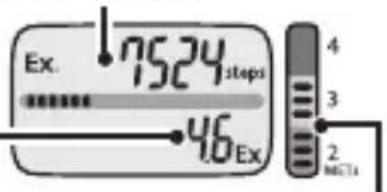
This displays only the Ex steps and Ex quantity that were of the intensity recommended for effective exercise (3 METs or more).
EN
Ex steps
This displays the number of steps measuring 3 METs or more from within all the steps taken during a day.
Guide to walking at 3 METs: Walking at 100 paces a minute for a stride length of 70 cm or 4 km/h.
Ex quantity
This is the amount of exercise as calculated from walking intensity and walking time at 3 METs or more.
text_image
Ex. 7524 steps 46 Ex 4 3 2 mctsWalking intensity (METs) indicator
This displays the intensity of the last 1 minute's walk (2 to 4 METs).
Note: This displays goes blank 1 minute after you stop walking.
Step count/Time display

text_image
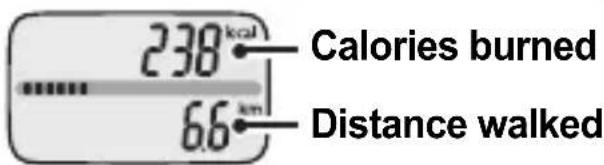
9542 Steps 15:12 TimeCalories/Distance display
text_image
238 kcal Calories burned 6.6 km Distance walkedTrip steps display

text_image
Trip steps In addition to the normal step count, this counts the number of steps since the step count was reset. This is useful for counting the number of steps for an event, etc.Trip days
This is the number of days from when the Trip step count was first reset (start) to when it is reset again (finish).
Note: If the number of Trip steps exceeds 999,999, the step and day count stops.
■ Cases where the unit may not be able to count steps accurately
Irregular movement
- When the unit is placed in a bag that moves irregularly because it hits your foot or clothes.
- When the unit hangs from your waist or a bag.
Inconsistent walking pace
- When you shuffle or wear sandals etc.
- When you cannot walk at a consistent pace in a crowded area.
Excessive vertical movement or vibration
- When standing up and/or sitting down.
- When doing sports other than walking.
- When ascending or descending stairs or on a steep slope.
- When there is vertical or horizontal vibration in a moving vehicle such as on the bicycle, in a car, trains or a bus.
When jogging or walking very slowly
8 Memory function
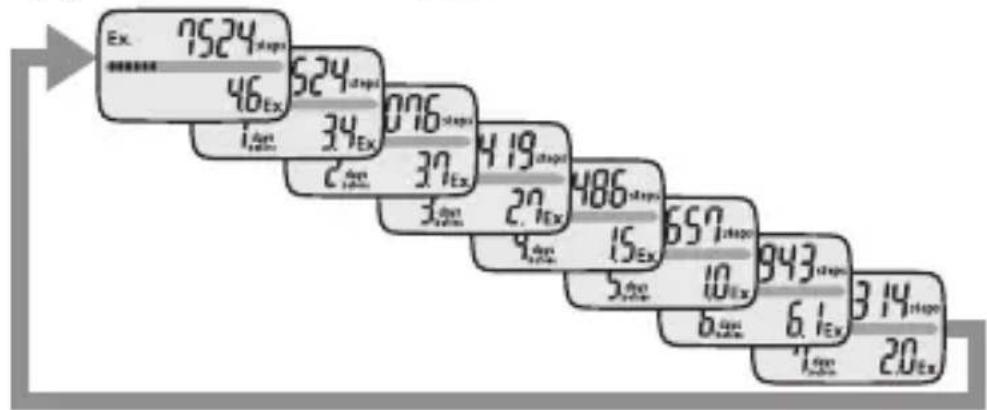
The measurements for each day (steps, calories burned, distance walked, Ex steps, and Ex quantity) are automatically stored in memory and reset to 0 at midnight (0:00) each day.
8.1 Recall data (Except for the Trip steps display)
1 Press to select the type of display you want to see.
2 Press to view the measurement results.
The previous day's (or—referring to weekly exercise units—week's) measurement results are displayed.
- The display shows the results for 7 days ago (or 4 weeks ago) with each press of MEMO
other
| Step | Value | |---|---| | 1 | 7524 | | 2 | 46 | | 3 | 524 | | 4 | 076 | | 5 | 34 | | 6 | 419 | | 7 | 27 | | 8 | 486 | | 9 | 15 | | 10 | 657 | | 11 | 10 | | 12 | 943 | | 13 | 6.1 | | 14 | 314 | | 15 | 20 |- You can also press 📋 to select the type of display you want to see while viewing the previous results.

text_image
Ex. 5524 steps 1 sec 34 Ex. 60 12 steps 1 sec 192 1 sec 42- Press to return to the current display.
Notes:
- The time is not displayed while viewing previous results.
- If no buttons are pressed for more than 1 minute, the display returns to the previous display.
9 Reset function
9.1 Resetting the weekly target
Reset the weekly target if you want to change the day from which the weekly target starts.
1 Press repeatedly until the Target display is selected.
2 Press for at least 2 seconds.
- If no buttons are pressed for more than 10 seconds or any button other than is pressed, the display will return to the Target display.
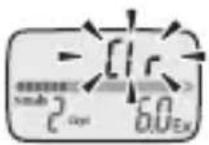
3 After "Clr" flashes on the display, press to reset the Target.
Note: Even if the Target display is reset, the Ex quantity for the day (from 0:00 until the Target display is reset) is not reset. If the Target display is reset, the weekly target will have the Ex quantity for the day deducted from it.
■ About the Week's total Ex quantity in memory
(Refer to Chapter 7.1)
If the Target display is reset, the Week's total Ex quantity in memory will change since it is recalculated based on the day before the Target display is reset.
9.2 Resetting the Trip steps data
Reset the trip steps data if you want to change the day from which the (your) trip starts.
1 Press repeatedly until the Trip steps display is selected.
2 Press for at least 2 seconds.
- If no buttons are pressed for more than 10 seconds or any button other than is pressed, the display will return to the Trip steps display.
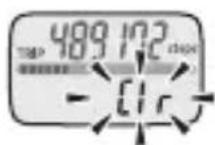
3 After "Clr" flashes on the display, press to reset the Trip step data.
10 Battery life and replacement
If the symbol blinks or appears on the display, replace the battery with a new (CR2032) battery.
| Blinking Battery power is low. | |
| Appears continuously | Battery power exhausted.The unit stops counting steps. |
Notes:
- Do not replace the battery around midnight (0:00). The measurement results of the day when the battery was removed will be added to the measurement results for the day the battery was inserted.
(It is assumed that the battery will be removed and replaced with a new one on the same day.) - The measurement results are automatically stored in memory on the hour (e.g. at 0:00, 1:00, 2:00, ... 21:00, 22:00, 23:00). The measurement results from the hour until the time the battery is replaced will be deleted for that day.
- When the battery is removed, the time will be reset to "0:00". Set the time after inserting the new battery (refer to Chapter 5 "Settings").
(The measurement results stored in memory and the weight, height, and stride length settings are not deleted.)
10.1 Replacing the battery
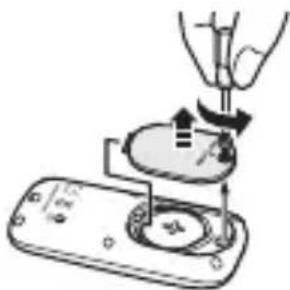
1 Loosen the screw of the battery cover on the back of the unit, and remove the battery cover by pulling it off in the direction of the arrow.
Use the supplied screwdriver or use a small screwdriver to loosen the screw on the battery cover.
2 Remove the battery with a thin, sturdy, stick that will not break easily.
Note: Do not use a pair of metal tweezers or a screwdriver.
3 Insert the battery (CR2032) with the positive (+) side face up.
4 Replace the battery cover by sliding the catch in first, then tighten the screw.
natural_image
Illustration of a hand using a tool to press or install a device with a circular component (no text or symbols visible)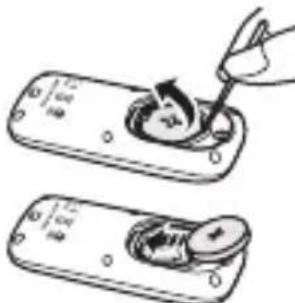
text_image
Diagram showing two steps of a tool interacting with a device, labeled with Chinese characters and numbers.
natural_image
Illustration of a hand using a tool to interact with a device (no text or symbols visible)11 Deleting all settings
Follow the procedure below to delete all the previous measurement results and settings, including the time, weight, height, and stride length.
1 Press the SET button on the back of the unit with a thin, sturdy, stick that will not break easily.
Note: Do not press the button with a sharp point. This could cause damage.
The hour setting will flash.
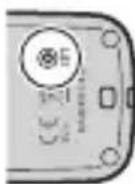
2 Press and at the same time for at least 2 seconds.
After "ALL Clr" has been displayed, the hour setting will appear.
The measurement results stored in memory and the settings for the time, weight, height, and stride length are deleted. To continue using the unit, reset the time, weight, height, and stride length settings (refer to Chapter 5 "Settings").
12 Maintenance and storage
12.1 Maintenance
Always keep the unit clean.
The unit should be cleaned with a soft dry cloth.
To remove stubborn stains, wipe the unit with a damp cloth moistened with water or mild detergent. Then wipe it dry.
Maintenance and storage precautions
Do not use volatile liquids, such as benzene, or thinner, to clean the unit.
Please observe the following storage conditions.
- Do not disassemble or modify the unit. Changes or modifications not approved by Omron Healthcare will void the user warranty.
- Do not subject the unit to strong shocks or vibrations, drop it, step on it, or leave it at an angle.
- Do not immerse the unit or any of the components in water. The unit is not waterproof. Do not wash it or touch it with wet hands. Be careful that water does not get into the unit.
- Do not subject the unit to extreme temperatures, humidity, moisture, or direct sunlight.
- Do not store the unit where it will be exposed to chemical or corrosive vapours.
Always store the unit out of the reach of young children.
Remove the batteries if the unit will not be used for a long time (3 months or more).
13 Trouble shooting
| Phenomenon Cause Rectification | ||
| Blinks or appears continuously. | Battery weak or exhausted. | Insert a new 3V lithium battery type CR2032 (refer to Chapter 10.1). |
| Nothing is displayed. | Polarities of battery (+ and -) aligned in wrong directions. | Insert battery in correct alignment (refer to Chapter 10.1). |
| Battery weak or exhausted. | Insert a new 3V lithium battery type CR2032 (refer to Chapter 10.1). | |
| Energy saving function active. | Press either of [MEMO] or [CLR] (refer to Chapter 7.1). | |
| Displayed values are incorrect. | The unit is attached incorrectly. | Follow instructions (refer to Chapter 6.2). |
| You are walking at inconsistent pace. | Cases where the unit may not be able to count steps accurately (refer to Chapter 7.2). | |
| Settings are wrong. | Change settings (refer to Chapter 5.2). | |
| “Err” is displayed. | A malfunction has occurred. | Remove the battery then insert it again (refer to Chapter 10.1). |
| The display is unusual or the buttons do not operate normally. | Remove the battery then insert it again (refer to Chapter 10.1). | |
Note: If a malfunction has occurred and you need to repair your unit, all settings and measurement results are deleted. We recommend you to record measurement results.
Physical Activity and Public Health in Older Adults (M. E. Nelson; et al.)
ACSM/AHA Recommendation; Circulation 2007;116:1094-1105
Physical Activity and Public Health (W. L. Haskell; et al.)
Update: ACSM/AHA Recommendation; Circulation
2007;116:1081-1093
14 Technical data
Product name Walking style X
Type HJ-304-E
Power supply 3V Lithium battery type CR2032
Battery life New battery will last for approx. 6 months (when used for walking 10,000 steps a day).
Note: Supplied battery is for trial use. This battery can run out within 4.5 months.
Measurement Steps: 0 to 999,999 steps
range Ex steps: 0 to 999,999 steps
Ex quantity: 0.0 to 399.9 Ex
Ex remaining this week: 21.0 to 0.0 Ex
Days remaining this week: 7 to 1 days
Week's total Ex quantity:
Target display: 21.0 to 399.9 Ex
Memory display: 0.0 to 399.9 Ex
Trip steps: 0 to 999,999 steps
Trip days: 1 to 3,999 days
Calories burned: 0 to 59,999 kcal
Distance walked: 0.0 to 399.9 km
Time: 0:00 to 23:59
Walking intensity (METs) indicator: 2 to 4
Capacity of Steps: 1 to 7 days
memory Ex steps: 1 to 7 days
Ex quantity: 1 to 7 days
Week's total Ex quantity: 1 to 4 weeks
Calories burned: 1 to 7 days
Distance walked: 1 to 7 days
Setting range Time: 0:00 to 23:59 (24-hour display)
Weight: 30 to 136 kg in units of 1 kg
Height: 100 to 199 cm in units of 1 cm
Stride length: 30 to 120 cm in units of 1 cm
Operating -10°C to +40°C/30 to 85% RH
temperature/humidity
External dimensions 75.5(W) × 33.5(H) × 11.8(D) mm
Weight Approx. 28 g (including battery)
Contents Step counter, Holder, Strap, Clip, 3V Lithium battery
type CR2032, Screwdriver and Instruction manual
These specifications are subject to change without notice.
* New battery life based on ÖMRON testing.
OMRON HEALTHCARE EUROPE B.V. guarantees this product for 2 years after date of purchase.
The guarantee does not cover battery, packaging and/or damages of any kind due to misuse (such as dropping or physical misuse) caused by the user. Claimed products will only be replaced when returned together with the original invoice / cash ticket.

This OMRON product is produced under the strict quality system of OMRON HEALTHCARE Co. Ltd., Japan.

Correct Disposal of This Product (Waste Electrical & Electronic Equipment)
This marking shown on the product or its literature, indicates that it should not be disposed of, with other household wastes at the end of its working life. To prevent possible harm to the environment or human health from uncontrolled waste disposal, please separate this from other types of wastes and recycle it responsibly to promote the sustainable reuse of material resources.
Household users should contact either the retailer where they purchased this product, or their local government office, for details of where and how they can take this item for environmentally safe recycling.
Business users should contact their supplier and check the terms and conditions of the purchase contract. This product should not be mixed with other commercial wastes for disposal.
This product does not contain any hazardous substances. Disposal of used batteries should be carried out in accordance with the national regulations for the disposal of batteries.
| Manufacturer | OMRON HEALTHCARE CO., LTD.24, Yamanouchi Yamanoshita-cho,Ukyo-ku, Kyoto, 615-0084, Japan  | |
| EU-representative | OMRON HEALTHCARE EUROPE B.V.Kruisweg 577,2132 NA Hoofddorp,The Netherlandswww.omron-healthcare.com  | |
| Production facility | OMRON DALIAN CO., LTD.Economic & Technical Development ZoneDalian 116600, China | |
| Subsidiary | OMRON HEALTHCARE UK LTD.Opal DriveFox Milne, Milton Keynes MK15 0DG,United Kingdom | |
| OMRON MedizintechnikHandelsgesellschaft mbHJohn-Deere-Str. 81a, 68163 Mannheim,Germanywww.omron-medizintechnik.de | ||
| OMRON SANTÉ FRANCE SAS14, rue de Lisbonne,93561 Rosny-sous-Bois Cedex, France | ||
EN
Made in China